2014 CHRYSLER 300 SRT sport mode
[x] Cancel search: sport modePage 9 of 132
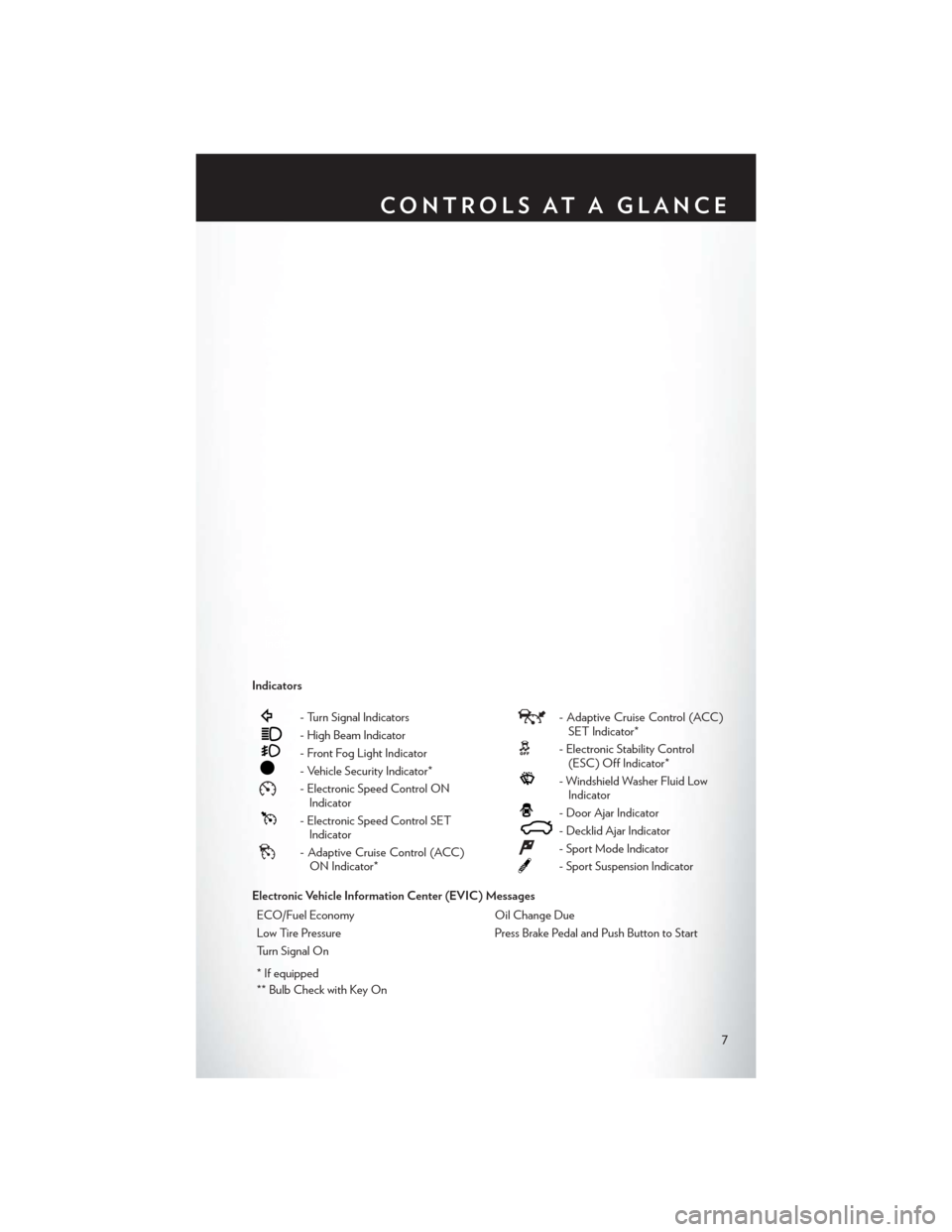
Indicators
- Turn Signal Indicators
- High Beam Indicator
- Front Fog Light Indicator
- Vehicle Security Indicator*
- Electronic Speed Control ONIndicator
- Electronic Speed Control SETIndicator
- Adaptive Cruise Control (ACC)ON Indicator*
- Adaptive Cruise Control (ACC)SET Indicator*
- Electronic Stability Control(ESC) Off Indicator*
- Windshield Washer Fluid LowIndicator
- Door Ajar Indicator
- Decklid Ajar Indicator
- Sport Mode Indicator
- Sport Suspension Indicator
Electronic Vehicle Information Center (EVIC) Messages ECO/Fuel Economy Oil Change Due
Low Tire Pressure Press Brake Pedal and Push Button to Start
Turn Signal On
* If equipped
** Bulb Check with Key On
CONTROLS AT A GLANCE
7
Page 35 of 132

Shifting From REVERSE To DRIVE
• Bring the vehicle to a complete stop, firmly press the brake pedal, then pull the shift lever fullyrearward and release when “D” is highlighted in the EVIC.
• To shift back into REVERSE from DRIVE, bring the vehicle to a complete stop, firmly press the brake pedal, press the lock button on the shift lever, then push the shift lever forward to the
second detent and release when “R” is highlighted in the EVIC.
Shifting From DRIVE To SPORT/LOW
Vehicles Equipped With SPORT Mode
• To shift from DRIVE to SPORT, pull the shift lever rearward until “S” is highlighted in the EVIC.
• To shift back into DRIVE from SPORT, pull the shift lever rearward until “D” is highlighted in the EVIC.
Vehicles Equipped With LOW Mode
• To shift from DRIVE to LOW, pull the shift lever rearward until “L” is highlighted in the EVIC.
• To shift back into DRIVE from LOW, pull the shift lever rearward until “D” is highlighted in the EVIC.
TRANSMISSION MODES/AUTOSTICK®
Sport Mode (If Equipped)
• Sport mode is driver selectable and provides more aggressive shifting, for spirited driving.
• Shifting into SPORT mode can be done anytime the vehicle is in the “D” Drive position.Simply tap the shift lever rearward and release when “S” is highlighted in the EVIC. Tapping
the shift lever rearward a second time will return the vehicle to the “D” Drive position.
NOTE:
When the vehicle is in SPORT mode, a “SPORT” message and green flag icon will be illuminated
in the instrument cluster.
Low Mode (If Equipped)
• LOW range should be used for engine braking when descending very steep grades. In this range, the transmission will downshift for increased engine braking. To switch between DRIVE
and LOW modes, tap the shift lever rearward.
• Shifting into LOW can be done anytime the vehicle is in the “D” DRIVE position.
OPERATING YOUR VEHICLE
33
Page 36 of 132

AUTOSTICK® — If Equipped
NOTE:
AutoStick® is only available on vehicles with SPORT mode.
• When the transmission is in DRIVE, it willoperate automatically, shifting between the
eight available gears. While in SPORT
mode, the transmission will only shift be-
tween seven of the eight available gears.
• To engage AutoStick®, simply tap one of the steering wheel-mounted shift paddles (+/-).
• In AutoStick® mode, the transmission will only shift up or down when (+/-) is manually
selected by the driver, except as described
below. It will remain in the selected gear until
another upshift or downshift is chosen.
• When AutoStick® is active, the current transmission gear is displayed in the EVIC.
• If AutoStick® is engaged while in DRIVE mode, lack of accelerator pedal activity will cause the transmission to revert to automatic operation. The transmission will also upshift automatically
once redline, (where the tachometer needle points to the red portion of the gauge) is reached.
If the accelerator is pressed to the floor, the transmission will downshift when possible (based
on current vehicle speed and gear).
• When AutoStick® is used in SPORT mode, the transmission will only shift up or down when commanded by the driver, except as noted below.
• In either DRIVE or SPORT mode, the transmission will automatically downshift as the vehicle slows to a stop (to prevent engine lugging) and will display the current gear. Tapping the (+)
paddle (at a stop) will allow starting in second gear. After a stop, the driver should manually
upshift (+) the transmission as the vehicle accelerates.
NOTE:
To disengage AutoStick® mode, press and hold the (+) shift paddle until “D” or “S” is once again
displayed in the EVIC. You can shift in or out of the AutoStick® mode at any time without taking
your foot off the accelerator pedal.
OPERATING YOUR VEHICLE
34
Page 47 of 132
SiriusXM SATELLITE RADIO
• SiriusXM Satellite Radio gives you over 130 channels, including 100% commercial-free musicfrom nearly every genre, plus all your favorite sports, news, talk and entertainment channels –
all with crystal clear, coast-to-coast coverage, all in one place and all at your fingertips.
• To access SiriusXM Satellite Radio, touch the SAT soft-key on the main Radio screen.
• The following describes features that are available when in SiriusXM Satellite Radio mode.
Selecting SiriusXM Satellite Channels
Seek Up/Seek Down
• Touch the Seek arrow soft-keys for less than two seconds to seek through channels in SAT mode.
• Touch and hold either arrow soft-key for more than two seconds to bypass channels without stopping. The radio will stop at the next listenable channel once the arrow soft-key is released.
Direct Tune
• Tune directly to a SAT channel by pressing the Tune soft-key on the screen, and entering the desired station number.
Jump
• Automatically tells you when Traffic & Weather for a favorite city is available, and gives you the option to switch to that channel. Touch Jump to activate the feature. After listening to Traffic
and Weather, touch Jump again to return to the previous channel.
Fav
• Activates the favorites menu. You can add up to 50 favorite artists or songs. Just touch Add Fav Artist or Add Fav Song while the song is playing. You will then be alerted any time one of
these songs, or works by these artists, is playing on other SiriusXM channels.
SiriusXM Parental Controls
• You can skip or hide certain channels from view if you do not want access to them. Touch the More soft-key, then the Settings soft-key, next touch the Sirius Setup soft-key, then select
Channel Skip. Touch the box, check-mark, next to the channel you want skipped. They will not
show up in normal usage.
• SiriusXM also offers the option to permanently block selected channels. Call 1-888-539-7474 and request the Family Package.
ELECTRONICS
45
Page 54 of 132
1–Fuel
PricesView detailed price information for fuel stations near your current location.
2–Movie
Listings View information on movies that are playing at theaters near your current loca-
tion.
3 – Sports
Scores View scores and upcoming events for all major sports.
4 – SiriusXM View subscription information.
5–My
Favorites View and store your favorite location, theater and sport teams for quick access.
6 – Weather View detailed weather conditions, forecasts and ski/snowboarding conditions at
local resorts.
PLAYING iPod/USB/MP3 DEVICES
• There are many ways to play music from iPod®/MP3 players or USB devices through your
vehicle's sound system.
1. Audio Jack
• The Audio Jack allows a portable device, such as an MP3 player or a cassette player, to be plugged into the radio and utilize the vehicle’s sound system, using a 3.5 mm audio cable, to
amplify the source and play through the vehicle speakers.
• Touching the Player soft-key then choosing the AUX source soft-key will change the mode to auxiliary device if the Audio Jack is connected, allowing the music from your portable device
to be heard through the vehicle's speakers. In order activate the AUX, plug in the audio jack.
ELECTRONICS
52
Page 70 of 132

ELECTRONIC CONTROL DAMPING SYSTEM
• This vehicle may be equipped with an electronic controlled damping system. This systemreduces body roll and pitch in many driving situations including cornering, acceleration and
braking. There are three modes of operation:
Automatic (Auto) Mode
• This is the default position when vehicleignition is first turned on. This mode will give
a sporty, but comfortable ride. Within this
mode, the suspension will adapt to the ve-
hicle inputs, including vehicle speed, steer-
ing inputs, braking, and acceleration.
•
If AutoStick® is engaged while in “Auto”
mode, the transmission will automatically shift
up if maximum engine speed is reached.
• Heavily pressing the accelerator pedal may generate an automatic downshift for im-
proved acceleration.
• This mode should be used for most driving situations.
SPORTSport Mode
• This mode is driver selectable when the vehicle is placed in SPORT mode (press the
CONTROLS button and then the SPORT
button on the display screen). This mode
will set suspension for maximum perfor-
mance handling and is intended for spirited
driving.
• When SPORT mode is enabled, a flag will light up in the instrument cluster.
NOTE:
The SPORT setting will provide a firmer ride.
SRT
68
Page 71 of 132

TrackMode
• In track mode, the transmission has asportier, more aggressive shift pattern.
• This mode includes SPORT Suspension and affects transmission shifting in either
normal DRIVE or AutoStick® mode.
• If AutoStick® (console shifter or paddle shifters) is engaged while in “Track” mode,
the transmission will remain in the selected
gear even when maximum engine speed is
reached. Engine overspeed protection is
achieved through fuel cut off at or near red-
line.
• This mode will provide aggressive shifting and is intended for spirited driving.
• The system will return to SPORT mode when the ignition switch is cycled from RUN to OFF, and back to RUN again, if this mode is selected.
PERFORMANCE FEATURES
Electronic Vehicle Information Center (EVIC)
• The Electronic Vehicle Information Center(EVIC) can be used to view or change the
following Performance Features. Press the
UP
or DOWNbutton until Sys-
tem Setup displays, then press the SELECT
button. Scroll through the settings us-
ing the UP or DOWN buttons. Press the
SELECT
button to change the setting.
Press the BACK button to scroll back to a
previous menu or sub menu.
• 0-60 mph (0-100 km/h) • Instantaneous G-Force
• Braking Distance • Peak G-Force
• 1/8 Mile • Digital Speedometer
• 1/4 Mile
0-60 m.p.h. (0-100 km/h)
• When selected, this screen displays the time it takes for the vehicle to go from 0 to 60 m.p.h. (0 to 100 km/h) within 10 seconds.
Braking Distance
• When selected, this screen displays the vehicle's braking distance and the speed at which thebrake pedal was depressed.
SRT
69
Page 77 of 132

- Electronic Throttle Control (ETC) Indicator Light
• This light informs you of a problem with the system.
• If a problem is detected, the light will come on while the engine is running. Cycle the ignitionwhen the vehicle has completely stopped and the shift lever is placed in the PARK position; the
light should turn off.
• If the light remains lit with the engine running, your vehicle will usually be drivable; however, see an authorized dealer immediately. If the light is flashing when the engine is running,
immediate service is required and you may experience reduced performance, an elevated/
rough idle or engine stall and your vehicle may require towing.
- Air Bag Warning Light
• If the light is not on during starting, stays on, or turns on while driving, have the vehicle servicedby an authorized dealer immediately.
SERVICE AWD SYSTEM Message
• If the SERVICE AWD SYSTEM warning message appears after engine start up, or duringdriving, it means the AWD system is not functioning properly. We recommend you do not
operate the vehicle. Have the vehicle serviced immediately.
– Sport Shifting
• This light will illuminate when SPORT MODEis selected. This mode provides performance
based transmission shifting depending on the driver requested throttle position.
– Sport Suspension Indicator
• The light will illuminate when SPORTorTrack MODE is selected. This mode provides
performance based tuning with improved handling through an electronic controlled damping
system.
Oil Change Indicator
Message
• If an “oil change” message (shown as Oil Change Due) appears and a single chime sounds, it is time for your next required oil change.
Resetting The Light After Servicing
Vehicles Equipped With Keyless Enter-N-Go™
• Without pressing the brake pedal, push the ENGINE START/STOP button and cycle the ignition to the ON/RUN position (Do not start the engine.)
• Fully depress the accelerator pedal, slowly, three times within 10 seconds.
• Without pressing the brake pedal, push the ENGINE START/STOP button once to return the ignition to the OFF/LOCK position.
WHAT TO DO IN EMERGENCIES
75