Page 253 of 590
ParkSense® Warning Display
The ParkSense® Warning screen will only be displayed if
Sound and Display is selected from the Uconnect®
System. Refer to “Uconnect® Settings” in “Understand-
ing Your Instrument Panel” for further information.
The ParkSense® Warning screen is located within the
Electronic Vehicle Information Center (EVIC). It provides
visual warnings to indicate the distance between the rear
fascia/bumper and/or front fascia/bumper and the de-
tected obstacle.
Park Assist Display
3
UNDERSTANDING THE FEATURES OF YOUR VEHICLE 251
Page 254 of 590
ParkSense® Display
The warning display will turn ON indicating the system
status when the vehicle is in REVERSE or when the
vehicle is in DRIVE and an obstacle has been detected.The system will indicate a detected obstacle by showing
three solid arcs and will produce a one-half second tone.
As the vehicle moves closer to the obstacle the EVIC
display will show fewer arcs and the sound tone will
change from slow, to fast, to continuous.
Park Assist System ON
Park Assist System OFF
252 UNDERSTANDING THE FEATURES OF YOUR VEHICLE
Page 256 of 590
The vehicle is close to the obstacle when the EVIC display
shows one flashing arc and sounds a continuous tone.
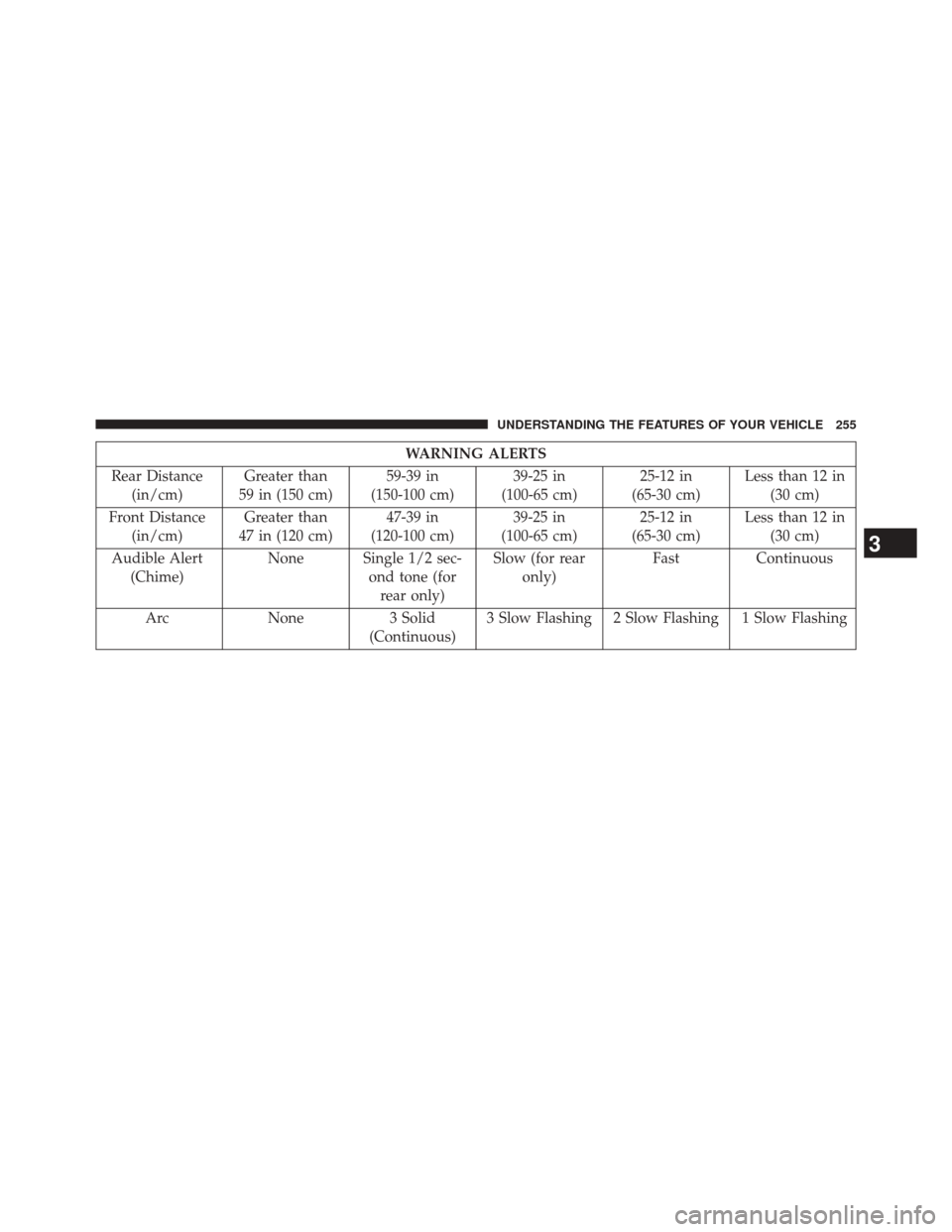
The following chart shows the warning alert operation
when the system is detecting an obstacle:
Continuous Tone
254 UNDERSTANDING THE FEATURES OF YOUR VEHICLE
Page 257 of 590
WARNING ALERTS
Rear Distance (in/cm) Greater than
59 in (150 cm) 59-39 in
(150-100 cm) 39-25 in
(100-65 cm) 25-12 in
(65-30 cm) Less than 12 in
(30 cm)
Front Distance (in/cm) Greater than
47 in (120 cm) 47-39 in
(120-100 cm) 39-25 in
(100-65 cm) 25-12 in
(65-30 cm) Less than 12 in
(30 cm)
Audible Alert (Chime) None Single 1/2 sec-
ond tone (forrear only) Slow (for rear
only) Fast
Continuous
Arc None3 Solid
(Continuous) 3 Slow Flashing 2 Slow Flashing 1 Slow Flashing
3
UNDERSTANDING THE FEATURES OF YOUR VEHICLE 255
Page 261 of 590
CAUTION!(Continued)
•The vehicle must be driven slowly when using
ParkSense® in order to be able to stop in time
when an obstacle is detected. When backing up, it
is recommended that the driver looks over his/her
shoulder when using ParkSense®.
WARNING!
• Drivers must be careful when backing up even
when using the ParkSense® Park Assist system.
Always check carefully behind your vehicle, look
behind you, and be sure to check for pedestrians,
animals, other vehicles, obstructions, and blind
spots before backing up. You are responsible for
safety and must continue to pay attention to your
surroundings. Failure to do so can result in serious
injury or death.
(Continued)
3
UNDERSTANDING THE FEATURES OF YOUR VEHICLE 259
Page 262 of 590

WARNING!(Continued)
•Before using the ParkSense® Park Assist system, it
is strongly recommended that the ball mount and
hitch ball assembly is disconnected from the ve-
hicle when the vehicle is not used for towing.
Failure to do so can result in injury or damage to
vehicles or obstacles because the hitch ball will be
much closer to the obstacle than the rear fascia
when the warning display turns on the single
flashing arc and sounds the continuous tone. Also,
the sensors could detect the ball mount and hitch
ball assembly, depending on its size and shape,
giving a false indication that an obstacle is behind
the vehicle.
PARKVIEW® REAR BACK UP CAMERA — IF
EQUIPPED
Your vehicle may be equipped with the ParkView® Rear
Back Up Camera that allows you to see an on-screen
image of the rear surroundings of your vehicle whenever
the shift lever is put into REVERSE. The image will be
displayed on the touchscreen display along with a cau-
tion note to “check entire surroundings” across the top of
the screen. After five seconds this note will disappear.
The ParkView® camera is located on the rear of the
vehicle above the rear License plate.
When the vehicle is shifted out of REVERSE, the rear
camera mode is exited and the last selected touchscreen
appears again.
260 UNDERSTANDING THE FEATURES OF YOUR VEHICLE
Page 263 of 590
NOTE:The ParkView® Rear Back Up Camera has pro-
grammable modes of operation that may be selected
through the Uconnect® System. Refer to “Uconnect®
Settings” in “Understanding Your Instrument Panel” for
further information. When the static grid lines have been programmed to turn
on, they will illustrate the width of the vehicle and will
show separate zones that will help indicate the distance
to the rear of the vehicle. The following table shows the
approximate distances for each zone:
Zone
Distance to the rear of the vehicle
Red 0 - 1 ft (0 - 30 cm)
Yellow 1 ft - 3 ft (30 cm - 1 m)
Green 3 ft or greater (1 m or greater)
WARNING!
Drivers must be careful when backing up even when
using the ParkView® Rear Back Up Camera. Always
check carefully behind your vehicle, and be sure to
(Continued)
WARNING!(Continued)
check for pedestrians, animals, other vehicles, ob-
structions, or blind spots before backing up. You are
responsible for the safety of your surroundings and
must continue to pay attention while backing up.
Failure to do so can result in serious injury or death.
3
UNDERSTANDING THE FEATURES OF YOUR VEHICLE 261
Page 275 of 590
WARNING!
Vehicle exhaust contains carbon monoxide, a danger-
ous gas. Do not run your vehicle in the garage while
programming the transceiver. Exhaust gas can cause
serious injury or death.
WARNING!
Your motorized door or gate will open and close
while you are programming the universal trans-
ceiver. Do not program the transceiver if people, pets
or other objects are in the path of the door or gate.
Only use this transceiver with a garage door opener
that has a “stop and reverse” feature as required by
Federal safety standards. This includes most garage
door opener models manufactured after 1982. Do not
(Continued)
WARNING!(Continued)
use a garage door opener without these safety fea-
tures. Call toll-free 1–800–355–3515 or, on the Internet
at www.HomeLink.com for safety information or
assistance.
General Information
This device complies with FCC rules Part 15 and Industry
Canada RSS-210. Operation is subject to the following
two conditions:
1. This device may not cause harmful interference.
2. This device must accept any interference that may be
received including interference that may cause unde-
sired operation.
3
UNDERSTANDING THE FEATURES OF YOUR VEHICLE 273