2014 CHEVROLET SS air condition
[x] Cancel search: air conditionPage 119 of 422

Black plate (27,1)Chevrolet SS Sedan Owner Manual (GMNA-Localizing-U.S.-6014851) - 2014 -
1st Edition - 8/22/13
Instruments and Controls 5-27
STEP ON BRAKE TO
RELEASE PARK BRAKE
This message displays when
attempting to release the electric
parking brake without the brake
pedal applied. SeeElectric Parking
Brake on page 9-27.
Cruise Control Messages
CRUISE SET TO XXX
This message displays when the
cruise control is set and shows the
speed it was set to. See Cruise
Control on page 9-32.
Door Ajar Messages
DRIVER DOOR OPEN
This message will display when the
driver door is open. Close the door
completely.
HOOD OPEN
This message will display when the
hood is open. Close the hood
completely.
LEFT REAR DOOR OPEN
This message will display when the
driver side rear door is open. Close
the door completely.
PASSENGER DOOR OPEN
This message will display when the
front passenger door is open. Close
the door completely.
RIGHT REAR DOOR OPEN
This message will display when the
passenger side rear door is open.
Close the door completely.
TRUNK OPEN
This message will display when the
trunk is open. Close the trunk
completely.
Engine Cooling System
Messages
A/C OFF DUE TO HIGH
ENGINE TEMP
This message displays when the
engine coolant becomes hotter than
the normal operating temperature.
To avoid added strain on a hot
engine, the air conditioning
compressor automatically turns off.
When the coolant temperature
returns to normal, the air
conditioning compressor turns back
on. The vehicle can continue to be
driven.
If this message continues to appear,
have the system repaired by your
dealer as soon as possible to avoid
damage to the engine.
ENGINE OVERHEATED —
IDLE ENGINE
This message displays when the
engine coolant temperature is too
hot. Stop and allow the vehicle to
idle until it cools down.
ProCarManuals.com
Page 123 of 422

Black plate (31,1)Chevrolet SS Sedan Owner Manual (GMNA-Localizing-U.S.-6014851) - 2014 -
1st Edition - 8/22/13
Instruments and Controls 5-31
Ride Control System
Messages
SERVICE TRACTION
CONTROL
This message displays when there
is a problem with the Traction
Control System (TCS). SeeTraction
Control/Electronic Stability Control
on page 9-30.
SERVICE STABILITRAK
This message displays if there is a
problem with the StabiliTrak system.
See Traction Control/Electronic
Stability Control on page 9-30.
Security Messages
THEFT ATTEMPTED
This message displays if the vehicle
detects a tamper condition.
Service Vehicle Messages
SERVICE AC SYSTEM
This message displays if there is a
problem with the air conditioning
system. Take the vehicle to your
dealer for service.
SERVICE POWER STEERING
This message displays if there is a
problem with the power steering
system. Take the vehicle to your
dealer for service.
SERVICE VEHICLE SOON
This message displays if there is a
problem with the vehicle. Take the
vehicle to your dealer for service.
Tire Messages
SERVICE TIRE MONITOR
SYSTEM
This message displays if there is a
problem with the Tire Pressure
Monitor System (TPMS). See Tire
Pressure Monitor Operation on
page 10-43 for more information.
TIRE LEARNING ACTIVE
This message displays when the
system is learning new tires. See
Tire Pressure Monitor Operation on
page 10-43for more information.
TIRE PRESSURE LOW ADD
AIR TO TIRE
On vehicles with the Tire Pressure
Monitor System (TPMS), this
message displays when the
pressure in one or more of the
vehicle's tires is low.
There is also an icon with the
warning that will indicate the
location of the low tire.
The low tire pressure warning light
will also come on. See Tire
Pressure Light on page 5-18.
If a tire pressure message displays,
inflate the tires until the tire pressure
is equal to the values shown on the
Tire and Loading Information label.
See Tires on page 10-34, Vehicle
Load Limits on page 9-10, and Tire
Pressure on page 10-41.
ProCarManuals.com
Page 127 of 422

Black plate (35,1)Chevrolet SS Sedan Owner Manual (GMNA-Localizing-U.S.-6014851) - 2014 -
1st Edition - 8/22/13
Instruments and Controls 5-35
‐The Automatic setting adjusts
the screen background
automatically depending on
the exterior lighting conditions.
‐ The Day setting brightens the
map background.
‐ The Night setting darkens the
map background.
.Speed Limits: Select to display
the posted speed limit on the
map, when available.
Vehicle Settings
Select and the following may
display:
.Climate and Air Quality
.Comfort and Convenience
.Collision/Detection Systems
.Lighting
.Power Door Locks
.Remote Lock/Unlock/Start
.Return to Factory Settings? Climate and Air Quality
Select and the following may
display:
.Auto Fan Speed
.Remote Start Auto Cool Seat
.Remote Start Auto Heat Seat
Auto Fan Speed
This feature sets the climate control
fan speed to maintain the interior
temperature.
Select High, Medium, or Low.
Remote Start Auto Cool Seat
When on and it is hot outside, the
ventilated seats will turn on
automatically.
Select to turn on or off.
Remote Start Auto Heat Seat
When on and it is cold outside, the
heated seats will turn on
automatically.
Select to turn on or off. Comfort and Convenience
Select and the following may
display:
.Chime Volume
.Button Chime
.Reverse Mirror Tilt
Chime Volume
This allows the selection of the
chime volume level.
Select Normal or High.
Button Chime
This allows the button chimes to be
turned on or off.
Select On or Off.
Reverse Mirror Tilt
This allows the reverse mirror tilt to
be set to on or off.
Select On or Off.
ProCarManuals.com
Page 200 of 422

Black plate (64,1)Chevrolet SS Sedan Owner Manual (GMNA-Localizing-U.S.-6014851) - 2014 -
1st Edition - 8/22/13
7-64 Infotainment System
.All Traffic Events On: Press to
enable display of all traffic icons
on the map.
.All Traffic Events Off: Press to
disable display of all traffic icons
on the map.
.User Defined: Press to define
the individual types of icons that
are displayed for traffic flow and
traffic conditions.
Traffic Flow Status
The traffic flow status will display in
green, yellow, or red lines beside
the road.
.Red indicates significantly
impaired traffic flow with average
speed less than 40 km/h
(25 mph).
.Yellow indicates slightly impaired
traffic flow with average speed
between 40 and 73 km/h (25 and
45 mph).
.Green indicates normal traffic
flow with average speed above
73 km/h (45 mph). Closed Roads, Traffic Delays,
Roadworks, Incidents, and
Advisories
Select the traffic event group for
display on the map screen. Some
events may cover more than one
traffic condition. See the following
traffic conditions.
Traffic Conditions
The following traffic condition icons
may display:
Stopped TrafficTraffic Jam
AccidentRoad Closed
Lane NarrowsRoad Work,
Construction
AlertRoad Condition
Road VisibilityOther
ProCarManuals.com
Page 202 of 422

Black plate (66,1)Chevrolet SS Sedan Owner Manual (GMNA-Localizing-U.S.-6014851) - 2014 -
1st Edition - 8/22/13
7-66 Infotainment System
Map Settings:Press to enter the
submenu to change Automatic
Zoom, enable Speed Limit display
on map, and change Map Display
settings.
.Map Display: Press to change
the screen background.
‐ The Automatic setting adjusts
the screen background
automatically depending on
the exterior lighting conditions.
‐ The Day setting brightens the
map background.
‐ The Night setting darkens the
map background.
To change the overall brightness
setting for the display, use the
vehicle interior lighting instrument
panel illumination control.
Global Positioning
System (GPS)
The position of the vehicle is
determined by using satellite
signals, various vehicle signals, and
map data.
At times, other interference such as
the satellite condition, road
configuration, condition of the
vehicle, and/or other circumstances
can affect the navigation system's
ability to determine the accurate
position of the vehicle.
The GPS shows the current position
of the vehicle using signals sent by
the GPS Satellites. When the
vehicle is not receiving signals from
the satellites, a symbol appears on
the map screen. See Navigation
Symbols on page 7-46.
This system might not be available
or interference can occur if any of
the following are true:
.Signals are obstructed by tall
buildings, trees, large trucks,
or a tunnel.
.Satellites are being repaired or
improved.
For more information if the GPS is
not functioning properly, see
Problems with Route Guidance on
page 7-67 andIf the System Needs
Service on page 7-68.
Vehicle Positioning
At times, the position of the vehicle
on the map could be inaccurate due
to one or more of the following
reasons:
.The road system has changed.
.The vehicle is driving on slippery
road surfaces such as sand,
gravel, or snow.
.The vehicle is traveling on
winding roads or long straight
roads.
.The vehicle is approaching a tall
building or a large vehicle.
.The surface streets run parallel
to a freeway.
ProCarManuals.com
Page 227 of 422
Black plate (1,1)Chevrolet SS Sedan Owner Manual (GMNA-Localizing-U.S.-6014851) - 2014 -
1st Edition - 8/22/13
Climate Controls 8-1
Climate Controls
Climate Control Systems
Dual Automatic Climate ControlSystem . . . . . . . . . . . . . . . . . . . . . . 8-1
Air Vents
Air Vents . . . . . . . . . . . . . . . . . . . . . . 8-6
Maintenance
Passenger Compartment AirFilter . . . . . . . . . . . . . . . . . . . . . . . . . 8-6
Climate Control Systems
Dual Automatic Climate Control System
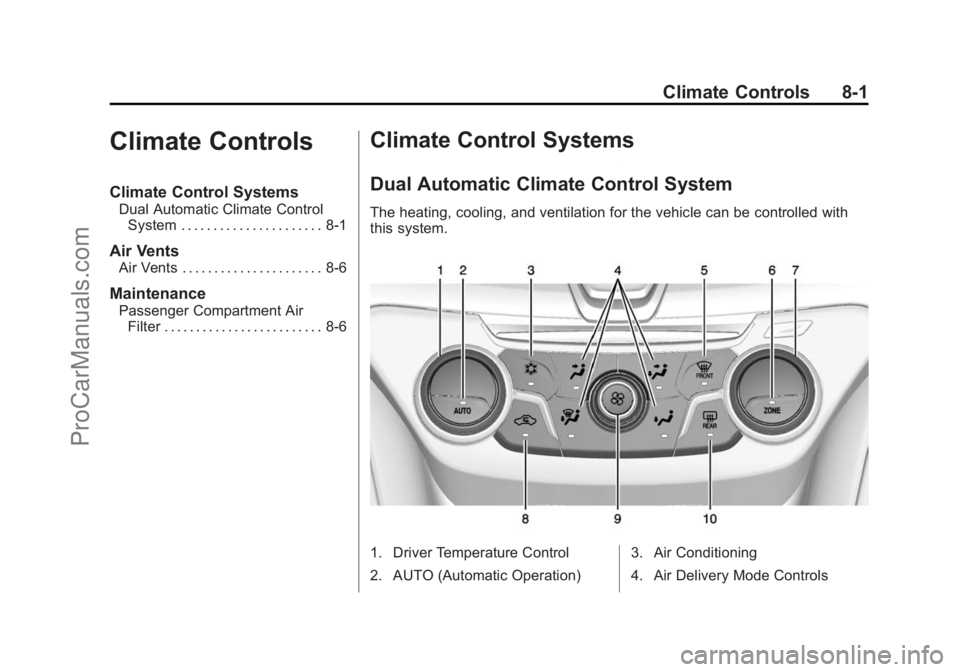
The heating, cooling, and ventilation for the vehicle can be controlled with
this system.
1. Driver Temperature Control
2. AUTO (Automatic Operation) 3. Air Conditioning
4. Air Delivery Mode Controls
ProCarManuals.com
Page 228 of 422

Black plate (2,1)Chevrolet SS Sedan Owner Manual (GMNA-Localizing-U.S.-6014851) - 2014 -
1st Edition - 8/22/13
8-2 Climate Controls
5. Front Defrost
6. ZONE
7. Passenger Temperature Control
8. Recirculation
9. Fan Control
10. Rear Window Defogger
Automatic Operation
AUTO (Automatic):When this
button is pressed, the system
automatically controls the inside
temperature, the air delivery mode,
the air conditioning compressor, and
the fan speed. When AUTO appears
in the display, the system is in full
automatic operation. If any of the
controls are manually adjusted, the
AUTO indicator turns off in the
display.
1. Press the AUTO button, if the AUTO indicator does not appear
on the display.
2. Adjust the temperature to a comfortable setting.
3. Adjust the air outlets as desired. 4. Let the system stabilize for a few
minutes.
In cold weather, the system starts in
the recirculation mode with the fan
off. As the engine warms up, warm
air is directed to the floor outlets,
before automatically changing to
bi-level mode with a reduced fan
speed.
Do not cover the solar sensor in the
center of the instrument panel, near
the windshield. See “Sensors”later
in this section.
The automatic climate control
system may not work as desired if
one or more of the instrument panel
outlets are closed.
Manual Operation
On/Off: Press9to turn the
system on or off.
9(Fan Control): Turn clockwise
or counterclockwise to increase or
decrease the fan speed. The fan
speed appears on the infotainment
display. Press the AUTO button to return to
automatic operation.
Driver and Passenger
Temperature Controls:
The
temperature can be adjusted
separately for the driver and the
passenger. Turn the temperature
controls clockwise or
counterclockwise to increase or
decrease the temperature.
The temperature setting between
21°C (70°F) and 23°C (74°F) is
recommended.
The temperature settings for each
side are shown in the temperature
control knob displays and the
infotainment display. If the
temperature control is past 30°C
(86°F), the display shows HI
(hottest). Turning it past 16°C
(61°F), shows LO (coolest).
ZONE: Press to synchronize the
driver and passenger temperatures.
Single-Zone Mode: All zones are
set to the same temperature. “Driver
has control” will be displayed on the
ProCarManuals.com
Page 229 of 422
Black plate (3,1)Chevrolet SS Sedan Owner Manual (GMNA-Localizing-U.S.-6014851) - 2014 -
1st Edition - 8/22/13
Climate Controls 8-3
infotainment display. Turn the driver
temperature control to adjust the
system temperature.
Dual-Zone Mode:Allows different
temperatures to be set for the driver
and passenger sides.
Enter Dual-Zone mode by adjusting
the passenger side temperature
when in Single-Zone mode.
Air Delivery Mode Controls:
Press
Y,),-, or[to change
the current airflow mode. The
current mode selection appears in
the display screen. Changing the
mode cancels the automatic
operation and the system goes into
semi-automatic operation. Press
AUTO to return to automatic
operation.
Select from the following:
Y(Vent): Air is directed to the
instrument panel outlets and
console outlet.
)(Bi-Level): Air is divided
between the instrument panel
outlets, console outlet and the floor outlets. Cooler air is directed to the
upper outlets and warmer air to the
floor outlets.
[(Floor):
Air is directed to the
floor outlets with some air directed
to the outer instrument panel,
windshield, and side window outlets.
-(Defog): Air is directed to the
windshield, floor and side window
outlets. Use this mode to clear the
windows of fog or moisture and
warm the passengers.
5FRONT (Defrost): Press to
turn the defrost on or off. The
5
FRONT indicator appears in the
display. A portion of the air is
directed to the windshield and side
window outlets, with some air
directed to the outer instrument
panel outlets.
For best results, clear all snow and
ice from the windshield before
defrosting.
Air Conditioning
#(Air Conditioning): Press to
turn the air conditioning system on
or off. The
#appears on the
infotainment display when the air
conditioning is on. When the air
conditioning is turned off,
#OFF
appears on the infotainment display.
The air conditioning system
removes moisture and heat from
the air.
The air conditioning might
automatically turn off during heavy
acceleration, abnormal system
pressure or very cold outside
temperatures.
Recirculation
h(Recirculation): Press to
change the air intake between
recirculated air and outside air.
h
appears on the infotainment display
when recirculation is activated.
The recirculation mode recycles
interior air and is not recommended
for extended use. If it is used for a
ProCarManuals.com