2014 CHEVROLET SPARK AUX
[x] Cancel search: AUXPage 153 of 362

Black plate (17,1)Chevrolet Spark Owner Manual (GMNA-Localizing-U.S./Canada-5853490) -
2014 - crc - 9/3/13
Infotainment System 7-17
.FAT32.
.exFAT.
Connecting a USB Storage
Device or iPod/iPhone
To connect a USB storage device,
connect the device to the USB port.
To connect an iPod/iPhone, connect
one end of the device’s cable to the
iPod/iPhone and the other end to
the USB port.
The iPod/iPhone charges while it is
connected to the vehicle if the
vehicle is in ACC/ACCESSORY,
ON/RUN. See Retained Accessory
Power (RAP) on page 9-18. When
the vehicle is turned off, the iPod/
iPhone automatically powers off and
will not charge or draw power from
the vehicle's battery. For more information on USB
usage, see
“Audio System
Information” underPictures and
Movies (Audio System) on
page 7-33 orPictures and Movies
(Picture System) on page 7-38 or
Pictures and Movies (Movie
System) on page 7-40.
Auxiliary Devices
Using the Auxiliary Input Jack
Settings menus and functions may
vary depending on vehicle options.
If equipped, the auxiliary input jack
in the center stack can be used to
connect external audio devices such
as an iPod
®, iPhone®, MP3 player,
CD player, and other supported
devices for use as another source
for audio listening. This input jack is
not an audio output; do not plug
headphones into the front auxiliary
input jack.
Radio without Touchscreen
To use a portable device, connect
the device with a 3.5 mm (1/8 in)
cable to the auxiliary input jack. The
radio will automatically switch to the
device if the radio is on.
When a device is already
connected, press the AUX button to
begin playing the device.
Use the
O/VOL knob to adjust the
volume.
Radio with Touchscreen
The infotainment system can play
music or movies connected by the
auxiliary device.
Play will begin when the system has
finished reading the information on
the device.
Page 154 of 362
Black plate (18,1)Chevrolet Spark Owner Manual (GMNA-Localizing-U.S./Canada-5853490) -
2014 - crc - 9/3/13
7-18 Infotainment System
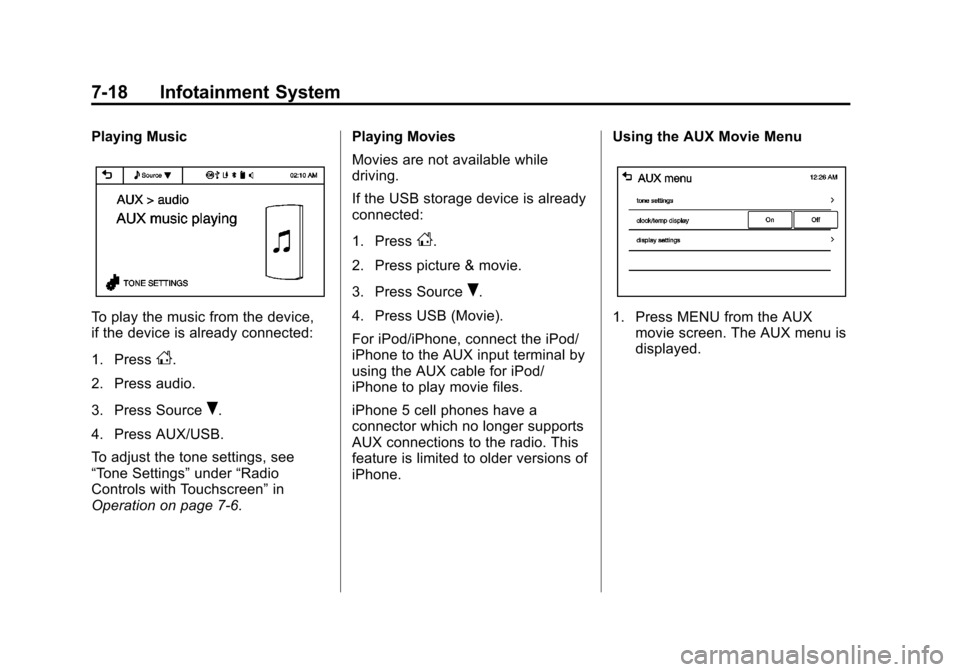
Playing Music
To play the music from the device,
if the device is already connected:
1. Press
D.
2. Press audio.
3. Press Source
R.
4. Press AUX/USB.
To adjust the tone settings, see
“Tone Settings” under“Radio
Controls with Touchscreen” in
Operation on page 7-6. Playing Movies
Movies are not available while
driving.
If the USB storage device is already
connected:
1. Press
D.
2. Press picture & movie.
3. Press Source
R.
4. Press USB (Movie).
For iPod/iPhone, connect the iPod/
iPhone to the AUX input terminal by
using the AUX cable for iPod/
iPhone to play movie files.
iPhone 5 cell phones have a
connector which no longer supports
AUX connections to the radio. This
feature is limited to older versions of
iPhone. Using the AUX Movie Menu
1. Press MENU from the AUX
movie screen. The AUX menu is
displayed.
Page 171 of 362

Black plate (35,1)Chevrolet Spark Owner Manual (GMNA-Localizing-U.S./Canada-5853490) -
2014 - crc - 9/3/13
Infotainment System 7-35
.USB storage device capacity
limit is 2,500 music files, 2,500
photo files, 250 movie files,
2,500 folders, and 10 stages of
folder structure. The iPod/iPhone
can play all music files
supported, but will only display
up to 2,500 files on the screen in
alphabetical order.
.Some iPod/iPhone product
models may not support the
connectivity or functionality of
this product.
.Only connect the iPod/iPhone
with connection cables
supported by iPod/iPhone
products. Other connection
cables cannot be used.
.The iPod/iPhone may be
damaged if it is connected to the
vehicle with the ignition on.
When not in use, disconnect the
iPod/iPhone.
.When the iPod/iPhone is
connected to the USB port by
using the iPod/iPhone cable, the
Bluetooth music is not
supported.
.Connect the iPod/iPhone to the
USB port by using the iPod/
iPhone cable to play the music
files. When the iPod/iPhone is
connected to the AUX input
terminal, the music file will
not play.
.The iPod/iPhone playback
functions and the information
displayed may be different when
played on the infotainment
system.
.Refer to the table for the
classification items related to the
search function provided by the
iPod/iPhone.
USB Player
Playing Music from a USB Device
.Connect the USB device to the
USB port.
.Play will start automatically after
the system has finished reading
the USB device.
.If a non-readable USB device is
connected, an error message
displays and the system will
switch to the previous audio
function.
Page 231 of 362

Black plate (7,1)Chevrolet Spark Owner Manual (GMNA-Localizing-U.S./Canada-5853490) -
2014 - crc - 9/3/13
Vehicle Care 10-7
1. Windshield Washer FluidReservoir. See Washer Fluid on
page 10-18.
2. Engine Coolant Surge Tank and Pressure Cap. See Cooling
System on page 10-12.
3. Engine Oil Dipstick. See Engine
Oil on page 10-7.
4. Engine Oil Fill Cap. See Engine
Oil on page 10-7.
5. Engine Cooling Fan (Out of View). See Cooling System on
page 10-12.
6. Engine Air Cleaner/Filter on
page 10-11.
7. Brake/Clutch Fluid Reservoir. See Brakes on page 10-18 and
Hydraulic Clutch on page 10-11.
8. Positive (+) Battery Terminal. See Battery on page 10-21.
9. Battery on page 10-21.
10. Auxiliary Fuse Block. See Engine Compartment Fuse
Block on page 10-29. 11.
Engine Compartment Fuse
Block on page 10-29.
Engine Oil
To ensure proper engine
performance and long life, careful
attention must be paid to engine oil.
Following these simple, but
important steps will help protect
your investment:
.Always use engine oil approved
to the proper specification and of
the proper viscosity grade. See
“Selecting the Right Engine Oil”
in this section.
.Check the engine oil level
regularly and maintain the
proper oil level. See “Checking
Engine Oil” and“When to Add
Engine Oil” in this section.
.Change the engine oil at the
appropriate time. See Engine Oil
Life System on page 10-9.
.Always dispose of engine oil
properly. See “What to Do with
Used Oil” in this section.
Checking Engine Oil
It is a good idea to check the engine
oil level at each fuel fill. In order to
get an accurate reading, the vehicle
must be on level ground. The
engine oil dipstick handle is a loop.
SeeEngine Compartment Overview
on page 10-6 for the location of the
engine oil dipstick.
Obtaining an accurate oil level
reading is essential:
1. If the engine has been running recently, turn off the engine and
allow several minutes for the oil
to drain back into the oil pan.
Checking the oil level too soon
after engine shutoff will not
provide an accurate oil level
reading.
{Warning
The engine oil dipstick handle
may be hot; it could burn you.
Use a towel or glove to touch the
dipstick handle.
Page 256 of 362

Black plate (32,1)Chevrolet Spark Owner Manual (GMNA-Localizing-U.S./Canada-5853490) -
2014 - crc - 9/3/13
10-32 Vehicle Care
Number Usage43 Not Used
44 Air Conditioning Relay
45 Air Conditioning
46 ECM/TCM 1
47 ECM/TCM 2
48 Low Vacuum Switch
49 Automatic Occupant Sensing
50 Mirror Heater
51 Rear Defog
52 Fuse Puller
53 Transmission Control Module
Relay Coil
54 Voltage Sensing
55 Rear Wiper
56 Rear Wiper Relay
57 Rear Defog RelayAuxiliary Fuse Block
The auxiliary fuse block is on the
driver side of the vehicle, near the
battery.
To access the fuses, press the tab
at the side of the cover, and lift the
cover.
The vehicle may not be equipped
with all of the fuses, relays, and
features shown. Number Usage
EVP RELAY Electric Vacuum Pump Relay
EVP MTR Electric Vacuum Pump Motor
Page 258 of 362

Black plate (34,1)Chevrolet Spark Owner Manual (GMNA-Localizing-U.S./Canada-5853490) -
2014 - crc - 9/3/13
10-34 Vehicle Care
The vehicle may not be equipped
with all of the fuses, relays, and
features shown.Number Usage
1 Not Used
2 Not Used
3 Heater, Ventilation, and Air
Conditioning
Switch
4 Heated Seat
5 Not Used
6 Blower
7 Body Control Module 4
8 Body Control Module 5
9 Body Control Module 7
10 Instrument Cluster
11 Not Used
12 Air Bag Power Number Usage
13 Radio
14 Switch Backlighting
15 Rear Parking Assist
16 Body Control Module 1
17 Body Control Module 2
18 Body Control Module 3
19 Body Control Module 6
20 Body Control Module 8
21 Heater, Ventilation, and Air
Conditioning
22 Data Link Connector
23 Discrete Logic Ignition Sensor Number Usage
24 Outside Rearview Mirror
25 Spare Fuse
26 Not Used
27 Not Used
28 Instrument Cluster
29 Air Bag Ignition
30 Rear Window
31 Front Window
32 Lighter/Auxiliary Power Outlet
33 Not Used
34 Run Relay
35 Logic Mode Relay
36 Accessory/ Retained
Accessory Power
Relay
37 Not Used
38 Radio
Page 351 of 362

Black plate (1,1)Chevrolet Spark Owner Manual (GMNA-Localizing-U.S./Canada-5853490) -
2014 - crc - 9/3/13
INDEX i-1
A
Accessories andModifications . . . . . . . . . . . . . . . . . 10-3
Accessory Power . . . . . . . . . . . . . . 9-18
Add-On Electrical Equipment . . . . . . . . . . . . . . . . . . . 9-39
Additional Information
OnStar
®. . . . . . . . . . . . . . . . . . . . . . 14-5
Air Cleaner/Filter, Engine . . . . . 10-11
Air Filter, Passenger Compartment . . . . . . . . . . . . . . . . . 8-4
Air Intake . . . . . . . . . . . . . . . . . . . . . . . 8-4
Air Vents . . . . . . . . . . . . . . . . . . . . . . . 8-3
Airbag System Check . . . . . . . . . . . . . . . . . . . . . . . . 3-30
How Does an AirbagRestrain? . . . . . . . . . . . . . . . . . . . 3-22
Passenger Sensing System . . . . . . . . . . . . . . . . . . . . . . 3-24
What Makes an Airbag
Inflate? . . . . . . . . . . . . . . . . . . . . . . 3-22
What Will You See after an Airbag Inflates? . . . . . . . . . . . . . 3-23
When Should an Airbag Inflate? . . . . . . . . . . . . . . . . . . . . . . 3-21
Where Are the Airbags? . . . . . . 3-19 Airbags
Adding Equipment to the
Vehicle . . . . . . . . . . . . . . . . . . . . . . 3-29
Passenger Status Indicator . . . 5-11
Readiness Light . . . . . . . . . . . . . . 5-10
Servicing Airbag-Equipped Vehicles . . . . . . . . . . . . . . . . . . . . . 3-28
System Check . . . . . . . . . . . . . . . . 3-17
Alarm Vehicle Security . . . . . . . . . . . . . . 2-10
AM-FM Radio . . . . . . . . . . . . . . . . . . . 7-9
Antenna
Multi-band . . . . . . . . . . . . . . . . . . . . 7-16
Antilock Brake System (ABS) . . . . . . . . . . . . . . . . 9-25
Warning Light . . . . . . . . . . . . . . . . . 5-16
Appearance Care Exterior . . . . . . . . . . . . . . . . . . . . . 10-69
Interior . . . . . . . . . . . . . . . . . . . . . . 10-74
Armrest Front Seat . . . . . . . . . . . . . . . . . . . . . 3-5
Assistance Program, Roadside . . . . . . . . . . . . . . . . . . . . . 13-5
Audio System Radio Reception . . . . . . . . . . . . . . 7-15
Theft-Deterrent Feature . . . . . . . . 7-2 Automatic
Door Locks . . . . . . . . . . . . . . . . . . . . 2-7
Headlamp System . . . . . . . . . . . . . 6-2
Transmission . . . . . . . . . . . . . . . . . 9-21
Transmission Fluid . . . . . . . . . 10-10
Automatic Transmission Shift Lock Control
Function Check . . . . . . . . . . . 10-22
Auxiliary Devices . . . . . . . . . . . . . . . . . . . . . . . 7-17
B
Battery . . . . . . . . . . . . . . . . . . . . . . . 10-21Jump Starting . . . . . . . . . . . . . . . 10-64
Power Protection . . . . . . . . . . . . . . 6-6
Blade Replacement, Wiper . . . 10-23
Bluetooth Overview . . . . . . . . . . . . . . . 7-19, 7-21
Brake System Warning Light . . . . . . . . 5-15
Brakes . . . . . . . . . . . . . . . . . . . . . . . . 10-18 Antilock . . . . . . . . . . . . . . . . . . . . . . . 9-25
Assist . . . . . . . . . . . . . . . . . . . . . . . . . 9-26
Fluid . . . . . . . . . . . . . . . . . . . . . . . . 10-19
Parking . . . . . . . . . . . . . . . . . . . . . . . 9-26
Braking . . . . . . . . . . . . . . . . . . . . . . . . . 9-3
Page 353 of 362

Black plate (3,1)Chevrolet Spark Owner Manual (GMNA-Localizing-U.S./Canada-5853490) -
2014 - crc - 9/3/13
INDEX i-3
Courtesy Lamps . . . . . . . . . . . . . . . . 6-5
Courtesy TransportationProgram . . . . . . . . . . . . . . . . . . . . . . 13-7
Cover Cargo . . . . . . . . . . . . . . . . . . . . . . . . . . 4-1
Cruise Control . . . . . . . . . . . . . . . . . 9-29 Light . . . . . . . . . . . . . . . . . . . . . . . . . . 5-21
Customer Assistance . . . . . . . . . . 13-4 Offices . . . . . . . . . . . . . . . . . . . . . . . . 13-3
Text Telephone (TTY)Users . . . . . . . . . . . . . . . . . . . . . . . 13-4
Customer Information Service PublicationsOrdering Information . . . . . . .13-11
Customer Satisfaction Procedure . . . . . . . . . . . . . . . . . . . . 13-1
D
Damage Repair, Collision . . . . . . 13-9
Danger, Warnings, and
Cautions . . . . . . . . . . . . . . . . . . . . . . . . iv
Data Recorders, Event . . . . . . . 13-14
Daytime Running Lamps (DRL) . . . . . . . . . . . . . . . . . . 6-2
Indicator Light . . . . . . . . . . . . . . . . 5-20
Defensive Driving . . . . . . . . . . . . . . . 9-2 Delayed Locking . . . . . . . . . . . . . . . . 2-6
Devices
Auxiliary . . . . . . . . . . . . . . . . . . . . . . 7-17
Diagnostics OnStar
®. . . . . . . . . . . . . . . . . . . . . . 14-5
Distracted Driving . . . . . . . . . . . . . . . 9-2
Dome Lamps . . . . . . . . . . . . . . . . . . . 6-5
Door Ajar Light . . . . . . . . . . . . . . . . . . . . . 5-21
Ajar Reminder . . . . . . . . . . . . . . . . . 2-6
Central Locking System . . . . . . . 2-6
Delayed Locking . . . . . . . . . . . . . . . 2-6
Locks . . . . . . . . . . . . . . . . . . . . . . . . . . 2-5
Drive Belt Routing, Engine . . . . . 12-3
Driver Information Center (DIC) . . . . . . . . . . . . . . . . . 5-22
Driving Defensive . . . . . . . . . . . . . . . . . . . . . . 9-2
Drunk . . . . . . . . . . . . . . . . . . . . . . . . . . 9-3
For Better Fuel Economy . . . . . 1-15
Highway Hypnosis . . . . . . . . . . . . . 9-6
Hill and Mountain Roads . . . . . . . 9-6
If the Vehicle is Stuck . . . . . . . . . . 9-8
Loss of Control . . . . . . . . . . . . . . . . 9-4
Off-Road Recovery . . . . . . . . . . . . 9-4 Driving (cont'd)
Vehicle Load Limits . . . . . . . . . . . . 9-9
Wet Roads . . . . . . . . . . . . . . . . . . . . 9-5
Winter . . . . . . . . . . . . . . . . . . . . . . . . . 9-7
E
Electrical Equipment,
Add-On . . . . . . . . . . . . . . . . . . . . . . 9-39
Electrical System Engine CompartmentFuse Block . . . . . . . . . . . . . . . . 10-29
Fuses and Circuit Breakers . . . . . . . . . . . . . . . . . . 10-29
Instrument Panel Fuse Block . . . . . . . . . . . . . . . . . . . . . . 10-33
Overload . . . . . . . . . . . . . . . . . . . 10-28
Emergency OnStar
®. . . . . . . . . . . . . . . . . . . . . . 14-2
Engine Air Cleaner/Filter . . . . . . . . . . . .10-11
Check and Service Engine
Soon Light . . . . . . . . . . . . . . . . . . 5-12
Compartment Overview . . . . . . . 10-6
Coolant . . . . . . . . . . . . . . . . . . . . . 10-13
Coolant Temperature Warning Light . . . . . . . . . . . . . . . 5-18