2014 CHEVROLET MALIBU center console
[x] Cancel search: center consolePage 178 of 428
Black plate (16,1)Chevrolet Malibu Owner Manual (GMNA-Localizing-U.S./Canada/Mexico-
6081487) - 2014 - CRC - 11/19/13
7-16 Infotainment System
.Press and hold¨to fast forward
through a track.
.Release¨to return to playing
speed.
TUNE/MENU: Turn to the right or
left to select the next or previous
track. Press this knob to select the
menu. If a track is selected from the
list, the system plays the track and
returns to the CD screen.
Error Messages
If Disc Read Error displays and/or
the disc comes out, it could be for
one of the following reasons:
.The disc has an invalid or
unknown format.
.The disc is not from a correct
region.
.The disc is very hot. Try the disc
again when the temperature
returns to normal.
.The road is very rough. Try the
disc again when the road is
smoother.
.The disc is dirty, scratched, wet,
or upside down.
.The air is very humid. Try the
disc again later.
.There was a problem while
burning the disc.
.The label is caught in the CD
player.
If the CD is not playing correctly, for
any other reason, try a known
good CD.
If any error continues, contact your
dealer.
Auxiliary Devices
This vehicle may have an auxiliary
input jack in the center console.
Possible auxiliary audio sources
include:
.Laptop computer
.MP3 player
.Tape player This jack is not an audio output. Do
not plug headphones into the
auxiliary input jack. Auxiliary
devices should be set up while the
vehicle is in P (Park).
Connect a 3.5 mm (1/8 in) cable
from the auxiliary device to the
auxiliary input jack. When a device
is connected, the system
automatically begins playing audio
from the device over the vehicle
speakers.
If an auxiliary device has already
been connected, but a different
source is currently active, press the
CD/AUX button on the radio
faceplate, then press SOURCE
repeatedly to cycle through all of the
available audio source screens, until
the AUX source screen is selected.
Portable devices are controlled by
using the menu system described in
Overview on page 7-3.
Page 179 of 428
Black plate (17,1)Chevrolet Malibu Owner Manual (GMNA-Localizing-U.S./Canada/Mexico-
6081487) - 2014 - CRC - 11/19/13
Infotainment System 7-17
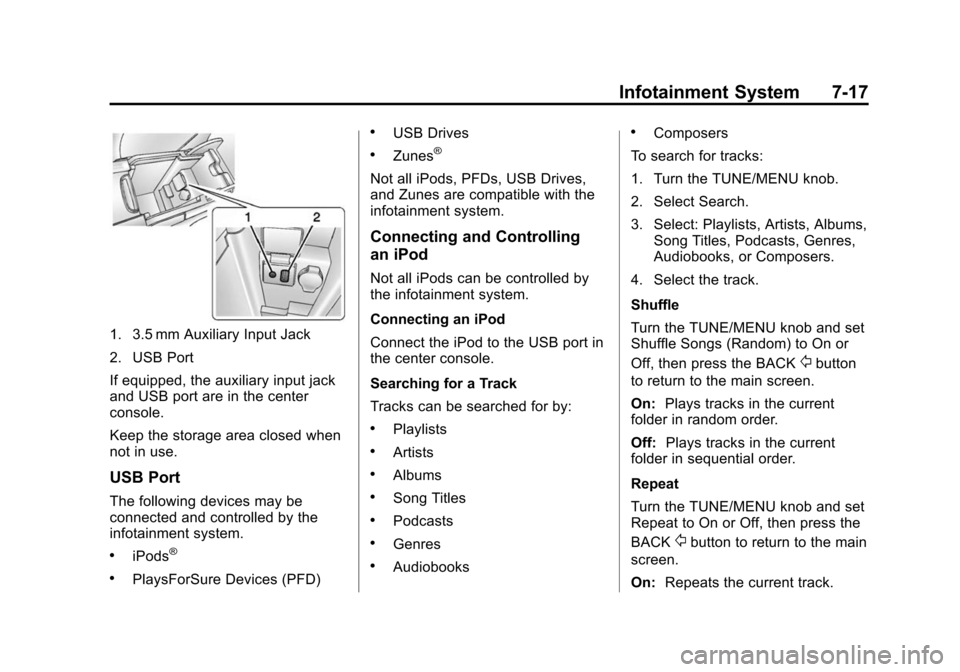
1. 3.5 mm Auxiliary Input Jack
2. USB Port
If equipped, the auxiliary input jack
and USB port are in the center
console.
Keep the storage area closed when
not in use.
USB Port
The following devices may be
connected and controlled by the
infotainment system.
.iPods®
.PlaysForSure Devices (PFD)
.USB Drives
.Zunes®
Not all iPods, PFDs, USB Drives,
and Zunes are compatible with the
infotainment system.
Connecting and Controlling
an iPod
Not all iPods can be controlled by
the infotainment system.
Connecting an iPod
Connect the iPod to the USB port in
the center console.
Searching for a Track
Tracks can be searched for by:
.Playlists
.Artists
.Albums
.Song Titles
.Podcasts
.Genres
.Audiobooks
.Composers
To search for tracks:
1. Turn the TUNE/MENU knob.
2. Select Search.
3. Select: Playlists, Artists, Albums, Song Titles, Podcasts, Genres,
Audiobooks, or Composers.
4. Select the track.
Shuffle
Turn the TUNE/MENU knob and set
Shuffle Songs (Random) to On or
Off, then press the BACK
/button
to return to the main screen.
On: Plays tracks in the current
folder in random order.
Off: Plays tracks in the current
folder in sequential order.
Repeat
Turn the TUNE/MENU knob and set
Repeat to On or Off, then press the
BACK
/button to return to the main
screen.
On: Repeats the current track.
Page 180 of 428
Black plate (18,1)Chevrolet Malibu Owner Manual (GMNA-Localizing-U.S./Canada/Mexico-
6081487) - 2014 - CRC - 11/19/13
7-18 Infotainment System
Off:Playback starts from the
beginning of the current track after
the last track finishes.
Connecting and Controlling a
PlaysForSure Device (PFD)
or Zune
Connecting a PFD or Zune
Connect the PFD or Zune to the
USB port in the center console.
Searching for a Track
Tracks can be searched for by:
.Playlists
.Artists
.Albums
.Song Titles
.Podcasts
.Genres
To search for tracks:
1. Turn the TUNE/MENU knob.
2. Select Search. 3. Select: Playlists, Artists, Albums,
Song Titles, Podcasts,
or Genres.
4. Select the track.
Shuffle Functionality
Turn the TUNE/MENU knob and set
Shuffle Songs (Random) to On
or Off.
On: Plays current tracks in random
order.
Off: Plays current tracks in
sequential order.
Repeat Functionality
Turn the TUNE/MENU knob and set
Repeat to On or Off.
Repeat On: Repeats the current
track.
Repeat Off: Playback starts from
the beginning of the current track
after the last track finishes.
Connecting and Controlling a
USB Drive
The infotainment system can only
play back .mp3 and .wma files from
a USB drive.
Only the first 10,000 songs are
recognized on the device.
When a device is not supported, the
message “No supported data found.
You can safely disconnect the
device” appears.
Connecting a USB Drive
Connect the USB drive to the USB
port in the center console.
Searching for a Track
It is normal for the search feature to
take some time to display the
information after reading the device
due to the amount of information
stored.
Files that do not have any meta
data stored in the ID3 tag display as
Unknown.
Page 229 of 428
Black plate (25,1)Chevrolet Malibu Owner Manual (GMNA-Localizing-U.S./Canada/Mexico-
6081487) - 2014 - CRC - 11/19/13
Driving and Operating 9-25
Shifting out of Park
This vehicle is equipped with an
electronic shift lock release system.
The shift lock release is
designed to:
.Prevent ignition key removal (if
equipped) unless the shift lever
is in P (Park) with the shift lever
button fully released.
.Prevent movement of the shift
lever out of P (Park), unless the
ignition is in ON/RUN and the
brake pedal is applied.
The shift lock release is always
functional except in the case of an
uncharged or low voltage (less than
9-volt) battery.
If the vehicle has an uncharged
battery or a battery with low voltage,
try charging or jump starting the
battery. See Jump Starting
(On-board with eAssist Only) on
page 10-91 orJump Starting (with
or without eAssist) on page 10-92. To shift out of P (Park):
1. Apply the brake pedal.
2. Place the ignition in ON/RUN.
3. Press the shift lever button.
4. Move the shift lever to the
desired position.
If still unable to shift out of P (Park):
1. Fully release the shift lever button.
2. Hold the brake pedal down and press the shift lever button
again.
3. Move the shift lever to the desired position.
If you are still having a problem
shifting, see your dealer.
Shift Lock Manual Release
If jump starting the vehicle did not
work, the shift lock manual release
must be used. To access the shift lock manual
release:
1. Apply the parking brake.
2. Release the shift lever trim from
the center console at the rear,
then fold upward and turn it to
the left.
Page 305 of 428
Black plate (43,1)Chevrolet Malibu Owner Manual (GMNA-Localizing-U.S./Canada/Mexico-
6081487) - 2014 - CRC - 11/19/13
Vehicle Care 10-43
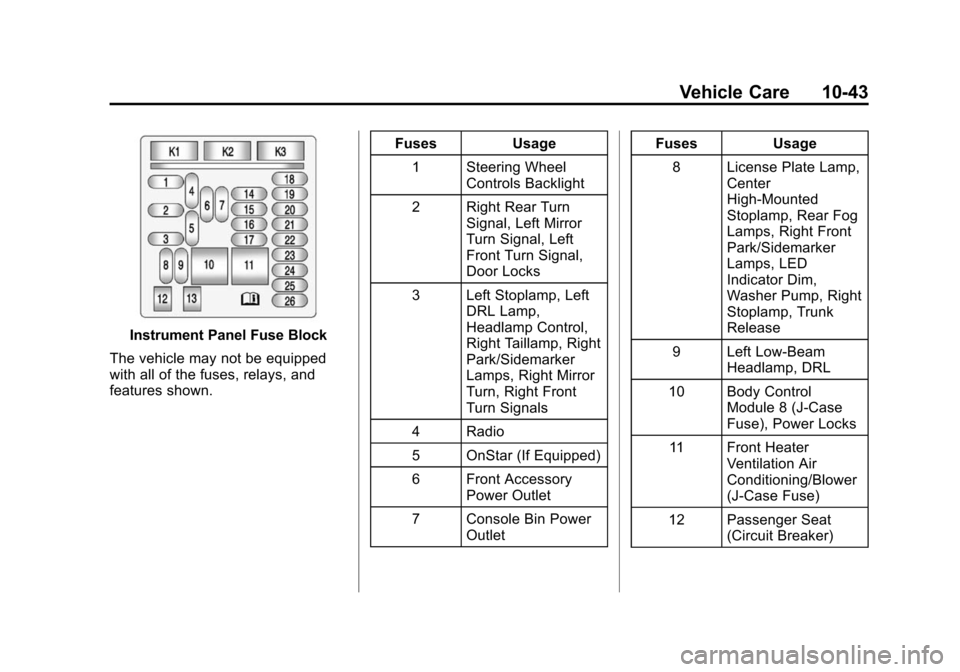
Instrument Panel Fuse Block
The vehicle may not be equipped
with all of the fuses, relays, and
features shown. Fuses Usage
1 Steering Wheel Controls Backlight
2 Right Rear Turn Signal, Left Mirror
Turn Signal, Left
Front Turn Signal,
Door Locks
3 Left Stoplamp, Left DRL Lamp,
Headlamp Control,
Right Taillamp, Right
Park/Sidemarker
Lamps, Right Mirror
Turn, Right Front
Turn Signals
4 Radio
5 OnStar (If Equipped)
6 Front Accessory Power Outlet
7 Console Bin Power Outlet Fuses Usage
8 License Plate Lamp, Center
High-Mounted
Stoplamp, Rear Fog
Lamps, Right Front
Park/Sidemarker
Lamps, LED
Indicator Dim,
Washer Pump, Right
Stoplamp, Trunk
Release
9 Left Low-Beam Headlamp, DRL
10 Body Control Module 8 (J-Case
Fuse), Power Locks
11 Front Heater Ventilation Air
Conditioning/Blower
(J-Case Fuse)
12 Passenger Seat (Circuit Breaker)
Page 416 of 428

Black plate (2,1)Chevrolet Malibu Owner Manual (GMNA-Localizing-U.S./Canada/Mexico-
6081487) - 2014 - CRC - 11/19/13
i-2 INDEX
B
Battery . . . . . . . . . . . . . . . . . . . . . . . 10-24Jump Starting . . . . . . . . 10-91, 10-92
Load Management . . . . . . . . . . . . . 6-7
Voltage and ChargingMessages . . . . . . . . . . . . . . . . . . . 5-27
Blade Replacement, Wiper . . . 10-27
Bluetooth
Overview . . . . . . . . . 7-21, 7-23, 7-26
Brake System Warning Light . . . . . . . . 5-17
Brakes . . . . . . . . . . . . . . . . . . . . . . . . 10-22 Antilock . . . . . . . . . . . . . . . . . . . . . . . 9-30
Assist . . . . . . . . . . . . . . . . . . . . . . . . . 9-32
Fluid . . . . . . . . . . . . . . . . . . . . . . . . 10-23
Parking . . . . . . . . . . . . . . . . . . . . . . . 9-31
System Messages . . . . . . . . . . . . 5-28
Braking . . . . . . . . . . . . . . . . . . . . . . . . . 9-3
Break-In, New Vehicle . . . . . . . . . 9-14
Bulb Replacement . . . . . . . . . . . . 10-36 Fog Lamps . . . . . . . . . . . . . 6-4, 10-33
Halogen Bulbs . . . . . . . . . . . . . . 10-29
Headlamp Aiming . . . . . . . . . . . 10-28
Headlamps . . . . . . . . . . . . . . . . . 10-29 Bulb Replacement (cont'd)
Headlamps, Front Turn
Signal, Sidemarker, and
Parking Lamps . . . . . . . . . . . . 10-29
High Intensity Discharge (HID) Lighting . . . . . . . . . . . . . 10-29
License Plate Lamps . . . . . . . 10-36
Taillamps, Turn Signal,
Stoplamps, and
Back-up Lamps . . . . 10-33, 10-34
Buying New Tires . . . . . . . . . . . . . 10-61
C
Calibration . . . . . . . . . . . . . . . . . . . . . . 5-4
California Fuel Requirements . . . . . . . . . . . 9-49
Perchlorate MaterialsRequirements . . . . . . . . . . . . . . . 10-3
Warning . . . . . . . . . . . . . . . . . . . . . . 10-2
Camera Rear Vision (RVC) . . . . . . . . . . . . 9-43
Canadian Vehicle Owners . . . . . . . . iii
Capacities and Specifications . . . . . . . . . . . . . . . . 12-2 Carbon Monoxide
Engine Exhaust . . . . . . . . . . . . . . . 9-26
Trunk . . . . . . . . . . . . . . . . . . . . . . . . . 2-14
Winter Driving . . . . . . . . . . . . . . . . . 9-8
Cargo Tie-Downs . . . . . . . . . . . . . . . . . . . . . 4-2
Cautions, Danger, and
Warnings . . . . . . . . . . . . . . . . . . . . . . . . iv
CD Player . . . . . . . . . . . . . . . . . . . . . 7-15
Center Console Storage . . . . . . . . 4-2
Chains, Tire . . . . . . . . . . . . . . . . . . 10-66
Charging System Light . . . . . . . . 5-14
Check Engine Light . . . . . . . . . . . . . . . . . . 5-14
IgnitionTransmission Lock . . . . . . . . 10-27
Child Restraints Infants and YoungChildren . . . . . . . . . . . . . . . . . . . . . 3-34
Lower Anchors and Tethers for Children . . . . . . . . . 3-40
Older Children . . . . . . . . . . . . . . . . 3-32
Securing . . . . . . . . . . . . . . . . 3-47, 3-49
Systems . . . . . . . . . . . . . . . . . . . . . . 3-37
Page 425 of 428

Black plate (11,1)Chevrolet Malibu Owner Manual (GMNA-Localizing-U.S./Canada/Mexico-
6081487) - 2014 - CRC - 11/19/13
INDEX i-11
Stoplamps and Back-up LampsBulb Replacement . . . 10-33, 10-34
Storage Areas Center Console . . . . . . . . . . . . . . . . 4-2
Convenience Net . . . . . . . . . . . . . . 4-2
Glove Box . . . . . . . . . . . . . . . . . . . . . 4-1
Instrument Panel . . . . . . . . . . . . . . 4-1
Storage Compartments . . . . . . . . . 4-1
Storing the Tire Sealant and Compressor Kit . . . . . . . . . 10-83
Stuck Vehicle . . . . . . . . . . . . . . . . . . . 9-9
Sun Visors . . . . . . . . . . . . . . . . . . . . . 2-23
Sunroof . . . . . . . . . . . . . . . . . . . . . . . . 2-23
Symbols . . . . . . . . . . . . . . . . . . . . . . . . . . iv
System Forward Collision
Alert (FCA) . . . . . . . . . . . . . . . . . . 9-37
Infotainment . . . . . . . . . . . . 7-1, 13-15
T
Tachometer . . . . . . . . . . . . . . . . . . . . 5-10
Taillamps Bulb Replacement . . . 10-33, 10-34
Text Telephone (TTY) Users . . . 13-4 Theft-Deterrent
Systems . . . . . . . . . . . . . . . 2-17, 2-18
Immobilizer . . . . . . . . . . . . . . . . . . . 2-17
Time . . . . . . . . . . . . . . . . . . . . . . . . . . . . 5-4
Tires Buying New Tires . . . . . . . . . . . 10-61
Chains . . . . . . . . . . . . . . . . . . . . . . 10-66
Changing . . . . . . . . . . . . . . . . . . . 10-84
Compact Spare . . . . . . . . . . . . . 10-90
Designations . . . . . . . . . . . . . . . 10-49
Different Size . . . . . . . . . . . . . . . 10-63
If a Tire Goes Flat . . . . . . . . . . 10-67
Inflation Monitor System . . . . 10-56
Inspection . . . . . . . . . . . . . . . . . . 10-59
Messages . . . . . . . . . . . . . . . . . . . . 5-33
Pressure . . . . . . . . . . . . . . . . . . . . 10-54
Pressure Light . . . . . . . . . . . . . . . . 5-20
Pressure Monitor System . . . 10-55
Rotation . . . . . . . . . . . . . . . . . . . . 10-59
Sealant andCompressor Kit . . . . 10-69, 10-76
Sealant and Compressor Kit, Storing . . . . . . . . . . . . . . . . 10-83
Sidewall Labeling . . . . . . . . . . . 10-46
Terminology and Definitions . . . . . . . . . . . . . . . . . 10-50 Tires (cont'd)
Uniform Tire Quality
Grading . . . . . . . . . . . . . . . . . . . 10-64
Wheel Alignment and Tire
Balance . . . . . . . . . . . . . . . . . . . 10-65
Wheel Replacement . . . . . . . . 10-65
When It Is Time for New Tires . . . . . . . . . . . . . . . . . . . . . . 10-61
Winter . . . . . . . . . . . . . . . . . . . . . . 10-46
Towing Driving Characteristics . . . . . . . . 9-53
Equipment . . . . . . . . . . . . . . . . . . . . 9-57
General Information . . . . . . . . . . 9-53
Recreational Vehicle . . . . . . . . 10-95
Trailer . . . . . . . . . . . . . . . . . . . . . . . . 9-56
Vehicle . . . . . . . . . . . . . . . . . . . . . 10-95
Track Events and Competitive Driving . . . . . . . . . . . 9-6
Traction Control System (TCS)/StabiliTrak®Light . . . . . . . . . . . . 5-19
Off Light . . . . . . . . . . . . . . . . . . . . . . 5-19
Traction Control/Electronic
Stability Control . . . . . . . . . . . . . . 9-32
Trailer Towing . . . . . . . . . . . . . . . . . . . . . . . . 9-56