2014 CHEVROLET IMPALA lock
[x] Cancel search: lockPage 15 of 422
Black plate (9,1)Chevrolet Impala Owner Manual (GMNA-Localizing-U.S./Canada-5772216) -
2014 - 2nd crc - 5/14/13
In Brief 1-9
Power Seats
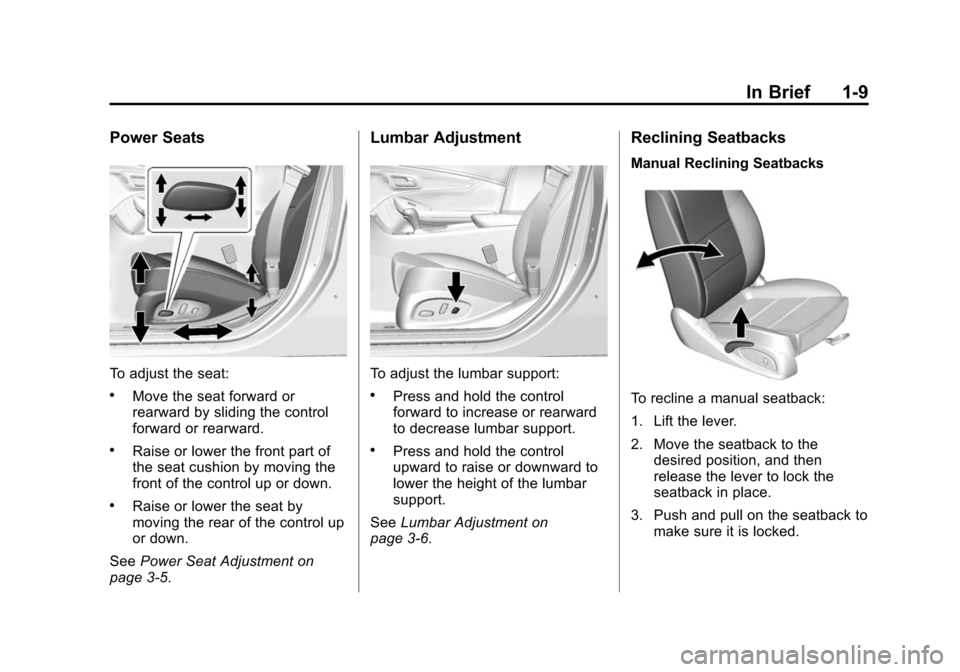
To adjust the seat:
.Move the seat forward or
rearward by sliding the control
forward or rearward.
.Raise or lower the front part of
the seat cushion by moving the
front of the control up or down.
.Raise or lower the seat by
moving the rear of the control up
or down.
See Power Seat Adjustment on
page 3-5.
Lumbar Adjustment
To adjust the lumbar support:
.Press and hold the control
forward to increase or rearward
to decrease lumbar support.
.Press and hold the control
upward to raise or downward to
lower the height of the lumbar
support.
See Lumbar Adjustment on
page 3-6.
Reclining Seatbacks
Manual Reclining Seatbacks
To recline a manual seatback:
1. Lift the lever.
2. Move the seatback to the desired position, and then
release the lever to lock the
seatback in place.
3. Push and pull on the seatback to make sure it is locked.
Page 16 of 422
Black plate (10,1)Chevrolet Impala Owner Manual (GMNA-Localizing-U.S./Canada-5772216) -
2014 - 2nd crc - 5/14/13
1-10 In Brief
To return the seatback to the upright
position:
1. Lift the lever fully withoutapplying pressure to the
seatback, and the seatback will
return to the upright position.
2. Push and pull on the seatback to make sure it is locked.
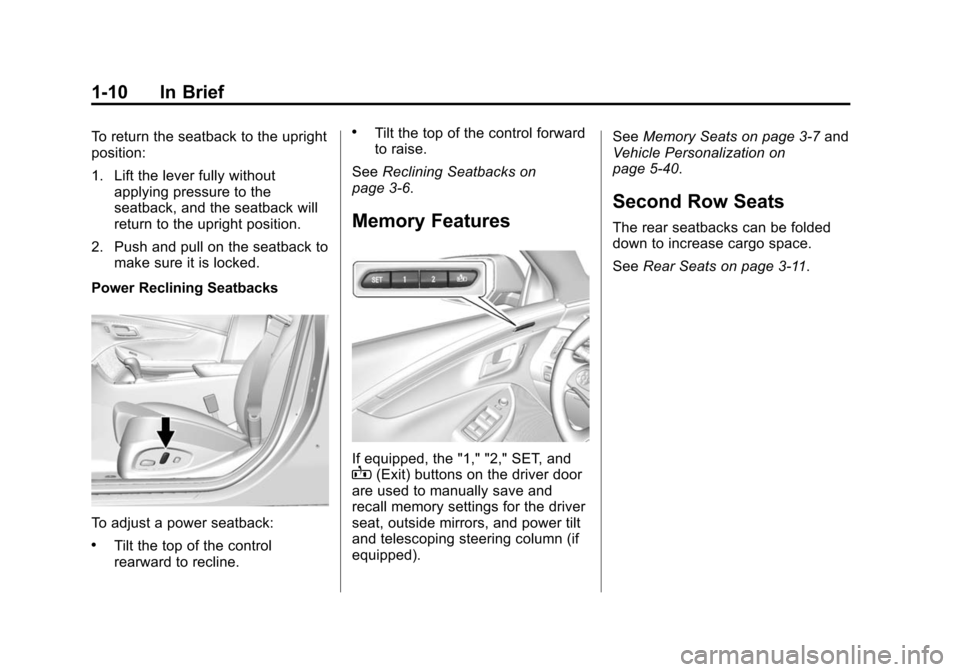
Power Reclining Seatbacks
To adjust a power seatback:
.Tilt the top of the control
rearward to recline.
.Tilt the top of the control forward
to raise.
See Reclining Seatbacks on
page 3-6.
Memory Features
If equipped, the "1," "2," SET, andB(Exit) buttons on the driver door
are used to manually save and
recall memory settings for the driver
seat, outside mirrors, and power tilt
and telescoping steering column (if
equipped). See
Memory Seats on page 3-7 and
Vehicle Personalization on
page 5-40.
Second Row Seats
The rear seatbacks can be folded
down to increase cargo space.
See Rear Seats on page 3-11.
Page 19 of 422
Black plate (13,1)Chevrolet Impala Owner Manual (GMNA-Localizing-U.S./Canada-5772216) -
2014 - 2nd crc - 5/14/13
In Brief 1-13
when the vehicle is started. See
Automatic Dimming Rearview Mirror
on page 2-20.
Steering Wheel
Adjustment
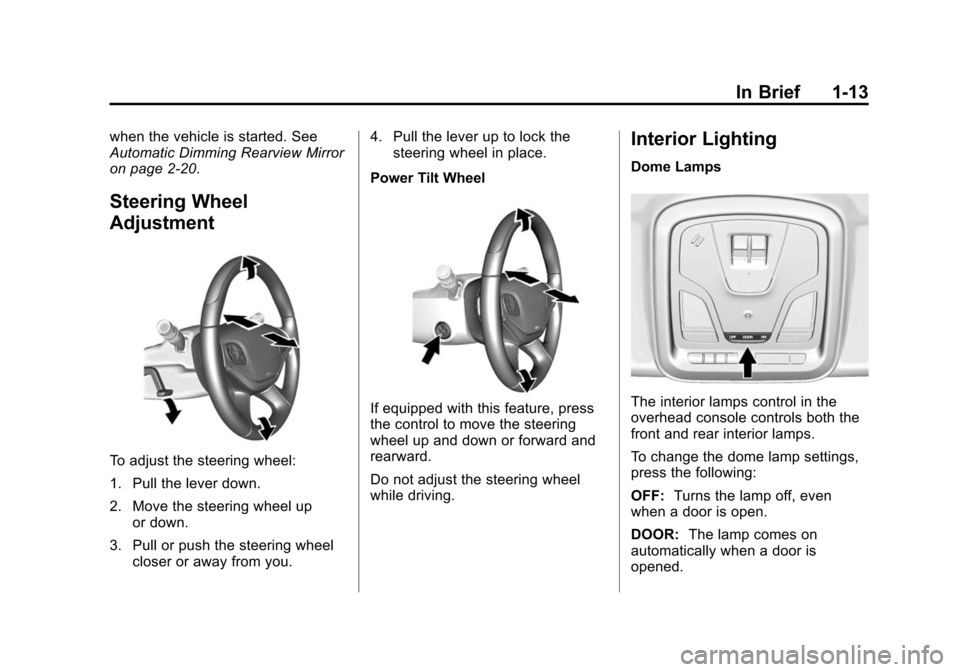
To adjust the steering wheel:
1. Pull the lever down.
2. Move the steering wheel upor down.
3. Pull or push the steering wheel closer or away from you. 4. Pull the lever up to lock the
steering wheel in place.
Power Tilt Wheel
If equipped with this feature, press
the control to move the steering
wheel up and down or forward and
rearward.
Do not adjust the steering wheel
while driving.
Interior Lighting
Dome Lamps
The interior lamps control in the
overhead console controls both the
front and rear interior lamps.
To change the dome lamp settings,
press the following:
OFF: Turns the lamp off, even
when a door is open.
DOOR: The lamp comes on
automatically when a door is
opened.
Page 24 of 422
Black plate (18,1)Chevrolet Impala Owner Manual (GMNA-Localizing-U.S./Canada-5772216) -
2014 - 2nd crc - 5/14/13
1-18 In Brief
Vehicle Features
Radio(s)
O
:Press to turn the system on.
Press and hold to turn it off. When
on, press to mute; press again to
unmute. Turn to increase or
decrease the volume.
RADIO: Press to choose between
FM, AM, and SiriusXM
®,
if equipped.
MEDIA: Press to change the audio
source between CD, USB, SD card,
and AUX.
{: Press to go to the Home Page.
MENU: Press to select a menu.
g:Press to seek the previous
station or track.
l: Press to seek the next station
or track.
See Overview on page 7-3 about
these and other radio features.
Storing Radio Station Presets
Up to 25 preset stations from all
bands can be stored in the favorite
lists in any order. Up to five stations
can be stored in each favorite page
and the number of favorite pages
can be set.
To store the station to a position in
the list, while on the active source
main page, such as AM, FM,
or SiriusXM (if equipped), press and
hold a Favorites/Soft Key button on
the faceplate.
See “Storing Radio Station Presets”
under AM-FM Radio on page 7-7.
Setting the Clock
SeeClock (Base Radio) on
page 5-5 orClock (Uplevel Radio)
on page 5-5.
Satellite Radio
Vehicles with a SiriusXM®satellite
radio tuner and a valid SiriusXM
satellite radio subscription can
receive SiriusXM programming.
SiriusXM Satellite Radio
Service
SiriusXM is a satellite radio service
based in the 48 contiguous United
States and 10 Canadian provinces.
SiriusXM satellite radio has a wide
variety of programming and
commercial-free music, coast to
coast, and in digital-quality sound.
A fee is required to receive the
SiriusXM service.
For more information refer to:
.www.siriusxm.com or call
1-866-635-2349 (U.S.).
.www.xmradio.ca or call
1-877-209-0079 (Canada).
See Satellite Radio on page 7-9.
Portable Audio Devices
This vehicle has a 3.5 mm (1/8 in)
auxiliary input jack and USB port in
the center console. If equipped with
storage behind the radio, there is a
USB port inside. See Instrument
Panel Storage on page 4-1.
External devices such as iPods
®,
Page 31 of 422
Black plate (25,1)Chevrolet Impala Owner Manual (GMNA-Localizing-U.S./Canada-5772216) -
2014 - 2nd crc - 5/14/13
In Brief 1-25
mode. Remember to shift to P (Park)
and turn the ignition to LOCK/OFF
before exiting the vehicle.
SeeStarting the Engine on
page 9-19.
Regenerative Braking
Regenerative braking takes some of
the energy from the moving vehicle
and turns it into electrical energy.
This energy is then stored in the
vehicle's high voltage battery
system, contributing to increased
fuel efficiency.
The system works whenever the
accelerator pedal is released, and
increases the energy captured as
more brake pedal is applied.
Battery
This vehicle has a standard 12-volt
battery. Refer to the replacement
number on the original battery label
when a new standard 12-volt battery
is needed. Vehicles with eAssist also have a
high voltage battery. Only a trained
service technician with the proper
knowledge and tools should inspect,
test, or replace the high voltage
battery. See your dealer if the high
voltage battery needs service. See
Battery on page 10-27.
Service
Never try to do your own service on
eAssist components. You can be
injured and the vehicle can be
damaged if you try to do your own
service work. Service and repair of
these high voltage components
should only be performed by a
trained service technician with the
proper knowledge and tools. See
Doing Your Own Service Work on
page 10-3.
Performance and
Maintenance
Traction Control/
Electronic Stability
Control
The Traction Control System (TCS)
limits wheel spin. The system turns
on automatically every time the
vehicle is started.
The StabiliTrak system assists with
directional control of the vehicle in
difficult driving conditions. The
system also turns on automatically
every time the vehicle is started.
.To turn off traction control, press
and release the
gbutton on the
center console. The Traction Off
Light
iilluminates.
.To turn off both traction control
and StabiliTrak, press and hold
the
gbutton, until the Traction
Off Light
iand the StabiliTrak
Off Light
gilluminate.
Page 35 of 422
Black plate (1,1)Chevrolet Impala Owner Manual (GMNA-Localizing-U.S./Canada-5772216) -
2014 - 2nd crc - 5/14/13
Keys, Doors, and Windows 2-1
Keys, Doors, and
Windows
Keys and Locks
Keys . . . . . . . . . . . . . . . . . . . . . . . . . . 2-1
Remote Keyless Entry (RKE)System . . . . . . . . . . . . . . . . . . . . . . 2-2
Remote Keyless Entry (RKE) System Operation . . . . . . . . . . . 2-3
Remote Vehicle Start . . . . . . . . . 2-9
Door Locks . . . . . . . . . . . . . . . . . . 2-10
Power Door Locks . . . . . . . . . . . 2-12
Delayed Locking . . . . . . . . . . . . . 2-12
Automatic Door Locks . . . . . . . 2-13
Lockout Protection . . . . . . . . . . . 2-13
Safety Locks . . . . . . . . . . . . . . . . . 2-14
Doors
Trunk . . . . . . . . . . . . . . . . . . . . . . . . 2-14
Vehicle Security
Vehicle Security . . . . . . . . . . . . . . 2-16
Vehicle Alarm System . . . . . . . 2-16 Immobilizer . . . . . . . . . . . . . . . . . . 2-17
Immobilizer Operation (Key
Access) . . . . . . . . . . . . . . . . . . . . 2-17
Immobilizer Operation (Keyless Access) . . . . . . . . . . . 2-18
Exterior Mirrors
Convex Mirrors . . . . . . . . . . . . . . 2-19
Power Mirrors . . . . . . . . . . . . . . . . 2-19
Folding Mirrors . . . . . . . . . . . . . . . 2-20
Heated Mirrors . . . . . . . . . . . . . . . 2-20
Reverse Tilt Mirrors . . . . . . . . . . 2-20
Interior Mirrors
Interior Rearview Mirrors . . . . . 2-20
Manual Rearview Mirror . . . . . . 2-20
Automatic Dimming Rearview
Mirror . . . . . . . . . . . . . . . . . . . . . . . 2-20
Windows
Windows . . . . . . . . . . . . . . . . . . . . . 2-21
Power Windows . . . . . . . . . . . . . 2-21
Sun Visors . . . . . . . . . . . . . . . . . . . 2-23
Roof
Sunroof . . . . . . . . . . . . . . . . . . . . . . 2-23
Keys and Locks
Keys
{Warning
Leaving children in a vehicle with
an ignition key or Remote
Keyless Entry (RKE) transmitter is
dangerous and children or others
could be seriously injured or
killed. They could operate the
power window or other controls or
make the vehicle move. The
windows will function with the key
in the ignition or with the RKE
transmitter in the vehicle, and
children or others could be caught
in the path of a closing window.
Do not leave children in a vehicle
with the ignition key or an RKE
transmitter.
Page 36 of 422

Black plate (2,1)Chevrolet Impala Owner Manual (GMNA-Localizing-U.S./Canada-5772216) -
2014 - 2nd crc - 5/14/13
2-2 Keys, Doors, and Windows
The key that is part of the Remote
Keyless Entry (RKE) transmitter can
be used for the ignition and all locks
if the vehicle is a Key Access
vehicle. If the vehicle has the
keyless ignition, the key can be
used for the locks.RKE With Remote Start Shown,Without Similar
Press the button on the RKE
transmitter to extend the key. Press
the button and the key blade to
retract the key.
If the vehicle has an ignition and it
becomes difficult to turn the key,
inspect the key blade for debris.
Periodically clean with a brush
or pick.
See your dealer if a new key is
needed. With an active OnStar subscription,
an OnStar Advisor may remotely
unlock the vehicle. See
OnStar
Overview on page 14-1.
Remote Keyless Entry
(RKE) System
See Radio Frequency Statement on
page 13-15.
If there is a decrease in the RKE
operating range:
.Check the distance. The
transmitter may be too far from
the vehicle.
.Check the location. Other
vehicles or objects may be
blocking the signal.
.Check the transmitter's battery.
See “Battery Replacement” later
in this section.
.If the transmitter is still not
working correctly, see your
dealer or a qualified technician
for service.
Page 37 of 422
Black plate (3,1)Chevrolet Impala Owner Manual (GMNA-Localizing-U.S./Canada-5772216) -
2014 - 2nd crc - 5/14/13
Keys, Doors, and Windows 2-3
Remote Keyless Entry
(RKE) System Operation
The transmitter functions may work
up to 60 m (197 ft) away from the
vehicle.
Keep in mind that other conditions,
such as those previously stated, can
impact the performance of the
transmitter.
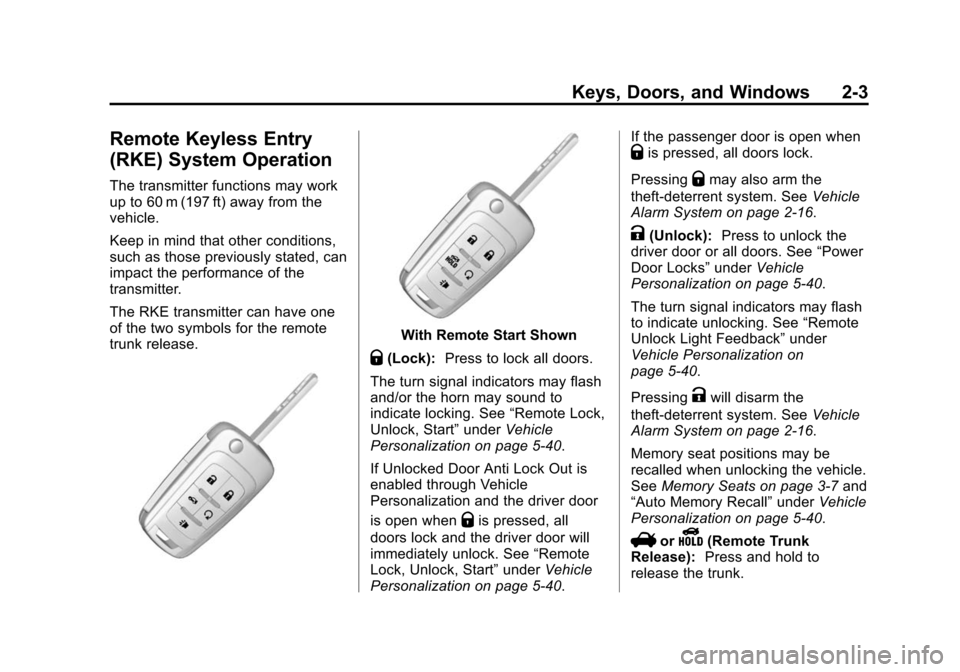
The RKE transmitter can have one
of the two symbols for the remote
trunk release.
With Remote Start Shown
Q(Lock):Press to lock all doors.
The turn signal indicators may flash
and/or the horn may sound to
indicate locking. See “Remote Lock,
Unlock, Start” underVehicle
Personalization on page 5-40.
If Unlocked Door Anti Lock Out is
enabled through Vehicle
Personalization and the driver door
is open when
Qis pressed, all
doors lock and the driver door will
immediately unlock. See “Remote
Lock, Unlock, Start” underVehicle
Personalization on page 5-40. If the passenger door is open when
Qis pressed, all doors lock.
Pressing
Qmay also arm the
theft-deterrent system. See Vehicle
Alarm System on page 2-16.
K(Unlock): Press to unlock the
driver door or all doors. See “Power
Door Locks” underVehicle
Personalization on page 5-40.
The turn signal indicators may flash
to indicate unlocking. See “Remote
Unlock Light Feedback” under
Vehicle Personalization on
page 5-40.
Pressing
Kwill disarm the
theft-deterrent system. See Vehicle
Alarm System on page 2-16.
Memory seat positions may be
recalled when unlocking the vehicle.
See Memory Seats on page 3-7 and
“Auto Memory Recall” underVehicle
Personalization on page 5-40.
VorY(Remote Trunk
Release): Press and hold to
release the trunk.