2014 CHEVROLET CAMARO buttons
[x] Cancel search: buttonsPage 9 of 432

Black plate (3,1)Chevrolet Camaro Owner Manual (GMNA-Localizing-U.S./Canada/Mexico-
6042601) - 2014 - CRC - 1/21/14
In Brief 1-3
1.Air Vents on page 8-3.
2. Turn Signal Lever. See Turn and
Lane-Change Signals on
page 6-4.
Headlamp High/Low-Beam
Changer on page 6-2.
Flash-to-Pass on page 6-2.
Driver Information Center (DIC)
Buttons (If Equipped). See
Driver Information Center (DIC)
on page 5-24.
3. Tap Shift (If Equipped). See Manual Mode on page 9-32.
4. Instrument Cluster on page 5-7.
5. Windshield Wiper/Washer on
page 5-3.
6. Light Sensor. See Automatic
Headlamp System on page 6-2.
7. Infotainment on page 7-1.
8. Hood Release (Out of View). See Hood on page 10-5.
9. Data Link Connector (DLC) (Out of View). See Malfunction
Indicator Lamp on page 5-16. 10.
Exterior Lamp Controls on
page 6-1.
Front Fog Lamps on page 6-4
(If Equipped).
Instrument Panel Illumination
Control on page 6-5.
11. Cruise Control on page 9-46.
12. Steering Wheel Adjustment on
page 5-2.
13. Horn on page 5-3.
14. Steering Wheel Controls on
page 5-2.
15. Head-Up Display (HUD) on
page 5-28 (If Equipped).
16. Climate Control Systems on
page 8-1.
17. Transmission Temperature
Gauge (Except ZL1) on
page 5-12.
Voltmeter Gauge on page 5-13.
Engine Oil Temperature Gauge
on page 5-11. Engine Oil Pressure Gauge on
page 5-10.
18. Traction Control/Electronic
Stability Control on page 9-39.
Performance Traction
Management (PTM). See
Competitive Driving Mode on
page 9-41 (ZL1 or Z/28
Models Only).
19. Shift Lever. See Automatic
Transmission on page 9-28 or
Manual Transmission on
page 9-34.
20. Power Outlets on page 5-5.
21. Hazard Warning Flashers on
page 6-4.
Page 15 of 432

Black plate (9,1)Chevrolet Camaro Owner Manual (GMNA-Localizing-U.S./Canada/Mexico-
6042601) - 2014 - CRC - 1/21/14
In Brief 1-9
2. Press one of the four sides onthe
h(control pad) to adjust the
mirror.
3. Adjust each outside mirror so that a little of the vehicle and the
area behind it can be seen.
See Power Mirrors on page 2-14.
Interior
Adjust the inside rearview mirror for
a clear view of the area behind your
vehicle.
If equipped, push the tab forward for
daytime use and pull it for nighttime
use to avoid glare from the
headlamps from behind.
If equipped, automatic dimming
reduces the glare of the headlamps
from behind. The dimming feature
comes on when the vehicle is
started.
Cleaning the Mirror
Do not spray glass cleaner directly
on the mirror. Use a soft towel
dampened with water.
Steering Wheel
Adjustment
To adjust the steering wheel:
1. Pull the lever down.
2. Move the steering wheel up
or down.
3. Pull or push the steering wheel closer or away from you.
4. Pull the lever up to lock the steering wheel in place.
Do not adjust the steering wheel
while driving.
Interior Lighting
Dome Lamps
The dome lamp buttons are
overhead near the rearview mirror.
To change the settings, press the
following:
(: Turns the lamp off, even when
a door is open.
H: Turns the lamp on
automatically when a door is
opened.
': Turns the lamp on.
For more information on interior
lighting, see Instrument Panel
Illumination Control on page 6-5.
Page 18 of 432

Black plate (12,1)Chevrolet Camaro Owner Manual (GMNA-Localizing-U.S./Canada/Mexico-
6042601) - 2014 - CRC - 1/21/14
1-12 In Brief
Transmission
Automatic Transmission
Tap Shift
Tap Shift allows the driver to
manually control the automatic
transmission. To use Tap Shift, the
shift lever must be in M (Manual
Mode) or D (Drive). Vehicles with
this feature have indicators on the
steering wheel. The controls are on
the back of the steering wheel. Tap
the left control to downshift, and the
right control to upshift. A Driver
Information Center (DIC) message
indicates the gear the vehicle is in.
Electronic Range Select
(ERS) Mode
Vehicles with axle code GW8 have
an ERS mode. ERS mode allows
you to choose the top-gear limit of
the transmission with fully automatic
gear selection. This can help controlthe vehicle's speed while driving
downhill or towing a trailer. The
vehicle has an electronic shift
position indicator within the
instrument cluster. When using the
ERS mode a number will display
next to the M, indicating the current
maximum gear allowed.
To use this feature:
1. Move the shift lever to
M (Manual Mode).
2. Press the plus/minus buttons on the back of the steering wheel,
to increase or decrease the gear
range available.
See Manual Mode on page 9-32.
Manual Transmission
One to Four Shift Message
(V8 Only)
When this message comes on, you
can only shift from 1 (First) to
4 (Fourth) instead of 1 (First) to
2 (Second). The message will be
displayed in the Driver Information
Center. See Manual Transmission
on page 9-34.
Page 19 of 432

Black plate (13,1)Chevrolet Camaro Owner Manual (GMNA-Localizing-U.S./Canada/Mexico-
6042601) - 2014 - CRC - 1/21/14
In Brief 1-13
Vehicle Features
Radio(s)
VOL/O:Press to turn the system
on and off. Turn to increase or
decrease the volume.
RADIO/BAND: Press to choose
between FM, AM, or SiriusXM
®,
if equipped.
MENU/SELECT: Turn to select
radio stations.
SEEK
7: Press to seek the
previous radio station or track.
SEEK
6: Press to seek the next
radio station or track.
Buttons 1−6: Press to save and
select favorite stations.
INFO: Press to show available
information about the current station
or track.
For more information about these
and other radio features, see
Overview on page 7-2.
Storing a Favorite Station
Stations from all bands can be
stored in the favorite lists in any
order. Up to six stations can be
stored in each favorite page and the
number of available favorite pages
can be set.
To store the station to a position in
the list, press the corresponding
numeric button 1−6 until the station
can be heard again.
For more information, see “Storing
and Retrieving Favorites” inAM-FM
Radio on page 7-7.
Setting the Clock
Adjusting the Time and Date
The clock menu can only be used
with the radio on while in ON/RUN
or ACC/ACCESSORY.
1. Press the CONFIG button.
2. Select Time and Date.
3. Select Set Time or Set Date.
4. Turn the MENU/SELECT knob to adjust the highlighted value. 5. Press the MENU/SELECT knob
to select the next value.
6. To save the time or date and return to the Time and Date
menu, press the
/BACK button
at any time or press the MENU/
SELECT knob after adjusting the
minutes or year.
Setting the 12/24 Hour Format
1. Press the CONFIG button.
2. Select Time and Date.
3. Highlight 12 hr / 24 hr Format.
4. Press the MENU/SELECT knob to select the 12 hour or 24 hour
display format.
For detailed instructions on setting
the clock, see Clock on page 5-4.
Satellite Radio
If equipped, vehicles with a
SiriusXM®satellite radio tuner and a
valid SiriusXM satellite radio
subscription can receive SiriusXM
programming.
Page 30 of 432

Black plate (4,1)Chevrolet Camaro Owner Manual (GMNA-Localizing-U.S./Canada/Mexico-
6042601) - 2014 - CRC - 1/21/14
2-4 Keys, Doors, and Windows
PressingKwill disarm the
theft-deterrent system. See Vehicle
Alarm System on page 2-11.
VorY(Remote Trunk
Release): Press and hold to open
the trunk.
7(Vehicle Locator/Panic
Alarm): Press and release to
initiate vehicle locator. The exterior
lamps flash and the horn chirps
three times.
Press and hold
7for at least
three seconds to sound the panic
alarm. The horn sounds and the
turn signals flash until
7is pressed
again or the key is placed in the
ignition and turned to ON/RUN.
/(Remote Vehicle Start):
If equipped, press and release
Q
and then immediately press and
hold
/for at least four seconds to
start the engine from outside the
vehicle using the RKE transmitter.
See Remote Vehicle Start on
page 2-5. The buttons on the keys are
disabled when there is a key in the
ignition.
Programming Transmitters to
the Vehicle
Only RKE transmitters programmed
to this vehicle will work. If a
transmitter is lost or stolen, a
replacement can be purchased and
programmed through your dealer.
When the replacement transmitter is
programmed to this vehicle, all
remaining transmitters must also be
reprogrammed. Any lost or stolen
transmitters will no longer work
once the new transmitter is
programmed.
Programming with a Recognized
Transmitter
To program a new key:
1. Insert the original, already
programmed key in the ignition
and turn to the key to the ON/
RUN position. 2. Turn the key to LOCK/OFF, and
remove the key.
3. Insert the new key to be programmed and turn it to the
ON/RUN position within
five seconds.
The security light will turn off
once the key has been
programmed.
4. Repeat Steps 1–3 if additional keys are to be programmed.
If a key is lost or damaged, see your
dealer to have a new key made.
Programming without a
Recognized Transmitter
Program a new key to the vehicle
when a recognized key is not
available. Canadian regulations
require that owners see their dealer.
If there are no currently recognized
keys available, follow this procedure
to program the first key.
Page 41 of 432

Black plate (15,1)Chevrolet Camaro Owner Manual (GMNA-Localizing-U.S./Canada/Mexico-
6042601) - 2014 - CRC - 1/21/14
Keys, Doors, and Windows 2-15
Interior Mirrors
Interior Rearview Mirrors
Adjust the rearview mirror for a clear
view of the area behind your
vehicle.
If equipped with OnStar, the vehicle
may have three control buttons at
the bottom of the mirror. See your
dealer for more information about
OnStar and how to subscribe to it.
SeeOnStar Overview on page 14-1.
Do not spray glass cleaner directly
on the mirror. Use a soft towel
dampened with water.
Manual Rearview Mirror
If equipped with a manual rearview
mirror, push the tab forward for
daytime use and pull it for nighttime
use to avoid glare from the
headlamps from behind.
Automatic Dimming
Rearview Mirror
If equipped, automatic dimming
reduces the glare of headlamps
from behind. The dimming feature
comes on when the vehicle is
started.
Windows
{Warning
Never leave a child, a helpless
adult, or a pet alone in a vehicle,
especially with the windows
closed in warm or hot weather.
They can be overcome by the
extreme heat and suffer
permanent injuries or even death
from heat stroke.
Page 128 of 432

Black plate (24,1)Chevrolet Camaro Owner Manual (GMNA-Localizing-U.S./Canada/Mexico-
6042601) - 2014 - CRC - 1/21/14
5-24 Instruments and Controls
Information Displays
Driver Information
Center (DIC)
The DIC displays information about
your vehicle. It also displays
warning messages if a system
problem is detected. SeeVehicle
Messages on page 5-32. All
messages appear in the DIC display
in the center of the instrument
cluster.
The vehicle may also have features
that can be customized through the
controls on the radio. See Vehicle
Personalization on page 5-43.
DIC Operation and Displays
The DIC has different displays
which can be accessed by using the
DIC buttons on the turn signal lever
on the left side of the steering
wheel. The DIC displays trip, fuel,
vehicle system information, and
warning messages if a system
problem is detected. The bottom of the DIC display
shows what position the shift lever
is in (automatic transmission only),
the odometer, and the direction the
vehicle is driving.
DIC Buttons
1.
SET/CLR (Set/Clear): Press to
set, or press and hold to clear,
the menu item displayed.
2.
w/x(Band): Use the band to
scroll through the items in
each menu.
3. MENU: Press this button to get
to the Trip/Fuel Menu and the
Vehicle Information Menu. Some
models may also have a
Performance Menu. This button is also used to return to or exit
the last screen displayed on
the DIC.
Trip/Fuel Menu Items
Press the MENU button on the turn
signal lever until Trip/Fuel
Information Menu is displayed. Use
the band to scroll through the
following menu items:
.Digital Speedometer
.Trip 1
.Trip 2
.Fuel Range
.Average Fuel Economy
.Average Vehicle Speed
.Turn-by-Turn
.Blank
Digital Speedometer
The speedometer shows how fast
the vehicle is moving in either
kilometers per hour (km/h) or miles
per hour (mph). The speedometer
cannot be reset.
Page 150 of 432
Black plate (46,1)Chevrolet Camaro Owner Manual (GMNA-Localizing-U.S./Canada/Mexico-
6042601) - 2014 - CRC - 1/21/14
5-46 Instruments and Controls
Universal Remote
System
SeeRadio Frequency Statement on
page 13-15.
Universal Remote System
Programming
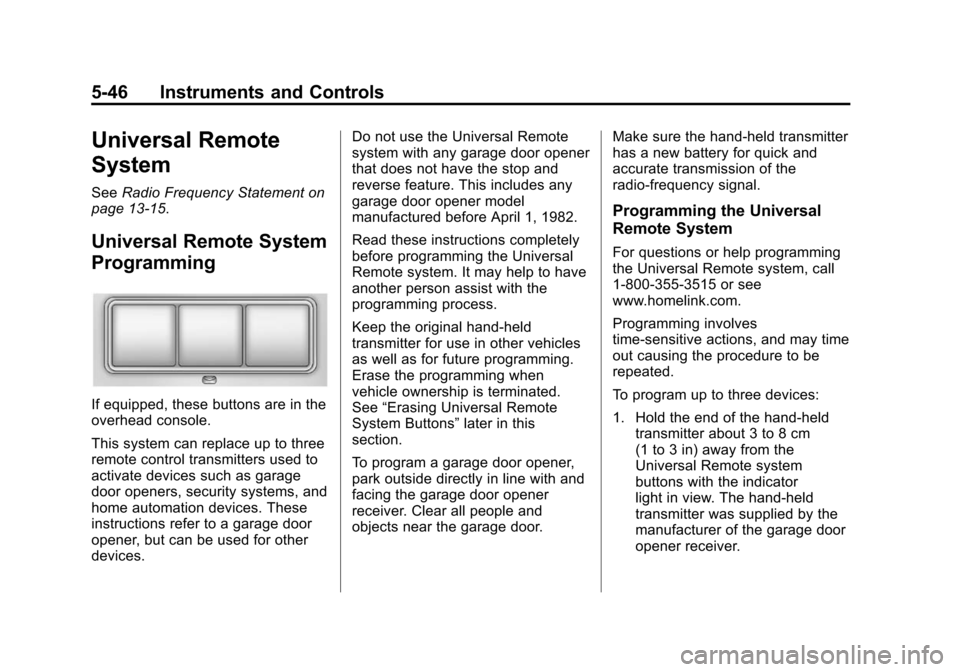
If equipped, these buttons are in the
overhead console.
This system can replace up to three
remote control transmitters used to
activate devices such as garage
door openers, security systems, and
home automation devices. These
instructions refer to a garage door
opener, but can be used for other
devices. Do not use the Universal Remote
system with any garage door opener
that does not have the stop and
reverse feature. This includes any
garage door opener model
manufactured before April 1, 1982.
Read these instructions completely
before programming the Universal
Remote system. It may help to have
another person assist with the
programming process.
Keep the original hand-held
transmitter for use in other vehicles
as well as for future programming.
Erase the programming when
vehicle ownership is terminated.
See
“Erasing Universal Remote
System Buttons” later in this
section.
To program a garage door opener,
park outside directly in line with and
facing the garage door opener
receiver. Clear all people and
objects near the garage door. Make sure the hand-held transmitter
has a new battery for quick and
accurate transmission of the
radio-frequency signal.
Programming the Universal
Remote System
For questions or help programming
the Universal Remote system, call
1-800-355-3515 or see
www.homelink.com.
Programming involves
time-sensitive actions, and may time
out causing the procedure to be
repeated.
To program up to three devices:
1. Hold the end of the hand-held
transmitter about 3 to 8 cm
(1 to 3 in) away from the
Universal Remote system
buttons with the indicator
light in view. The hand-held
transmitter was supplied by the
manufacturer of the garage door
opener receiver.