2014 BMW I8 brake
[x] Cancel search: brakePage 164 of 216
HintsUse approved charging cables only
Use only approved charging cables or
charging stations for charging. Otherwise,
there is a danger of property damage or per‐ sonal injury, e.g., from burning cables. Informa‐
tion about the approved charging cables can
be obtained from the service center.◀
Use the charging cable only for charging
the vehicle, and do not extend it
Use the charging cable only for charging the
vehicle and do not extend it with cables or
adapters. Otherwise, it may not be possible to
complete the charging process or property
damage might occur, e.g., due to a cable fire.◀
Do not use any damaged charging cables
Do not use any damaged charging ca‐
bles. Otherwise, there is a risk of injury from
high voltage.◀
Storage
The Level 1 charging cable is located in the
cargo area.
The Level 2 charging cable can be stored in
the same place.
If required, store the charging cable with the
installed plug cover to prevent moisture in the
charging cable plug.Connection
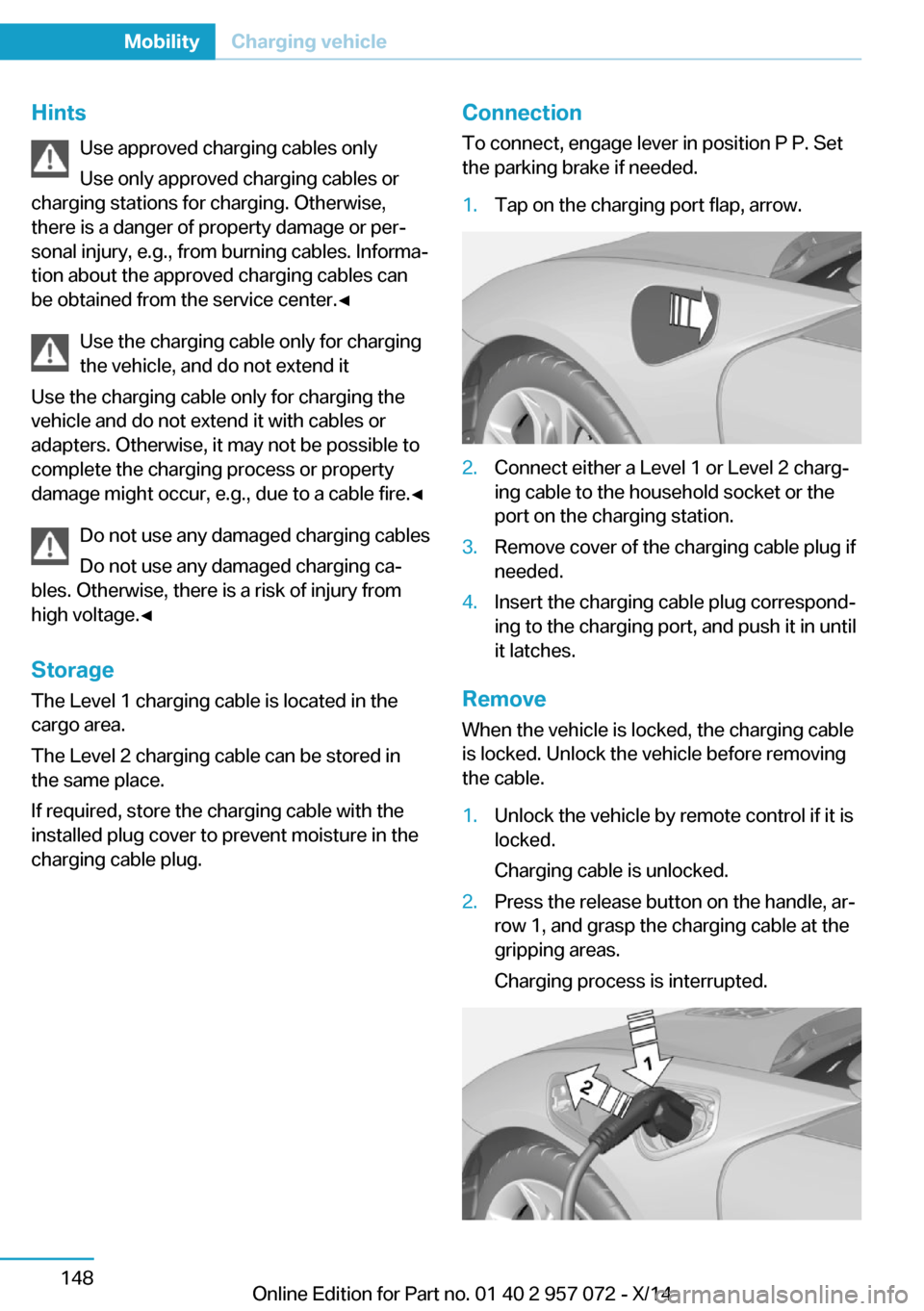
To connect, engage lever in position P P. Set
the parking brake if needed.1.Tap on the charging port flap, arrow.2.Connect either a Level 1 or Level 2 charg‐
ing cable to the household socket or the
port on the charging station.3.Remove cover of the charging cable plug if
needed.4.Insert the charging cable plug correspond‐
ing to the charging port, and push it in until
it latches.
Remove
When the vehicle is locked, the charging cable
is locked. Unlock the vehicle before removing
the cable.
1.Unlock the vehicle by remote control if it is
locked.
Charging cable is unlocked.2.Press the release button on the handle, ar‐
row 1, and grasp the charging cable at the
gripping areas.
Charging process is interrupted.Seite 148MobilityCharging vehicle148
Online Edition for Part no. 01 40 2 957 072 - X/14
Page 165 of 216

3.Remove the charging cable from the
charging port, arrow 2.4.Close the charging port flap.5.Attach cover of the charging cable plug if
needed.6.Disconnect either a Level 1 or Level 2
charging cable from the household socket
or the port on the charging station.7.Stow the charging cable.
At a charging station, insert the perma‐
nently installed charging cable in the place
provided for it.
Manual release
The charging cable may be locked during the
charging process.
The charging cable may be locked during the
charging process if the vehicle is locked.
Manual unlocking of the charging
cable
In case of an electrical malfunction, the charg‐
ing cable can be manually unlocked.
When charging at a charging station, complete
the charging process at the charging station
before unlocking the charging cable.
1.Open door on the side of the charging port
flap.2.Open cover, arrow 1.
Pull the blue knob, Arrow 2. Charging
cable is manually unlocked.
3.Grasp the charging cable at the gripping
areas.4.Remove charging cable.
Charging operation
Hints Following safety instructions of the
power mains connection
During the charging process, heed the safety
instructions of the respective power mains
connection. Otherwise, there could be a risk of
personal injury or property damage from high
voltage, e.g., from electrocution or fire.◀
Using a Level 1 charging cable at other
household sockets
Before charging at other household sockets,
adapt the charging current strength to the
mains. Otherwise, there is a risk of fire, e.g.,
from overheating of the household socket or
overloading of the power mains.◀
Starting charging process
1.Engage selector lever position P. Set the
parking brake if needed.2.Planning charging process, refer to
page 150.3.Switch off drive readiness.4.Connect either a Level 1 or Level 2 charg‐
ing cable to the household socket or the
port on the charging station.5.Open charging port flap.6.Connect charging cable to the vehicle, re‐
fer to page 148.
At high temperatures, initially the high-voltage
battery is cooled. The charging process can be
started with a delay.
Display of the charging status
The charging status is indicated by the indica‐
tor light at the charging port.
Seite 149Charging vehicleMobility149
Online Edition for Part no. 01 40 2 957 072 - X/14
Page 186 of 216

MaintenanceVehicle features and options
This chapter describes all standard, country-
specific and optional features offered with the
series. It also describes features that are not
necessarily available in your car, e. g., due to
the selected options or country versions. This
also applies to safety-related functions and
systems.
BMW maintenance system
The maintenance system indicates required
maintenance measures, and thereby provides
support in maintaining road safety and the op‐
erational reliability of the vehicle.
Note Maintenance and repairs
Have maintenance and repair work per‐
formed only by a service center or a workshop
that works according to BMW specifications
with appropriately trained personnel. Other‐
wise, there is the risk of fatal injury from elec‐
trocution due to the high-voltage system's
high voltage.◀
Condition Based Service
CBS
Sensors and special algorithms take into ac‐
count the driving conditions of your vehicle.
Based on this, Condition Based Service recog‐
nizes the maintenance requirements.
The system makes it possible to adapt the
amount of maintenance corresponding to your
user profile.Detailed information on service requirements,
refer to page 80, can be displayed on the Con‐
trol Display.
For service data Information on the required maintenance is
continuously stored in the remote control. Your service center will read out this data and
suggest the right array of service procedures for your vehicle.
Therefore, hand your service specialist the re‐
mote control with which the vehicle was driven
most recently.
Storage periods
Storage periods during which the vehicle bat‐
tery was disconnected are not taken into ac‐
count.
If this occurs, have a service center update the
time-dependent maintenance procedures,
such as checking brake fluid and, if needed,
changing the engine oil and the microfilter/
activated-charcoal filter.
Service and Warranty
Information Booklet for US
models and Warranty and
Service Guide Booklet for
Canadian models
Please consult your Service and Warranty In‐
formation Booklet for US models and Warranty
and Service Guide Booklet for Canadian mod‐
els for additional information on service re‐
quirements.
Maintenance and repair should be performed
by your service center. Make sure to have reg‐
ular maintenance procedures recorded in the
vehicle's Service and Warranty Information
Booklet for US models, and in the WarrantySeite 170MobilityMaintenance170
Online Edition for Part no. 01 40 2 957 072 - X/14
Page 193 of 216
Tow-starting and towingTransporting your vehicle
Note
Your vehicle is not permitted to be towed.
Therefore, contact a service center in the
event of a breakdown.
Do not have the vehicle towed
Have your vehicle transported on a load‐
ing platform only; otherwise, damage may oc‐
cur.◀
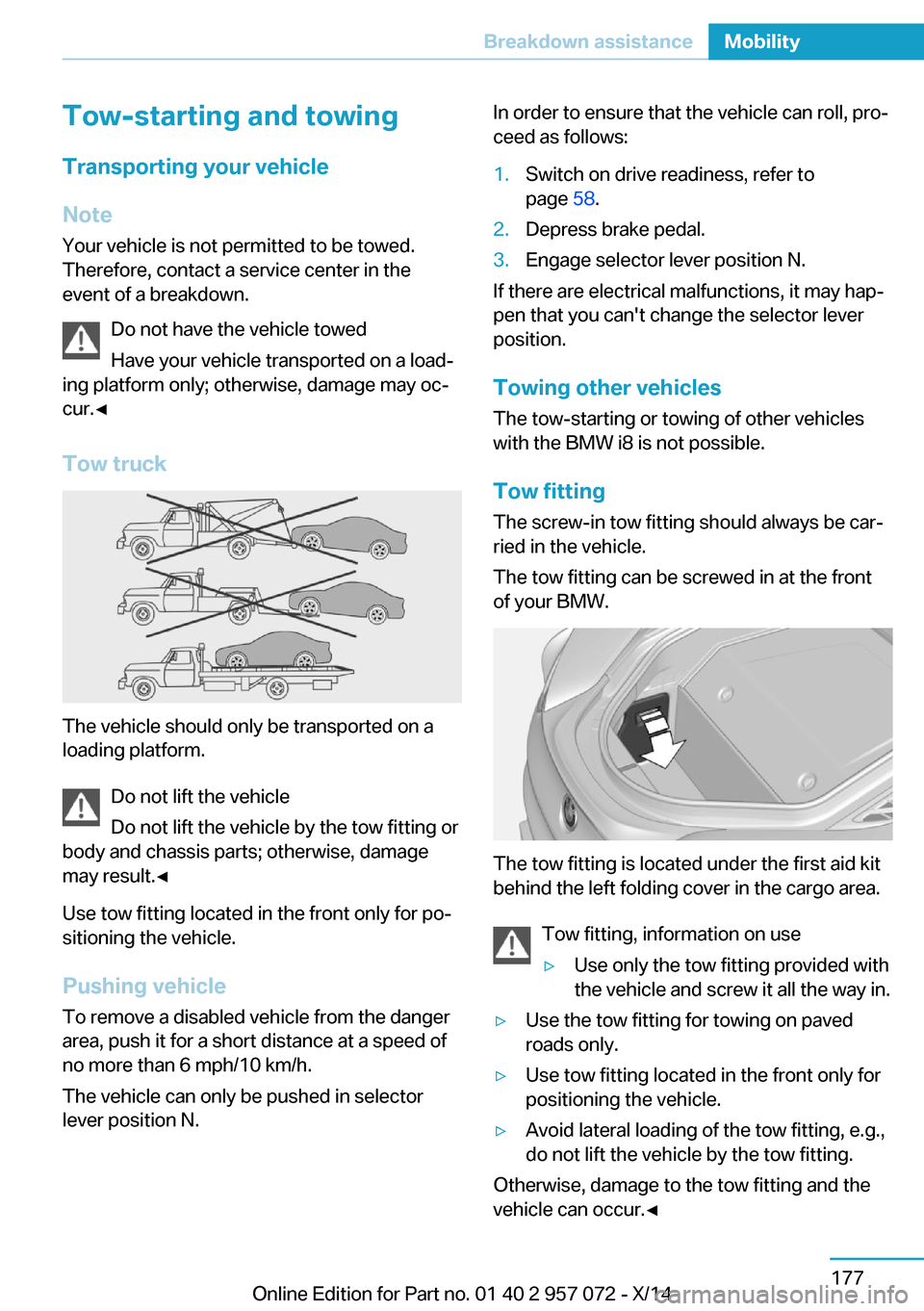
Tow truck
The vehicle should only be transported on a
loading platform.
Do not lift the vehicle
Do not lift the vehicle by the tow fitting or
body and chassis parts; otherwise, damage
may result.◀
Use tow fitting located in the front only for po‐
sitioning the vehicle.
Pushing vehicle To remove a disabled vehicle from the danger
area, push it for a short distance at a speed of
no more than 6 mph/10 km/h.
The vehicle can only be pushed in selector
lever position N.
In order to ensure that the vehicle can roll, pro‐
ceed as follows:1.Switch on drive readiness, refer to
page 58.2.Depress brake pedal.3.Engage selector lever position N.
If there are electrical malfunctions, it may hap‐
pen that you can't change the selector lever
position.
Towing other vehicles The tow-starting or towing of other vehicles
with the BMW i8 is not possible.
Tow fitting The screw-in tow fitting should always be car‐
ried in the vehicle.
The tow fitting can be screwed in at the front
of your BMW.
The tow fitting is located under the first aid kit
behind the left folding cover in the cargo area.
Tow fitting, information on use
▷Use only the tow fitting provided with
the vehicle and screw it all the way in.▷Use the tow fitting for towing on paved
roads only.▷Use tow fitting located in the front only for
positioning the vehicle.▷Avoid lateral loading of the tow fitting, e.g.,
do not lift the vehicle by the tow fitting.
Otherwise, damage to the tow fitting and the
vehicle can occur.◀
Seite 177Breakdown assistanceMobility177
Online Edition for Part no. 01 40 2 957 072 - X/14
Page 195 of 216
there is the risk of fatal injury from electrocu‐
tion due to the system's high voltage.◀
Esliding fluids
Do not touch any fluids esliding from the
high-voltage battery, or the skin can sustain
chemical burns.◀
General information
If you are involved in an accident with your ve‐
hicle, compliance with the following additional
safety precautions is required with regard to
the high-voltage system:▷Secure the crash site.▷Immediately notify rescue forces, police, or
firefighters of the fact that your vehicle is
equipped with a high-voltage system.▷Engage selector lever position P, apply the
parking brake, and reel off the ignition or
deactivate drive readiness.▷Lock the vehicle after exiting.▷Do not inhale any gases esliding from the
high-voltage battery; if needed, maintain a
safe distance from the vehicle.Seite 179Breakdown assistanceMobility179
Online Edition for Part no. 01 40 2 957 072 - X/14
Page 197 of 216

Before driving into a car wash
In order to ensure that the vehicle can roll in a
car wash, take the following steps:1.Drive into the car wash.2.Engage selector lever position N.3.Press the Start/Stop button.
In this way, operating readiness remains
switched on, and a Check-Control mes‐
sage is displayed.
To activate drive readiness:
1.Depress the brake pedal.2.Press the Start/Stop button.
Pressing the Start/Stop button without step‐
ping on the brake turns operating readiness
off.
Selector lever position Selector lever position P is engaged automati‐
cally:
▷With operating readiness turned off.▷After approx. 15 minutes.
Headlights
▷Do not rub dry and do not use abrasive or
acidic cleansers.▷Soak areas that have been dirtied e. g.,
from insects, with shampoo and wash off
with water.▷Thaw ice with de-icing spray; do not use an
ice scraper.
After washing the vehicle
After washing the vehicle, apply the brakes
briefly to dry them; otherwise, braking action
can be reduced and corrosion of the brake
discs can occur.
Completely remove all residues on the win‐
dows, to minimize loss of visibility due to
smearing and to reduce wiper noises and
wiper blade wear.
Vehicle care
Car care productsBMW recommends using care and cleaning
products from BMW, since these have been
tested and approved.
Car care and cleaning products
Follow the instructions on the container.
When cleaning the interior, open the doors or
windows.
Only use products intended for cleaning vehi‐ cles.
Cleansers can contain substances that are
dangerous and harmful to your health.◀
Vehicle paint Regular care contributes to driving safety and
value retention. Environmental influences in
areas with elevated air pollution or natural con‐
taminants, such as tree resin or pollen can af‐
fect the vehicle's paintwork. Tailor the fre‐
quency and extent of your car care to these
influences.
Aggressive substances such as spilled fuel, oil,
grease or bird droppings, must be removed im‐
mediately to prevent the finish from being al‐
tered or discolored.
Leather care
Remove dust from the leather often, using a
cloth or vacuum cleaner.
Otherwise, particles of dust and road grime
chafe in pores and folds, and lead to increased
wear and premature degradation of the leather
surface.
To guard against discoloration, such as from
clothing, provide leather care roughly every
two months.
Clean light-colored leather more frequently be‐
cause soiling on such surfaces is substantially
more visible.Seite 181CareMobility181
Online Edition for Part no. 01 40 2 957 072 - X/14
Page 198 of 216
Use leather care products; otherwise, dirt and
grease will gradually break down the protective
layer of the leather surface.
Suitable care products are available from the
service center.
Upholstery material care Vacuum regularly with a vacuum cleaner.
If upholstery is very dirty, e.g., with beverage
stains, use a soft sponge or microfiber cloth
with a suitable interior cleaner.
Clean the upholstery down to the seams using
large sweeping motions. Avoid rubbing the
material vigorously.
Damage from Velcro® fasteners
Open Velcro® fasteners on pants or
other articles of clothing can damage the seat
covers. Ensure that any Velcro® fasteners are
closed.◀
Caring for special components
Light-alloy wheels When cleaning the vehicle, use only neutral
wheel cleaners having a pH value from 5 to 9.
Do not use abrasive cleaning agents or steam
jets above 140 ℉/60 ℃. Follow the manufac‐
turer's instructions.
Aggressive, acidic or alkaline cleaning agents
can destroy the protective layer of adjacent
components, such as the brake disk.
Chrome surfaces Carefully clean components such as the radia‐
tor grille or door handles with an ample supply of water, possibly with shampoo added, partic‐
ularly when they have been exposed to road
salt.
Rubber components Aside from water, treat only with rubber
cleansers.When cleaning rubber seals, do not use any
silicon-containing car care products in order to
avoid damage or noises.
Plastic components
These include:▷Imitation leather surfaces.▷Roofliner.▷Lamp lenses.▷Instrument cluster cover.▷Matt black spray-coated components.▷Painted parts in the interior.▷Carbon parts in the interior.
Clean with a microfiber cloth.
Dampen cloth lightly with water.
Do not soak the roofliner.
No cleansers that contain alcohol or sol‐
vents
Do not use cleansers that contain alcohol or
solvents, such as lacquer thinners, heavy-duty
grease removers, fuel, or such; this could lead
to surface damage.◀
Safety belts
Dirty belt straps impede the reeling action and
thus have a negative impact on safety.
Chemical cleaning
Do not clean chemically; this can destroy
the webbing.◀
Use only a mild soapy solution, with the safety
belts clipped into their buckles.
Do not allow the reels to retract the safety
belts until they are dry.
Carpets and floor mats No objects in the area around the pedals
Keep floor mats, carpets, and any other
objects out of the pedal area; otherwise, the
function of the pedals could be impeded while
driving and create the risk of an accident.
Seite 182MobilityCare182
Online Edition for Part no. 01 40 2 957 072 - X/14
Page 206 of 216

Everything from A to Z
IndexA ABS, Antilock Brake Sys‐ tem 105
Acceleration Assistant, refer to Launch Control 70
Acoustic pedestrian protec‐ tion 62
AC quick charging cable, see Level 2 charging cable 147
Activated-charcoal filter 123
Activate drive readiness 60
Adapting to the course of the road, hybrid system 76
Adaptive brake lights, refer to Brake force display 104
Additives, oil 167
Adjustments, seats/head re‐ straints 48
Adjustments, steering wheel 53
After washing vehicle 181
Airbags 93
Airbags, indicator/warning light 94
Air circulation, refer to Recir‐ culated-air mode 121
Air, dehumidifying, refer to Cooling function 121
Air distribution, manual 122
Air flow, automatic climate control 122
Air pressure, tires 159
Air vents, refer to Ventila‐ tion 123
Alarm system 45
Alarm, unintentional 46
All around the center con‐ sole 16
All around the roofliner 17 All around the steering
wheel 14
All-season tires, refer to Win‐ ter tires 164
Alternating-code hand-held transmitter 126
Alternative oil types 168
Antifreeze, washer fluid 67
Antilock Brake System, ABS 105
Anti-slip control, refer to DSC 105
Approved axle load 187
Approved engine oils 167
Arrival time 84
Artificial engine noise 62
Assistance for the combus‐ tion engine 62
Assistance, Roadside Assis‐ tance 176
Assistance when driving off 108
ASSIST, Hybrid system 62
Assist system, refer to Intelli‐ gent Safety 99
AUTO intensity 122
Automatic car wash 180
Automatic climate con‐ trol 120
Automatic Curb Monitor 51
Automatic deactivation, front- seat passenger airbags 95
Automatic deactivation of the high-voltage system 178
Automatic headlight con‐ trol 90
Automatic locking 45
Automatic recirculated-air control 121 Automatic transmission, see
Steptronic Sport transmis‐
sion 67
AUTO program, automatic cli‐ mate control 122
AUTO program, intensity 122
Average fuel consumption 84
Average speed 84
Axle loads, weights 187
B Backup charging 152
Band-aids, refer to First aid kit 176
Battery, 12 volt 173
Battery replacement, vehicle battery 173
Battery replacement, vehicle remote control 36
Battery state indicator 74
Battery, vehicle 173
Belts, safety belts 50
Beverage holder, cu‐ pholder 131
BMW Assist 6
BMW eDRIVE 31
BMW maintenance sys‐ tem 170
Body work, see Working on the vehicle 178
Bottle holder, refer to Cu‐ pholders 131
Brake assistant 105
Brake discs, break-in 134
Brake force display 104
Brake lights, adaptive 104
Brake lights, brake force dis‐ play 104
Brake pads, break-in 134
Braking, hints 136 Seite 190ReferenceEverything from A to Z190
Online Edition for Part no. 01 40 2 957 072 - X/14