2014 BMW I3 ECO mode
[x] Cancel search: ECO modePage 158 of 230

with each other. In addition, there is no assur‐
ance that the radiation generated during trans‐
mission will be conducted away from the vehi‐
cle interior.◀
Hydroplaning Hydroplaning
When driving on wet or slushy roads, re‐
duce your speed to prevent hydroplaning.◀
On wet or slushy roads, a wedge of water can
form between the tires and road surface.
This phenomenon is referred to as hydroplan‐
ing. It is characterized by a partial or complete
loss of contact between the tires and the road
surface, ultimately undermining your ability to
steer and brake the vehicle.
Driving through water Observe water level and speed
Do not exceed the maximum water level
and maximum speed; otherwise, the vehicle's
engine, the electrical systems and the trans‐
mission may be damaged.◀
Drive though calm water only and only if it is
not deeper than 9.8 inches/25 cm and at this
height, no faster than walking speed, up to 3 mph/5 km/h.
Braking safely
Your vehicle is equipped with ABS as a stand‐
ard feature.
Applying the brakes fully is the most effective
way of braking in situations needed.
Steering is still responsive. You can still avoid
any obstacles with a minimum of steering ef‐
fort.
Pulsation of the brake pedal and sounds from
the hydraulic circuits indicate that ABS is in its
active mode.
In certain braking situations, the perforated
brake discs can cause functional problems.However, this has no effect on the perform‐
ance and operational reliability of the brake.
Objects in the range of movement of the pedals and in the footwell
Do not allow objects in the interior
around pedals and foot space
Keep floor mats, carpets, and any other ob‐
jects out of the pedal area and do not stow
them in the footwell; otherwise, the function of
the pedals could be impeded while driving.
Do not place additional floor mats over existing
mats or other objects.
Only use floor mats that have been approved
for the vehicle and can be properly attached to
floor.
Ensure that the floor mats are securely fas‐
tened again after they were removed for clean‐
ing, e.g.◀
Hills Avoid stressing the brakes
Avoid placing excessive stress on the
brake system. Light but consistent brake pres‐
sure can lead to high temperatures, brakes
wearing out and possibly even brake failure.◀
Do not drive in neutral
Do not drive in neutral or with drive readi‐
ness switched off, as doing so disables engine
braking. In addition, steering and brake assist
are unavailable with the engine stopped.◀
On downhill sections, use energy recovery if
possible to decelerate the vehicle.
Brake disc corrosion
Brake disc corrosion and contamination of the
brake pads are favored by:▷Low mileage.▷Extended periods when the vehicle is not
used at all.▷Infrequent use of the brakes.Seite 144Driving tipsThings to remember when driving146
Page 163 of 230

Switch off any functions that
are not currently needed
Functions such as the rear window defroster
require a lot of energy and reduce the range,
especially in city and stop-and-go traffic.
Reel off these functions if they are not needed.
The ECO PRO and ECO PRO+ driving pro‐
grams support the energy-conserving use of
comfort features. They automatically perform a
partial or complete deactivation of these func‐
tions.
Have maintenance carried
out
Have vehicles maintained regularly to achieve
optimal vehicle efficiency and operating life.
The maintenance should be carried out by
your service center.
ECO PRO and ECO PRO+ The concept
ECO PRO and ECO PRO+ support an efficient
driving style. To this end, the control of the
drive is optimized for moderate acceleration,
and adapted to lighting and comfort features,
such as climate control output. Some vehicle
functions cannot be used during activated
drive mode ECO PRO and ECO PRO+.
In addition, context-sensitive instructions can
be displayed that assist in driving efficiently.
At a glance With ECO PRO and ECO PRO+ different set‐
tings are made in the respective mode.
ECO PRO▷Reduce heat output or heating cycle for ex‐
terior mirror, rear window and seat heating.▷What reduces the the cooling and heating
output of the climate control system.▷The speed is limited to an adjustable maxi‐
mum value between 50 mph/80 km/h and
80 mph/130 km/h. To intentionally exceed
the speed limit, press the accelerator pedal
all the way down.
ECO PRO+
The cooling and heating output of the climate
control system are additionally deactivated on
ECO PRO+ activation.
The low beams are dimmed.
The maximum speed is limited to
55 mph/90 km/h. In special situations, the
speed limit can be consciously exceeded by applying the accelerator pedal.
Activate ECO PRO and ECO PRO+ Press button repeatedly until ECO
PRO or ECO PRO+ is displayed in the
instrument cluster.
Configuring ECO PRO
Via the Driving Dynamics Control
1.Activate ECO PRO.2."Configure ECO PRO"3.Configure the program.
Via the iDrive
1."Settings"2."ECO PRO mode"
Or
1."Settings"2."Driving mode"3."Configure ECO PRO"
Configure the program.
ECO PRO Tip
▷"Limit at:":Seite 149Increase rangeDriving tips151
Page 165 of 230
Displaying ECO PRO Tips:1."Vehicle info"2."eDRIVE"3. "ECO PRO Tips"
Settings are stored for the profile currently in
use.
ECO PRO driving style analysis
The concept
The system helps develop a particularly effi‐
cient driving style and to save energy.
For this purpose, the driving style is analyzed.
The assessment is done in various categories
and is displayed on the Control Display.
Those assessments will help you adjust your
driving style and save some energy.
The last fifteen minutes of a trip are evaluated.
The range of the vehicle can be extended by
an efficient driving style.
Functional requirement The function is only available in ECO PRO
mode.
Calling up ECO PRO driving styleanalysis
1.Activate ECO PRO.2."eDRIVE"3. Select the symbol.
Display on the Control Display
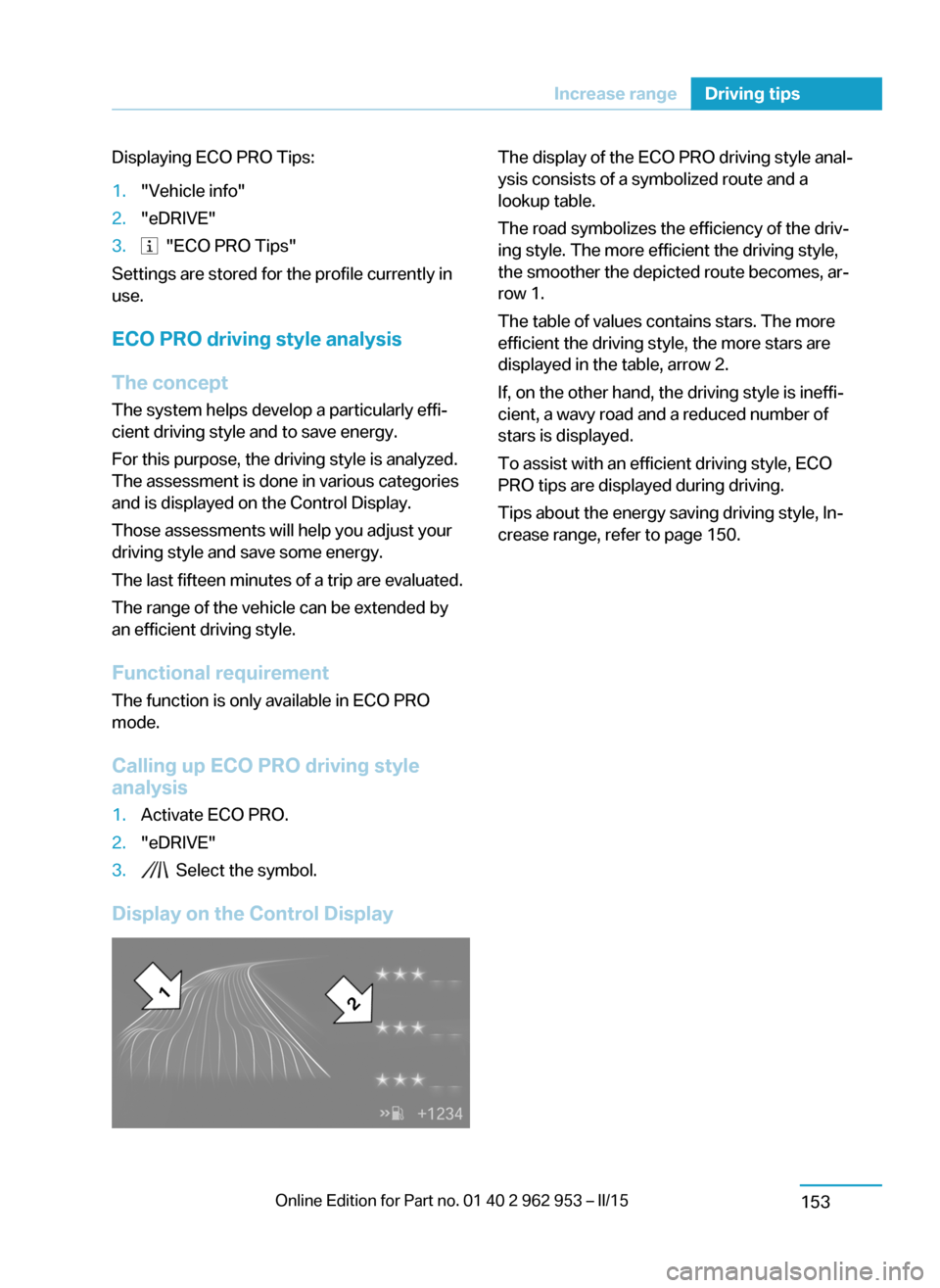
The display of the ECO PRO driving style anal‐
ysis consists of a symbolized route and a
lookup table.
The road symbolizes the efficiency of the driv‐
ing style. The more efficient the driving style,
the smoother the depicted route becomes, ar‐
row 1.
The table of values contains stars. The more
efficient the driving style, the more stars are
displayed in the table, arrow 2.
If, on the other hand, the driving style is ineffi‐
cient, a wavy road and a reduced number of
stars is displayed.
To assist with an efficient driving style, ECO
PRO tips are displayed during driving.
Tips about the energy saving driving style, In‐
crease range, refer to page 150.Seite 151Increase rangeDriving tips153
Page 197 of 230

MaintenanceVehicle features and options
This chapter describes all standard, country-
specific and optional features offered with the
series. It also describes features that are not
necessarily available in your car, e. g., due to
the selected options or country versions. This
also applies to safety-related functions and
systems.
BMW maintenance system
The maintenance system indicates required
maintenance measures, and thereby provides
support in maintaining road safety and the op‐
erational reliability of the vehicle.
Note Maintenance and repairs
Have maintenance and repair work per‐
formed only by a service center or a workshop
that works according to BMW specifications
with appropriately trained personnel. Other‐
wise, there is the risk of fatal injury from elec‐
trocution due to the high-voltage system's
high voltage.◀
Condition Based Service
CBS
Sensors and special algorithms take into ac‐
count the driving conditions of your vehicle.
Based on this, Condition Based Service recog‐
nizes the maintenance requirements.
The system makes it possible to adapt the
amount of maintenance corresponding to your
user profile.Detailed information on service requirements,
refer to page 82, can be displayed on the Con‐
trol Display.
For service data Information on the required maintenance is
continuously stored in the remote control. Your service center will read out this data and
suggest the right array of service procedures for your vehicle.
Therefore, hand your service specialist the re‐
mote control with which the vehicle was driven
most recently.
Storage periods
Storage periods during which the vehicle bat‐
tery was disconnected are not taken into ac‐
count.
If this occurs, have a service center update the
time-dependent maintenance procedures,
such as checking brake fluid and, if needed,
changing the engine oil and the microfilter/
activated-charcoal filter.
Service and Warranty
Information Booklet for US
models and Warranty and
Service Guide Booklet for
Canadian models
Please consult your Service and Warranty In‐
formation Booklet for US models and Warranty
and Service Guide Booklet for Canadian mod‐
els for additional information on service re‐
quirements.
Maintenance and repair should be performed
by your service center. Make sure to have reg‐
ular maintenance procedures recorded in the
vehicle's Service and Warranty Information
Booklet for US models, and in the WarrantySeite 183MaintenanceMobility185
Page 218 of 230

Appendix
Any updates to the Owner's Manual of the ve‐
hicle are listed here.
Correction to the Owner's
Manual
Opposite to the description in this Owner's
Manual, the following changes were imple‐
mented after the editorial deadline:
Remote control
1Unlocking
2Locking
3Unlock the tailgate
4Panic mode
Tailgate
Unlock the tailgate
Press button on the remote control for
approx. 1 second to unlock the tail‐
gate.
Depending on the settings, the doors are un‐
locked as well.
Unlocking the tailgate separately in
the case of Comfort Access
Press button on tailgate's exterior.
This corresponds to pressing the re‐
mote control button.
Hood
Opening from the outside
The hood cannot be opened from the outside.
Unlocking hood
The hood cannot be unlocked using the re‐
mote control.
Press the button in the driver's floor
area to unlock the button.
Adjusting
Unlocking
The settings for hood and tailgate are not
available.
Seite 202
ReferenceAppendix
206
Page 222 of 230

Data, technical 204
Daytime running lights 90
Defrosting, refer to Windows, defrosting 128, 131
Dehumidifying, air 128, 130
Deleting personal data 24
Deletion of personal data 24
Departure times, stationary climate control 133
Digital clock 82
Dimensions 204
Dimmable exterior mirrors 56
Dimmable interior rearview mirror 57
Direction indicator, refer to Turn signals 69
Display for performance and energy recovery 76
Display lighting, refer to In‐ strument lighting 90
Displays 74
Displays, cleaning 201
Displays, eDRIVE system 75
Displays, high-voltage sys‐ tem 75
Disposal, coolant 184
Disposal, vehicle battery 191
Distance control, refer to PDC 117
Divided screen view, split screen 23
Door lock 41
Door lock, refer to Remote control 36
Drive display 76
Drive-off assistant 108
Drive-off assistant, refer to DSC 106
Drive readiness in detail 63
Drive readiness, switching off 65
Drive readiness, switching on 63
Driving Dynamics Con‐ trol 107
Driving in detail 66 Driving instructions, break- in 144
Driving instructions, eDRIVE drive system 144
Driving mode 107
Driving notes, general 145
Driving, refer to drive readi‐ ness in detail 63
Driving stability control sys‐ tems 106
Driving, Start/Stop button 62
Driving style analysis 153
Driving tips 145
DSC Dynamic Stability Con‐ trol 106
DTC Dynamic Traction Con‐ trol 107
Dynamic Stability Control DSC 106
Dynamic Traction Control DTC 107
E
ECO PRO 151
ECO PRO+ 151
ECO PRO display 151
ECO PRO driving mode 151
ECO PRO driving style analy‐ sis 153
ECO PRO mode 151
ECO PRO Tip - driving in‐ struction 152
eDRIVE drive system, driving instructions 144
eDRIVE, electric driving, see BMW eDRIVE 31
eDrive system, at a glance 31
eDRIVE system, displays 75
EfficientDynamics 152
Electric driving 66
Electric driving, see BMW eDRIVE 31
Electric range 82
Electronic Stability Program ESP, refer to DSC 106 Emergency charging, refer toBackup charging 164
Emergency detection, remote control 37
Emergency release, fuel filler flap 166
Emergency Request 193
Emergency service, refer to Roadside Assistance 194
Emergency start function, en‐ gine start 37
Emergency unlocking, trans‐ mission lock 65
Energy Control 86
Energy recovery, display‐ ing 76
Energy recovery, driving sta‐ bility control systems 106
Engine coolant 183
Engine oil 181
Engine oil, adding 182
Engine start during malfunc‐ tion 37
Engine start, jump-start‐ ing 194
Entering a car wash 198
Error displays, see Check Control 77
ESP Electronic Stability Pro‐ gram, refer to DSC 106
Exchanging wheels/tires 173
Exhaust system 145
Exterior mirror, automatic dimming feature 56
Exterior mirrors 55
External start 194
External temperature dis‐ play 81
External temperature warn‐ ing 81
Eyes for securing cargo 149
F
Failure message, see Check Control 77 Seite 208ReferenceEverything from A to Z210
Page 226 of 230

Range Extender, mainte‐nance run 67
Rearview camera 120
Rearview mirror 55
Rear window de‐ froster 128, 131
Recirculated-air filter 132
Recirculated-air mode 128, 131
Recommended fuel grade 168
Recommended tire brands 174
Refueling 165
Remaining range 82
Remote control/key 36
Remote control, malfunc‐ tion 40
Replacement fuse 192
Replacing wheels/tires 173
Reporting safety defects 10
RES button 112
RES button, see Camera- based cruise control,
ACC 109
RES button, see Cruise con‐ trol 115
Reserve warning, refer to Range 82
Reset, Tire Pressure Monitor TPM 96
Retaining straps, securing cargo 149
Retreaded tires 174
Roadside parking lights 90
RON recommended fuel grade 168
Roofliner 17
Rope for tow-starting/ towing 195
Rubber components, care 200
S Safe braking 146 Safety 7
Safety belt reminder for driv‐ er's seat and front passen‐
ger seat 53
Safety belts 53
Safety belts, care 200
Safety of the high-voltage system 196
Safety systems, airbags 92
Screen, refer to Control Dis‐ play 18
Screw thread, see screw thread for tow fitting, screw
thread for tow fitting 196
Sealant 174
Seat belts, refer to Safety belts 53
Seat heating, front 52
Seating position for chil‐ dren 58
Seats 51
Secondary lights, rear 190
Selection list in instrument cluster 84
Sensors, care 201
Service and warranty 8
Service requirements, Condi‐ tion Based Service
CBS 185
Service requirements, dis‐ play 82
Service, Roadside Assis‐ tance 194
Services, ConnectedDrive 6
SET button, see Camera- based cruise control,
ACC 109
SET button, see Cruise con‐ trol 115
Settings, locking/unlock‐ ing 45
Settings, mirrors 55
Settings on Control Dis‐ play 87
Side airbags 92
Signaling, horn 14 Signals when unlocking 46
Sitting safely 51
Size 204
Slide/tilt glass roof 49
Smallest turning radius 204
Snow chains 178
Socket 134
Socket, OBD Onboard Diag‐ nostics 186
SOS button 193
Spare fuse 192
Speed, average 86
Speed limit detection, com‐ puter 86
Speed limiter, display 83
Speed Limit Information 83
Speed warning 86
Split screen 23
Stability control systems 106
Standard charging cable, see Level 1 charging cable 157
Standard charging, see Level 1 Charging 161
Standing air conditioning, re‐ mote control 46
Start/Stop button 62
Start function during malfunc‐ tion 37
Stationary climate con‐ trol 132
Status control display, tires 95
Status information, iDrive 22
Status of Owner's Manual 7
Steering wheel, adjusting 57
Storage compartments 138
Storage compartments, loca‐ tions 138
Storage, tires 174
Storing the vehicle 201
Summer tires, tread 172
Sun visor 134
Supplementary text mes‐ sage 80
Switch for Dynamic Driv‐ ing 107 Seite 212ReferenceEverything from A to Z214