2014 BMW 7 SERIES blind
[x] Cancel search: blindPage 131 of 265

Tow-starting and towing
For towing the vehicle turn, switch off the
Intelligent Safety systems; otherwise malfunc‐
tions of the individual braking systems might
lead to accidents.◀
System limits Be alert
Due to system limitations, warnings may
be not issued at all, or may be issued late or
improperly. Therefore, always be alert and
ready to intervene; otherwise, there is the risk
of an accident.◀
Detection range
The detection potential of the camera is lim‐
ited.
Thus a warning might not be issued or be is‐
sued late.
E. g. the following situations may not be de‐
tected:▷Partially covered pedestrians.▷Pedestrians that are not detected as such
because of the viewing angle or contour.▷Pedestrians outside of the detection range.▷Pedestrians having a body size less than
32 in/80 cm.
Functional limitations
The system may not be fully functional or may
not be available in the following situations:
▷In heavy fog, rain, sprayed water or snow‐
fall.▷In tight curves.▷If the driving stability control systems are
deactivated, e.g. DSC OFF.▷If the camera viewing field or the front
windshield are dirty or covered.▷Up to 10 seconds after the start of the en‐
gine, via the Start/Stop knob.▷During calibration of the camera immedi‐
ately after vehicle shipment.▷If there is constant blinding effects be‐
cause of oncoming light, e.g., from the sun
low in the sky.▷When it is dark outside.
Night Vision with Pedestrian
and Animal Detection
The concept Night Vision with pedestrian and animal detec‐
tion is a night vision system.
An infrared camera scans the area in front of
the vehicle and issues a warning if it detects
pedestrians and animals on the street. Warm
objects that are similar in shape to human be‐
ings or animals are detected by the system. If necessary, the heat image can be displayed on
the Control Display.
Heat image
The image shows the heat radiated by objects
in the field of view of the camera.
Warm objects have a light appearance and
cold objects, a dark appearance.
The ability to detect an object depends on the
temperature difference between the object
and the background and on the level of heat
radiation emitted by the object. Objects that
are similar in temperature to the environment
or that radiate very little heat are difficult to de‐
tect.
Seite 127SafetyControls127
Online Edition for Part no. 01 40 2 956 029 - X/14
Page 136 of 265

▷When lane markings are covered in snow,
ice, dirt or water.▷In tight curves or on narrow lanes.▷When the lane markings are covered by
objects.▷When driving very close to the vehicle in
front of you.▷When driving toward bright lights.▷When the windshield in front of the interior
rearview mirror is fogged over, dirty or cov‐
ered with stickers, etc.▷During calibration of the camera immedi‐
ately after vehicle shipment.
Active Blind Spot Detection
The concept
Two radar sensors below the rear bumper
monitor the area behind and next to the vehicle
at speeds above approx. 30 mph/50 km/h.
The system indicates whether there are vehi‐
cles in the blind spot, arrow 1, or approaching
from behind on the adjacent lane, arrow 2.
The lamp in the exterior mirror housing is dim‐
med.
Before you change lanes after setting the turn
signal, the system issues a warning in the sit‐
uations described above.
The lamp in the exterior mirror housing flashes
and the steering wheel vibrates.
Hints
Personal responsibility
The system does not serve as a substi‐
tute for the driver's personal judgment of the
traffic situation.
Be aware of the traffic situation and the vehi‐
cle's surroundings at all times, otherwise acci‐
dents are still possible despite all warnings.◀
At a glance
Button in the vehicle
Active Blind Spot Detection
Radar sensors
The radar sensors are located under the rear
bumper.
Switching on/off Press button.
▷On: the LED lights up.▷Off: the LED goes out.Seite 132ControlsSafety132
Online Edition for Part no. 01 40 2 956 029 - X/14
Page 137 of 265

The system can issue warnings at speeds
above approx. 30 mph/50 km/h.
Settings are stored for the profile currently in
use.
Display
Lamp in the exterior mirror housing
Information stage
The dimmed lamp in the exterior mirror hous‐
ing indicates when there are vehicles in the
blind spot or approaching from behind.
Warning If the turn signal is set while a vehicle is in the
critical zone, the steering wheel vibrates briefly
and the lamp in the exterior mirror housing
flashes brightly.
The warning stops when the turn signal is
switched off, or the other vehicle leaves the
critical zone.
System limits
The system may not be fully functional in the
following situations:
▷When a vehicle is approaching at a speed
much faster than your own.▷In heavy fog, rain or snowfall.▷In tight curves or on narrow lanes.▷If the bumper is dirty or iced up, or covered
with stickers.
A Check Control message is displayed when
the system is not fully functional.
For US owners only
The transmitter and receiver units comply with
part 15 of the FCC/Federal Communication
Commission regulations. Operation is gov‐
erned by the following:
FCC ID:▷NBG009014A.
Compliance statement:
This device complies with part 15 of the FCC
Rules. Operation is subject to the following
two conditions:
▷This device may not cause harmful inter‐
ference, and▷this device must accept any interference
received, including interference that may
cause undesired operation.
Any unauthorized modifications or changes to
these devices could void the user's authority to
operate this equipment.
Brake force display
The concept
▷During normal brake application, the outer
brake lights light up.▷During heavy brake application, the inner
brake lights light up in addition.Seite 133SafetyControls133
Online Edition for Part no. 01 40 2 956 029 - X/14
Page 159 of 265

▷For objects with porous surfaces.
Low objects already displayed, e.g., curbs, can
move into the blind area of the sensors before
or after a continuous tone sounds.
False warnings
PDC may issue a warning under the following conditions even though there is no obstacle
within the detection range:
▷In heavy rain.▷When sensors are very dirty or covered
with ice.▷When sensors are covered in snow.▷On rough road surfaces.▷On uneven surfaces, such as speed
bumps.▷In large buildings with right angles and
smooth walls, e.g., in underground ga‐
rages.▷Through heavy pollution.▷Due to other ultrasound sources, e.g.,
sweeping machines, high pressure steam
cleaners or neon lights.
Malfunction
A Check Control message is displayed.
The range of the sensors is shown as a shaded
area on the Control Display.
PDC has failed. Have the system checked.
To ensure full functionality:
▷Keep the sensors clean and free of ice.▷dimmedDo not put any stickers on sen‐
sors.▷When using high-pressure washers, do not
spray the sensors for long periods and
maintain a distance of at least 12 in/30 cm.Surround View
The concept Surround View comprises various camera as‐
sistance systems that help the driver when
parking, maneuvering, and at complex exits
and intersections.▷Rearview camera, refer to page 155▷Side View, refer to page 158.▷Top View, refer to page 159.
Rearview camera
The concept The rearview camera provides assistance in
parking and maneuvering backwards. The area
behind the vehicle is shown on the Control
Display.
Hints Check the traffic situation as well
Check the traffic situation around the ve‐
hicle with your own eyes. Otherwise, an acci‐
dent could result from road users or objects
that are not lidtured by the camera.◀
At a glance
Button in the vehicle
Rearview camera
Seite 155Driving comfortControls155
Online Edition for Part no. 01 40 2 956 029 - X/14
Page 162 of 265
System limits
Detection of objects
Very low obstacles as well as high, protruding
objects such as ledges may not be detected by
the system.
Assistance functions also take into account
data of the PDC.
Follow instructions in the PDC chapter, refer to
page 153.
The objects displayed on the Control Display
under certain circumstances are closer than
they appear. Do not estimate the distance from
the objects on the display.
Side View The concept Side View provides an early look at cross traffic
at blind driveways and intersections. Road
users concealed by obstacles to the left and
right of the vehicle can only be detected rela‐
tively late from the driver's seat. To improve
visibility, two cameras in the front of the vehi‐
cle record the traffic situation on each side.
Hints
The images from both cameras are shown si‐
multaneously on the Control Display.
Check the traffic situation as well
Check the traffic situation around the ve‐
hicle on blind driveways and intersections with
your own eyes. Otherwise, an accident could
result from road users or objects located out‐
side the picture area of the Side View cam‐
eras.◀At a glance
Button in the vehicle
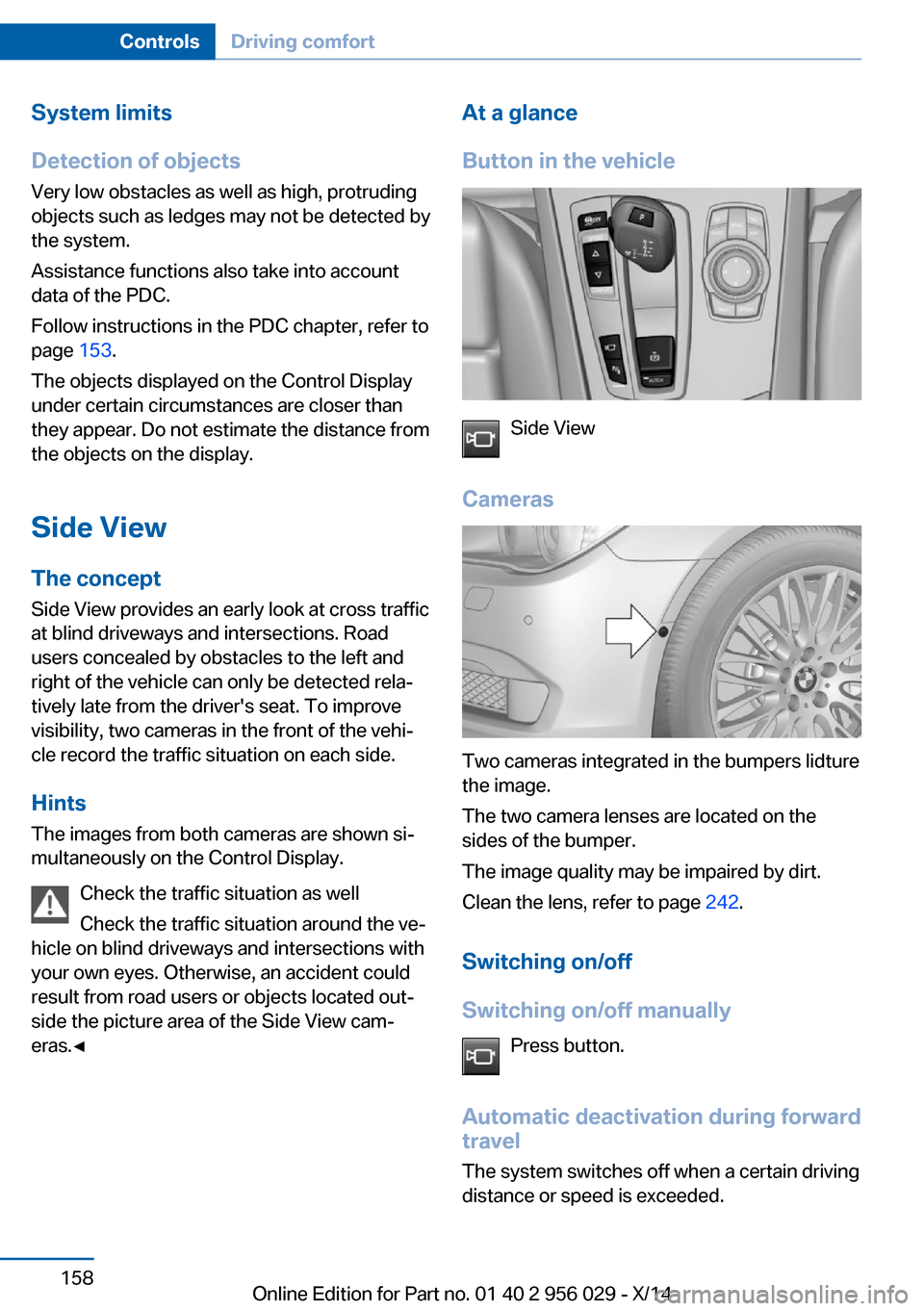
Side View
Cameras
Two cameras integrated in the bumpers lidture
the image.
The two camera lenses are located on the
sides of the bumper.
The image quality may be impaired by dirt.
Clean the lens, refer to page 242.
Switching on/off
Switching on/off manually Press button.
Automatic deactivation during forward
travel
The system switches off when a certain driving
distance or speed is exceeded.
Seite 158ControlsDriving comfort158
Online Edition for Part no. 01 40 2 956 029 - X/14
Page 168 of 265

▷Possible on snow-covered or slippery road
surfaces.▷When there are obstacles that are hard to
overcome, such as curbs.▷When there are obstacles that suddenly
arise.▷If the Park Distance Control PDC displays
clearances that are too small.▷If a maximum number of parking attempts
or the time taken for parking is exceeded.▷If a turn signal has been actuated contrary
to the desired side for parking.▷When switching to another function on the
Control Display.
A Check Control message is displayed.
Resume An interrupted parking procedure can be con‐
tinued if needed.
Follow the instructions on the Control Display
to do this.
System limits
No parking assistance
The parking assistant does not offer assis‐
tance in the following situations:
▷In tight curves.
Functional limitations
The system may not be fully functional in the
following situations:
▷On bumpy road surfaces such as gravel
roads.▷On slippery ground.▷On steep uphill or downhill grades.▷With accumulations of leaves/snow in the
parking space.
Limits of ultrasonic measurement
Ultrasonic measuring might not function under
the following circumstances:
▷For small children and animals.▷For persons with certain clothing, e.g.
coats.▷With external interference of the ultra‐
sound, e.g. from passing vehicles or loud
machines.▷When sensors are dirty, iced over, dam‐
aged or out of position.▷Under certain weather conditions such as
high relative humidity, rain, snowfall, ex‐
treme heat or strong wind.▷With tow bars and trailer couplings of other
vehicles.▷With thin or wedge-shaped objects.▷With moving objects.▷With elevated, protruding objects such as
ledges or cargo.▷With objects with corners and sharp edges.▷With objects with a fine surface structure
such as fences.▷For objects with porous surfaces.
Low objects already displayed, e.g., curbs, can
move into the blind area of the sensors before
or after a continuous tone sounds.
The parking assistant may identify parking
spaces that are not suitable for parking.
Malfunction
A Check Control message is displayed.
The parking assistant failed. Have the system
checked.
Seite 164ControlsDriving comfort164
Online Edition for Part no. 01 40 2 956 029 - X/14
Page 254 of 265

Everything from A to Z
IndexA ABS, Antilock Brake Sys‐ tem 136
ACC, Active Cruise Control with Stop & Go 144
Activated-charcoal filter 168
Active Blind Spot Detec‐ tion 132
Active Cruise Control with Stop & Go, ACC 144
Active Protection 134
Active seat, front 56
Active seat ventilation, front 57
Active seat ventilation, rear 60
Active Steering, integral 140
Adaptive brake assistant 136
Adaptive brake lights, refer to Brake force display 133
Adaptive drive 139
Adaptive Light Control 106
Adaptive Light Control, bulb replacement 229
Additives, oil 222
Adjusting, steering wheel 67
Adjustments, seats/head re‐ straints 54
After washing vehicle 240
Airbags 110
Airbags, indicator/warning light 111
Air circulation, refer to Recir‐ culated-air mode 167
Air, dehumidifying, refer to Cooling function 167
Air distribution, manual 166
Air flow, automatic climate control 166 Air outlets, see ventila‐
tion 168
Air pressure, tires 207
Alarm system 47
Alarm, unintentional 48
All around the center con‐ sole 16
All around the roofliner 17
All around the steering wheel 14
All-season tires, refer to Win‐ ter tires 215
All-wheel-drive 138
Alternating-code hand-held transmitter 173
Alternative oil types 222
Ambient light 108
Animal detection, see Night Vision 127
Antifreeze, washer fluid 83
Antilock Brake System, ABS 136
Anti-slip control, refer to DSC 136
Approved axle load 247
Approved engine oils 222
Armrest, refer to Center arm‐ rest 181
Arrival time 100
Ashtray 174
Assistance, Roadside Assis‐ tance 235
Assistance when driving off 136
Attentiveness assistant 134
AUTO H button 77
AUTO H button, refer to Au‐ tomatic Hold 77
AUTO intensity 166
Automatic car wash 239 Automatic climate con‐
trol 165
Automatic Cruise Control with Stop & Go 144
Automatic Curb Monitor 66
Automatic deactivation, front- seat passenger airbags 112
Automatic headlight con‐ trol 106
Automatic Hold 77
Automatic locking 47
Automatic recirculated-air control 167
Automatic Soft Closing, doors 40
Automatic Soft Closing, trunk lid 41
Automatic transmission, see Steptronic transmission 84
Automatic trunk lid 41
AUTO program, automatic cli‐ mate control 166
AUTO program, intensity 166
Auto Start/Stop function 75
Average fuel consump‐ tion 100
Average speed 100
Axle loads, weights 247
B Backrest curvature, refer to Lumbar support 55
Backrest, seats 54
Backrest, width 56
Band-aids, refer to First aid kit 235
Bar for tow-starting/ towing 237
Basic position, rear seats 59 Seite 250ReferenceEverything from A to Z250
Online Edition for Part no. 01 40 2 956 029 - X/14
Page 255 of 265

Battery replacement, vehiclebattery 232
Battery replacement, vehicle remote control 35
Battery, vehicle 232
Belts, safety belts 60
Beverage holder, cu‐ pholder 182
Blinds, sun protection 50
BMW Advanced Diesel 203
BMW Assist, see user's manual for Navigation, En‐
tertainment and Communi‐
cation
BMW maintenance sys‐ tem 225
Bonus range, ECO PRO 194
Bottle holder, refer to Cu‐ pholder 182
Brake assistant 136
Brake assistant, adaptive 136
Brake discs, break-in 186
Brake force display 133
Brake lights, adaptive 133
Brake lights, brake force dis‐ play 133
Brake lights, bulb replace‐ ment 230
Brake pads, break-in 186
Braking, hints 188
Breakdown assis‐ tance 234, 235
Break-in 186
Brightness of Control Dis‐ play 103
Bulb replacement, rear 230
Bulb replacement, see Lamp and bulb replacement 227
Button, RES 147
Button, Start/Stop 73
Bypassing, refer to Jump- starting 235 C
California Proposition 65 Warning 7
Calling up mirror adjust‐ ment 47
Calling up seat adjust‐ ment 47
Calling up steering wheel ad‐ justment 47
Camera, care 242
Camera, rearview cam‐ era 156
Camera, Side View 158
Camera, Top View 160
Can holder, refer to Cu‐ pholder 182
Car battery 232
Car care products 240
Care, displays 242
Care, vehicle 240
Cargo 189
Cargo area, storage compart‐ ments 182
Cargo, securing 190
Cargo straps, securing cargo 190
Car key, refer to Remote con‐ trol 34
Carpet, care 242
Car wash 239
Catalytic converter, refer to Hot exhaust system 186
CBS Condition Based Serv‐ ice 225
CD/Multimedia, see user's manual for Navigation, En‐
tertainment and Communi‐
cation
Center armrest 181
Center console 16
Central locking system 39
Central screen, refer to Con‐ trol Display 18
Changes, technical, refer to Safety 7 Changing parts 227
Changing wheels 231
Changing wheels/tires 214
Chassis number, see vehicle identification number 9
Check Control 90
Checking the engine oil level electronically 220
Checking the oil level elec‐ tronically 220
Children, seating position 69
Children, transporting safely 69
Child restraint fixing sys‐ tem 69
Child restraint fixing system LATCH 70
Child restraint fixing systems, mounting 69
Child safety locks 72
Child seat, mounting 69
Child seats 69
Chrome parts, care 241
Cigarette lighter 174
Cleaning displays 242
Climate control 165
Climate control laminated tinted safety glass 187
Climate control on roof‐ liner 171
Climate control wind‐ shield 187
Clock 95
Closing/opening via door lock 39
Closing/opening with remote control 37
Closing the trunk lid with no- touch activation 45
Clothes hooks 182
Coasting 196
Coasting with engine decou‐ pled, coasting 196
Coasting with idling en‐ gine 196 Seite 251Everything from A to ZReference251
Online Edition for Part no. 01 40 2 956 029 - X/14