2014 BMW 650I CONVERTIBLE ESP
[x] Cancel search: ESPPage 216 of 243
Breakdown assistanceVehicle equipment
All standard, country-specific and optional
equipment that is offered in the model series is
described in this chapter. Therefore, equip‐
ment is also described that is not available in a
vehicle, e. g., because of the selected optional
equipment or country variant. This also applies
for safety-related functions and systems.
Hazard warning flashers
The button is located in the center console.
Intelligent Emergency
Request
Requirements
▷The radio ready state is switched on.▷The Assist system is functional.▷The SIM card integrated in the vehicle has
been activated.▷A ConnectedDrive contract is available.
General information
Only press the SOS button in an emergency.
Hints
Emergency Request not guaranteed
For technical reasons, the Emergency
Request cannot be guaranteed under unfavor‐
able conditions.◀
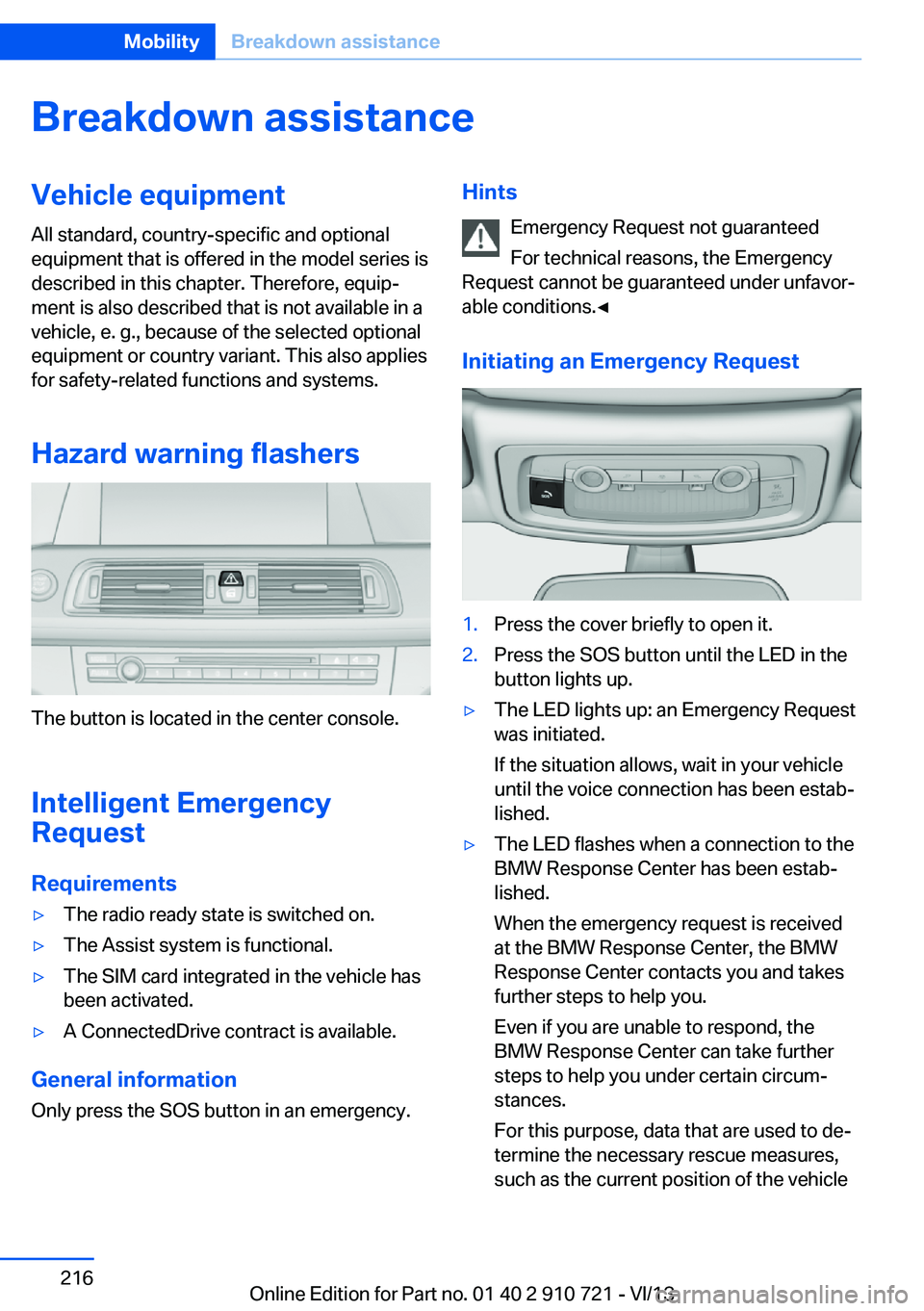
Initiating an Emergency Request1.Press the cover briefly to open it.2.Press the SOS button until the LED in the
button lights up.▷The LED lights up: an Emergency Request
was initiated.
If the situation allows, wait in your vehicle
until the voice connection has been estab‐
lished.▷The LED flashes when a connection to the
BMW Response Center has been estab‐
lished.
When the emergency request is received
at the BMW Response Center, the BMW
Response Center contacts you and takes
further steps to help you.
Even if you are unable to respond, the
BMW Response Center can take further
steps to help you under certain circum‐
stances.
For this purpose, data that are used to de‐
termine the necessary rescue measures,
such as the current position of the vehicleSeite 216MobilityBreakdown assistance216
Online Edition for Part no. 01 40 2 910 721 - VI/13
Page 217 of 243
if it can be established, are transmitted to
the BMW Response Center.▷If the LED is flashing, but the BMW Re‐
sponse Center can no longer be heard via
the speaker, you can nevertheless still be
heard for the BMW Response Center.
Initiating an Emergency Request
automatically
Under certain conditions, an Emergency Re‐
quest is automatically initiated immediately af‐
ter a severe accident. Automatic Collision Noti‐
fication is not affected by pressing the SOS
button.
Warning triangle
The warning triangle is located under a cover
on the left side of the cargo area.
Press against the lower edge of the cover and
remove the cover.
First aid kit NoteSome of the articles have a limited service life.
Check the expiration dates of the contents
regularly and replace any expired items
promptly.
Storage
The first aid kit is located in the insert in the
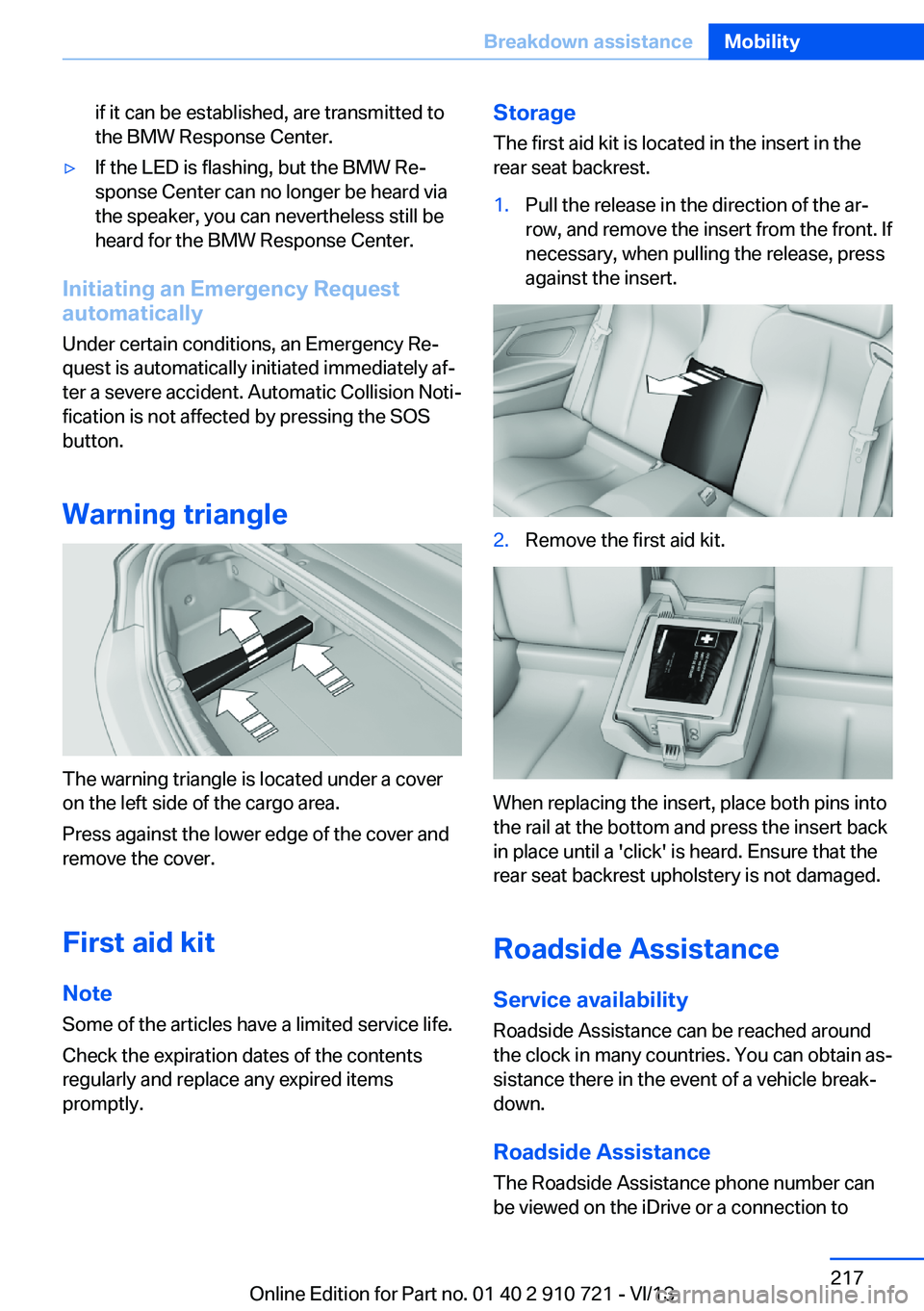
rear seat backrest.1.Pull the release in the direction of the ar‐
row, and remove the insert from the front. If
necessary, when pulling the release, press
against the insert.2.Remove the first aid kit.
When replacing the insert, place both pins into
the rail at the bottom and press the insert back
in place until a 'click' is heard. Ensure that the
rear seat backrest upholstery is not damaged.
Roadside Assistance
Service availability Roadside Assistance can be reached around
the clock in many countries. You can obtain as‐
sistance there in the event of a vehicle break‐
down.
Roadside Assistance The Roadside Assistance phone number can
be viewed on the iDrive or a connection to
Seite 217Breakdown assistanceMobility217
Online Edition for Part no. 01 40 2 910 721 - VI/13
Page 218 of 243
Roadside Assistance can be established di‐
rectly.
Jump-starting
Notes If the battery is discharged, an engine can be
started using the battery of another vehicle
and two jumper cables. Only use jumper ca‐
bles with fully insulated clamp handles.
To prevent personal injury or damage to both
vehicles, adhere strictly to the following proce‐
dure.
Do not touch live parts
To avoid the risk of potentially fatal in‐
jury, always avoid all contact with electrical
components while the engine is running.◀
Preparation1.Check whether the battery of the other ve‐
hicle has a voltage of 12 volts. This infor‐
mation can be found on the battery.2.Switch off the engine of the assisting vehi‐
cle.3.Switch off any electronic systems/power
consumers in both vehicles.
Bodywork contact between vehicles
Make sure that there is no contact be‐
tween the bodywork of the two vehicles; other‐
wise, there is the danger of short circuits.◀
Starting aid terminals Connecting order
Connect the jumper cables in the correct
order; otherwise, there is the danger of injury
from sparking.◀
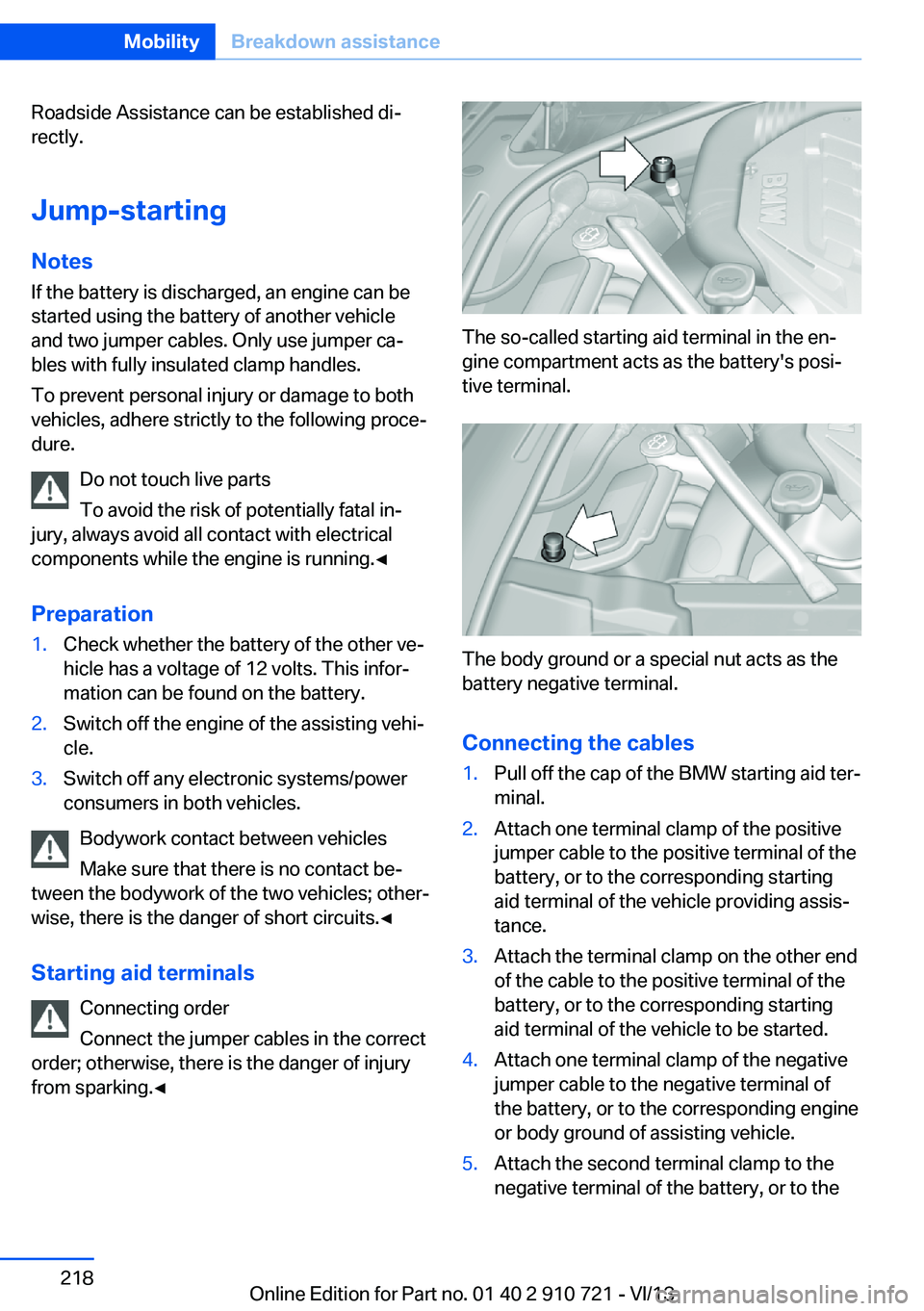
The so-called starting aid terminal in the en‐
gine compartment acts as the battery's posi‐
tive terminal.
The body ground or a special nut acts as the
battery negative terminal.
Connecting the cables
1.Pull off the cap of the BMW starting aid ter‐
minal.2.Attach one terminal clamp of the positive
jumper cable to the positive terminal of the
battery, or to the corresponding starting
aid terminal of the vehicle providing assis‐
tance.3.Attach the terminal clamp on the other end
of the cable to the positive terminal of the
battery, or to the corresponding starting
aid terminal of the vehicle to be started.4.Attach one terminal clamp of the negative
jumper cable to the negative terminal of
the battery, or to the corresponding engine
or body ground of assisting vehicle.5.Attach the second terminal clamp to the
negative terminal of the battery, or to theSeite 218MobilityBreakdown assistance218
Online Edition for Part no. 01 40 2 910 721 - VI/13
Page 219 of 243
corresponding engine or body ground of
the vehicle to be started.
Starting the engine
Never use spray fluids to start the engine.
1.Start the engine of the assisting vehicle
and let it run for several minutes at an in‐
creased idle speed.2.Start the engine of the vehicle being
started in the usual way.
If the first starting attempt is not success‐
ful, wait a few minutes before making an‐
other attempt in order to allow the dis‐
charged battery to recharge.3.Let both engines run for several minutes.4.Disconnect the jumper cables in the re‐
verse order.
Check the battery and recharge if necessary.
Tow-starting and towing Automatic transmission: transporting
your vehicle
Note
Your vehicle is not permitted to be towed.
Therefore, contact a service center in the
event of a breakdown.
Do not have the vehicle towed
Have your vehicle transported on a load‐
ing platform only; otherwise, damage may oc‐
cur.◀
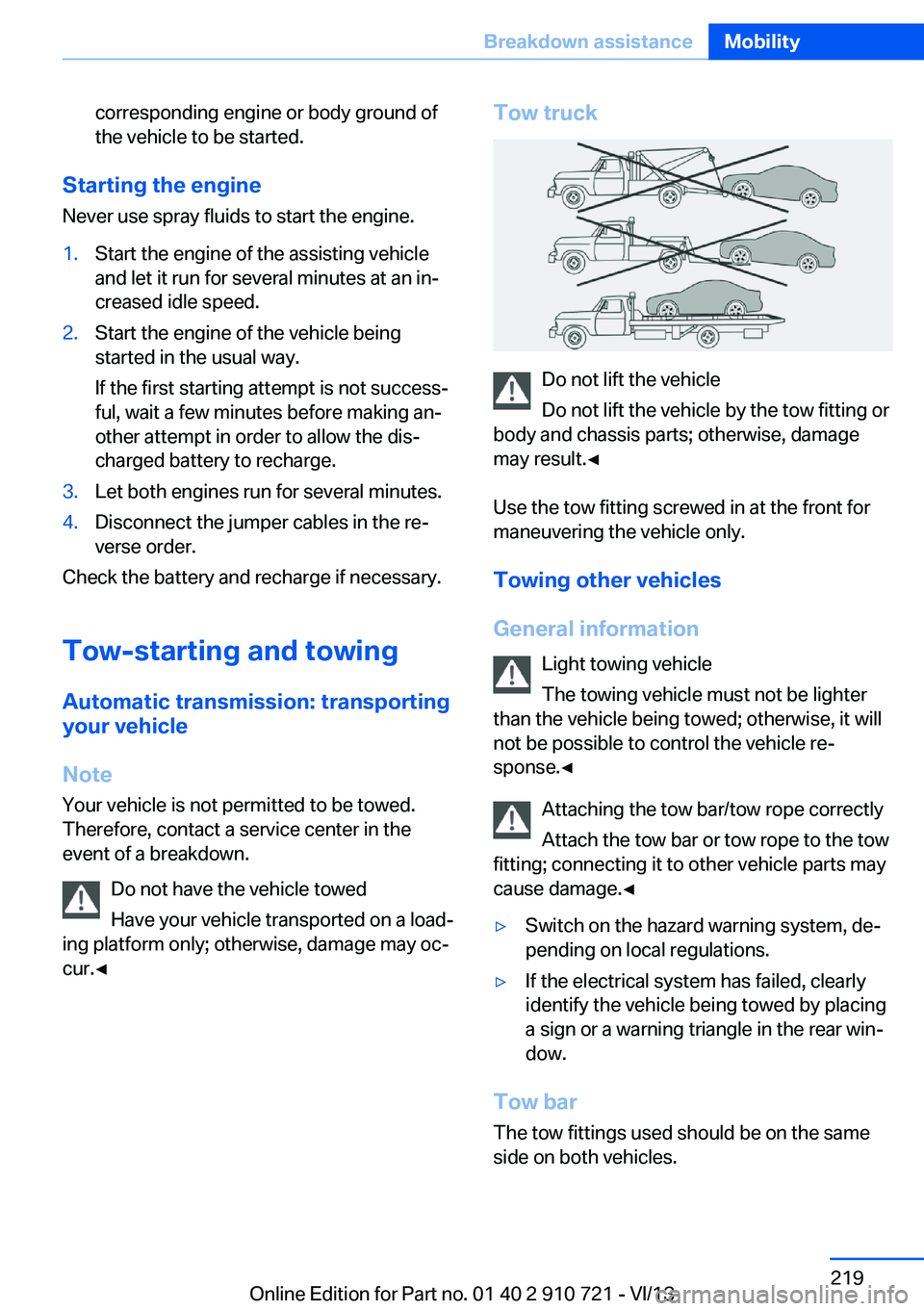
Tow truck
Do not lift the vehicle
Do not lift the vehicle by the tow fitting or
body and chassis parts; otherwise, damage
may result.◀
Use the tow fitting screwed in at the front for
maneuvering the vehicle only.
Towing other vehicles
General information Light towing vehicle
The towing vehicle must not be lighter
than the vehicle being towed; otherwise, it will
not be possible to control the vehicle re‐
sponse.◀
Attaching the tow bar/tow rope correctly
Attach the tow bar or tow rope to the tow
fitting; connecting it to other vehicle parts may
cause damage.◀
▷Switch on the hazard warning system, de‐
pending on local regulations.▷If the electrical system has failed, clearly
identify the vehicle being towed by placing
a sign or a warning triangle in the rear win‐
dow.
Tow bar
The tow fittings used should be on the same
side on both vehicles.
Seite 219Breakdown assistanceMobility219
Online Edition for Part no. 01 40 2 910 721 - VI/13
Page 223 of 243
the convertible top in the convertible top
well while the top is wet or frozen.▷Remove water stains that may neverthe‐
less have appeared on the headliner using
a microfiber cloth and an interior cleaner.▷When the vehicle is parked in enclosed
areas for lengthy periods, ensure that the
area is well ventilated.▷If possible, park the vehicle in the shade to
protect it from intensive solar radiation so
that color, rubber and fabric are not af‐
fected.▷Remove bird droppings immediately as
their corrosive effect will otherwise attack
the convertible top and damage the rubber
seals.▷Hard to remove tree sap or bird droppings
can be removed from the convertible top
with special tree sap remover and a soft
brush.
Do not use spot remover
Do not use spot remover, paint thinner,
solvent, gasoline, or similar products to re‐
move spots on the convertible top. These
products may destroy the rubber coating. In‐
correct care and cleaning may cause the
convertible top and its seams to become
leaky.◀
To remove heavy soiling, especially for light
colored convertible tops, use a special
convertible top cleaner.
Proceed as follows:
1.Spray the convertible top with the
convertible top cleaner.2.Make the convertible top cleaner foam up
using a well saturated sponge, moving it in
circular motions.3.Finish washing the vehicle in the car wash
or rinse with ample amounts of water.
Otherwise, follow the instructions for use from
the manufacturer.
Treat the convertible top with an impregnating
agent after it has been washed three to five
times.
Suitable cleaners and car products can be ob‐
tained from the service department.
Leather care
Remove dust from the leather often, using a
cloth or vacuum cleaner.
Otherwise, particles of dust and road grime
chafe in pores and folds, and lead to increased wear and premature degradation of the leather
surface.
To guard against discoloration, such as from
clothing, provide leather care roughly every
two months.
Clean light-colored leather more frequently be‐
cause soiling on such surfaces is substantially
more visible.
Use leather care products; otherwise, dirt and
grease will gradually break down the protective
layer of the leather surface.
Suitable care products are available from the
service center.
Upholstery material care Vacuum regularly with a vacuum cleaner.
If they are very dirty, e.g., beverage stains, use
a soft sponge or microfiber cloth with a suita‐
ble interior cleaner.
Clean the upholstery down to the seams using
large sweeping motions. Avoid rubbing the
material vigorously.
Damage from Velcro® fasteners
Open Velcro® fasteners on pants or
other articles of clothing can damage the seat
covers. Ensure that any Velcro® fasteners are
closed.◀Seite 223CareMobility223
Online Edition for Part no. 01 40 2 910 721 - VI/13
Page 234 of 243
Congestion Assistant 136
ConnectedDrive, see user's manual for Navigation, En‐
tertainment and Communi‐
cation
ConnectedDrive Services
Control Display 16
Control Display, settings 89
Controller 16
Control systems, driving sta‐ bility 122
Convenient closing 34
Convenient opening 34
Convertible, convertible top 43
Convertible mode, automatic climate control 158
Convertible program, auto‐ matic climate control 158
Convertible top 43
Convertible top, care 222
Convertible top, cargo area partition 45
Convertible top, emergency operation 45
Convertible top, rollover pro‐ tection system 99
Convertible top tool 45
Coolant 207
Coolant temperature 83
Cooling function 159
Cooling, maximum 159
Cooling system 207
Corrosion on brake discs 176
Cruise control 139
Cruise control, active with Stop & Go 130
Cruising range 83
Cupholder 171
Current fuel consumption 84
D
Damage, tires 199
Damping Control, dy‐ namic 125 Data, technical 228
Date 83
Daytime running lights 92
Defrosting, refer to Windows, defrosting 159
Departure time, parked-car heating 162
Departure time, parked-car ventilation 162
Destination distance 88
Digital clock 83
Dimensions 228
Dimmable exterior mirrors 58
Dimmable interior rearview mirror 58
Direction indicator, refer to Turn signals 69
Display in windshield 154
Display lighting, refer to In‐ strument lighting 94
Displays 76, 77
Displays, cleaning 225
Disposal, coolant 207
Disposal, vehicle battery 214
Distance control, refer to PDC 142
Distance information 155
Distance to destination 88
Divided screen view, split screen 20
Door lock, refer to Remote control 30
Doors, Automatic Soft Clos‐ ing 36
Downhill control 124
Drive-off assistant 122
Drive-off assistant, refer to DSC 122
Driver assistance, see Intelli‐ gent Safety 105
Driving Assistant, see Intelli‐ gent Safety 105
Driving Dynamics Con‐ trol 126
Driving instructions, breaking in 174 Driving mode 126
Driving notes, general 174
Driving stability control sys‐ tems 122
Driving tips 174
DSC Dynamic Stability Con‐ trol 122
DTC driving dynamics 123
DTC Dynamic Traction Con‐ trol 123
Dynamic Damping Con‐ trol 125
Dynamic Drive 125
Dynamic Stability Control DSC 122
Dynamic Traction Control DTC 123
E
ECO PRO 180
ECO PRO, bonus range 181
ECO PRO display 180
ECO PRO displays 79
ECO PRO driving mode 180
ECO PRO mode 180
ECO PRO Tip - driving in‐ struction 182
EfficientDynamics 182
Electronic displays, instru‐ ment cluster 77
Electronic Stability Program ESP, refer to DSC 122
Emergency detection, remote control 31
Emergency operation, convertible top 45
Emergency release, door lock 36
Emergency release, fuel filler flap 188
Emergency Request 216
Emergency service, refer to Roadside Assistance 217
Emergency start function, en‐ gine start 31 Seite 234ReferenceEverything from A to Z234
Online Edition for Part no. 01 40 2 910 721 - VI/13
Page 235 of 243

Emergency unlocking, trunklid 38
Energy Control 84
Energy recovery 84
Engine, automatic Start/Stop function 65
Engine, automatic switch- off 65
Engine compartment 203
Engine compartment, work‐ ing in 203
Engine coolant 207
Engine idling when driving, coasting 183
Engine oil 205
Engine oil, adding 206
Engine oil additives 206
Engine oil change 206
Engine oil filler neck 206
Engine oil temperature 82
Engine oil types, alterna‐ tive 206
Engine oil types, ap‐ proved 206
Engine start during malfunc‐ tion 31
Engine start, jump-start‐ ing 218
Engine start, refer to Starting the engine 64
Engine stop 64
Engine temperature 82
Entering/exiting vehicle, as‐ sistance, steering wheel 59
Entering a car wash 221
Equipment, interior 164
ESP Electronic Stability Pro‐ gram, refer to DSC 122
Exchanging wheels/tires 199
Exhaust system 174
Exterior mirror, automatic dimming feature 58
Exterior mirrors 57
External start 218
External temperature dis‐ play 83 External temperature warn‐
ing 83
Eyes for securing cargo 178
F
Failure message, refer to Check Control 80
False alarm, refer to Uninten‐ tional alarm 41
Fan, refer to Air flow 158
Fault displays, refer to Check Control 80
Filler neck for engine oil 206
Fine wood, care 224
First aid kit 217
Fitting for towing, refer to Tow fitting 220
Flat tire, changing wheels 213
Flat Tire Monitor FTM 103
Flat tire, Tire Pressure Moni‐ tor TPM 100
Flat tire, warning lamp 101, 104
Flooding 175
Floor carpet, care 224
Floor mats, care 224
Fold-out position, windshield wipers 71
Foot brake 175
Front airbags 96
Front center armrest 170
Front fog lamps 94
Front lamps 210
Front passenger airbags, au‐ tomatic deactivation 98
Front passenger airbags, indi‐ cator lamp 98
Front seats 51
Front turn signals, refer to Light-emitting diodes,
LEDs 212
FTM Flat Tire Monitor 103
Fuel 190
Fuel cap 188 Fuel consumption, current 84
Fuel consumption, refer to Average fuel consump‐
tion 88
Fuel filler flap 188
Fuel gauge 82
Fuel quality 190
Fuel recommendation 190
Fuel, tank capacity 231
Fuse 214
G
Garage door opener, refer to Integrated universal remote
control 164
Gasoline 190
Gasoline quality 190
Gear change, automatic transmission 73
Gear shift indicator 85
General driving notes 174
Glove compartment 169
Gross vehicle weight, ap‐ proved 229
Gross weight, permissible for trailer towing 229
H
Handbrake, refer to Parking brake 67
Hand-held transmitter, alter‐ nating code 165
Hazard warning flashers 216
HDC Hill Descent Con‐ trol 124
Headlamp control, auto‐ matic 92
Headlamp courtesy delay fea‐ ture 91
Headlamp courtesy delay fea‐ ture via remote control 35
Headlamp flasher 70
Headlamp glass 211
Headlamps 210 Seite 235Everything from A to ZReference235
Online Edition for Part no. 01 40 2 910 721 - VI/13