2014 AUDI TT ROADSTER key
[x] Cancel search: keyPage 93 of 244

may not be sufficient for the Homelink sys
tem to learn the radio frequency signal. Per
form all other steps as descr ibed above.
Operating the Homelink transmitter
The HomeLink transmitter works in the same
manner as the original hand held remote con
trol that came with the system.
Fi g. 100 Overhead co nsole: Homeli nk keypad
• Press the app ropriate programmed button
© , @ or@ to activat e th e des ired remote
c o ntrol func tion
¢ &. in General informa
tion on page 89.
Reprogramming a single button
A HomeLink button can be reprogrammed in
dividually without affecting the other button
allocations.
Programming the overhead keypad
• Press the app ropriate Homel ink button u n-
t il t he indicato r light begins flashing slowly .
Programming the bumper mounted tran s
mitter
1. H old the original remote control at a dis
tance between
0 -5 in . (0 -13 cm) from the
bumper below the appropriate headlight
fo r you r vehi cle (u se the sh ortest dis tan ce
possib le).
2. A im the remote con tro l just below the
driver side head light.
3. Press and hold the activation button on the remote contro l.
4 . The emergency flashers wi ll flash
three
times
(after about 15 -60 seconds) w hen
Homelink 91
the p rogramming is successful. Now re
l ease the button on the remote control.
• If the dev ice utilizes a rolling code, p lease
follow phase 3 of ¢
page 89, Programming
the Home Link transmitter
for rolling code
programm ing .
Th is p rocedu re will cause the e xisting pro
gramming on the Homelink button to be
erased!
Erasing the programming of the
Homelink transmitter
When you erase the programming, the pro
gramming on all three of the transmitter channels with be lost!
• Perform steps 1 to 4 as described on
~ page 90, Phase 1: programming the over
head k eypad .
When completed, the Homelink system will
be in the prog ramm ing mode and is then
r eady to learn the codes fo r remote controlled
devices.
(D Tips
- Programmed buttons can not be erased
ind iv idually.
- For security reasons you are advised to erase the programming of the Homelink
system before yo u se ll you r vehicle.
Page 106 of 244
104 Safety belts
-Never strap more than one person, in
cluding small children, into any single
safety belt.
- Never place a safety belt over a child sit
t ing on your lap.
- Always keep feet in the footwell in front
of the seat while the vehicle is being driv
en.
- Never let any person ride with feet on
the instrument panel or sticking out the
window or on the seat.
- Never remove a safety belt while the ve
hicle is moving. Doing so will increase
your risk of being injured or killed.
- Never wear belts twisted.
- Never wear belts over rigid or breakable
objects in or on your clothing, such as
eye glasses, pens, keys, etc., as these
may cause injury.
- Never wear the shoulder part of the belt
under your arm or otherwise out of posi
tion.
- Several layers of heavy clothing may in
terfere with correct positioning of belts
and reduce their effectiveness.
- Always keep belt buckles free of anything
that may prevent the buckle from latch
ing securely.
- Never use comfort clips or devices that
create slack in the shoulder belt. Howev
er, special clips may be required for the
correct use of some child restraint sys
tems.
- Never allow safety belts to become dam
aged by being caught in door or seat hardware.
- Torn or frayed safety belts can tear and
damaged belt hardware can break in an
accident. Inspect belts regularly.
If web
bing, bindings, buckles, or retractors are
damaged, have belts replaced by an au
thorized Audi dealer or qualified work
shop.
- Safety belts that have been worn and
loaded in an accident must be replaced
with the correct replacement safety belt by an authorized Audi dealer or qualified
workshop . Replacement may be necessa- ry even if damage cannot be clearly seen.
Anchorages that were loaded must also
be inspected.
- Never remove, modify, disassemble, or
try to repair the safety belts yourself.
- Always keep the belts clean. Dirty belts
may not work properly and can impair
the function of the inertia reel¢
ta
ble Cleaning interior on page 157.
Safety belts
Fastening safety belts
Seat first -everybody buckle up!
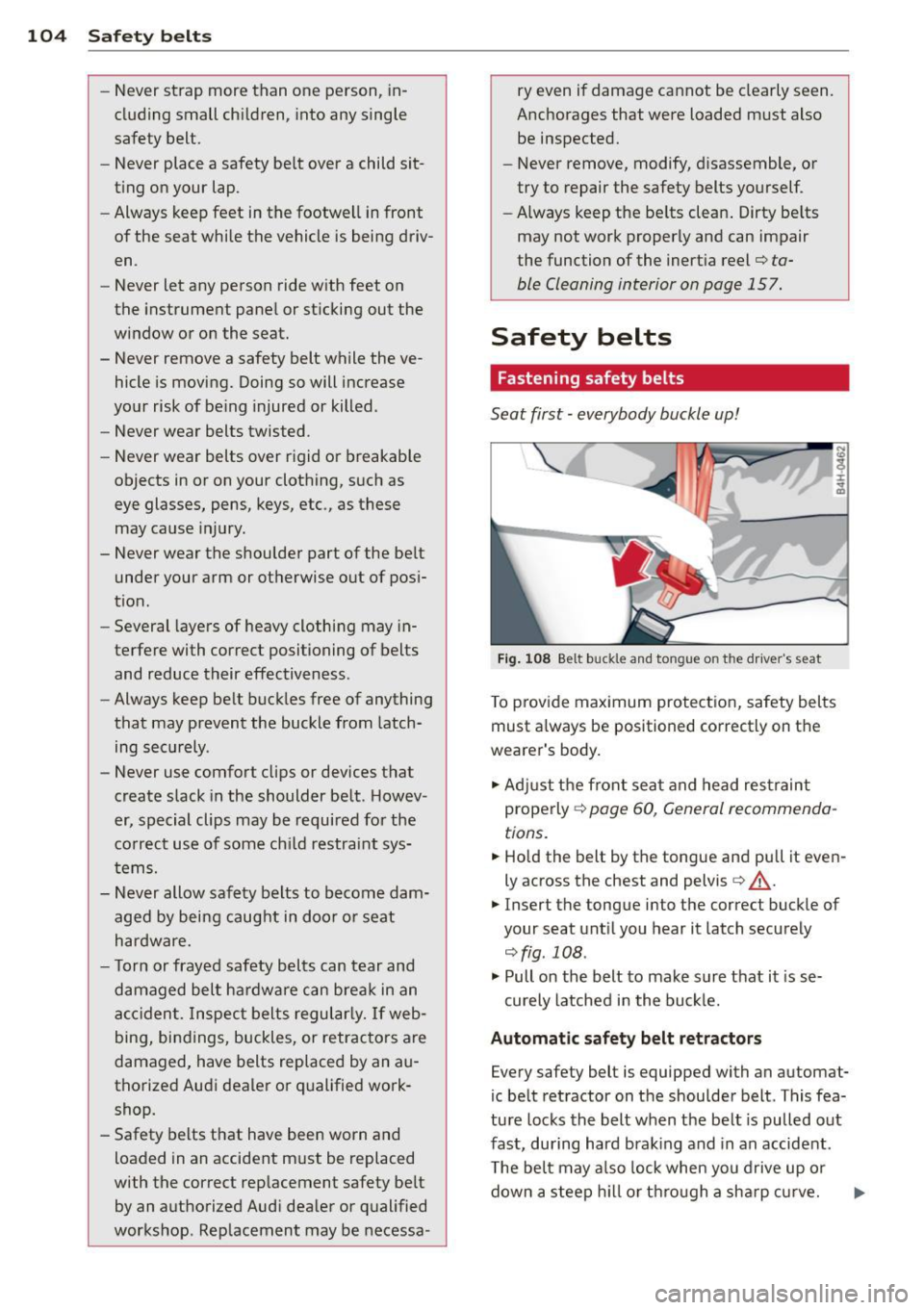
Fig. 108 Belt buckle and tongue on the driver's seat
To provide maximum protection, safety belts
must always be positioned correctly on the
wearer's body.
.,. Adjust the front seat and head restraint
properly ¢
page 60, General recommenda
tions.
.,. Hold the belt by the tongue and pull it even
ly across the chest and pelvis ¢
.&_.
.,. Insert the tongue into the correct buckle of
your seat until you hear it latch securely
¢fig . 108.
.,. Pull on the belt to make sure that it is se-
curely latched in the buckle.
Automatic safety belt retractors
Every safety belt is equipped with an automat
ic belt retractor on the shoulder belt . This fea
ture locks the belt when the belt is pulled out
fast, during hard braking and in an accident .
The belt may also lock when you drive up or
down a steep hi ll or through a sharp curve.
Page 107 of 244
During normal driving the belt lets you move
freely.
Safety belt pretensioners
The safety belts are equipped with a belt p re
tensione r that helps to t igh ten the safety belt
and remove s lack when the pretensione r is ac
tivated. The function of the pretensioner is monitored by a warning light
q page 15.
Switchable lo cking feature
Every safe ty belt excep t the one on the driver
seat is eq uipped w ith a switchab le locking fea
ture that
mu st be used when the safety belt is
used to attach a child seat . Be s ure to read the
important informat ion about th is feature
q page 138.
A WARNING
Improperly positioned safety belts can
cause serious injury in an accident
¢ page 105, Safety belt position .
-Safety belts offer optimum protection
only when the seatback is upright and
belts are properly positioned on the
body .
-
- Never attach the safety belt to the buck
le for another seat . Attach ing the belt to
the wrong buckle will reduce safety belt
effect iveness and ca n cause serious per
sonal in jury.
- A passenger who is no t properly rest rain
ed can be serio usly inju red by the safety
belt itself when it moves from the stron-
ger parts of the body into critical areas
like the abdomen .
- Always lock the convert ible locking re
tractor when yo u are secur ing a chi ld
seat in the vehicle
¢ page 140.
Safety belts 105
Safety belt position
Correct belt position is the key to getting
maximum protection from safety belts .
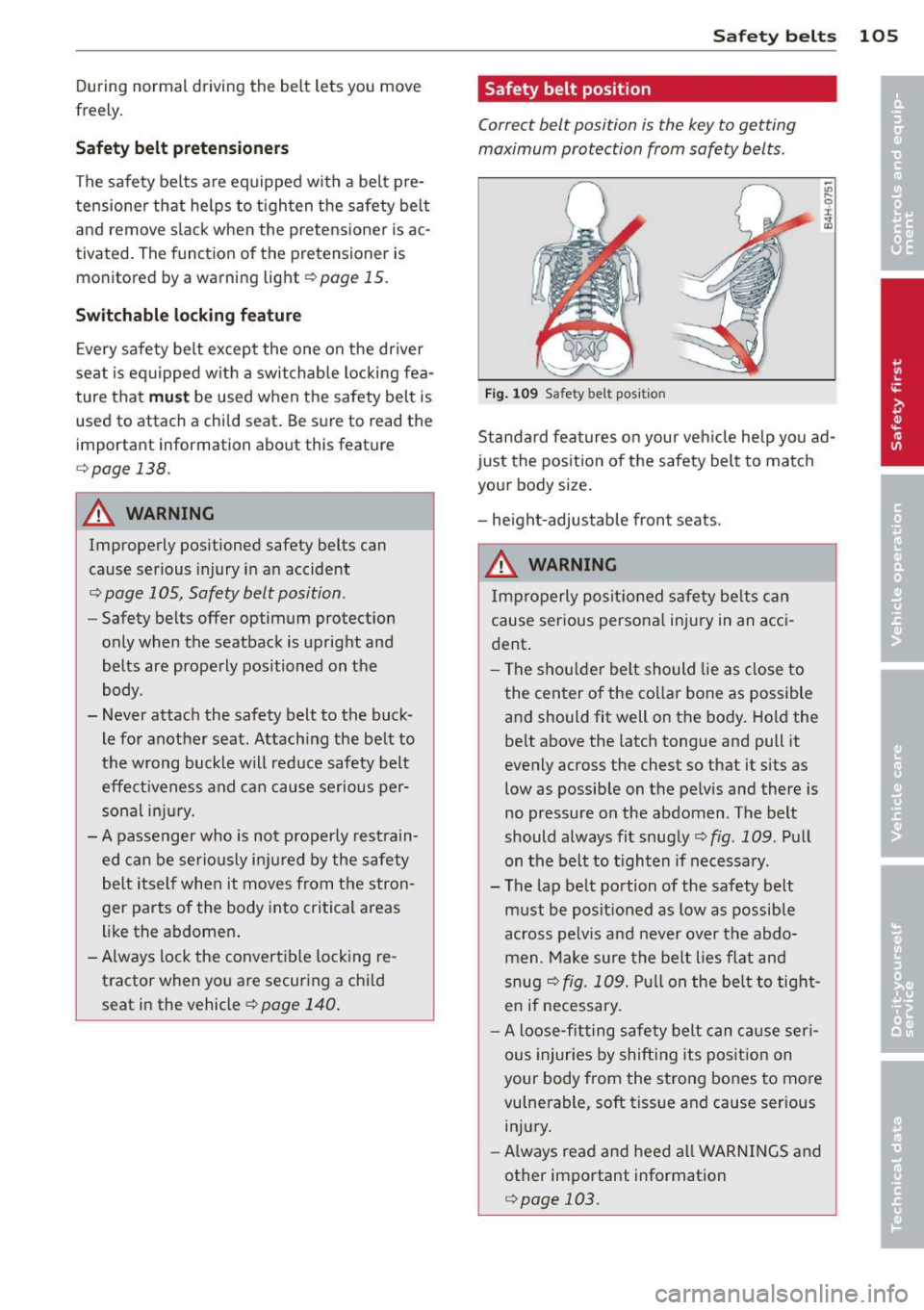
Fig . 1 09 Safety belt po sit ion
;;;
9 r ., a,
Standard fea tures on your veh icle he lp you ad
just the position o f the safety bel t to matc h
your body size .
- he ight-adjustable fron t seats.
A WARNING
Improperly posit ioned s afety be lts c an
cause serious persona l injury in an acci
dent .
-
-The s hou lder belt should lie as close to
the center o f the collar bone as possible
a nd should fit well on the body. Hold the
be lt above the latch tongue and pull it
evenly across the chest so that it sits as
low as possib le on the pelv is and there is
no pressure on the abdomen . The belt
should always fit snugly¢
fig. 109 . Pull
on the belt to t ighten if necessary.
- The lap belt portion of the safety belt
must be posit ioned as low as possible
across pelvis and never over the abdo
men . Make sure the belt lies flat and
snug
q fig. 109. Pu ll on the be lt to tight
e n if necessary.
- A loose-fitting safety belt can cause seri
ous injuries by shifting its pos it ion on
your body from the strong bones to more
vulnerable, soft tissue and cause ser ious
injury.
- Always read and heed all WARNINGS and
other important information
¢ page 103.
Page 150 of 244

148 Intelligent technology
Battery diagnosi s
Battery diagnosis continuously determines
the state of the battery. Sensors determine
battery voltage, battery current and battery
temperature. This determines the current
state of charge and the power of the battery.
Idling current management
I dling current management reduces energy
consumption while the vehicle is standing.
With the ignition switched off, it controls the
energy supply to the various electrical compo
nents. Data from battery diagnosis is consid
ered.
Depending on the battery's state of charge,
individual consumers are gradually turned off
to prevent excessive discharge of the battery
and thus maintain starting capability.
Dynamic energy management
While the vehicle is being driven, dynamic en
ergy management distributes the energy gen
erated according to the needs of the individu
al components. It regulates consumption, so
that more electrical energy is not being used
than is being generated and ensures an opti
mal state of charge for the battery .
(D Tips
-But even energy management cannot
negate the limits of physics. Consider
that the power and life of a battery are
limited .
- If starting ability is threatened, you are informed by a warning
~page 149,
Driver notification in the instrument
cluster display.
What you should know
The highest priority is given to maintaining
starting capability .
The battery is severely taxed in short -distance
driving, in city traffic and during the cold time
of year. Abundant electrical energy is re
quired, but only a little is generated.
It is also
critical if the engine is not running and electri- cal components are turned on.
In this in
stance energy is being consumed but none is
being generated.
It is in precisely these situations that you will
notice energy management actively regulat
ing the distribution of energy.
Vehicle stands for an extended period
If you do not drive your vehicle over a period
of several days or weeks , electrical compo
nents are gradually cut back or switched off .
This reduces energy consumption and main
tains starting capability over a longer period.
Take into consideration that when you unlock
your vehicle, some convenience functions ,
such as the remote key or power seat adjust
ment, may not be available. The convenience
functions will be available again when you
turn on the ignition and start the engine.
With the engine turned off
If you listen to the radio, for example, with
the engine turned off, the battery is being dis
charged.
If starting capability is jeopardized due to en
ergy consumption, a message appears in the
driver information display.
You have to start the engine to charge the
battery.
With the engine running
Although electrical energy is generated when
the vehicle is being driven, the battery can be
come discharged. This happens mostly when
little energy is being generated and a great
deal consumed and the battery's state of
charge is not optimal.
To bring the energy balance back into equili
brium, consumers which require especially
large amounts of energy are temporarily cut
back or switched off . Heating systems in par
ticular require a great deal of energy. If you
notice, for example, that the heated seats* or
the heated rear window are not heating, they
have been temporarily cut back or switched .,.
Page 167 of 244

Checking and filling Engine hood
Releasing the engine hood
The engine hood is released from inside the
vehicle .
Fig. 128 Dr ive r's s ide footwe ll: e ng ine hood relea se
lever
"' Open the driver's door .
"' Pull the release lever on the left under the
instrument panel
i=> fig. 128 in the d irection
of the arrow .
The hood pops up slightly under spring pres
sure.
Opening the engine hood
F ig . 129 Release lever u nde r the engine hood
Before opening the engi ne hood, make sure
that the windshield wipers are flat against the
windshie ld. Otherwise, they could damage the
paint on the hood.
"' Lift the hood slight ly ¢
_A .
"' Pull up on the release under the hood
¢ fig . 129. This releases the catch.
"' Open the hood all the way .
Checking and fillin g 165
A WARNING
Hot engine coolant can burn you.
- To reduce the risk of being burned, never open the hood if you see or hear steam
or coolant escaping from the eng ine
compartment . Wait unt il no steam or
coolant can be seen or heard before care
fu lly opening the hood.
Closing the engine hood
"' Pull the hood down until the pressure from
the struts is reduced.
"' Let the hood
drop down and latch in p lace.
Do not try to push it shut; it may fail to en
gage ¢_& .
A WARNING
--
A hood that is not completely latched
could fly up and b lock your view while dr iv
ing.
- When you close the engine hood, check it
to make sure the safety catch has proper
ly engaged. The hood shou ld be flush
with the surround ing vehicle body parts.
- If you notice while driv ing that the hood
is not secured properly, stop at once and
close it .
Working in the engine compartment
Be especially careful whenever you work in
the engine compartment!
Whenever yo u must pe rform any wo rk in the
e n g ine compartment, for e xample ch ecki ng
and filling th e diff erent fluids, there is a risk
of injury, burn s and a ccidents. To prev ent
p ersonal injury always obse rve the foll owing
WARNINGS . The engine compa rtment of an y
vehicle i s a hazardou s area !
¢ &.
A WARNING ~
To help avoid injury, be fo re yo u check any
thing under the hood:
- Sw itch off the engi ne.
- Remove the ignition key.
Page 215 of 244

Fuses and bulbs
Electrical fuses
Replacing fuses
Fuses that have blown will have metal strips
that have burned through.
Fig. 161 End face of instrument panel: removing cover
p la te to access fuses
Fig . 162 Left side of eng ine compart ment: fuse cove r
Fuse cover on the left end face of the
instrument panel
.. Switch off the ignition and the electrical
component affected.
.. Carefully pry the fuse cover off the instru
ment panel using the ignition key or a
screwdriver
~ fig. 161 .
.. Check the fuse list ing on the next pages to
find out which f use belongs to the compo
nent which has failed
¢ page 214, Fuse Lo
cation, Instrument Panel left .
.. Remove the blown fuse with the plastic clip
provided. The clip is located on the holder in
t he fuse box .
.. Replace a blown fuse (recognizable by the
melted metal str ip inside) with a fuse of the
same amperage .
.. Firmly snap the cover back onto the instru
ment pane l face .
Fuses and bulbs 213
Fuse cover in engine compartment
.. Switch the ignit ion and the affected con
sumer off .
.. Unlatch the fuse cover, p ush the two slides
forward
~ fig. 162.
.. Fi nd out which fuse belongs to the equip
ment which stopped working
~page 215,
Fuse location, le~ side of engine compart
ment.
.. Remove the plastic from its retainer in the
fuse box cove r (left face end of the instru
ment panel), place it on the f use in question
and pull it out .
.. If the fuse is burned out (recogni zable by
melted strips of metal), replace it with a
new fuse
of the same rating .
.. Replace the fuse cover .
.. Push the two slides to the rear
¢ fig. 162.
Insta ll the fuse cover carefully to prevent
water from enter ing .
The various electrical circuits are protected by
fuses. The fuses are clustered in a centralized
unit. The unit is located behind the face panel
at the end of the instrument panel.
You are well advised to keep a supply of spare
fuses in your vehicle. Fuses with the proper
ampere ratings are available at your author
ized Audi dealer.
A WARNING
-
Do not repair fuses and never replace a
b lown fuse with one that has a higher amp
rating. This can cause damage to the elec
trica l system and a fire.
(D Note
If a new fuse burns out again after short ly
have you have installed it, have the electri
ca l system checked by your authorized
Audi dealer.
Page 229 of 244

steadily reduced the scope of maintenance
and repairs which can be carried o ut by vehicle
owners.
Also, safe ty and en vironment al con
cerns p lace very strict limits on the nature of
repairs and adjustments to engine and trans
miss io n parts which an owner can perform .
Maintenance, adjustments and repa irs usua lly
require special tools, testing dev ices and oth
er equipment availab le to specially trained
workshop personne l in order to assure proper
pe rformance, reliab ility and safety of the vehi
cle and its many systems .
Improper ma intenance, adjustments and re
pa irs can impair the operation and reliability
of your vehicle and even void your vehicle war
ranty. Therefore, p roof of servic ing in accord
ance w ith the maintenance schedule may be a
condition for upholding a poss ible war ran ty
claim made within the warranty period .
Above all, operational safety can be adversely
affected, creating unnecessary risks for you
and your passengers .
If in doubt about any serv icing, have it done
by your authorized Audi dealer or any othe r
p roperly equipped and q ualified works hop .
We strong ly urge you to give yo ur auth o rized
Aud i dea ler the opportuni ty to perform all
schedu led maintenance and necessary repairs .
Your dea ler has the facilities, original parts
and tra ined spec ialists to keep your vehicle
running properly.
Performing limit ed ma inten anc e yourself
The fo llow ing pages describe a limited num
ber of proced ures which can be pe rformed on
your vehicle with ordina ry too ls, should the
need arise and trained personnel be unavaila
ble. Before performing any of these proce
dures, always t horoughly read a ll of the app li
cable text and carefully follow the instruc
tions given . Always rigorously obse rve the
WARNINGS provided.
Befo re you check anything in the engine
c ompartm ent, a lway s re ad and heed all
WARN INGS ~
A and ~ A in Working in the
engine compartment on page 165.
Con sumer In formation 22 7
_& WARNING
- Ser ious personal injury may occur as a re
sult of improperly performed mainte
nance, ad justments or repa irs .
- Always be extremely careful when work
ing on the vehicle . Always follow com
monly accep ted safety pract ices and gen
era l common sense. Never r is k personal
inju ry.
- Do not attempt any of the maintenance,
checks or repairs descr ibed o n the fol
lowing pages if you are not fully fam ilia r
with these or othe r procedures with re
spect to the vehi cle, or are uncertain how
to p roceed .
- Do not do any work without the proper
too ls and equipment. Have the necessa ry
wo rk done by your authorized A udi deal
er or another proper ly equipped and
qualified wor kshop.
- The engine compartment of any motor
veh icle is a potentially hazardous area.
Never reach into t he area around or
touch the rad iator fan. It is temperature
contro lled and can switch on suddenly -
even when the engine is off and the igni
tion key has been removed. The rad iator
f a n switches on a utomat ica lly when the
coo lant reaches a certain tempera ture
an d will continue to run until the coo lant
tem perature drops .
- Always remove the ign ition key before
anyone gets under the vehicle.
- Always support your veh icle with safety
stands i f it is necessary to work under
neath the vehicle. The jack s upplied with
the vehicle is not adequate for this pur
pose and cou ld collapse causing serio us
personal injury.
- I f you must work underneath the vehicle
with the wheels on t he ground, a lways
make sure the vehicle is on leve l ground,
that the wheels a re a lways securely
blocked a nd that the engine cannot be
started. •
•
Page 231 of 244
Technical Modifications
Our guidelines must be complied with when technical modifications are made .
Always consult an authorized Aud i dealer be
fore starting work on any modifications.
This will he lp ensure that vehicle function,
performance and safety are not impaired
¢ .&. .
Attempting to work on electronic components
and the software used with them can cause
malfunctions. Beca use of the way electronic
components are interconnected with each
other, such malfunctions can also have an ad
verse affect on other systems that are not di
rectly involved . Th is means that you r isk both
a substantial reduction in the operational
safety of you r vehicle and an inc reased wea r of
vehi cle parts¢ _&..
Author ized Audi dealers w ill perform th is
wo rk in a professiona l and competent ma nner
or, in spec ial cases, refer you to a p rofessional
company that specializes in such mod ifi ca
tions .
_& WARNING t=
Improper repairs and modifications can
change the way vehicle systems wo rk and
cause damage to the veh icle and ser ious
personal injury.
(D Note
If emergency repairs must be performed
elsewhere, have the veh icle examined by
an authorized A udi dealersh ip as soon as
possible.
Declaration of Compliance, Telecommu
nication or Electronic Systems
-
Radio Frequency Devices and Radiocommuni
cation Equipment User Manual Notice.
The manufacturer is not responsible for any
radio or TV interference caused by unauthor
i zed modifications to th is equ ipment.
Con sumer In formation 229
D evices
T he following devices each comply wi th FCC
Pa rt 15 .1 9, FCC Part 15.2 1 and RSS -Gen Iss ue
1:
- Cell phone pac kage
- Electron ic immobilizer
- Homelink un iversal remote co ntrol
- Remote control key
FCC Part 15.19
This device complies with part 15 of the FCC
Ru les. Operation is subject to the fo llow ing
two conditions:
(1) This devi ce may not cause harm ful inte r
ference, and
( 2 ) this device must accept any inte rfe rence
received, including inter ference that may
ca use undes ired operation .
FCC Part 15.21
CAUTION:
Changes or mod ificat ions not expressly ap
proved by the party responsible for compli
ance could vo id the user's authority to operate
the eq uipment.
RSS-Gen Issue 1
Operation is sub ject to the fo llow ing two con
dit ions:
(1) this device may not ca use interference,
and
(2) this device must accep t any inte rference,
incl uding interference tha t may cause unde
s ired operation of the device .
•
•