2014 AUDI S6 steering wheel
[x] Cancel search: steering wheelPage 74 of 304

7 2 Warm and cold
(D Note
To avoid damage to the heating e lements
in the seats, do not kneel on the seats or
place heavy loads on a small area of the
seat .
Setup
Applies to vehicles: with four-zone a utomat ic clima te con·
tro l
The climate control system setup is accessed
through the MMI .
.,. Se lect : I CAR I func tion button> (Car )* sys·
terns
con trol but ton > AC .
Rear cabin settings*
When th is fu nction is selected, all sett ings for
the rear can be adjusted through the climate
control sys tem in the cockpit. The cl imate
con trol sys tem se tt ings cannot be adjusted in
the rea r seat at the same time. This func tion
switches
o ff after a certain period of time or
when one of the dia ls in the cockp it is press
ed .
Auto recirculation*
The sensit ivity level of the au tomatic rec ircu
lation mode can be set at vario us leve ls from
off to sensit ive. The recirculation mode is con
trolled a utomat ica lly. You must p ress the ~
button if fog forms on the windows.
Footwell temperature
You can adju st the footwell temperat ure so
that it is cooler or wa rme r.
Supplementary heater*
The supplementary heater warms the interio r
of veh icles with diesel engines * mo re quick ly .
T he s upplementa ry he ater is cont ro lled au to
mat ic all y in the
Aut o setting .
Steering wheel heating
App lies to vehicles: wi th hea ted s tee rin g whe el
The steering wheel rim can be heated .
Fig. 72 Stee ring co lu mn : stee rin g w heel hea tin g but ·
ton
.,. Press the~ button to switch steering whee l
heating on/off. The message
Steering wheel
heating on !/Steering wheel heating off !
appears in the instrument cluster d isp lay.
T he temperat ure is maintained at a constant
l evel when steering wheel heating is switched
on.
T he steering wheel hea ting se tt ings are stor
ed automat ica lly and assigne d to the remote
control key that is in use .
Page 75 of 304

On the road
Steering
Manually adjustable steering wheel
Applies to vehicles: with manu ally adjustable steering
w hee l
The height and reach of the steering wheel
can be adjusted .
Fig. 73 Leve r on t he steer ing co lumn
" Pull the lever¢ fig. 73 -arrow -¢_&..
"Move the steer ing whee l to the desired posi
t ion.
" Push the lever aga inst the steeri ng column
u ntil it locks.
There must be at least 10 inc hes (25 cm) be
tween your chest and the cente r of the steer
in g wheel.
If you cannot sit more than 10 in
ches (25 cm) from the s teer ing whee l, see if
adaptive eq uipment is available to help you
reach the peda ls and increase the distance
from the steer ing whee l.
F or deta iled informa tion on how to adjus t the
d river's seat, see
r::!.> page 53.
_& WARNING
Improper use of steering wheel adjust
ment and improper seating position can
cause se rious personal injury .
- Adjust the steer ing whee l co lumn on ly
when the veh icle is not moving to pre
vent loss of veh icle cont rol.
-
- Adjust the driver's seat or steering wheel
so that there is a min imum of 10 inches
(25 cm) between your chest and the
steering wheel¢
page 129, fig . 144 . If
yo u cannot mai ntai n this min imum dis-
On the road 73
tance, the a irbag system cannot protect
you proper ly.
- If physical limitations prevent you from
sitting 10 inches (25 cm) or more from
the steering wheel, check with your au
thorized A udi dealer to see if adaptive
equ ipment is ava ilable .
- If the steer ing wheel is aligned with your
face , the suppleme nta l dr iver's a irbag
cannot provide as much protection in an
accident . Always make sure that the
steer ing whee l is a ligned with your
ches t.
- Always hold the ste ering whee l w ith your
hands at the 9 o'clock and 3 o'clock posi
tions to reduce the ris k of persona l injury
if the driver's airbag dep loys .
-Never hold the stee ring wheel at the 12
o' clock posi tion or wi th your hands ins ide
the stee rin g wheel rim or on t he steering
wheel hub . Holding the steering whee l
the wrong way can cause se rious injuries
to the hands, arms and head if the driv
er's airbag deploys.
Electrically adjustable steering wheel
App lies to vehicles: wi th electrica lly ad justable stee ring
w heel
The steering wheel position can be electrically
adjusted for height and reach.
F ig . 7 4 Sw itc h fo r steeri ng w hee l adju stment
"To adjust the height, p ress the switch up/
down. The steer ing column w ill cont inue
moving as long as you are press ing the
switch .
" To
move th e steering wheel forwa rd or back,
press the switch forward/back. The steering
I),-
Page 76 of 304
7 4 On the road
column will continue moving as long as you
are pressing the switch.
There must be at least 10 inc hes (25 cm) be
tween you r chest and the center of the steer
ing whee l.
If you cannot sit more than 10 in
ches (25 cm) from the steering whee l, see if
adaptive equipment is available to help you reach the pedals and increase the distance
from the steer ing wheel.
F or detai led information on how to adjust the
driver's seat, see
<::> page 53 .
In vehicles with the memory f unction* , the
steering column settings are stored together
with the seat position.
A WARNING
Improper use of steering wheel adjust
ment and improper seating position can
cause se rious personal injury.
- Adjust the steer ing whee l column on ly
when the vehicle is not moving to pre
vent loss of veh icle control.
-
- Adjust the driver's seat or steering wheel
so that the re is a min imum of 10 inches
(25 cm) between your chest and the
steering wheel ¢
page 129, fig. 144. If
you can not maintain this min imum dis
tan ce, the airbag system cannot protect
yo u properly.
- If phys ica l limi tations prevent you from
sitting 10 in ches (25 cm) o r more from
the steering wheel, check with yo ur au
tho rized Aud i dealer to see if adaptive
equipment is availab le .
- If the steering wheel is aligned with you r
face, the supp lemental drive r's airbag
cannot provide as much protect ion in an
acc ident. A lways make sure that the
steering wheel is aligned with your
chest.
- Always hold the steering wheel with your
hands at the 9 o'clock and 3 o'clock posi
t ions to reduce the risk of pe rsonal injury
if the d river 's airbag deploys.
- Never hold the steering whee l at the 12
o'clock posit ion or w ith your hands i nside the steering wheel rim or on the steering
wheel hub. Hold
ing the steer ing wheel
the wrong way can cause serious injuries
to the hands, arms and head if the driv
er 's airbag deploys.
Easy entry feature
Applies to vehicles: with electrically adjustable steering
wheel
The easy entry feature makes it easier to en
ter and exit the vehicle by automatically ad
justing the steering wheel.
.. Select in the MM I: ICARI function button>
(Car )* sys tem s control b utton > V ehicle set
ting s
> Seats > D rive r's seat > Easy entry >
On .
When the easy ent ry feature is turned on, the
steering wheel moves up to the park position
when you switch
off the ignition. After you en
ter the veh icle, the steering wheel moves to
the stored position as soon as you sw itch on
the ignit ion.
Starting and stopping
the engine
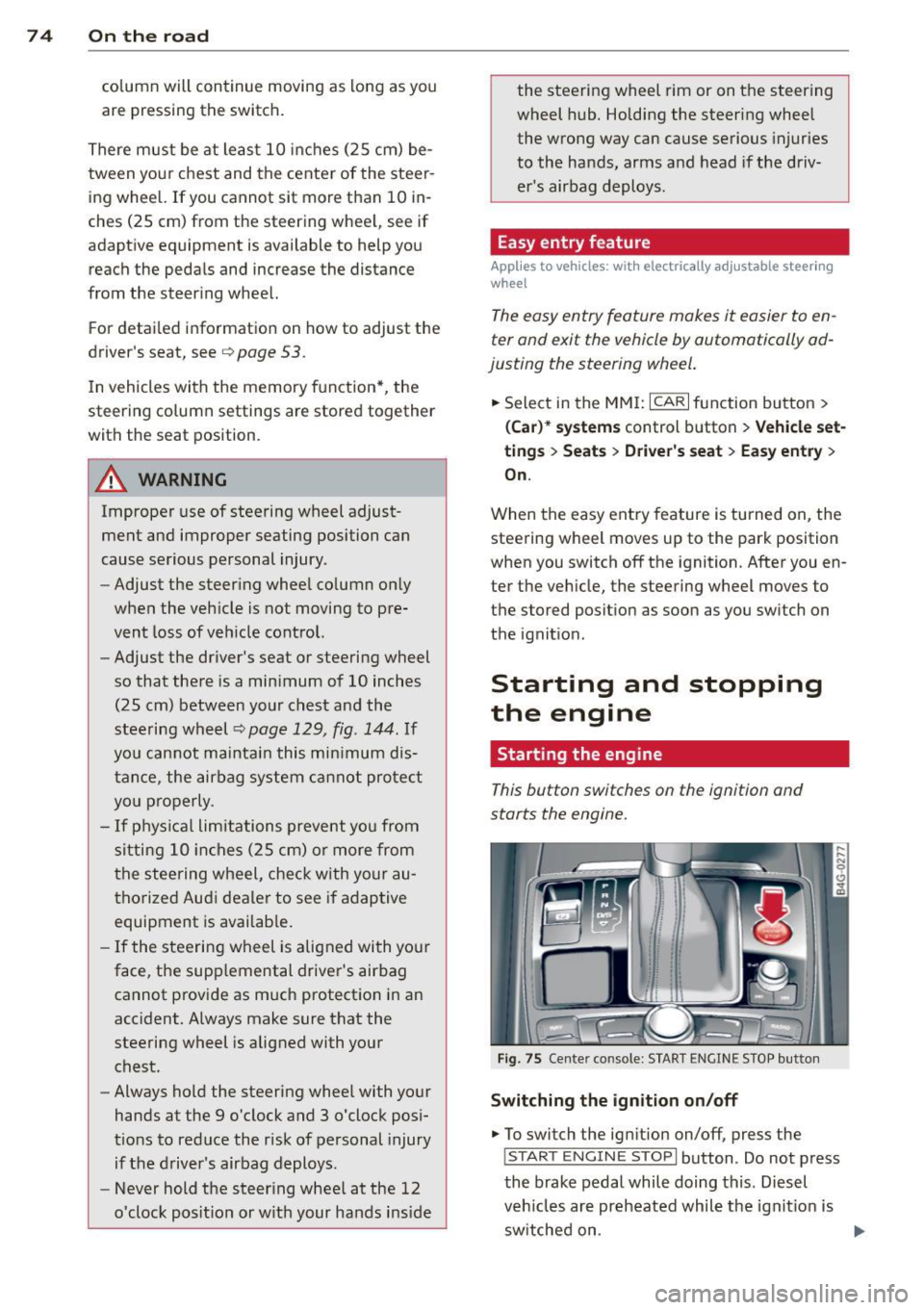
Starting the engine
This button switches on the ignition and
starts the engine.
Fig . 75 Center console: S TART ENGINE S TOP butto n
Switching the ign ition on /off
.. To switch the ign ition on/off, press the
I STAR T ENGINE ST OPI button . Do not press
the brake pedal while doing this . Diesel
veh icles are preheated while the ignit ion is
sw itched on .
lilJ,
Page 82 of 304

80 On the road
Starting/stopping the engine
Applies to vehicles: with Start-Stop-Syste m
Fig. 78 Instrument duster : eng ine sw itched off (stop
phase)
.. Slow the vehicle to a stop us ing the bra ke
and keep p ress ing t he b rake pedal. The en
gine w ill switch off. The
[IJ in dicator light
appears in the information line in the instru
ment cluster d isplay .
.. When you take your foot off the brake ped
al, the engine restarts. The indicator light
turns off.
Additional information
The engine wi ll switch off in the P, D, N and S
positions as well as in manua l mode . In the P
position, the engine wi ll also remain off if you
take your foot off the brake pedal. The eng ine
starts again when you select another se lector
lever pos ition and take your foot off the brake
pedal.
If you select the R pos ition during a Stop
phase, the engine will start again.
Shift from D to P quickly to prevent the engine
from start ing unintentionally when shift ing
through R .
You can determine for yourself if the eng ine
will stop or not by reducing or increasing the
amount of force you use to press the brake pedal. For example, if you only lightly press
on the brake pedal in stop-and and-go traffic
or when turni ng, the engine will not switch off
when the vehicle is stationa ry . As soon as you
p ress the brake down harde r, the eng ine will
switch off.
General information
Applies to vehicles: with Start -Stop-System
The standard Start-Stop-mode can be cancel
led for different system-related reasons.
Fig. 79 Inst rume nt cluster: eng ine -S top te mporarily
un ava ilab le
Eng ine w ill not sw itch off
Before each stop phase, the system checks if
certain conditions have been met. For exam
ple, the eng ine will
not be switched off in the
follow ing s ituations :
- The engine has not reached the minimum
requ ired temperature for Start-Stop-mode.
- The interior temperat ure se lected by the A/C
system has not been reached.
- The outside temperatu re is extremely high/
low .
- The windshield is being defrosted
i=:> page 69, i=:> page 71.
- The parking system* is switched on.
-The battery charge level is too low.
- The steering wheel is sharply tur ned o r
t here i s a steer ing movemen t.
- After engaging the reverse gear .
- O n sharp incl ines.
The
r,J indicator light appears in the informa
t ion line in the instrument cluster d isplay
¢ fig . 79.
Engine automatically resta rts
T he stop p hase is inter rupted in the following
situations, for example . The engine resta rts
without any action by the driver .
- The interior tempera ture varies from the
temperature selected in the A/C system .
Page 89 of 304

Audi adaptive cruise control and braking guard 87
tachometer @and is also shown briefly in
the display @
c::> fig. 88.
.. You must also press the brake pedal when
the vehicle is stopped.
Switching adaptive cruise control off
.. Push the lever away from you into position
@ until it clicks into place. The message
ACC off appears.
@ Indicator lights
ra 1 -Adaptive cruise control is switched on. No
vehicles are detected up ahead . The stored
speed is ma intained.
I -A moving vehicle is detected up ahead .
The adaptive cruise control system regulates
the speed and distance to the moving vehicle
ahead and acce lerates/brakes automatical ly.
fa) -Adaptive cruise contro l is switched on. A
moving vehicle up ahead was detected. Your
ve hicl e remains stopped.
I -When automat ic braking is not able to
keep enough distance to a previously detected
moving vehicle up ahead, you must take con
trol and brake
c::> page 89, Prompt for driver
intervention.
© Display
If adaptive cruise control is not shown in the
disp lay, you can call it up with the multifunc
tion steering wheel buttons
c::> page 24.
Based on the symbols in the d isplay, you can
determine if the system is maintaining a dis
tance to the vehicle ahead and what that d is
tance is.
No vehicle -No veh icle ahead was detected .
White vehicle -A vehicle ahead was detected.
Red vehicle -Prompt for the driver to take ac
tion
c::> page 89.
Both arrow s on the scale© indicate the dis
tance to the vehicle ahead. No arrow appears
when the vehicle is on an open road and there
is no object ahead . If an object is detected
ahead , the arrow moves on the scale . The
green zone on the scale shows the stored
distance. For information on changing the
stored distance, refer to
c::> page 88 . If the
distance selected is too close or may soon be
come too close, the arrows move into the red
zone on the sca le .
A WARNING
Improper use of the adaptive cruise con
trol can cause collisions, other accidents
and serious personal injur ies .
- Pressing the
!SET ! button when driv ing at
speeds below
20 mph (30 km/h), will au
tomatically accelerate the vehicle to
20
mph (30 km/h), which is the minimum
speed that can be set.
(D Tips
-If you switch the ignit ion or the adaptive
cruise control off, the set speed is erased
from the system memory.
- You cannot switch the Electronic Stabili
zation Control (ESC) to the SPORT mode
when adaptive cruise control is switched
on.
Changing the speed
Applies to vehicles: with Aud i adapt ive crui se control
0
f
• 0
Fig. 89 Selector lever: changing the speed
.. To increase or reduce the speed in incre
ments,
tap the lever up or down.
-0:, N 0 ± ... a)
.. To increase or reduce the speed quickly, hold
the lever up or down until the red LED @
reaches the desired speed
c::> page 86,
fig.BB.
~
Page 95 of 304

Audi active Lane assist
Active Lane assist
Description
Applies to vehicles: with active lane assist
Active lane assist helps you keep your vehicle
in your lane.
Active lane assist detects lane marker lines
within the limits of the system using a camera in the windshield . If you are approaching a de
tected lane marker line and it appears likely
that you w ill leave the lane, the system will
warn you by means of corrective steer ing . T he
driver can over ride the cor re ct ive steer ing at
any time. If the veh icle crosses a line, the d riv
er is also warned by a light
vibration in the
steering whee l. The vibration warning must
be switched on in the MMI for this to happen.
Active lane ass ist is operable when the line
marking the lane is detected on at least one
side of the vehicle .
If the system is in active standby mode and
the turn signa l is activated before driving over
the lane marker line, the warning does not oc
cur since the system allows for intentional lane changes .
The system is designed for driv ing on free
ways and expanded highways and thus works
only at speeds of 40 mph (65 km/h) or more .
If the vehicle is also equipped with Audi adap
tive cruise control*, the corrective steering
will be more specif ic in regard to the driving
situation . In addition to the lane marker lines,
the system can a lso take into acco unt other
objects such as guard rails. If they are detect
ed i n close proximity to the veh icle, Audi a c
tive lane ass ist helps prevent the vehi cle from
driving too close to them . The re is also pass
ing assistance. The system does not provide
any corrective steering if it detects that you
are passing another vehicle.
A WARNING
- The system warns the driver that the ve
hicle is leaving the lane us ing corrective
Audi acti ve lane a ssis t 93
steer ing. The driver is always responsible
for keeping the vehicle within the lane.
- The system can assist the driver in keep
ing the vehicle in the lane, but it does
not steer by itself. A lways keep your
hands on the steering wheel.
- Corrective steering may not occur in cer tain sit uat ions, such as dur ing heavy
brak ing.
- The camera does not recognize all lane
marker lines. Corrective steer ing can only
take p lace on the side of the vehicle
where lane marker lines are detected .
- Other road structures or objects cou ld
possibly be identified un intent ionally as
lane ma rker lines. As a result, cor rect ive
steer ing may be unexpected or may not
oc cur .
- The camera view can be restricted, for
examp le by vehicles driving ahead o r by
r ai n, snow, heavy spray or light s hining
into the camera. This can result in a ctive
lane assist not detecting the lane marke r
lines or detect ing them inco rrectly .
- Unde r ce rtain condi tions such as ruts in
the road, a banked roadway or cross
winds, the corrective stee ring alone may
not be enough to keep the vehicle in the
lane.
- For safety reasons, active lane ass ist
must not be used when there are poor
road and/or weather condit ions such as
slippery roads, fog, gravel, heavy rai n,
snow and the potent ial for hydroplaning .
Using act ive lane assist under thes e con
ditions may increase the risk of a crash.
Page 96 of 304

94 Audi active lane assist
Activating and deactivating
A pp lies to vehicles: with active lan e assis t
Fig. 94 Turn signal leve r: Active lane ass ist butto n
Fig. 95 Windshie ld: Active lane assist ca mera viewing
wi ndow
-
I
~ Press the ¢ fig. 94 button to activate or de
activate the system. The indicator light.
or . in the instrument cluster will illumi
nate or go out.
Instrument cluster indicator light
• Ready: The indicator light shows that the
system is ready to use . The system can now
warn you if you are about to cross a known
lane marker line .
• Not ready: The indicator light shows that
the system is turned on but unable to send a
warning . This can be due to the following :
- There is no lane marker line .
- The relevan t lane marker lines are not de-
tected (for example, markings in a construc
tion zone or because they are obstructed by
snow, dirt, water or backlight ing) .
- The vehicle 's speed is below the speed need
ed to activate it, which is about 40 mph (65
km/h) .
- The lane is narrower than about 8 ft . (2 .5 m)
or wider than 4 .5 m .
- The curve is too sharp . - The driver's hands are not on th
e steering
wheel.
(D Tips
Make sure the camera's field of view
¢
fig. 95 is not obstructed by stickers, de
posits or anything else. For information on
cleaning, refer to¢
page 210.
Active lane assist display in the
instrument cluster
App lies to vehicles: wit h act ive lane assist
Fig. 96 Display : Active lane ass is t is sw itc hed on and is
warning
Fig. 97 Instrume nt cl ust er: Act ive lane a ssist is sw itch ·
ed o n but no t re ady to p rovid e wa rning s
You can call up the active lane assist display
using the buttons in the multifunction steer
ing wheel ¢
pag e 24.
An additional indicator appears in the Head
up Display*.
When active lane assist is switched on, the
system indicates which lines are detected by
displaying solid lines on the left and/or right
side of your vehicle: .,..
Page 97 of 304

White Active lane assist is sw itched on
line(s) and ready to p rov ide warnings
on the side that is ind icated
¢ fig. 96.
Red line Act ive lane assist is warning you
(left or that you are about to leave your
right) lane
¢ fig . 96 . In addition, the
steeri ng wheel vibrates s light ly.
Gray Act ive lane assist is switched on
line(s) but is not ready to provide warn-
ings
¢ fig . 97 .
Mes sages in the instrument clu ster
display
When the active lane ass ist turns off automat
ically, the i nstrument cluster ind icator goes
out and one of the fo llow ing messages ap
pears on the display :
Audi active lane a ssist : Curr ently un availa
bl e. No camera view
This message appears if the camera is no lon
ger funct ional after the system has cont inous
ly failed to detect the lane markings . This
could happen if :
- The camera field of view¢
page 94, fig. 95
is d irty or covered in ice. Clean the area on
the windshie ld.
- The camera field of view is fogged over. Wait
until the fog has cleared before switching
active lane assist on .
- The system has been unable to detect the
lanes for an extended period of time due to
road cond it ions . Switch active lane ass ist
back on when the lines are more visible .
Audi active lane a ssist : Currently un available
A temporary ma lf u nction is preventing lane
assist from operating. Try sw itching active
lane assist on again later.
Audi acti ve lane a ssist : S ys tem fault!
Drive to you r autho rized Aud i dea le r soon to
h ave the ma lfunction co rrec ted.
Audi active lane a ssis t: Pl ea se take over
s te ering
Audi acti ve lane a ssis t 95
This message appears if yo u do not s teer the
vehicle yourself . If this is the case, active lane
ass ist does not switch off, b ut it does sw itch
to the "not ready" stat us. The system can help
you keep the vehicle in the lane. However it is
your own responsibility to steer and control
t h e ve hicle .
Setting the steering wheel vibration
Applies to vehicles: with active lane assist
11> Select: !CAR ! function button> (Car )* sys
tem s
control button > Driver a ssis t > Aud i
a ctive lan e as sis t.
You can switch the vibrat ing warn ing in t he
stee ring wheel
o n or off .
(D Tips
Your setting is a utomat ically stored and
assigned to the remote control key being
used.