2014 AUDI RS7 SPORTBACK tow
[x] Cancel search: towPage 95 of 292
Audi side assist Lane Change Assistant
Description
App lies to vehicles: with side assist
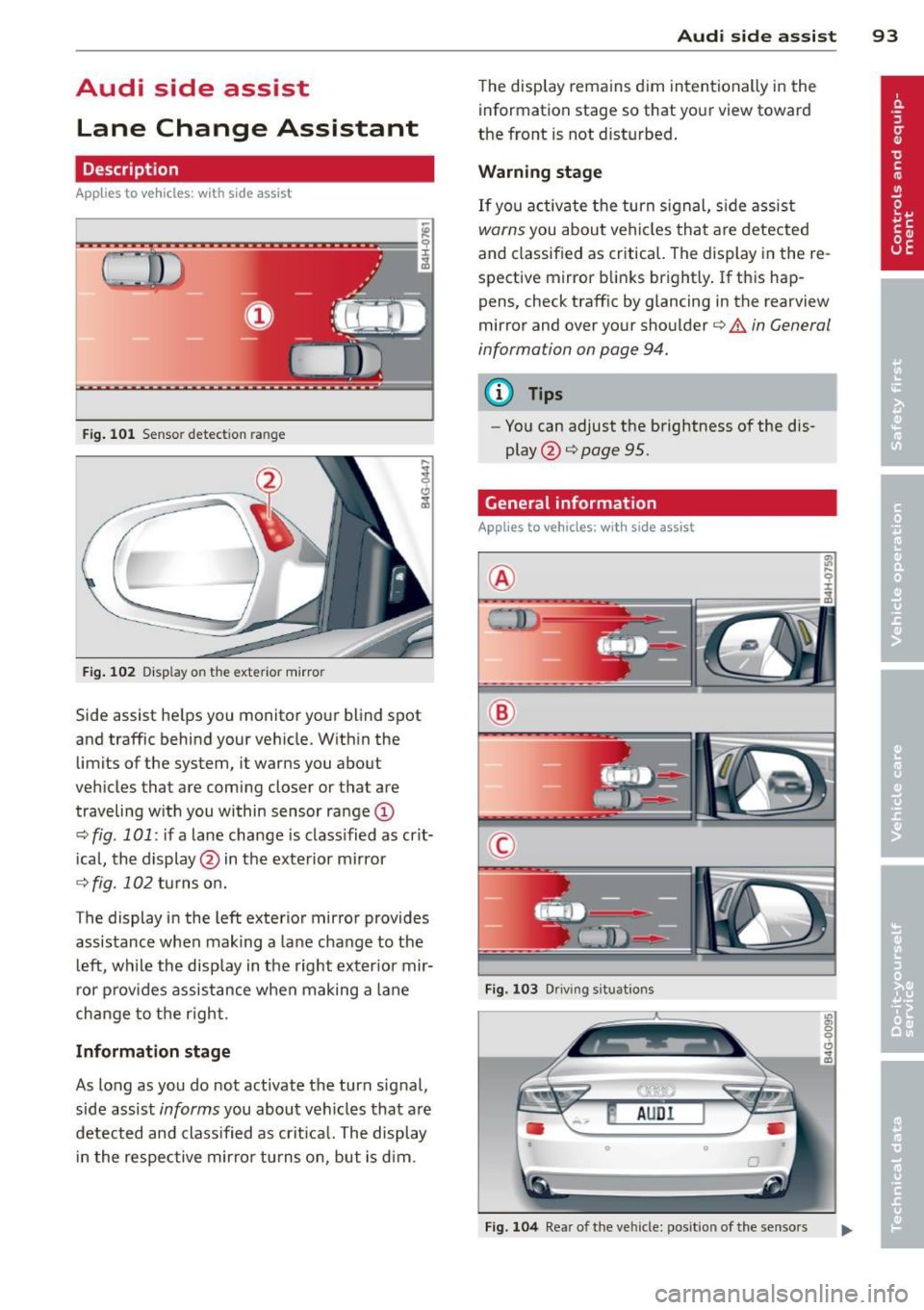
Fig. 101 Sensor detection range
Fig. 102 Display on the exterior mirror
Side assist he lps you monitor your blind spot
and traffic behind your veh icle. With in the
limits of the system, it warns you about
vehicles that are coming closer or that are
traveling w ith you within sensor range
(D
c::, fig . 101: if a lane change is class ified as crit
ical, the display@ in the exterior mirror
c::> fig. 102 turns on.
The display in the left exterior mirror provides
assistance when making a lane change to the
le ft, while the display in the right exterior mir
ror provides assistance when making a lane
change to the right.
Information stage
As long as you do not activate the turn signal,
side assist
informs you about vehicles that are
detected and classified as crit ical. The display
in the respective mirror turns on, but is d im.
Audi side assist 93
The display remains dim intentionally in the
information stage so that your view toward
the front is not disturbed .
Warning stage
If you activate the turn signal, side assist
warns you about veh icles that are detected
and classified as critical. The display in the re
spective mirror blinks brightly . If this hap
pens, check traff ic by glancing in the rearview
mirror and over your shoulder
c::> A in General
information on page 94.
@ Tips
- Yo u can adjust the brightness of the dis
play @
c::> page 95.
General information
Applies to vehicles: with side assist
®
®
©
Fig. 103 Driving situations
Fig. 104 Rear of the vehicle: position of the senso rs
Page 99 of 292
(dynamic). The goal is a high level of agility
and ability to accelerate on curves. The vehicle
is very responsive to steering.
Curve light*
The curve light adapts to driving on curves.
The pivoting action and the lighting are also
adapted to the mode.
Adaptive cruise control*
The behavior when accelerating can be adjust
ed from comfo rtable to sporty, depending on
the drive se lect mode . Adaptive cruise control
also responds to the driving behavior of the
vehicle ahead in a more conservative or sporty
manner .
Engine sound
The sound of the engine is adapted to these
l ected mode and ranges from subtle to sporty.
(D Note
-Make sure there is enough clearance
above and below the vehicle when park
in g. The height of the vehicle can change
once it is parked due to temperature
fluctuations, changes to the load condi
tions and changes to the driving modes,
which can affect clearance.
- When transporting the vehicle on a car
carrier, train, ship or by other means, on
ly tie the veh icle down at the running
surface of the tires, which is the outer
circumference. Securing the vehicle at
the axle components, suspension struts
or tow ing eyes is not permitted because
the pressure in the air suspension struts
can change during transport. The vehicle
may not be secured sufficiently if this
happens.
(D} Tips
- In some models, the maximum vehicle
speed can only be reached in the
Auto
and Dynamic modes.
- Se lecting the
Dynamic mode results in
spo rty shifting characteristics. The S
gear position engages automatically .
Audi drive select 97
-In vehicles that have dynamic steering*,
operating noise is heard when starting or
stopping the engine. This does not indi
cate a problem.
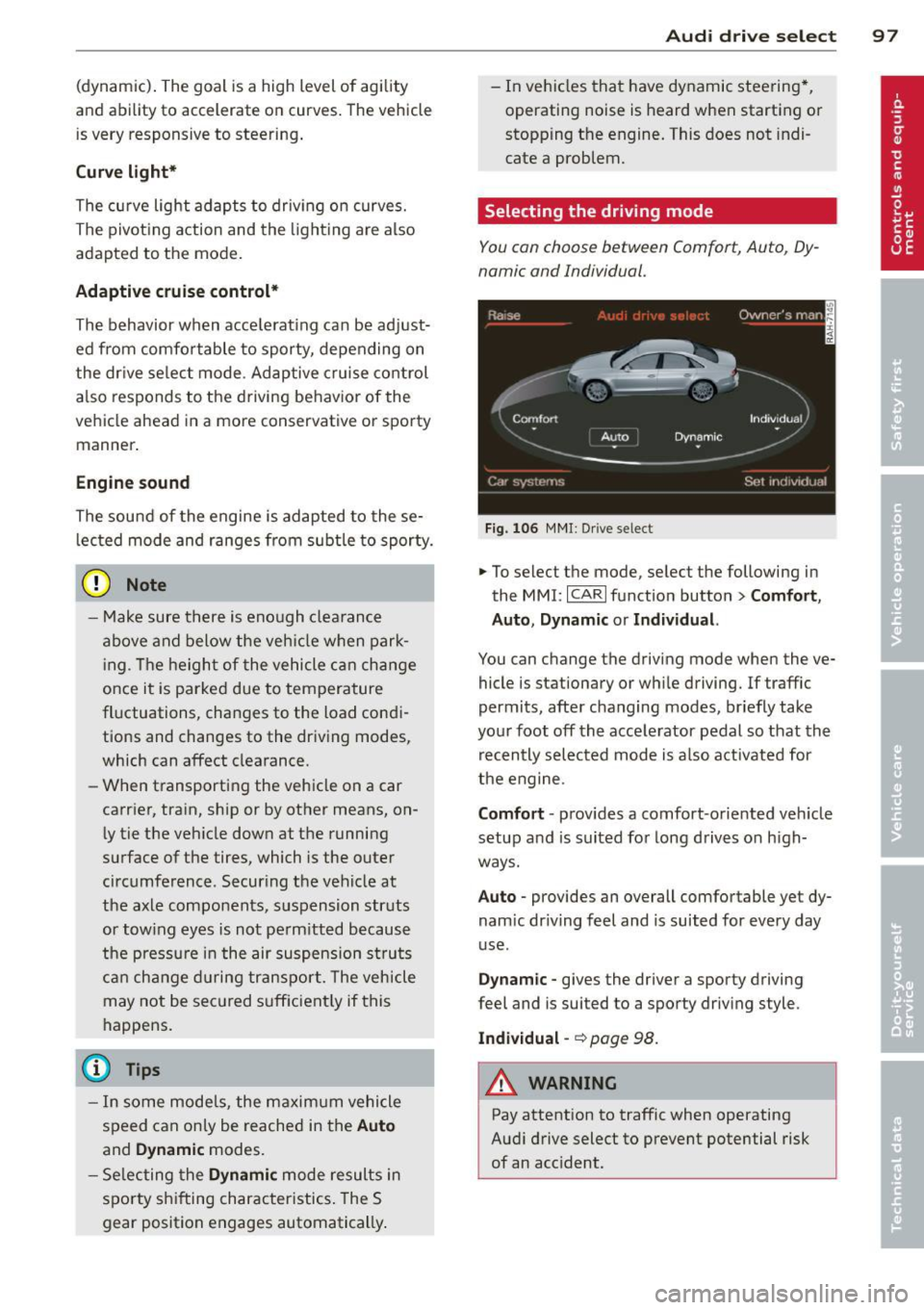
Selecting the driving mode
You can choose between Comfort, Auto, Dy
namic and Individual.
Fig. 106 MMI: Drive select
.,. To select the mode, select the following in
the
MMI: ICARI function button> Comfort,
Auto, Dynamic or Individual.
You can change the driving mode when the ve
hicle is stationary or wh ile driving. If traffic
permits, after changing modes, briefly take
your foot off the accelerator pedal so that the
recently selected mode is also activated for
the engine.
Comfort · provides a comfort-oriented veh icle
setup and is suited for long drives on h igh
ways.
Auto · provides an overall comfortable yet dy
nam ic dr iving feel and is suited for every day
use .
Dynamic -gives the driver a sporty driving
feel and is suited to a sporty driving style.
Individual -~page 98.
&_ WARNING
Pay attention to traffic when operating
Audi drive select to prevent potential risk
of an acc ident.
-
Page 111 of 292
The transmission temperature has increased
significantly due to the sporty driving manner. Drive in a less sporty manner until the tem
perature returns to the normal range and the
indicator light switches of.
[O] Transmission malfunction: You can con
tinue driving
There is a system ma lfunction in the transmis
sion. You may continue driving. Drive to your
authorized Audi dealer or qualified repair fa
cility soon to have the malfunction corrected .
[O] Transmission malfunction: You can con
tinue driving with limited functionality
There is a system malfunction in the transmis
sion . The transmission is switching to emer
gency mode. This mode only shifts into cer
tain gears or will no longer shift at a ll. The en
gine may stall. Drive to your authorized Audi
dealer or qualified repair facility immediately
to have the malfunction corrected .
[O] Transmission malfunction: Stop vehicle
and shift to P
Do not continue driving. Select the P selector
l eve r position and see you r autho rized Aud i
dealer or qualified repair facility for assis
tance.
(D Note
If the transmission switches to emergency
mode, you should take the vehicle to an
authorized Audi dealership as soon as pos
sible to have the condition corrected .
Automatic Transmission 109
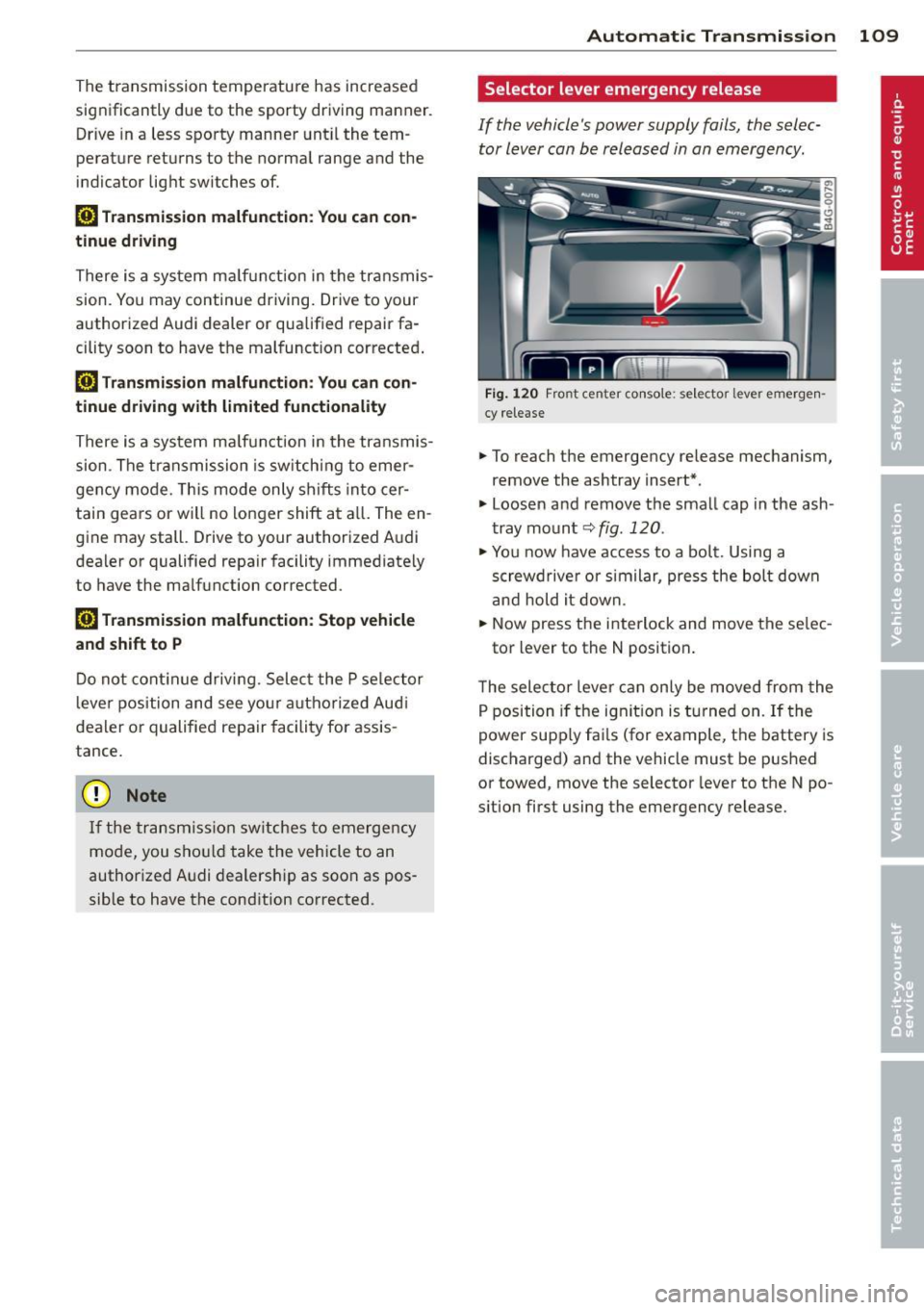
Selector lever emergency release
If the vehicle's power supply fails, the selec
tor lever can be released in an emergency.
F ig . 1 20 Fro nt center co nsole: se lector lever emerge n
cy release
.,. To reach the emergency release mechanism,
remove the ashtray insert*.
.,. Loosen and remove the small cap in the ash
tray mount
q fig. 120 .
.,. You now have access to a bolt. Using a
screwd river or similar, press the bolt down
and hold it down.
.,. Now press the interlock and move the se lec-
tor lever to the N position .
T he selector lever can only be moved from the
P position if the ignit ion is turned on . If the
power supply fai ls (for example, the battery is
discharged) and the vehicle must be pushed
or towed, move the selector lever to the N po
s ition first using the emergency release.
Page 115 of 292
example, after a collision, do not contin
ue to use the system for safety reasons.
Have it checked by your authorized Audi
dealership or authorized repa ir facility .
- Only use the rear v iew camera to assist
you if it shows a good, clear picture. For
example, the image may be affected by
the sun shin ing into the lens, dirt on the
lens or if there is a system fau lt.
- Use the rear view camera only if the lug
gage compartment lid is comp letely
closed. Ma ke su re any objects you may
h ave mounted on the luggage compart
ment lid do not block the rear view cam
era.
- The camera lens en la rges and dis torts
the field of vision. The ob ject appears
both a ltered and inaccurate on the
screen .
- In certain s ituations, peop le or objects in
the display appear closer or f urther
away:
- For objects that do not touch the
ground , such as the bumper of a
pa rked vehicle, a t railer hitch or the
rea r of a truck. Do not use the help
lines in this case.
- If driven from a leve l su rface onto a n
incline, or a downward slope.
- If driven towa rd p rotruding objects.
- If the veh icle is ca rrying too much load
in the rear.
(D Note
- Always read and follow the applicable
warnings
¢ (D in General information on
page 110.
- The orange colored orientat ion lines in
the Infotainment d isplay show the vehi
cle path depending on the steering
whee l ang le. The front of the vehicle
front sw ings out more than the rear of
the veh icle. Mainta in p lenty of distan ce
so that your outside mirro r o r a corne r of
you r vehicle does not collide with any ob
stacles.
Par king sys tem s 113
Switching on/off
App lies to vehicles: wit h parking system plus w ith rear
v iew camera
Switching on
.. Shift in to reverse or
.. press the
PwA bu tton in the center console
¢ page 111, fig . 122 . A short confirmation
tone sounds and the LED in the button turns
on .
Swi tching between the re ar view camera
and optical display
.,. Press the Graphi c control button®
¢ page 114, fig. 128 to see the optical d is
play .
.. Press the
Rearview control b utton to see the
rear view camera image.
Switching off
.,. Dr ive forward faster than 6 mph (10 km/h),
or
.. Press the
p,,1A button, or
.,. Switch the ignit ion off.
(D Tips
The visual d isplay in the left part of the
display should help you detec t the critical
vehicle areas .
Page 127 of 292
~ Fasten and wear safety belts correctly
¢page 136.
~ Always keep both feet in the footwell so
that you are in control of the vehicle at all
times.
For detailed information on how to adjust the
driver's seat, see
¢ page 54 .
A WARNING
Drivers who are unbelted, out of position
or too close to the airbag can be seriously
injured by an airbag as it unfolds. To help
reduce the risk of serious personal injury:
- Always adjust the driver's seat and the
steering wheel so that there are at least
10 inches (25 cm) between your breast
bone and the steering wheel.
- Always adjust the driver's seat and the
steering wheel so that there are at least
4 inches (10 cm) between the knees and
the lower part of the instrument panel.
- Always hold the steering wheel on the
outside of the steering wheel rim with
your hands at the 9 o'clock and 3 o'clock
positions to help reduce the risk of per
sonal injury if the driver's airbag inflates.
- Never hold the steering wheel at the
12 o'clock position or with your hands at
other positions inside the steering wheel
rim or on the steering wheel hub . Hold
ing the steering wheel the wrong way
can cause serious injuries to the hands, arms and head if the driver's airbag in
flates.
- Pointing the steering wheel toward your
face decreases the ability of the supple
mental driver's airbag to protect you in a
collision .
- Always sit in an upright position and nev
er lean against or place any part of your
body too close to the area where the air
bags are located.
- Before driving, always adjust the front
seats properly and make sure that all
passengers are properly restrained.
Driving Safely 125
-For adjustable head restraints: before
driving, always also adjust the head re
straints properly.
- Never adjust the seats while the vehicle
is moving. Your seat may move unexpect
edly and you could lose control of the ve hicle .
- Never drive with the backrest reclined or
tilted far back! The farther the backrests are tilted back, the greater the risk of in
jury due to incorrect positioning of the safety belt and improper seating posi
tion .
- Children must always ride in child seats
¢ page 168. Special precautions apply
when installing a child seat on the front
passenger seat ¢
page 142.
Proper seating position for the front
passenger
The proper front passenger seating position
is important for safe, relaxed driving.
For your own safety and to reduce the risk of
injury in the event of an accident, we recom
mend that you adjust the seat for the front
passenger to the following position :
~ Adjust the angle of the seatback so that it is
in an upright position and your back comes
in full contact with it whenever the vehicle is
moving.
~ For adjustable head restraints: adjust the
head restraint so the upper edge is as even
as possible with the top of your head. If that
is not possible, try to adjust the head re
straint so that it is as close to this position
as possible
¢ page 127. Move the head re
straint so that it is as close to the back of
the head as possible.
~ Keep both feet flat on the floor in front of
the front passenger seat.
~ Fasten and wear safety belts correctly
¢ page 136.
For detailed information on how to adjust the
front passenger's seat, see
¢ page 53. .,..
•
•
Page 131 of 292
Floor mats used in your vehicle must be at
tached to these fast eners. Proper ly securing
the floor mats will prevent them from s lid ing
into positions that could interfere with the
pedals or impair safe operation of your vehicle
in other ways .
A WARNING
Pedals that cannot move freely can resu lt
in a loss of veh icle contro l and increase the
r isk o f se rious personal injury .
- Always make sure that floor mats are
properly secured.
- Never place or install floor mats or o ther
floo r coverings in the veh icle that cannot
be properly secured in pla ce to prevent
them from slipping and inte rfering w ith
the pedals or the ability to control the
vehicle.
- Never place o r inst all floo r ma ts or o ther
floo r coverings on top of already insta l
led floor mats. Additional floor mats and
other coverings wi ll reduce the size of
the pedal a rea and interfere with the
peda ls.
- Always properly reinstall and secure f loor
mats t hat have been taken out for clean
ing.
- Always make sure that ob jects cannot
fall into the driver footwe ll wh ile the ve
hicle is moving. Objects can become
t rapped under the brake pedal and accel
erator peda l causing a loss of veh icle
control.
Stowing luggage
Loading the luggage compartment
All luggage and other objects must be prop
erly stowed and secured in the luggage com
partment.
L oose items in the luggage compar tment can
shift suddenly , changing vehicle hand ling
characterist ics. Loose items can also increase
the r isk of se rious personal injury in a sudden
vehicle maneuve r or in a collision .
Driving S afel y 129
.. Distribute the load evenly in the l uggage
compa rtment .
.. Always place and proper ly secure heavy
items in the luggage compartment as fa r
forward as possible .
.. Secure luggage using the tie -downs p rov id
ed
c:> page 64, Luggage compartment.
.. Make s ure that the rear seatback is securely
la tched in place.
A WARNING
I mproperly store d luggage or other items
can fly t hro ugh the ve hicle causing ser ious
personal injury in the event of hard brak
ing or an accident. To help reduce the risk
of ser ious persona l injury:
- Always put objects, for exam ple, luggage
or other heavy items in the luggage com
partment.
- Always secure objects in the luggage
compartment using the t ie-down hoo ks
a nd suitable straps.
A WARNING
Heavy loads w ill influence the way yo ur ve
h icle handles . To help reduce the risk of a
loss of cont ro l leading to serious pe rsonal
injury :
- Always keep in mind when transporting
heavy objects, that a change in the cen
ter of gravity can also cause changes in
veh icle han dling:
- Always distribute the load as evenly as
possible.
- Place heavy objects as far forward in
the luggage compartment as possible.
- Never exceed the Gross Axle Weight Rat
ing or the G ross Vehicle We ight Rating
specified on the sa fety comp liance stick
er on the left door jamb. Exceeding per
miss ible weight standards can cause the
ve hicle to slide and hand le different ly .
- Please observe informat ion on safe dr iv
ing
c:>page 123.
•
•
Page 140 of 292
138 Safety belts
& WARNING
Improperly positione d safety belts can
cause serious personal injury in an acci
dent.
- The shoulder belt should lie as close to
the center of the collar bone as possible
and should fit well on the body. Hold the
belt above the latch tongue and pull it
evenly across the chest so that it sits as
low as possible on the pelvis and there is
no pressure on the abdomen. The belt
should always fit snugly¢
fig. 155. Pull
on the belt to tighten if necessary.
-A loose-fitting safety belt can cause seri
ous injuries by shifting its position on
your body from the strong bones to more
vulnerable, soft tissue and cause serious injury.
-Always read and heed all WARNINGS and
other important information
¢page 136.
Pregnant women must also be correctly
restrained
The best way to protect the fetus is to make
sure that expectant mothers always wear safety belts correctly -throughout the preg
nancy.
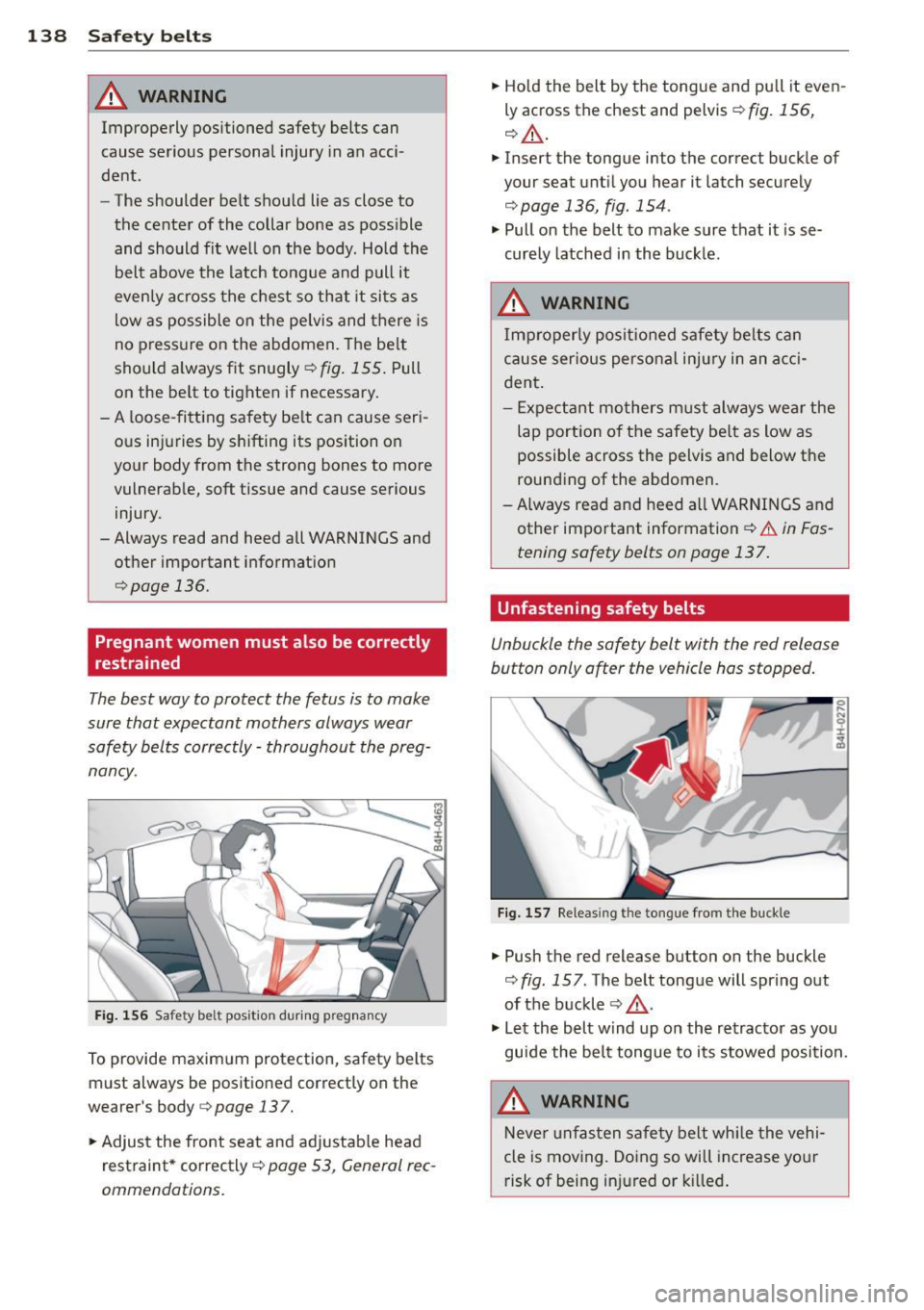
Fig. 156 Safety belt position during pregnancy
To provide maximum protection, safety belts
must always be positioned correctly on the
wearer's body
¢ page 137.
"'Adjust the front seat and adjustable head
r estraint * correctly ¢
page 53, General rec
ommendations.
"'Hold the belt by the tongue and pull it even
ly across the chest and pelvis¢
fig. 156,
¢ _&..
"' Insert the tongue into the correct buckle of
your seat until you hear it latch securely
¢page 136, fig. 154.
"' Pull on the belt to make sure that it is se
curely latched in the buckle.
& WARNING
Improperly positioned safety belts can
cause serious personal injury in an acci
dent.
-
- Expectant mothers must always wear the
lap portion of the safety belt as low as
possible across the pelvis and below the
rounding of the abdomen.
- Always read and heed all WARNINGS and
other important information¢.&.
in Fas
tening safety belts on page 137.
Unfastening safety belts
Unbuckle the safety belt with the red release
button only after the vehicle has stopped.
Fig. 157 Releas ing the tongue from the buckle
"' Push the red release button on the buckle
¢ fig. 157. The belt tongue will spring out
of the buckle
¢ ,& .
"' Let the belt wind up on the retractor as you
guide the belt tongue to its stowed position.
& WARNING
Never unfasten safety belt while the vehi
cle is moving. Doing so will increase your
risk of being injured or killed.
Page 153 of 292
-Repairs to the front passenger seat must
be performed by qualified and properly
trained workshop personnel.
- Never remove the front passenger or
driver seat from the vehicle.
- Never remove the upholstery from the
front passenger seat.
- Never disassemble or remove parts from
the seat or disconnect wires from it.
- Never carry sharp objects in your pockets
or put them on the seat. The capacitive
passenger detection mat in the front
passenger seat will not function properly
if it is punctured .
- Never carry things on your lap or carry
objects on the front passenger seat.
Such objects can influence the capaci
tance registered by the capacitive pas senger detection system, so that incor
rect information is provided to the airbag
control unit.
- Never store items under the front pas
senger seat. Parts of the Advanced Air
bag System under the passenger seat
could be damaged, preventing them and
the airbag system from working proper
ly.
- Never place seat covers or replacement
upholstery that have not been specifical
ly approved by Audi on the front seats.
- Seat covers can prevent the Advanced
Airbag System from recognizing child re
straints or occupants on the front pas
senger seat and prevent the side airbag in the seat backrest from deploying prop
erly .
- If a seat heater has been retrofitted or
otherwise added to the front passenger
seat, never install any child restraint sys
tem on this seat.
- Never use cushions, pillows, blankets, or
similar items on the front passenger
seat. The additional layers prevent the capacitive passenger detection system
from accurately measuring the capaci
tance of the child safety seat and/or the
person on the seat and thus keep the Ad-
Airbag system 151
vanced Airbag System from working
properly .
- Never place or use any electrical device
(such as a laptop, CD player, electronic
games device, power inverter or seat
heater for child seats) on the front pas
senger seat if the device is connected to
the 12-volt socket or the cigarette light er socket. Such devices can influence the
capacitance registered by the capacitive
passenger detection system, so that in
correct information is provided to the air
bag control unit.
- If you must use a child restraint on the
front passenger seat and the child re
straint manufacturer's instructions re
quire the use of a towel, foam cushion or
something else to properly position the
child restraint, make certain that the
PASSENGER AIR BAG OFF light comes
on and stays on whenever the child re
straint is installed on the front passen
ger seat.
- If the
PASSENGER AIR BAG OFF light
does not come on and stay on, immedi
ately install child restraint in a rear seat
ing position and have the airbag system
inspected by your Audi dealer.
_& WARNING ~
If the front passenger seat gets wet, dry it
immediately.
- If liquid soaks into the front passenger
seat, this can keep the airbag system
from working properly and may, for in
stance, deactivate the passenger frontal
airbag. If this happens, the
PASSENGER
AIR BAG OFF
light will come on and stay
on together with the airbag indicator
light
fl in the instrument cluster .
- If liquid is pooled on the seat, but has
not soaked in, this may also keep the air
bag system from working properly and
cause the passenger frontal airbag to be
enabled (turned on), even though there
is a properly installed child restraint sys-
tem on the seat. Wet towels or other wet .,..
•
•