2014 Alfa Romeo MiTo Date
[x] Cancel search: DatePage 6 of 280
VERY IMPORTANTREFUELLING
Petrol engines: only refuel with unleaded petrol with
octane rating (RON) not less than 95 in compliance with the
European Standard EN228.
Diesel engines: refuel only with diesel fuel conforming to
the European specification EN590. The use of other products
or mixtures may damage the engine beyond repair and
consequently invalidate the warranty, due to the damage
caused.
STARTING THE ENGINE
Petrol engines: make sure that the handbrake is engaged,
set the gear lever to neutral, fully depress the clutch without
depressing the accelerator, then turn the ignition key to AVV
and release it as soon as the engine has started.
Diesel engines: turn the ignition key to MAR and wait for
the warning lights
and
to go out; then turn the
ignition key to AVV and release it as soon as the engine has
started.
PARKING ON FLAMMABLE MATERIAL
The catalytic converter develops high temperatures during
operation. Do not park the car on grass, dry leaves, pine
needles or other flammable material: fire hazard.
RESPECTING THE ENVIRONMENT
The car is fitted with a system that carries out a continuous
diagnosis of the emission-related components in order to help
protect the environment.
ELECTRICAL ACCESSORIES
If after having purchased the car you decide to add
accessories requiring electricity (with the risk of gradually
draining the battery), contact Alfa Romeo Authorized
Services. They can calculate the overall electric requirement
and check that the car's electric system can support the
required load.
CODE card(for versions/markets, where provided)
Keep it in a safe place, not in the car. We recommend that
you always carry the electronic code provided on the CODE
card with you, in case you need to perform an emergency
start.
SCHEDULED SERVICING
Correct maintenance of the car is essential for ensuring that it
maintains its performance and its safety features, its
environmental friendliness and low running costs for a long
time to come.
THE OWNER MANUAL CONTAINS…
...important information, advice and warnings for correct use,
driving safety and maintenance of your car over time.
Particular attention should be paid to information marked
with the following symbols:
(personal safety)
(environmental protection)
(car integrity).
Page 13 of 280

CONSTANTLY ON: Low engine
oil pressure (red)
FLASHING: Engine oil deteriorated
(for versions/markets, where provided - red)
When the key is turned to MAR the warning light comes on, but should
go out as soon as the engine is started.
1. Low engine oil pressure
The warning light turns on and stays on constantly (along with a
message on the display on some versions) when the system detects that
engine oil pressure is low.
If the warning light
turns on when driving (on
some versions, together with the message on the display),
stop the car immediately and contact Alfa Romeo
Authorized Services.
2. Engine oil deteriorated
(for versions/markets, where provided)
The warning light will turn on flashing and, on some versions, with a
specific message on the display.
Depending on the versions, the warning light flashing modes are as
follows:
❒for 1 minute every two hours;
❒cycles of 3 minutes with intervals with the warning light off for 5
seconds until the oil is changed.After the first indication, at each engine start up the warning light will
continue flashing as described above until the oil is changed. On some
versions, the display shows a dedicated message together with the
warning light.
If the warning light flashes, this does not mean that the car is defective,
but simply informs the driver that it is now necessary to change the
oil as a result of regular vehicle use.
Remember that the deterioration of the engine oil is accelerated by:
❒mainly town use of the car which makes the DPF regeneration
process more frequent;
❒use of the car for short drives, in which the engine does not have
time to reach its regular operating temperature;
❒repeated interruption of the regeneration process, signalled by the
DPF warning light coming on.
If the warning light switches on, the deteriorated
engine oil must be changed as soon as possible, and
never more than 500 km from the first time that the
warning light switches on. Failure to observe the above
indications may result in severe damage to the engine and
invalidate the warranty. The activation of this warning light is not
related to the amount of oil in the engine. Therefore, never top
up with oil when the warning light starts flashing.
9GETTING TO
KNOW YOUR CARSAFETY
STARTING AND
DRIVING
IN AN EMERGENCY
SERVICING AND
MAINTENANCE
TECHNICAL
SPECIFICATIONS
INDEX
Page 24 of 280
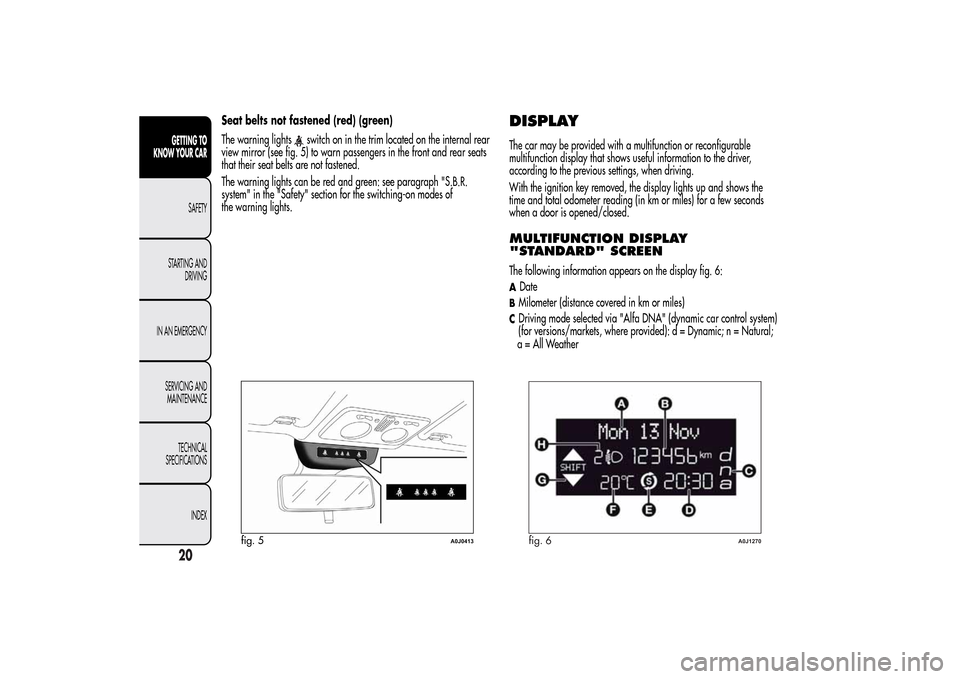
Seat belts not fastened (red) (green)
The warning lights
switch on in the trim located on the internal rear
view mirror (see fig. 5) to warn passengers in the front and rear seats
that their seat belts are not fastened.
The warning lights can be red and green: see paragraph "S.B.R.
system" in the "Safety" section for the switching-on modes of
the warning lights.
DISPLAYThe car may be provided with a multifunction or reconfigurable
multifunction display that shows useful information to the driver,
according to the previous settings, when driving.
With the ignition key removed, the display lights up and shows the
time and total odometer reading (in km or miles) for a few seconds
when a door is opened/closed.MULTIFUNCTION DISPLAY
"STANDARD" SCREENThe following information appears on the display fig. 6:ADateBMilometer (distance covered in km or miles)CDriving mode selected via "Alfa DNA" (dynamic car control system)
(for versions/markets, where provided): d = Dynamic; n = Natural;
fig. 5
A0J0413
fig. 6
A0J1270
20GETTING TO
KNOW YOUR CAR
SAFETY
STARTING AND
DRIVING
IN AN EMERGENCY
SERVICING AND
MAINTENANCE
TECHNICAL
SPECIFICATIONS
INDEX
a = All Weather
Page 27 of 280

CONTROL BUTTONS"+" or
(versions with Start&Stop system): to scroll upwards
through the screen and the related options or to increase the displayed
value fig. 10.
SET/
: press briefly to access the menu and/or go to next screen
or confirm the selection. Hold down to go back to the standard screen.
"–" or
(versions with Start&Stop system): to scroll downwards
through the screen and the related options or to decrease the displayed
value.
IMPORTANT The "+" and "–" buttons (or
and
for
versions with Start&Stop system) activate different functions according
to the following situations:
❒within the menu, they allow you to scroll up or down;
❒during settings operations, they increase or decrease values.
SETUP MENUThe menu comprises a series of options which can be selected using
the "+" and "–" buttons (or
and
for versions with
Start&Stop system) to access the different selection and setting
operations (Setup) indicated below.
Some options have a submenu. The menu can be activated by briefly
pressing the SET/
button.
The menu comprises the following options:
❒MENU
❒SPEED BEEP
❒LIGHT SENSOR (for versions/markets where provided)
❒RAIN SENSOR (for versions/markets, where provided)
❒TRIP B ACTIVATION/DATA
❒SET TIME
❒SET DATE
❒FIRST PAGE (for versions/markets where provided)
❒SEE RADIO
❒AUTOCLOSE
❒MEASUREMENT UNIT
❒LANGUAGE
❒BUZZER VOLUME
❒BUTTON VOLUME
❒SEAT BELT BEEP/BUZZ
❒SERVICE
❒AIRBAG/PASSENGER BAG
❒DAYTIME RUNNING LIGHTS
fig. 10
A0J0302
23GETTING TO
KNOW YOUR CARSAFETY
STARTING AND
DRIVING
IN AN EMERGENCY
SERVICING AND
MAINTENANCE
TECHNICAL
SPECIFICATIONS
INDEX
Page 30 of 280

Time adjustment (Clock adjustment)This function enables the clock to be set through two sub-menus:
“Time” and “Format”.
To carry out the adjustment, proceed as follows:
❒briefly press the SET/
button and two submenus ("Time" and
"Format") will be displayed;
❒press the "+" or "–" button to move between the two submenus;
❒once you have selected a sub-menu to be modified, press SET/
briefly;
❒when the “Time” submenu is entered, by briefly pressing SET/the hours flash on the display;
❒press the "+" or "−" button to adjust;
❒briefly press the SET/
button, which makes the display flash the
"minutes";
❒press the "+" or "−" button to adjust.
IMPORTANT Each press on the "+" or "−" buttons causes an increase
or decrease of one unit. Hold down the button to increase/decrease
the setting rapidly and automatically. Complete the adjustment with
single presses of the button when you approach the desired value.
❒When you select “Format”, pressing the SET/
button briefly
makes the display mode flash on the display;
❒press "+" or "–" to select “24h” or “12h”.
When you have made the required settings, briefly press the
SET/
button to go back to the submenu screen or hold the button
down to go back to the main menu screen without saving the new
settings.
Hold the SET/
button down again to return to the standard screen
or to the main menu according to where you are in the menu.
Set date (Setting the date)Using this function it is possible to change the date (day – month –
year).
Proceed as follows to start the update:
❒briefly press the SET/
button: the "year" starts flashing on the
display;
❒press the "+" or "−" button to adjust;
❒briefly press the SET/button: the "month" will flash on the
display;
❒press the "+" or "−" button to adjust;
❒briefly press the SET/button: the “day” will flash on the
display;
❒press the "+" or "−" button to adjust.
IMPORTANT Each press on the + or - buttons causes an increase or
decrease of one unit. Hold the button down to increase/decrease the
setting rapidly and automatically. Complete the setting by with single
presses of the button when you approach the required value.
Briefly press the SET/
button to go back to the menu screen or
hold the button down to go back to the standard screen without saving.
First page (Display of information on
the main screen)(for versions/markets, where provided)
This function allows you to choose the information you would like to
see on the main screen. You can view the date or the trip distance.
To make your choice, proceed as follows:
❒briefly press the SET/
button: "Initial page" will be displayed;
26GETTING TO
KNOW YOUR CAR
SAFETY
STARTING AND
DRIVING
IN AN EMERGENCY
SERVICING AND
MAINTENANCE
TECHNICAL
SPECIFICATIONS
INDEX
Page 31 of 280
❒press the SET/
button again briefly to display the "date" and
"engine info" options;
❒press "+" or "−" to select the desired view on the main screen of the
display;
❒briefly press the SET/
button to go back to the menu screen or
hold the button down to go back to the standard screen without
saving.
When the key is turned to MAR-ON and the initial check stage is over,
the display will show the information selected via the "First page"
menu function.
See radio
(audio information display)This function is used to display radio information.
❒Radio: selected radio station frequency or RDS message, automatic
tuning activation or AutoSTore;
❒CD audio/CD MP3: track number.
To show the radio information on the display ("On") or clear it ("Off"),
proceed as follows:
❒briefly press the SET/
button, the display will show "On" or
"Off" flashing depending on the previous setting;
❒press the "+" or "−" button to select;
❒briefly press the SET/button to go back to the menu screen or
hold the button down to go back to the standard screen without
saving.
Autoclose (Automatic door lock
operation with car running)When activated (On), this function locks the doors automatically when
the vehicle speed exceeds 20 km/h.
Proceed as follows to activate or deactivate this function:
❒press the SET/
button briefly to display a submenu;
❒press the SET/button briefly to make the display flash "On" or
"Off" according to what was previously set;
❒press the "+" or "−" button to select;
❒press the SET/button briefly to return to the submenu screen or
hold the button down to return to the main menu screen without
saving;
❒hold the SET/button down again to return to the standard
screen or to the main menu according to where you are in the menu.
Unit of measurement (Setting the
unit of measurement)With this function it is possible to set the measurement units through
three sub-menus: “Distance”, “Consumption” and “Temperature”.
To set the desired measurement unit, proceed as follows:
❒briefly press the SET/
button to display the three sub-menus;
❒press the "+" or "−" button to move between the three submenus;
❒once the submenu to be modified has been selected, briefly press the
SET/
button;
❒when the “Distance” submenu is entered: briefly pressing SET/
displays "km" or "mi" depending on the previous setting;
27GETTING TO
KNOW YOUR CARSAFETY
STARTING AND
DRIVING
IN AN EMERGENCY
SERVICING AND
MAINTENANCE
TECHNICAL
SPECIFICATIONS
INDEX
Page 36 of 280
VALUES DISPLAYEDRange
This indicates the indicative distance that may be travelled with the fuel
in the tank, assuming that driving conditions do not change.
The display will show the reading '-----' when the following events take
place:
❒range value lower than 50 km (or 30 mi)
❒car parked with engine running for a long period.
IMPORTANT The range can be affected by several factors: driving style
(see “Driving style” in the “Starting and driving” section), type of
route (motorway, towns and cities, mountain roads, etc.), conditions of
use (load, tyre pressures, etc.). Trip planning must therefore take the
above into account.
Distance covered
Shows the distance covered since the start of the new journey.
Average consumption
Shows the approximate average fuel consumption since the start of the
new journey.
Instantaneous consumption
This indicates the fuel consumption. The value is constantly updated.
The display will show “----”ifthecarisparked with the engine
running.Average speed
This shows the average car speed as a function of the overall time
elapsed since the start of the new journey.
Trip time
The time elapsed since the start of a new journey.
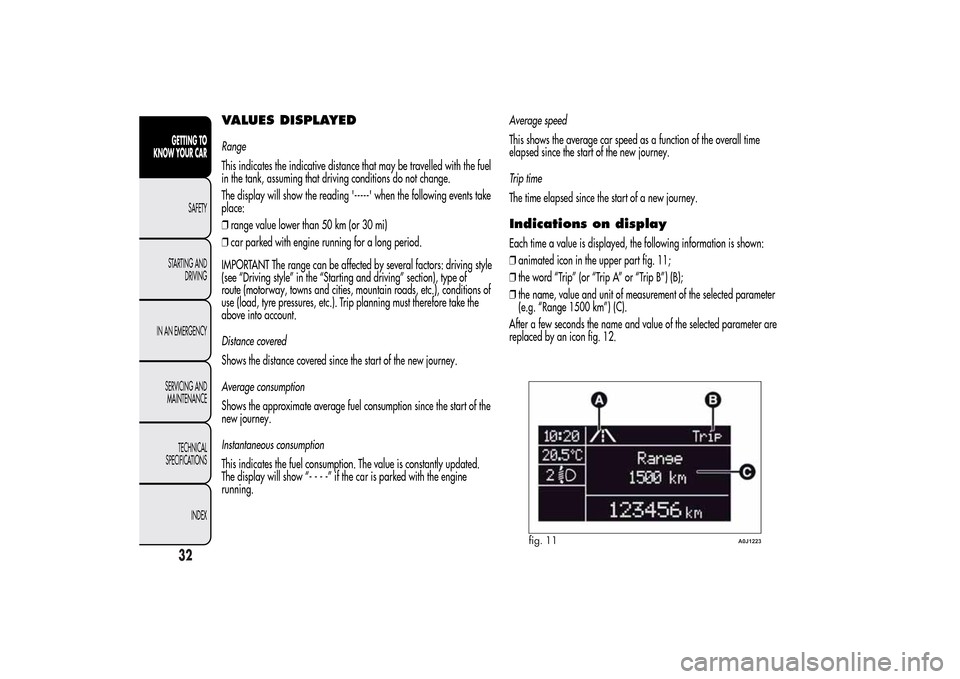
Indications on displayEach time a value is displayed, the following information is shown:
❒animated icon in the upper part fig. 11;
❒the word “Trip” (or “Trip A” or “Trip B”) (B);
❒the name, value and unit of measurement of the selected parameter
(e.g. “Range 1500 km”) (C).
After a few seconds the name and value of the selected parameter are
replaced by an icon fig. 12.
fig. 11
A0J1223
32GETTING TO
KNOW YOUR CAR
SAFETY
STARTING AND
DRIVING
IN AN EMERGENCY
SERVICING AND
MAINTENANCE
TECHNICAL
SPECIFICATIONS
INDEX
Page 47 of 280
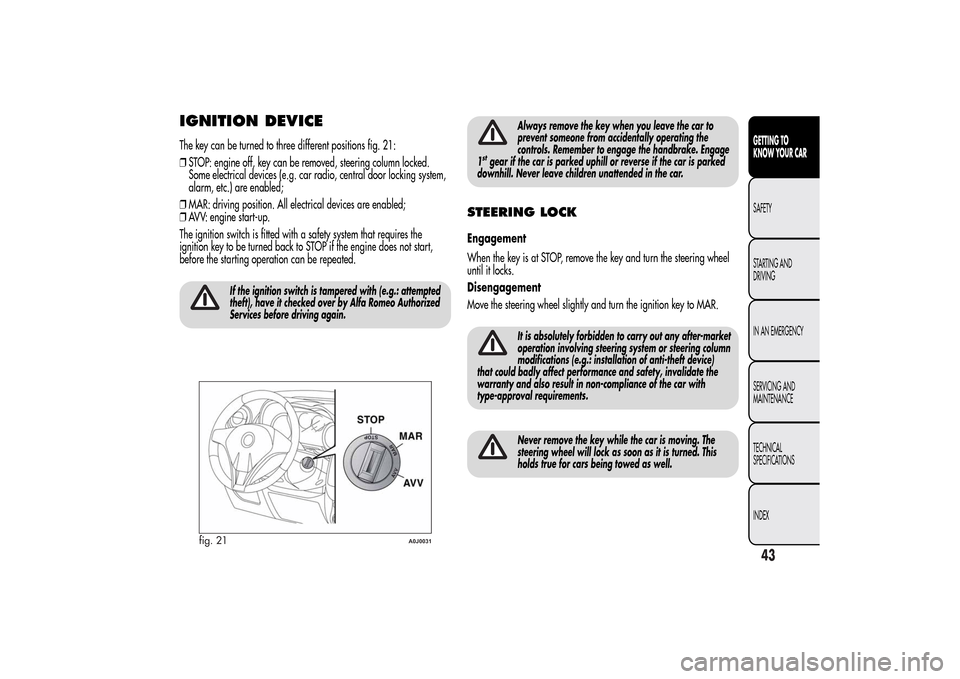
IGNITION DEVICEThe key can be turned to three different positions fig. 21:
❒STOP: engine off, key can be removed, steering column locked.
Some electrical devices (e.g. car radio, central door locking system,
alarm, etc.) are enabled;
❒MAR: driving position. All electrical devices are enabled;
❒AVV: engine start-up.
The ignition switch is fitted with a safety system that requires the
ignition key to be turned back to STOP if the engine does not start,
before the starting operation can be repeated.
If the ignition switch is tampered with (e.g.: attempted
theft), have it checked over by Alfa Romeo Authorized
Services before driving again.
Always remove the key when you leave the car to
prevent someone from accidentally operating the
controls. Remember to engage the handbrake. Engage
1
stgear if the car is parked uphill or reverse if the car is parked
downhill. Never leave children unattended in the car.
STEERING LOCKEngagement
When the key is at STOP, remove the key and turn the steering wheel
until it locks.
Disengagement
Move the steering wheel slightly and turn the ignition key to MAR.
It is absolutely forbidden to carry out any after-market
operation involving steering system or steering column
modifications (e.g.: installation of anti-theft device)
that could badly affect performance and safety, invalidate the
warranty and also result in non-compliance of the car with
type-approval requirements.Never remove the key while the car is moving. The
steering wheel will lock as soon as it is turned. This
holds true for cars being towed as well.
fig. 21
A0J0031
43GETTING TO
KNOW YOUR CARSAFETY
STARTING AND
DRIVING
IN AN EMERGENCY
SERVICING AND
MAINTENANCE
TECHNICAL
SPECIFICATIONS
INDEX