Page 194 of 363

193
uuGeneral Information on the Audio System uCompatible iPod ®, iPhone ®, and USB Flash Drives
Compatible iPod ®, iPhone® , and USB Flash Drives
•Use a recommended USB flash drive of 256 MB or higher.
• Some digital audio players may not be compatible.
• Some USB flash drives (e.g., a device with security lockout) may not work.
• Some software files may not allow for audio play or text data display.
• Some versions of MP3, WMA, or AAC formats may be unsupported.
■iPod® and iPhone ® Model Compatibility
Model
iPod ® (5th generation)
iPod classic ® 80GB/160GB (launch in 2007)
iPod classic ® 120GB (launch in 2008)
iPod classic ® 160GB (launch in 2009)
iPod nano ® (1st to 6th generation*) *launch in 2010
iPod touch ® (1st to 4th generation*) *launch in 2010
iPhone ® 3G/iPhone ® 3GS/iPhone ® 4/iPhone ® 4S
■USB Flash Drives
1iPod ® and iPhone ® Model Compatibility
This system may not work with all software versions
of these devices.
1 USB Flash Drives
Files on the USB flash drive are played in their stored
order. This order may be different from the order
displayed on your PC or device.
QRG
Index
FeaturesTOC
Page 220 of 363
Continued219
uuBluetooth ® HandsFreeLink ®u HFL Menus
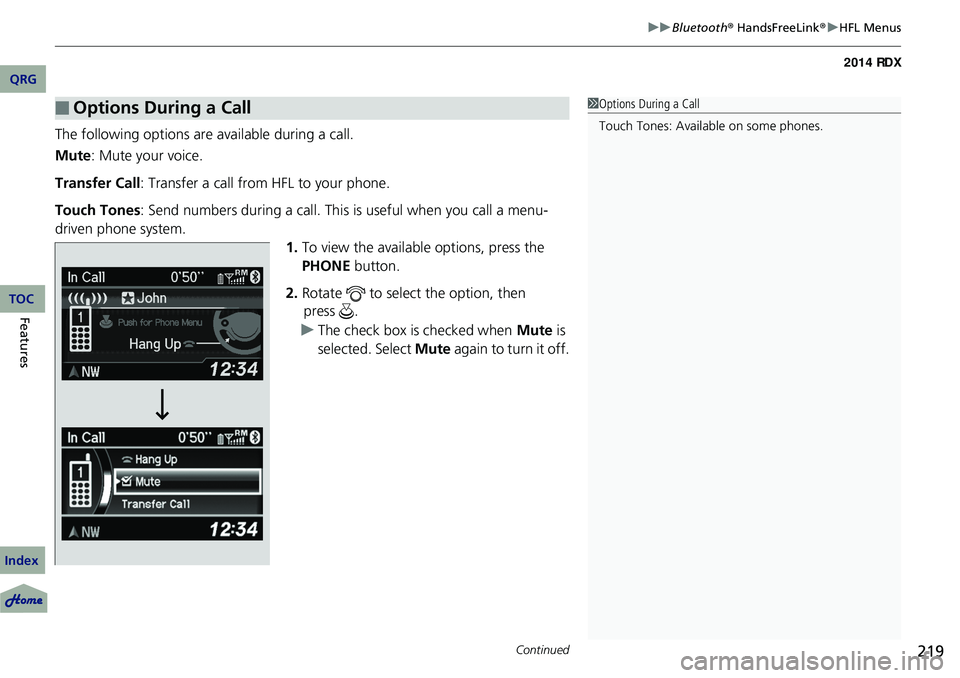
The following options ar e available during a call.
Mute : Mute your voice.
Transfer Call : Transfer a call from HFL to your phone.
Touch Tones : Send numbers during a call. This is useful when you call a menu-
driven phone system.
1.To view the availabl e options, press the
PHONE button.
2. Rotate to select the option, then
u The check box is checked when Mute is
selected. Select Mute again to turn it off.
■Options During a Call1Options During a Call
Touch Tones: Available on some phones.
QRG
Index
FeaturesTOCpress .
Page 226 of 363

225
Compass*
When you set the power mode to ON, the compass self-calibrates, and the compass
display appears.
Compass Calibration
If the compass indicates the wrong direction, or the CAL. indicator blinks, you need
to manually calibrate the system.
1.Set the power mode to ON.
2. Press and hold the SETUP button until the
display shows the compass setting menu.
3. Rotate to select Calibration, then
4. When the display changes to Calibration
Start, press .
5. Drive the vehicle slow ly in two circles.
u The compass starts to show a direction
after the calibration. The CAL. indicator
goes off.
1 Compass*
Compass operation can be affected under the
following conditions:
•Driving near power lines or stations•Crossing a bridge
•Passing a large vehicle, or driving near a large
object that can cause a magnetic disturbance
•When accessories such as antennas and roof racks
are mounted by magnets
Compass Setting Menu Items
1 Compass Calibration
Calibrate the compass in an open area.
While setting the compass:
•The BACK button returns to the previous screen.•The SETUP button cancels the setting mode.
* Not available on all models
QRG
Index
FeaturesTOC
press .
Page 228 of 363

227
Driving
This chapter discusses driving, refueling, and information on items such as accessories.
Before Driving
Driving Preparation .......................... 228
Maximum Load Limit........................ 231
Towing a Trailer Towing Preparation .......................... 233
Driving Safely with a Trailer .............. 236
Towing Your Vehicle ........................ 237
Off-Highway Driving Guidelines General Information ......................... 238
Important Safety Precautions............ 238
Avoiding Trouble ............................. 239
When Driving Starting the Engine .......................... 240 Precautions While Driving ................
242
Automatic Transmission ................... 243
Shifting ............................................ 244
Cruise Control ................................. 248
VSA® (Vehicle Stability Assist), aka ESC
(Electronic Stability Control), System .. 251
AWD (All-Wheel Drive) with Intelligent Control
System*..................................................... 253TPMS (Tire Pressure Monitoring System) ... 253Tire Pressure Monitoring System (TPMS) -
Required Federal Explanation ......... 255
Braking Brake System ................................... 257ABS (Anti-lock Brake System) ...........
259
Brake Assist System ......................... 260
Parking Your Vehicle When Stopped ................................ 261
Multi-View Rear Camera .................. 262
Refueling Fuel Information .............................. 263
How to Refuel ................................. 264
Fuel Economy .................................... 265
Improving Fuel Economy .................. 265
Accessories and Modifications Accessories ...................................... 266
Modifications................................... 266
* Not available on all models
QRG
Index2014 RDX
Page 231 of 363
230
uuBefore Driving uDriving Preparation
Driving
• Be sure items placed on the floor behind the front seats cannot roll under the
seats.
u They can interfere with the driver's ability to operate the pedals, the operation
of the seats, or the operation of the sensors under the seats.
• Everyone in the vehicle must fasten their seat belt.
2Fastening a Seat Belt P. 32
•Make sure that the indicators in the ins trument panel come on when you start the
vehicle, and go off soon after.
u Always have a dealer check the vehicle if a problem is indicated.
2 Indicators P. 68
QRG
Index
TOC
Page 232 of 363

231
uuBefore Driving uMaximum Load Limit
Continued
Maximum Load Limit
The maximum load for your ve hicle is 870 lbs (395 kg).1Maximum Load Limit
Gross Vehicle Weight Rating (GVWR):
The maximum allowable weight of the vehicle, all
occupants, all a ccessories, all cargo, and the tongue
load. 2 Specifications P. 344
Gross Axle Weight Rating (GAWR):
The maximum allowable weight of the vehicle axle. 2 Specifications P. 344
3WARNING
Overloading or improper loading
can affect handling and stability
and cause a crash in which you
can be hurt or killed.
Follow all load limits and other
loading guidelines in this manual.
QRG
Index
DrivingTOC
See Tire and Loading Information label attached to the driver's doorjamb.
This figure includes the total weight of all occupants, cargo, and accessories,
and the tongue load if you are towing a trailer.
Steps for Determining Correct Load Limit -
(1) Locate the statement “The combined weight of occupants and cargo should
never exceed XXX kg or XXX lbs.” on your vehicle's placard.
(2) Determine the combined weight of the driver and passengers that will
(3) Subtract the combined weight of the driver and passengers from XXX kg
(4) The resulting figure equals the available amount of cargo and luggage load
capaci ty. For example, if the “XXX” amount equals 1,4000 lbs. and there
will be five 150 lb. passengers in your vehicle, the amount of available
cargo and luggage load capacity is 650 lbs.
(1,400 - 750 (5 x 150) = 650 lbs.)
Label Example
or XXX lbs. be riding in your vehicle.
Page 233 of 363
232
uuBefore Driving uMaximum Load Limit
Driving
Load Limits Example
Example1
Max Load 870 lbs
(395 kg) Passenger Weight
150 lbs x 2 = 300 lbs (68 kg x 2 = 136 kg) Cargo Weight
570 lbs
(259 kg)
Example2 Max Load 870 lbs
(395 kg) Passenger Weight
150 lbs x 5 = 750 lbs (68 kg x 5 = 340 kg) Cargo Weight
120 lbs (55 kg)
QRG
Index
TOC
(5) Determine the combined weight of luggage and cargo being loaded on the
vehicle. That we ight may not safely exceed the available cargo and luggage load capacity calculated in step 4.
(6) If your vehicle will be towing a trailer, load from your trailer will be transferred
to your vehicle. Consult this manual to determine how this reduces the available cargo and luggage load capacity of your vehicle.
In addition, the total weight of the vehicle, all occupants, accessories, cargo, and trailer tongue load must not exceed the Gross Vehicle Weight Rating (GVWR) or
the Gross Axle Weight Rating (GAWR). Both are on a label on the driver's doorjamb.
Page 234 of 363

233Continued
Towing a Trailer
Towing Preparation
Your vehicle can tow a trailer if you carefully observe the load limits, use the proper
equipment, and follow the towing guidelin es. Check the load limits before driving.
■Total trailer weight
Maximum allowable weight of the trailer,
cargo, and everything in or on it must not
exceed 1,500 lbs (680 kg). Towing loads in
excess of this can seriously affect vehicle
handling and performance and can damage
the engine and drivetrain.
■Tongue load
The weight of the tongue with a fully loaded
trailer on the hitch should be approximately
10% of the total trailer weight.
• Excessive tongue load reduces front tire
traction and steering control. Too little
tongue load can make the trailer unstable
and cause it to sway.
• To achieve a proper tongue load, start by
loading 60% of the load toward the front
of the trailer and 40% toward the rear.
Readjust the lo ad as needed.
■Towing Load Limits1Towing Load Limits
Check if all loads are within limits at a public scale.
If a public scale is not av ailable, add the estimated
weight of your cargo load to the weight of your
trailer (as quoted by th e manufacturer), and the
tongue load.
Break-in Period
Avoid towing a trailer duri ng your vehicle's first 600
miles (1,000 km).
Never exceed the gross weight ratings.
Gross weight information 2 Vehicle Specifications P. 344
3WARNING
Exceeding any load limit or improperly
loading your vehicle and trailer can cause a
crash in which you can be seriously hurt or
killed.
Check the loading of your vehicle and
trailer carefully before starting to drive.
Total Load
Tongue LoadTongue Load
QRG
Index
DrivingTOC