2013 VOLVO V60 warning light
[x] Cancel search: warning lightPage 176 of 422
04 Driver support
Collision Warning with Auto Brake & Pedestrian Protection*
04
174* Option/accessory, for more information, see Introduction.
The collision warning system and City
Safety™ complement each other. For more
information on City Safety™, see page 168.
1 - Collision warningThe driver is first warned of a potentially immi-
nent collision.
The collision warning system detects pedes-
trians, stationary vehicles as well as vehicles
driving in the same direction in front of the car.
If there is a risk of collision with a pedestrian or
a vehicle, the driver's attention is attracted with
a flashing red warning signal (no. [1] in the illus-
tration on page 173) and an acoustic signal.
2 - Brake support2
If the risk of collision has increased further after
the collision warning then the brake support is
activated.
This means that the brake system is prepared
for rapid braking by applying the brakes lightly,
which may feel like a slight jolt.
If the brake pedal is depressed sufficiently
quickly then full brake function is implemented.
Brake support also reinforces the driver's brak-
ing if the system considers that the braking is
not sufficient to avoid a collision.
3 - Auto Brake2
The automatic brake function is activated last.
If in this situation the driver has not yet started
to take evasive action and the risk of collision
is imminent then the automatic braking func-
tion is deployed - this takes place irrespective
of whether or not the driver brakes. Braking
then takes place with full brake force in order
to reduce collision speed, or with limited brake
force if it is sufficient to avoid a collision.WARNING
The collision warning system does not
engage in all driving situations or traffic,
weather or road conditions. The collision
warning system does not react to vehicles
driving in another direction to the car or to
animals.
Warning only activated in the event of a high
risk for collision. This section "Function"
and the section "Limitations" inform about
limitations that the driver must be aware of
before using the Collision Warning system
with Auto Brake.
Warnings and brake interventions for
pedestrians are switched off at vehicle
speeds exceeding 80 km/h.
Warnings and brake interventions for
pedestrians do not work in darkness and
tunnels - not even when streetlights are lit.
The auto-brake function can prevent a col-
lision or reduce collision speed. To ensure
full brake performance, the driver should
always depress the brake pedal - even when
the car auto-brakes.
Never wait for a collision warning. The driver
is always responsible that the correct dis-
tance and speed are maintained - even
when the collision warning system with
auto-brake is used.
2With system Level 2 only.
ProCarManuals.com
Page 177 of 422
04 Driver support
Collision Warning with Auto Brake & Pedestrian Protection*
04
* Option/accessory, for more information, see Introduction.175 Detection of pedestrians
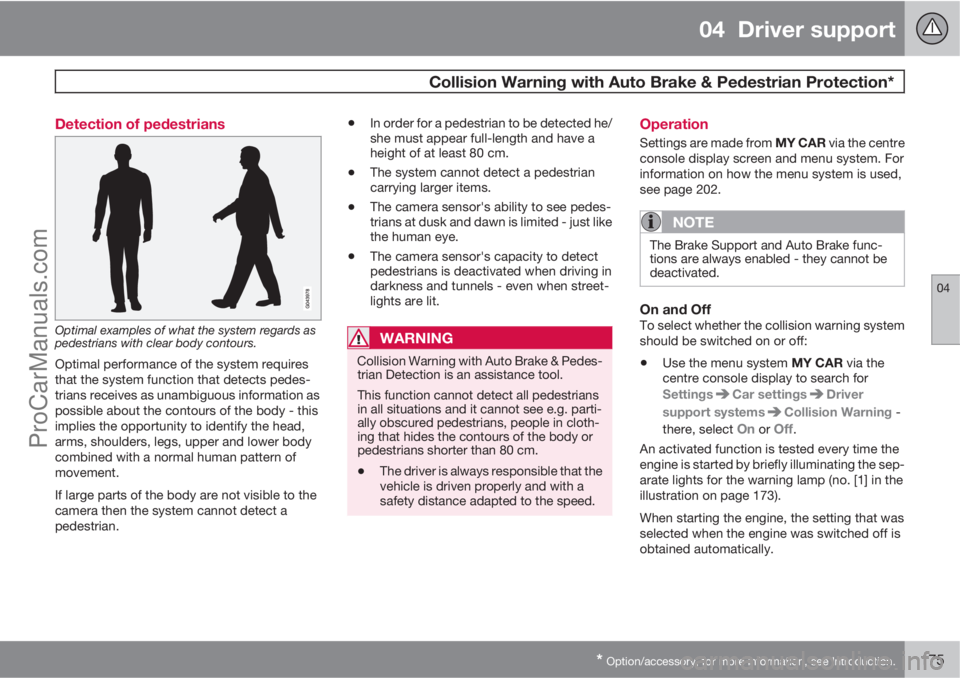
Optimal examples of what the system regards as
pedestrians with clear body contours.
Optimal performance of the system requires
that the system function that detects pedes-
trians receives as unambiguous information as
possible about the contours of the body - this
implies the opportunity to identify the head,
arms, shoulders, legs, upper and lower body
combined with a normal human pattern of
movement.
If large parts of the body are not visible to the
camera then the system cannot detect a
pedestrian.
•In order for a pedestrian to be detected he/
she must appear full-length and have a
height of at least 80 cm.
•The system cannot detect a pedestrian
carrying larger items.
•The camera sensor's ability to see pedes-
trians at dusk and dawn is limited - just like
the human eye.
•The camera sensor's capacity to detect
pedestrians is deactivated when driving in
darkness and tunnels - even when street-
lights are lit.
WARNING
Collision Warning with Auto Brake & Pedes-
trian Detection is an assistance tool.
This function cannot detect all pedestrians
in all situations and it cannot see e.g. parti-
ally obscured pedestrians, people in cloth-
ing that hides the contours of the body or
pedestrians shorter than 80 cm.
•The driver is always responsible that the
vehicle is driven properly and with a
safety distance adapted to the speed.
Operation
Settings are made from MY CAR via the centre
console display screen and menu system. For
information on how the menu system is used,
see page 202.
NOTE
The Brake Support and Auto Brake func-
tions are always enabled - they cannot be
deactivated.
On and OffTo select whether the collision warning system
should be switched on or off:
•Use the menu system MY CAR via the
centre console display to search for
Settings
Car settingsDriver
support systems
Collision Warning -
there, select
On or Off.
An activated function is tested every time the
engine is started by briefly illuminating the sep-
arate lights for the warning lamp (no. [1] in the
illustration on page 173).
When starting the engine, the setting that was
selected when the engine was switched off is
obtained automatically.
ProCarManuals.com
Page 179 of 422
04 Driver support
Collision Warning with Auto Brake & Pedestrian Protection*
04
* Option/accessory, for more information, see Introduction.177
For the sensors to work correctly, they must be
kept clear of dirt, ice and snow, and be cleaned
regularly with water and car shampoo.
NOTE
Dirt, ice and snow covering the sensors will
reduce their function and may prevent
measurement.
Limitations
Collision Warning with Auto Brake and Pedes-
trian Detection is active from approx. 4 km/h.
The visual warning signal (no. [1] in the illustra-
tion on page 173) may be difficult to notice in
the event of strong sunlight, reflections, when
sunglasses are being worn or if the driver is not
looking straight ahead. The warning sound
should therefore always be activated.
On slippery road surfaces the braking distance
is extended, which may reduce the capacity to
avoid a collision. In such situations the ABS
and DSTC systems will provide best possible
braking force with maintained stability.
NOTE
The visual warning signal can be temporarily
disengaged in the event of high passenger
compartment temperature caused by
strong sunlight for example. If this occurs
then the warning sound is activated even if
it is deactivated in the menu system.
•Warnings may not appear if the dis-
tance to the vehicle in front is small or if
steering wheel and pedal movements
are large, e.g. a very active driving style.
WARNING
Warnings and brake interventions could be
implemented late or not at all if the traffic
situation or external influences mean that
the radar or camera sensor cannot detect a
pedestrian or a vehicle in front correctly.
The sensor system has a limited range for
pedestrians and the system therefore pro-
vides effective warnings and brake inter-
ventions at vehicle speeds up to 50 km/h.
For stationary or slow-moving vehicles,
warnings and brake interventions are effec-
tive at vehicle speeds up to 70 km/h.
Warnings for stationary or slow-moving
vehicles could be disengaged due to dark-
ness or poor visibility.
Warnings and brake interventions for
pedestrians are switched off at vehicle
speeds exceeding 80 km/h.
The collision warning system uses the same
radar sensors as adaptive cruise control. For
more information on the radar sensor and its
limitations, see page 178.
If warnings are perceived as being too frequent
or disturbing then the warning distance can be
reduced. This then leads to the system provid-
ing a warning at a later stage, which reduces
the total number of warnings; see the section
"Set warning distance" on page 176.
ProCarManuals.com
Page 180 of 422
04 Driver support
Collision Warning with Auto Brake & Pedestrian Protection*
04
178* Option/accessory, for more information, see Introduction.
Collision Warning with Auto Brake is tempo-
rarily deactivated with reverse gear engaged.
Collision Warning with Auto Brake is not acti-
vated at low speeds - under 4 km/h, which is
why the system does not intervene in situations
where the car is approaching a vehicle in front
very slowly, e.g. when parking.
In situations where the driver demonstrates
active, aware driving behaviour, a collision
warning may be postponed slightly in order to
keep unnecessary warnings to a minimum.
When Auto Brake has prevented a collision
with a stationary object the car remains sta-
tionary for a maximum of 1.5 seconds. If the car
is braked for a vehicle in front that is moving,
then speed is reduced to the same speed as
that maintained by the vehicle in front.
On a car with manual gearbox the engine stops
when Auto Brake has stopped the car, unless
the driver manages to depress the clutch pedal
beforehand.
Camera sensor limitationsThe car’s camera sensor is also used - as well
as by Collision Warning with Auto Brake - by
the functions:
•Automatic main/dipped beam dimming -
see page 88
•Road sign information - see page 148
•Driver Alert Control – see page 182
•Lane Departure Warning – see page 185.
NOTE
Keep the windscreen surface in front of the
camera sensor clean from ice, snow, mist
and dirt.
Do not attach or fit anything to the wind-
screen in front of the camera sensor, as this
could reduce or prevent the function of one
or more camera-dependent systems.
The camera sensors have limitations similar to
the human eye, i.e. they "see" worse in dark-
ness, heavy snowfall or rain and in thick fog for
example. Under such conditions the functions
of camera-dependent systems could be sig-
nificantly reduced or temporarily disengaged.
Strong oncoming light, reflections in the car-
riageway, snow or ice on the road surface, dirty
road surfaces or unclear lane markings could
also significantly reduce camera sensor func-
tion when it is used to scan the carriageway
and detect pedestrians and other vehicles.
The field of vision of the camera sensor is lim-
ited, which is why pedestrians and vehicles
cannot be detected in some situations, or they
are detected later than anticipated.
During very high temperatures the camera is
temporarily switched off for about 15 minutesafter the engine is started in order to protect
camera functionality.
Fault tracing and action
If the display shows the message Windscreen
Sensors blocked then this means that the
camera sensor is blocked and cannot detect
pedestrians, vehicles or road markings in front
of the car.
At the same time, this means that - besides
Collision Warning with Auto Brake - the Auto-
matic main/dipped beam dimming, Road sign
information, Driver Alert Control and Lane
Departure Warning functions will not have full
functionality either.
The following table presents possible causes
for a message being shown along with the
appropriate action.
ProCarManuals.com
Page 193 of 422

04 Driver support
Park assist camera*
04
* Option/accessory, for more information, see Introduction.191 General
The parking camera is an assist system and is
activated when reverse gear is engaged (can
be changed in the settings menu, see
page 202).
The camera image is shown on the centre con-
sole's screen.
NOTE
When a towbar is configured with the car's
electrical system, the protrusion of the tow-
bar is included when the function measures
the parking space.
WARNING
•The parking camera serves as an aid. It
does not relieve the driver of responsi-
bility when reversing.
•The camera has blind spots, where
obstacles cannot be detected.
•Be aware of people and animals in the
vicinity of the car.
Function and operation
CAM button location.
The camera shows what is behind the car and
if something appears from the sides.
The camera shows a wide area behind the car
and part of the bumper and any towbar.
Objects on the screen may appear to tilt slightly
- this is normal.
NOTE
Objects on the display screen may be closer
to the car than they appear to be on the
screen.
If another view is active the parking camera
system takes over automatically and the cam-
era image is displayed on the screen.When reverse gear is engaged two unbroken
lines are shown graphically which illustrate
where the car's rear wheels will roll with the
current steering wheel angle, this facilitates
tight parking, reversing into tight spaces and
for hitching a trailer. The car’s approximate
external dimensions are illustrated by means of
two dashed lines. These help lines can be
switched off in the settings menu.
If the car is also equipped with parking assis-
tance sensors* then their information is dis-
played graphically as coloured fields in order to
illustrate the distance to detected obstacles,
see page 188.
The camera is active approx. 5 seconds after
reverse gear has been disengaged or until the
car's speed exceeds 10 km/h.
Camera location next to the opening handle.
ProCarManuals.com
Page 197 of 422

04 Driver support
BLIS* – Blind Spot Information System
04
* Option/accessory, for more information, see Introduction.195 Activate/deactivate
Button for activating/deactivating.
BLIS is activated when the engine is started.
The indicator lamps in the door panels flash
three times when BLIS is activated.
The system can be deactivated/activated after
starting the engine with one press on the
BLIS button.
Some combinations of the selected equipment
leave no vacant space for a button in the centre
console - in which case the function is handled
by the car's menu system MY CAR under
Settings
Car settingsBLIS. (For a
description of the menu system - see
page 202).When BLIS is deactivated, the lamp in the but-
ton goes out and a message is shown in the
instrument panel display.
When BLIS is activated the light in the button
illuminates, a new text message is shown on
the display and the indicator lamps in the door
panels flash 3 times. Press the OK button to
delete the text message. (For a description of
messages - see page 200).
When BLIS operates
The system operates when the car is driven at
a speed above 10 km/h.
OvertakingThe system is designed to react if:
•you overtake another vehicle at a speed of
up to 10 km/h faster than the other vehicle
•you are overtaken by a vehicle travelling up
to 70 km/h faster than you are travelling.
WARNING
BLIS does not work in sharp bends.
BLIS does not work when the car is revers-
ing.
A wide trailer coupled to the car can conceal
other vehicles in adjacent lanes. It can pre-
vent the vehicle in the screened area from
being detected by BLIS.
Daylight and darknessIn daylight the system reacts to the shape of
the surrounding vehicles. The system is
designed to detect motor vehicles such as
cars, trucks, buses and motorcycles.
In darkness the system reacts to the head-
lamps of surrounding vehicles. If the head-
lamps of surrounding vehicles are not switched
on then the system does not detect the vehi-
cles. This means for example that the system
does not react to a trailer without headlamps
which is towed behind a car or truck.
WARNING
The system does not react to cyclists or
moped riders.
The BLIS cameras have limitations similar to
those of the human eye, i.e. they do not
"see" as well e.g. in heavy snowfall, against
strong light or in thick fog.
ProCarManuals.com
Page 226 of 422

05 Comfort and driving pleasure
Trip computer
05
224* Option/accessory, for more information, see Introduction.
General
Information display and controls.
OK - confirms.
Thumbwheel – browse between menus
and options in the trip computer list.
RESET – resets.
The trip computer's menu is in a variable loop.
One of the menu options is a blank display - it
also marks the beginning/end of the loop.
Functions
NOTE
If a warning message appears when the trip
computer is used then the message must
first be acknowledged before the trip com-
puter can be reactivated. Acknowledge the
warning message by pressing OK.
To change unit for distance and speed - go to
MY CAR
SettingsSystem options
Distance and fuel units, see page 202.
Average speedAverage speed is calculated from the last
resetting. Reset using RESET.
InstantaneousCurrent fuel consumption is calculated every
second. The information on the display is
updated every couple of seconds. When the
car is stationary, "
----" appears on the display.
AverageAverage fuel consumption is calculated from
the last resetting. Reset using RESET.
NOTE
There may be a slight error in the reading if
a fuel-driven supplementary and/or parking
heater* has been used.
Km to empty tankThe calculation is based on the average fuel
consumption over the last 30 km and the
remaining driveable fuel quantity. The display
shows the approximate distance that can be
driven with the fuel quantity remaining in the
tank.
An economic driving style generally results in a
longer driving distance. For more information
on how fuel consumption can be influenced,
see page 11.
No guaranteed range remains when the display
shows "
---- km to empty tank". Refuel as
soon as possible.
NOTE
There may be a slight error in the reading if
the driving style has been changed.
Resetting1.
Select --- km/h average speed or --.- l/
100km average.
ProCarManuals.com
Page 230 of 422
05 Comfort and driving pleasure
Comfort inside the passenger compartment
05
228* Option/accessory, for more information, see Introduction.
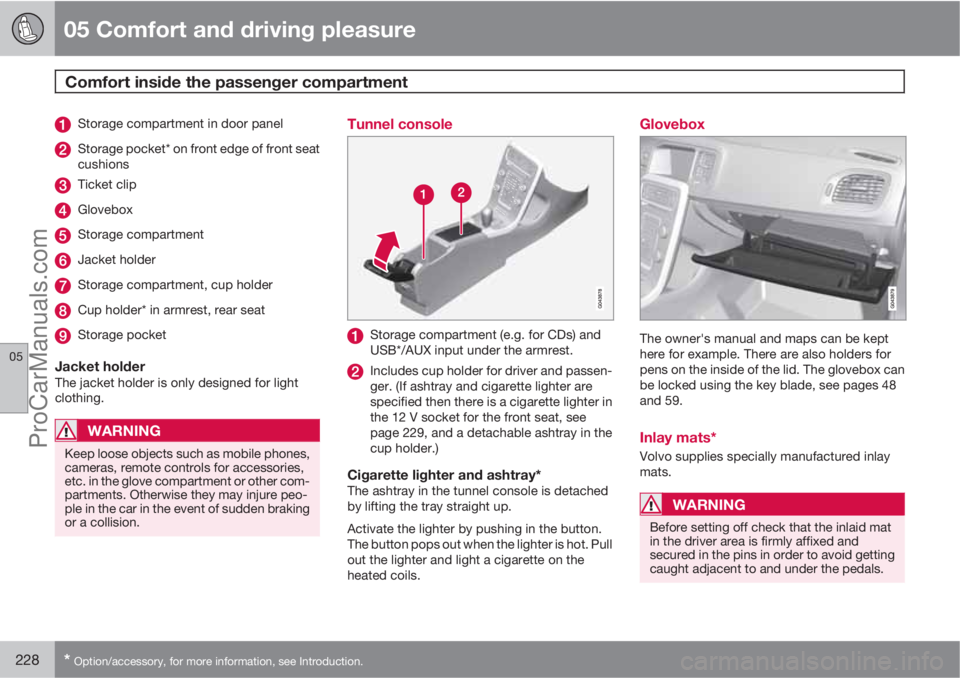
Storage compartment in door panel
Storage pocket* on front edge of front seat
cushions
Ticket clip
Glovebox
Storage compartment
Jacket holder
Storage compartment, cup holder
Cup holder* in armrest, rear seat
Storage pocket
Jacket holderThe jacket holder is only designed for light
clothing.
WARNING
Keep loose objects such as mobile phones,
cameras, remote controls for accessories,
etc. in the glove compartment or other com-
partments. Otherwise they may injure peo-
ple in the car in the event of sudden braking
or a collision.
Tunnel console
Storage compartment (e.g. for CDs) and
USB*/AUX input under the armrest.
Includes cup holder for driver and passen-
ger. (If ashtray and cigarette lighter are
specified then there is a cigarette lighter in
the 12 V socket for the front seat, see
page 229, and a detachable ashtray in the
cup holder.)
Cigarette lighter and ashtray*The ashtray in the tunnel console is detached
by lifting the tray straight up.
Activate the lighter by pushing in the button.
The button pops out when the lighter is hot. Pull
out the lighter and light a cigarette on the
heated coils.
Glovebox
The owner's manual and maps can be kept
here for example. There are also holders for
pens on the inside of the lid. The glovebox can
be locked using the key blade, see pages 48
and 59.
Inlay mats*
Volvo supplies specially manufactured inlay
mats.
WARNING
Before setting off check that the inlaid mat
in the driver area is firmly affixed and
secured in the pins in order to avoid getting
caught adjacent to and under the pedals.
ProCarManuals.com