2013 VOLVO V60 change time
[x] Cancel search: change timePage 170 of 422
04 Driver support
City Safety™
04
168* Option/accessory, for more information, see Introduction.
General
City Safety™ is a function for helping the driver
to avoid a collision when driving in queues,
amongst other things, when changes in the
traffic ahead, combined with a lapse in atten-
tion, could lead to an incident.
The function is active at speeds
under50 km/h and it helps the driver by auto-
matically braking the car in the event of immi-
nent risk of collision with vehicles in front,
should the driver not react in time by braking
and/or steering away.
City Safety™ is activated in situations where
the driver should have started braking earlier,
which is why it cannot help the driver in every
situation.
City Safety™ is designed to be activated as
late as possible in order to avoid unnecessary
intervention.
City Safety™ must not be used as an excuse
for the driver to change his/her driving style. If
the driver solely relies on City Safety™ to do
the braking, there will be a collision sooner or
later.
The driver or passengers normally only notice
City Safety™ if a situation arises where the car
is extremely close to being in a collision.If the car is also equipped with a Collision
Warning function with Auto Brake*, these two
systems complement each other. For more
information on Collision Warning function with
Auto Brake, see page 173.
IMPORTANT
Maintenance and replacement of City
Safety™ components must only be per-
formed by a workshop - an authorised Volvo
workshop is recommended.
WARNING
City Safety™ does not engage in all driving
situations or traffic, weather or road condi-
tions.
City Safety™ does not react to vehicles
driving in a different direction from the car,
to small vehicles, motorcycles and bicycles
or to humans and animals.
City Safety™ can prevent collision at a
speed difference of less than 15 km/h - at a
higher speed difference, it is only possible
to reduce collision speed. In order to obtain
full brake function, the driver must depress
the brake pedal.
Never wait for City Safety™ to engage. The
driver always bears responsibility for main-
taining the proper distance and speed.
Function
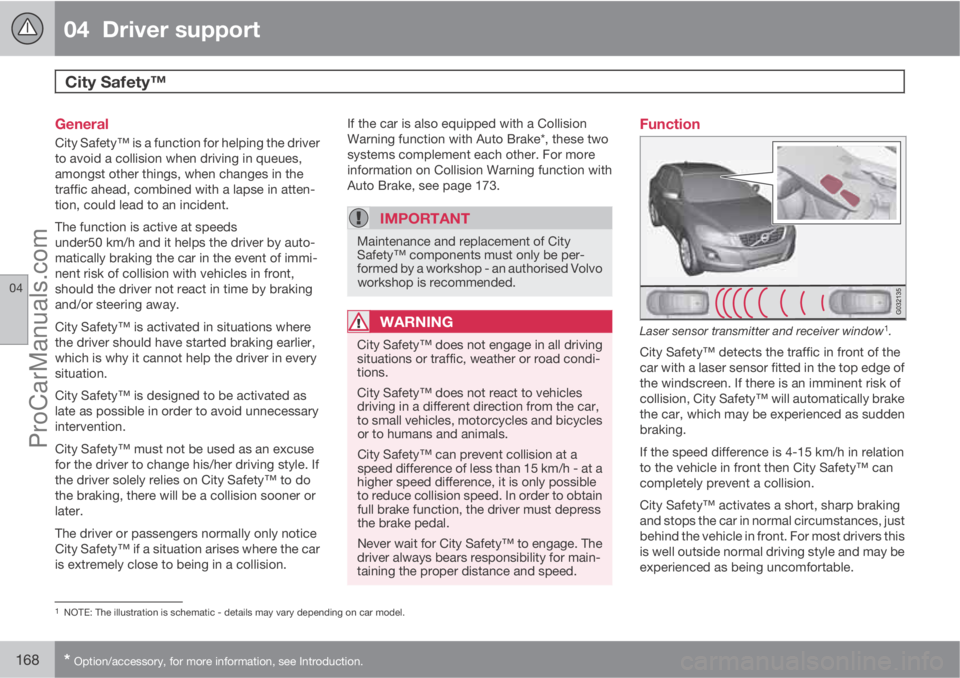
Laser sensor transmitter and receiver window1.
City Safety™ detects the traffic in front of the
car with a laser sensor fitted in the top edge of
the windscreen. If there is an imminent risk of
collision, City Safety™ will automatically brake
the car, which may be experienced as sudden
braking.
If the speed difference is 4-15 km/h in relation
to the vehicle in front then City Safety™ can
completely prevent a collision.
City Safety™ activates a short, sharp braking
and stops the car in normal circumstances, just
behind the vehicle in front. For most drivers this
is well outside normal driving style and may be
experienced as being uncomfortable.
1NOTE: The illustration is schematic - details may vary depending on car model.
ProCarManuals.com
Page 175 of 422
04 Driver support
Collision Warning with Auto Brake & Pedestrian Protection*
04
* Option/accessory, for more information, see Introduction.173 General
"Collision Warning with Auto Brake & Pedes-
trian Detection" is an aid to assist the driver
when there is a risk of colliding with a pedes-
trian or vehicle in front that is stationary or
moving in the same direction.
Collision Warning with Auto Brake & Pedestrian
Detection is activated in situations where the
driver should have started braking earlier,
which is why it cannot help the driver in every
situation.
Collision Warning with Auto Brake & Pedestrian
Detection is designed to be activated as late as
possible in order to avoid unnecessary inter-
vention.
Collision Warning with Auto Brake & Pedestrian
Detection may prevent a collision or reduce the
collision speed.
Collision Warning with Auto Brake & Pedestrian
Detection must not be used as an excuse for
the driver to change his/her driving style. If the
driver solely relies on Collision Warning with
Auto Brake to do the braking, there will be a
collision sooner or later.
Two system levelsDepending on how the car equipped, the Col-
lision Warning with Auto Brake & Pedestrian
Detection function may appear in two variants:
Level 1 and Level 2.
Level 1The driver is merely warned of occurring obsta-
cles by means of visual and acoustic signals -
no automatic braking intervenes, the driver
must himself brake.
Level 2The driver is warned of occurring obstacles by
means of visual and acoustic signals - the car
is braked automatically if the driver himself
does not act within a reasonable time.
IMPORTANT
Maintenance of components included in
Collision Warning with Auto Brake & Pedes-
trian Detection must only be carried out in a
workshop - an authorised Volvo workshop
is recommended.
Function
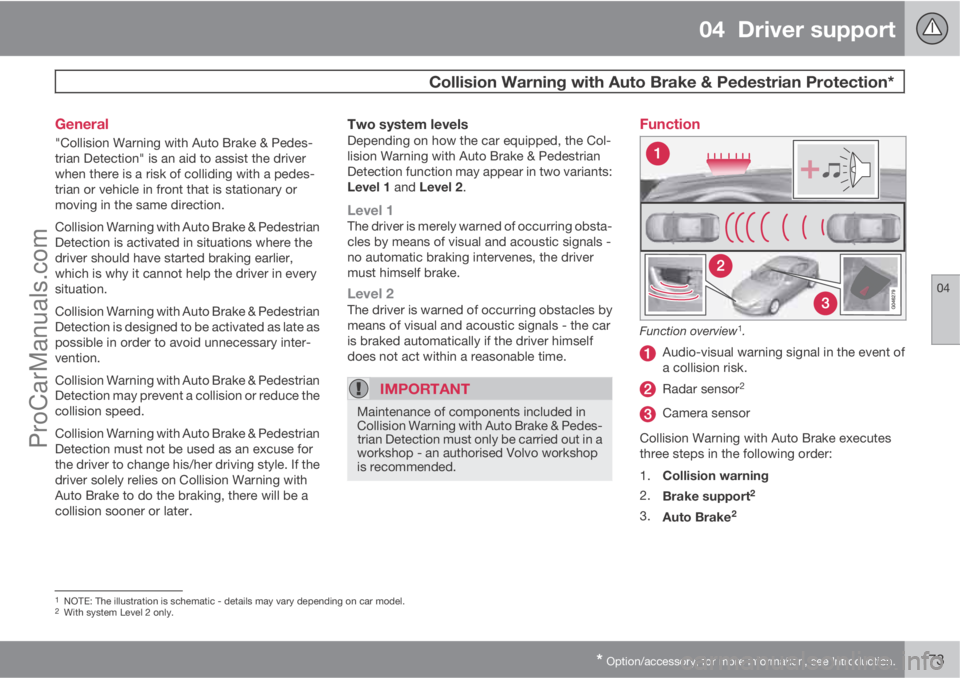
Function overview1.
Audio-visual warning signal in the event of
a collision risk.
Radar sensor2
Camera sensor
Collision Warning with Auto Brake executes
three steps in the following order:
1.
Collision warning
2.
Brake support
2
3.
Auto Brake2
1NOTE: The illustration is schematic - details may vary depending on car model.2With system Level 2 only.
ProCarManuals.com
Page 178 of 422

04 Driver support
Collision Warning with Auto Brake & Pedestrian Protection*
04
176* Option/accessory, for more information, see Introduction.
Activating/deactivating warning signalsThe warning lamp (no. [1] in the illustration on
page 173) is activated automatically when the
engine is started if Collision Warning is ena-
bled.
The warning sound can be activated/deacti-
vated separately:
•Select On or Off in the menu system MY
CAR under Settings
Car settings
Driver support systemsCollision
Warning
Warning sound.
Set warning distanceThe warning distance regulates the distance at
which the visual and acoustic warnings are
deployed.
•Select one of the options from Long,Normal or Short in the menu system MY
CAR under Settings
Car settings
Driver support systemsCollision
Warning
Warning distance.
The warning distance determines the system's
sensitivity. Warning distance
Long provides an
earlier warning. First test with Long and if this
setting produces too many warnings, which
could be perceived as irritating in certain sit-uations, then change to warning distance
Normal.
Only use warning distance
Short in excep-
tional cases, e.g. for dynamic driving.
NOTE
When the adaptive cruise control is in use
the warning lamp and warning sound will be
used by the cruise control even if the colli-
sion warning system is switched off.
The collision warning system warns the
driver in the event of a risk of a collision, but
the function cannot shorten driver reaction
time.
In order for the collision warning system to
be effective, always drive with the Distance
Alert set at time interval 4 – 5. see
page 165.
NOTE
Even if the warning distance has been set toLong warnings could be perceived as being
late in certain situations, e.g. when there are
large differences in speed or if vehicles in
front brake heavily.
WARNING
No automatic system can guarantee
100 % correct function in all situations.
Therefore, never test the Auto Brake system
by driving at people or vehicles - this may
cause severe damage and injury and risk
lives.
Checking settingsThe settings required can be controlled on the
centre console display screen. Search with the
menu system MY CAR under Settings
Car
settings
Driver support systems
Collision Warning, see page 202.
Maintenance
Camera and radar sensor3.
3NOTE: The illustration is schematic - details may vary depending on car model.
ProCarManuals.com
Page 203 of 422
05 Comfort and driving pleasure
Menus and messages
05
201
NOTE
If a warning message appears while you are
using the trip computer, the message must
be read (press OK) before the previous
activity can be resumed.
MessageSpecification
Stop safelyAStop and switch off the
engine. Serious risk of
damage - consult a
workshop
B.
Stop engineAStop and switch off the
engine. Serious risk of
damage - consult a
workshop
B.
Service urgentAContact a workshopB to
check the car immedi-
ately.
Service
requiredAContact a workshopB to
check the car as soon
as possible.
See manualARead the owner's man-
ual.
Book time for
maintenanceTime to book regular
service - contact a
workshop
B.
MessageSpecification
Time for regular
maintenanceTime for regular service
- contact a workshopB.
The timing is deter-
mined by the number of
kilometres driven, num-
ber of months since the
last service, engine run-
ning time and oil grade.
Maintenance
overdueIf the service intervals
are not followed then
the warranty does not
cover any damaged
parts - contact a work-
shop
B.
Transmission
oil Change nee-
dedContact a workshopB to
check the car as soon
as possible.
Transmission
performance
lowThe gearbox cannot
handle full capacity.
Drive carefully until the
message clears
C.
If shown repeatedly -
contact a workshop
B.
MessageSpecification
Transmission
hot Reduce
speedDrive more smoothly or
stop the car in a safe
manner. Disengage the
gear and run the engine
at idling speed until the
message clears
C.
Transmission
hot Stop safelyCritical fault. Stop the
car immediately in a
safe manner and con-
tact a workshop
B.
Temporarily
OFFAA function has been
temporarily switched
off and is reset auto-
matically while driving
or after starting again.
Low battery
Power save
modeThe audio system is
switched off to save
energy. Charge the bat-
tery.
APart of message, shown together with information on where
the problem has arisen.
BAn authorised Volvo workshop is recommended.CFor more messages concerning automatic transmission, see
page 125.
ProCarManuals.com
Page 213 of 422
05 Comfort and driving pleasure
Climate control
05
* Option/accessory, for more information, see Introduction.211
severely contaminated environment, it may be
necessary to replace the filter more often.
NOTE
There are different types of passenger com-
partment filter. Make sure that the correct
filter is fitted.
Clean Zone Interior Package (CZIP)*This option keeps the passenger compartment
clear of allergy and asthma inducing sub-
stances. For more information on CZIP, see the
brochure included with the purchase of the car.
The following is included:
•An enhanced fan function that means that
the fan starts when the car is opened with
the remote control key. The fan fills the
passenger compartment with fresh air. The
function starts when required and is dis-
engaged automatically after a time or when
one of the passenger compartment doors
is opened. The amount of time the fan runs
is reduced gradually due to reduced need
up until the car is 4 years old.
•The air quality system IAQS is a fully auto-
matic system that cleans the air in the pas-
senger compartment from contaminants
such as particles, hydrocarbons, nitrous
oxides and ground-level ozone.
NOTE
To keep the CZIP standard in cars with CZIP
the IAQS filter must be changed after
15 000 km or once per year depending on
whichever occurs first. However, up to
75 000 km over 5 years. In cars without CZIP
and where the customer does not want to
keep the CZIP standard the IAQS filter must
be changed at a regular service.
Use of tested materials in the interior
equipment.
The materials have been developed in order to
minimise the quantity of dust in the passenger
compartment and they contribute to making
the passenger compartment easier to keep
clean. The carpets in both the passenger com-
partment and the cargo area are removable
and easy to remove and clean. Use cleaning
agents and car care products recommended
by Volvo, see page 363.
Menu settingsIt is possible to activate/deactivate or change
the default settings for four of the climate con-
trol system's functions via the centre console.
For general information about menu naviga-
tion, see page 203:
•Fan speed in automatic mode*, see
page 216.
•Recirculation timer for passenger com-
partment air, see page 217.
•Automatic rear window defrosting, see
page 104.
•Air quality system IAQS*, see page 217
The climate control system's functions can be
reset to the default settings via the menu sys-
tem in MY CAR and this is carried out under:
Settings
Climate settingsReset
climate settings.
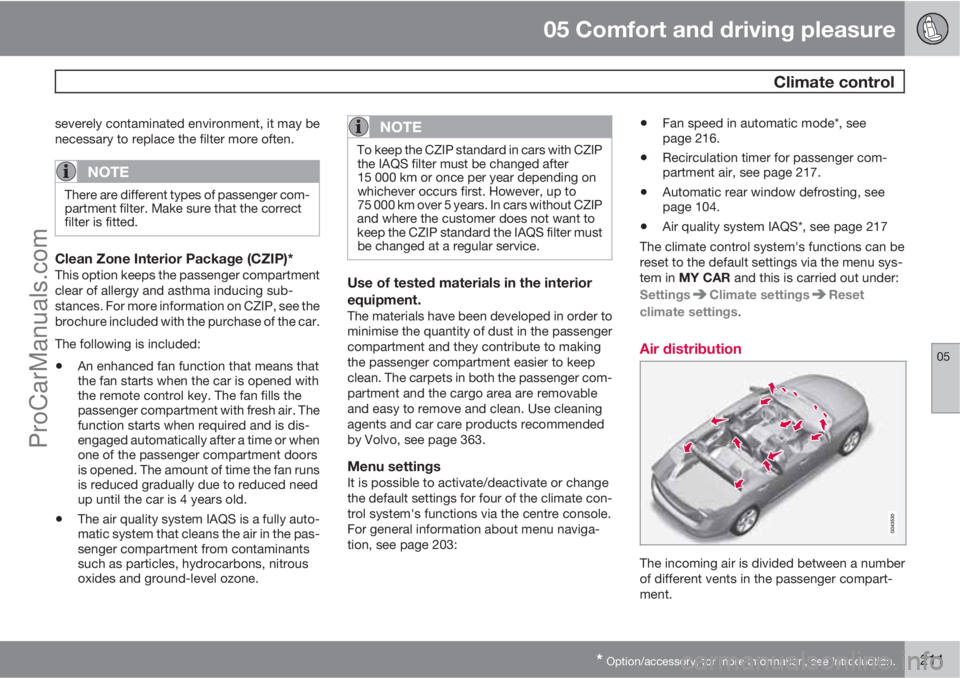
Air distribution
The incoming air is divided between a number
of different vents in the passenger compart-
ment.
ProCarManuals.com
Page 228 of 422
05 Comfort and driving pleasure
Adapting driving characteristics
05
226* Option/accessory, for more information, see Introduction.
Active chassis - Four-C*
Active chassis, Four-C (Continously Controlled
Chassis Concept), regulates the characteris-
tics of the shock absorbers so that the car's
driving characteristics can be adjusted. There
are three settings: Comfort, Sport and
Advanced.
ComfortThis setting means that the car is perceived as
being more comfortable on rough and uneven
road surfaces. Shock absorption is soft and the
movement of the body is smooth and gentle.
SportThis setting means that the car is perceived as
being more sporty and is recommended for
more active driving. Steering response is faster
than in the Comfort mode. Shock absorption is
harder and the body follows the road in order
to reduce rolling during cornering.
AdvancedThis setting is only recommended on very even
and smooth road surfaces.
The shock absorbers are optimised for maxi-
mum roadholding and rolling in bends is further
minimised.
Operation
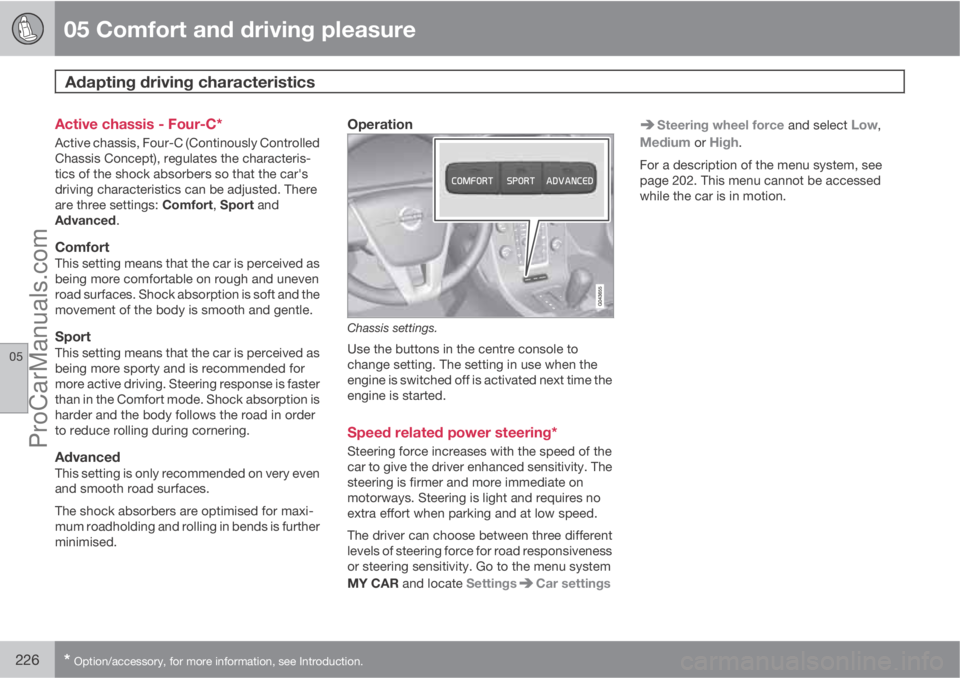
Chassis settings.
Use the buttons in the centre console to
change setting. The setting in use when the
engine is switched off is activated next time the
engine is started.
Speed related power steering*
Steering force increases with the speed of the
car to give the driver enhanced sensitivity. The
steering is firmer and more immediate on
motorways. Steering is light and requires no
extra effort when parking and at low speed.
The driver can choose between three different
levels of steering force for road responsiveness
or steering sensitivity. Go to the menu system
MY CAR and locate Settings
Car settings
Steering wheel force and select Low,
Medium or High.
For a description of the menu system, see
page 202. This menu cannot be accessed
while the car is in motion.
ProCarManuals.com
Page 242 of 422

06 Infotainment system
General information on infotainment
06
240* Option/accessory, for more information, see Introduction.
3.
Press and hold the FAV button until the
"favourites menu" is shown.
4.
Turn TUNE to select an option from the list
and press OK/MENU to save.
>
When the main source (e.g. RADIO,
MEDIA) is active the stored function is
available via a short press on FAV.
General audio settings
Press SOUND to access the audio settings
menu (Bass, Treble, etc.). Scroll forward with
SOUND or OK/MENU to your selection (e.g.
Treble).
Adjust the setting by turning TUNE and save
the setting with OK/MENU.
Continue pressing SOUND or OK/MENU to
access other options:
•Surround9 - Can be set to the On/Off posi-
tion. When On is selected, the system
selects the setting for optimal sound repro-
duction. Normally DPLII and
then
appear in the TV screen. If the recording is
made with Dolby Digital technology then
playback will take place with this setting,
then appears in the TV screen.When Off is selected, 3-channel stereo is
available.
•Bass - Bass level.
•Treble - Treble level.
•Fader – Balance between the front and
rear speakers.
•Balance – Balance between the left and
right-hand speakers.
•Subwoofer*9 - Bass speaker level.
•DPL II centre level3 channel centre
level9 - Volume for centre speaker.
•DPL II surround level9, 10 – Level for sur-
round.
Advanced audio settings
Equalizer11
The volume level can be adjusted separately
for different wavelengths.
1.
Press OK/MENU to access
Audio
settings and select Equalizer.
2.
Select wavelength by turning TUNE and
confirm with OK/MENU.3. Adjust the audio settings by turning
TUNE and confirm with OK/MENU. Con-
tinue in the same way with other wave-
lengths you want to change.
4. When you have finished with audio set-
tings, press EXIT to confirm and return to
normal view.
For general information on menu navigation,
see page 238 and menu overview, see
page 241.
Sound stage9
The sound experience can be optimised for the
driver's seat, both front seats or the rear seat.
If there are passengers in both the front and
rear seats then the option recommended is;
both front seats. The options can be selected
under Audio settings
Sound stage.
For general information on menu navigation,
see page 238 and menu overview, see
page 241.
Audio volume and automatic volume
control
The audio system compensates for disrupting
noises in the passenger compartment by
increasing the volume in relation to the speed
9Only Premium Sound Multimedia.10Only when Surround is activated.11Not Performance.
ProCarManuals.com
Page 244 of 422
06 Infotainment system
General information on infotainment
06
242* Option/accessory, for more information, see Introduction.
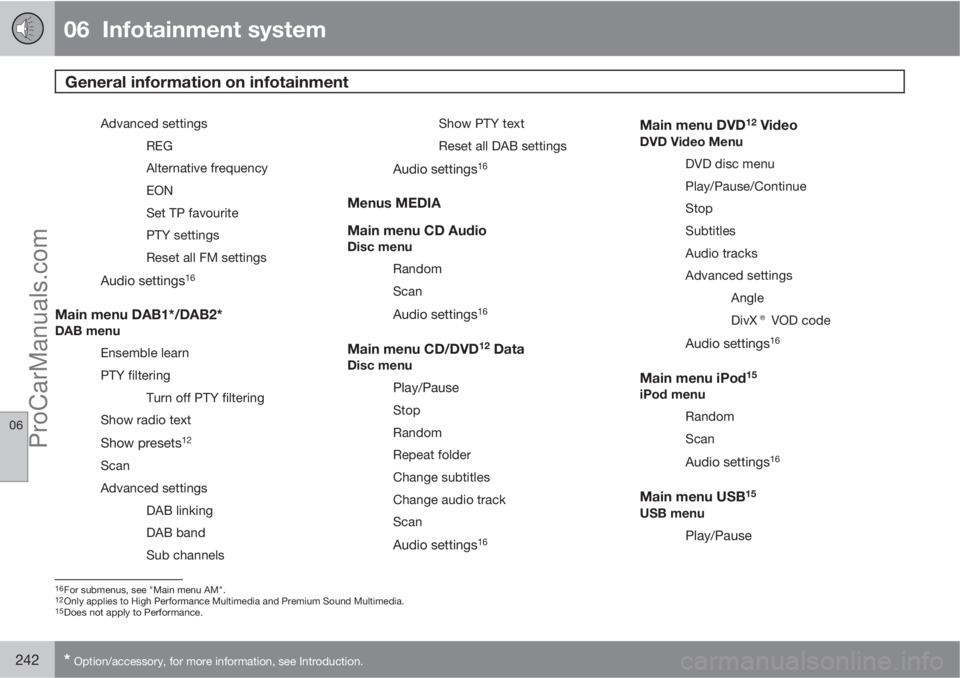
Advanced settings
REG
Alternative frequency
EON
Set TP favourite
PTY settings
Reset all FM settings
Audio settings16
Main menu DAB1*/DAB2*DAB menu
Ensemble learn
PTY filtering
Turn off PTY filtering
Show radio text
Show presets12
Scan
Advanced settings
DAB linking
DAB band
Sub channelsShow PTY text
Reset all DAB settings
Audio settings16
Menus MEDIA
Main menu CD Audio
Disc menu
Random
Scan
Audio settings16
Main menu CD/DVD12 DataDisc menu
Play/Pause
Stop
Random
Repeat folder
Change subtitles
Change audio track
Scan
Audio settings16
Main menu DVD12 VideoDVD Video Menu
DVD disc menu
Play/Pause/Continue
Stop
Subtitles
Audio tracks
Advanced settings
Angle
DivX® VOD code
Audio settings16
Main menu iPod15
iPod menu
Random
Scan
Audio settings16
Main menu USB15
USB menu
Play/Pause
16For submenus, see "Main menu AM".12Only applies to High Performance Multimedia and Premium Sound Multimedia.15Does not apply to Performance.
ProCarManuals.com