2013 VOLVO V60 buttons
[x] Cancel search: buttonsPage 103 of 422

03 Your driving environment
Windows, rearview and door mirrors
03
* Option/accessory, for more information, see Introduction.101 General
Laminated glassThe glass is reinforced which pro-
vides better protection against
break-ins and improved sound insu-
lation in the passenger compartment.
The windscreen and other windows* have lami-
nated glass.
Water and dirt-repellent coating*Windows are treated with a coating
that improves the view in difficult
weather conditions. Maintenance, see
page 362.
IMPORTANT
Do not use a metal ice scraper to remove ice
from the windows. Use the defroster to
remove ice from the mirrors, see page 104.
Heat-reflecting windscreen*
Areas where IR film is not applied.
Dimensions
A40 mm
B80 mm
The windscreen is equipped with a heat-
reflecting film (IR) that reduces the solar heat
radiation into the passenger compartment.
The positioning of electronic equipment, such
as a transponder, behind a glass surface with
heat-reflecting film may affect its function and
performance.
For the optimal function of electronic equip-
ment, it should be positioned on the part of thewindscreen with no heat-reflecting film (see the
highlighted area in the above illustration).
Power windows
Driver's door control panel.
Switch for electric child safety locks* and
disengaging rear power window buttons,
see page 62.
Rear window controls
Front window controls
WARNING
Check that none of the rear seat passengers
is in danger of becoming trapped in any way
when closing the windows from the driver's
door.
ProCarManuals.com
Page 106 of 422

03 Your driving environment
Windows, rearview and door mirrors
03
104* Option/accessory, for more information, see Introduction.
after approx. 10 seconds, or sooner by press-
ing the L and R button.
Automatic angling of the door mirror
when parking1
When reverse gear is engaged the door mirror
is automatically angled down so that the driver
can see the side of the road when parking for
example. When reverse gear is disengaged the
mirror automatically returns to its original posi-
tion after a short time.
The function can be activated/deactivated in
the menu system MY CAR under Settings
Car settingsSide mirror settingsTilt
left mirror or
Tilt right mirror. For a descrip-
tion of the menu system, see page 203.
Automatic retraction when locking1
When the car is locked/unlocked with the
remote control key the door mirrors are auto-
matically retracted/extended.
The function can be activated/deactivated in
the menu system MY CAR under Settings
Car settingsSide mirror settingsFold
mirrors. For a description of the menu system,
see page 203.
Resetting to neutralMirrors that have been moved out of position
by an external force must be reset electrically
to the neutral position for electric retracting/
extending to work correctly:
1.
Retract the mirrors with the L and R but-
tons.
2.
Fold them out again with the L and R but-
tons.
3. Repeat the above procedure as necessary.
The mirrors are now reset in neutral position.
Retractable power door mirrors*The mirrors can be retracted for parking/driving
in narrow spaces:
1.
Depress the L and R buttons simultane-
ously (key position must be at least I).
2. Release them after
approximately 1 second. The mirrors auto-
matically stop in the fully retracted posi-
tion.
Fold out the mirrors by pressing down the L
and R buttons simultaneously. The mirrors
automatically stop in the fully extended posi-
tion.
Home safe and approach lightingThe light on the door mirrors illuminates when
approach lighting or home safe lighting is
selected, see page 94.
Rear window and door mirror
defrosters
Use the defroster to quickly remove misting
and ice from the rear window and the door mir-
rors.
One press of the button starts the heating. The
light in the button indicates that the function is
active. Disconnect the heating as soon as the
ice/misting is cleared in order not to load the
battery unnecessarily. However, the heating is
switched off automatically after a certain time.
1Only in combination with power seat with memory, see page 81.
ProCarManuals.com
Page 117 of 422

03 Your driving environment
Starting the engine
03
115
Operation
Remote control buttons for remote start.
Locking
Approach lighting
Information3
Remote starting the engineMaximum distance for enabling remote star-
ting of the engine is approx. 30 metres in unob-
structed space - in addition, the car must be
locked.
To remote start the engine:1. Briefly press on the remote control key's
lock button (1).
2. Follow this immediately afterwards with a
long press - at least 2 seconds - on
button (2).
If the conditions for ERS are fulfilled then the
following takes place:
1. All direction indicators flash quickly several
times.
2. The engine starts.
3. All direction indicators illuminate with a
constant glow for 3 seconds to verify that
the engine has started.
NOTE
After remote starting, the car continues to
be locked but with the alarm deactivated.
With PCC4 keyThe light indication for Approach
lighting5 flashes several times when
the button is pressed and then goes
to constant glow if all criteria for ERS
have been fulfilled. However, this does not
mean that ERS has started the engine.
To check whether ERS has started the engine,
the user can press the Information button (3) -
if the engine has started, there is a light indi-
cation on the button for Approach lighting (2).
Active functionsThe following functions are activated with a
remote started engine:
•Ventilation system
•Audio/video system.
Deactivated functionsThe following functions are deactivated with a
remote started engine:
•headlamps
•Position lamps
•Number plate lighting
•Windscreen wiper.
the engine is switched offThe following steps switch off an ERS-started
engine:
•The remote control key's lock button (1) is
depressed
•The car is unlocked
•A door is opened
3Only on PCC key, see page 47.4Read about the PCC key on page 47.5Read about Approach lighting on page 46 and 94.
ProCarManuals.com
Page 143 of 422
03 Your driving environment
HomeLinkŸŸ *
03
* Option/accessory, for more information, see Introduction.141 General
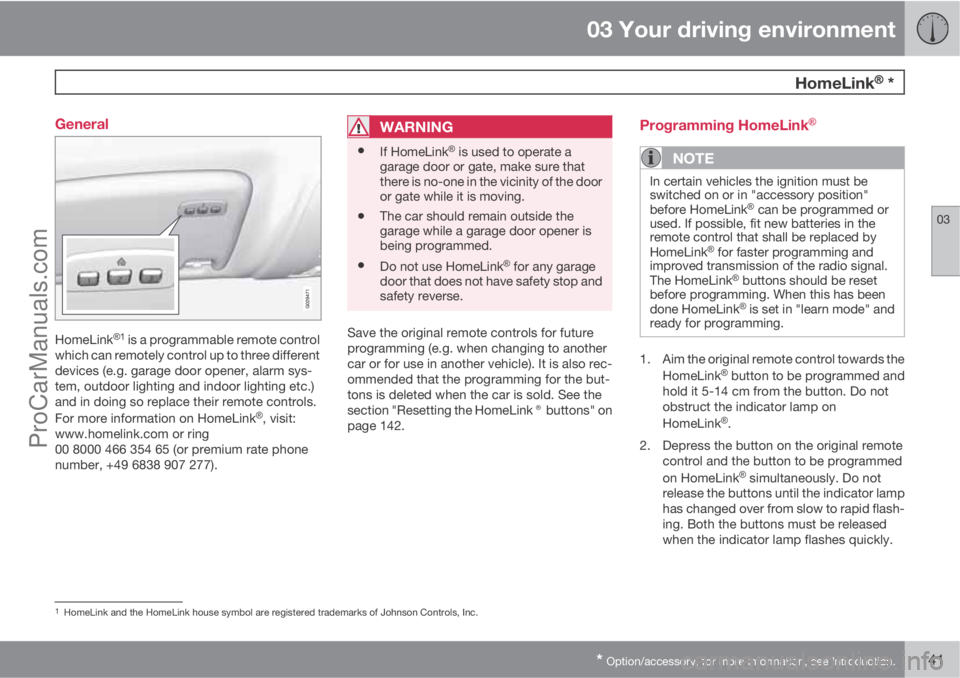
HomeLinkŸ1 is a programmable remote control
which can remotely control up to three different
devices (e.g. garage door opener, alarm sys-
tem, outdoor lighting and indoor lighting etc.)
and in doing so replace their remote controls.
For more information on HomeLink
Ÿ, visit:
www.homelink.com or ring
00 8000 466 354 65 (or premium rate phone
number, +49 6838 907 277).
WARNING
•If HomeLinkŸ is used to operate a
garage door or gate, make sure that
there is no-one in the vicinity of the door
or gate while it is moving.
•The car should remain outside the
garage while a garage door opener is
being programmed.
•Do not use HomeLinkŸ for any garage
door that does not have safety stop and
safety reverse.
Save the original remote controls for future
programming (e.g. when changing to another
car or for use in another vehicle). It is also rec-
ommended that the programming for the but-
tons is deleted when the car is sold. See the
section "Resetting the HomeLink® buttons" on
page 142.
Programming HomeLinkŸ
NOTE
In certain vehicles the ignition must be
switched on or in "accessory position"
before HomeLink
Ÿ can be programmed or
used. If possible, fit new batteries in the
remote control that shall be replaced by
HomeLink
Ÿ for faster programming and
improved transmission of the radio signal.
The HomeLink
Ÿ buttons should be reset
before programming. When this has been
done HomeLink
Ÿ is set in "learn mode" and
ready for programming.
1. Aim the original remote control towards the
HomeLinkŸ button to be programmed and
hold it 5-14 cm from the button. Do not
obstruct the indicator lamp on
HomeLink
Ÿ.
2. Depress the button on the original remote
control and the button to be programmed
on HomeLink
Ÿ simultaneously. Do not
release the buttons until the indicator lamp
has changed over from slow to rapid flash-
ing. Both the buttons must be released
when the indicator lamp flashes quickly.
1HomeLink and the HomeLink house symbol are registered trademarks of Johnson Controls, Inc.
ProCarManuals.com
Page 144 of 422

03 Your driving environment
HomeLinkŸŸ *
03
142* Option/accessory, for more information, see Introduction.
3.
Depress the HomeLinkŸ button being
programmed, hold it depressed for
5 seconds and then release it. Repeat if
necessary until the garage door is acti-
vated. If the door is not activated, press the
programmed HomeLink
Ÿ button and hold
it depressed and check the indicator lamp.
>
Constant glow: The indicator lamp illu-
minates with a constant glow when the
button is kept depressed, this indicates
that the programming is complete.
The garage door, gate or similar should
now be activated when the pro-
grammed HomeLink
Ÿ button is
depressed.
Glow not constant: The indicator lamp
flashes quickly for approx. 2 seconds
and then changes over to a constant
glow. In which case, continue with the
programming steps 4-6 in order to com-
plete the programming of a device with
rolling code (usually a garage door
opener).
4.
Locate the "programming button
2" on the
receiver for the garage door for example,
normally located close to the antenna's
bracket on the receiver.5. Depress and release the receiver's "pro-
gramming button". The button flashes for
approx. 30 seconds and the next step must
be carried out within this period.
6. While the receiver's "programming button"
is still flashing, press the button on
HomeLink
Ÿ being programmed and hold it
depressed for approx. 2 seconds and then
release it. Repeat the press/hold/release
sequence up to 3 times to conclude the
programming.
Operation
When HomeLinkŸ is fully programmed it can be
used in place of the separate original remote
controls.
Press the programmed button and hold it
depressed until the garage door, alarm system,
etc. is activated (may take several seconds).
Naturally the original remote controls can still
be used in parallel with HomeLink
Ÿ if required.
NOTE
If the ignition is switched off, HomeLinkŸ will
work for 30 minutes after the driver's door
has been opened.
If programming problems persist, contact
HomeLinkŸ on: www.homelink.com or ring
00 8000 466 354 65 (or premium rate phone
number +49 6838 907 277).
Resetting the HomeLinkŸ buttons
It is only possible to reset all of the
HomeLinkŸ buttons at the same time, not each
button individually. However, individual but-
tons can be reprogrammed, see the following
section "Programming individual buttons".
1. Depress the two outer buttons on
HomeLink
Ÿ and do not release until the
indicator lamp starts to flash.
2. Release the buttons.
>
HomeLink
Ÿ is now set in so-called
"learn mode" and is ready to be reprog-
rammed, see section "Programming
HomeLink®" on page 141.
2Button designation and colour vary depending on manufacturer.
ProCarManuals.com
Page 145 of 422
03 Your driving environment
HomeLinkŸŸ *
03
* Option/accessory, for more information, see Introduction.143 Programming individual buttons
To reprogram an individual HomeLinkŸ button,
proceed as follows:
1.
Depress the required button and do not
release.
2.
When the indicator lamp on HomeLink
Ÿ
starts to flash, after approx. 20 seconds,
start with step 1 in section "Programming
HomeLink®" on page 141.
For more information or to leave comments
about HomeLink
Ÿ, visit: www.homelink.com or
ring 00 8000 466 354 65 (or premium rate
phone number +49 6838 907 277).
ProCarManuals.com
Page 152 of 422
04 Driver support
Speed limiter*
04
150* Option/accessory, for more information, see Introduction.
General information on the speed
limiter
A speed limiter (Speed Limiter) can be regar-
ded as a reverse cruise control - the driver reg-
ulates the speed using the accelerator pedal
but is prevented from accidentally exceeding a
pre-selected/set speed by the speed limiter.
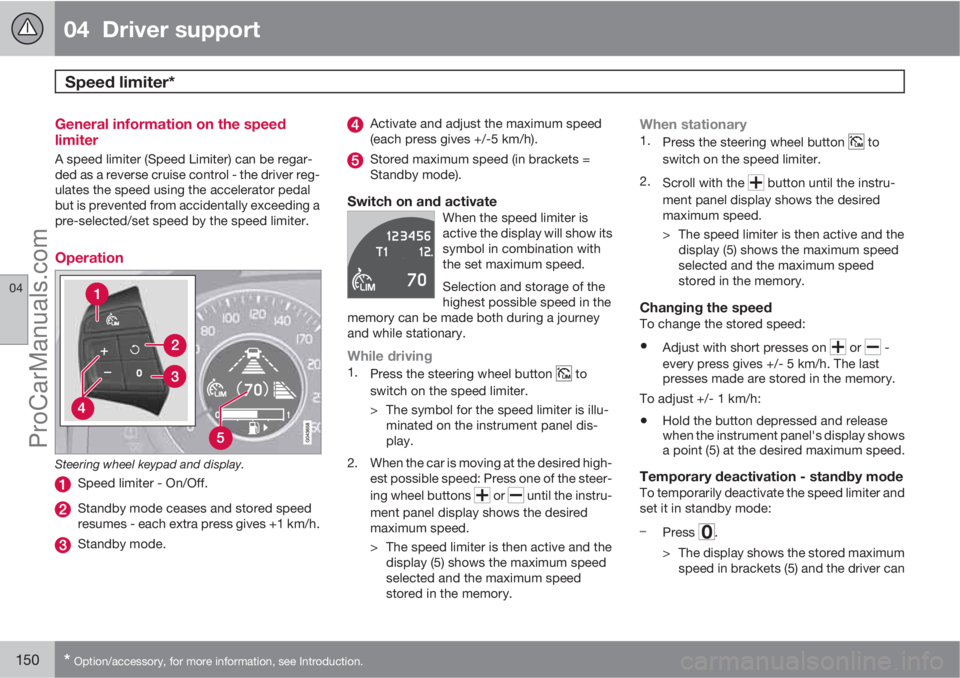
Operation
Steering wheel keypad and display.
Speed limiter - On/Off.
Standby mode ceases and stored speed
resumes - each extra press gives +1 km/h.
Standby mode.
Activate and adjust the maximum speed
(each press gives +/-5 km/h).
Stored maximum speed (in brackets =
Standby mode).
Switch on and activateWhen the speed limiter is
active the display will show its
symbol in combination with
the set maximum speed.
Selection and storage of the
highest possible speed in the
memory can be made both during a journey
and while stationary.
While driving1.
Press the steering wheel button to
switch on the speed limiter.
> The symbol for the speed limiter is illu-
minated on the instrument panel dis-
play.
2. When the car is moving at the desired high-
est possible speed: Press one of the steer-
ing wheel buttons
or until the instru-
ment panel display shows the desired
maximum speed.
> The speed limiter is then active and the
display (5) shows the maximum speed
selected and the maximum speed
stored in the memory.
When stationary1.
Press the steering wheel button to
switch on the speed limiter.
2.
Scroll with the
button until the instru-
ment panel display shows the desired
maximum speed.
> The speed limiter is then active and the
display (5) shows the maximum speed
selected and the maximum speed
stored in the memory.
Changing the speedTo change the stored speed:
•Adjust with short presses on or -
every press gives +/- 5 km/h. The last
presses made are stored in the memory.
To adjust +/- 1 km/h:
•Hold the button depressed and release
when the instrument panel's display shows
a point (5) at the desired maximum speed.
Temporary deactivation - standby modeTo temporarily deactivate the speed limiter and
set it in standby mode:
–
Press
.
> The display shows the stored maximum
speed in brackets (5) and the driver can
ProCarManuals.com
Page 153 of 422
04 Driver support
Speed limiter*
04
* Option/accessory, for more information, see Introduction.151
temporarily exceed the set maximum
speed.
The speed limiter is re-activated by one
press on
at which the display's
brackets disappear and the car's maxi-
mum speed is again limited.
Temporary deactivation with the
accelerator pedal
The speed limiter can also be set in standby
mode with the accelerator pedal, e.g. for rap-
idly accelerating the car out of a situation:
–Depress the accelerator pedal fully.
> The display shows the stored maximum
speed in brackets (5) and the driver can
temporarily exceed the set maximum
speed.
The speed limiter is automatically re-
activated after the release of the accel-
erator pedal and the car's speed is
slowed down to below the selected/
stored maximum speed - the display's
brackets disappear and the car's maxi-
mum speed is again limited.
Alarm for speed exceededOn steep roads the engine braking effect may
be inadequate and the selected maximum
speed exceeded. The driver is alerted about
this with an acoustic signal.The signal is active until the driver has slowed
to below the selected maximum speed.
NOTE
The alarm is only activated after 5 seconds
if the speed has been exceeded by at least
3 km/h provided that none of the buttons
or has been depressed during the last
half minute.
DeactivateTo deactivate the speed limiter:
–
Press the steering wheel button
.
> The display's symbol for the speed lim-
iter and the set speed (5) are cleared.
The selected and stored speed are thus
deleted from the memory and cannot be
resumed with the
button.
The driver can then use the accelerator
pedal to choose a speed without limita-
tion.
ProCarManuals.com