2013 VOLVO V60 ECU
[x] Cancel search: ECUPage 53 of 422
02 Locks and alarm
Battery replacement, remote control key/PCC*
02
* Option/accessory, for more information, see Introduction.51 Replacing the battery
The batteries should be replaced if:
•the information symbol is illuminated and
the display shows Low battery in remote
control. Please change batteries.
and/or
•the locks repeatedly do not react to signals
from the remote control key within
20 metres from the car.
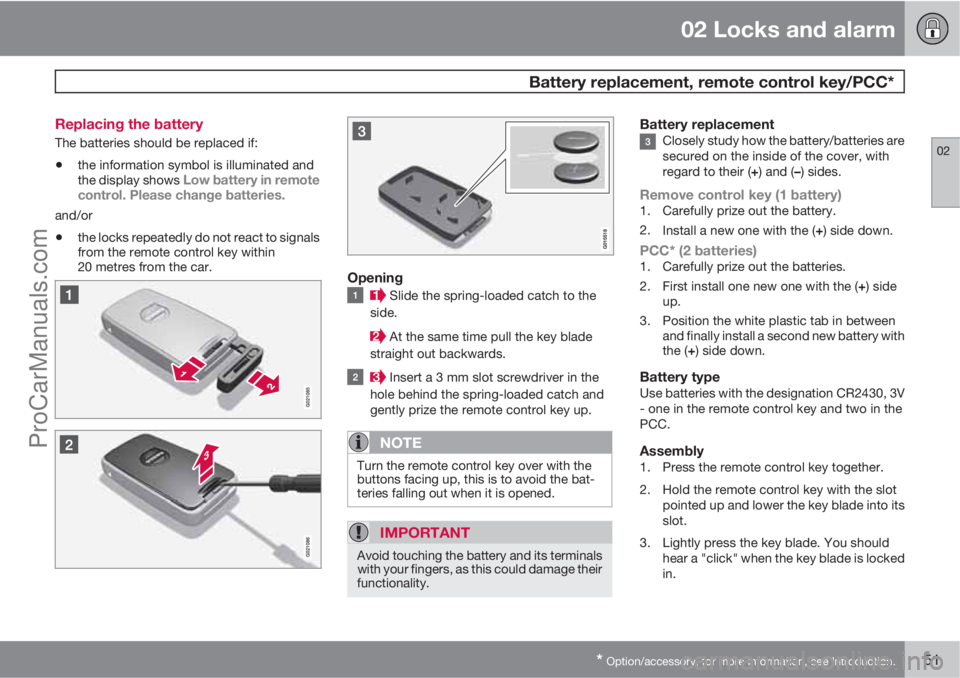
Opening
Slide the spring-loaded catch to the
side.
At the same time pull the key blade
straight out backwards.
Insert a 3 mm slot screwdriver in the
hole behind the spring-loaded catch and
gently prize the remote control key up.
NOTE
Turn the remote control key over with the
buttons facing up, this is to avoid the bat-
teries falling out when it is opened.
IMPORTANT
Avoid touching the battery and its terminals
with your fingers, as this could damage their
functionality.
Battery replacementClosely study how the battery/batteries are
secured on the inside of the cover, with
regard to their (+) and (–) sides.
Remove control key (1 battery)1. Carefully prize out the battery.
2.
Install a new one with the (+) side down.
PCC* (2 batteries)1. Carefully prize out the batteries.
2.
First install one new one with the (+) side
up.
3. Position the white plastic tab in between
and finally install a second new battery with
the (+) side down.
Battery typeUse batteries with the designation CR2430, 3V
- one in the remote control key and two in the
PCC.
Assembly1. Press the remote control key together.
2. Hold the remote control key with the slot
pointed up and lower the key blade into its
slot.
3. Lightly press the key blade. You should
hear a "click" when the key blade is locked
in.
ProCarManuals.com
Page 87 of 422
03 Your driving environment
Steering wheel
03
* Option/accessory, for more information, see Introduction.85 Adjusting
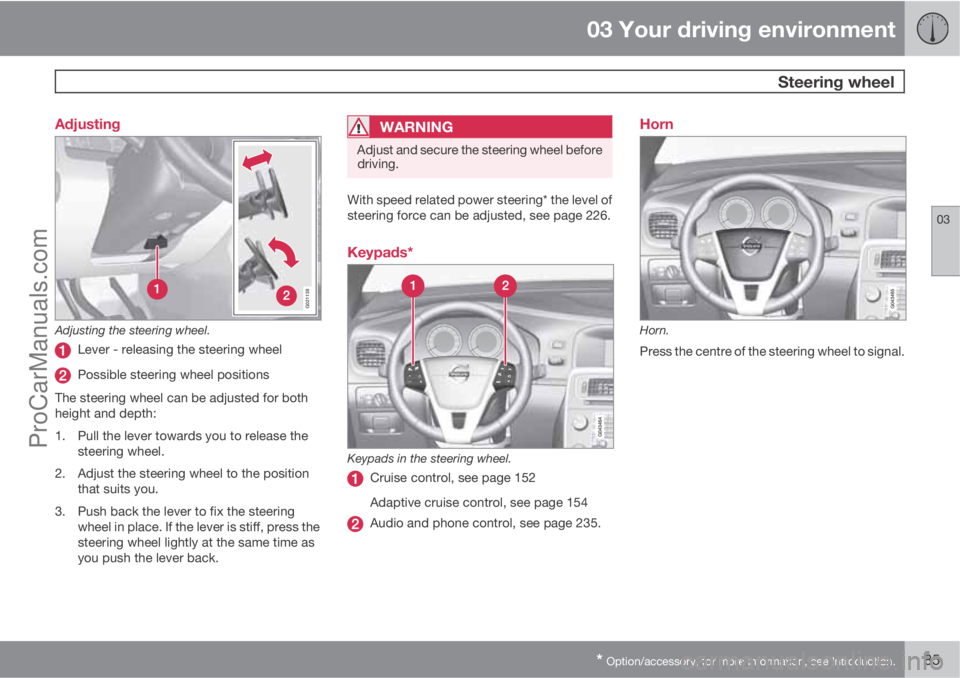
G021138
Adjusting the steering wheel.
Lever - releasing the steering wheel
Possible steering wheel positions
The steering wheel can be adjusted for both
height and depth:
1. Pull the lever towards you to release the
steering wheel.
2. Adjust the steering wheel to the position
that suits you.
3. Push back the lever to fix the steering
wheel in place. If the lever is stiff, press the
steering wheel lightly at the same time as
you push the lever back.
WARNING
Adjust and secure the steering wheel before
driving.
With speed related power steering* the level of
steering force can be adjusted, see page 226.
Keypads*
Keypads in the steering wheel.
Cruise control, see page 152
Adaptive cruise control, see page 154
Audio and phone control, see page 235.
Horn
Horn.
Press the centre of the steering wheel to signal.
ProCarManuals.com
Page 122 of 422

03 Your driving environment
Starting the engine – external battery
03
120
Jump starting
If the battery is flat then the car can be started
with current from another battery.
When jump starting the car, the following steps
are recommended to avoid short circuits or
other damage:
1. Insert the remote control key in key posi-
tion 0, see page 78.
2. Check that the donor battery has a voltage
of 12 V.
3. If the donor battery is installed in another
car - switch off the donor car's engine and
make sure that the two cars do not touch
each other.4. Connect one of the red jump lead's clamps
to the donor battery's positive terminal (1).
IMPORTANT
Connect the start cable carefully to avoid
short circuits with other components in the
engine compartment.
5. Open the clips on the front cover of the
battery in your car and remove the cover,
see page 345.
6. Connect the red jump lead's other clamp
onto the car's positive terminal (2).
7. Connect one of the black jump lead's
clamps to the donor battery's negative ter-
minal (3).
8. Connect the other clamp to a grounding
point, e.g. right-hand engine mounting at
the top, the outer screw head (4).
9. Check that the jump lead clamps are
affixed securely so that there are no sparks
during the starting procedure.
10. Start the engine of the "donor car" and
allow it to run a few minutes at a speed
slightly higher than idle approx. 1500 rpm.
11. Start the engine in the car with the dis-
charged battery.
IMPORTANT
Do not touch the crocodile clips during the
start procedure. There is a risk of sparks
forming.
12. Remove the jump leads in reverse order -
first the black and then the red.
> Make sure that none of the black jump
lead's clamps comes into contact with
the battery's positive terminal or the
clamp connected to the red jump lead!
WARNING
•The battery can generate oxyhydrogen
gas, which is highly explosive. A spark
can be formed if a jump lead is con-
nected incorrectly, and this can be
enough for the battery to explode.
•The battery contains sulphuric acid,
which can cause serious burns.
•If sulphuric acid comes into contact
with eyes, skin or clothing, flush with
large quantities of water. If acid
splashes into the eyes - seek medical
attention immediately.
For more information on the car's battery - see
page 344.
ProCarManuals.com
Page 175 of 422
04 Driver support
Collision Warning with Auto Brake & Pedestrian Protection*
04
* Option/accessory, for more information, see Introduction.173 General
"Collision Warning with Auto Brake & Pedes-
trian Detection" is an aid to assist the driver
when there is a risk of colliding with a pedes-
trian or vehicle in front that is stationary or
moving in the same direction.
Collision Warning with Auto Brake & Pedestrian
Detection is activated in situations where the
driver should have started braking earlier,
which is why it cannot help the driver in every
situation.
Collision Warning with Auto Brake & Pedestrian
Detection is designed to be activated as late as
possible in order to avoid unnecessary inter-
vention.
Collision Warning with Auto Brake & Pedestrian
Detection may prevent a collision or reduce the
collision speed.
Collision Warning with Auto Brake & Pedestrian
Detection must not be used as an excuse for
the driver to change his/her driving style. If the
driver solely relies on Collision Warning with
Auto Brake to do the braking, there will be a
collision sooner or later.
Two system levelsDepending on how the car equipped, the Col-
lision Warning with Auto Brake & Pedestrian
Detection function may appear in two variants:
Level 1 and Level 2.
Level 1The driver is merely warned of occurring obsta-
cles by means of visual and acoustic signals -
no automatic braking intervenes, the driver
must himself brake.
Level 2The driver is warned of occurring obstacles by
means of visual and acoustic signals - the car
is braked automatically if the driver himself
does not act within a reasonable time.
IMPORTANT
Maintenance of components included in
Collision Warning with Auto Brake & Pedes-
trian Detection must only be carried out in a
workshop - an authorised Volvo workshop
is recommended.
Function
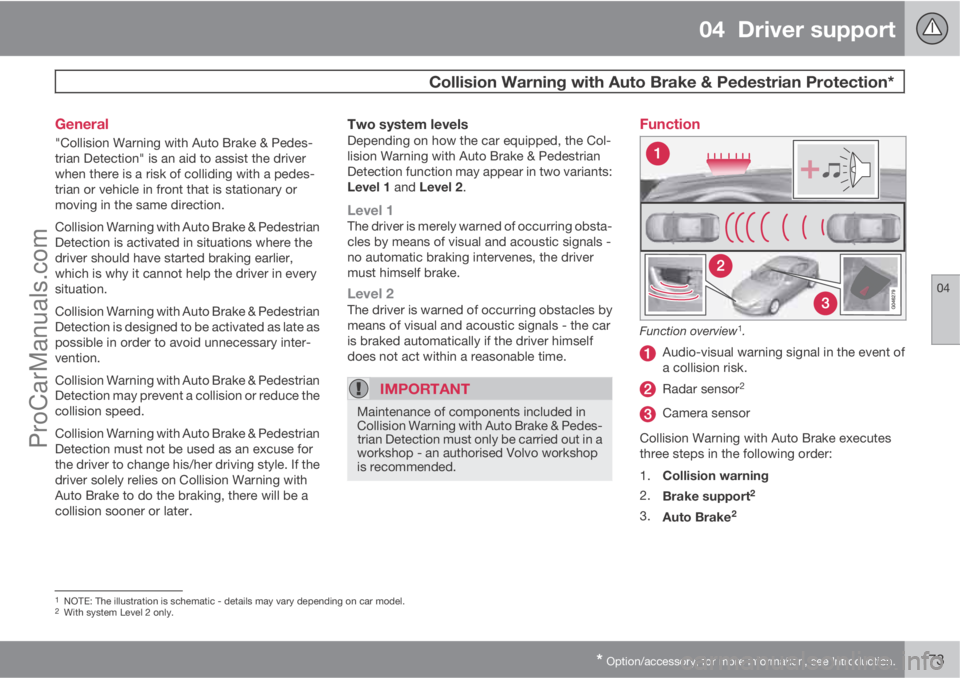
Function overview1.
Audio-visual warning signal in the event of
a collision risk.
Radar sensor2
Camera sensor
Collision Warning with Auto Brake executes
three steps in the following order:
1.
Collision warning
2.
Brake support
2
3.
Auto Brake2
1NOTE: The illustration is schematic - details may vary depending on car model.2With system Level 2 only.
ProCarManuals.com
Page 230 of 422
05 Comfort and driving pleasure
Comfort inside the passenger compartment
05
228* Option/accessory, for more information, see Introduction.
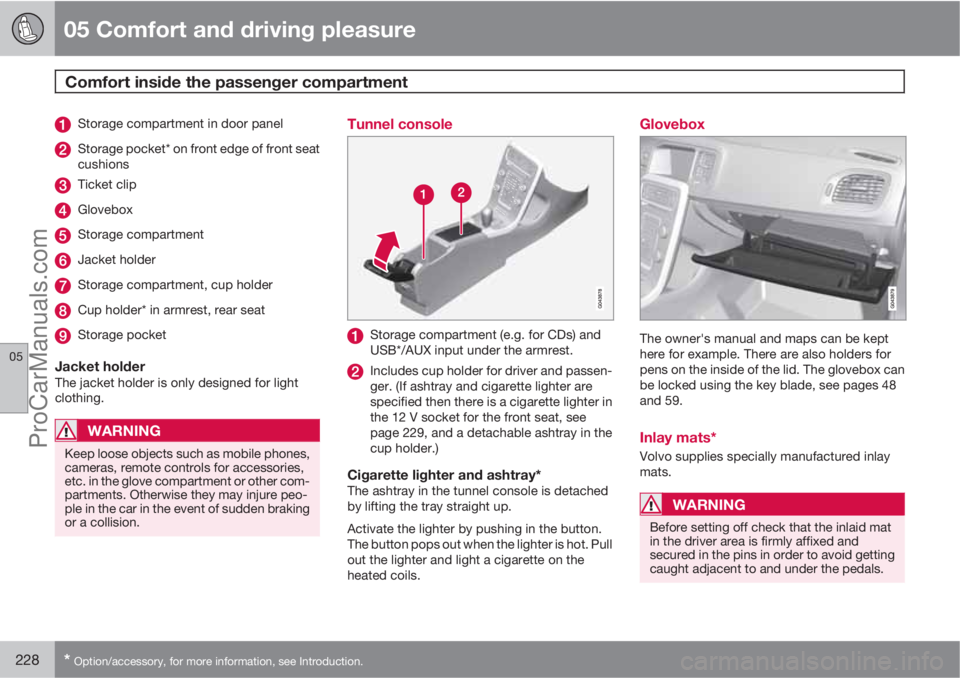
Storage compartment in door panel
Storage pocket* on front edge of front seat
cushions
Ticket clip
Glovebox
Storage compartment
Jacket holder
Storage compartment, cup holder
Cup holder* in armrest, rear seat
Storage pocket
Jacket holderThe jacket holder is only designed for light
clothing.
WARNING
Keep loose objects such as mobile phones,
cameras, remote controls for accessories,
etc. in the glove compartment or other com-
partments. Otherwise they may injure peo-
ple in the car in the event of sudden braking
or a collision.
Tunnel console
Storage compartment (e.g. for CDs) and
USB*/AUX input under the armrest.
Includes cup holder for driver and passen-
ger. (If ashtray and cigarette lighter are
specified then there is a cigarette lighter in
the 12 V socket for the front seat, see
page 229, and a detachable ashtray in the
cup holder.)
Cigarette lighter and ashtray*The ashtray in the tunnel console is detached
by lifting the tray straight up.
Activate the lighter by pushing in the button.
The button pops out when the lighter is hot. Pull
out the lighter and light a cigarette on the
heated coils.
Glovebox
The owner's manual and maps can be kept
here for example. There are also holders for
pens on the inside of the lid. The glovebox can
be locked using the key blade, see pages 48
and 59.
Inlay mats*
Volvo supplies specially manufactured inlay
mats.
WARNING
Before setting off check that the inlaid mat
in the driver area is firmly affixed and
secured in the pins in order to avoid getting
caught adjacent to and under the pedals.
ProCarManuals.com
Page 291 of 422

07 During your journey
Fuel
07
289
IMPORTANT
•Always refuel with unleaded petrol so as
not to damage the catalytic converter.
•Do not use additives not recommended
by Volvo.
Bioethanol E85
Do not modify the fuel system or its compo-
nents, and do not replace components with
parts that are not specifically designed for use
with bioethanol.
WARNING
Methanol must not be used. A decal on the
inside of the fuel filler flap shows the correct
alternative fuel.
The use of components not designed for
bioethanol engines could cause fire, injury
or engine damage.
Reserve fuel canThe reserve fuel can should be filled with petrol,
see the NOTE box, page 118.
IMPORTANT
Make sure the reserve fuel can is securely
fastened and that its cap is sealed.
WARNING
Ethanol is sensitive to sparks, and explosive
gases could form in the reserve fuel can if it
is refuelled with ethanol.
Diesel
Only use diesel fuel from well-known produc-
ers. Never use diesel of dubious quality. Diesel
should fulfil the EN 590 or JIS K2204 stand-
ards. Diesel engines are sensitive to contami-
nants in the fuel, such as excessively high vol-
umes of sulphur particles for example.
At low temperatures (-6 °C to -40 °C), a paraffin
precipitate may form in the diesel fuel, which
may lead to ignition problems. Special diesel
fuel designed for low temperatures around
freezing point is available from the major oil
companies. This fuel is less viscous at low tem-
peratures and reduces the risk of paraffin pre-
cipitate.
The risk of condensation in the fuel tank is
reduced if the tank is kept well filled. Whenrefuelling, check that the area around the fuel
filler pipe is clean. Avoid spilling fuel onto the
paintwork. Wash off any spillage with deter-
gent and water.
IMPORTANT
Only ever use fuel that fulfils the European
diesel standard.
The sulphur content must be a maximum of
50 ppm.
IMPORTANT
Diesel type fuels that must not be used:
•Special additives
•Marine diesel fuel
•Heating oil
•FAME1 (Fatty Acid Methyl Ester) and
vegetable oil.
These fuels do not fulfil the requirements in
accordance with Volvo recommendations
and generate increased wear and engine
damage that is not covered by the Volvo
warranty.
Empty tankThe design of the fuel system in a diesel engine
means that if the vehicle runs out of fuel, the
1Diesel fuel may contain a certain amount of FAME, but further amounts must not be added.
ProCarManuals.com
Page 294 of 422

07 During your journey
Loading
07
292
General information on loading
Payload depends on the car's kerb weight. The
total of the weight of the passengers and all
accessories reduces the car's payload by a
corresponding weight. For more detailed infor-
mation on weights, see page 373.
The tailgate is opened via a button on
the lighting panel or the remote con-
trol key, see page 59.
WARNING
The car's driving characteristics change
depending on the weight and distribution of
the load.
To bear in mind when loading
•Position the load firmly against the rear
seat's backrest.
Note that objects must not prevent the function
of the WHIPS system for the front seats if any
of the rear seat's backrests is folded down,see
page 27.
•Centre the load.
•Heavy objects should be placed as low as
possible. Avoid placing heavy loads on
lowered backrests.
•Cover sharp edges with something soft to
avoid damaging the upholstery.
•Secure all loads to the load retaining eye-
lets with straps or web lashings.
WARNING
A loose object weighing 20 kg can, in a
frontal collision at a speed of 50 km/h, carry
the impact of an item weighing 1000 kg.
WARNING
The protection provided by the inflatable
curtain in the headlining may be compro-
mised or eliminated by high loads.
•Never load cargo above the backrest.
WARNING
Always secure the load. During heavy brak-
ing the load may otherwise shift, causing
injury to the car's occupants.
Cover sharp edges and sharp corners with
something soft.
Switch off the engine and apply the parking
brake when loading/unloading long items.
Otherwise you may accidentally knock the
gear lever or gear selector with the load into
a drive position - and the car could then
move off.
Front seat
The passenger seat backrest can also be
folded for an extra long load, see page 80.
Roof load
Using load carriersTo avoid damaging the car and for maximum
possible safety while driving, the load carriers
designed by Volvo are recommended.
Carefully follow the installation instructions
supplied with the carriers.
•Check periodically that the load carriers
and load are properly secured. Lash the
load securely with retaining straps.
•Distribute the load evenly over the load
carriers. Put the heaviest objects at the
bottom.
•The size of the area exposed to the wind,
and therefore fuel consumption, increase
with the size of the load.
•Drive gently. Avoid quick acceleration,
heavy braking and hard cornering.
WARNING
The car's centre of gravity and driving cha-
racteristics are altered by roof loads. For
information on maximum permitted roof
load, including load carriers and any space
box, see page 373.
ProCarManuals.com
Page 295 of 422
07 During your journey
Loading
07
* Option/accessory, for more information, see Introduction.293 Lowering the rear seat backrest
To simplify loading in the cargo area, the rear
seat backrest can be folded down, see
page 82.
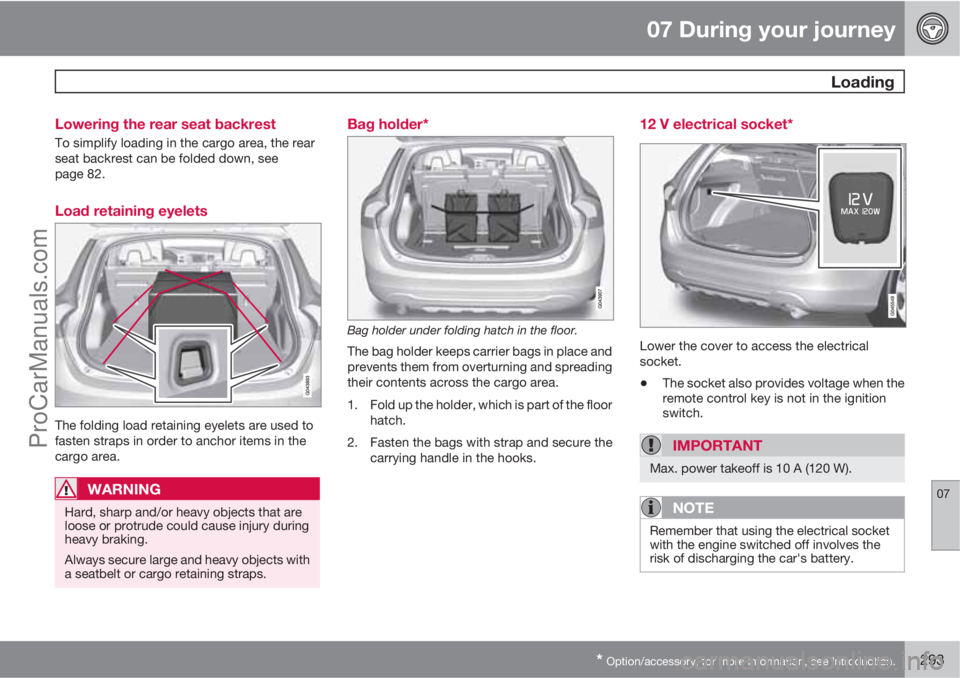
Load retaining eyelets
The folding load retaining eyelets are used to
fasten straps in order to anchor items in the
cargo area.
WARNING
Hard, sharp and/or heavy objects that are
loose or protrude could cause injury during
heavy braking.
Always secure large and heavy objects with
a seatbelt or cargo retaining straps.
Bag holder*
Bag holder under folding hatch in the floor.
The bag holder keeps carrier bags in place and
prevents them from overturning and spreading
their contents across the cargo area.
1. Fold up the holder, which is part of the floor
hatch.
2. Fasten the bags with strap and secure the
carrying handle in the hooks.
12 V electrical socket*
Lower the cover to access the electrical
socket.
•The socket also provides voltage when the
remote control key is not in the ignition
switch.
IMPORTANT
Max. power takeoff is 10 A (120 W).
NOTE
Remember that using the electrical socket
with the engine switched off involves the
risk of discharging the car's battery.
ProCarManuals.com