2013 VOLKSWAGEN TIGUAN tires
[x] Cancel search: tiresPage 23 of 356

– 24 hr. mode
– Daylight save
▪ Snow tires (winter tires)
– On
– + 5 mph
– - 5 mph
▪ Units
– Temperature
– Consump./ dist.
▪ Tire pressure , Tire pressure monitoring system (TPMS)
▪ Alt. speed dsp (alternative speed display On/Off)
▪ Service
– Info
– Reset
▪ Factory setting
Applicable only in Canada
Menu structure – overview (Premium version)
Page 24 of 356

– Speed warn. (speed warning)
▪ Compass (vehicles without )
▪ Convenience
– ATA confirm
Single door
Auto. close
– Central locking
Auto unlock
Unlock doors
– Window op. (window operation)
OFF
All
Driver
– Mirror down (vehicles with memory seats)
– Mirror adjust
Individually
Both mirrors
– Factory setting
▪ Lights & Vision
– Coming home
– Leaving home
– Footwell light
– Conv. turn sig. (convenience turn signal)
– Factory setting
▪ Time
– Hours
– Minutes
– 24 hr. mode
– Daylight save
▪ Snow tires (winter tires)
– On
– + 5 mph
– - 5 mph
▪ Units
– Temperature
– Consump./ dist.
▪ Tire pressure , Tire pressure monitoring system (TPMS)
▪ Alt. speed dsp (alternative speed display On/Off)
▪ Service
– Info
– Reset
▪ Factory setting
Page 27 of 356
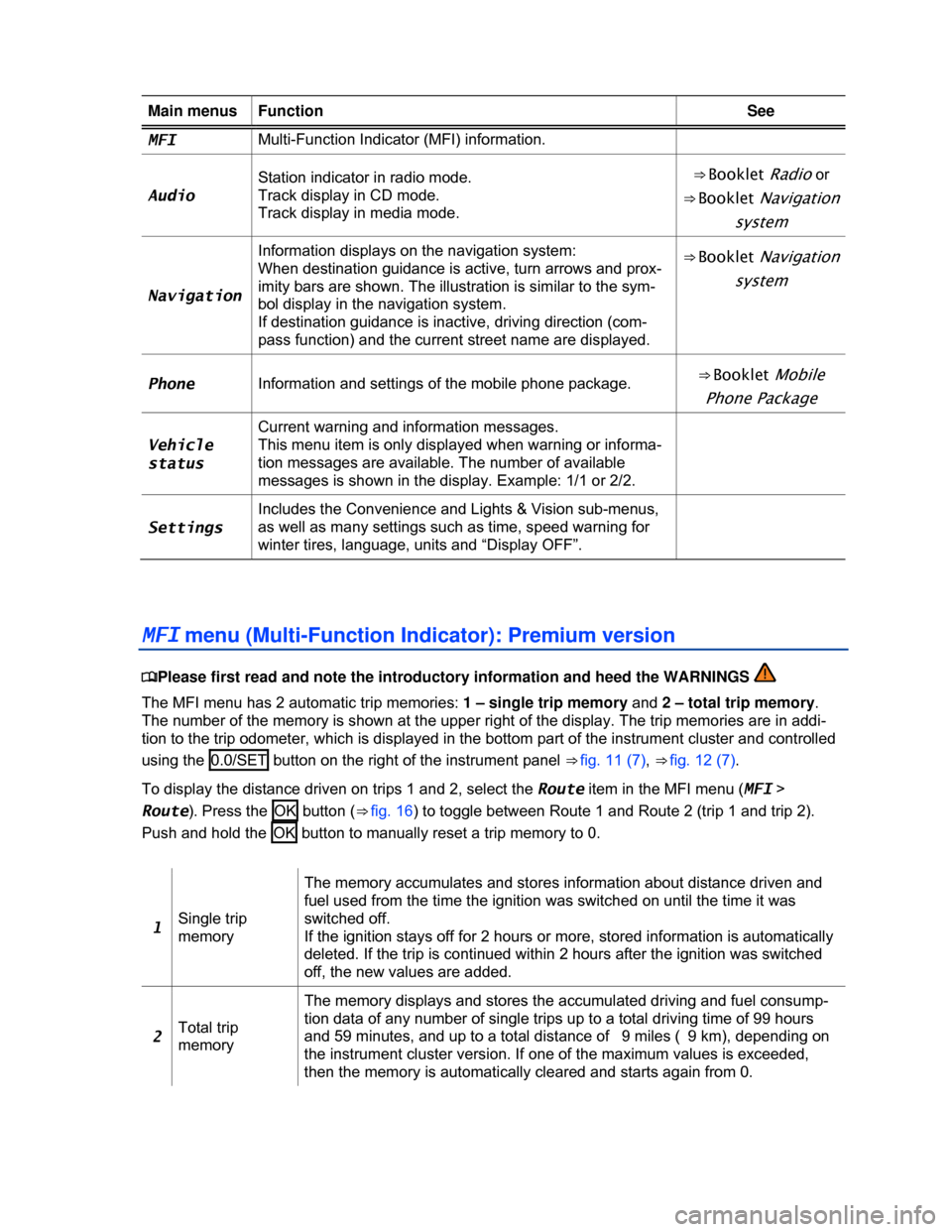
Main menus Function See
MFI Multi-Function Indicator (MFI) information.
Audio
Station indicator in radio mode.
Track display in CD mode.
Track display in media mode.
⇒ Booklet Radio or
⇒ Booklet Navigation
system
Navigation
Information displays on the navigation system:
When destination guidance is active, turn arrows and prox-
imity bars are shown. The illustration is similar to the sym-
bol display in the navigation system.
If destination guidance is inactive, driving direction (com-
pass function) and the current street name are displayed.
⇒ Booklet Navigation
system
Phone Information and settings of the mobile phone package. ⇒ Booklet Mobile
Phone Package
Vehicle
status
Current warning and information messages.
This menu item is only displayed when warning or informa-
tion messages are available. The number of available
messages is shown in the display. Example: 1/1 or 2/2.
Settings
Includes the Convenience and Lights & Vision sub-menus,
as well as many settings such as time, speed warning for
winter tires, language, units and “Display OFF”.
MFI menu (Multi-Function Indicator): Premium version
Page 146 of 356
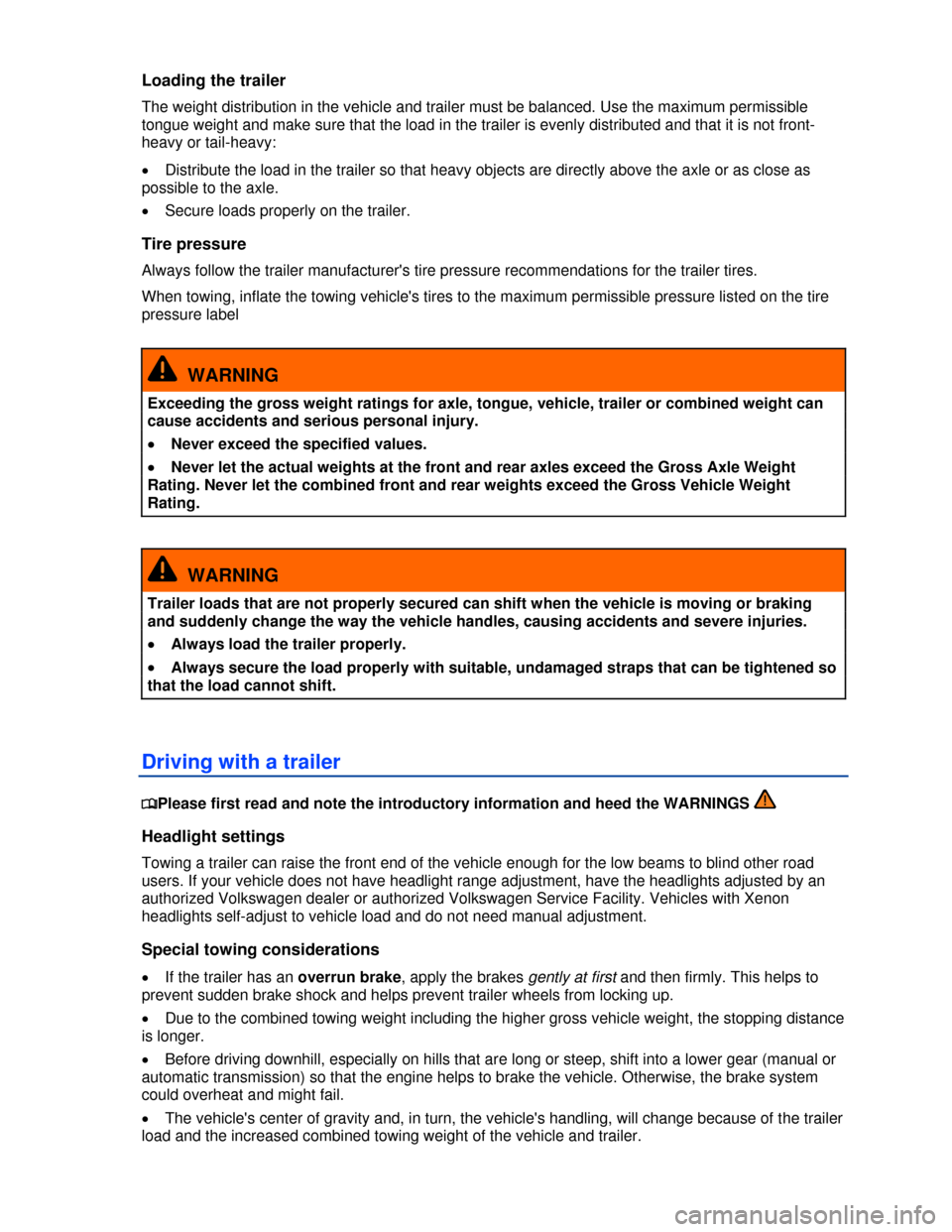
Loading the trailer
The weight distribution in the vehicle and trailer must be balanced. Use the maximum permissible
tongue weight and make sure that the load in the trailer is evenly distributed and that it is not front-
heavy or tail-heavy:
x Distribute the load in the trailer so that heavy objects are directly above the axle or as close as
possible to the axle.
x Secure loads properly on the trailer.
Tire pressure
Always follow the trailer manufacturer's tire pressure recommendations for the trailer tires.
When towing, inflate the towing vehicle's tires to the maximum permissible pressure listed on the tire
pressure label
WARNING
Exceeding the gross weight ratings for axle, tongue, vehicle, trailer or combined weight can
cause accidents and serious personal injury.
x Never exceed the specified values.
x Never let the actual weights at the front and rear axles exceed the Gross Axle Weight
Rating. Never let the combined front and rear weights exceed the Gross Vehicle Weight
Rating.
WARNING
Trailer loads that are not properly secured can shift when the vehicle is moving or braking
and suddenly change the way the vehicle handles, causing accidents and severe injuries.
x Always load the trailer properly.
x Always secure the load properly with suitable, undamaged straps that can be tightened so
that the load cannot shift.
Driving with a trailer
Page 190 of 356
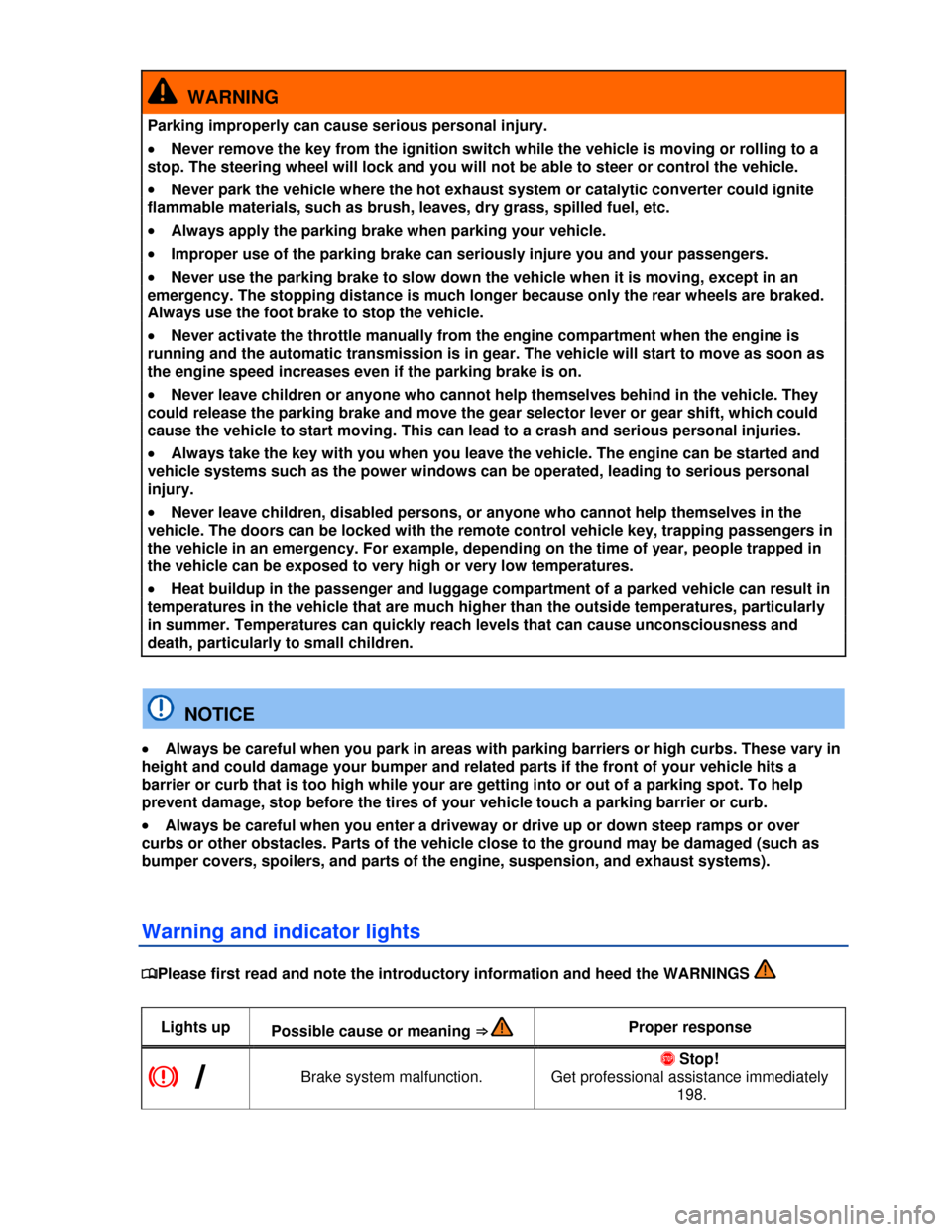
WARNING
Parking improperly can cause serious personal injury.
x Never remove the key from the ignition switch while the vehicle is moving or rolling to a
stop. The steering wheel will lock and you will not be able to steer or control the vehicle.
x Never park the vehicle where the hot exhaust system or catalytic converter could ignite
flammable materials, such as brush, leaves, dry grass, spilled fuel, etc.
x Always apply the parking brake when parking your vehicle.
x Improper use of the parking brake can seriously injure you and your passengers.
x Never use the parking brake to slow down the vehicle when it is moving, except in an
emergency. The stopping distance is much longer because only the rear wheels are braked.
Always use the foot brake to stop the vehicle.
x Never activate the throttle manually from the engine compartment when the engine is
running and the automatic transmission is in gear. The vehicle will start to move as soon as
the engine speed increases even if the parking brake is on.
x Never leave children or anyone who cannot help themselves behind in the vehicle. They
could release the parking brake and move the gear selector lever or gear shift, which could
cause the vehicle to start moving. This can lead to a crash and serious personal injuries.
x Always take the key with you when you leave the vehicle. The engine can be started and
vehicle systems such as the power windows can be operated, leading to serious personal
injury.
x Never leave children, disabled persons, or anyone who cannot help themselves in the
vehicle. The doors can be locked with the remote control vehicle key, trapping passengers in
the vehicle in an emergency. For example, depending on the time of year, people trapped in
the vehicle can be exposed to very high or very low temperatures.
x Heat buildup in the passenger and luggage compartment of a parked vehicle can result in
temperatures in the vehicle that are much higher than the outside temperatures, particularly
in summer. Temperatures can quickly reach levels that can cause unconsciousness and
death, particularly to small children.
NOTICE
x Always be careful when you park in areas with parking barriers or high curbs. These vary in
height and could damage your bumper and related parts if the front of your vehicle hits a
barrier or curb that is too high while your are getting into or out of a parking spot. To help
prevent damage, stop before the tires of your vehicle touch a parking barrier or curb.
x Always be careful when you enter a driveway or drive up or down steep ramps or over
curbs or other obstacles. Parts of the vehicle close to the ground may be damaged (such as
bumper covers, spoilers, and parts of the engine, suspension, and exhaust systems).
Warning and indicator lights
Page 195 of 356
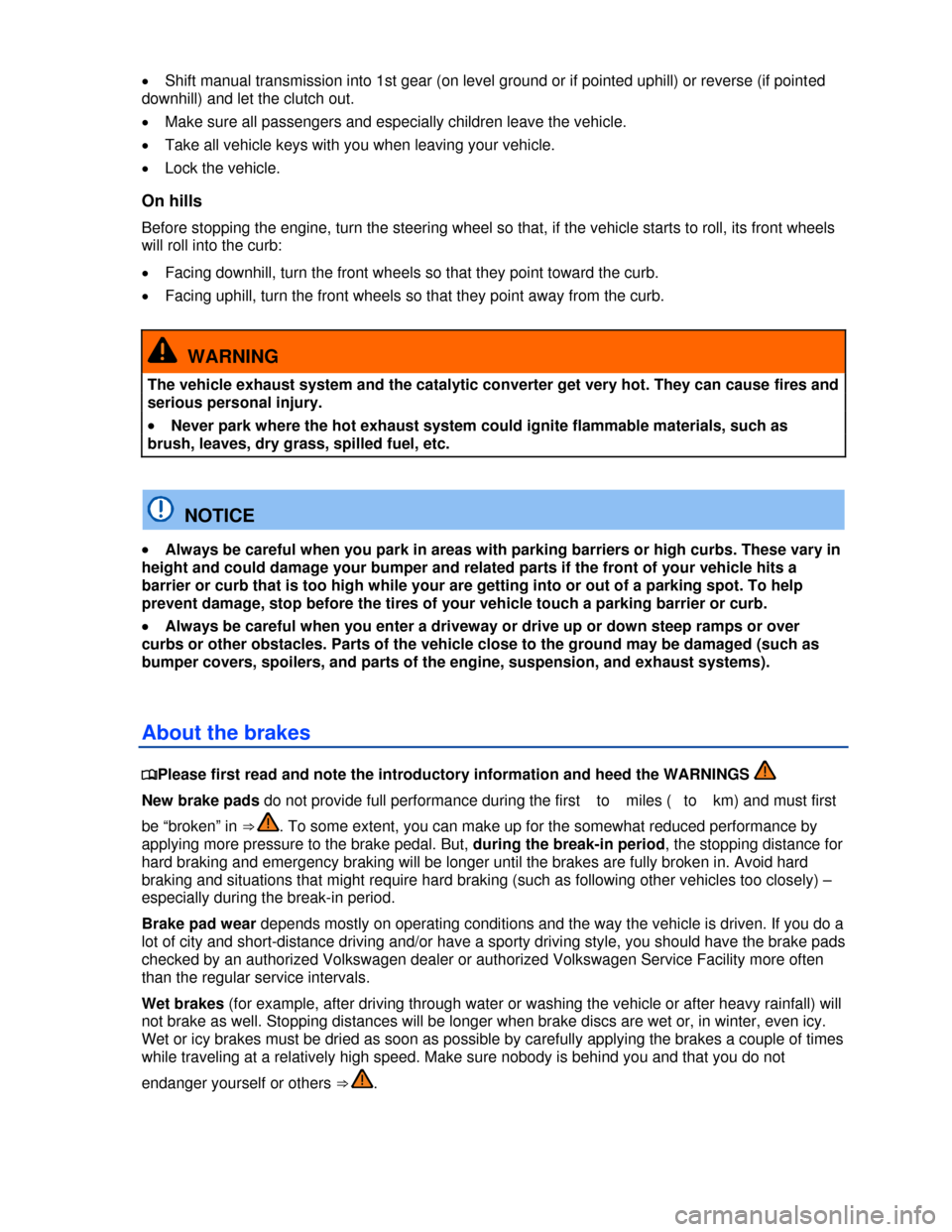
x Shift manual transmission into 1st gear (on level ground or if pointed uphill) or reverse (if pointed
downhill) and let the clutch out.
x Make sure all passengers and especially children leave the vehicle.
x Take all vehicle keys with you when leaving your vehicle.
x Lock the vehicle.
On hills
Before stopping the engine, turn the steering wheel so that, if the vehicle starts to roll, its front wheels
will roll into the curb:
x Facing downhill, turn the front wheels so that they point toward the curb.
x Facing uphill, turn the front wheels so that they point away from the curb.
WARNING
The vehicle exhaust system and the catalytic converter get very hot. They can cause fires and
serious personal injury.
x Never park where the hot exhaust system could ignite flammable materials, such as
brush, leaves, dry grass, spilled fuel, etc.
NOTICE
x Always be careful when you park in areas with parking barriers or high curbs. These vary in
height and could damage your bumper and related parts if the front of your vehicle hits a
barrier or curb that is too high while your are getting into or out of a parking spot. To help
prevent damage, stop before the tires of your vehicle touch a parking barrier or curb.
x Always be careful when you enter a driveway or drive up or down steep ramps or over
curbs or other obstacles. Parts of the vehicle close to the ground may be damaged (such as
bumper covers, spoilers, and parts of the engine, suspension, and exhaust systems).
About the brakes
Page 199 of 356

automatically switches off to keep the brake from overheating. As soon as the brake has cooled down,
EDL automatically switches on again.
XDL is an extension of the Electronic Differential Lock system. XDL does not react to drive wheel
slippage when driving straight ahead. Instead, XDL detects slippage of the inside front wheel during
fast cornering. XDL applies enough brake pressure to this wheel in order to stop the slippage. This
improves traction, which helps the vehicle stay on track.
WARNING
Driving fast on icy, slippery, or wet roads can lead to a loss of control and result in serious
personal injury for you and your passengers.
x Always adjust your speed and driving style to road, traffic, weather, and visibility
conditions. Never let the additional safety that ESC, ABS, BAS, ASR, and EDL can provide
tempt you into taking extra risks.
x Braking assistance systems cannot overcome the laws of physics and always prevent
loss of vehicle control. Slippery and wet roads are still dangerous even with ESC and the
other systems!
x Driving too fast on wet roads can cause the wheels to lose contact with the road and
“hydroplane.” A vehicle that has lost road contact cannot be braked, steered, or controlled.
x These systems cannot reduce the risk of accident, for example if you drive too fast for
conditions or if you do not keep your distance from the vehicle in front of you.
x Although these systems are very effective and can help you control the vehicle in many
difficult situations, always remember that your vehicle handling control is limited by tire
traction.
x When accelerating on a slippery surface, for example on ice and snow, depress the
accelerator carefully. Even with these systems, the wheels may start to spin, leading to a loss
of vehicle control.
WARNING
The effectiveness of ESC can be significantly reduced if other components and systems that
affect vehicle dynamics, including but not limited to brakes, tires, and other systems
mentioned above, are not properly maintained or functioning.
x Always remember that vehicle alterations or modifications can affect the functioning of
the ABS, BAS, ASR, EDL and ESC systems.
x Changing the vehicle suspension or using an unapproved tire/wheel combination can
change the way the ABS, BAS, ASR, EDL and ESC systems work and reduce their
effectiveness.
x The effectiveness of ESC is also determined by the tires fitted
All 4 wheels must be equipped with identical tires in order for ESC and ASR to work properly.
Differences in the tread circumference of the tires can cause the system to reduce the engine power
when it is not expected.
If ABS is not working, ESC, ASR, and EDL will also not work.
You may hear noises when these systems are active.
Page 202 of 356

WARNING
Brake fluid is poisonous.
x To reduce the risk of poisoning, never use food, beverage or other non-original containers
to store brake fluid. Someone might be misled by the original label on the container, or by the
shape of the container, and drink the brake fluid. This could occur even if you relabel the
container as “brake fluid.”
x Only store brake fluid in the closed, original container and keep it out of the reach of
children.
NOTICE
Brake fluid will damage vehicle paint, plastic parts and tires. Wipe any brake fluid off vehicle
paint and other vehicle parts immediately.
Brake fluid can pollute the environment. Brake fluid that has leaked out must be collected and
disposed of properly, following all applicable environmental regulations.