Page 215 of 353

1) Do not use Rear Assist in the following situations:
– If the driver is not familiar with the system.
– If the position or angle of the camera has changed, such as after a rear-end collision. Have the
system checked by an authorized Volkswagen dealer or an authorized Volkswagen Service Facility.
2) Examples of optical distortion by the camera:
The Rear Assist camera displays only two-dimensional images. Recesses and protruding objects on
the ground or protruding parts on other vehicles are difficult or impossible to identify due to the lack
of depth of field.
Objects or another vehicle may seem closer or farther away on the screen than they really are:
– When driving from a level surface onto an upward or downward slope.
– When driving up or down a slope onto a level surface.
– If the rear of the vehicle is heavily loaded.
– When approaching protruding objects. These objects can disappear from the field of view when
backing up.
Cleaning the camera lens
Keep the camera lens clean and free of snow and ice:
x Engage the parking brake.
x Switch on the ignition.
x Select the Reverse (R) gear.
x Wet the camera lens with a commercially available alcohol-based glass cleaner and clean with a
dry cloth ⇒ .
x Remove snow with a brush.
x Remove ice with deicer spray ⇒ .
NOTICE
x Never use abrasive cleaning agents to clean the camera lens.
x Never remove snow or ice on the camera lens with warm or hot water. This can damage the
camera lens.
Volkswagen recommends practicing parking with Rear Assist in a safe place with little or no
traffic or in a parking lot under good visibility and weather conditions in order to familiarize yourself
with the system, the orientation lines and the way they work.
Rear Assist does not work when the luggage compartment lid is open.
Page 217 of 353

When a turn signal is set, unnecessary lines and areas are hidden.
Orientation lines overview
Meaning of the orientation lines and areas projected on screen ⇒ fig. 131. All distances of the
orientation lines refer to a vehicle on a level surface.
(1) Red: Safety distance. Area up to about 16 inches (40 cm) behind the vehicle on the road.
(2) Vehicle's width limits.
(3) Point to change steering angle.
When the yellow line touches the curb or any other parking space boundary, the steering wheel
must be turned in the opposite direction (close-up view).
(4) The area parallel to the vehicle that is needed for parking. The area shown must fit completely
into the parking space.
(5) Parked vehicle at the curb.
Parking
x Position the vehicle about 3 feet (1 meter) away from and parallel to the parking space and shift
into Reverse.
x On the screen of the navigation system, activate Mode 2 for parallel parking.
x Back up slowly and steer the vehicle so that the yellow surface on the screen is flush with the side
boundary of the parking space (such as the curb) and stops short of any obstacle (5), such as another
vehicle.
x Turn the steering wheel as far as it will go into the direction of the parking space and slowly back
up.
x Once the yellow line (3) touches the side of the parking space, for example, a marking or the curb
(close-up view), turn the steering wheel as far as it will go in the opposite direction.
x Continue backing up until the vehicles is positioned in the parking space parallel to the road. If
necessary, correct the parking position.
It may take up to 5 seconds for the area detected by the sensors to be displayed on the factory-
installed radio or navigation system screen.
Page 219 of 353
Applicable only in the United States
Indicator lights
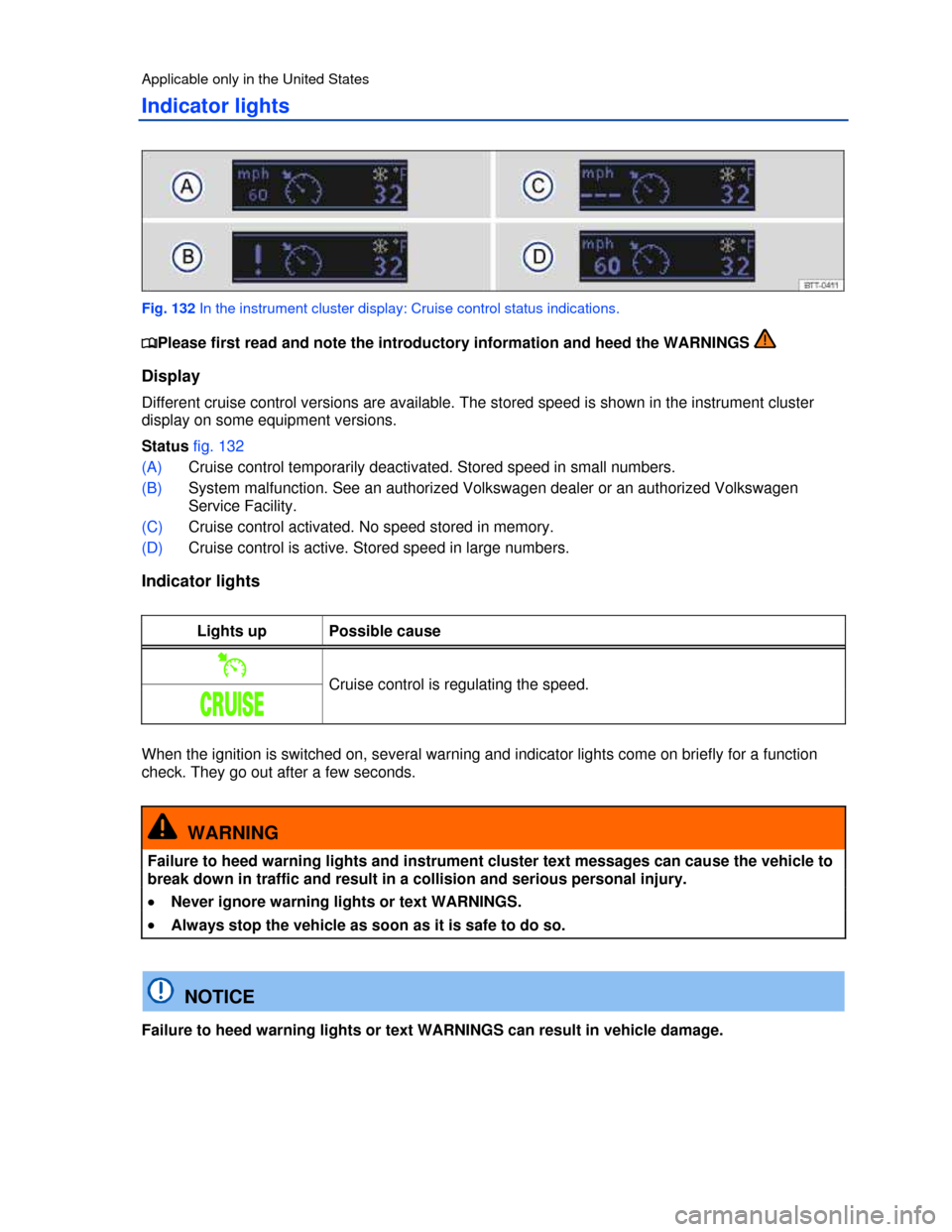
Fig. 132 In the instrument cluster display: Cruise control status indications.
Page 220 of 353
Applicable only in Canada
Indicator lights
Fig. 133 In the instrument cluster display: Cruise control status indications.
Page 226 of 353

Your vehicle's Tire Pressure Monitoring System (TPMS) uses the Anti-lock Brake System (ABS)
sensors to indirectly check the tire pressure of all 4 tires while you are driving. The sensors monitor the
tread circumference (rolling circumference) and vibration characteristics of the individual tires. TPMS
warns if there is a significant loss of pressure in one or more tires while the vehicle is moving.
Pressure loss is signaled by the indicator light Ç (described below) as well as by text warnings in the
instrument cluster display if your vehicle has this display (Multi-Function Indicator- MFI).
The original benchmark pressure is the recommended maximum load cold tire inflation pressure for
the tires that come with your vehicle. This pressure is listed on the tire pressure label on the driver
door jamb. After adjusting the tire pressures in all 4 tires, you must confirm and store the new cold
inflation pressures using the Settings menu in the instrument cluster , which changes the
benchmark pressure to match the current pressure of the tires on your vehicle.
Recalibrating the TPMS to reset the benchmark cold tire inflation pressure is explained below
More information:
x Volkswagen Information System
x Transporting
x Braking, stopping and parking
x Exterior care and cleaning
x Tires and wheels
x Parts, accessories, repairs and modifications
x Consumer information
Page 229 of 353
Flashes Display text Possible cause or meaning
⇒
Proper response
Ç – There is a malfunction
between a sensor and the
system. The function can be
temporarily disrupted by
interference from transmitters
in the vicinity of the vehicle
working in the same
frequency range such as radio
equipment, remote controls or
children's toys.
Switch the source of interference off.
(Intermittently
while
driving.)
Page 233 of 353
NOTICE
Failure to heed warning lights or text WARNINGS can result in vehicle damage.
Driving for a longer period of time on rough roads or with a dynamic and sporty style can make
the TPMS system temporarily unavailable. The indicator light will come on, signaling a malfunction, but
will go out again once the road condition or driving style changes.
Applicable only in the United States
Tire Pressure Monitoring System (TPMS)
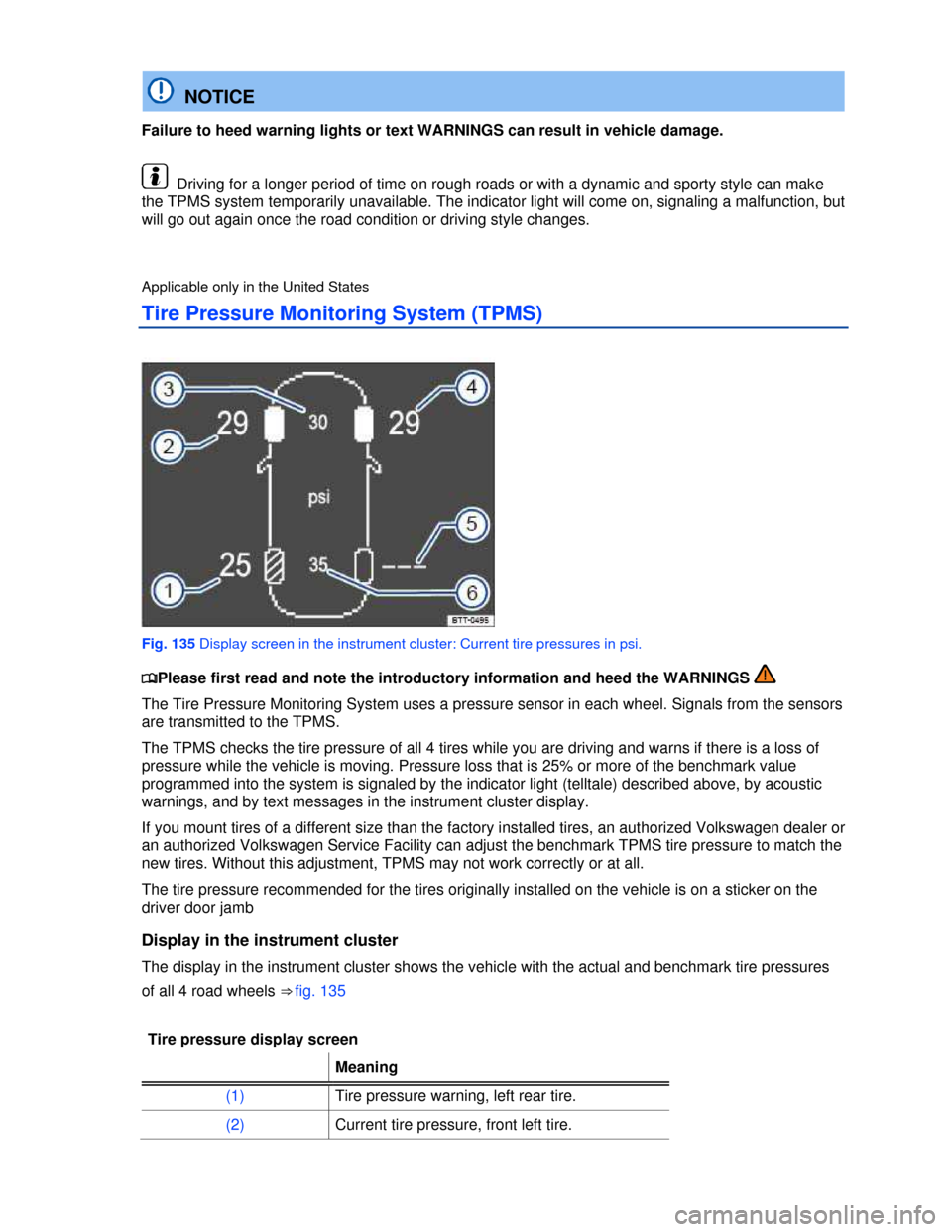
Fig. 135 Display screen in the instrument cluster: Current tire pressures in psi.
Page 234 of 353

Tire pressure display screen
Meaning
(3) Benchmark pressure, front tires
(4) Current tire pressure, front right tire.
(5) No data received, right rear tire.
(6) Benchmark pressure, rear tires
If the tire pressure is too low, the relevant tires and the respective readings are highlighted in yellow.
Each tire, including the spare (if provided), should be checked monthly when cold and inflated to the
inflation pressure recommended by the vehicle manufacturer on the vehicle placard or tire inflation
pressure label. (If your vehicle has tires of a different size than the size indicated on the vehicle
placard or tire inflation pressure label, you should determine the proper tire inflation pressure for those
tires.)
As an added safety feature, your vehicle has been equipped with a Tire Pressure Monitoring System
(TPMS) that illuminates a low tire pressure telltale when one or more of your tires is significantly
underinflated. Accordingly, when the low tire pressure telltale illuminates, you should stop and check
your tires as soon as possible, and inflate them to the proper pressure. Driving on a significantly
underinflated tire causes the tire to overheat and can lead to tire failure. Under-inflation also reduces
fuel efficiency and tire tread life, and may affect the vehicle's handling and stopping ability.
Please note that the TPMS is not a substitute for proper tire maintenance, and it is the driver's
responsibility to maintain correct tire pressure, even if under-inflation has not reached the level to
trigger illumination of the TPMS low tire pressure telltale.
Your vehicle has also been equipped with a TPMS malfunction indicator to indicate when the system
is not operating properly. The TPMS malfunction indicator is combined with the low tire pressure
telltale. When the system detects a malfunction, the telltale will flash for approximately one minute and
then remain continuously illuminated. This sequence will continue upon subsequent vehicle start-ups
as long as the malfunction exists.
When the malfunction indicator is illuminated, the system may not be able to detect or signal low tire
pressure as intended. TPMS malfunctions may occur for a variety of reasons, including the installation
of replacement or alternate tires or wheels on the vehicle that prevent the TPMS from functioning
properly. Always check the TPMS malfunction telltale after replacing one or more tires or wheels on
your vehicle to ensure that the replacement or alternate tires and wheels allow the TPMS to continue
to function properly.
Spare wheel or compact spare wheel
The spare wheel or compact spare wheel has no tire pressure sensor. When the spare or compact
spare wheel is mounted on the vehicle, the Tire Pressure Monitoring System (TPMS) indicator light will
flash in the instrument cluster display. The TPMS continues to monitor the other 3 wheels.
Tire storage
If the tires do not move for an extended period of time, the sensors will not transmit tire pressures to
the system. This saves sensor battery life. When the ignition is switched on, the sensors transmit
signals to the Tire Pressure Monitoring System.