Page 259 of 876
259
2-2. Instrument cluster and information display
2
When driving
SIENNA_OM_OM45472U_(U)
■
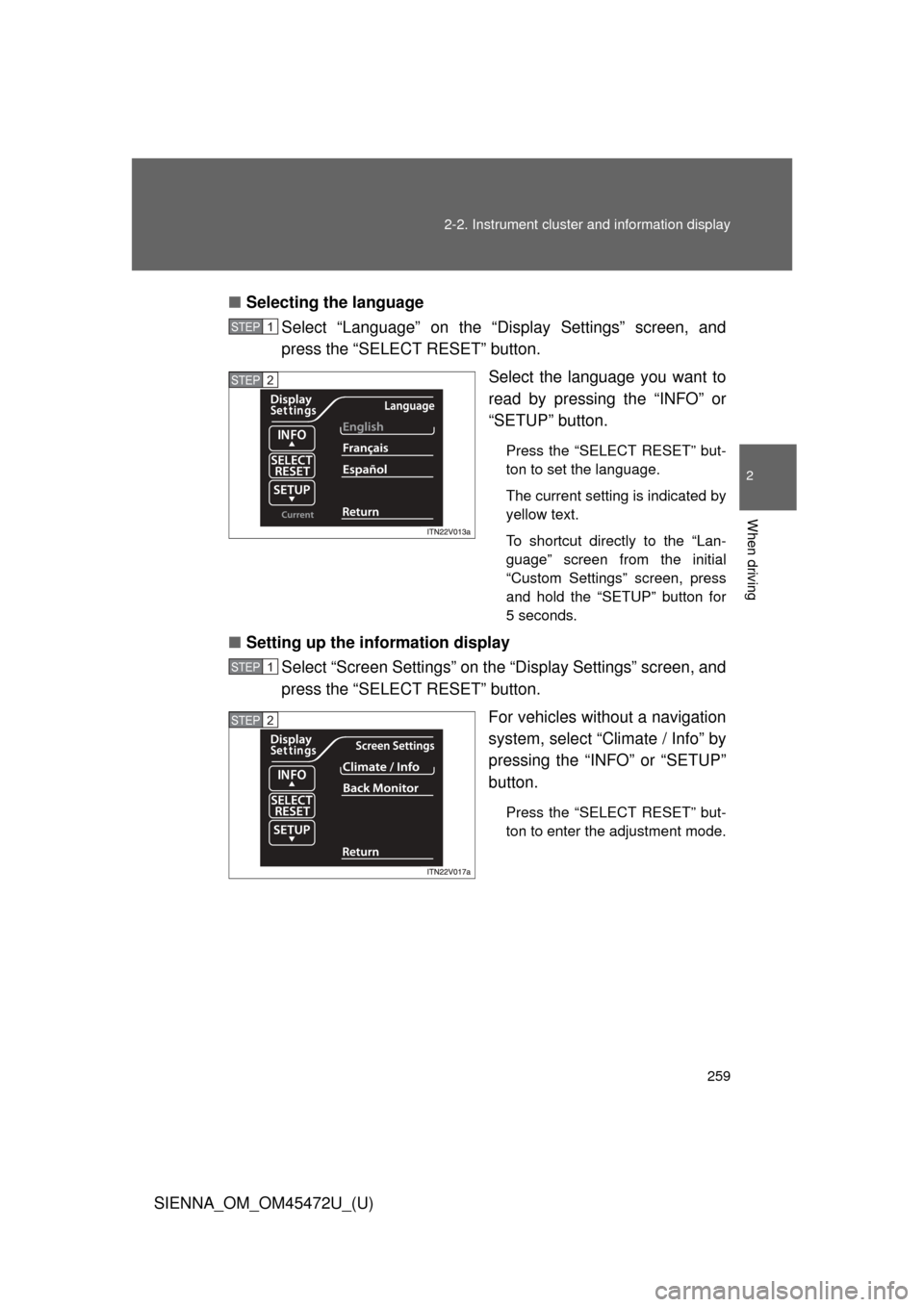
Selecting the language
Select “Language” on the “Display Settings” screen, and
press the “SELECT RESET” button.
Select the language you want to
read by pressing the “INFO” or
“SETUP” button.
Press the “SELECT RESET” but-
ton to set the language.
The current setting is indicated by
yellow text.
To shortcut directly to the “Lan-
guage” screen from the initial
“Custom Settings” screen, press
and hold the “SETUP” button for
5 seconds.
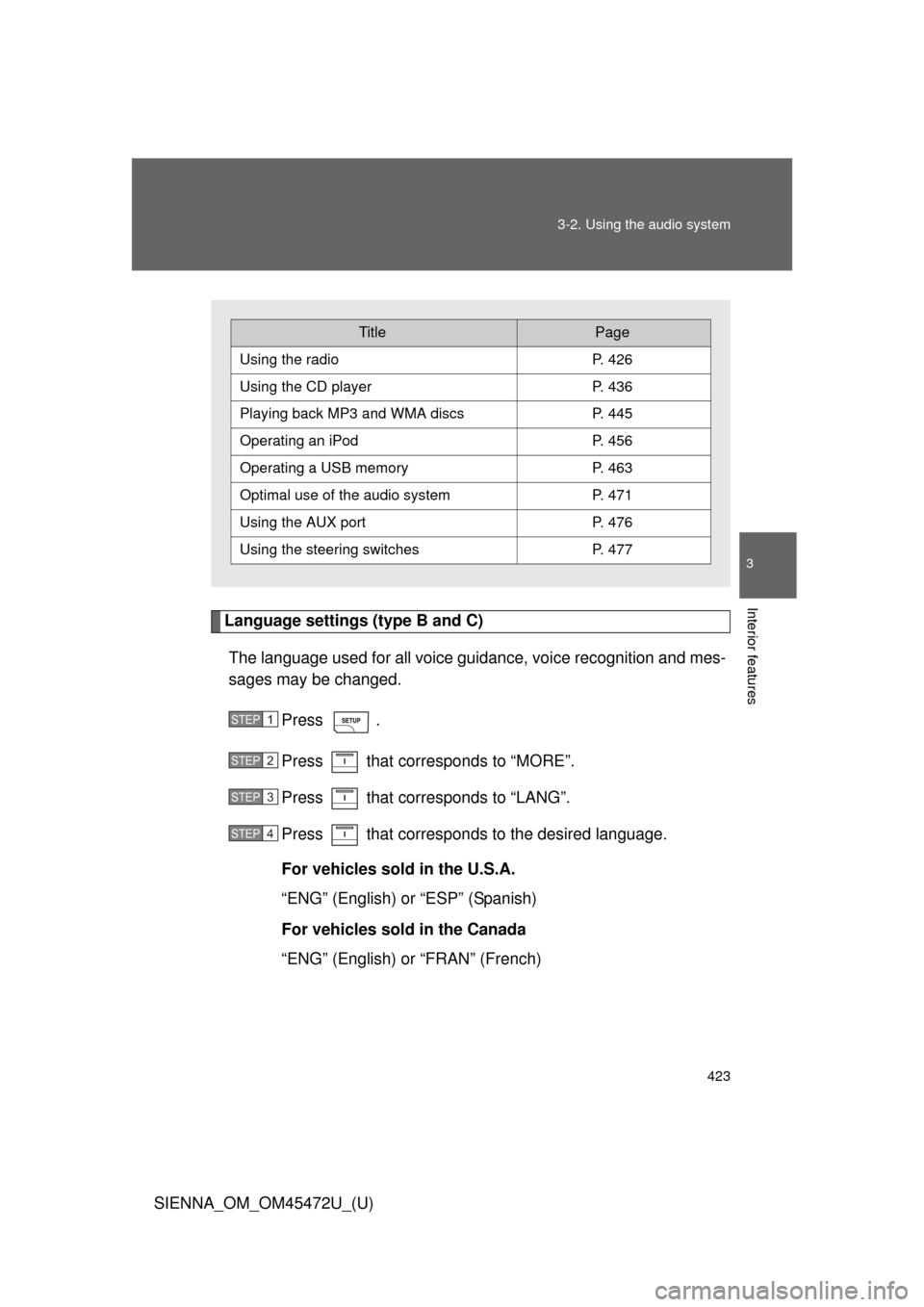
■Setting up the information display
Select “Screen Settings” on the “Display Settings” screen, and
press the “SELECT RESET” button.
For vehicles without a navigation
system, select “Climate / Info” by
pressing the “INFO” or “SETUP”
button.
Press the “SELECT RESET” but-
ton to enter the adjustment mode.
STEP1
STEP2
STEP1
STEP2
Page 423 of 876
423
3-2. Using the audio system
3
Interior features
SIENNA_OM_OM45472U_(U)
Language settings (type B and C)
The language used for all voice guidance, voice recognition and mes-
sages may be changed.
Press .
Press that corresponds to “MORE”.
Press that corresponds to “LANG”.
Press that corresponds to the desired language.
For vehicles sold in the U.S.A.
“ENG” (English) or “ESP” (Spanish)
For vehicles sold in the Canada
“ENG” (English) or “FRAN” (French)
TitlePage
Using the radioP. 426
Using the CD playerP. 436
Playing back MP3 and WMA discs P. 445
Operating an iPodP. 456
Operating a USB memoryP. 463
Optimal use of the audio systemP. 471
Using the AUX port P. 476
Using the steering switchesP. 477
STEP1
STEP2
STEP3
STEP4
Page 475 of 876
475
3-2. Using the audio system
3
Interior features
SIENNA_OM_OM45472U_(U)
■
Setting the number of preset pages (type B and C)
The number of preset pages desired can be set from 1 to 6. The
initial setting is 6 pages.
Press .
Press that corresponds to “MORE”.
Press that corresponds to “PRESET”.
Press that corresponds to the desired number of pre-
set pages.
■ Language settings (type B and C)
P. 4 2 3
■Trademark owned by SRS Labs, Inc. (type A and B)
The audio systems utilize SRS FOCUS
™ and SRS TruBass audio
enhancement technologies, under license from SRS Labs, Inc., in all mode
except AM radio mode.
FOCUS, TruBass, SRS and
symbols are trademarks of SRS Labs,
Inc.
FOCUS and TruBass technologies are incorporated under license from
SRS Labs, Inc.
STEP1
STEP2
STEP3
STEP4
Page 503 of 876
503
3-4. Using the rear audio system
3
Interior features
SIENNA_OM_OM45472U_(U)
Opening and closing the display
■ Opening and closing the display
Press the lock release button to
open the display.
Pull the display down to an easily
viewable angle (at 100 or 120 ).
To close the display, push the
display up until a click is heard.
The illumination of the screen is
automatically turned off when the
display is closed. However, the
rear seat entertainment system is
not turned off. (The sound is not
turned off.)
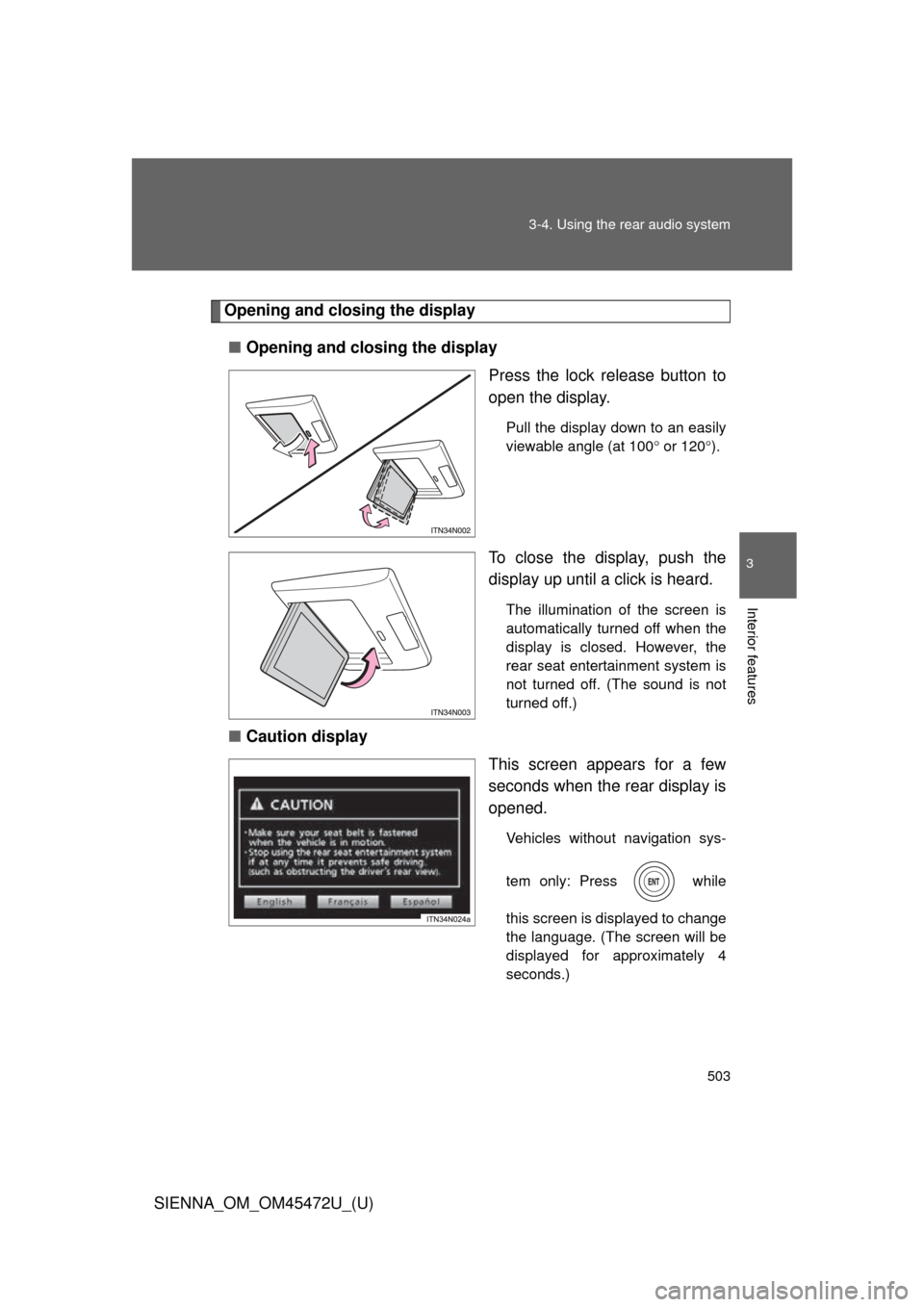
■ Caution display
This screen appears for a few
seconds when the rear display is
opened.
Vehicles without navigation sys-
tem only: Press while
this screen is displayed to change
the language. (The screen will be
displayed for approximately 4
seconds.)
Page 518 of 876
518 3-4. Using the rear audio system
SIENNA_OM_OM45472U_(U)
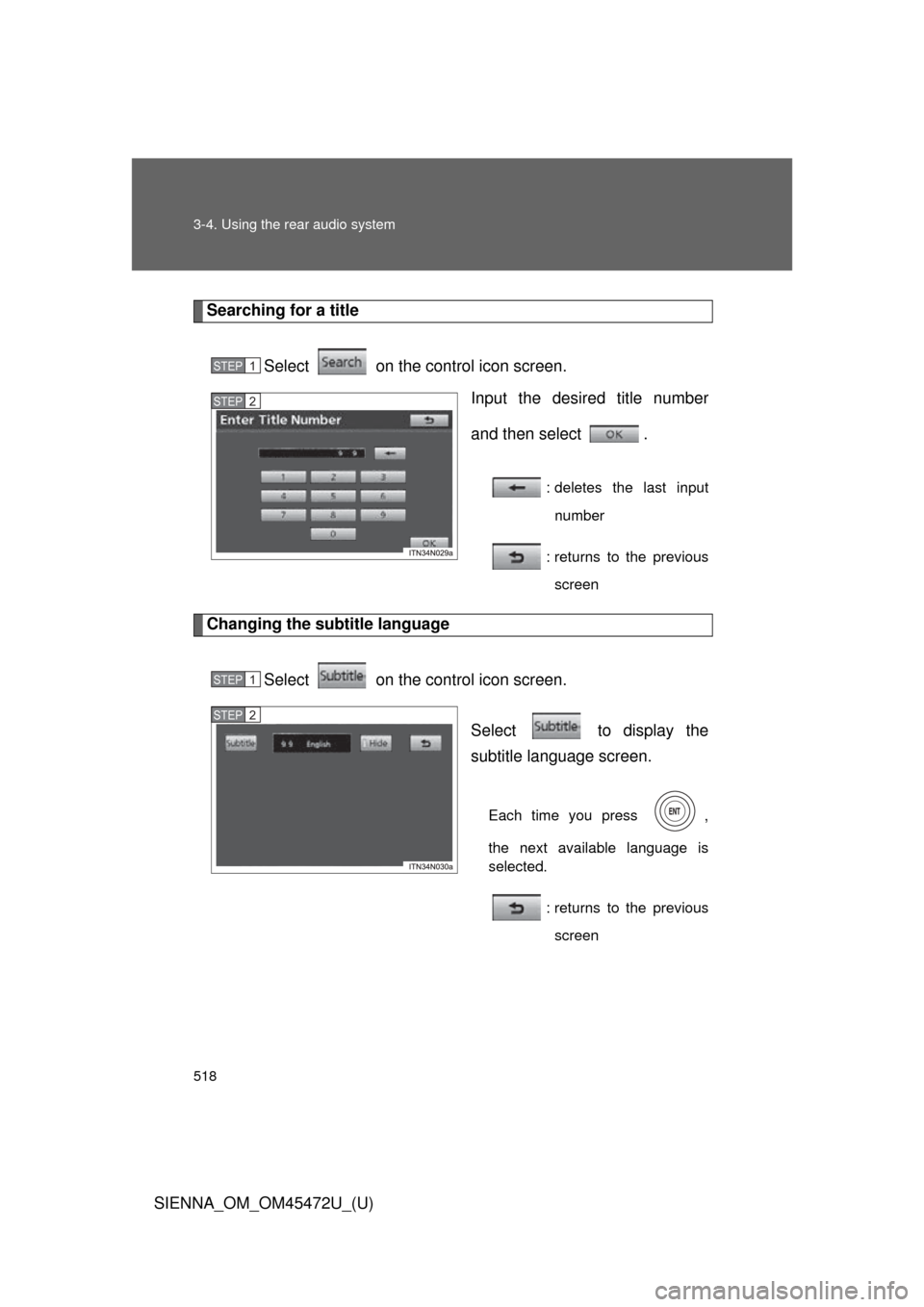
Searching for a titleSelect on the control icon screen. Input the desired title number
and then select .
: deletes the last inputnumber
: returns to the previous screen
Changing the subtitle language
Select on the control icon screen. Select to display the
subtitle language screen.
Each time you press ,
the next available language is
selected.: returns to the previousscreen
STEP1
STEP2
STEP1
STEP2
Page 519 of 876
519
3-4. Using the rear audio system
3
Interior features
SIENNA_OM_OM45472U_(U)
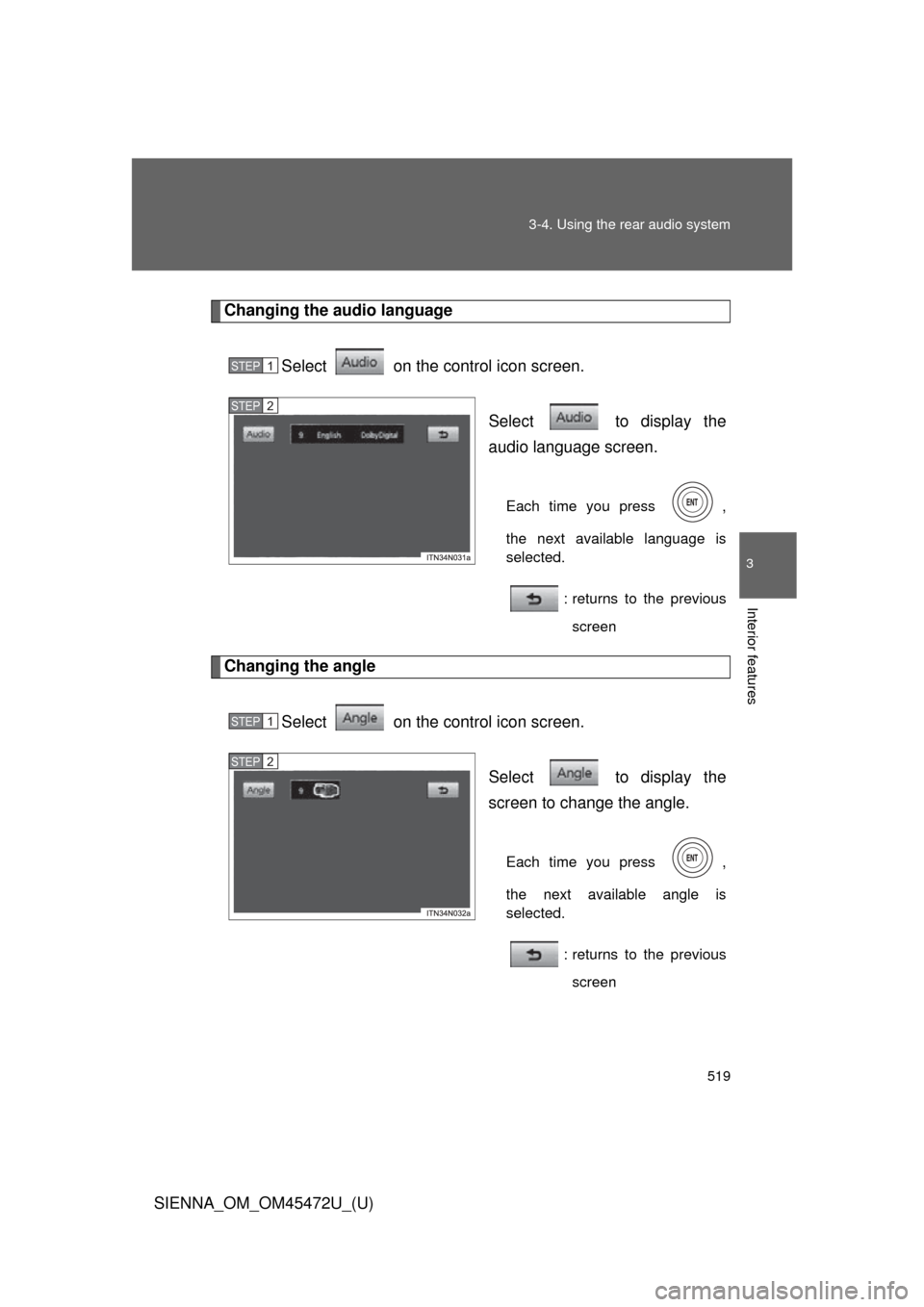
Changing the audio language
Select on the control icon screen. Select to display the
audio language screen.
Each time you press ,
the next available language is
selected.: returns to the previousscreen
Changing the angle
Select on the control icon screen. Select to display the
screen to change the angle.
Each time you press ,
the next available angle is
selected.: returns to the previousscreen
STEP1
STEP2
STEP1
STEP2
Page 520 of 876
520 3-4. Using the rear audio system
SIENNA_OM_OM45472U_(U)
■DVD player and DVD video discs
This DVD player is compatible NTSC color TV formats. DVD video discs
conforming to other formats such as PAL or SECAM cannot be used.
■ Region codes
Some DVD video discs have a region code indicating where you can use
them. If the DVD video disc is not labeled “ALL” or “1”, you cannot use it in
this DVD player. If you attempt to play an inappropriate DVD video disc in
this player, “Region code error” appears on the screen. Even if the DVD
video disc does not have a region code, in some cases you cannot use it.
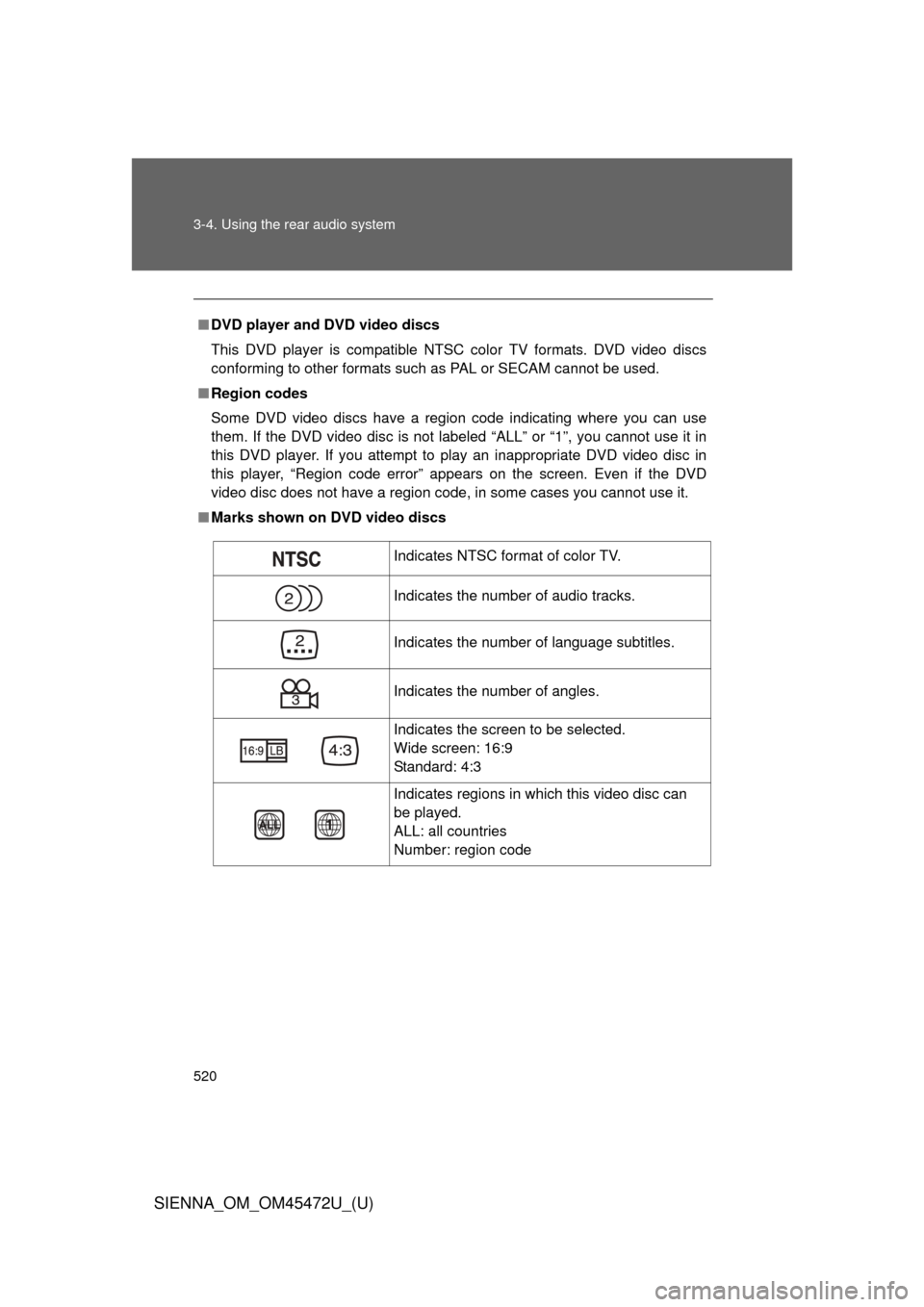
■ Marks shown on DVD video discs
Indicates NTSC format of color TV.
Indicates the number of audio tracks.
Indicates the number of language subtitles.
Indicates the number of angles.
Indicates the screen to be selected.
Wide screen: 16:9
Standard: 4:3
Indicates regions in which this video disc can
be played.
ALL: all countries
Number: region code
Page 521 of 876
521
3-4. Using the rear audio system
3
Interior features
SIENNA_OM_OM45472U_(U)
■
DVD video disc glossary
● DVD video discs: Digital Versatile Discs that hold world’s standard video.
DVD video discs have adopted “MPEG2”, one of the world standards of
digital compression technologies. The picture data is compressed by 1/
40 on average and stored. Variable rate encoded technology has been
adopted in which the volume of data assigned to the picture is changed
depending on the picture format. Audio data is stored using PCM and
Dolby digital, which enables higher quality of sound. Furthermore, multi-
angle and multi-language features will also help you enjoy the more
advanced technology of DVD video.
● Viewer restrictions: This feature limits what can be viewed in conformity
with the level of restrictions of the country. The level of restrictions varies
depending on the DVD video disc. Some DVD video discs cannot be
played at all, or violent scenes are skipped or replaced with other scenes.
• Level 1: DVD video discs for children can be played.
• Level 2 - 7: DVD video discs for children and G-rated movies can be
played.
• Level 8: All types of DVD video discs can be played.