Page 245 of 876
245
2-2. Instrument cluster and information display
2
When driving
SIENNA_OM_OM45472U_(U)
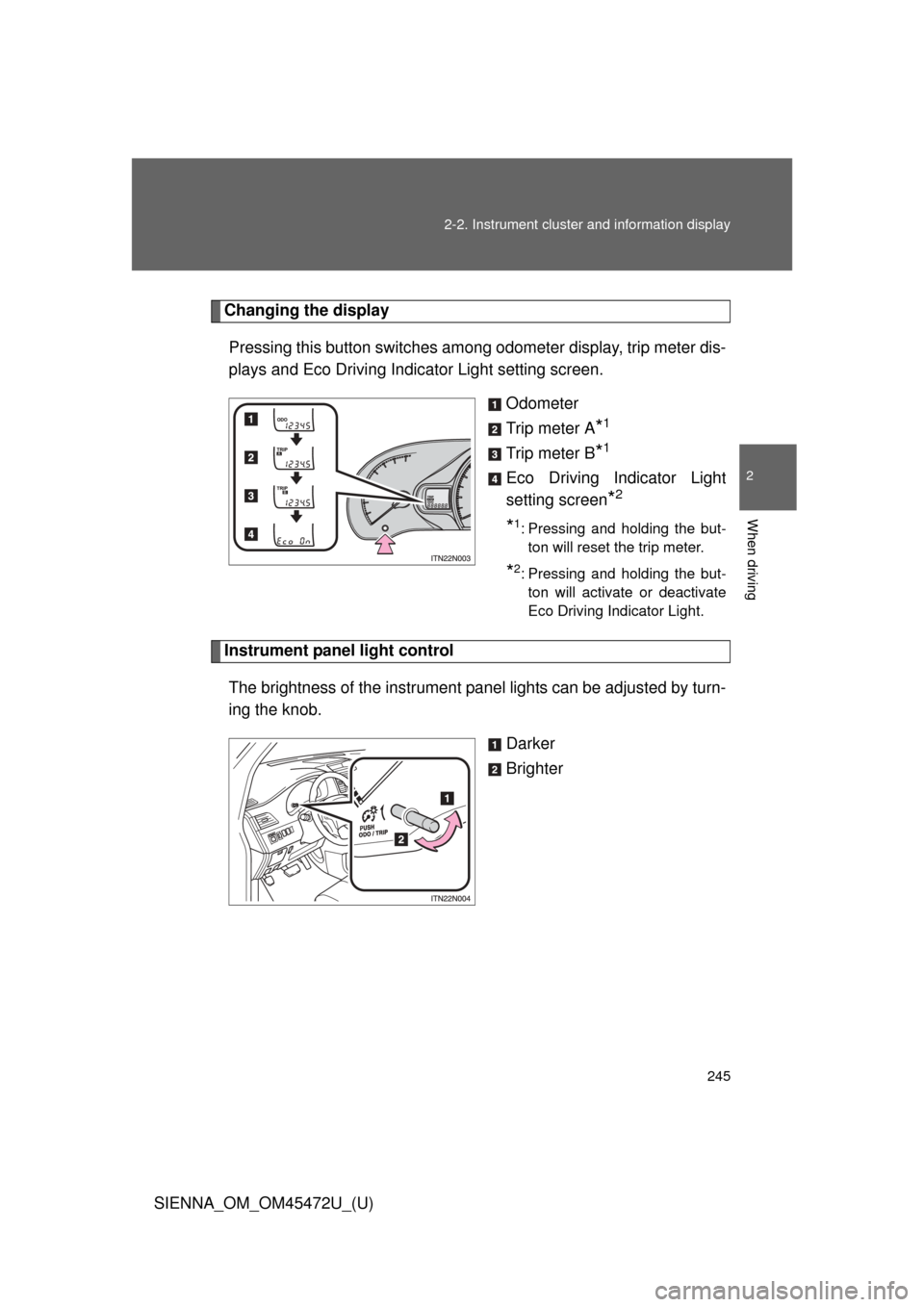
Changing the display
Pressing this button switches amon g odometer display, trip meter dis-
plays and Eco Driving Indicator Light setting screen.
Odometer
Trip meter A
*1
Trip meter B*1
Eco Driving Indicator Light
setting screen
*2
*1: Pressing and holding the but-ton will reset the trip meter.
*2: Pressing and holding the but-ton will activate or deactivate
Eco Driving Indicator Light.
Instrument panel light control
The brightness of the instrument pa nel lights can be adjusted by turn-
ing the knob.
Darker
Brighter
Page 247 of 876
247
2-2. Instrument cluster and information display
2
When driving
SIENNA_OM_OM45472U_(U)
Indicators and warning lights
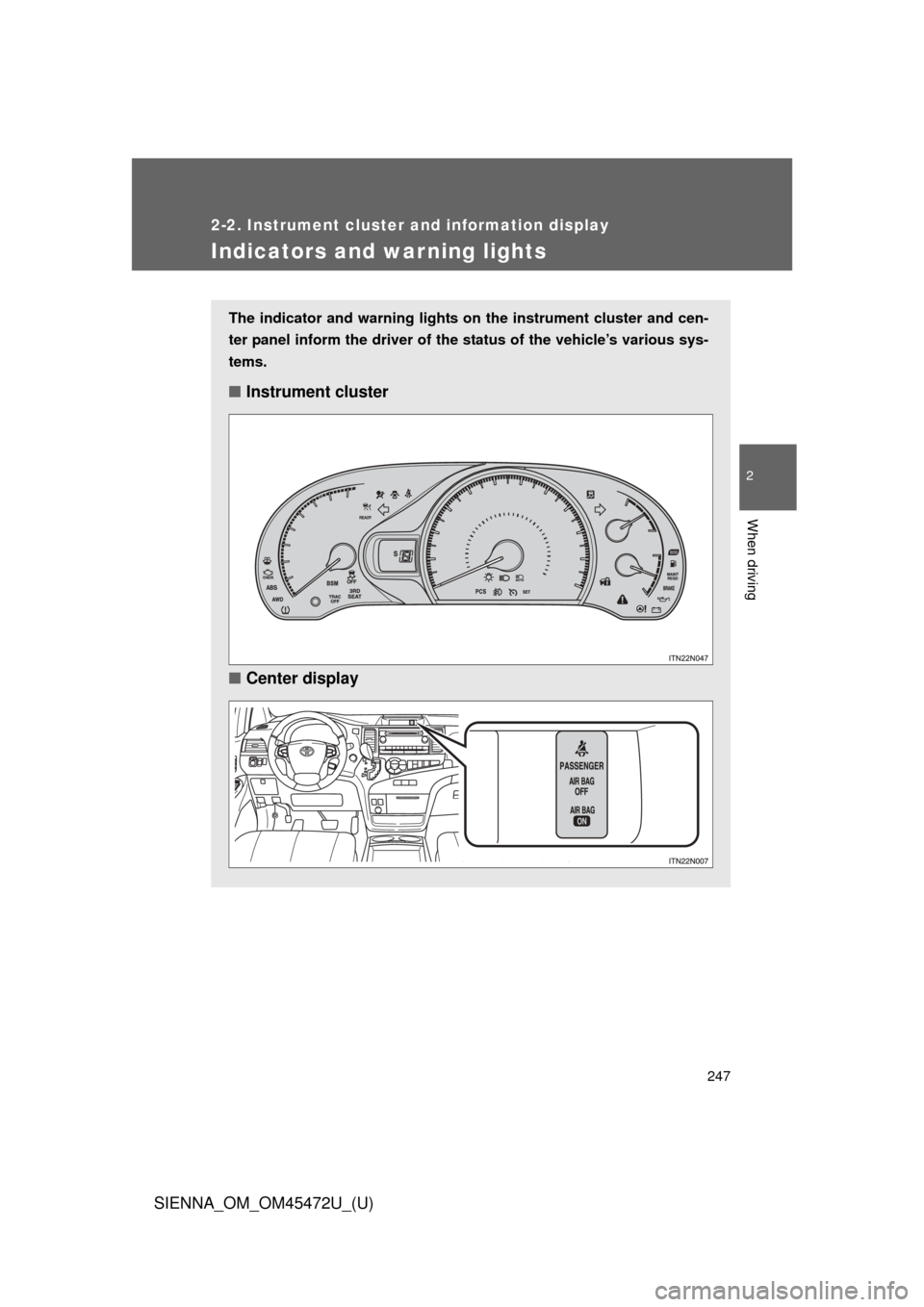
The indicator and warning lights on the instrument cluster and cen-
ter panel inform the driver of the status of the vehicle’s various sys-
tems.
■ Instrument cluster
■ Center display
Page 249 of 876
249
2-2. Instrument cluster and information display
2
When driving
SIENNA_OM_OM45472U_(U)
■
Indicators
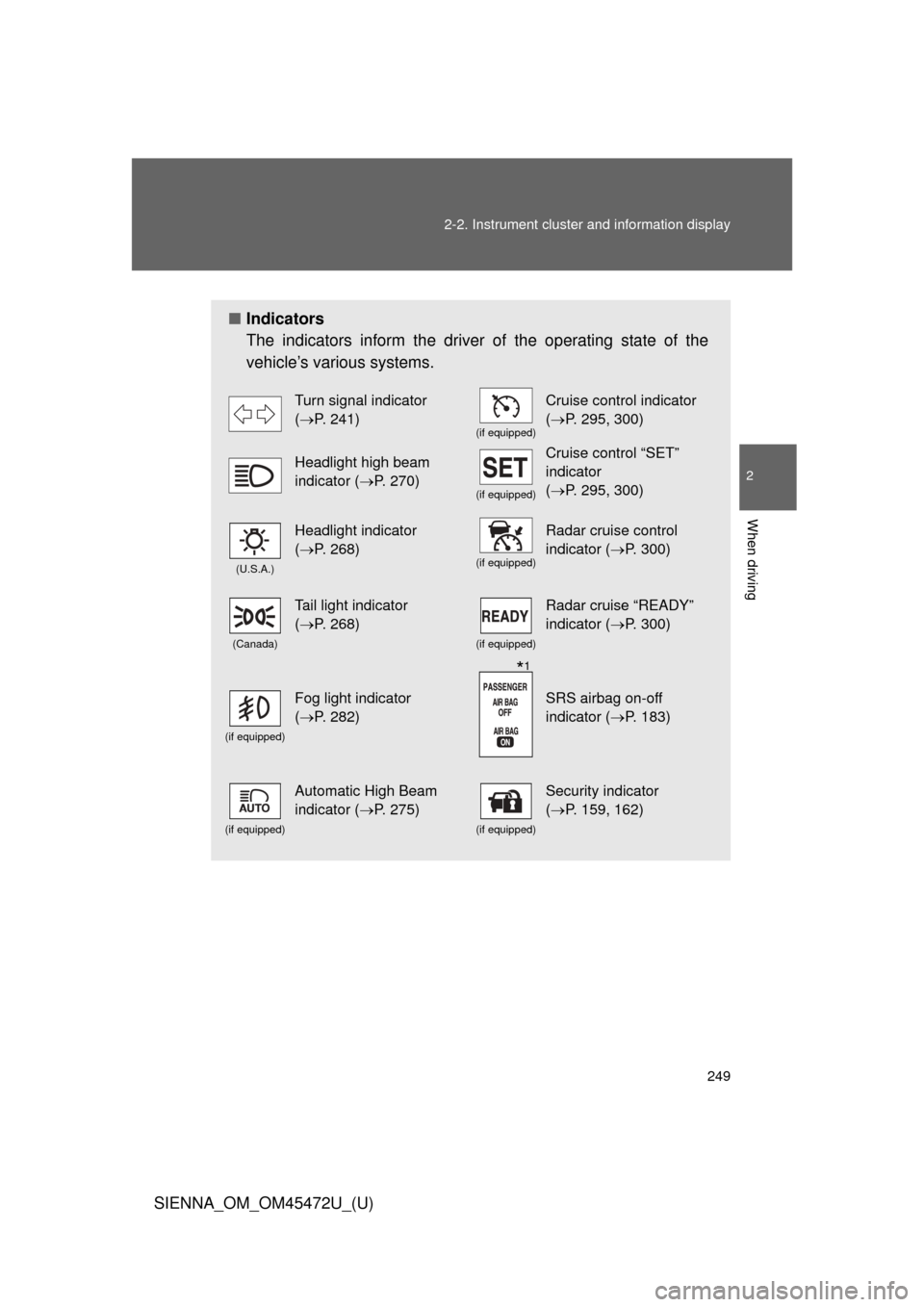
The indicators inform the driver of the operating state of the
vehicle’s various systems.
Turn signal indicator
(P. 241)
(if equipped)
Cruise control indicator
(P. 295, 300)
Headlight high beam
indicator ( P. 270)
(if equipped)
Cruise control “SET”
indicator
(P. 295, 300)
(U.S.A.)
Headlight indicator
(P. 268)
(if equipped)
Radar cruise control
indicator ( P. 300)
(Canada)
Tail light indicator
(P. 268)
(if equipped)
Radar cruise “READY”
indicator ( P. 300)
(if equipped)
Fog light indicator
(P. 282)SRS airbag on-off
indicator ( P. 183)
(if equipped)
Automatic High Beam
indicator (P. 275)
(if equipped)
Security indicator
(P. 159, 162)
*1
Page 250 of 876
250 2-2. Instrument cluster and information display
SIENNA_OM_OM45472U_(U)
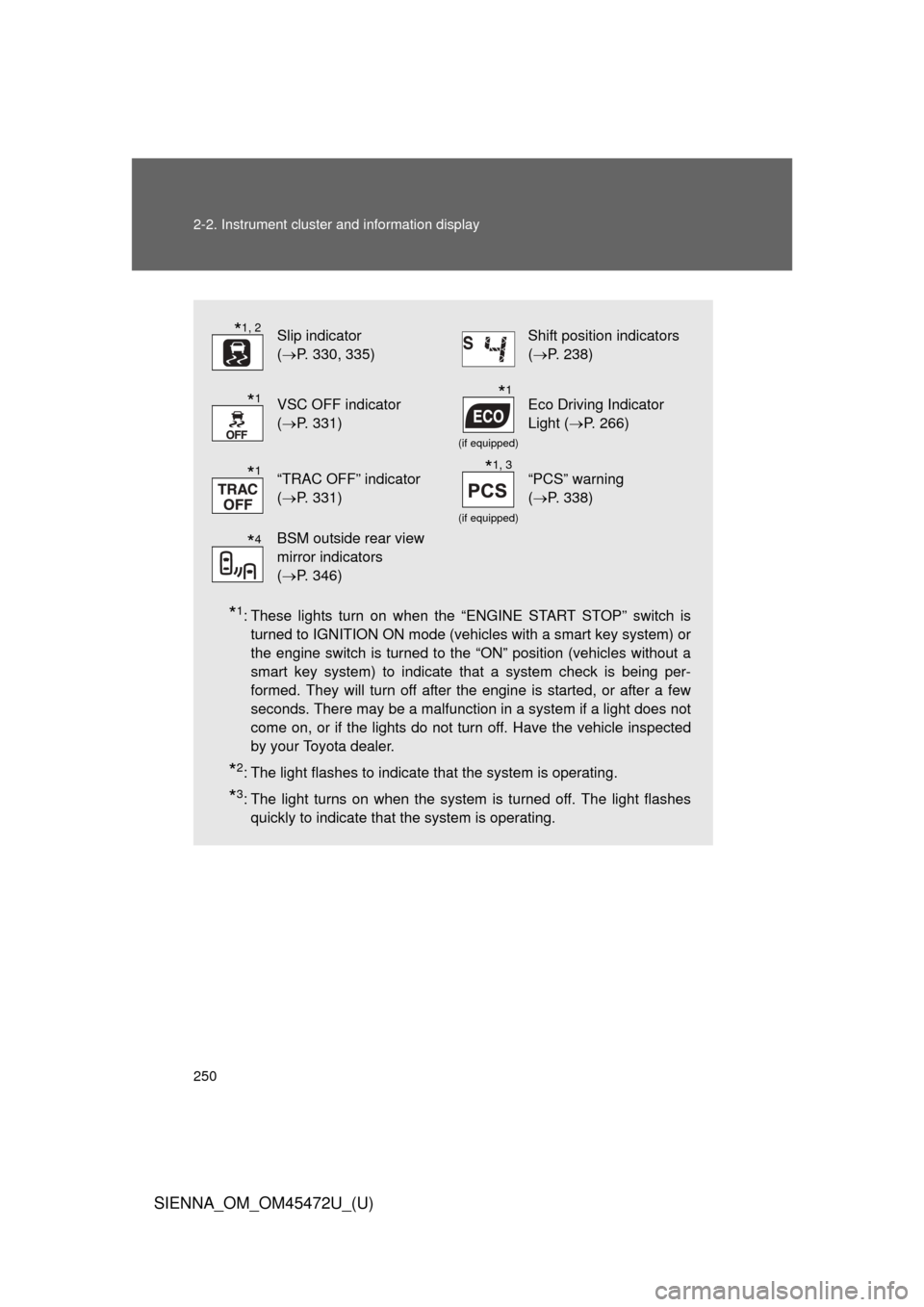
*1: These lights turn on when the “ENGINE START STOP” switch isturned to IGNITION ON mode (vehicles with a smart key system) or
the engine switch is turned to the “ON” position (vehicles without a
smart key system) to indicate that a system check is being per-
formed. They will turn off after the engine is started, or after a few
seconds. There may be a malfunction in a system if a light does not
come on, or if the lights do not turn off. Have the vehicle inspected
by your Toyota dealer.
*2: The light flashes to indicate that the system is operating.
*3: The light turns on when the system is turned off. The light flashesquickly to indicate that the system is operating.
Slip indicator
(P. 330, 335)Shift position indicators
(P. 238)
VSC OFF indicator
(P. 331)
(if equipped)
Eco Driving Indicator
Light ( P. 266)
“TRAC OFF” indicator
(P. 331)
(if equipped)
“PCS” warning
(P. 338)
BSM outside rear view
mirror indicators
(P. 346)
*1, 2
*1*1
*1*1, 3
*4
Page 252 of 876
252 2-2. Instrument cluster and information display
SIENNA_OM_OM45472U_(U)
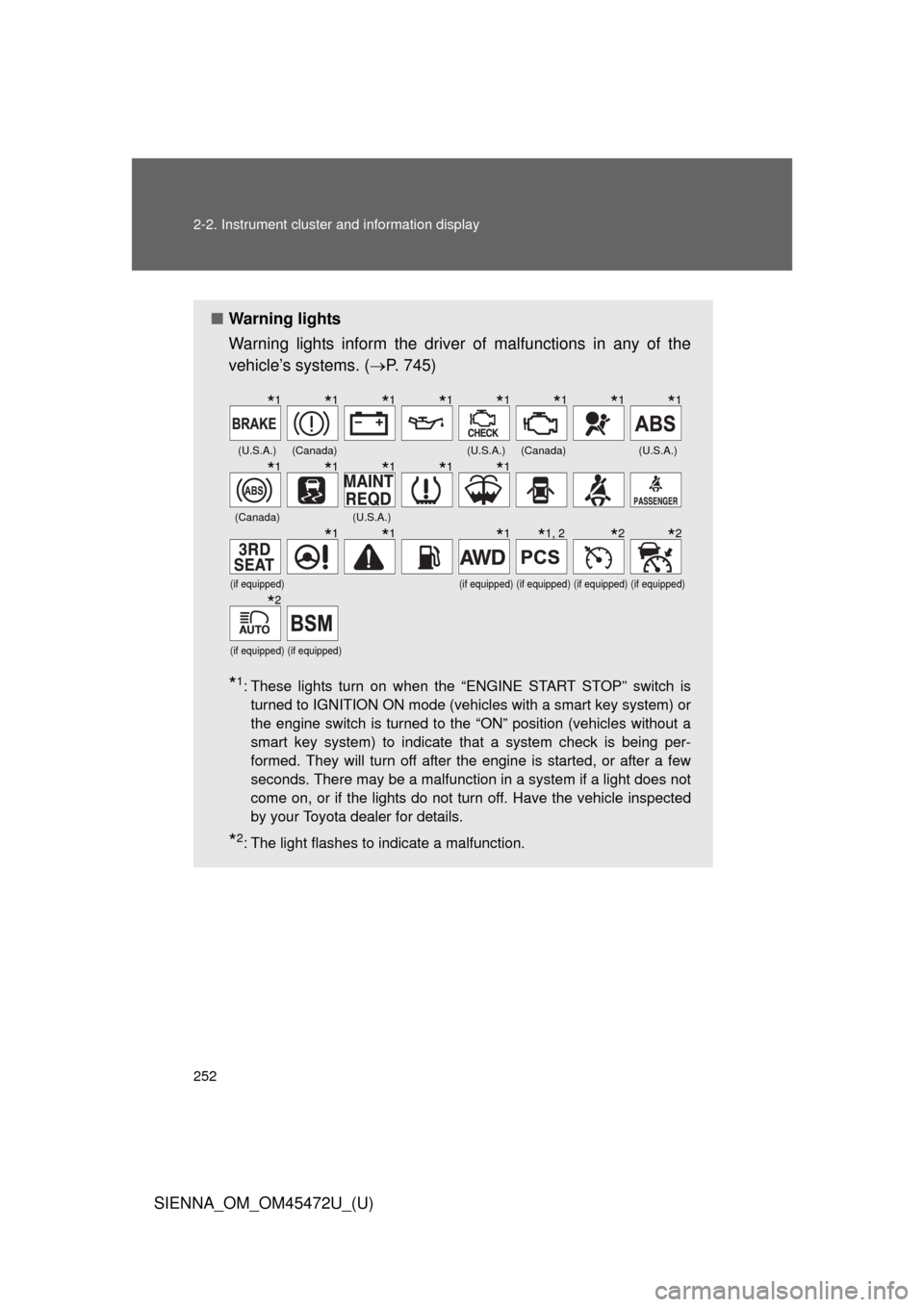
■Warning lights
Warning lights inform the driver of malfunctions in any of the
vehicle’s systems. ( P. 745)
*1: These lights turn on when the “ENGINE START STOP” switch is
turned to IGNITION ON mode (vehicles with a smart key system) or
the engine switch is turned to the “ON” position (vehicles without a
smart key system) to indicate that a system check is being per-
formed. They will turn off after the engine is started, or after a few
seconds. There may be a malfunction in a system if a light does not
come on, or if the lights do not turn off. Have the vehicle inspected
by your Toyota dealer for details.
*2: The light flashes to indicate a malfunction.
(U.S.A.)(Canada)(U.S.A.)(Canada)(U.S.A.)
(Canada)(U.S.A.)
(if equipped)(if equipped)(if equipped)(if equipped)(if equipped)
(if equipped)(if equipped)
*1*1*1*1*1*1*1*1
*1*1*1*1*1
*1*1*1*1, 2*2*2
*2
Page 253 of 876
253
2-2. Instrument cluster and information display
2
When driving
SIENNA_OM_OM45472U_(U)
CAUTION
■
If a safety system warning light does not come on
Should a safety system light such as the ABS or SRS airbag warning light
not come on when you start the engine, this could mean that these systems
are not available to help protect you in an accident, which could result in
death or serious injury. Have the vehicle inspected by your Toyota dealer
immediately if this occurs.
Page 266 of 876
266 2-2. Instrument cluster and information display
SIENNA_OM_OM45472U_(U)
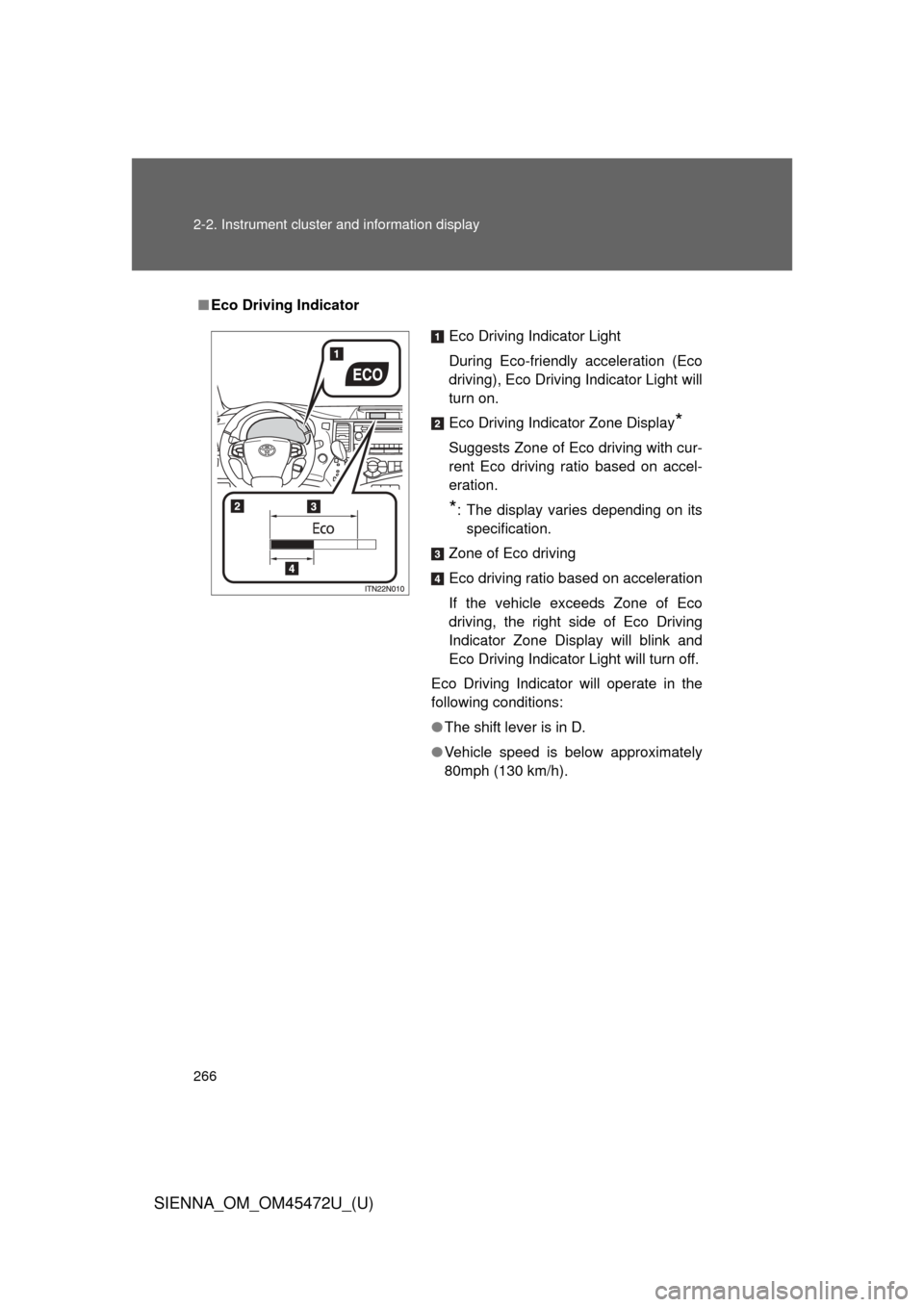
■Eco Driving Indicator
Eco Driving Indicator Light
During Eco-friendly acceleration (Eco
driving), Eco Driving Indicator Light will
turn on.
Eco Driving Indicator Zone Display
*
Suggests Zone of Eco driving with cur-
rent Eco driving ratio based on accel-
eration.
*: The display varies depending on its
specification.
Zone of Eco driving
Eco driving ratio based on acceleration
If the vehicle exceeds Zone of Eco
driving, the right side of Eco Driving
Indicator Zone Display will blink and
Eco Driving Indicator Light will turn off.
Eco Driving Indicator will operate in the
following conditions:
● The shift lever is in D.
● Vehicle speed is below approximately
80mph (130 km/h).
Page 268 of 876
268
SIENNA_OM_OM45472U_(U)
2-3. Operating the lights and wipers
Headlight switch
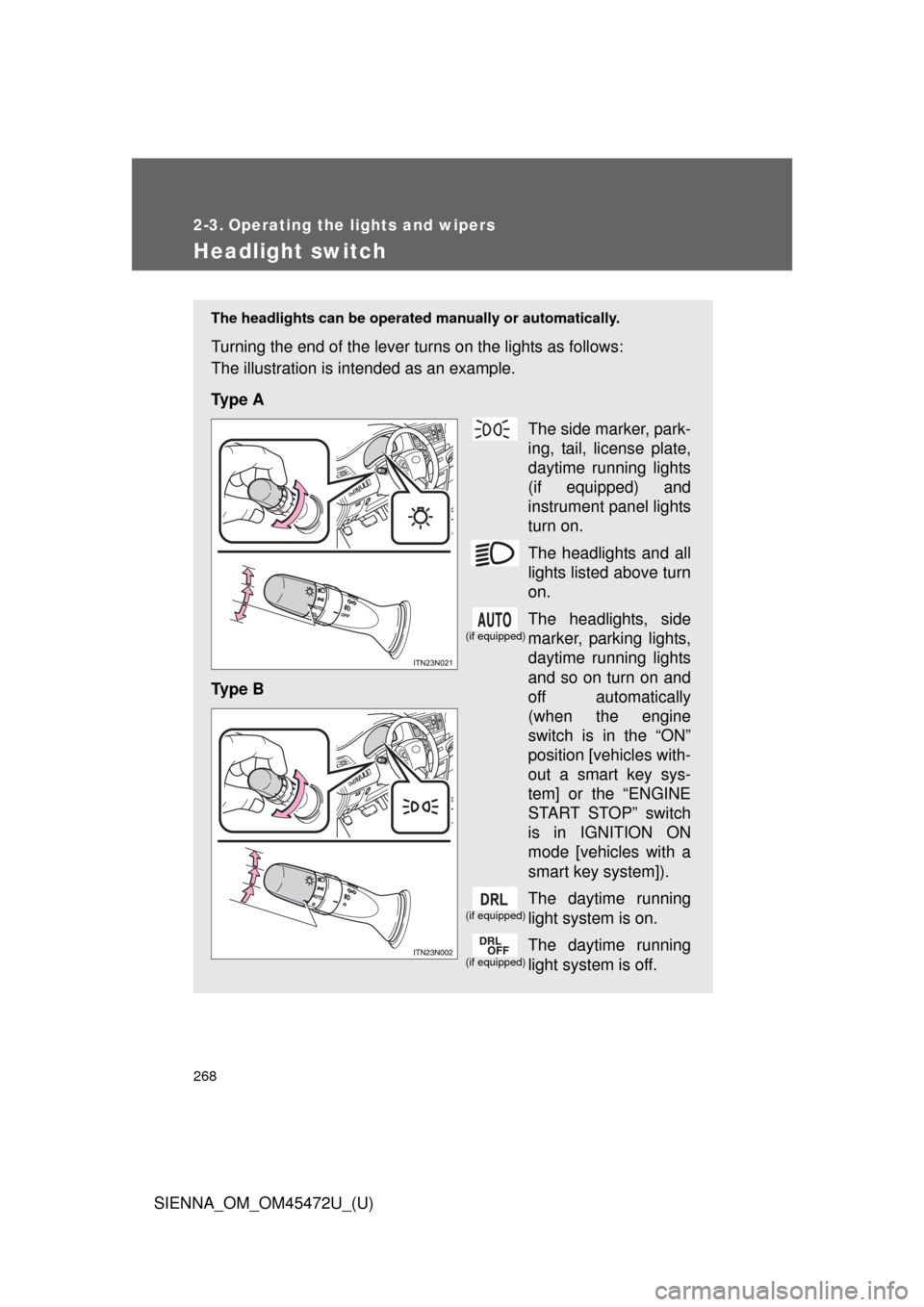
The headlights can be operated manually or automatically.
Turning the end of the lever turns on the lights as follows:
The illustration is intended as an example.
Ty p e A
The side marker, park-
ing, tail, license plate,
daytime running lights
(if equipped) and
instrument panel lights
turn on.
The headlights and all
lights listed above turn
on.
The headlights, side
marker, parking lights,
daytime running lights
and so on turn on and
off automatically
(when the engine
switch is in the “ON”
position [vehicles with-
out a smart key sys-
tem] or the “ENGINE
START STOP” switch
is in IGNITION ON
mode [vehicles with a
smart key system]).
The daytime running
light system is on.
The daytime running
light system is off.
Ty p e B
(if equipped)
(if equipped)
(if equipped)