Page 234 of 876

234 2-1. Driving procedures
SIENNA_OM_OM45472U_(U)
■When the “ENGINE START STOP” switch indicator flashes in amber
The system may be malfunctioning. Have the vehicle inspected by your
Toyota dealer immediately.
■ If the electronic key battery is depleted
P. 709
CAUTION
■When starting the engine
Always start the engine while sitting in the driver’s seat. Do not depress the
accelerator pedal while starting the engine under any circumstances.
Doing so may cause an accident resulting in death or serious injury.
■ Caution while driving
If the vehicle begins to slide due to engine failure or other circumstances, do
not lock or open the doors until the vehicle reaches a safe and complete
stop. Activation of the steering lock in this circumstance may lead to an acci-
dent, resulting in death or serious injury.
■ Stopping the engine in an emergency
If you want to stop the engine in an emergency while driving the vehicle,
press and hold the “ENGINE START STOP” switch for more than 2 seconds,
or press it briefly 3 times or more in succession. ( P. 796)
However, do not touch the “ENGINE START STOP” switch while driving
except in an emergency. Turning the engine off while driving will not cause
loss of steering or braking control, but the power assist to these systems will
be lost. This will make it more difficult to steer and brake, so you should pull
over and stop the vehicle as soon as it is safe to do so.
Page 239 of 876
239
2-1. Driving procedures
2
When driving
SIENNA_OM_OM45472U_(U)
■
Shift ranges and their functions
●Automatically selecting gears between 1 and 6 according to
vehicle speed and driving conditi ons. But, the gear is limited
according to selected shift range.
● You can choose from 6 levels of engine braking force.
● A lower shift range will provide greater engine br aking force than
a higher shift range, and the engine speed will also increase.
■S mode
● When the shift range is 5 or lower, holding the shift lever toward “+” sets
the shift range to 6.
● To prevent excessive engine speed, a function was adopted that auto-
matically selects a higher shift range before the engine speed becomes
too high.
● To protect the automatic transaxle, a function is adopted that automati-
cally selects a higher shift range when the fluid temperature is high.
■ When driving with the cruise contro l or dynamic radar cruise control
Engine braking will not occur in S mode, even when downshifting to 5 or 4.
( P. 295, 300)
■ If the shift lever cannot be shifted from P
● P. 780
● Vehicles with AUTO ACCESS SEAT : If the AUTO ACCESS SEAT has
not been locked in place after being stowed, the shift lever cannot be
shifted from P.
For details, refer to “AUTO ACCESS SEAT OWNER’S MANUAL”.
Page 243 of 876
243
2-1. Driving procedures
2
When driving
SIENNA_OM_OM45472U_(U)
Hor n
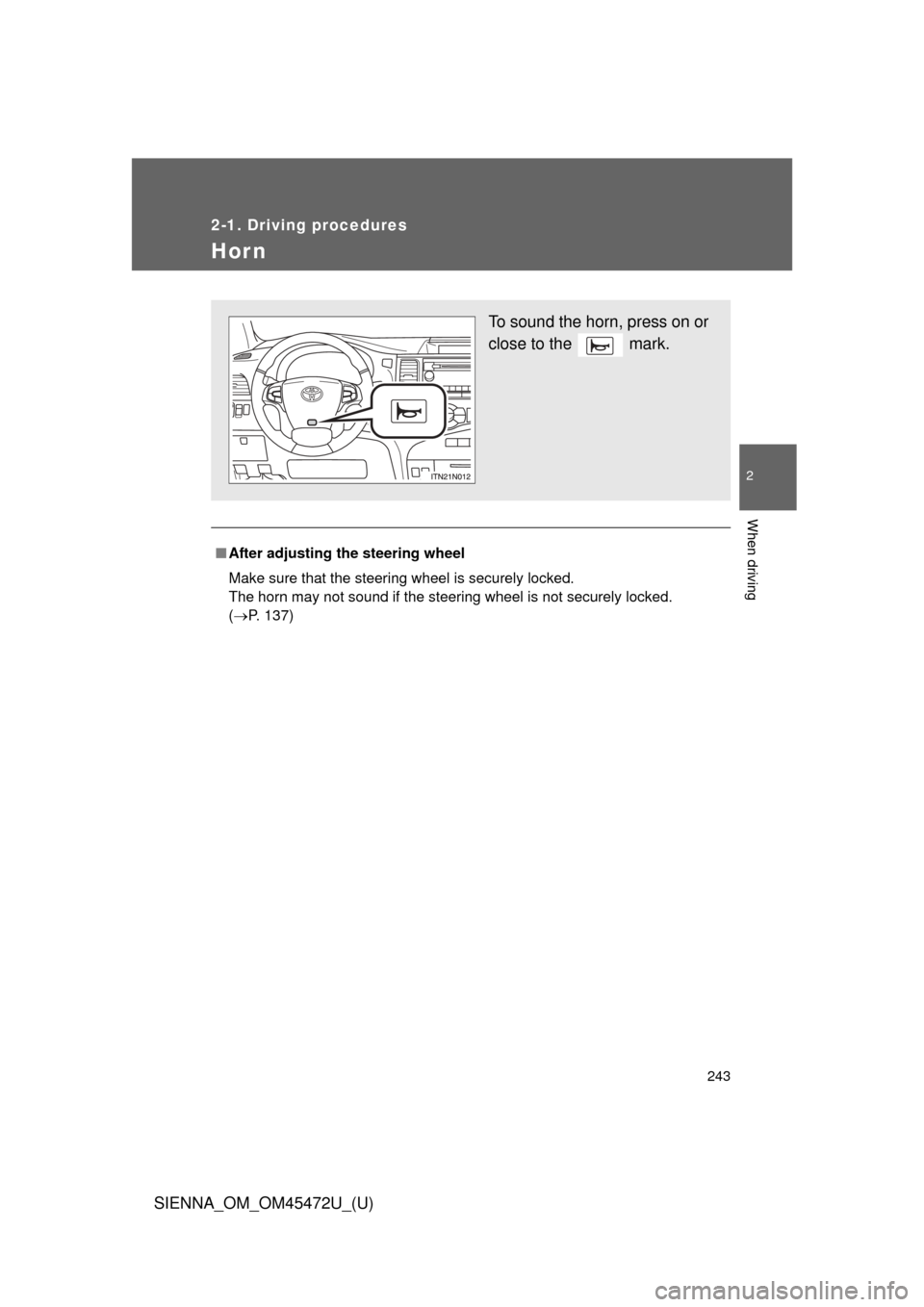
■After adjusting the steering wheel
Make sure that the steering wheel is securely locked.
The horn may not sound if the steering wheel is not securely locked.
(P. 137)
To sound the horn, press on or
close to the mark.
Page 254 of 876
254
2-2. Instrument cluster and information display
SIENNA_OM_OM45472U_(U)
Multi-information display
: If equipped
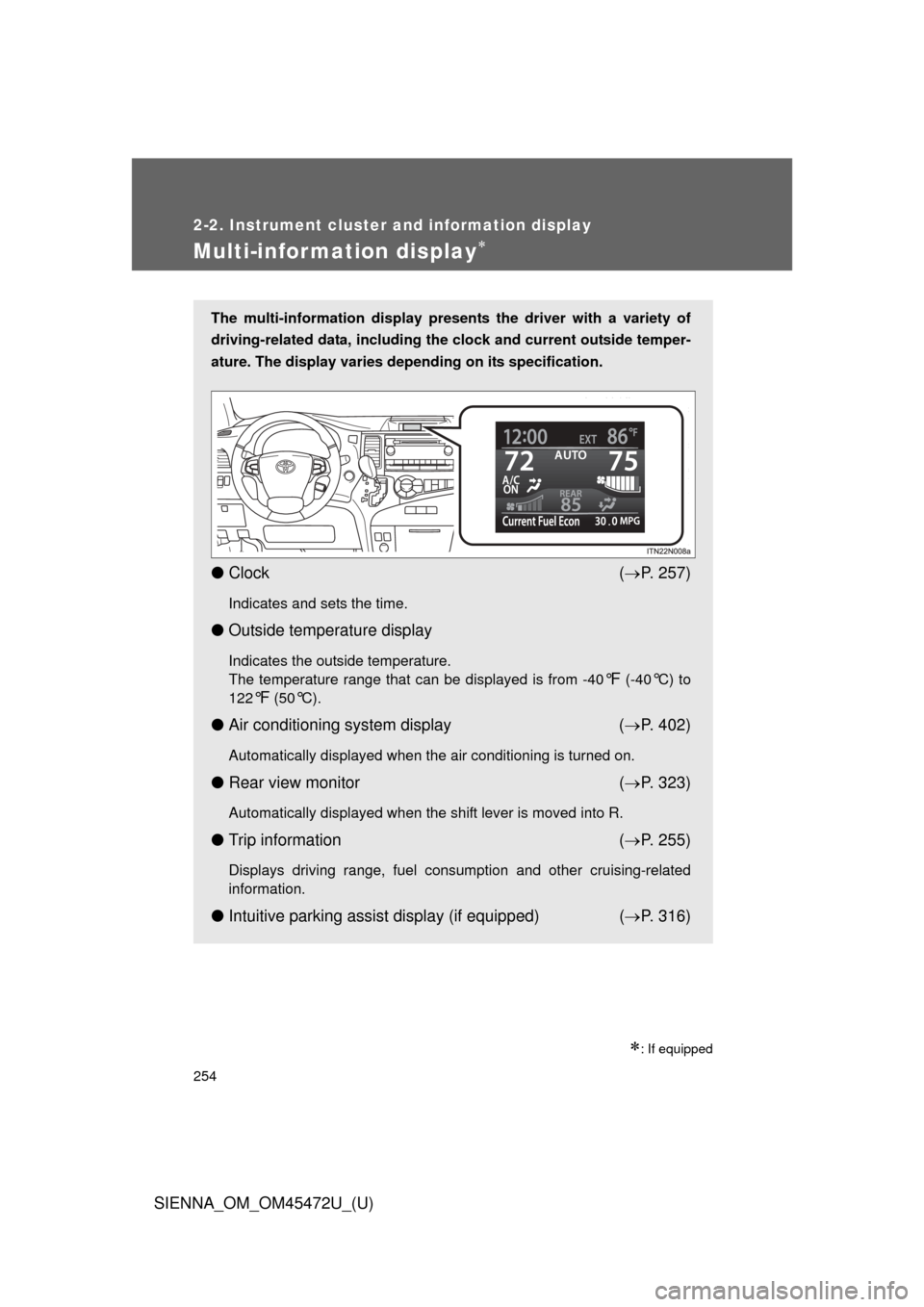
The multi-information display presents the driver with a variety of
driving-related data, including the clock and current outside temper-
ature. The display varies depending on its specification.
● Clock ( P. 257)
Indicates and sets the time.
● Outside temperature display
Indicates the outside temperature.
The temperature range that can be displayed is from -40
°F (-40°C) to
122
°F (50°C).
● Air conditioning system display ( P. 402)
Automatically displayed when the air conditioning is turned on.
● Rear view monitor ( P. 323)
Automatically displayed when the shift lever is moved into R.
● Trip information ( P. 255)
Displays driving range, fuel consumption and other cruising-related
information.
● Intuitive parking assist display (if equipped) ( P. 316)
Page 257 of 876
257
2-2. Instrument cluster and information display
2
When driving
SIENNA_OM_OM45472U_(U)
■
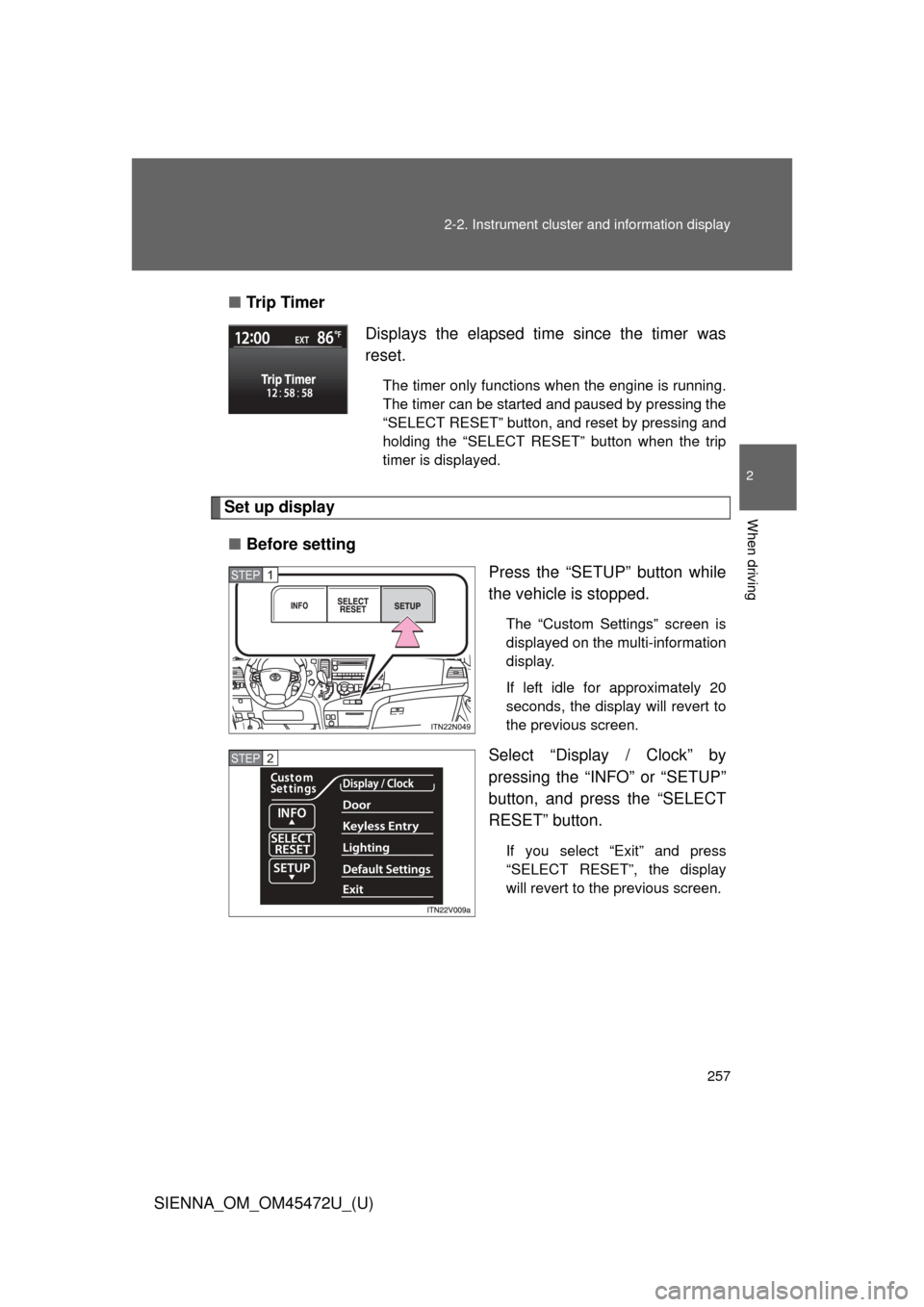
Tr i p Ti m e r
Set up display
■ Before setting
Press the “SETUP” button while
the vehicle is stopped.
The “Custom Settings” screen is
displayed on the multi-information
display.
If left idle for approximately 20
seconds, the display will revert to
the previous screen.
Select “Display / Clock” by
pressing the “INFO” or “SETUP”
button, and press the “SELECT
RESET” button.
If you select “Exit” and press
“SELECT RESET”, the display
will revert to the previous screen.
Displays the elapsed time since the timer was
reset.
The timer only functions when the engine is running.
The timer can be started and paused by pressing the
“SELECT RESET” button, and reset by pressing and
holding the “SELECT RESET” button when the trip
timer is displayed.
STEP1
STEP2
Page 258 of 876
258 2-2. Instrument cluster and information display
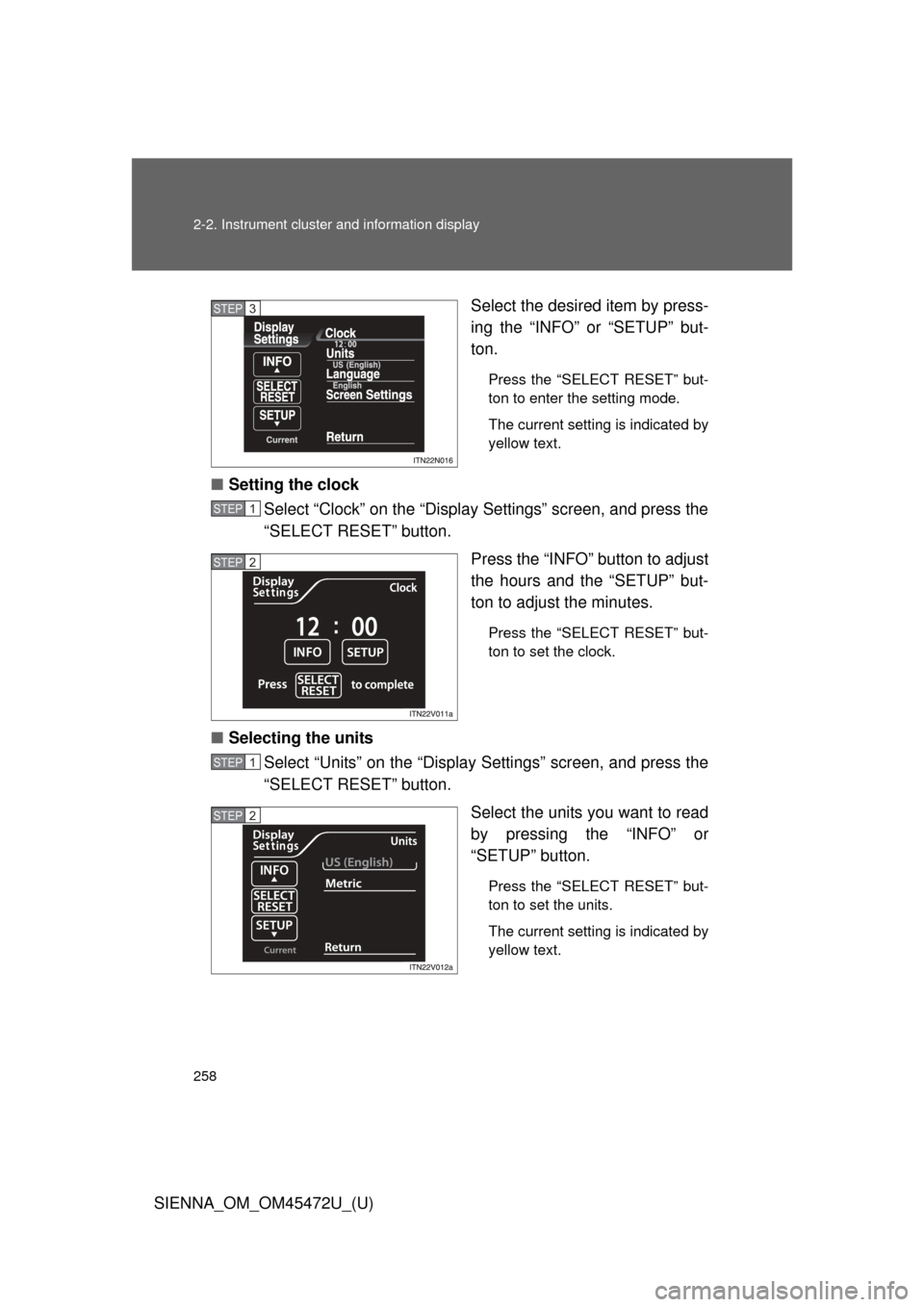
SIENNA_OM_OM45472U_(U)Select the desired item by press-
ing the “INFO” or “SETUP” but-
ton.
Press the “SELECT RESET” but-
ton to enter the setting mode.
The current setting is indicated by
yellow text.
■
Setting the clock
Select “Clock” on the “Display Settings” screen, and press the
“SELECT RESET” button.
Press the “INFO” button to adjust
the hours and the “SETUP” but-
ton to adjust the minutes.
Press the “SELECT RESET” but-
ton to set the clock.
■Selecting the units
Select “Units” on the “Display Settings” screen, and press the
“SELECT RESET” button.
Select the units you want to read
by pressing the “INFO” or
“SETUP” button.
Press the “SELECT RESET” but-
ton to set the units.
The current setting is indicated by
yellow text.
STEP3
STEP1
STEP2
STEP1
STEP2
Page 272 of 876
272 2-3. Operating the lights and wipers
SIENNA_OM_OM45472U_(U)
■Daytime running light system (if equipped)
● To make your vehicle more visible to other drivers, the headlights turn on
automatically (at a reduced intensity) whenever the engine is started and
the parking brake is released. Daytime running lights are not designed for
use at night.
For the U.S.A.: Daytime running lights can be turned off by operating the
headlight switch.
● Compared to turning on the headlights, the daytime running light system
offers greater durability and consumes less electricity, so it can help
improve fuel economy.
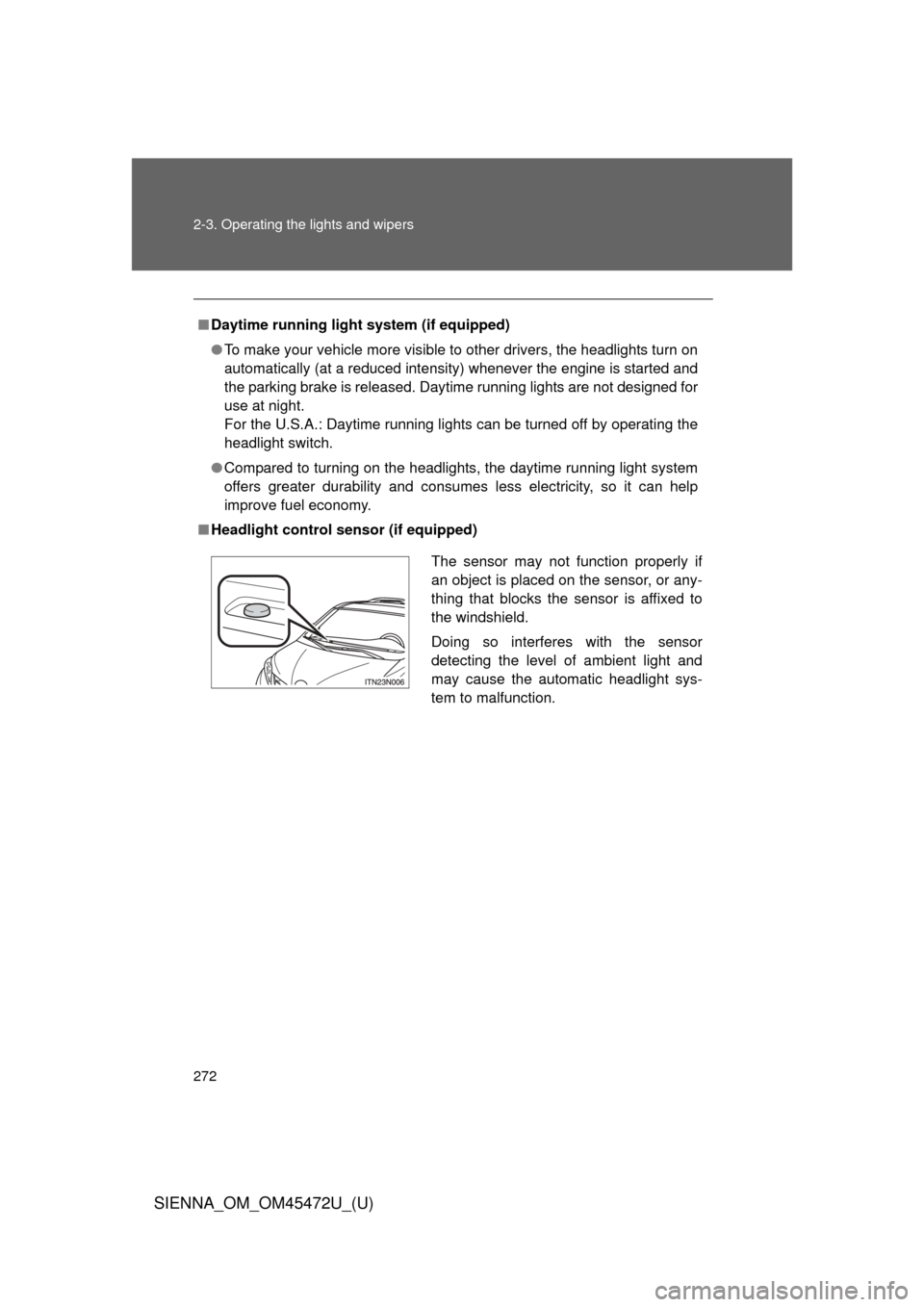
■ Headlight control sensor (if equipped)
The sensor may not function properly if
an object is placed on the sensor, or any-
thing that blocks the sensor is affixed to
the windshield.
Doing so interferes with the sensor
detecting the level of ambient light and
may cause the automatic headlight sys-
tem to malfunction.
Page 273 of 876
273
2-3. Operating the lights and wipers
2
When driving
SIENNA_OM_OM45472U_(U)
■
Automatic light off system
Vehicles without a smart key system
● When the headlights are on: The headlights and tail lights turn off 30 sec-
onds after a door is opened and closed if the engine switch is turned to
the “ACC” or “LOCK” position. (The lights turn off immediately if
on the key is pressed after all the doors are locked.)
● When only the tail lights are on: The tail lights turn off automatically if the
engine switch is turned to the “ACC” or “LOCK” position and the driver’s
door is opened.
To turn the lights on again, turn the engine switch to the “ON” position, or
turn the light switch off once and then back to the
or .
Vehicles with a smart key system
● When the headlights are on: The headlights and tail lights turn off 30 sec-
onds after a door is opened and closed if the “ENGINE START STOP”
switch is turned to ACCESSORY mode or turned off. (The lights turn off
immediately if on the key is pressed after all the doors are
locked.)
● When only the tail lights are on: The tail lights turn off automatically if the
“ENGINE START STOP” switch is turned to ACCESSORY mode or
turned off and the driver’s door is opened.
To turn the lights on again, turn the “ENGINE START STOP” switch to IGNI-
TION ON mode, or turn the light switch off and then back to or
.