Page 307 of 520
307
3-4. Other interior features
3
Interior features
■
The power outlet can be used when
The “POWER” switch is in ACCESSORY or ON mode.
CAUTION
■Using a power outlet
Observe the following precautions to reduce the risk of injury.
●Use of the power outlet when it is wet with water or snow may result in
electrical shocks and is extremel y dangerous. The power outlet must be
thoroughly dried before use.
● Do not allow children to use or play with the power outlet.
● Be careful not to get any part of your body caught in the power outlet lid.
● When using electrical appliances, strictly follow any cautions and notices
written on their labels and in the manufacturers' instruction manuals.
● Do not modify, disassemble or repair the power outlet in any way. Doing so
may result in unexpected malfunctions or accidents, which could cause
serious damage or injuries. Contact your Toyota dealer for any necessary
repairs.
■ To prevent injuries and accidents, secu rely fix all electric appliances
before use and do not use any app liances that may do any of the fol-
lowing:
● Distract the driver while driving, or hamper safe driving.
● Result in a fire or burn injuries due to the appliance rolling, falling or over-
heating while driving.
● Emit steam while the windows of the cabin are closed.
Page 309 of 520
309
3-4. Other interior features
3
Interior features
NOTICE
■
To prevent any damage caused by heat
●Do not use any electrical appliances that give off intense heat, such as
toasters.
● Do not use any electrical appliances that are easily affected by vibration or
heat inside the vehicle. Vibration while driving, or the heat of the sun while
parking, may result in damage to those electrical appliances.
■ If any electrical appliances ar e to be used while driving
Securely fasten both the appliances and their cables to prevent them from
falling or getting caught in any of the power train components.
■ If the power outlet is loose when an electrical appliance plug is con-
nected
Replace the outlet. Contact your Toyota dealer for any necessary replace-
ments.
■ If the power outlet gets dirty
Use a soft, clean cloth to wipe it gently. Do not use any cleansing materials,
such as organic solvents, wax, or compound cleaners, as these may dam-
age the power outlet or cause it to malfunction.
Page 316 of 520
316
3-4. Other interior features
Floor mat
CAUTION
Observe the following precautions.
Failure to do so may cause the driver's floor mat to slip, possibly interfering
with the pedals while driving. An unexpectedly high speed may result or it may
become difficult to stop the vehicle, leading to a serious accident.
■When installing the driver's floor mat
●Do not use floor mats designed for other models or different model year
vehicles, even if they are Toyota Genuine floor mats.
● Only use floor mats designed for the driver's seat.
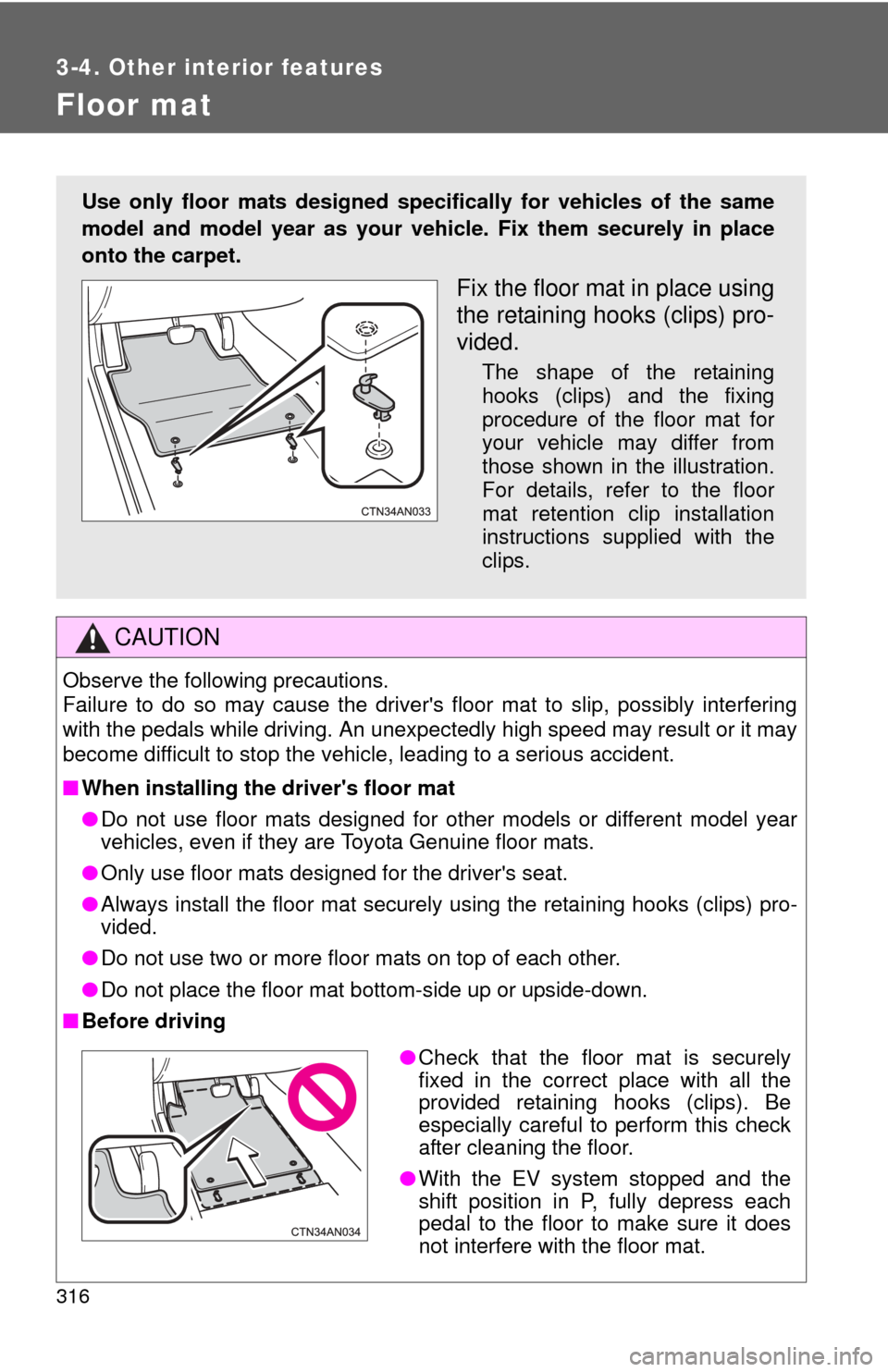
● Always install the floor mat securely using the retaining hooks (clips) pro-
vided.
● Do not use two or more floor mats on top of each other.
● Do not place the floor mat bottom-side up or upside-down.
■ Before driving
Use only floor mats designed specifically for vehicles of the same
model and model year as your vehic le. Fix them securely in place
onto the carpet.
Fix the floor mat in place using
the retaining hooks (clips) pro-
vided.
The shape of the retaining
hooks (clips) and the fixing
procedure of the floor mat for
your vehicle may differ from
those shown in the illustration.
For details, refer to the floor
mat retention clip installation
instructions supplied with the
clips.
● Check that the floor mat is securely
fixed in the correct place with all the
provided retaining hooks (clips). Be
especially careful to perform this check
after cleaning the floor.
● With the EV system stopped and the
shift position in P, fully depress each
pedal to the floor to make sure it does
not interfere with the floor mat.
Page 317 of 520
317
3-4. Other interior features
3
Interior features
Luggage compar tment features
■Cargo hooks
Pull the hook down to use it.
The cargo hooks are provided
for securing loose items.
■Grocery bag hooks
■ Storage box
Ty p e A
The rear deck board can be folded up into two positions.
Lift the rear deck board.
STEP 1
Page 319 of 520
319
3-4. Other interior features
3
Interior features
CAUTION
■
When the cargo hooks are not in use
To avoid injury, always return the cargo hooks to their stowed positions.
■ Caution while driving
Do not drive with any of the deck boards opened. Items may fall out and
cause injury.
NOTICE
■To prevent damage to the grocery bag hooks
Do not hang heavy loads on the hooks.
■ Space unsuitable for storing items
Do not put items in the space behind the
cover on the left side of the luggage com-
partment.
The items may collide with the ECU while
driving, damaging the unit.ECU
Page 320 of 520
320
3-4. Other interior features
Garage door opener
The garage door opener (HomeLink Universal Transceiver) is manufac-
tured under license from HomeLink.
Programming HomeLink®
The HomeLink compatible transceiver in your vehicle has 3 buttons
which can be programmed to operate 3 different devices. Refer to the
programming method below appropriate for the device.
Buttons
Indicator
The garage door opener can be programmed to operate garage
doors, gates, entry doors, door locks, hom e lighting systems, secu-
rity systems, and other devices.
Page 323 of 520

323
3-4. Other interior features
3
Interior features
Press and hold the vehicle's programmed HomeLink button
for 3 seconds and then releas e it. Repeat this step once
again. The garage door may open.
If the garage door opens, the programming process is complete. If
the door does not open, press and release the button a third time.
This third press and release will complete the programming process
by opening the garage door.
The ceiling mounted garage door opener motor should now recog-
nize the HomeLink
signal and operate the garage door.
Repeat the steps above to prog ram another rolling code sys-
tem for any of the remaining HomeLink buttons.
■ Programming an entry gate
Place the remote control transmitter 1 to 3 in. (25 to 75 mm)
away from the HomeLink
buttons.
Keep the HomeLink indicator light in view while programming.
Press and hold the selected HomeLink button.
Repeatedly press and release (cycle) the remote control
transmitter for 2 seconds each until step 4 is completed.
When the HomeLink
indicator light starts to flash rapidly,
release the buttons.
Test the HomeLink
operation by pressing the newly pro-
grammed button. Check to see if the gate/device operates
correctly.
Repeat the steps above to program another device for any of
the remaining HomeLink
buttons.
■ Programming other devices
To program other devices such as home security systems, home
door locks and lighting, contact your Toyota dealer for assistance.
■ Reprogramming a button
The individual HomeLink
buttons cannot be erased but can be
reprogrammed. To reprogram a button, follow the “Reprogramming
a HomeLink
button” instructions.
STEP 3
STEP 4
STEP 1
STEP 2
STEP 3
STEP 4
STEP 5
STEP 6
Page 326 of 520
326
3-4. Other interior features
Safety Connect
Safety Connect is a subscription-based telematics service that uses
Global Positioning System (GPS) data and embedded cellular tech-
nology to provide safety and security features to subscribers. Safety
Connect is supported by Toyota ’s designated response center,
which operates 24 hours per day, 7 days per week.
Safety Connect service is available by subscription on select,
telematics hardware-equipped vehicles.
By using the Safety Connect servi ce, you are agreeing to be bound
by the Telematics Subscription Serv ice Agreement and its Terms and
Conditions, as in effect and amende d from time to time, a current
copy of which is available at Toyota.com. All use of the Safety Con-
nect service is subject to such then-applicable Terms and Condi-
tions.
■ System components
Microphone
“SOS” button
LED light indicators


