Page 199 of 640

199
2-1. Driving procedures
PRIUS_OM_OM47791U_(U)
2
When driving
■
When the P position cont rol system malfunctions
The “POWER” switch will not be able to be turned off. In such a case, the
switch can be turned off after applying the parking brake.
Have the vehicle inspected by your Toyota dealer immediately.
■ Ending display
When the “POWER” switch is turned off, each of the following will be dis-
played on the multi-information display, and will extinguish after approxi-
mately 30 seconds.
● The driving distance, driving time, consumption and eco savings since
the hybrid system was started*
● The odometer
● The clock
*: The amount of money saved or spent, selected on the Eco savings record
display ( P. 56), is displayed.
CAUTION
■When starting the hybrid system
Always start the hybrid system while sitting in the driver’s seat. Do not
depress the accelerator pedal while starting the hybrid system under any cir-
cumstances.
Doing so may cause an accident resulting in death or serious injury.
■ Stopping the hybrid system in an emergency
If you want to stop the hybrid system in an emergency while driving the vehi-
cle, press and hold the “POWER” switch for more than 2 seconds, or press it
briefly 3 times or more in succession. ( P. 563)
However, do not touch the “POWER” switch while driving except in an emer-
gency. Turning the hybrid system off while driving will not cause loss of
steering or braking control, but the power assist to these systems will \
be lost.
This will make it more difficult to steer and brake, so you should pull over
and stop the vehicle as soon as it is safe to do so.
Page 215 of 640
215
2-1. Driving procedures
PRIUS_OM_OM47791U_(U)
2
When driving
Hor n
■After adjusting the steering wheel
Make sure that the steering wheel is securely locked.
The horn may not sound if the steering wheel is not securely locked.
(P. 119)
To sound the horn, press on or
close to the mark.
Page 217 of 640
217
2-2. Instrument cluster
PRIUS_OM_OM47791U_(U)
2
When driving
Touch tracer display (if equipped)
When the audio control switches,
climate control switches, “DISP”
button or “TRIP” button of the
steering wheel are touched, the
touch tracer display will appear
in front of the gauges, with the
touched button highlighted to
allow the driver to identify the
button that is being operated.
The button can then be operated
by further presses.
If an audio/navigation system is
used that is not compatible with
the steering switches in this vehi-
cle, the audio switch display may
not operate correctly.
Page 226 of 640
226 2-2. Instrument cluster
PRIUS_OM_OM47791U_(U)
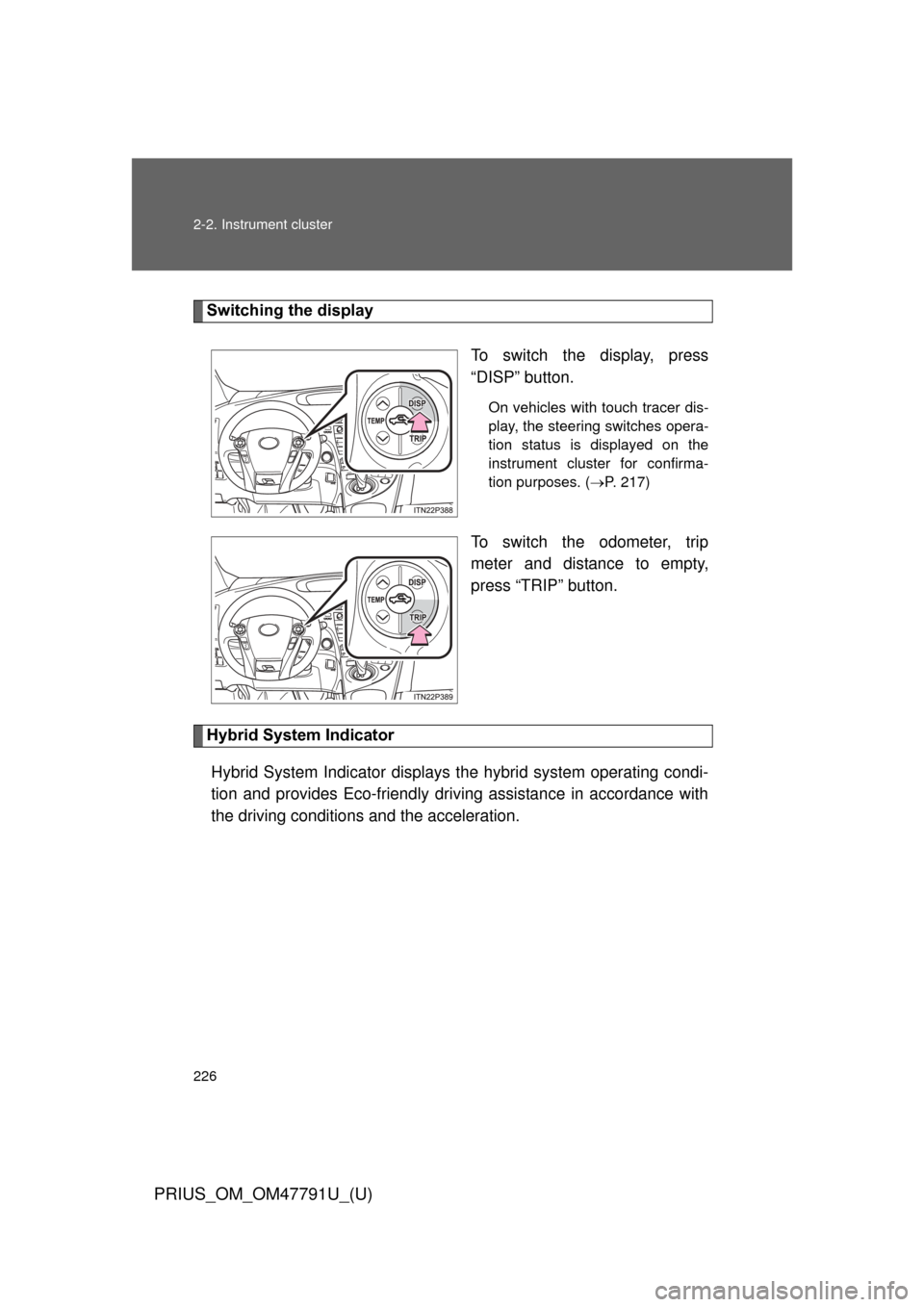
Switching the displayTo switch the display, press
“DISP” button.
On vehicles with touch tracer dis-
play, the steering switches opera-
tion status is displayed on the
instrument cluster for confirma-
tion purposes. (P. 217)
To switch the odometer, trip
meter and distance to empty,
press “TRIP” button.
Hybrid System Indicator
Hybrid System Indicator displays the hybrid system operating condi-
tion and provides Eco-friendly driving assistance in accordance with
the driving conditions and the acceleration.
Page 238 of 640
238 2-2. Instrument cluster
PRIUS_OM_OM47791U_(U)
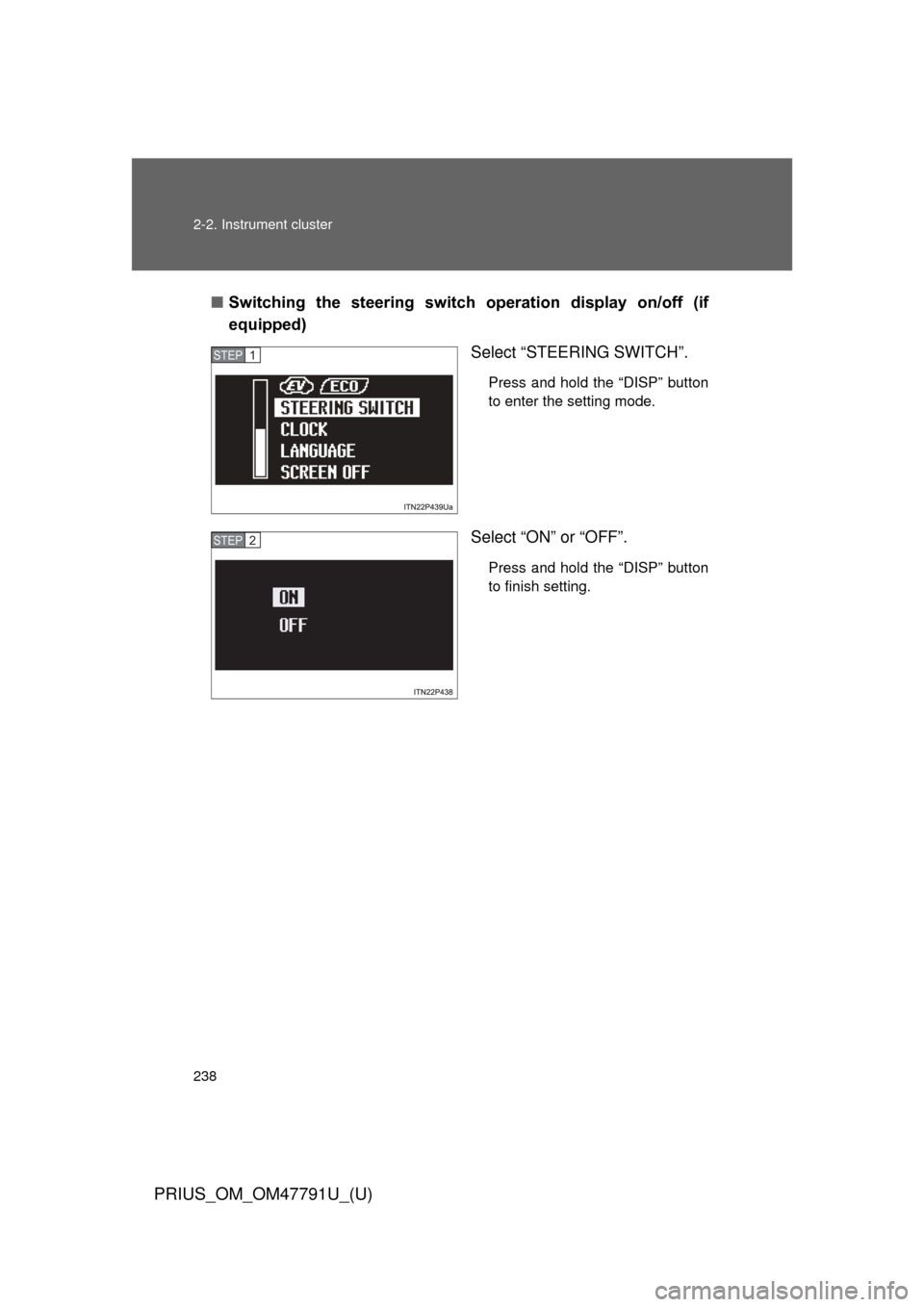
■Switching the steering switch operation display on/off (if
equipped)
Select “STEERING SWITCH”.
Press and hold the “DISP” button
to enter the setting mode.
Select “ON” or “OFF”.
Press and hold the “DISP” button
to finish setting.
STEP 1
STEP 2
Page 243 of 640

243
2-2. Instrument cluster
PRIUS_OM_OM47791U_(U)
2
When driving
■
Driving in Eco drive mode
The multi-information display will automatically switch the display to Hybrid
System Indicator, regardless of which display is currently being shown.
(P. 226)
■ Touch tracer display (if equipped)
● The touch tracer display can be set to not display even if the steering
switches are touched.
● Only the circular, rubber-covered switches have a built-in touch sensor.
Touching any of the other switches will not display the touch tracer dis-
play.
■ Display settings can be changed when
The vehicle speed is less than approximately 5 mph (8 km/h).
■ Engine speed
On hybrid vehicles, engine speed is precisely controlled in order to help
improve fuel efficiency and reduce exhaust emissions etc. There are times
when the engine speed that is displayed may differ even when vehicle oper-
ation and driving conditions are the same.
■ When the 12-volt battery is disconnected
The following data will be reset.
● Average fuel consumption
● Distance to empty
● Average vehicle speed
● Clock
● Display settings
● Trip meter
Page 244 of 640
244 2-2. Instrument cluster
PRIUS_OM_OM47791U_(U)
■Vacuum fluorescent display
Small spots or light spots may appear on the display. This phenomenon is
characteristic of vacuum fluorescent displays, and there is no problem to
continue using the display.
NOTICE
■Steering switches
To prevent damage to the steering switches, observe the following precau-
tions.
● Do not touch the steering switches with wet hands
● Do not push hard or sharp objects into the steering switches
● Do not subject the steering switches to strong impacts
● Do not allow organic solvents containing thinner, benzene or gasoline, or
acidic/alkaline soap to adhere to the surfaces of the steering switches
Page 287 of 640

287
2-4. Using other
driving systems
PRIUS_OM_OM47791U_(U)
2
When driving
CAUTION
■When the sensor may not be corr ectly detecting the vehicle ahead
Apply the brakes as necessary when any of the following types of vehicles
are in front of you.
As the sensor may not be able to correctly detect these types of vehicles,
the approach warning ( P. 279) will not be activated, and a fatal or serious
accident may result.
● Vehicles that cut in suddenly
● Vehicles traveling at low speeds
● Vehicles that are not moving
● Vehicles with small rear ends (trailers with no load on board etc.)
● Motorcycles traveling in the same lane
■ Conditions under which the vehicle -to-vehicle distance control may
not function correctly
Apply the brakes as necessary in the following conditions as the radar sen-
sor may not be able to correctly detect vehicles ahead, and a fatal or serious
accident may result:
● When water or snow thrown up by the surrounding vehicles hinders the
functioning of the sensor
● When your vehicle is pointing upwards (caused by a heavy load in the lug-
gage compartment etc.)
● When the road curves or when the lanes are narrow
● When steering wheel operation or your position in the lane is unstable
● When the vehicle ahead of you decelerates suddenly