Page 169 of 556

169
2-1. Driving procedures
2
When driving
NOTICE
■
To prevent 12-volt battery discharge
●Do not leave the “POWER” switch in ACCESSORY or ON mode for long
periods of time without the hybrid system on.
● If is displayed on the multi-information display, the “POWER”
switch is not off. Exit the vehicle after turning the “POWER” switch off.
● Do not stop the hybrid system when the shift lever is in a position other
than P. If the hybrid system is stopped in another shift lever position, the
“POWER” switch will not be turned off but instead be turned to ACCES-
SORY mode. If the vehicle is left in ACCESSORY mode, 12-volt battery
discharge may occur.
■ When starting the hybrid system
If the hybrid system becomes difficult to start, have your vehicle checked by
your Toyota dealer immediately.
■ Symptoms indicating a malfunction with the “POWER” switch
If the “POWER” switch seems to be operating somewhat differently than
usual, such as the switch sticking slightly, there may be a malfunction. Con-
tact your Toyota dealer immediately.
Page 204 of 556

204 2-3. Operating the lights and wipers
■Daytime running light system
●To make your vehicle more visible to other drivers, the headlights turn on
automatically (at a reduced intensity) whenever the hybrid system is
started and the parking brake is released. Daytime running lights are not
designed for use at night.
For type A: Daytime running lights can be turned off by operating the
switch.
● Compared to turning on the headlights, the daytime running light system
offers greater durability and consumes less electricity, so it can help
improve fuel economy.
■ Light reminder buzzer
Vehicles without a smart key system
A buzzer sounds when the engine switch is turned to the “LOCK” or “ACC”
position and the driver's door is opened while the lights are turned on.
Vehicles with a smart key system
A buzzer sounds when the “POWER” switch is turned off or turned to
ACCESSORY mode and the driver's door is opened while the lights are
turned on.
■ Battery-saving function
In the following conditions, the remaining lights will go off automatically after
20 minutes in order to prevent the vehicle battery from being discharged:
●The headlights and/or tail lights are on.
● The engine switch is turned to the “ACC” or “LOCK” position (vehicles
without a smart key system) or the “P OWER” switch is turned to ACCES-
SORY mode or turned off (vehicles with a smart key system).
This function will be canceled in any of the following situations:
● When the engine switch is turned to the “ON” position (vehicles without a
smart key system) or the “POWER” switch is turned to ON mode (vehi-
cles with a smart key system).
● When the light switch is operated.
● When the door is opened or closed.
Page 270 of 556
270 3-2. Using the audio system
■Cord hook
■ About iPod
●“Made for iPod” and “Made for iPhone” mean that an electroni\
c acces-
sory has been designed to connect specifically to iPod, or iPhone,
respectively, and has been certified by the developer to meet Apple per-
formance standards.
● Apple is not responsible for the operation of this device or its compliance
with safety and regulatory standards. Please note that the use of this
accessory with iPod or iPhone may affect wireless performance.
● iPhone, iPod, iPod classic, iPod n ano and iPod touch are trademarks of
Apple Inc., registered in the U.S. and other countries.
A cord can be secured as shown in the
illustration.
Cords with a diameter of approximately
0.2 in. (5 mm) can be secured.
Page 334 of 556
334
3-6. Other interior features
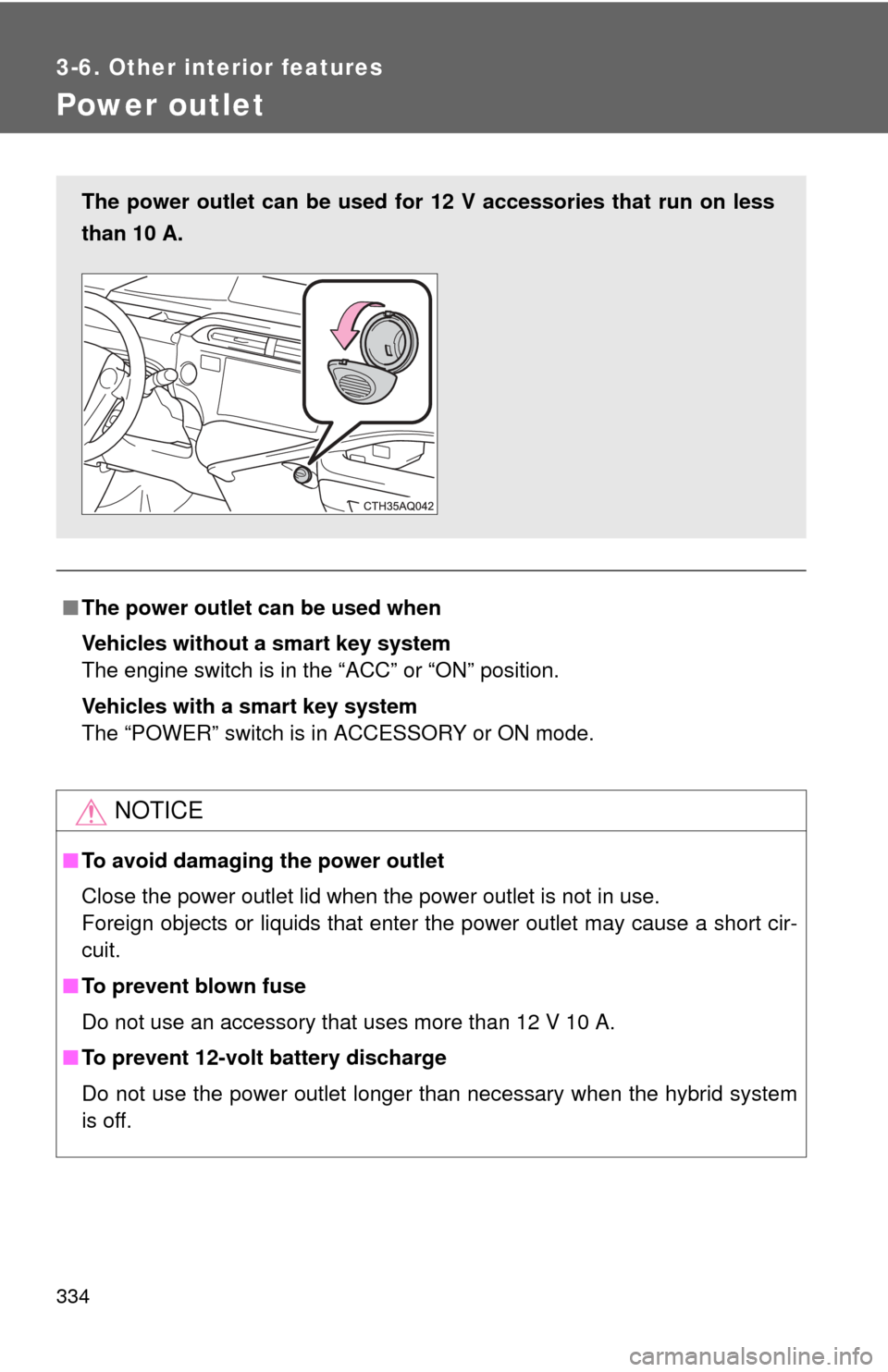
Power outlet
■The power outlet can be used when
Vehicles without a smart key system
The engine switch is in the “ACC” or “ON” position.
Vehicles with a smart key system
The “POWER” switch is in ACCESSORY or ON mode.
NOTICE
■ To avoid damaging the power outlet
Close the power outlet lid when the power outlet is not in use.
Foreign objects or liquids that enter the power outlet may cause a short cir-
cuit.
■ To prevent blown fuse
Do not use an accessory that uses more than 12 V 10 A.
■ To prevent 12-volt battery discharge
Do not use the power outlet longer than necessary when the hybrid system
is off.
The power outlet can be used for 12 V accessories that run on less
than 10 A.
Page 379 of 556

379
4-3. Do-it-yourself maintenance
4
Maintenance and care
■
Before recharging
When recharging, the 12-volt battery produces hydrogen gas which is flam-
mable and explosive. Therefore, observe the following precautions before
recharging:
●If recharging with the 12-volt battery installed on the vehicle, be sure to
disconnect the ground cable.
● Make sure the power switch on the charger is off when connecting and
disconnecting the charger cables to the 12-volt battery.
■ When disconnecting the 12- volt battery terminals
Always disconnect the negative (-) terminal first.
■ After recharging/reconn ecting the 12-volt battery (vehicles with a
smart key system)
● Unlocking the doors using the smart key system may not be possible
immediately after reconnecting the 12-volt battery. If this happens, use
the wireless remote control or the mechanical key to lock/unlock the
doors.
● Start the hybrid system with the “POWER” switch in ACCESSORY mode.
The hybrid system may not start with the “POWER” switch turned off.
However, the hybrid system will operate normally from the second
attempt.
● The “POWER” switch mode is recorded by the vehicle. If the 12-volt bat-
tery is reconnected, the vehicle will return the “POWER” switch mode to
the status it was in before the 12-volt battery was disconnected. Make
sure to turn off the power before disconnect the 12-volt battery. Take
extra care when connecting the 12-volt battery if the “POWER” switch
mode prior to discharge is unknown.
If the system will not start even after multiple attempts, contact your Toyota
dealer.
Page 430 of 556
430 5-1. Essential information
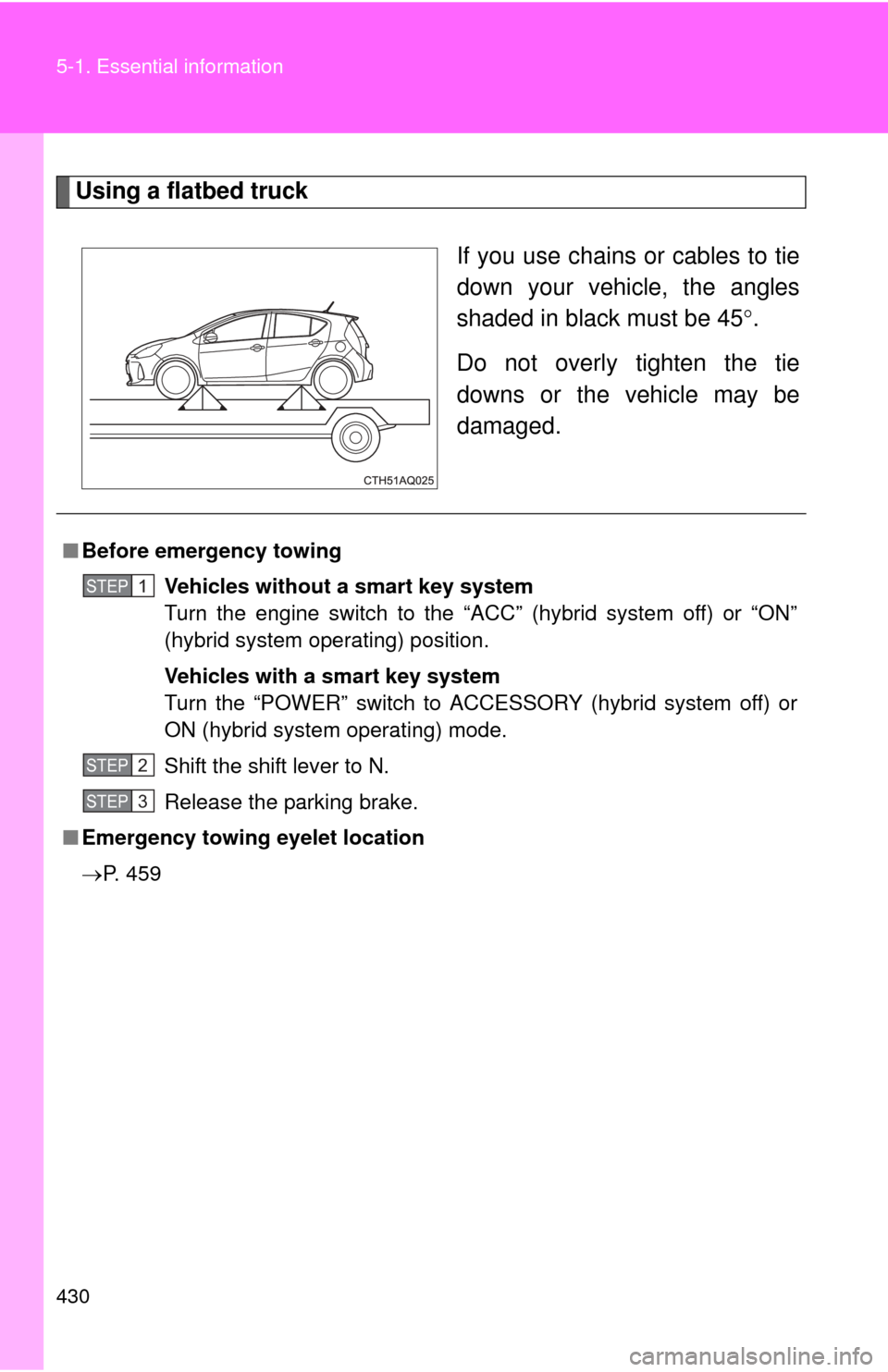
Using a flatbed truckIf you use chains or cables to tie
down your vehicle, the angles
shaded in black must be 45.
Do not overly tighten the tie
downs or the vehicle may be
damaged.
■ Before emergency towing
Vehicles without a smart key system
Turn the engine switch to the “ACC” (hybrid system off) or “ON”
(hybrid system operating) position.
Vehicles with a smart key system
Turn the “POWER” switch to ACCESSORY (hybrid system off) or
ON (hybrid system operating) mode.
Shift the shift lever to N.
Release the parking brake.
■ Emergency towing eyelet location
P. 459
STEP1
STEP2
STEP3
Page 472 of 556
472 5-2. Steps to take in an emergency
Emergency start function (vehicles with a smart key system)When the hybrid system does not start, the following steps can be
used as an interim measure to start the hybrid system if the
“POWER” switch is functioning normally: Shift the shift lever to P.
Set the parking brake.
Turn the “POWER” switch to ACCESSORY mode.
Press and hold the “POWER” switch for about 15 seconds
while depressing the brake pedal firmly.
Even if the hybrid system can be started using the above steps, the
system may be malfunctioning. Have the vehicle inspected by your
Toyota dealer.
■ The interior lights and headlights do not turn on, or the horn
does not sound.
One of the following may be the cause of the problem:
●One or both of the 12-volt ba ttery terminals may be discon-
nected.
● The 12-volt battery may be discharged. ( P. 477)
Contact your Toyota dealer if the problem cannot be repaired, or if
repair procedures are unknown.
STEP1
STEP2
STEP3
STEP4
Page 473 of 556
5
When trouble arises
473
5-2. Steps to take in an emergency
If the shift lever cannot be shifted from P
If the shift lever cannot be shifted with your foot on the brake pedal,
there may be a problem with the shift lock system (a system to pre-
vent accidental operation of the shift lever). Have the vehicle
inspected by your Toyo ta dealer immediately.
The following steps may be used as an emergency measure to
ensure that the shift lever can be shifted:
Set the parking brake.
Vehicles without a smart key system
Turn the engine switch to the “ACC” position.
Vehicles with a smart key system
Turn the “POWER” switch to ACCESSORY mode.
Depress the brake pedal.
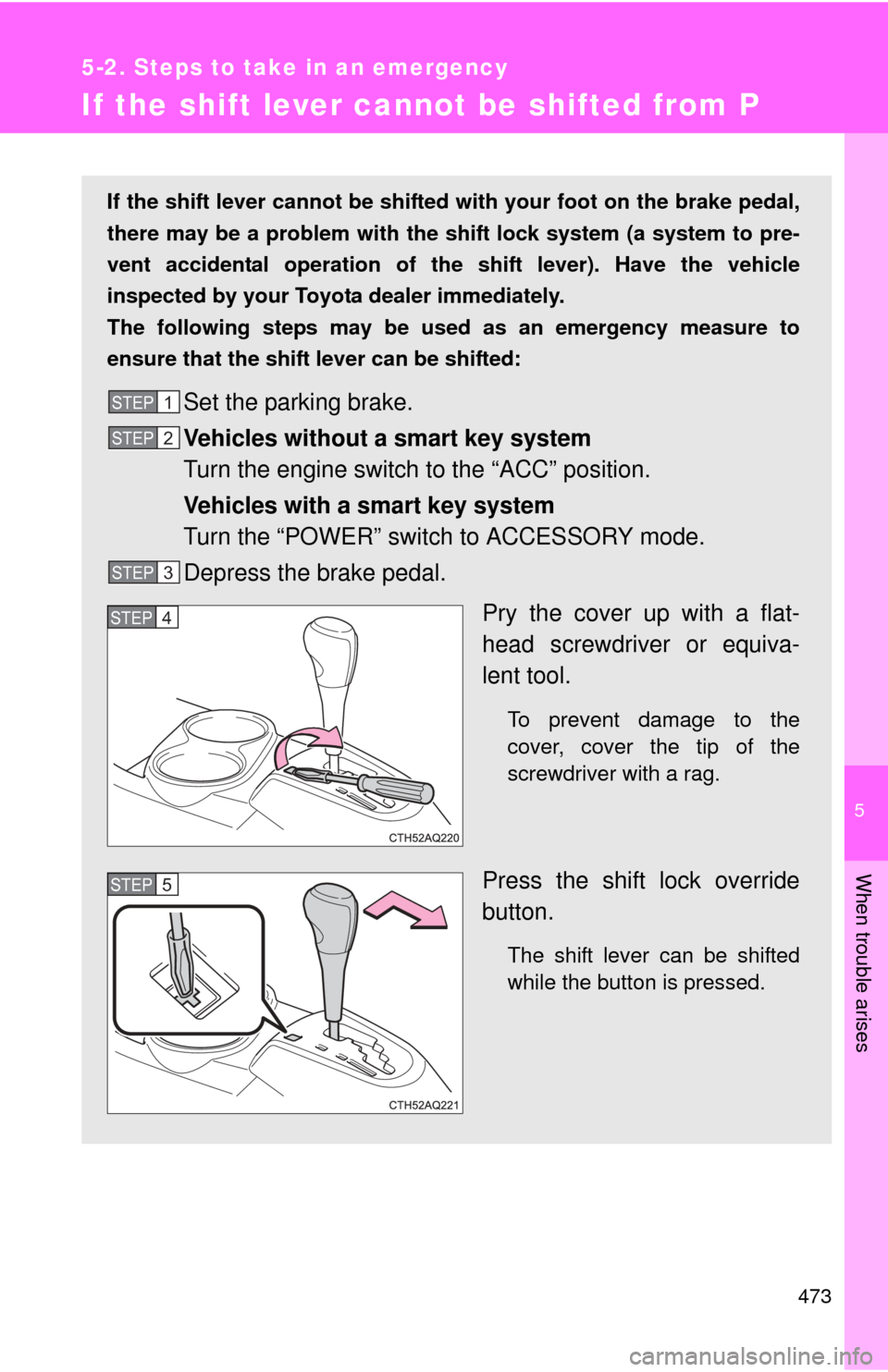
Pry the cover up with a flat-
head screwdriver or equiva-
lent tool.
To prevent damage to the
cover, cover the tip of the
screwdriver with a rag.
Press the shift lock override
button.
The shift lever can be shifted
while the button is pressed.
STEP1
STEP2
STEP3
STEP4
STEP5