Page 230 of 500

230 3-2. Using the audio system
■About iPod
●“Made for iPod” and “Made for iPhone” mean that an electronic acces-
sory has been designed to connect specifically to iPod, or iPhone,
respectively, and has been certified by the developer to meet Apple per-
formance standards.
●Apple is not responsible for the operation of this device or its compliance
with safety and regulatory standards. Please note that the use of this
accessory with iPod or iPhone may affect wireless performance.
●iPhone, iPod, iPod classic, iPod nano and iPod touch are trademarks of
Apple Inc., registered in the U.S. and other countries.
■iPod functions
●When an iPod is connected and the audio source is changed to iPod
mode, the iPod will resume play from the same point in which it was last
used.
●Depending on the iPod that is connected to the system, certain functions
may not be available. If a function is unavailable due to a malfunction (as
opposed to a system specification), disconnecting the device and recon-
necting it once again may resolve the problem.
●While connected to the system, the iPod cannot be operated with its own
controls. It is necessary to use the controls of the vehicle’s audio system
instead.
Page 232 of 500
232 3-2. Using the audio system
■Compatible models
The following iPod
, iPod nano, iPod classic, iPod touch and iPhone
devices can be used with this system.
●Made for
• iPod touch (4th generation)
• iPod touch (3rd generation)
• iPod touch (2nd generation)
• iPod touch (1st generation)
• iPod classic
• iPod with video
• iPod nano (6th generation)
• iPod nano (5th generation)
• iPod nano (4th generation)
• iPod nano (3rd generation)
• iPod nano (2nd generation)
• iPod nano (1st generation)
• iPhone 4
• iPhone 3GS
• iPhone 3G
• iPhone
Depending on differences between models or software versions etc., some
models might be incompatible with this system.
Items related to standards and limitations are as follows:
●Maximum number of lists in device: 9999
●Maximum number of songs in device: 65535
●Maximum number of songs per list: 65535
CAUTION
■Caution while driving
Do not connect the iPod or operate the controls.
Page 251 of 500

251
3
Interior features
3-3. Using the Bluetooth® audio system
Bluetooth® audio/phone
■Conditions affecting operation
The Bluetooth
® audio/phone may not operate normally in the following situa-
tions:
●The portable player does not support Bluetooth
®
●The cellular phone is located outside the service area
●The Bluetooth
® device is switched off
●The Bluetooth
® device has a low battery
●The Bluetooth
® device is not connected to the system
●The Bluetooth
® device is behind the seat or in the glove box or console
box, or metal material covers or touches the device
■Bluetooth® audio
The Bluetooth
® audio system enables you to enjoy music played
on a portable digital audio player (portable player) from the vehi-
cle speakers via wireless communication.
This audio system supports Bluetooth
®, a wireless data system
capable of playing portable audio music without cables. If your
portable player does not support Bluetooth
®, the Bluetooth®
audio system will not function.
■Bluetooth
® phone (hands-free phone system)
This system supports Bluetooth
®, which allows you to make or
receive calls without using cables to connect a cellular phone
and the system, and without operating the cellular phone.
: If equipped
Page 252 of 500

252 3-3. Using the Bluetooth
® audio system
■When transferring ownership of the vehicle
Be sure to initialize the system to prevent personal data from being improp-
erly accessed. (P. 272)
■About Bluetooth
®
■Compatible models
●Bluetooth
® specifications:
Ver. 1.1, or higher (recommended: Ver. 2.1 + EDR or higher)
●Following Profiles:
• A2DP (Advanced Audio Distribution Profile) Ver. 1.0, or higher (recom-
mended: Ver. 1.2 or higher)
• AVRCP (Audio/Video Remote Control Profile) Ver. 1.0 or higher (rec-
ommended: Ver. 1.3 or higher)
Portable players must correspond to the above specifications in order to be
connected to the Bluetooth
® audio system. However, please note that some
functions may be limited depending on the type of portable player.
●Cellular phone
• HFP (Hands Free Profile) Ver. 1.0 or higher (recommended: Ver. 1.5)
• OPP (Object Push Profile) Ver. 1.1
• PBAP (Phone Book Access Profile) Ver. 1.0
CAUTION
■Caution while driving
●Do not use a cellular phone.
●Do not connect Bluetooth
® device or operate the controls.
Bluetooth is a registered trademark of
Bluetooth SIG. Inc.
Page 254 of 500
254
3-3. Using the Bluetooth® audio system
Using the Bluetooth® audio/phone
■Audio unit
Bluetooth
® connection con-
dition
If “BT” is not displayed, the
Bluetooth® audio/phone
cannot be used.
Display
A message, name, number,
etc. is displayed.
Lower-case characters and
special characters cannot
be displayed.
Displays the set up menu
Selects items such as menu
and number
Turn: Selects an item
Press: Inputs the selected
item
Displays information that is
too long to be displayed at
one time on the display
(press and hold)
Selects speed dials
On-hook switch
Turns the hands-free sys-
tem off/ends a call/refuses a
call
Off-hook switch
Turns the hands-free sys-
tem on/starts a call
Page 255 of 500
255 3-3. Using the Bluetooth
® audio system
3
Interior features
■Steering wheel switches
P. 248
■Microphone
Vehicles with moon roof
Vehicles without moon roof
Page 256 of 500
256 3-3. Using the Bluetooth
® audio system
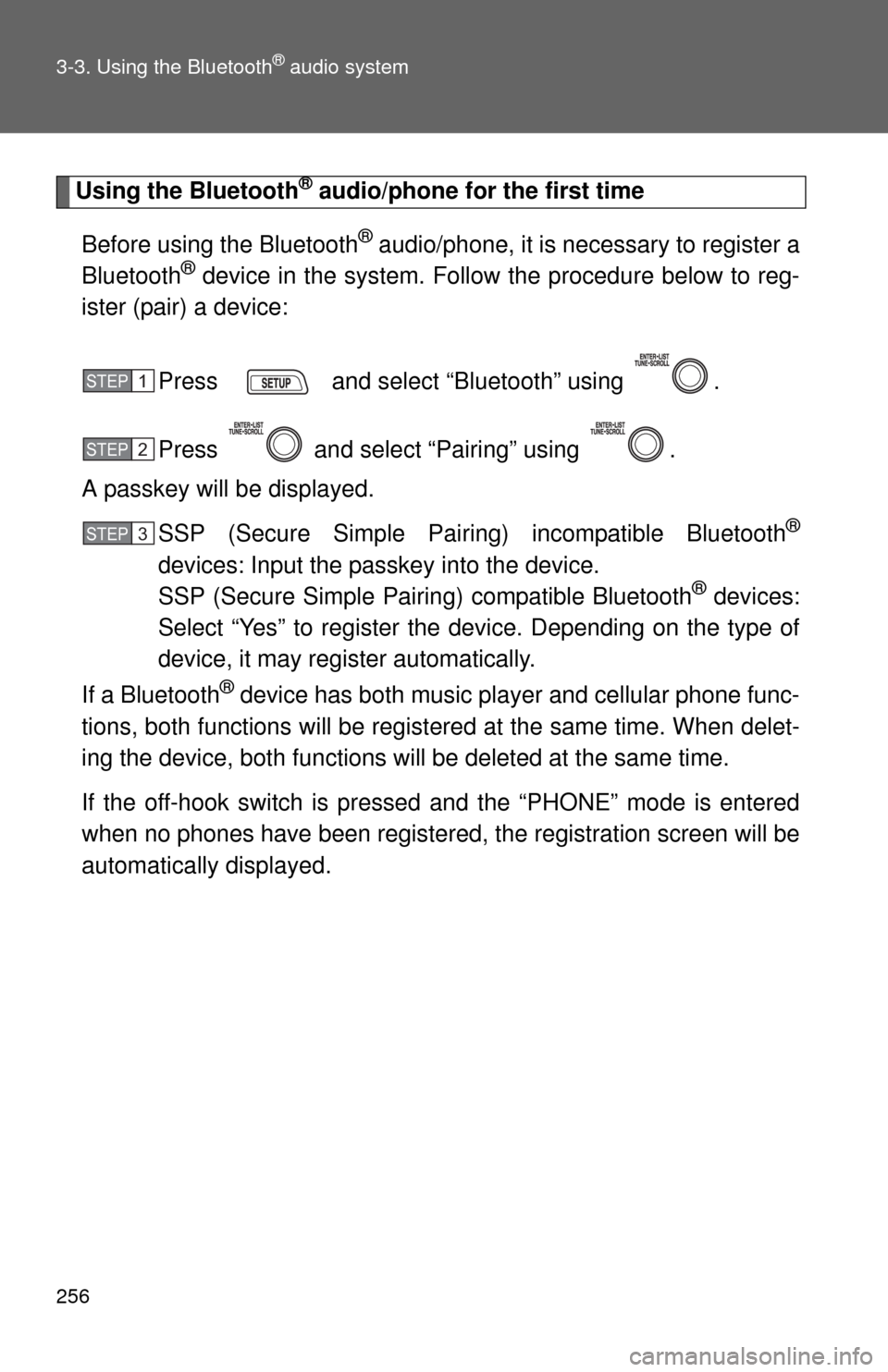
Using the Bluetooth® audio/phone for the first time
Before using the Bluetooth
® audio/phone, it is necessary to register a
Bluetooth® device in the system. Follow the procedure below to reg-
ister (pair) a device:
Press and select “Bluetooth” using .
Press and select “Pairing” using .
A passkey will be displayed.
SSP (Secure Simple Pairing) incompatible Bluetooth
®
devices: Input the passkey into the device.
SSP (Secure Simple Pairing) compatible Bluetooth® devices:
Select “Yes” to register the device. Depending on the type of
device, it may register automatically.
If a Bluetooth
® device has both music player and cellular phone func-
tions, both functions will be registered at the same time. When delet-
ing the device, both functions will be deleted at the same time.
If the off-hook switch is pressed and the “PHONE” mode is entered
when no phones have been registered, the registration screen will be
automatically displayed.
STEP1
STEP2
STEP3
Page 257 of 500
257 3-3. Using the Bluetooth
® audio system
3
Interior features
Menu list of the Bluetooth® audio/phone
First menuSecond menuThird menuOperation details
“Bluetooth”“BT Pairing” -Registering a
Bluetooth
® device
“List Phone” -Listing the registered
cellular phones
“List Audio” -Listing the registered
portable players
“Passkey” - Changing the passkey
“BT Power” -Setting automatic
connection of the device
on or off
“Bluetooth info”“Device Name”
“Device
Address”Displaying the device
status
“Display
Setting”-Setting the automatic
connection confirmation
display to on or off
“Initialize” - Initializing the settings


