Page 163 of 720
163 2-1. Driving procedures
2
When driving
LC200_OM_OM60F57U_(U)
CAUTION
■When braking the vehicle
●When the brakes are wet, drive more cautiously.
Braking distance increases when the brakes are wet, and may cause one
side of the vehicle to brake differently than the other side. Also the parking
brake may not securely hold the vehicle.
●If the power brake assist function does not operate, do not follow other
vehicles closely and avoid downhill or sharp turns that require braking.
In this case, braking is still possible, but it will require more force on the
pedal than usual. Braking distance may also increase.
●Do not pump the brake pedal if the engine stalls.
Each push on the brake pedal uses up the reserve for the power-assisted
brakes.
●The brake system consists of 2 individual hydraulic systems: if one of the
systems fails, the other will still operate. In this case, the brake pedal
should be depressed more firmly than usual and braking distance
becomes longer.
Do not drive your vehicle with only a single brake system. Have your
brakes fixed immediately.
Page 164 of 720
164 2-1. Driving procedures
LC200_OM_OM60F57U_(U)
NOTICE
■While driving the vehicle
●Do not depress the accelerator and brake pedals at the same time during
driving, as this may restrain driving torque.
●Do not use the accelerator pedal or depress accelerator and brake pedals
together to hold the vehicle on a hill.
■When parking the vehicle
Always put the shift lever in “P”. Failure to do so may cause the vehicle to
move or the vehicle may accelerate suddenly if the accelerator pedal is acci-
dentally depressed.
■Avoiding damage to vehicle parts
●Do not turn the steering wheel fully in either direction and hold it there for a
long time.
Doing so may damage the power steering pump.
●When driving over bumps in the road, drive as slowly as possible to avoid
damaging the wheels, underside of the vehicle, etc.
Page 166 of 720
166
2-1. Driving procedures
LC200_OM_OM60F57U_(U)
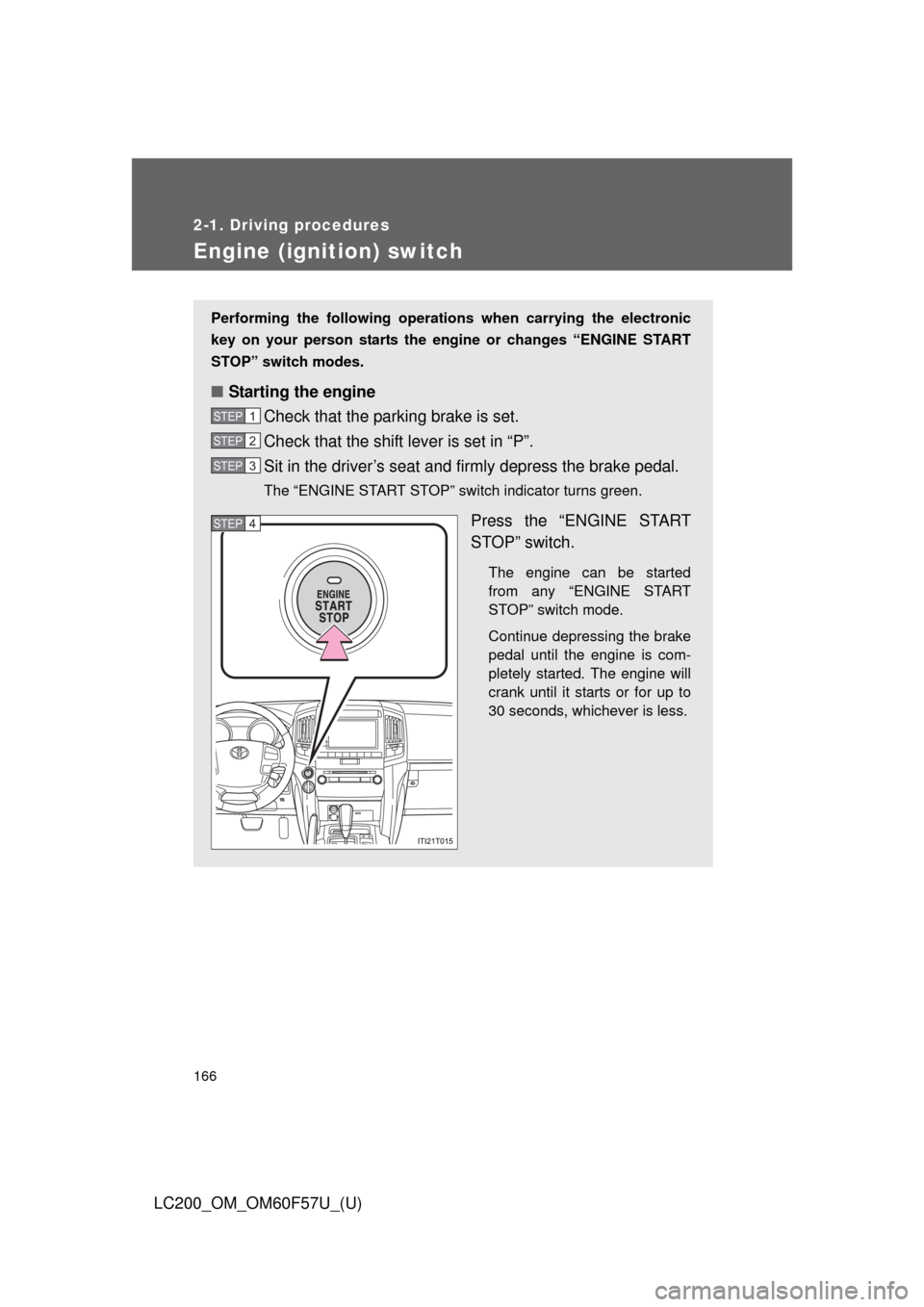
Engine (ignition) switch
Performing the following operations when carrying the electronic
key on your person starts the engine or changes “ENGINE START
STOP” switch modes.
■Starting the engine
Check that the parking brake is set.
Check that the shift lever is set in “P”.
Sit in the driver’s seat and firmly depress the brake pedal.
The “ENGINE START STOP” switch indicator turns green.
Press the “ENGINE START
STOP” switch.
The engine can be started
from any “ENGINE START
STOP” switch mode.
Continue depressing the brake
pedal until the engine is com-
pletely started. The engine will
crank until it starts or for up to
30 seconds, whichever is less.
STEP1
STEP2
STEP3
STEP4
Page 171 of 720
171
2-1. Driving procedures
2
When driving
LC200_OM_OM60F57U_(U)
Automatic transmission
Select a shift position appropriate for the driving conditions.
■Shifting the shift lever
While the “ENGINE START STOP” switch is in IGNITION
ON mode, depress the brake pedal and move the shift
lever.
■Shift position uses
*1: Shifting to the “D” position allows the system to select a gear suitable
for the driving conditions. Setting the shift lever to the “D” position is
recommended for normal driving.
*2: Selecting shift ranges using “S” mode restricts the upper limit of the
possible gear ranges, controls engine braking forces, and prevents
unnecessary upshifting.
Shift positionFunction
PParking the vehicle or starting the engine
RReversing
NCondition in which the power is not transmitted
DNormal driving*1
S“S” mode driving*2 (P. 173)
Page 177 of 720
177
2-1. Driving procedures
2
When driving
LC200_OM_OM60F57U_(U)
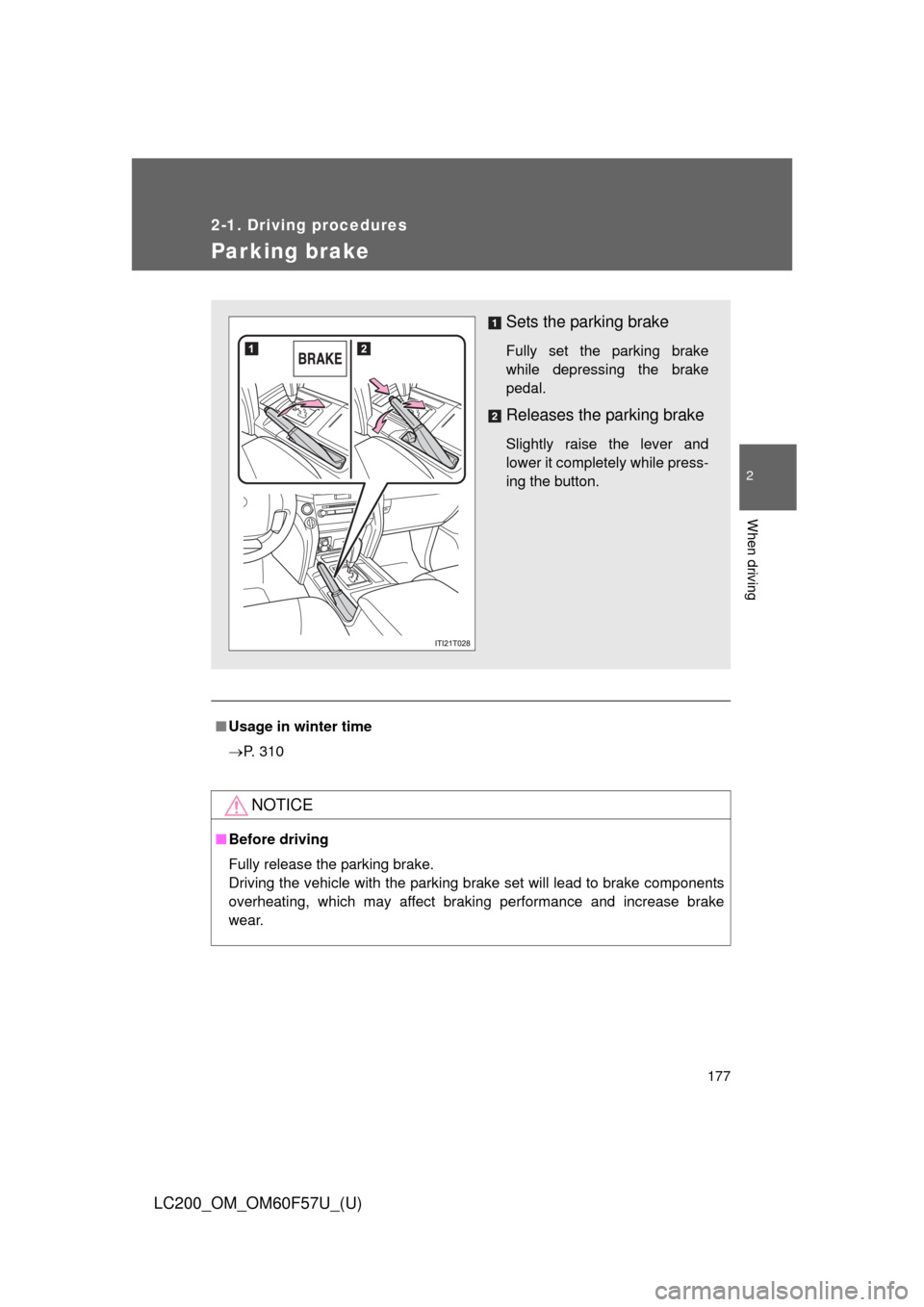
Parking brake
■Usage in winter time
P. 310
NOTICE
■Before driving
Fully release the parking brake.
Driving the vehicle with the parking brake set will lead to brake components
overheating, which may affect braking performance and increase brake
wear.
Sets the parking brake
Fully set the parking brake
while depressing the brake
pedal.
Releases the parking brake
Slightly raise the lever and
lower it completely while press-
ing the button.
Page 199 of 720
199 2-3. Operating the lights and wipers
2
When driving
LC200_OM_OM60F57U_(U)
■Daytime running light system
●To make your vehicle more visible to other drivers, the headlights turn on
automatically (at a reduced intensity) whenever the engine is started and
the parking brake is released. Daytime running lights are not designed for
use at night.
●Compared to turning on the headlights, the daytime running light system
offers greater durability and consumes less electricity, so it can help
improve fuel economy.
■Headlight control sensor
The sensor may not function properly if
an object is placed on the sensor, or any-
thing that blocks the sensor is affixed to
the windshield.
Doing so interferes with the sensor
detecting the level of ambient light and
may cause the automatic headlight sys-
tem to malfunction.
Page 237 of 720

237 2-4. Using other driving systems
2
When driving
LC200_OM_OM60F57U_(U)
■Sensor detection information
●The sensor’s detection areas are limited to the areas around the vehi-
cle’s front corner and rear bumpers.
●Certain vehicle conditions and the surrounding environment may affect
the ability of the sensor to correctly detect obstacles. Particular instances
where this may occur are listed below.
• There is dirt, snow or ice on the sensor. (Wiping the sensors will
resolve this problem.)
• The sensor is frozen. (Thawing the area will resolve this problem.)
In especially cold weather, if a sensor is frozen the screen may show
an abnormal display, or obstacles may not be detected.
• The sensor is covered in any way.
• The vehicle is leaning considerably to one side.
• On an extremely bumpy road, on an incline, on gravel, or on grass
• The vicinity of the vehicle is noisy due to vehicle horns, motorcycle
engines, air brakes of large vehicles, or other loud noises producing
ultrasonic waves.
• There is another vehicle equipped with parking assist sensors in the
vicinity.
• The sensor is coated with a sheet of spray or heavy rain.
• The vehicle is equipped with a fender pole or wireless antenna.
• Towing eyelets are installed.
• The bumper or sensor receives a strong impact.
• The vehicle is approaching a tall or curved curb.
• In harsh sunlight or intense cold weather
• The area directly under the bumpers is not detected.
• If obstacles draw too close to the sensor.
• A non-genuine Toyota suspension (lowered suspension etc.) is
installed.
• People may not be detected if they are wearing certain types of cloth-
ing.
In addition to the examples above, there are instances in which, because
of their shape, signs and other objects may be judged by the sensor to be
closer than they are.
Page 239 of 720
239 2-4. Using other driving systems
2
When driving
LC200_OM_OM60F57U_(U)
CAUTION
■When using the intuitive parking assist
Observe the following precautions.
Failing to do so may result in the vehicle being unable to be driven safely
and possibly cause an accident.
●Do not use the sensor at speeds in excess of 6 mph (10 km/h).
●The sensors’ detection areas and reaction times are limited. When moving
forward or reversing, check the areas surrounding the vehicle (especially
the sides of the vehicle) for safety, and drive slowly, using the brake to
control the vehicle’s speed.
●Do not install accessories within the sensors’ detection areas.
NOTICE
■When using intuitive parking assist
In the following situations, the system may not function correctly due to a
sensor malfunction etc. Have the vehicle checked by your Toyota dealer.
●A beep does not sound when you turn the main switch on.
●The intuitive parking assist operation display flashes, and a beep sounds
when no obstacles are detected.
●If the area around a sensor collides with something, or is subjected to
strong impact.
●If the bumper collides with something.
●If the display shows continuously without a beep.
●If a display error occurs, first check the sensor.
If the error occurs even if there is no ice, snow or mud on the sensor, it is
likely that the sensor is malfunctioning.
■Notes when washing the vehicle
Do not apply intensive bursts of water or steam to the sensor area.
Doing so may result in the sensor malfunctioning.