Page 28 of 372
28
1-2. Opening, closing and locking the doors
Side doors
The vehicle can be locked and unlocked using the wireless remote
control, key or door lock switch.
■Wireless remote control
P. 2 6
■ Key
Locks all doors
Unlocks all doors
Turning the key a single
time in the driver’s door
unlocks the driver’s door,
and turning the key again
unlocks the other doors.
■ Door lock switch
For driver’s use
Unlocks all doors
Locks all doors
Page 30 of 372

30 1-2. Opening, closing and locking the doors
Locking the side doors from the outside without a keyMove the inside door lock button to the lock position.
Close the door.
The door cannot be locked if the key is in the engine switch.
■ Key reminder buzzer
A buzzer sounds if the driver’s door is opened, while the engine switch is in
the ACC or LOCK position to remind you to remove the key.
■ Customization that can be configured at Scion dealer
Settings (e.g. unlocking function using a key) can be changed.
(Customizable features P. 339)
CAUTION
■To prevent an accident
Observe the following precautions while driving the vehicle.
Failing to do so may result in a door opening and an occupant falling out,
resulting in death or serious injury.
●Always use a seat belt.
● Always lock all doors.
● Ensure that all doors are properly closed.
● Do not pull the inside handle of the doors while driving.
The doors may be opened and the passengers are thrown out of the vehi-
cle and it may result in serious injury or death.
● Be especially careful for the side doors, as the doors may be opened even
if the inside lock buttons are in locked position.
Page 31 of 372
31
1
1-2. Opening, closing and locking the doors
Before driving
Back door
■When closing the back door
The back door can be locked/unlocked and opened by the following
procedures.
■ Locking and unlocking the back door
Door lock switch
P. 2 8
Wireless remote control
P. 2 6
Key
P. 2 4
■ Opening the back door from outside the vehicle
Raise the back door while
pushing up the back door
opener switch.
The back door cannot be
closed immediately after the
back door opener switch is
pushed.
Lower the back door using the back door
handle, and make sure to push the back
door down from the outside to close it.
Page 60 of 372
60
1-6. Theft deterrent system
Engine immobilizer system
: If equipped
The vehicle's keys have built-in transponder chips that prevent the
engine from starting if the key has not been previously registered in
the vehicle's on-board computer.
Never leave the keys inside the vehicle when you leave the vehicle.
The indicator light flashes after
the key has been removed
from the engine switch to indi-
cate that the system is operat-
ing.
The indicator light stops flash-
ing after the registered key
has been inserted into the
engine switch to indicate that
the system has been can-
celed.
Page 61 of 372

61
1-6. Theft deterrent system
1
Before driving
■
System maintenance
The vehicle has a maintenance-free type engine immobilizer system.
■ Conditions that may cause the system to malfunction
● If the key is in contact with a metallic object
● If the key is in close proximity to or touching a key to the security system
(key with a built-in transponder chip) of another vehicle
■ Certifications for the engine immobilizer system
For vehicles sold in U.S.A.
FCC ID: MOZRI-20BTY
This device complies with Part 15 of the FCC Rules. Operation is subject to
the following two conditions: (1) this device may not cause harmful interfer-
ence, and (2) this device must accept any interference received, including
interference that may cause undesired operation.
FCC WARNING:
Changes or modifications not expressly approved by the party responsible
for compliance could void the user’s authority to operate the equipment. For vehicles sold in Canada
This device complies with RSS-210 of Industry Canada.
Operation is subject to the following two conditions: (1) this device may not
cause interference, and (2) this device must accept any interference, includ-
ing interference that may cause undesired operation of the device.
NOTICE
■ To ensure the system operates correctly
Do not modify or remove the system. If modified or removed, the proper
operation of the system cannot be guaranteed.
Page 77 of 372

77
1-7. Safety information
1
Before driving
CAUTION
■
SRS airbag precautions
●If a vinyl cover is put on the area where the SRS knee airbags will deploy,
be sure to remove it.
● Do not use seat accessories which cover the parts where the SRS side
airbags and SRS seat cushion airbags inflate as they may interfere with
inflation of the airbags. Such accessories may prevent the side airbags
and seat cushion airbags from activating correctly, disable the system or
cause the side airbags and seat cushion airbags to inflate accidentally,
resulting in death or serious injury.
● Do not strike or apply significant levels of force to the area of the SRS air-
bag components.
Doing so can cause the SRS airbags to malfunction.
● Do not touch any of the component parts immediately after the SRS air-
bags have deployed (inflated) as they may be hot.
● If breathing becomes difficult after the SRS airbag has deployed, open a
door or window to allow fresh air in, or leave the vehicle if it is safe to do
so. Wash off any residue as soon as possible to prevent skin irritation.
● If the areas where the SRS airbags are stored, such as the steering wheel
pad and front and rear pillar garnishes, are damaged or cracked, have
them replaced by your Scion dealer.
●Do not attach any heavy, sharp or hard
objects such as keys or accessories to
the key. The objects may restrict the
SRS knee airbags inflation or be thrust
into the driver’s seat area by the force
of the deploying airbag, thus causing a
danger.
Page 102 of 372

102
2-1. Driving procedures
Driving the vehicle
Starting on a steep uphillWith the brake pedal depressed, firmly set the parking brake
and shift the shift lever to D.
Gently depress the accelerator pedal.
Release the parking brake.
The following procedures should be observed to ensure safe driv-
ing.
■ Starting the engine ( P. 111 )
■ Driving
With the brake pedal depressed, shift the shift lever to D. ( P. 114)
Release the parking brake. ( P. 116)
Gradually release the brake pedal and gently depress the
accelerator pedal to accelerate the vehicle.
■ Stopping
With the shift lever in D, depress the brake pedal.
If necessary, set the parking brake.
When the vehicle is stopped for an extended period of time, shift
the shift lever to P or N. ( P. 114)
■Parking the vehicle
With the shift lever in D, depress the brake pedal.
Set the parking brake. ( P. 116)
Shift the shift lever to P. ( P. 114)
When parking on a hill, if necessary, block the wheels.
Turn the engine switch off to stop the engine.
Lock the door, making sure that you have the key on your
person.
Page 111 of 372
111
2-1. Driving procedures
2
When driving
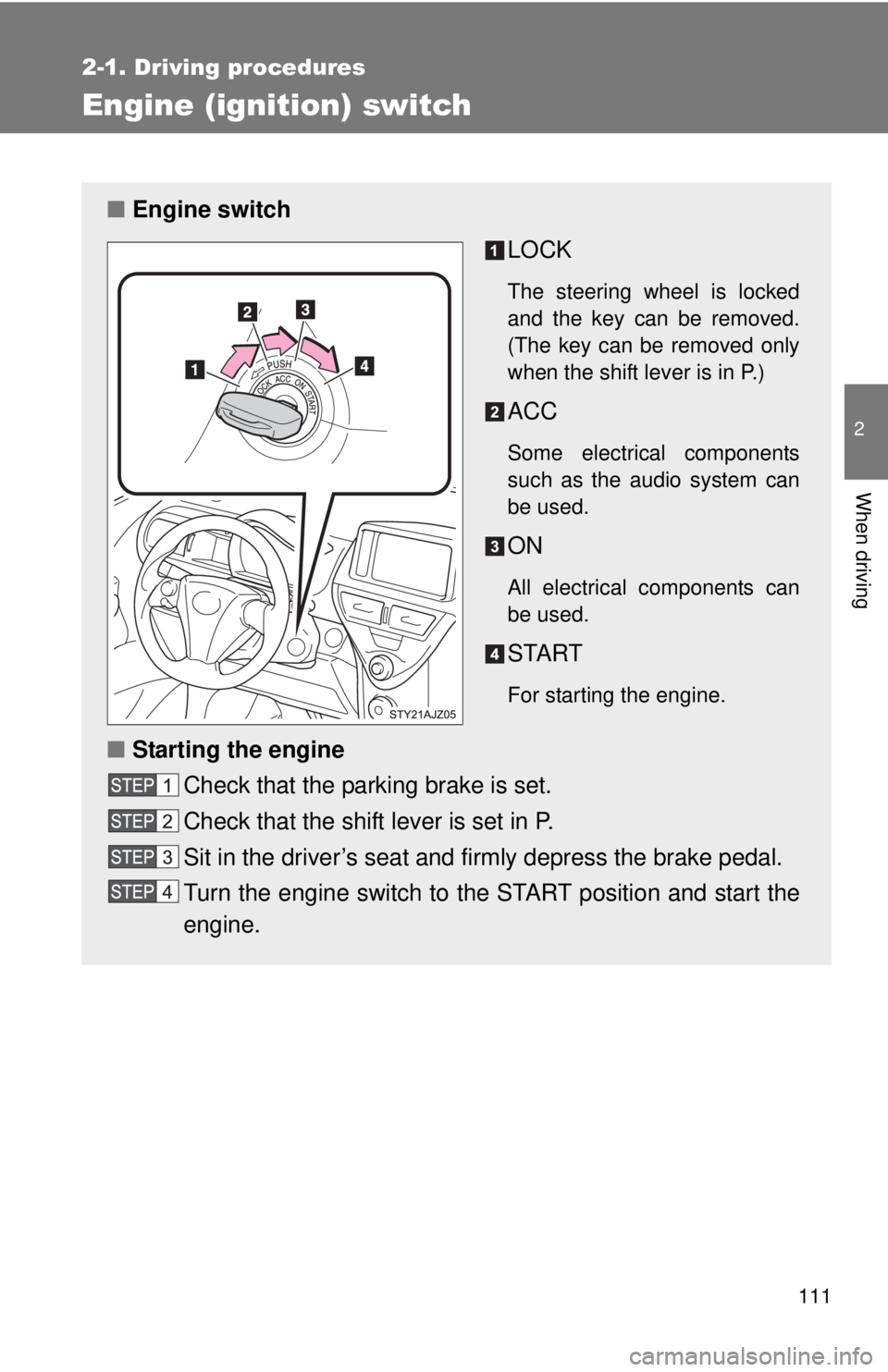
Engine (ignition) switch
■Engine switch
LOCK
The steering wheel is locked
and the key can be removed.
(The key can be removed only
when the shift lever is in P.)
ACC
Some electrical components
such as the audio system can
be used.
ON
All electrical components can
be used.
START
For starting the engine.
■Starting the engine
Check that the parking brake is set.
Check that the shift lever is set in P.
Sit in the driver’s seat and firmly depress the brake pedal.
Turn the engine switch to the START position and start the
engine.