Page 4 of 684

TABLE OF CONTENTSIndex
4
3-3. Using the Bluetooth®
audio system
Bluetooth
® audio system .... 357
Using the Bluetooth®
audio system .................... 360
Operating a Bluetooth
®
enabled portable player ... 365
Setting up a Bluetooth
®
enabled portable player ... 367
Bluetooth
® audio system
setup ................................ 372
3-4. Using the hands-free phone system
(for cellular phone)
Hands-free phone system (for cellular phone)
features ............................ 373
Using the hands-free phone system ................... 377
Making a phone call ........... 386
Setting a cellular phone...... 390
Security and system setup ................................ 395
Using the phone book ........ 399
3-5. Using the rear audio system
Rear seat entertainment system features ................ 406
Using the DVD player (DVD video)...................... 413
Using the DVD player (video CD) ........................ 422
Using the DVD player (audio CD/CD text) ........... 425
Using the DVD player (MP3 discs) ...................... 426
Using the video mode ........ 428 Changing the initial
setting ............................... 429
3-6. Using the interior lights Interior lights list.................. 436
• Personal/interior light main switch ....................... 437
• Personal/interior lights ...... 437
• Interior light ....................... 438
3-7. Using the storage features List of storage features ....... 439
• Glove box ......................... 440
• Console box ..................... 441
• Overhead console ............ 442
• Cup holders ...................... 443
• Bottle holders ................... 447
• Auxiliary boxes ................. 448
• Side table ......................... 450
3-8. Other interior features Sun visors ........................... 452
Vanity mirrors ..................... 453
Clock................................... 454
Conversation mirror ............ 455
Power outlets ...................... 456
Seat heaters ....................... 460
Armrests ............................. 462
Assist grips ......................... 463
Floor mat ............................ 464
Luggage compartment features ............................ 465
Garage door opener ........... 470
Compass ............................ 476
Page 22 of 684
22
E
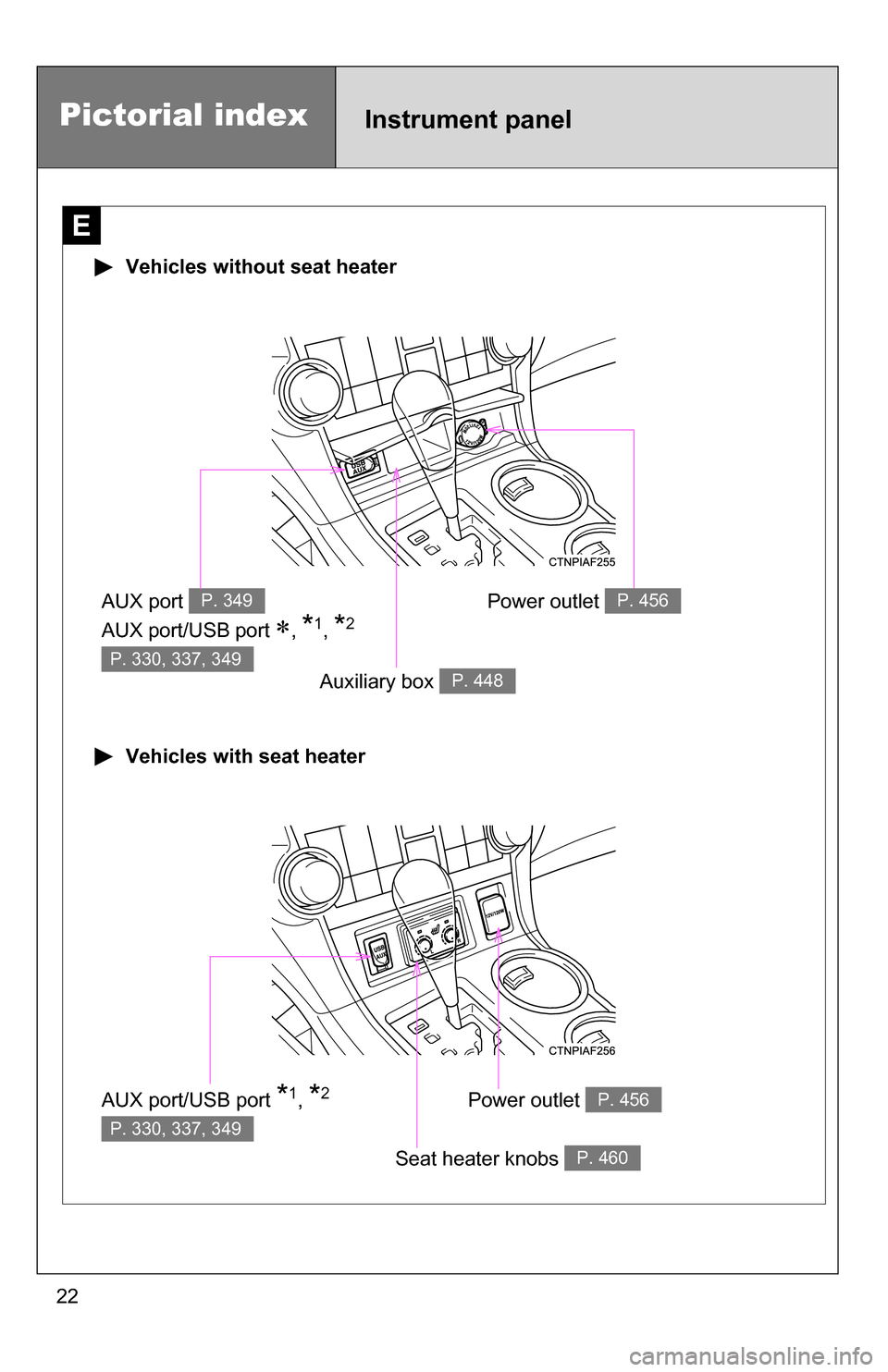
Vehicles without seat heater
Vehicles with seat heater
AUX port
AUX port/USB port
, *1, *2
P. 349
P. 330, 337, 349
Auxiliary box P. 448
AUX port/USB port *1, *2
P. 330, 337, 349
Seat heater knobs P. 460
Power outlet P. 456
Power outlet P. 456
Pictorial indexInstrument panel
Page 273 of 684

Interior features3
273
3-5. Using the rear audio system
Rear seat entertainment system features ............. 406
Using the DVD player (DVD video) ................... 413
Using the DVD player (video CD)...................... 422
Using the DVD player (audio CD/CD text) ........ 425
Using the DVD player (MP3 discs) .................... 426
Using the video mode ...... 428
Changing the initial setting ............................ 429
3-6. Using the interior lights Interior lights list ............... 436
• Personal/interior light
main switch .................... 437
• Personal/interior lights ... 437
• Interior light .................... 438 3-7. Using the storage features
List of storage features .... 439
• Glove box....................... 440
• Console box ................... 441
• Overhead console .......... 442
• Cup holders ................... 443
• Bottle holders ................. 447
• Auxiliary boxes ............... 448
• Side table ....................... 450
3-8. Other interior features Sun visors ........................ 452
Vanity mirrors ................... 453
Clock ................................ 454
Conversation mirror ......... 455
Power outlets ................... 456
Seat heaters..................... 460
Armrests........................... 462
Assist grips....................... 463
Floor mat .......................... 464
Luggage compartment features .......................... 465
Garage door opener......... 470
Compass .......................... 476
Page 287 of 684
287
3-1. Using the air conditioning system
and defogger
3
Interior features
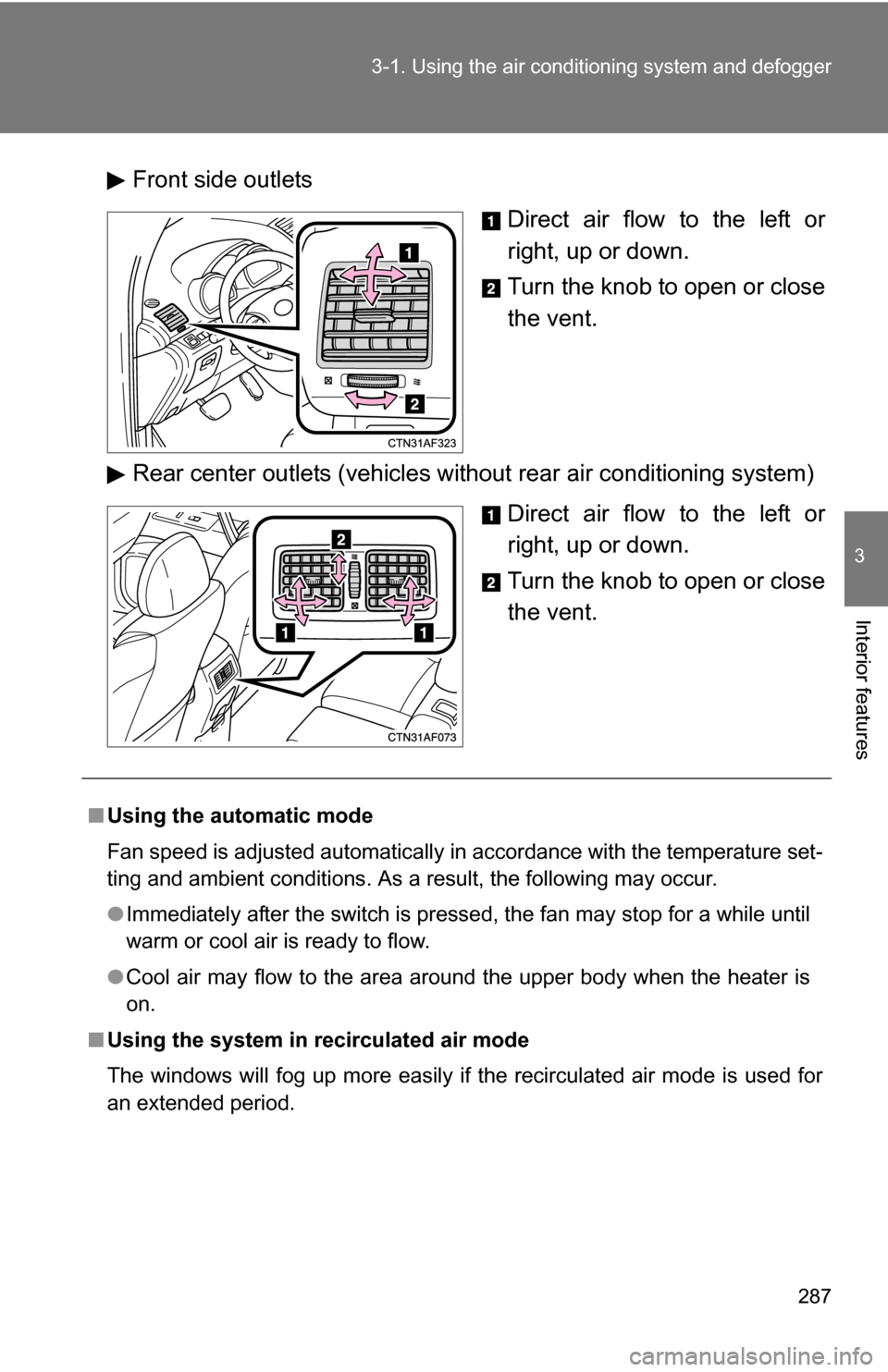
Front side outlets
Direct air flow to the left or
right, up or down.
Turn the knob to open or close
the vent.
Rear center outlets (vehicles without rear air conditioning system) Direct air flow to the left or
right, up or down.
Turn the knob to open or close
the vent.
■Using the automatic mode
Fan speed is adjusted automatically in accordance with the temperature set-
ting and ambient conditions. As a result, the following may occur.
●Immediately after the switch is pressed, the fan may stop for a while until
warm or cool air is ready to flow.
● Cool air may flow to the area around the upper body when the heater is
on.
■ Using the system in recirculated air mode
The windows will fog up more easily if the recirculated air mode is used for
an extended period.
Page 330 of 684
330
3-2. Using the audio system
Operating an iPod
: If equipped
Connecting an iPod enables you to enjoy music from the vehicle
speakers.
■ Connecting an iPod
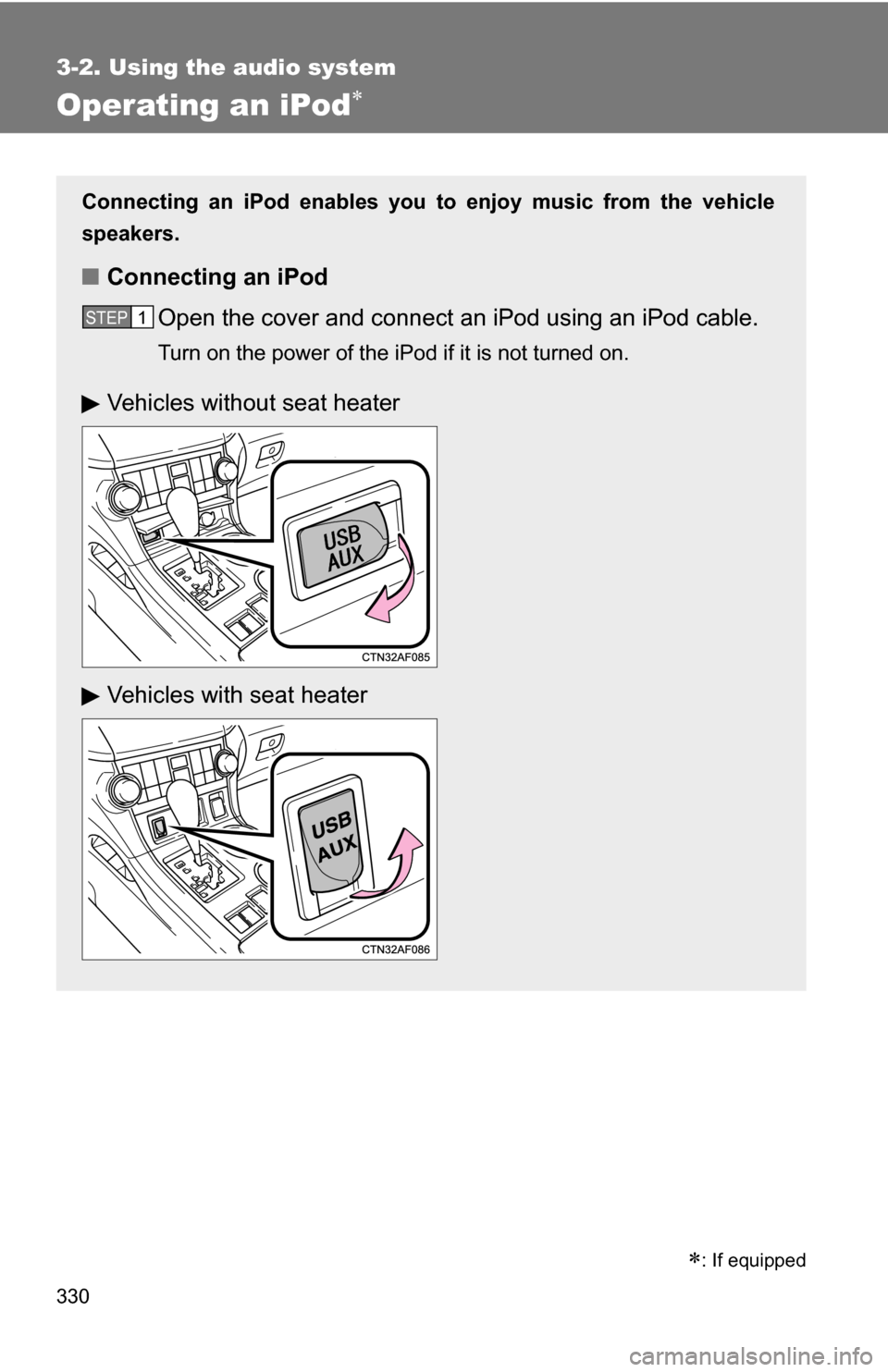
Open the cover and connect an iPod using an iPod cable.
Turn on the power of the iPod if it is not turned on.
STEP1
Vehicles without seat heater
Vehicles with seat heater
Page 337 of 684
337
3-2. Using the audio system
3
Interior features
Operating a USB memor y
Connecting a USB memory enables you to enjoy music from the
vehicle speakers.
■Connecting a USB memory
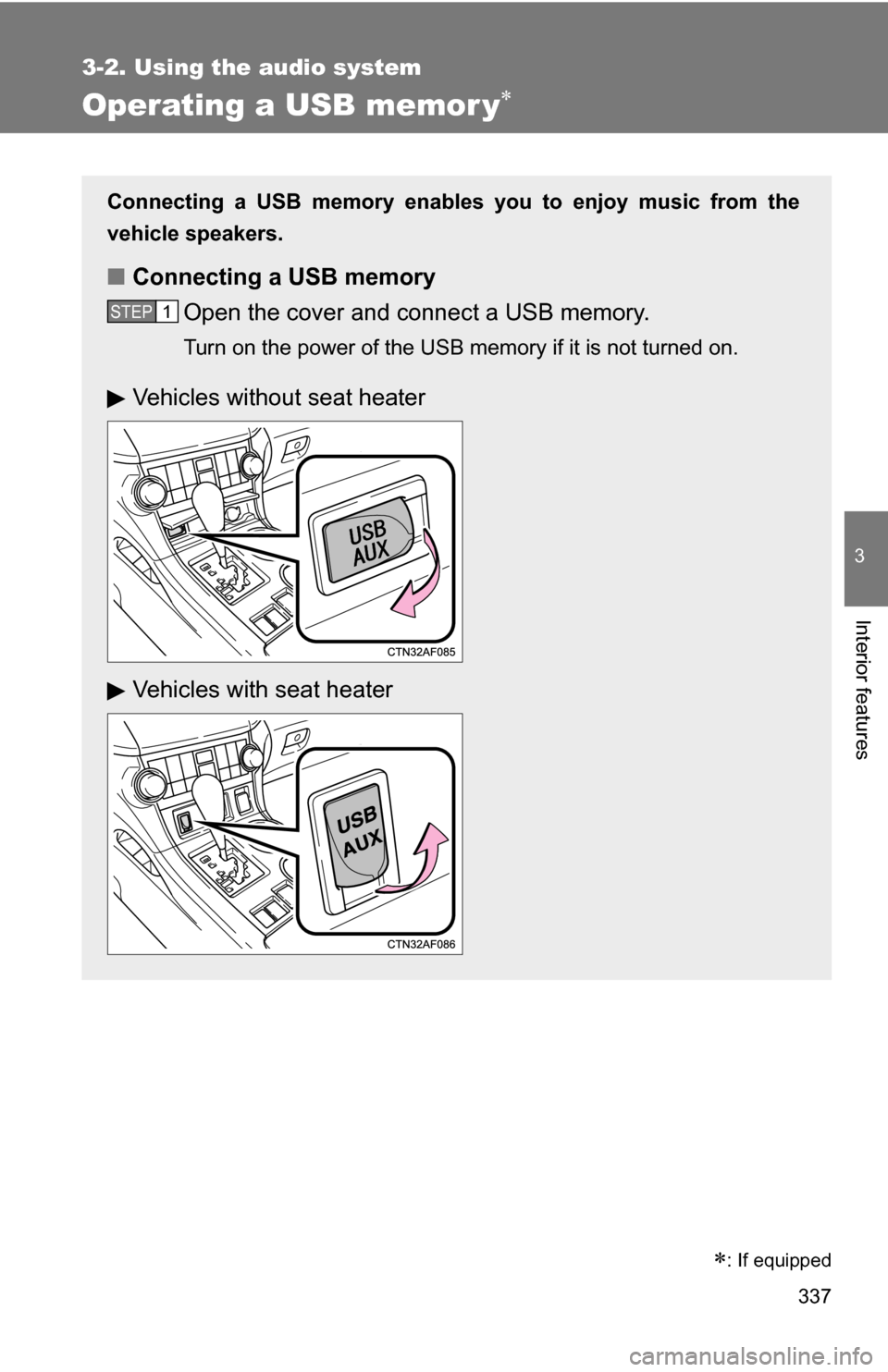
Open the cover and connect a USB memory.
Turn on the power of the USB memory if it is not turned on.
STEP1
Vehicles without seat heater
Vehicles with seat heater
: If equipped
Page 349 of 684
349
3-2. Using the audio system
3
Interior features
Using the AUX port
This port can be used to connect a portable audio device and listen
to it through the vehicle’s speakers.
Open the cover and connect the portable audio device.
Vehicles without seat heater (type A)
Vehicles without seat heater (type B and C)
Vehicles with seat heaterSTEP1
Page 421 of 684
421
3-5. Using the rear audio system
3
Interior features
■
Audio
Manufactured under license from Dolby Laboratories. “Dolby”, “Pro Logic”,
and are trademarks of Dolby
Laboratories. Confidential unpublished
works.
1992-1997 Dolby
Laboratories. All rights reserved.
“dts” is a trademark of Digital Theater Systems, Inc.