Page 307 of 704
307
2-5. Driving information
2
When driving
4RUNNER_U
●
Always place wheel blocks under both the vehicle’s and the
trailer’s wheels when parking. Ap ply the parking brake firmly, and
put the transmission in P. Avoid pa rking on a slope, but if unavoid-
able, do so only after performing the following:
Apply the brakes and keep them applied.
Have someone place wheel blo cks under both the vehicle’s
and trailer’s wheels.
When the wheel blocks are in pl ace, release the brakes slowly
until the blocks absorb the load.
Apply the parking brake firmly.
Shift into P and turn off the engine.
● When restarting after parking on a slope:
With the transmission in P, start the engine. Be sure to keep
the brake pedal pressed.
Shift into a forward gear. If reversing, shift into R.
Release the parking brake and brake pedal, and slowly pull or
back away from the wheel blocks. Stop and apply the brakes.
Have someone retrieve the blocks.
STEP 1
STEP 2
STEP 3
STEP 4
STEP 5
STEP 1
STEP 2
STEP 3
STEP 4
Page 320 of 704
320 3-1. Using the air conditioning system and defogger
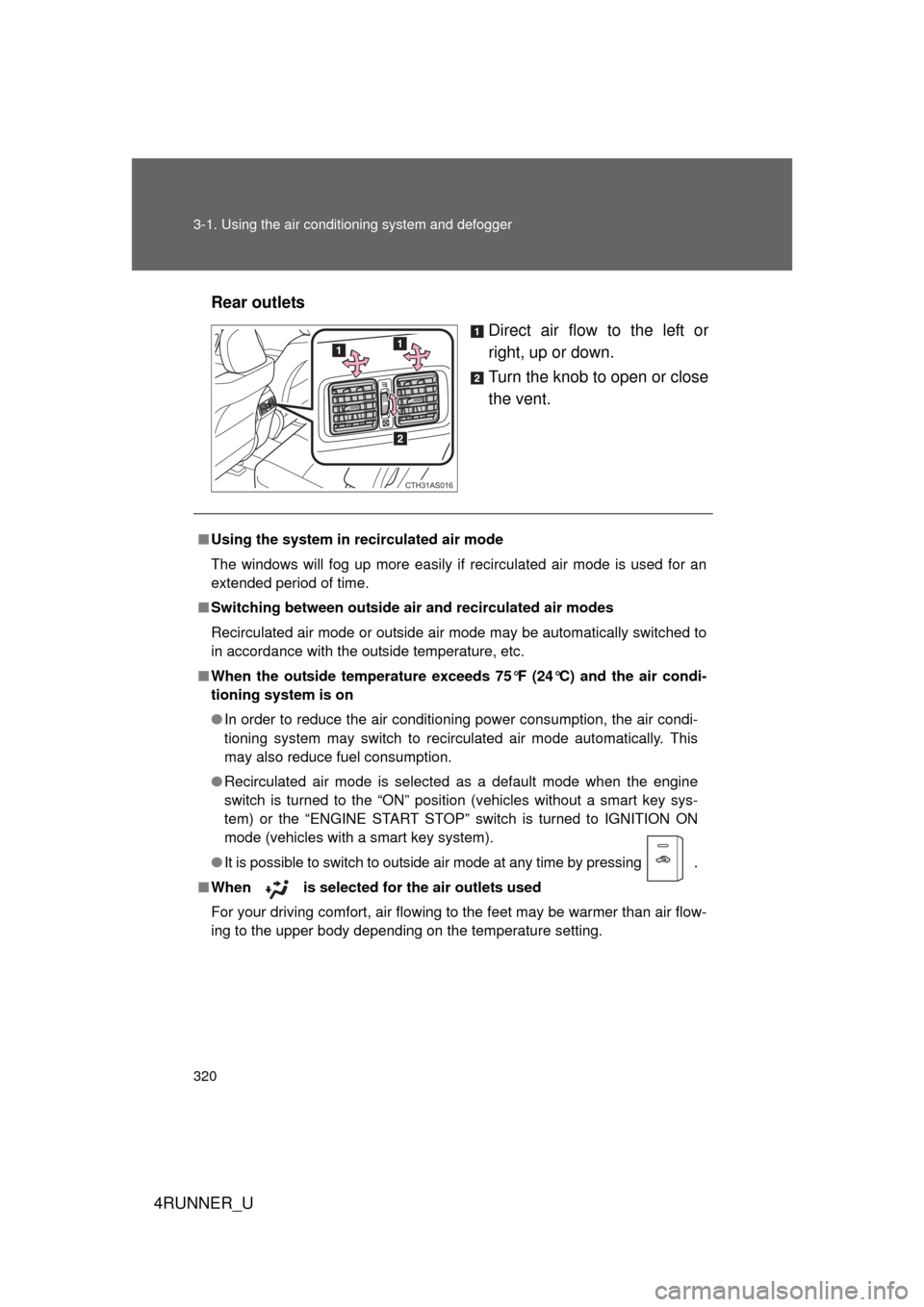
4RUNNER_URear outlets
Direct air flow to the left or
right, up or down.
Turn the knob to open or close
the vent.
CTH31AS016
■Using the system in recirculated air mode
The windows will fog up more easily if recirculated air mode is used for an
extended period of time.
■ Switching between outside air and recirculated air modes
Recirculated air mode or outside air mode may be automatically switched to
in accordance with the outside temperature, etc.
■ When the outside temperature exceed s 75°F (24°C) and the air condi-
tioning system is on
● In order to reduce the air conditioning power consumption, the air condi-
tioning system may switch to recirculated air mode automatically. This
may also reduce fuel consumption.
● Recirculated air mode is selected as a default mode when the engine
switch is turned to the “ON” position (vehicles without a smart key sys-
tem) or the “ENGINE START STOP” switch is turned to IGNITION ON
mode (vehicles with a smart key system).
● It is possible to switch to outside air mode at any time by pressing
.
■When is selected for the air outlets used
For your driving comfort, air flowing to the feet may be warmer than air flow-
ing to the upper body depending on the temperature setting.
Page 328 of 704

328 3-1. Using the air conditioning system and defogger
4RUNNER_U
■Using automatic mode
Fan speed is adjusted automatically according to the temperature setting
and ambient conditions. As a result, the following may occur:
● The system may switch automatically to recirculated air mode when the
coolest temperature setting is selected when the ambient temperature is
high.
● Immediately after the switch is pressed, the fan may stop for a while until
warm or cool air is ready to flow.
● Cool air may flow to the area around the upper body when the heater is
on.
■ Switching between outside air and recirculated air modes
Recirculated air mode or outside air mode may be automatically switched to
in accordance with the temperature setting, the outside temperature, etc.
■ When the outside temperature exceed s 75°F (24°C) and the air condi-
tioning system is on
● In order to reduce the air conditioning power consumption, the air condi-
tioning system may switch to recirculated air mode automatically. This
may also reduce fuel consumption.
● Recirculated air mode is selected as a default mode when the engine
switch is turned to the “ON” position (vehicles without a smart key sys-
tem) or the “ENGINE START STOP” switch is turned to IGNITION ON
mode (vehicles with a smart key system).
● It is possible to switch to outside air mode at any time by pressing
.
■Using the system in recirculated air mode
The windows will fog up more easily if recirculated air mode is used.
Page 332 of 704
332 3-1. Using the air conditioning system and defogger
4RUNNER_U
■The defoggers can be operated when
● Vehicles without a smart key system:
The engine switch is in the “ON” position.
Vehicles with a smart key system:
The “ENGINE START STOP” switch is in IGNITION ON mode.
● The back window is completely closed.
■ The outside rear view mirror defoggers
Turning the rear window defogger on will turn the outside rear view mirror
defoggers on.
CAUTION
■ When the outside rear view mirror defoggers are on
Do not touch outside surface of the rear view mirrors, as they can become
very hot and burn you.
Page 333 of 704
333
3-1. Using the air conditioning system and defogger
3
Interior features
4RUNNER_U
Windshield wiper de-icer
■The windshield wiper de-icer can be operated when
Vehicles without a smart key system
The engine switch is in the “ON” position.
Vehicles with a smart key system
The “ENGINE START STOP” switch is in IGNITION ON mode.
CAUTION
■When the windshield wiper de-icer is on
Do not touch the lower part of the windshield or the side of the front pillars,
as the surfaces can become very hot and burn you.
: If equipped
This feature is used to prevent ice from building up on the wind-
shield and wiper blades.
Turns the windshield wiper de-
icer on/off
The windshield wiper de-icer
will automatically turn off after
approximately 15 minutes.
CTH31AS020
Page 403 of 704

403
3-3. Using the Bluetooth
® audio system
3
Interior features
4RUNNER_U
Press the talk switch and say “From car” or “From audio”, and
select “Confirm” using a voice command or .
Vehicles with smart key system: If “From car” is selected, the porta-
ble player will be automatically connected whenever the “ENGINE
START STOP” switch is in either ACCESSORY or IGNITION ON
mode.
Vehicles without smart key system: If “From car” is selected, the por-
table player will be automatically connected whenever the engine
switch is in either the “ACC” or “ON” position.
Changing the registered name of a portable player
Select “Change Name” using a voice command or .
Select the name of the portable player to be changed by
either of the following methods, and select “Confirm” using a
voice command or :
a. Press the talk switch and say the name of desired portableplayer.
b. Press the talk switch and say “List audio players”. When the name of the desired portable player is read aloud, press the
talk switch.
Press the talk switch or select “Record Name” using ,
and say the new name.
Select “Confirm” using a voice command or .
STEP 3
STEP 1
STEP 2
STEP 3
STEP 4
Page 441 of 704
441
3
Interior features
4RUNNER_U
3-5. Using the interior lights
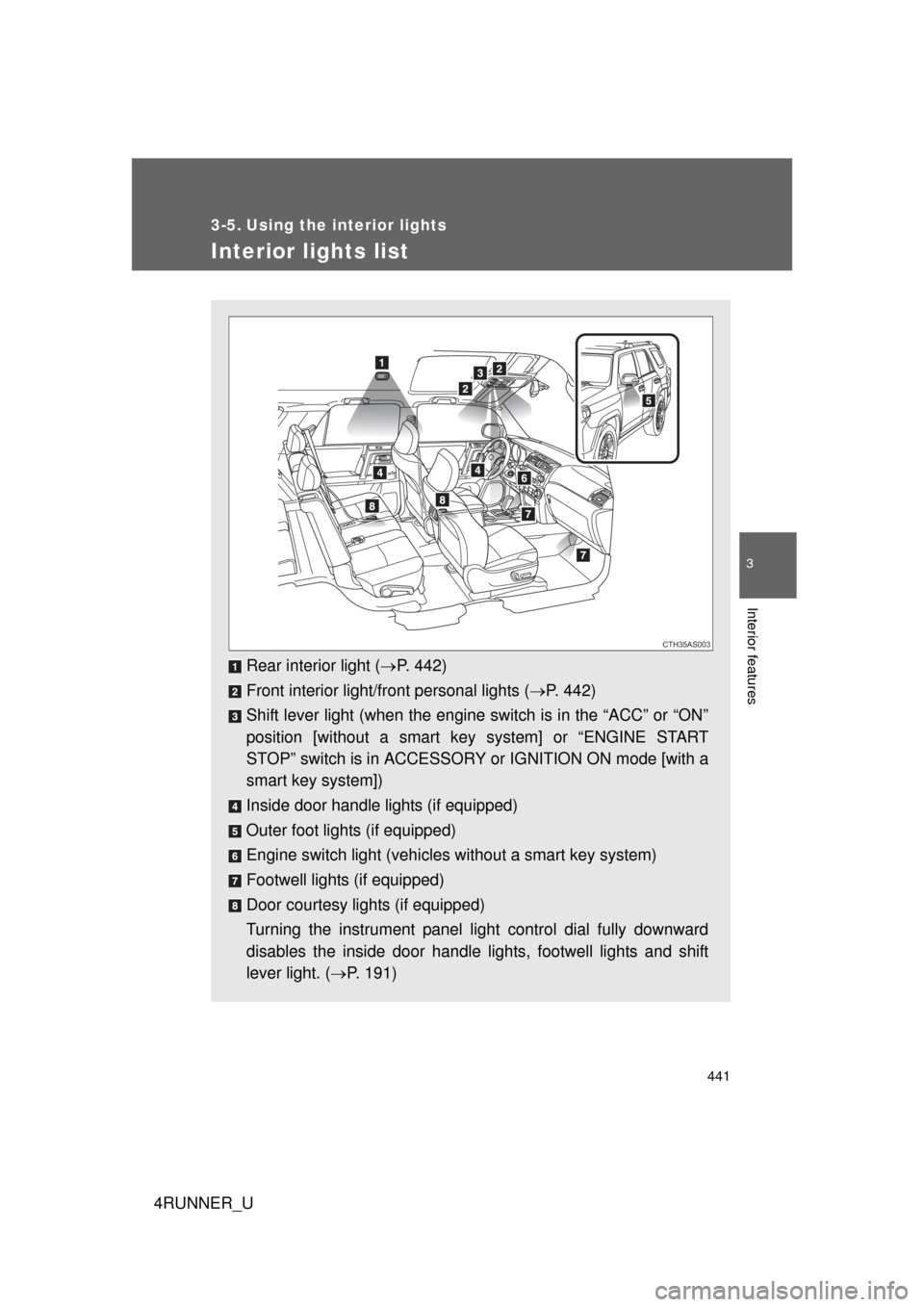
Interior lights list
Rear interior light (P. 442)
Front interior light/front personal lights ( P. 442)
Shift lever light (when the engine switch is in the “ACC” or “ON”
position [without a smart ke y system] or “ENGINE START
STOP” switch is in ACCESSORY or IGNITION ON mode [with a
smart key system])
Inside door handle lights (if equipped)
Outer foot lights (if equipped)
Engine switch light (vehicles without a smart key system)
Footwell lights (if equipped)
Door courtesy lights (if equipped)
Turning the instrument panel light control dial fully downward
disables the inside door handle lights, footwell lights and shift
lever light. ( P. 191)
CTH35AS003
Page 443 of 704
443
3-5. Using the interior lights
3
Interior features
4RUNNER_U
■
Illuminated entry system
Vehicles without a smart key system
The lights automatically turn on/off according to the engine switch position,
whether the doors are locked/unlocked, and whether the doors are open/
closed.
Vehicles with a smart key system
The lights automatically turn on/off according to “ENGINE START STOP”
switch mode, the presence of the electronic key, whether the doors are
locked/unlocked, and whether the doors are open/closed.
■ To prevent battery discharge
If the following lights remain on, the lights will go off automatically after 20
minutes:
● Engine switch light
● Front interior light
● Rear interior light
● Personal light
● Footwell lights
● Inside door handle lights
● Door courtesy lights
■ Customization that can be co nfigured at Toyota dealer
Settings (e.g. the time elapsed before lights turn off) can be changed.
(Customizable features
P. 664)
Personal lights