Page 590 of 704
590
5-1. Essential information
4RUNNER_U
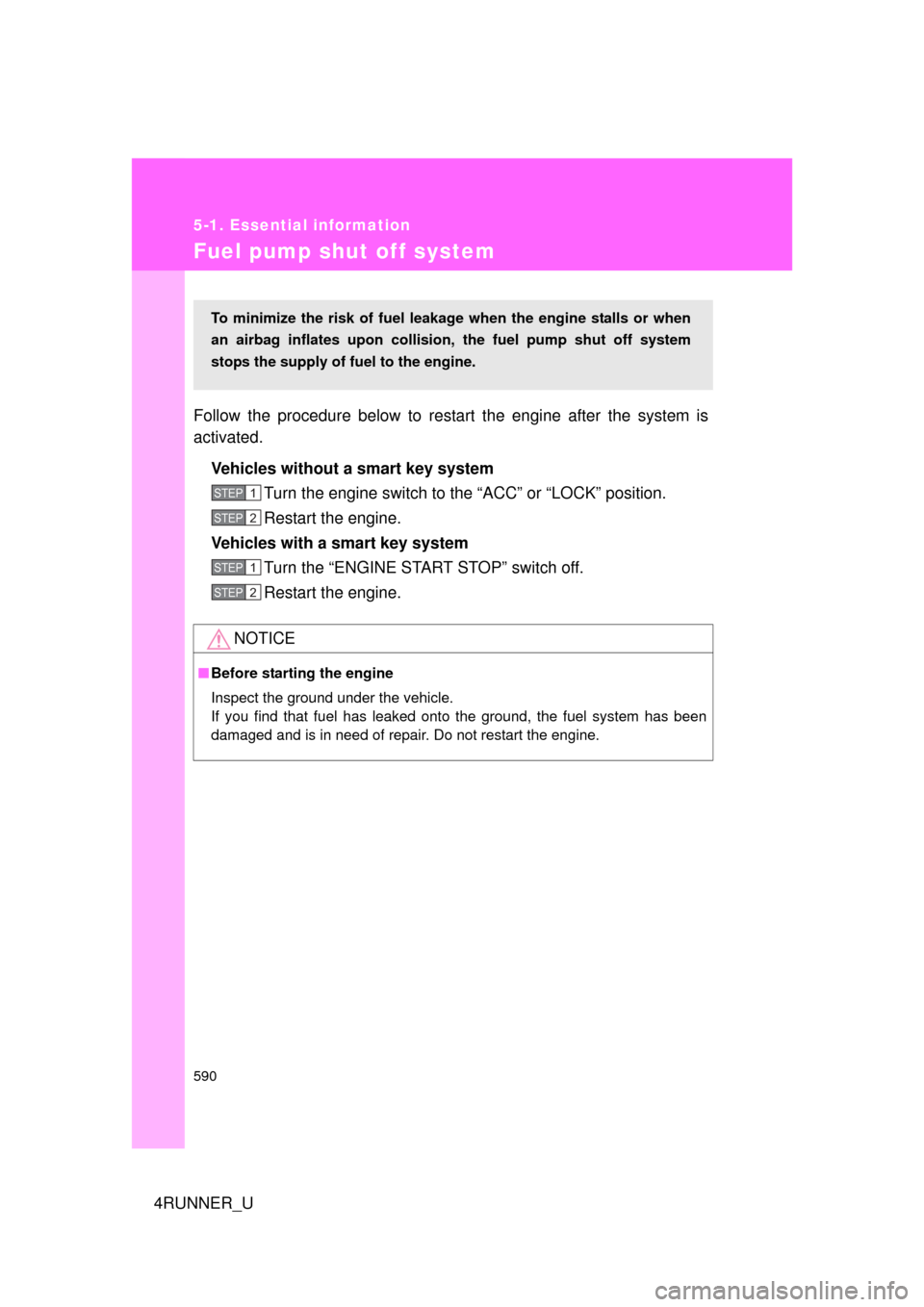
Fuel pump shut off system
Follow the procedure below to restart the engine after the system is
activated.Vehicles without a smart key system Turn the engine switch to the “ACC” or “LOCK” position.
Restart the engine.
Vehicles with a smart key system
Turn the “ENGINE START STOP” switch off.
Restart the engine.
NOTICE
■Before starting the engine
Inspect the ground under the vehicle.
If you find that fuel has leaked onto the ground, the fuel system has been
damaged and is in need of repair. Do not restart the engine.
To minimize the risk of fuel leakage when the engine stalls or when
an airbag inflates upon collision , the fuel pump shut off system
stops the supply of fuel to the engine.
STEP 1
STEP 2
STEP 1
STEP 2
Page 599 of 704
5
When trouble arises
599
5-2. Steps to take in an emergency
4RUNNER_U
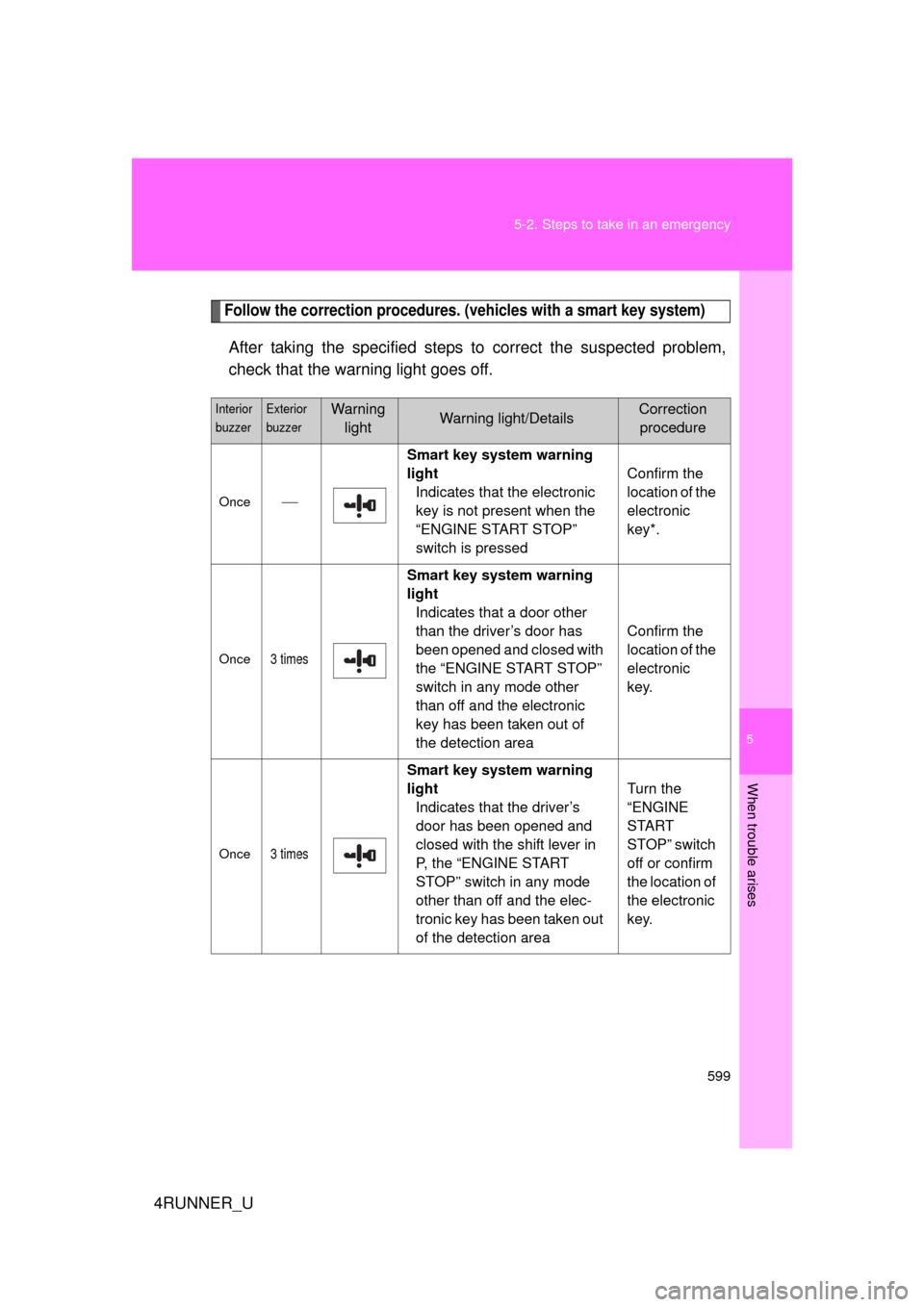
Follow the correction procedures. (vehicles with a smart key system)
After taking the specified steps to correct the suspected problem,
check that the warning light goes off.
Interior
buzzerExterior
buzzerWarning
lightWarning light/DetailsCorrection procedure
Once Smart key system warning
light
Indicates that the electronic
key is not present when the
“ENGINE START STOP”
switch is pressed Confirm the
location of the
electronic
key*.
Once3 times
Smart key system warning
light
Indicates that a door other
than the driver’s door has
been opened and closed with
the “ENGINE START STOP”
switch in any mode other
than off and the electronic
key has been taken out of
the detection area Confirm the
location of the
electronic
key.
Once3 times
Smart key system warning
light
Indicates that the driver’s
door has been opened and
closed with the shift lever in
P, the “ENGINE START
STOP” switch in any mode
other than off and the elec-
tronic key has been taken out
of the detection area Turn the
“ENGINE
START
STOP” switch
off or confirm
the location of
the electronic
key.
Page 600 of 704
600 5-2. Steps to take in an emergency
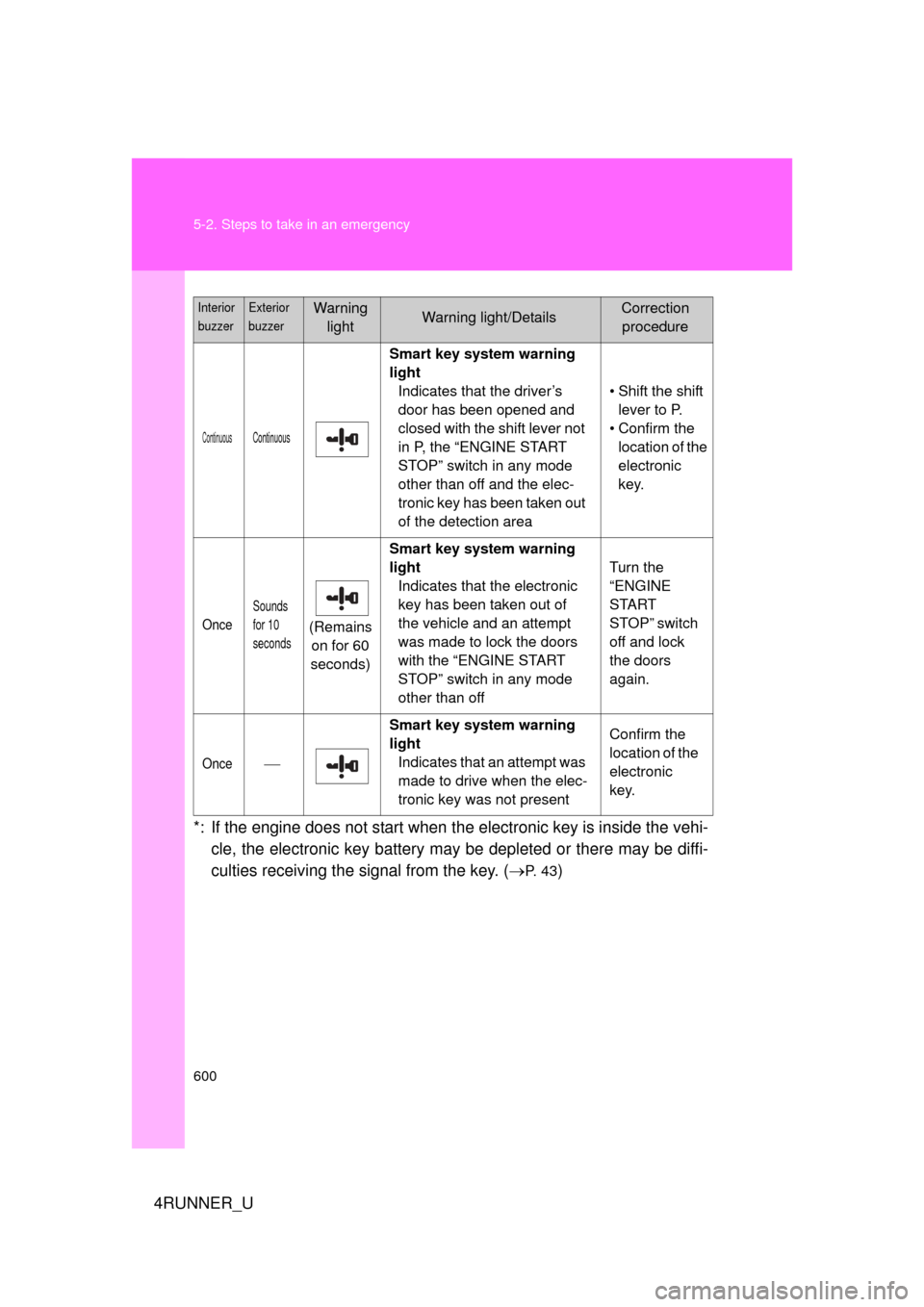
4RUNNER_U*: If the engine does not start when the electronic key is inside the vehi-
cle, the electronic key battery may be depleted or there may be diffi-
culties receiving the si gnal from the key. (
P. 4 3)
ContinuousContinuous
Smart key system warning
light
Indicates that the driver’s
door has been opened and
closed with the shift lever not
in P, the “ENGINE START
STOP” switch in any mode
other than off and the elec-
tronic key has been taken out
of the detection area • Shift the shift
lever to P.
• Confirm the location of the
electronic
key.
Once
Sounds
for 10
seconds
(Remains on for 60
seconds) Smart key system warning
light
Indicates that the electronic
key has been taken out of
the vehicle and an attempt
was made to lock the doors
with the “ENGINE START
STOP” switch in any mode
other than off Turn the
“ENGINE
START
STOP” switch
off and lock
the doors
again.
Once
Smart key system warning
light
Indicates that an attempt was
made to drive when the elec-
tronic key was not present Confirm the
location of the
electronic
key.
Interior
buzzerExterior
buzzerWarning
lightWarning light/DetailsCorrection procedure
Page 603 of 704

5
When trouble arises
603
5-2. Steps to take in an emergency
4RUNNER_U
■If the tire pressure warning system is not functioning
The tire pressure warning system will be disabled in the following condi-
tions:
(When the condition be
comes normal, the system will work properly.)
●If tires not equipped with tire pressure warning valves and transmit-
ters are used
●If the ID code on the tire pressure warning valves and transmitters is
not registered in the tire pressure warning computer
●If the tire inflation pressure is 73 psi (500 kPa, 5.1 kgf/cm2 or bar) or
higher
The tire pressure warning system may be disabled in the following condi-
tions:
(When the condition be comes normal, the system will work properly.)
●If electronic devices or facilities using similar radio wave frequencies
are nearby
●If a radio set at a similar frequency is in use in the vehicle
●If a window tint that affects the radio wave signals is installed
●If there is a lot of snow or ice on the vehicle, particularly around the
wheels or wheel housings
●If non-genuine Toyota wheels are used (Even if you use Toyota
wheels, the tire pressure warning system may not work properly with
some types of tires.)
●If tire chains are used
■If the tire pressure warning light frequently comes on after blinking
for 1 minute
If the tire pressure warning light frequently comes on after blinking for 1
minute when the “ENGINE START STOP ” switch (vehicles with a smart
key system) or the engine switch (veh icles without a smart key system)
is turned on, have it che cked by your Toyota dealer.
■Customization that can be co nfigured at Toyota dealer
The vehicle speed linked seat belt reminder buzzer can be disabled.
(Customizable features P. 664) However, Toyota recommends that the
seat belt reminder buzzer be operational to alert the driver and front passen-
ger when seat belts are not fastened.
Page 621 of 704
5
When trouble arises
621
5-2. Steps to take in an emergency
4RUNNER_U
Emergency start function (vehicles with a smart key system)
When the engine does not start, the following steps can be used as
an interim measure to start the engine if the “ENGINE START STOP”
switch is functioning normally: Set the parking brake.
Shift the shift lever to P.
Turn the “ENGINE START STOP” switch to ACCESSORY
mode.
Press and hold the “ENGINE START STOP” switch for about
15 seconds while depressing the brake pedal firmly.
Even if the engine can be start ed using the above steps, the system
may be malfunctioning. Have the vehicle inspected by your Toyota
dealer.
■ The starter motor does not turn over, the interior lights and
headlights do not turn on, or the horn does not sound.
One of the following may be the cause of the problem:
● One or both of the battery terminals may be disconnected.
● The battery may be discharged. ( P. 627)
● There may be a malfunction in the steering lock system. (vehi-
cles with a smart key system)
Contact your Toyota dealer if the problem cannot be repaired, or if
repair procedures are unknown.
STEP 1
STEP 2
STEP 3
STEP 4
Page 622 of 704
622
5-2. Steps to take in an emergency
4RUNNER_U
If the shift lever cannot be shifted from P
If the shift lever cannot be shifted with your foot on the brake pedal,
there may be a problem with the shift lock system (a system to pre-
vent accidental operation of the shift lever). Have the vehicle
inspected by your Toyo ta dealer immediately.
The following steps may be used as an emergency measure to
ensure that the shift lever can be shifted:
Set the parking brake.
Vehicles without a smart key system
Turn the engine switch to the “ACC” position.
Vehicles with a smart key system
Turn the “ENGINE START STOP” switch to ACCESSORY
mode.
Depress the brake pedal.
Pry the cover up with a flat-
head screwdriver or equiva-
lent tool.
Press the shift lock override
button.
The shift lever can be shifted
while the button is pressed.
STEP 1
STEP 2
STEP 3
CTH52AS021
STEP 4
CTH52AS022
STEP 5
Page 626 of 704
626 5-2. Steps to take in an emergency
4RUNNER_U
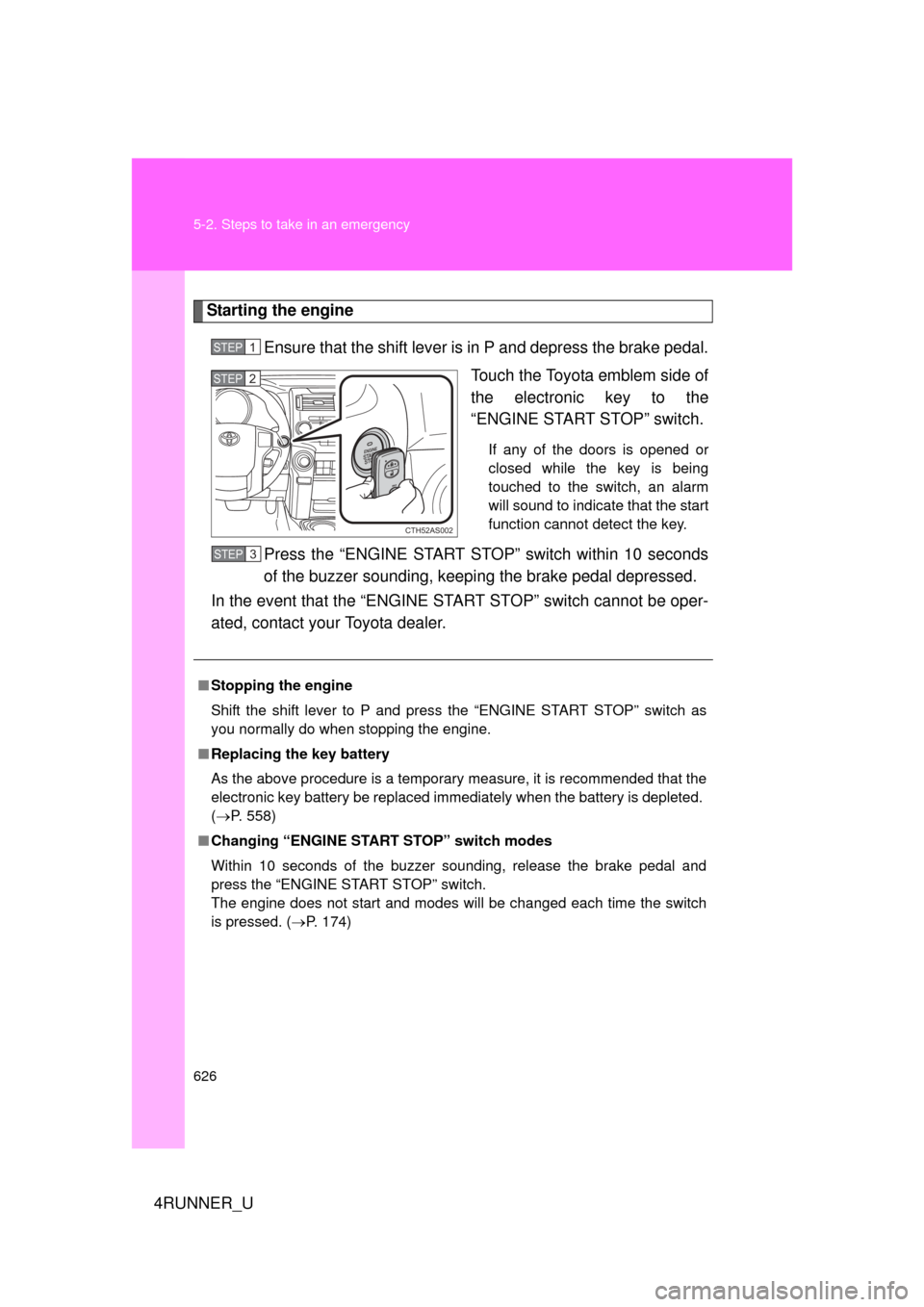
Starting the engineEnsure that the shift lever is in P and depress the brake pedal. Touch the Toyota emblem side of
the electronic key to the
“ENGINE START STOP” switch.
If any of the doors is opened or
closed while the key is being
touched to the switch, an alarm
will sound to indicate that the start
function cannot detect the key.
Press the “ENGINE START STOP” switch within 10 seconds
of the buzzer sounding, keep ing the brake pedal depressed.
In the event that the “ENGINE START STOP” switch cannot be oper-
ated, contact your Toyota dealer.
STEP 1
CTH52AS002
STEP 2
■ Stopping the engine
Shift the shift lever to P and press the “ENGINE START STOP” switch as
you normally do when stopping the engine.
■ Replacing the key battery
As the above procedure is a temporary measure, it is recommended that the
electronic key battery be replaced immediately when the battery is depleted.
(P. 558)
■ Changing “ENGINE START STOP” switch modes
Within 10 seconds of the buzzer sounding, release the brake pedal and
press the “ENGINE START STOP” switch.
The engine does not start and modes will be changed each time the switch
is pressed. ( P. 174)
STEP 3
Page 628 of 704
628 5-2. Steps to take in an emergency
4RUNNER_U
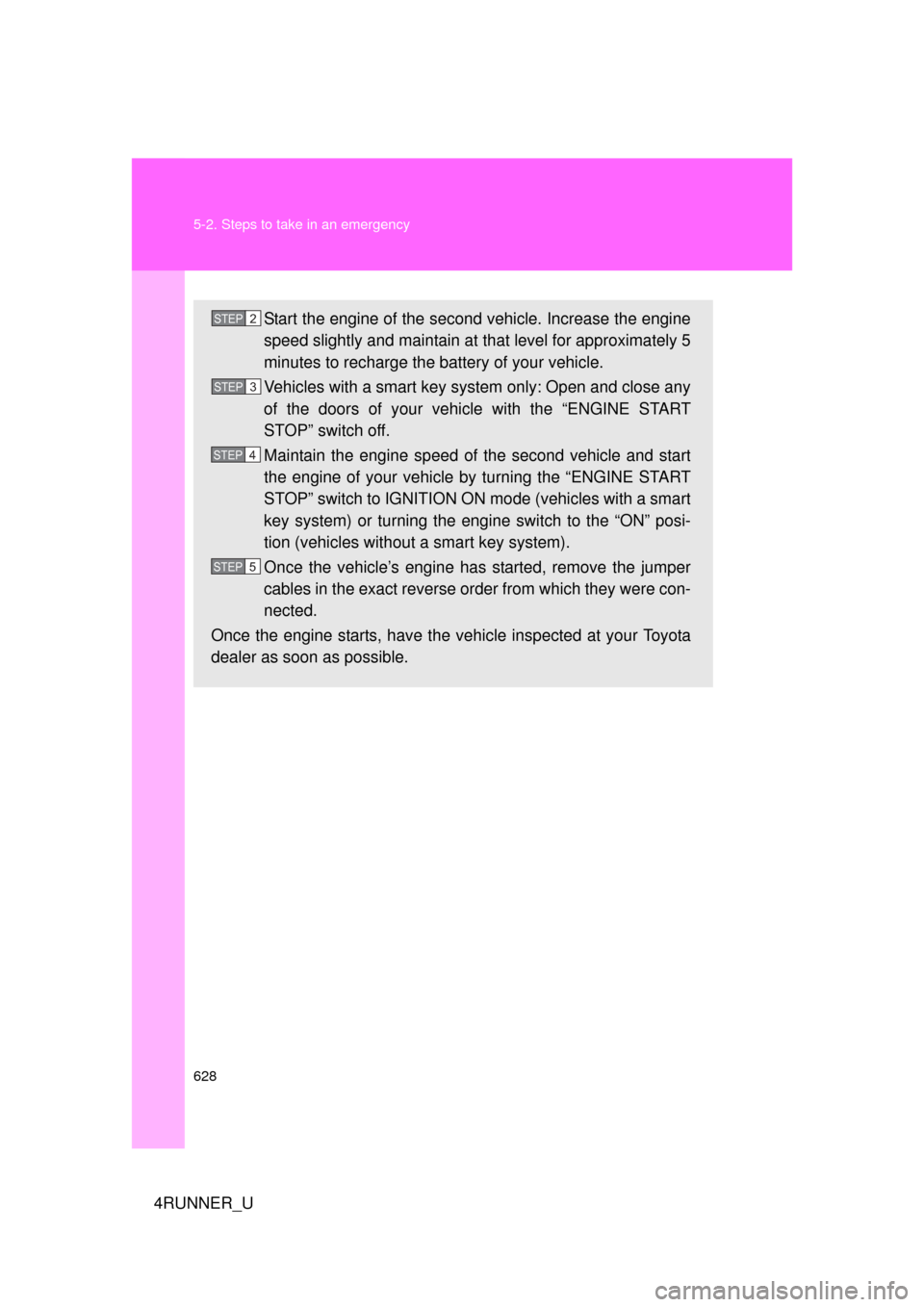
Start the engine of the second vehicle. Increase the engine
speed slightly and maintain at that level for approximately 5
minutes to recharge the battery of your vehicle.
Vehicles with a smart key system only: Open and close any
of the doors of your vehicle with the “ENGINE START
STOP” switch off.
Maintain the engine speed of the second vehicle and start
the engine of your vehicle by turning the “ENGINE START
STOP” switch to IGNITION ON mode (vehicles with a smart
key system) or turning the engine switch to the “ON” posi-
tion (vehicles without a smart key system).
Once the vehicle’s engine has started, remove the jumper
cables in the exact reverse or der from which they were con-
nected.
Once the engine starts, have the vehicle inspected at your Toyota
dealer as soon as possible.STEP 2
STEP 3
STEP 4
STEP 5