Page 343 of 704
343
3-2. Using the audio system
3
Interior features
4RUNNER_U
XM® Satellite Radio (if equipped)
■ Receiving XM
® Satellite Radio
Press or
.
The display changes as follows each time or is
pressed.
Type A: AM SAT1 SAT2 SAT3
Type B and C: AM FM SAT
Turn or to select the desired channel in all the
categories or press “ ” or “” on to select the desired
channel in the current category.
■ Setting XM
® Satellite Radio channel presets
Select the desired channel. Press and hold a button (from to ) until you hear a beep.
Type B and C: Each time is pressed, station pages are changed.
There are a total of 6 pages.
■ Changing the channel category
Press “ ” or “ ” on .
STEP 1
STEP 2
Page 344 of 704
344 3-2. Using the audio system
4RUNNER_U■
Scanning XM
® Satellite Radio channels
● Scanning channels in the current category
Press .
When the desired channel is reached, press
again.
● Scanning the preset channels
Press and hold until you hear a beep.
When the desired channel is reached, press
again.
■ Displaying text information
Press .
Each time is pressed, the display changes in the following
order:
Type A: Channel name Title (song/program title) Name (artist name/
feature) Channel number.
Type B and C: Title (song/program title) Name (artist name/feature)
Title (song/program title).
STEP 1
STEP 2
STEP 1
STEP 2
Page 346 of 704
346 3-2. Using the audio system
4RUNNER_U
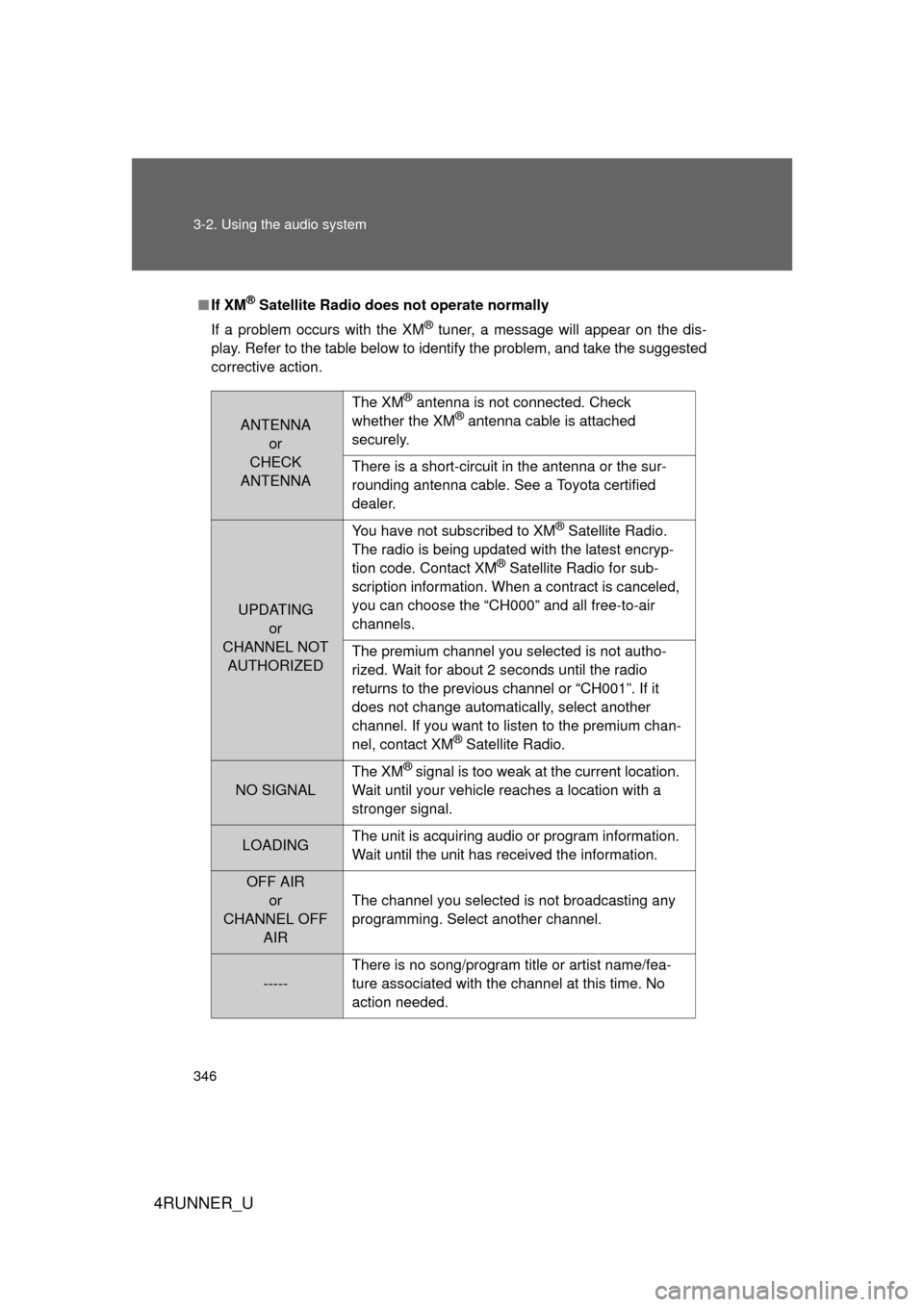
■If XM® Satellite Radio does not operate normally
If a problem occurs with the XM
® tuner, a message will appear on the dis-
play. Refer to the table below to identify the problem, and take the suggested
corrective action.
ANTENNA or
CHECK
ANTENNA The XM
® antenna is not connected. Check
whether the XM® antenna cable is attached
securely.
There is a short-circuit in the antenna or the sur-
rounding antenna cable. See a Toyota certified
dealer.
UPDATING or
CHANNEL NOT AUTHORIZED You have not subscribed to XM
® Satellite Radio.
The radio is being updated with the latest encryp-
tion code. Contact XM
® Satellite Radio for sub-
scription information. When a contract is canceled,
you can choose the “CH000” and all free-to-air
channels.
The premium channel you selected is not autho-
rized. Wait for about 2 seconds until the radio
returns to the previous channel or “CH001”. If it
does not change automatically, select another
channel. If you want to listen to the premium chan-
nel, contact XM
® Satellite Radio.
NO SIGNAL The XM
® signal is too weak at the current location.
Wait until your vehicle reaches a location with a
stronger signal.
LOADING The unit is acquiring audio or program information.
Wait until the unit has received the information.
OFF AIR
or
CHANNEL OFF AIR The channel you selected is not broadcasting any
programming. Select another channel.
-----
There is no song/program title or artist name/fea-
ture associated with the channel at this time. No
action needed.
Page 353 of 704
353
3-2. Using the audio system
3
Interior features
4RUNNER_U
Switching the display
Press .
Each time is pressed, the display changes in the following
order:
Type A: Track no./Elapsed time CD title Track name.
Type B and C: Track title Track name/Artist name Track name/
Elapsed time.
■ Display (type A only)
Up to 12 characters can be displayed at a time.
If there are 13 characters or more, pressing and holding for 1 sec-
ond or more will display the remaining characters.
A maximum of 24 characters can be displayed.
If is pressed for 1 second or more again or has not been pressed
for 6 seconds or more, the display will return to the first 12 characters.
Depending on the contents recorded, the characters may not be displayed
properly or may not be displayed at all.
Page 360 of 704
360 3-2. Using the audio system
4RUNNER_U
Repeat play■ Repeating a file
Press (RPT) or (RPT).
To cancel, press the button once more (type A and B), or twice more
(type C).
■Repeating all of the files in a folder
Type A: Press and hold (RPT) until you hear a beep.
Type B and C: Press (RPT) twice.
To cancel, press the button once more (type A and B), or twice more
(type C).
■Repeating all of the files in a disc (type C only)
Press (RPT) three times.
To cancel, press the same button again.
Switching the display
Press .
Each time is pressed, the display changes in the following
order:
Type A: Folder no./File no./Elapsed time Folder name File name
Album title (MP3 only) Track title Artist name.
Type B and C: Track title Track title/Artist name Track title/Album
name (MP3 only) Track title/Elapsed time.
Page 370 of 704
370 3-2. Using the audio system
4RUNNER_U
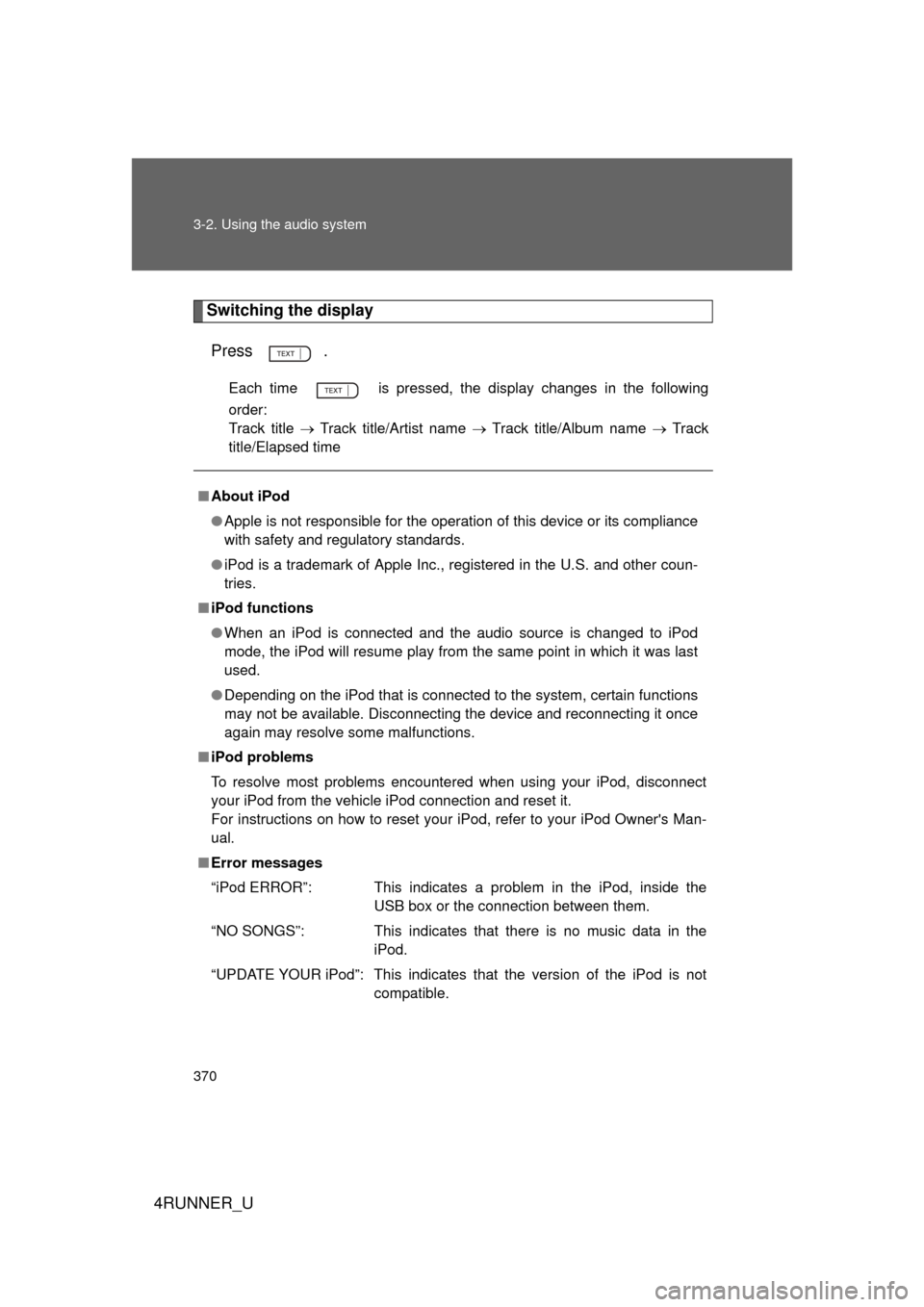
Switching the displayPress .
Each time is pressed, the display changes in the following
order:
Track title Track title/Artist name Track title/Album name Track
title/Elapsed time
■ About iPod
● Apple is not responsible for the operation of this device or its compliance
with safety and regulatory standards.
● iPod is a trademark of Apple Inc., registered in the U.S. and other coun-
tries.
■ iPod functions
● When an iPod is connected and the audio source is changed to iPod
mode, the iPod will resume play from the same point in which it was last
used.
● Depending on the iPod that is connected to the system, certain functions
may not be available. Disconnecting the device and reconnecting it once
again may resolve some malfunctions.
■ iPod problems
To resolve most problems encountered when using your iPod, disconnect
your iPod from the vehicle iPod connection and reset it.
For instructions on how to reset your iPod, refer to your iPod Owner's Man-
ual.
■ Error messages
“iPod ERROR”: This indicates a problem in the iPod, inside the
USB box or the connection between them.
“NO SONGS”: This indicates that there is no music data in the iPod.
“UPDATE YOUR iPod”: This indicates that the version of the iPod is not compatible.
Page 375 of 704
375
3-2. Using the audio system
3
Interior features
4RUNNER_U
Repeat play
■ Repeating a file
Press (RPT).
To cancel, press the button twice.
■Repeating all the files in a folder
Press (RPT) twice.
To cancel, press the button again.
Switching the display
Press .
Each time is pressed, the display changes in the following
order:
Track title Track title/Artist name Track title/Album name Track
title/Elapsed time
■ USB memory functions
Depending on the USB memory that is connected to the system, certain
functions may not be available. Disconnecting the device and reconnecting it
once again may resolve some malfunctions.
■ Error messages
“USB ERROR”: This indicates a problem either in the USB memory or
inside the USB box or connection between them.
“NO SUPPORT”: This indicates that no MP3/WMA files are included in the USB memory.
Page 386 of 704
386 3-2. Using the audio system
4RUNNER_U
Turning the power onPress when the audio system is turned off.
The audio system can be turned off by holding the switch down until you
hear a beep.
Changing the audio sourcePress when the audio system is turned on. The audio source
changes as follows each time the switch is pressed.
If no discs are inserted in the player, that mode will be skipped.
FM SAT CD (type B only) CD changer (type C only) Bluetooth®
Audio AUX USB/iPodAM
Adjusting the volume
Press “+” on to increase the vo lume and “-” to decrease the
volume.
Press and hold the switch to continue increasing or decreasing the vol-
ume.
Selecting a radio station
Press to select radio mode.
Press “” or “ ” on to select a radio station.
To scan for receivable stations, press and hold “ ” or “ ” on
until you hear a beep.
STEP 1
STEP 2