Page 340 of 704

340 3-2. Using the audio system
4RUNNER_U
Co-location:
This transmitter must not be co-located or operated in conjunction with any
other antenna or transmitter.
CAUTION
■For vehicles sold in the U.S.A. and Canada
● Part 15 of the FCC Rules and RSS-Gen of the IC Rules
FCC Warning:
Changes or modifications not expressly approved by the party responsible
for compliance could void the user's authority to operate the equipment.\
● Laser products
• Do not take this unit apart or attempt to make any changes yourself.
This is an intricate unit that uses a laser pickup to retrieve information
from the surface of compact discs. The laser is carefully shielded so
that its rays remain inside the cabinet. Therefore, never try to disas-
semble the player or alter any of its parts since you may be exposed to
laser rays and dangerous voltages.
• This product utilizes a laser. Use of controls or adjustments or performance of procedures other
than those specified herein may result in hazardous radiation expo-
sure.
• The use of optical instruments with this product will increase eye haz- ard.
NOTICE
■To prevent battery discharge
Do not leave the audio system on longer than necessary with the engine o\
ff.
■ To avoid damaging the audio system
Take care not to spill drinks or other fluids over the audio system.
Page 403 of 704

403
3-3. Using the Bluetooth
® audio system
3
Interior features
4RUNNER_U
Press the talk switch and say “From car” or “From audio”, and
select “Confirm” using a voice command or .
Vehicles with smart key system: If “From car” is selected, the porta-
ble player will be automatically connected whenever the “ENGINE
START STOP” switch is in either ACCESSORY or IGNITION ON
mode.
Vehicles without smart key system: If “From car” is selected, the por-
table player will be automatically connected whenever the engine
switch is in either the “ACC” or “ON” position.
Changing the registered name of a portable player
Select “Change Name” using a voice command or .
Select the name of the portable player to be changed by
either of the following methods, and select “Confirm” using a
voice command or :
a. Press the talk switch and say the name of desired portableplayer.
b. Press the talk switch and say “List audio players”. When the name of the desired portable player is read aloud, press the
talk switch.
Press the talk switch or select “Record Name” using ,
and say the new name.
Select “Confirm” using a voice command or .
STEP 3
STEP 1
STEP 2
STEP 3
STEP 4
Page 441 of 704
441
3
Interior features
4RUNNER_U
3-5. Using the interior lights
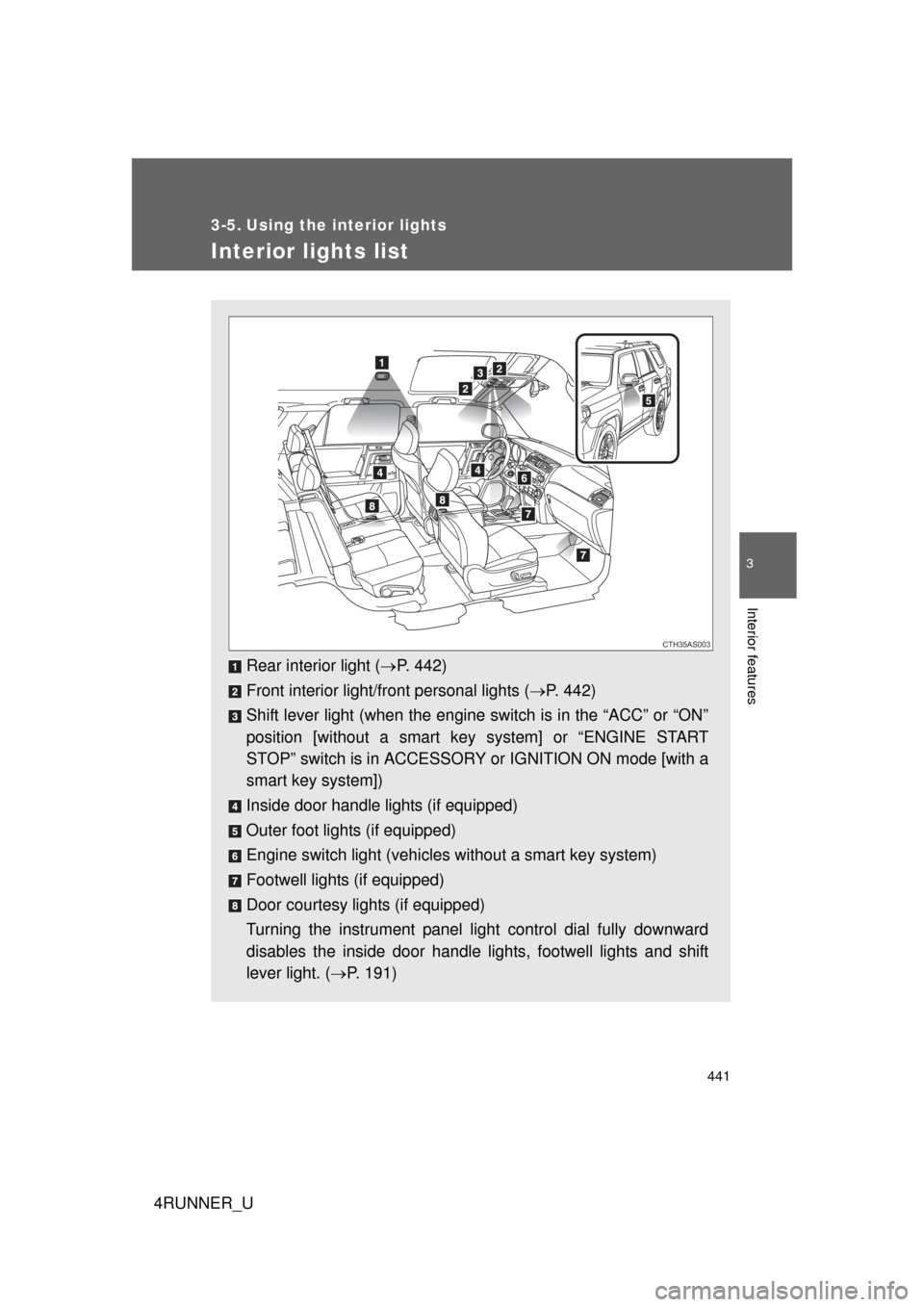
Interior lights list
Rear interior light (P. 442)
Front interior light/front personal lights ( P. 442)
Shift lever light (when the engine switch is in the “ACC” or “ON”
position [without a smart ke y system] or “ENGINE START
STOP” switch is in ACCESSORY or IGNITION ON mode [with a
smart key system])
Inside door handle lights (if equipped)
Outer foot lights (if equipped)
Engine switch light (vehicles without a smart key system)
Footwell lights (if equipped)
Door courtesy lights (if equipped)
Turning the instrument panel light control dial fully downward
disables the inside door handle lights, footwell lights and shift
lever light. ( P. 191)
CTH35AS003
Page 443 of 704
443
3-5. Using the interior lights
3
Interior features
4RUNNER_U
■
Illuminated entry system
Vehicles without a smart key system
The lights automatically turn on/off according to the engine switch position,
whether the doors are locked/unlocked, and whether the doors are open/
closed.
Vehicles with a smart key system
The lights automatically turn on/off according to “ENGINE START STOP”
switch mode, the presence of the electronic key, whether the doors are
locked/unlocked, and whether the doors are open/closed.
■ To prevent battery discharge
If the following lights remain on, the lights will go off automatically after 20
minutes:
● Engine switch light
● Front interior light
● Rear interior light
● Personal light
● Footwell lights
● Inside door handle lights
● Door courtesy lights
■ Customization that can be co nfigured at Toyota dealer
Settings (e.g. the time elapsed before lights turn off) can be changed.
(Customizable features
P. 664)
Personal lights
Page 458 of 704
458
3-7. Other interior features
4RUNNER_U
Vanity mirrors
NOTICE
■To prevent battery discharge
Do not leave the vanity lights on for extended periods while the engine is off.
Slide the cover to open.
The light turns on when the
cover is opened.
CTH37AS008
Page 460 of 704
460 3-7. Other interior features
4RUNNER_U
■For quicker adjustment of the clock
To advance the minutes and hours quickly, press and hold the “M” or “H” but-
ton.
The time can be adjusted back or forth by following the procedure below:
■ The clock is displayed when
Vehicles without a smart key system
The engine switch is in the “ACC” or “ON” position.
Vehicles with a smart key system
The “ENGINE START STOP” switch is in ACCESSORY or IGNITION ON
mode.
■ When disconnecting and reco nnecting battery terminals
The clock data will be reset.
The hour or minute can be moved for-
ward or backward by pressing the
“MODE/ ” or “SET/ ” button while
pressing and holding the “H” or “M” but-
ton. If the “MODE/ ” or “SET/ ” but-
ton is also pressed and held in the above
operation, the hour or minute will move
faster.
Page 462 of 704
462 3-7. Other interior features
4RUNNER_U
■The outside temperatur e is displayed when
Vehicles without a smart key system
The engine switch is in the “ON” position.
Vehicles with a smart key system
The “ENGINE START STOP” switch is in IGNITION ON mode.
Vehicles with Multi-terrain Select
Page 463 of 704

463
3-7. Other interior features
3
Interior features
4RUNNER_U
■
ICE indicator
Vehicles without Multi-terrain Select
Vehicles with Multi-terrain Select
■ Display
In the following situations, the correct outside temperature may not be dis-
played, or the display may take longer than normal to change:
● When the vehicle is stopped, or moving at low speeds (less than 14 mph
[24 km/h])
● When the outside temperature has changed suddenly (at the entrance/
exit of a garage, tunnel, etc.)
If the outside temperature lowers to 37°F
(3°C) or below when the engine switch is
in the “ON” position (vehicles without a
smart key system) or the “ENGINE
START STOP” switch is in IGNITION ON
mode (vehicles with a smart key system),
the “ICE” indicator will come on to warn
the driver that roads may be icy. Check
the road surface and drive carefully. (The
indicator will go off when the outside tem-
perature rises to 41°F [5°C].)
If the outside temperature lowers to 37°F
(3°C) or below when the engine switch is
in the “ON” position, the “ICE” indicator
will come on to warn the driver that roads
may be icy. Check the road surface and
drive carefully. (The indicator will go off
when the outside temperature rises to
41°F [5°C].)