2013 SUZUKI ERTIGA ECU
[x] Cancel search: ECUPage 42 of 207
Downloaded from www.Manualslib.com manuals search engine 2-27BEFORE DRIVING
60MK0-14E
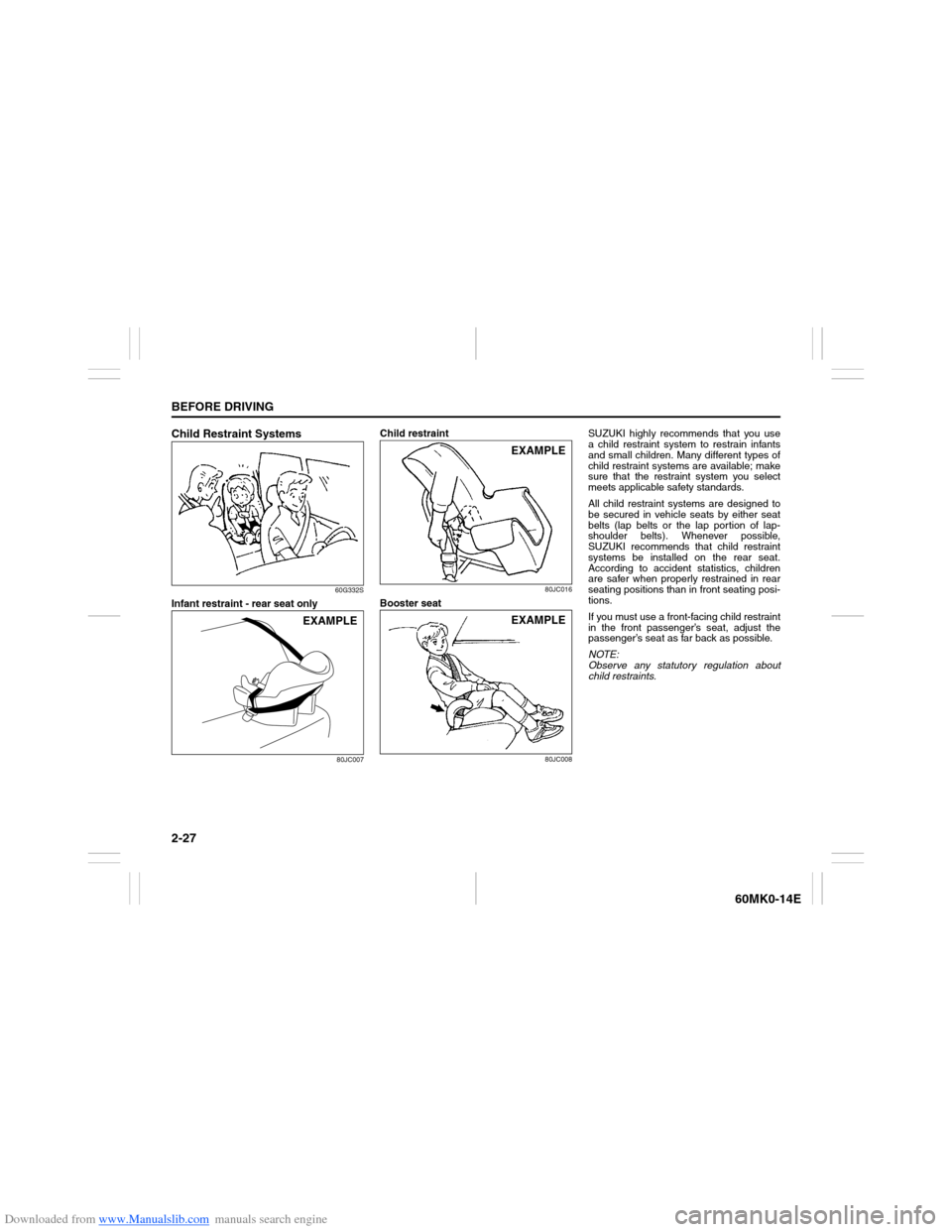
Child Restraint Systems
60G332S
Infant restraint - rear seat only
80JC007
Child restraint
80JC016
Booster seat
80JC008
SUZUKI highly recommends that you use
a child restraint system to restrain infants
and small children. Many different types of
child restraint systems are available; make
sure that the restraint system you select
meets applicable safety standards.
All child restraint systems are designed to
be secured in vehicle seats by either seat
belts (lap belts or the lap portion of lap-
shoulder belts). Whenever possible,
SUZUKI recommends that child restraint
systems be installed on the rear seat.
According to accident statistics, children
are safer when properly restrained in rear
seating positions than in front seating posi-
tions.
If you must use a front-facing child restraint
in the front passenger’s seat, adjust the
passenger’s seat as far back as possible.
NOTE:
Observe any statutory regulation about
child restraints.
EXAMPLE
EXAMPLEEXAMPLE
Page 44 of 207
Downloaded from www.Manualslib.com manuals search engine 2-29BEFORE DRIVING
60MK0-14E
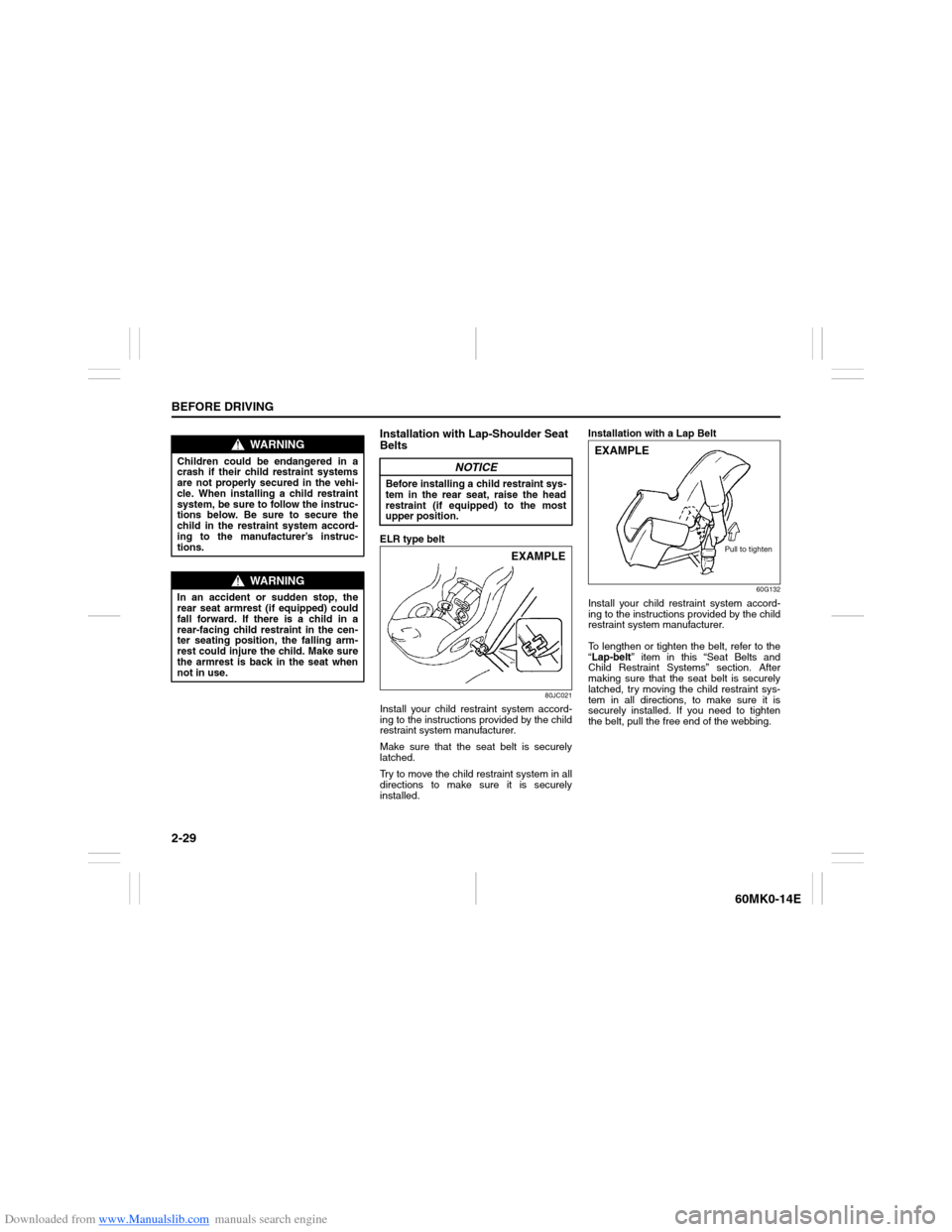
Installation with Lap-Shoulder Seat
BeltsELR type belt
80JC021
Install your child restraint system accord-
ing to the instructions provided by the child
restraint system manufacturer.
Make sure that the seat belt is securely
latched.
Try to move the child restraint system in all
directions to make sure it is securely
installed.Installation with a Lap Belt
60G132
Install your child restraint system accord-
ing to the instructions provided by the child
restraint system manufacturer.
To lengthen or tighten the belt, refer to the
“Lap-belt” item in this “Seat Belts and
Child Restraint Systems” section. After
making sure that the seat belt is securely
latched, try moving the child restraint sys-
tem in all directions, to make sure it is
securely installed. If you need to tighten
the belt, pull the free end of the webbing.
WARNING
Children could be endangered in a
crash if their child restraint systems
are not properly secured in the vehi-
cle. When installing a child restraint
system, be sure to follow the instruc-
tions below. Be sure to secure the
child in the restraint system accord-
ing to the manufacturer’s instruc-
tions.
WARNING
In an accident or sudden stop, the
rear seat armrest (if equipped) could
fall forward. If there is a child in a
rear-facing child restraint in the cen-
ter seating position, the falling arm-
rest could injure the child. Make sure
the armrest is back in the seat when
not in use.
NOTICE
Before installing a child restraint sys-
tem in the rear seat, raise the head
restraint (if equipped) to the most
upper position.
EXAMPLE
EXAMPLE
Pull to tighten
Page 48 of 207
Downloaded from www.Manualslib.com manuals search engine 2-33BEFORE DRIVING
60MK0-14E
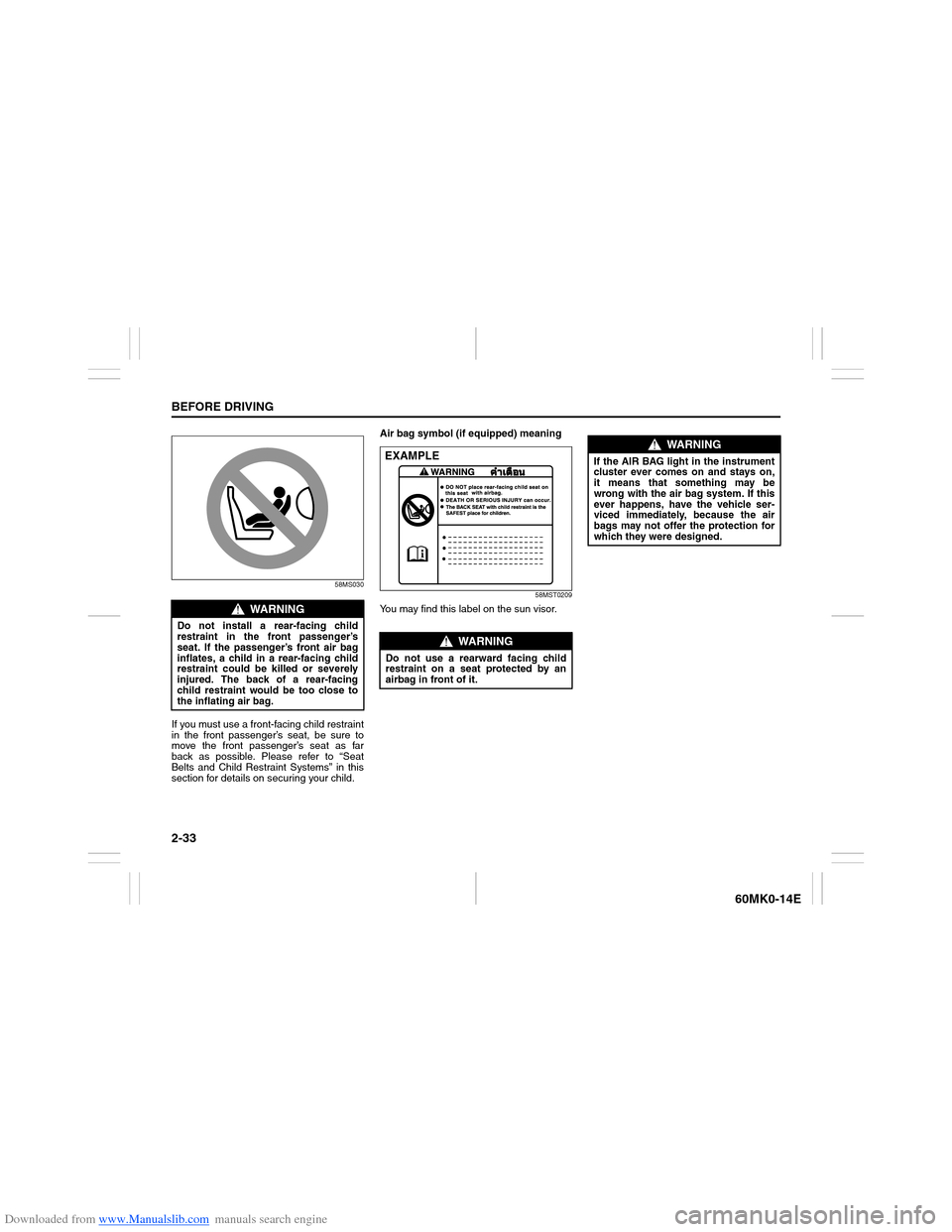
58MS030
If you must use a front-facing child restraint
in the front passenger’s seat, be sure to
move the front passenger’s seat as far
back as possible. Please refer to “Seat
Belts and Child Restraint Systems” in this
section for details on securing your child.Air bag symbol (if equipped) meaning
58MST0209
You may find this label on the sun visor.
WARNING
Do not install a rear-facing child
restraint in the front passenger’s
seat. If the passenger’s front air bag
inflates, a child in a rear-facing child
restraint could be killed or severely
injured. The back of a rear-facing
child restraint would be too close to
the inflating air bag.
WARNING
Do not use a rearward facing child
restraint on a seat protected by an
airbag in front of it.EXAMPLE
WARNING
If the AIR BAG light in the instrument
cluster ever comes on and stays on,
it means that something may be
wrong with the air bag system. If this
ever happens, have the vehicle ser-
viced immediately, because the air
bags may not offer the protection for
which they were designed.
Page 70 of 207
Downloaded from www.Manualslib.com manuals search engine 2-55BEFORE DRIVING
60MK0-14E
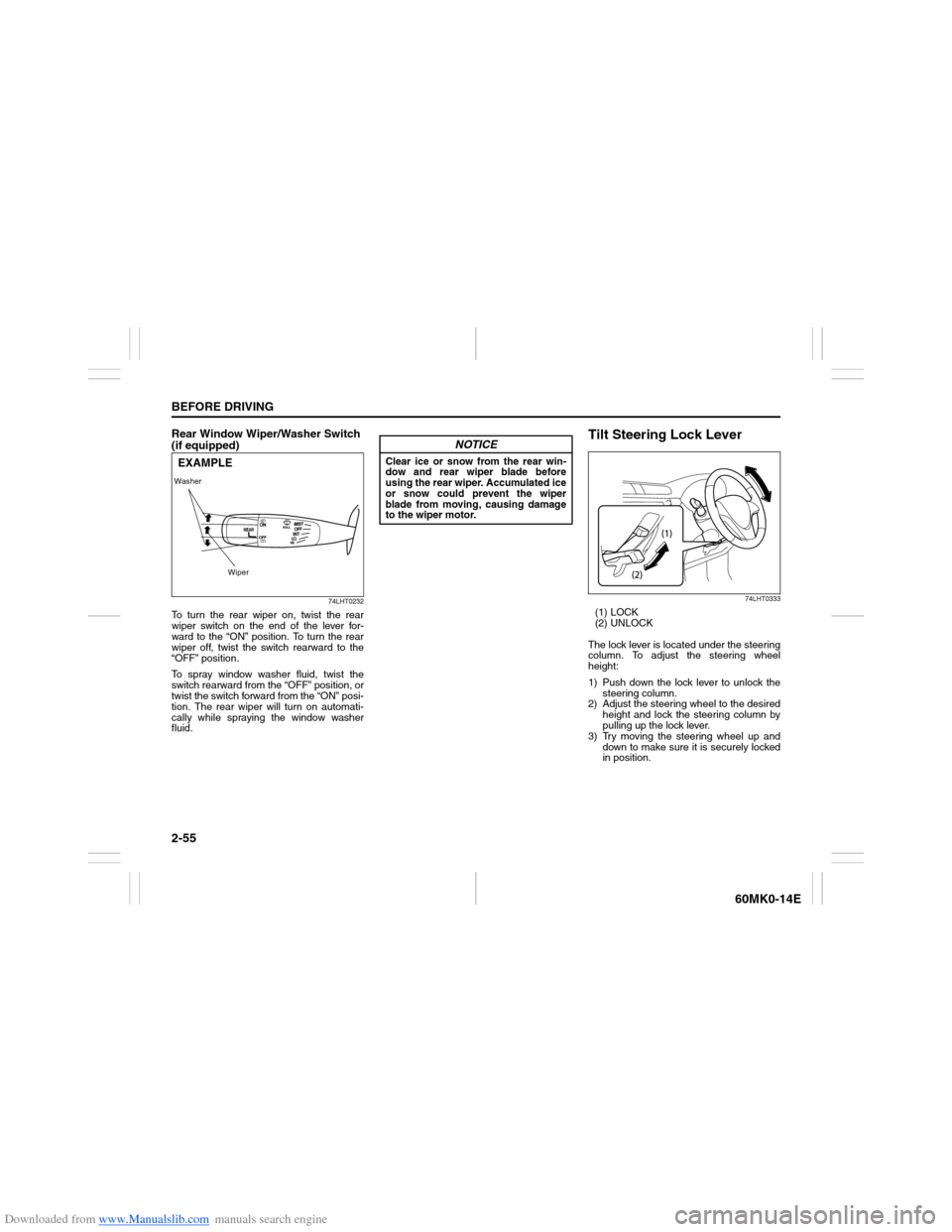
Rear Window Wiper/Washer Switch
(if equipped)
74LHT0232
To turn the rear wiper on, twist the rear
wiper switch on the end of the lever for-
ward to the “ON” position. To turn the rear
wiper off, twist the switch rearward to the
“OFF” position.
To spray window washer fluid, twist the
switch rearward from the “OFF” position, or
twist the switch forward from the “ON” posi-
tion. The rear wiper will turn on automati-
cally while spraying the window washer
fluid.
Tilt Steering Lock Lever
74LHT0333
(1) LOCK
(2) UNLOCK
The lock lever is located under the steering
column. To adjust the steering wheel
height:
1) Push down the lock lever to unlock the
steering column.
2) Adjust the steering wheel to the desired
height and lock the steering column by
pulling up the lock lever.
3) Try moving the steering wheel up and
down to make sure it is securely locked
in position.
Washer
WiperEXAMPLE
NOTICE
Clear ice or snow from the rear win-
dow and rear wiper blade before
using the rear wiper. Accumulated ice
or snow could prevent the wiper
blade from moving, causing damage
to the wiper motor.
Page 75 of 207

Downloaded from www.Manualslib.com manuals search engine 3-2
OPERATING YOUR VEHICLE
60MK0-14E
4) Make sure the hood is fully closed and
latched.
5) Check the headlights, turn signal lights,
brake lights and horn for proper opera-
tion.
6) Adjust the seat and head restraint (if
equipped).
7) Check the brake pedal and the parking
brake lever.
8) Adjust the mirrors.
9) Make sure that you and all passengers
have properly fastened your seat belts.
10)Make sure that all warning lights come
on as the key is turned to the “ON” posi-
tion.
11)Check all gauges.
12)Make sure that the BRAKE SYSTEM
WARNING light turns off when the
parking brake is released.
Once a week, or each time you fill your fuel
tank, perform the following under-hood
checks:
1) Engine oil level
2) Coolant level
3) Brake fluid level
4) Battery solution level
5) Windshield washer fluid level
6) Hood latch operation
Pull the hood release handle inside the
vehicle. Make sure that you cannot
open the hood all the way without
releasing the secondary latch. Be sure
to close the hood securely after check-
ing for proper latch operation. See theitem “All latches, hinges and locks” of
“CHASSIS AND BODY” in the “Periodic
Maintenance Schedule” in the
“INSPECTION AND MAINTENANCE”
section for lubrication schedule.
Once a month, or each time you fill your
fuel tank, check the tire pressure using a
tire pressure gauge. Also check the tire
pressure of the spare tire.
Engine Oil ConsumptionIt is normal for the engine to consume
some engine oil during normal vehicle
operation.
The amount of engine oil consumed
depends on the viscosity of the oil, the
quality of the oil and the conditions the
vehicle is driven under.
More oil is consumed during high-speed
driving and when there is frequent acceler-
ation and deceleration. Under high loads,
your engine also will consume more oil.
A new engine also consumes more oil,
since its pistons, piston rings and cylinder
walls have not yet become conditioned.
New engines reach the normal level of oil
consumption only after approximately 5000
km (3000 miles) driving.
Oil consumption:
Max. 1.0 L per 1000 km
(1 Qt. per 600 miles)
When judging the amount of oil consump-
tion, note that the oil may become diluted
and make it difficult to accurately judge the
true oil level.
As an example, if a vehicle is used for
repeated short trips, and consumes a nor-
mal amount of oil, the dipstick may not
show any drop in the oil level at all, even
after 1000 km (600 miles) or more of driv-
ing. This is because the oil is gradually
becoming diluted with fuel or moisture,
WARNING
Make sure the hood is fully closed
and latched before driving. If it is not,
it can fly up unexpectedly during
driving, obstructing your view and
resulting in an accident.
Page 79 of 207
Downloaded from www.Manualslib.com manuals search engine 3-6
OPERATING YOUR VEHICLE
60MK0-14E
For automatic transaxle vehicles, always
set the parking brake before moving the
gearshift lever to the “P” (PARK) position. If
you park on an incline and shift into “P”
before setting the parking brake, the
weight of the vehicle may make it difficult to
shift out of “P” when you are ready to drive
the vehicle.
When preparing to drive the vehicle, move
the gearshift lever out of the “P” position
before releasing the parking brake.Parking Brake Reminder Buzzer
A buzzer sounds intermittently to remind
you to release the parking brake if you
start the vehicle without releasing the park-
ing brake. Make sure that the parking
brake is fully released and the brake sys-
tem warning light turns off.
WARNING
Never drive your vehicle with the
parking brake on: rear brake effec-
tiveness can be reduced from over-
heating, brake life may be
shortened, or permanent brake
damage may result.
If the parking brake does not hold
the vehicle securely or does not
fully release, have your vehicle
inspected immediately by an autho-
rized SUZUKI dealer.
WARNING
Always set the parking brake fully
before leaving your vehicle or it may
move, causing injury or damage.
When parking, make sure the gear-
shift lever for manual transaxle vehi-
cles is in 1st gear or “R” (Reverse)
and the gearshift lever for automatic
transaxle vehicles is in “P” (Park).
Remember, even though the tran-
saxle is in gear, you must set the
parking brake fully.
WARNING
When parking the vehicle in
extremely cold weather, the following
procedure should be used:
1) Set the parking brake.
2) Manual transaxle - turn off the
engine, then shift into reverse or
first gear.
Automatic transaxle - shift into
“P” (Park) and turn off the engine.
3) Get out of the vehicle and put
chocks under the wheels.
4) Release the parking brake.
When you return to your vehicle,
you must remember to first set the
parking brake, then remove the
wheel chocks.
Page 127 of 207

Downloaded from www.Manualslib.com manuals search engine 5-32
OTHER CONTROLS AND EQUIPMENT
60MK0-14E
The anti-theft function is intended to dis-
courage thefts, such as that the audio sys-
tem becomes inoperable when it is
installed on other vehicles.
This function works by entering a Personal
Identification Number (PIN).
When the unit is disconnected from its
power source, such as when the audio
system is removed or the battery is discon-
nected, the unit will become inoperable
until the PIN is reentered.Setting the Anti-Theft Function
1) Press the VOL PUSH POWER knob (1)
to power off.
2) Hold down the buttons numbered [1]
and [6] of the Preset buttons (2) and
press the VOL PUSH POWER knob
(1).
“SECURITY” will be displayed.
3) Press the Up button (3) and the button
numbered [1] of the Preset buttons (2)
simultaneously.
4) Enter a 4-digit number to be registered
as PIN using the buttons numbered [1] -
[4] of the Preset buttons (2).
5) Hold down the TUNE FOLDER PUSH
SOUND knob (4) for 1 second or longer
to set the anti-theft function.
NOTE:
Take a note of the registered PIN and keep
it for the future use.Canceling the anti-theft feature
To cancel the anti-theft function, delete the
registered PIN.
1) Press the VOL PUSH POWER knob (1)
to power off.
2) Hold down the buttons numbered [1]
and [6] of the Preset buttons (2) and
press the VOL PUSH POWER knob
(1).
“PIN ENTRY” will be displayed.
3) Press the Up button (3) and the button
numbered [1] of the Preset buttons (2)
simultaneously.
4) Enter a 4-digit number to be registered
as PIN using the buttons numbered [1] -
[4] of the Preset buttons (2).
5) Hold down the TUNE FOLDER PUSH
SOUND knob (4) for 1 second or longer
to delete the registered PIN. The indi-
cation “----” will be displayed and the
anti-theft function will be canceled.
NOTE:
To change your PIN, first delete your cur-
rent PIN, then set a new one.
Page 128 of 207

Downloaded from www.Manualslib.com manuals search engine 5-33OTHER CONTROLS AND EQUIPMENT
60MK0-14E
Confirming the Personal Identification
Number (PIN)
When the main power source is discon-
nected such as when the battery is
replaced, etc, it is required to enter the PIN
to make the unit operable again.
1) Set the ignition switch to the “ACC”
position.
“SECURITY” will be displayed.
2) Press the Up button (3) and the button
numbered [1] of the Preset buttons (2)
simultaneously.
3) Enter a 4-digit number to be registered
as PIN using the buttons numbered [1] -
[4] of the Preset buttons (2).
4) Hold down TUNE FOLDER PUSH
SOUND knob (4) for 1 second or
longer.
When the PIN same as registered is
entered, the power of the audio system
will be turned off automatically and it
will become operable again.
NOTE:
If an incorrect PIN is entered, “ERROR”
and the total number of incorrect entry
attempts will be displayed.
If an incorrect PIN is entered 10 times or
more, “HELP” will be displayed and the
audio system will become inoperable.