2013 SUBARU IMPREZA WRX ECO mode
[x] Cancel search: ECO modePage 264 of 414
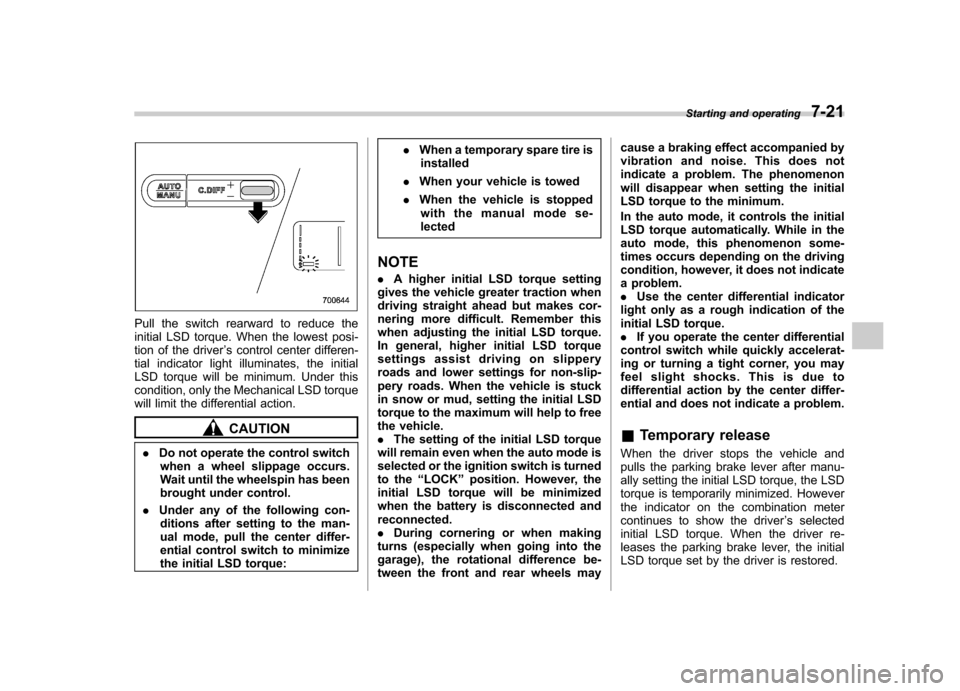
Pull the switch rearward to reduce the
initial LSD torque. When the lowest posi-
tion of the driver’s control center differen-
tial indicator light illuminates, the initial
LSD torque will be minimum. Under this
condition, only the Mechanical LSD torque
will limit the differential action.
CAUTION
. Do not operate the control switch
when a wheel slippage occurs.
Wait until the wheelspin has been
brought under control.
. Under any of the following con-
ditions after setting to the man-
ual mode, pull the center differ-
ential control switch to minimize
the initial LSD torque: .
When a temporary spare tire is
installed
. When your vehicle is towed
. When the vehicle is stopped
with the manual mode se-lected
NOTE . A higher initial LSD torque setting
gives the vehicle greater traction when
driving straight ahead but makes cor-
nering more difficult. Remember this
when adjusting the initial LSD torque.
In general, higher initial LSD torque
settings assist driving on slippery
roads and lower settings for non-slip-
pery roads. When the vehicle is stuck
in snow or mud, setting the initial LSD
torque to the maximum will help to free
the vehicle.. The setting of the initial LSD torque
will remain even when the auto mode is
selected or the ignition switch is turned
to the “LOCK ”position. However, the
initial LSD torque will be minimized
when the battery is disconnected andreconnected.. During cornering or when making
turns (especially when going into the
garage), the rotational difference be-
tween the front and rear wheels may cause a braking effect accompanied by
vibration and noise. This does not
indicate a problem. The phenomenon
will disappear when setting the initial
LSD torque to the minimum.
In the auto mode, it controls the initial
LSD torque automatically. While in the
auto mode, this phenomenon some-
times occurs depending on the driving
condition, however, it does not indicate
a problem..
Use the center differential indicator
light only as a rough indication of the
initial LSD torque.. If you operate the center differential
control switch while quickly accelerat-
ing or turning a tight corner, you may
feel slight shocks. This is due to
differential action by the center differ-
ential and does not indicate a problem. & Temporary release
When the driver stops the vehicle and
pulls the parking brake lever after manu-
ally setting the initial LSD torque, the LSD
torque is temporarily minimized. However
the indicator on the combination meter
continues to show the driver ’s selected
initial LSD torque. When the driver re-
leases the parking brake lever, the initial
LSD torque set by the driver is restored. Starting and operating
7-21
Page 266 of 414
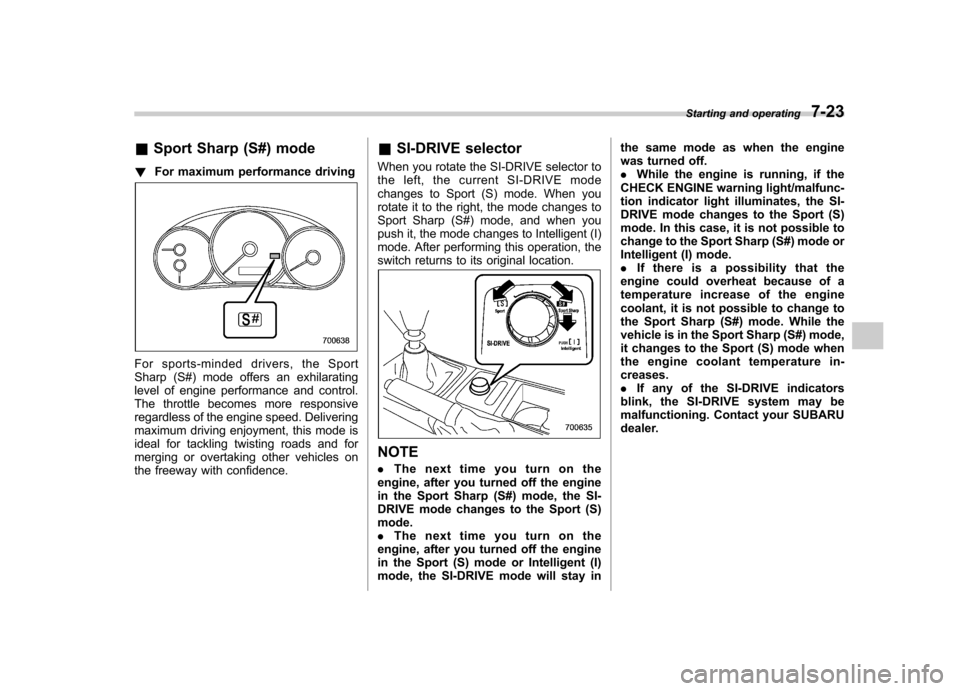
&Sport Sharp (S#) mode
! For maximum performance driving
For sports-minded drivers, the Sport
Sharp (S#) mode offers an exhilarating
level of engine performance and control.
The throttle becomes more responsive
regardless of the engine speed. Delivering
maximum driving enjoyment, this mode is
ideal for tackling twisting roads and for
merging or overtaking other vehicles on
the freeway with confidence. &
SI-DRIVE selector
When you rotate the SI-DRIVE selector to
the left, the current SI-DRIVE mode
changes to Sport (S) mode. When you
rotate it to the right, the mode changes to
Sport Sharp (S#) mode, and when you
push it, the mode changes to Intelligent (I)
mode. After performing this operation, the
switch returns to its original location.
NOTE . The next time you turn on the
engine, after you turned off the engine
in the Sport Sharp (S#) mode, the SI-
DRIVE mode changes to the Sport (S)mode.. The next time you turn on the
engine, after you turned off the engine
in the Sport (S) mode or Intelligent (I)
mode, the SI-DRIVE mode will stay in the same mode as when the engine
was turned off..
While the engine is running, if the
CHECK ENGINE warning light/malfunc-
tion indicator light illuminates, the SI-
DRIVE mode changes to the Sport (S)
mode. In this case, it is not possible to
change to the Sport Sharp (S#) mode or
Intelligent (I) mode.. If there is a possibility that the
engine could overheat because of a
temperature increase of the engine
coolant, it is not possible to change to
the Sport Sharp (S#) mode. While the
vehicle is in the Sport Sharp (S#) mode,
it changes to the Sport (S) mode when
the engine coolant temperature in- creases.. If any of the SI-DRIVE indicators
blink, the SI-DRIVE system may be
malfunctioning. Contact your SUBARU
dealer. Starting and operating
7-23
Page 272 of 414
Activation of this function is shown by
flashing the Vehicle Dynamics Control
operation indicator light. .Skid Suppression Function
The skid suppression function is designed
to help maintain directional stability by
suppressing the wheels ’tendency to slide
sideways during steering operations. Acti-
vation of this function is shown by flashing
the Vehicle Dynamics Control operation
indicator light. NOTE . The Vehicle Dynamics Control sys-
tem may be considered normal when
the following conditions occur.
–Slight twitching of the brake
pedal is felt. – The vehicle or steering wheel
shakes to a small degree.– An operating sound from the
engine compartment is heard
briefly when starting the engine
and when driving off after starting
the engine. – The brake pedal seems to jolt
when driving off after starting the engine.
. In the following circumstances, the
vehicle may be less stable than it feels
to the driver. The Vehicle Dynamics Control System may therefore operate.
Such operation does not indicate a
system malfunction.
–on gravel-covered or rutted
roads – on unfinished roads
– when the vehicle is fitted with
snow tires or winter tires
. Activation of the Vehicle Dynamics
Control system will cause operation of
the steering wheel to feel slightly
different compared to that for normalconditions. . It is always important to reduce
speed when appro aching a corner,
even if the vehicle is equipped with
Vehicle Dynamics Control. . Always turn off the engine before
replacing a tire as failure to do so may
render the Vehicle Dynamics Control
system unable to operate correctly.
& Vehicle Dynamics Control
system monitor
Refer to “Vehicle Dynamics Control warn-
ing light/Vehicle Dynamics Control opera-
tion indicator light ”F 3-20 and “Vehicle
Dynamics Control OFF indicator light/
Traction Control OFF indicator light (STI) ”
F 3-21. &
Vehicle Dynamics Control
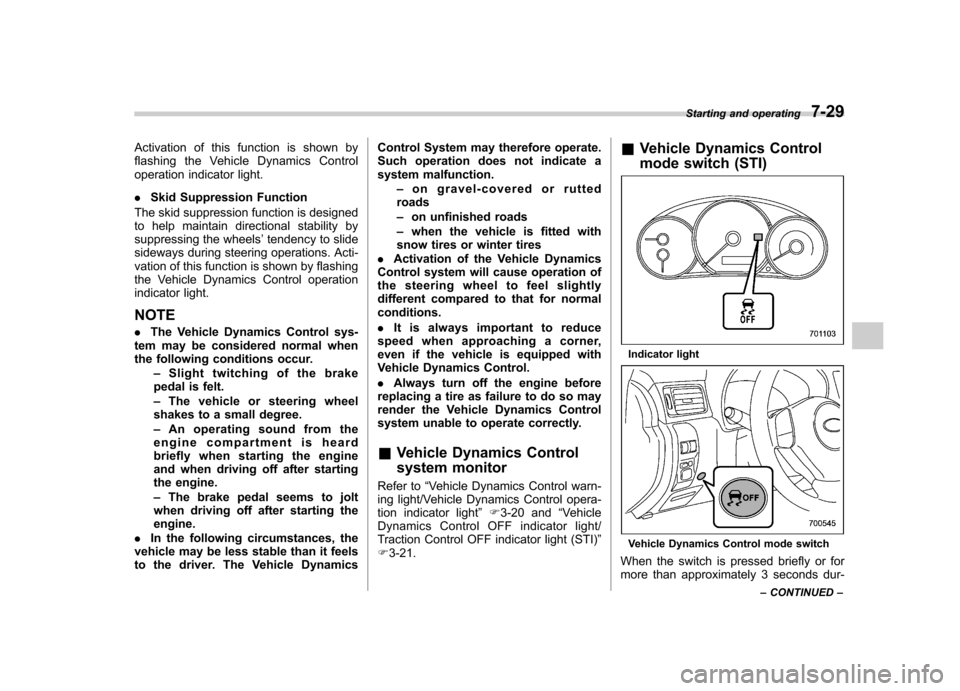
mode switch (STI)
Indicator light
Vehicle Dynamics Control mode switch
When the switch is pressed briefly or for
more than approximately 3 seconds dur- Starting and operating
7-29
– CONTINUED –
Page 273 of 414
7-30Starting and operating
ing engine operation, the mode of the
Vehicle Dynamics Control System will bechanged. ! Vehicle Dynamics Control mode
When the ignition switch is on, this mode
is selected.
This mode enables all controls for ABS,
the Traction Control System, and the
Vehicle Dynamics Control system. Select
this mode for most driving situations.
When this mode is selected, the indicator
light on the combination meter turns off. ! Traction mode
This mode restricts the functions of the
Traction Control System and Vehicle
Dynamics Control system and thus delays
utilizing their functions as a reaction to
vehicle behavior in comparison with the
Vehicle Dynamics Control mode. This
mode should be used in driving situations
where the vehicle dynamic performance
will improve without decreasing engine
torque control.
When the switch is pressed briefly during
engine operation, the indicator light on the
combination meter illuminates in green.
When the switch is pressed again to
reactivate the Vehicle Dynamics Control
system, the indicator light turns off. !
Vehicle Dynamics Control OFFmode
This mode allows only the ABS control.
This mode should be used in an emer-
gency situation such as getting out of
snow or mud.
When the switch is pressed for more than
approximately 3 seconds during engine
operation, the indicator light on the com-
bination meter illuminates in yellow. When
the switch is pressed again to reactivate
the Vehicle Dynamics Control system, the
indicator light turns off.
NOTE . The Vehicle Dynamics Control sys-
tem will be activated automatically
when the engine is started.. If the switch is held down for 10
seconds or longer, the indicator light
turns off, the Vehicle Dynamics Control
system is activated, and the system
ignores any further pressing of the
switch. To make the switch usable
again, turn the ignition switch to the“ LOCK ”position and restart the en-
gine.. When the Vehicle Dynamics Control
OFF mode is selected, the vehicle ’s
running performan ce is comparable
with that of a vehicle that does not
have a Vehicle Dynamics Control sys- tem. Do not deactivate the Vehicle
Dynamics Control system except when
absolutely necessary..
Even when the Vehicle Dynamics
Control OFF mode is selected, compo-
nents of the brake control system may
still activate. When the brake control
system is activated, the Vehicle Dy-
namics Control operation indicator
light illuminates. & Vehicle Dynamics Control
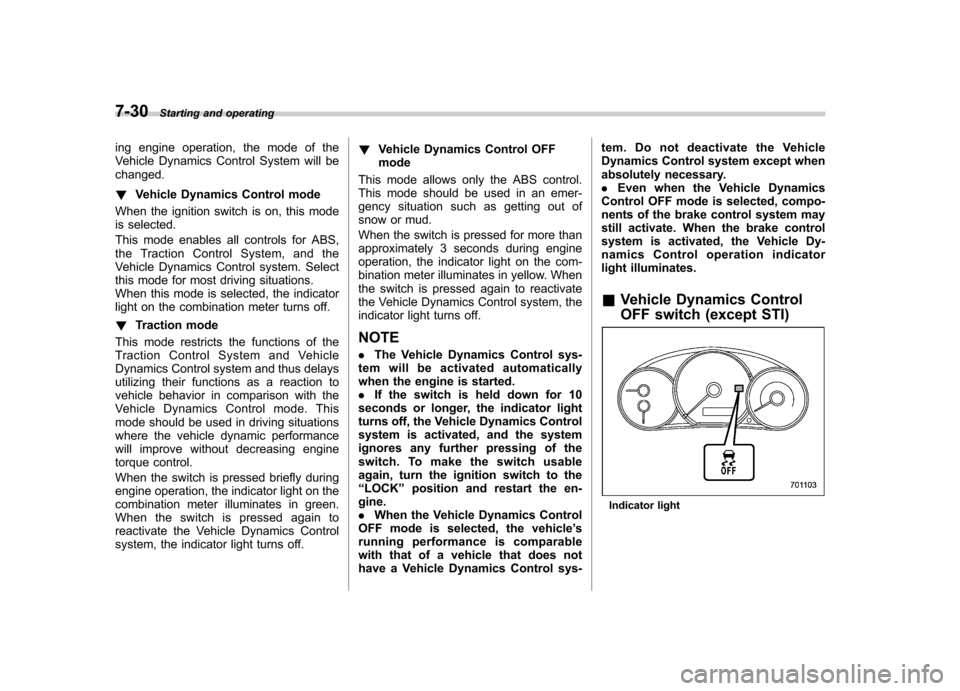
OFF switch (except STI)
Indicator light
Page 274 of 414
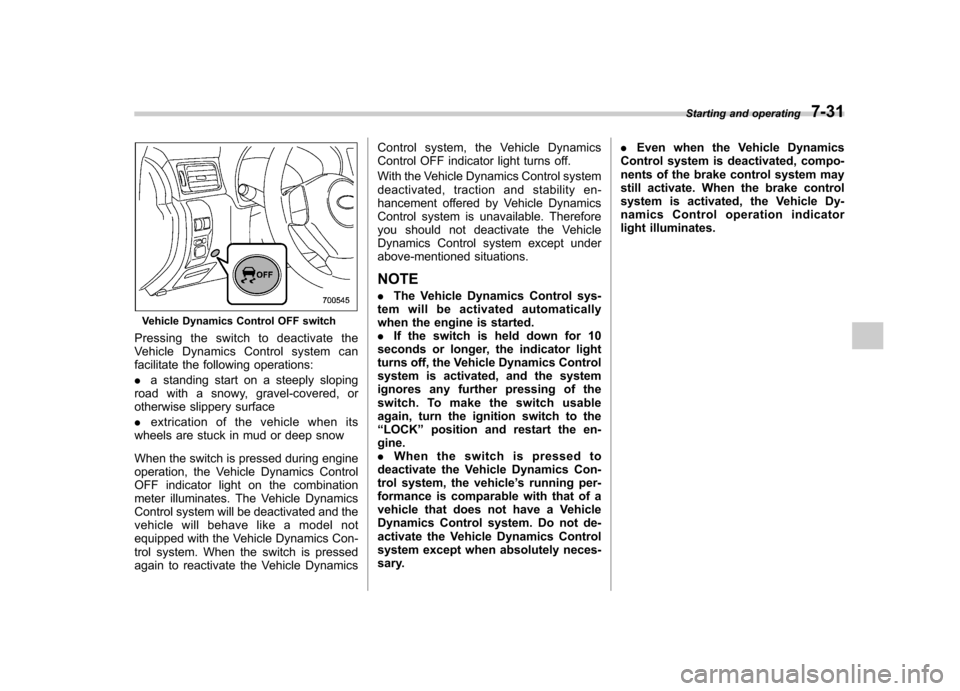
Vehicle Dynamics Control OFF switch
Pressingtheswitchtodeactivatethe
Vehicle Dynamics Control system can
facilitate the following operations: . a standing start on a steeply sloping
road with a snowy, gravel-covered, or
otherwise slippery surface . extrication of the vehicle when its
wheels are stuck in mud or deep snow
When the switch is pressed during engine
operation, the Vehicle Dynamics Control
OFF indicator light on the combination
meter illuminates. The Vehicle Dynamics
Control system will be deactivated and the
vehicle will behave like a model not
equipped with the Vehicle Dynamics Con-
trol system. When the switch is pressed
again to reactivate the Vehicle Dynamics Control system, the Vehicle Dynamics
Control OFF indicator light turns off.
With the Vehicle Dynamics Control system
deactivated, traction and stability en-
hancement offered by Vehicle Dynamics
Control system is unavailable. Therefore
you should not deactivate the Vehicle
Dynamics Control system except under
above-mentioned situations.
NOTE . The Vehicle Dynamics Control sys-
tem will be activated automatically
when the engine is started.. If the switch is held down for 10
seconds or longer, the indicator light
turns off, the Vehicle Dynamics Control
system is activated, and the system
ignores any further pressing of the
switch. To make the switch usable
again, turn the ignition switch to the“ LOCK ”position and restart the en-
gine.. When the switch is pressed to
deactivate the Vehicle Dynamics Con-
trol system, the vehicle ’s running per-
formance is comparable with that of a
vehicle that does not have a Vehicle
Dynamics Control system. Do not de-
activate the Vehicle Dynamics Control
system except when absolutely neces-
sary. .
Even when the Vehicle Dynamics
Control system is deactivated, compo-
nents of the brake control system may
still activate. When the brake control
system is activated, the Vehicle Dy-
namics Control operation indicator
light illuminates. Starting and operating
7-31
Page 279 of 414
7-36Starting and operating
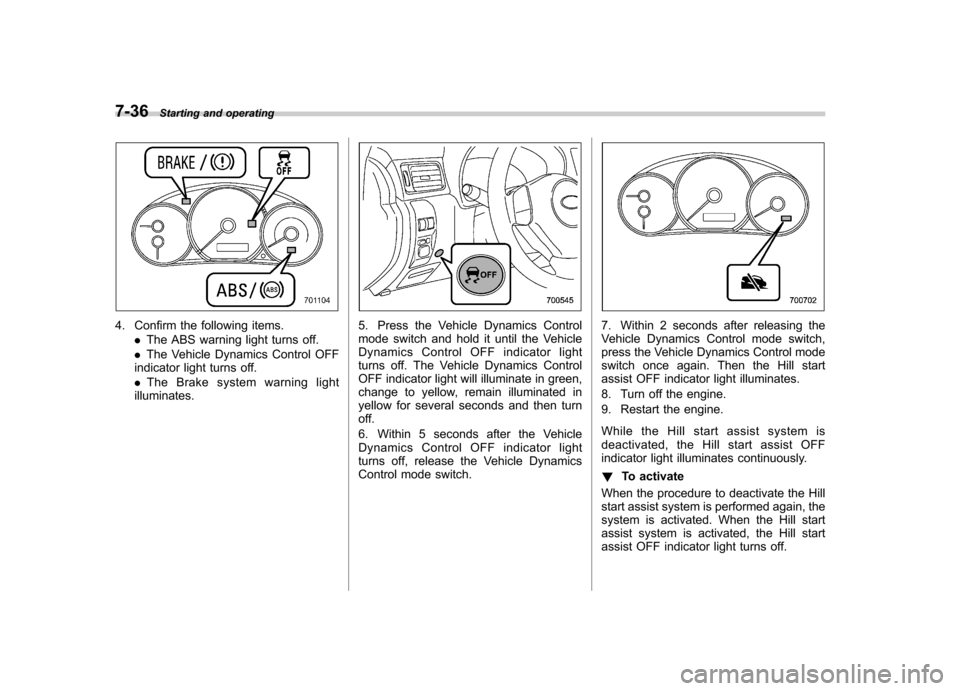
4. Confirm the following items.
.The ABS warning light turns off.
. The Vehicle Dynamics Control OFF
indicator light turns off. . The Brake system warning light
illuminates.5. Press the Vehicle Dynamics Control
mode switch and hold it until the Vehicle
Dynamics Control OFF indicator light
turns off. The Vehicle Dynamics Control
OFF indicator light will illuminate in green,
change to yellow, remain illuminated in
yellow for several seconds and then turn
off.
6. Within 5 seconds after the Vehicle
Dynamics Control OFF indicator light
turns off, release the Vehicle Dynamics
Control mode switch.7. Within 2 seconds after releasing the
Vehicle Dynamics Control mode switch,
press the Vehicle Dynamics Control mode
switch once again. Then the Hill start
assist OFF indicator light illuminates.
8. Turn off the engine.
9. Restart the engine.
While the Hill start assist system is
deactivated, the Hill start assist OFF
indicator light illuminates continuously. ! To activate
When the procedure to deactivate the Hill
start assist system is performed again, the
system is activated. When the Hill start
assist system is activated, the Hill start
assist OFF indicator light turns off.
Page 284 of 414

New vehicle break-in driving–the first
1,000 miles (1,600 km) ..................................... 8-2
Fuel economy hints ............................................ 8-2
Engine exhaust gas (carbon monoxide) ............ 8-2
Catalytic converter .............................................. 8-3
Periodic inspections ........................................... 8-4
Driving in foreign countries ............................... 8-4
Driving tips for AWD models .............................. 8-4
Winter driving ...................................................... 8-6
Operation during cold weather ............................. 8-6
Driving on snowy and icy roads .......................... 8-7Corrosion protection
............................................ 8-8
Snow tires ........................................................... 8-8
Tire chains .......................................................... 8-9
Rocking the vehicle ............................................. 8-9
Loading your vehicle ......................................... 8-10
Vehicle capacity weight ...................................... 8-10
GVWR and GAWR (Gross Vehicle Weight Rating and Gross Axle Weight Rating) ........................ 8-11
Roof molding and crossbar (if equipped) ............ 8-12
Trailer towing ..................................................... 8-13 Driving tips
8
Page 287 of 414
8-4Driving tips
Periodic inspections
To keep your vehicle in the best condition
at all times, always have the recom-
mended maintenance services listed in
the maintenance schedule in the “War-
ranty and Maintenance Booklet ”per-
formed at the specified time or mileageintervals. Driving in foreign countries
When planning to use your vehicle in
another country: .
Confirm the availability of the correct
fuel. Refer to “Fuel requirements ”F 7-3.
. Comply with all regulations and re-
quirements of each country. Driving tips for AWD models
WARNING
. Always maintain a safe driving
speed according to the road and
weather conditions in order to
avoid having an accident on a
sharp turn, during sudden brak-
ing or under other similar condi-tions.
. Always use the utmost care in
driving –overconfidence be-
cause you are driving an All-
Wheel Drive vehicle could easily
lead to a serious accident.
. When replacing a tire, you must
use a tire that is of the same size,
circumference, construction,
brand (tread pattern), speed sym-
bol and load index as the original
tires listed on the tire placard.
Using tires of other sizes, cir-
cumferences or constructions
may result in severe mechanical
damage to the drive train of your
vehicle and may affect ride,
handling, braking, speedometer/
odometer calibration, and clear-
ance between the body and tires.
It also may be dangerous and