2013 SKODA SUPERB lights
[x] Cancel search: lightsPage 28 of 274

Recommended gear
In order to minimise the fuel consumption, a recommendation for shifting into an-
other gear is indicated in the display.
If the system recognises that it is beneficial to change gear, an arrow B
1) is dis-
played. The arrow points up or down, depending on whether you should shift into a higher or lower gear.
The gear recommendation is intended only for vehicles with a manual transmis-
sion or for vehicles with an automatic transmission in manual shift mode (Tiptron-
ic).
For vehicles with manual gearshifting,
C
indicates the recommended gear.
CAUTION
The driver is always responsible for selecting the correct gear in different driving
situations, such as overtaking.
Door, boot lid or bonnet warning
First read and observe the introductory information and safety warn-
ings
on page 23.
Vehicles with a MAXI DOT display
If at least one door, the boot or bonnet is open, the display indicates the relevant
open door, boot or bonnet vehicle icon.
An acoustic signal will also sound if you drive the vehicle above 6 km/h.
Vehicles with a segment display
If at least one door or the boot or bonnet is open, the indicator lights
or
and
come on in the instrument cluster » page 14, Warning Lights .
Compass display
First read and observe the introductory information and safety warn-
ings
on page 23.
For vehicles with a factory fitted navigation system, an abbreviation for each
point of the compass (depending on the current direction of travel) is shown on
the top left-hand corner of the 2)
display.
The abbreviation for each point of the compass is displayed only when the igni-
tion is on.
Multifunction display (MFA)
Introduction
This chapter contains information on the following subjects:
Memory
26
Information overview
26
Warning against excessive speeds
28
The driving data is displayed on the multifunction display. The multifunction display can only be operated when the ignition is switched on.
After the ignition is switched on, the function that was last selected before
switching off the ignition is displayed.
For vehicles with a MAXI DOT display, the menu item MFA must be selected and
confirmed in the main menu » page 28, MAXI DOT display .
On vehicles with a MAXI DOT display, there is an option to fade out some of the
information » page 29, Settings .
1)
On vehicles with a segment display, the
B
arrow is displayed behind the
C
specification.
2)
Applies to vehicles using the MAXI DOT display.
25Information system
Page 32 of 274
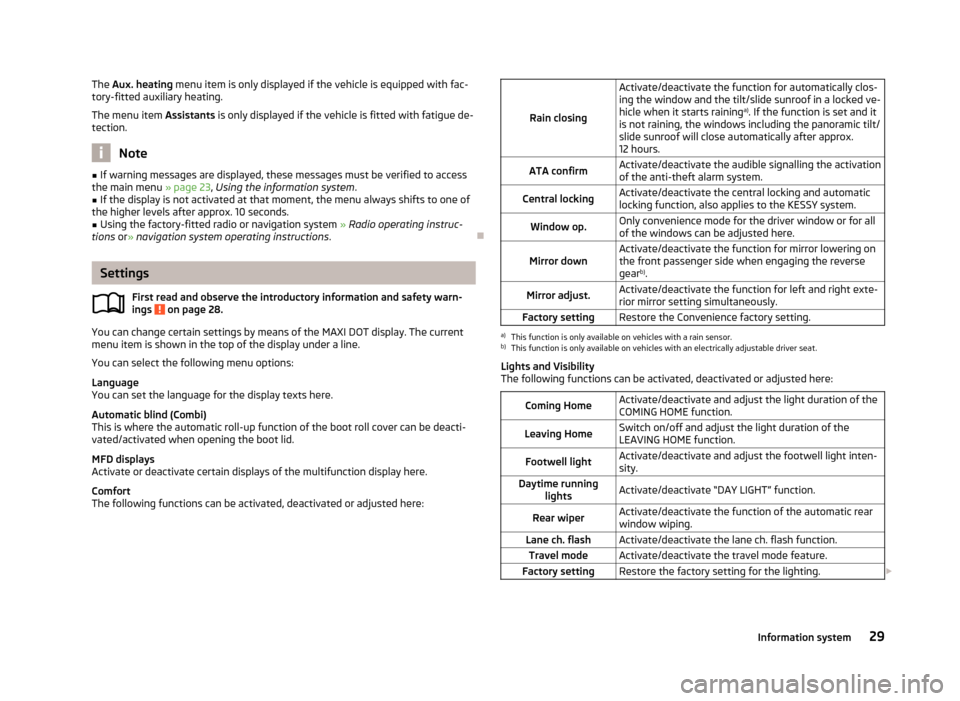
The Aux. heating menu item is only displayed if the vehicle is equipped with fac-
tory-fitted auxiliary heating.
The menu item Assistants is only displayed if the vehicle is fitted with fatigue de-
tection.
Note
■ If warning messages are displayed, these messages must be verified to access
the main menu » page 23, Using the information system .■
If the display is not activated at that moment, the menu always shifts to one of
the higher levels after approx. 10 seconds.
■
Using the factory-fitted radio or navigation system » Radio operating instruc-
tions or» navigation system operating instructions .
Settings
First read and observe the introductory information and safety warn-
ings
on page 28.
You can change certain settings by means of the MAXI DOT display. The current
menu item is shown in the top of the display under a line.
You can select the following menu options:
Language
You can set the language for the display texts here.
Automatic blind (Combi)
This is where the automatic roll-up function of the boot roll cover can be deacti-
vated/activated when opening the boot lid.
MFD displays
Activate or deactivate certain displays of the multifunction display here.
Comfort
The following functions can be activated, deactivated or adjusted here:
Rain closing
Activate/deactivate the function for automatically clos-
ing the window and the tilt/slide sunroof in a locked ve-
hicle when it starts raining a)
. If the function is set and it
is not raining, the windows including the panoramic tilt/
slide sunroof will close automatically after approx. 12 hours.ATA confirmActivate/deactivate the audible signalling the activationof the anti-theft alarm system.Central lockingActivate/deactivate the central locking and automatic
locking function, also applies to the KESSY system.Window op.Only convenience mode for the driver window or for all
of the windows can be adjusted here.Mirror downActivate/deactivate the function for mirror lowering on
the front passenger side when engaging the reverse gear b)
.Mirror adjust.Activate/deactivate the function for left and right exte-
rior mirror setting simultaneously.Factory settingRestore the Convenience factory setting.a)
This function is only available on vehicles with a rain sensor.
b)
This function is only available on vehicles with an electrically adjustable driver seat.
Lights and Visibility
The following functions can be activated, deactivated or adjusted here:
Coming HomeActivate/deactivate and adjust the light duration of the
COMING HOME function.Leaving HomeSwitch on/off and adjust the light duration of the
LEAVING HOME function.Footwell lightActivate/deactivate and adjust the footwell light inten-
sity.Daytime running lightsActivate/deactivate “DAY LIGHT” function.Rear wiperActivate/deactivate the function of the automatic rearwindow wiping.Lane ch. flashActivate/deactivate the lane ch. flash function.Travel modeActivate/deactivate the travel mode feature.Factory settingRestore the factory setting for the lighting. 29Information system
Page 35 of 274

Unlocking and opening
Unlocking and locking
Introduction
This chapter contains information on the following subjects:
Vehicle key
33
Unlock/lock with remote control
33
Unlocking/locking – KESSY
34
Safe securing system
35
Individual settings
35
Locking/unlocking the vehicle from the inside
36
Child safety lock
36
Opening/closing a door
37
Your car is equipped with a central locking system.
The central locking system allows you to lock and unlock all doors, the fuel filler
flap and tailgate at the same time based on the current setting 1)
.
The safe securing system » page 35 is integrated in the central locking system.
Once the car is locked from the outside, the door locks are automatically blocked
by the safe securing system »
.
The following takes place after unlocking 1)
.
› The doors, the boot lid and the fuel filler flap are unlocked.
› The interior light, which is switched by the door contact, comes on.
› The safe securing system is switched off.
› The indicator light in the driver door stops flashing.
› The anti-theft alarm system is deactivated.
The following takes place after locking 1)
.
› The doors, the boot lid and the fuel filler flap are locked.
› The interior lights switched by the door contact come on.
› The safe securing system is switched on.
› The indicator light in the driver door begins flashing.
› The anti-theft alarm system is activated.
Displaying an error
If the indicator light in the driver's door initially flashes quickly for around 2 sec-
onds, and then lights up for 30 seconds without interruption before flashing again slowly, you will need to seek the assistance of a specialist garage.WARNING■ If the car is locked and the safe securing system is activated, there must not
be any person in the car as it is then not possible to open either a door or a
window from the inside. The locked doors make it more difficult for rescuers
to get into the vehicle in an emergency – risk to life!■
Locked doors prevent unwanted entry into the vehicle from outside, for ex-
ample at road crossings.
Note
■ In the event of an accident in which the airbags are deployed, the locked doors
are automatically unlocked in order to enable rescuers to gain access to the vehi- cle.■
In case of failure of the central locking the driver's door can only be unlocked or
locked with the key. The other doors and the tailgate can be emergency locked or emergency released. ■Emergency locking of the door » page 240.
■ Emergency unlocking of the boot lid » page 241.
1)
Depending on the individual setting » page 35 .
32Using the system
Page 36 of 274

Vehicle keyFig. 12
Remote control key
First read and observe the introductory information and safety warn-ings on page 32.
Two remote control keys are provided with the vehicle » Fig. 12.
The transmitter with the battery is housed in the handle of the remote control
key. The receiver is located in the interior of the vehicle.
The operating range of the remote control key is approx. 30 m. But this range ofthe remote control can be reduced if the batteries are weak.
The remote control key has a fold-open key bit which can be used for unlocking
and locking the car manually and also for starting the engine.
The spare key must by initialised by a specialist garage after repair or replace-
ment of the receiver unit. Only then can the remote control key be used again.
WARNING■ Always withdraw the key whenever you leave the vehicle - even if it is only
for a short time. This is particularly important if children are left in the vehicle.
Otherwise, the children might start the engine or operate electrical equipment
(e.g. power windows) – risk of injury!■
Do not withdraw the ignition key from the ignition lock until the vehicle has
come to a stop. The steering lock might otherwise engage unintentionally –
risk of accident!
CAUTION■ Each key contains electronic components; therefore it must be protected
against moisture and severe shocks.■
Keep the groove of the keys absolutely clean. Impurities (textile fibres, dust,
etc.) have a negative effect on the functionality of the locking cylinder and igni-
tion lock.
■
The battery must be replaced if the central locking or anti-theft alarm system
does react to the remote control at less than approx. 3 metres away » page 239.
Note
If you lose a key, please contact a specialist garage, who will be able to provide
you with a new one.
Unlock/lock with remote control
Fig. 13
Remote control key
First read and observe the introductory information and safety warn-
ings on page 32.
Explanation of graphic
Unlocking the vehicle
Locking the vehicle
Unlocking the boot lid
Folding out/folding up of the key bit Warning light
Unlocking
The turn signal lights flash twice as confirmation that the vehicle has been un-
locked.
AB33Unlocking and opening
Page 37 of 274

If you unlock the vehicle and do not open a door or the boot lid within the next
30 seconds, the vehicle will lock again automatically and the safelock system or
anti-theft alarm system will be switched on. This function is intended to prevent
the car being unlocked unintentionally.
The seat and mirror are adjusted after the vehicle is unlocked » page 69.
Locking
The turn signal lights flash once as confirmation that the vehicle has been locked.
If the doors or the boot lid remain open after the vehicle has been locked, the
turn signal lights do not flash until they have been closed.
The current position of the seat and mirror after the vehicle is locked » page 69.
Checking the battery condition
The battery is empty if the red warning iconB
» Fig. 13 does not flash when you
press a button on the remote control key. Replace the battery » page 239.
WARNINGIf the car is locked from the outside and the safelock system is switched on,
there must not be any person in the car as it is then not possible to open ei- ther a door or a window from the inside. The locked doors make it more diffi-
cult for rescuers to get into the vehicle in an emergency – risk to life!
CAUTION
■ Only operate the remote control when the doors and boot lid are closed and the
vehicle is in your line of sight.■
If the driver door is open, the vehicle cannot be locked using the remote control
key.
■
The operation of the remote control may temporarily be affected by signal inter-
ference from transmitters close to the car and which operate in the same fre-
quency range (e.g. mobile phone, TV transmitter).
Note
For vehicles with anti-theft alarm the acoustic signals can also be activated/deac-
tivated by locking/unlocking » page 29.
Unlocking/locking – KESSYFig. 14
KESSY: Name of the zones/sensors in the handle of the front door
First read and observe the introductory information and safety warn- ings
on page 32.
The KESSY system (Keyless Entry Start Exit System) enables unlocking and lock-
ing of the vehicle without actively using the remote control key. The key must be
in one of the areas
A,
B
or
C
» Fig. 14 (about 1.5 meters away from the vehicle).
Unlocking
›
Grab the door handle of the front door or cover the sensor
2
» Fig. 14 with the
whole palm of your hand » .
Locking
›
Touch the sensor
1
» Fig. 14 with your fingers.
On vehicles fitted with automatic gearbox, the selector lever must be moved into the position P before unlocking.
Unlocking the boot lid
›
Press the button in the handle of the boot lid » page 39.
Switching off the safelock system
›
Use your fingers to touch the sensor
1
twice within 2 seconds.
Unlocking or locking areas Front door left
Front door right
Luggage compartment lid
If you cover the sensor
2
at the same time as the sensor
1
» Fig. 14 when un-
locking the vehicle, it is not unlocked.
ABC34Using the system
Page 39 of 274

Automatic locking/unlocking
All doors are locked from a speed of around 15 km/h. The button in the handle of
the boot lid is deactivated.
If the ignition key is withdrawn, the car is then automatically unlocked again. In addition, it is possible for the driver or front passenger to unlock the car by press- ing the central locking button .
The vehicle doors can be unlocked and opened at any time by pulling once on the door opening lever.
Locking/unlocking the vehicle from the inside
Fig. 15
Central locking button
First read and observe the introductory information and safety warn-ings on page 32.
If the vehicle was not locked from the outside, it can also be unlocked and locked
with the rocker switch on the door opening lever of the driver or front passenger
door » Fig. 15 even without the ignition switched on. While a door is opened, the
vehicle cannot be locked.
Locking
›
Press the button
/» Fig. 15 .
The symbol
in the button comes on.
Unlocking
›
Press the button
/» Fig. 15 .
The symbol
in the button is no longer illuminated.
The following applies if your vehicle has been locked using the central locking
button.
› It is not possible to open the doors or the boot lid from the outside (safety fea-
ture, e.g. when stopping at traffic lights etc.).
› The doors can be unlocked and opened from the inside by a single pull on the
opening lever of the respective door.
› In the event of an accident in which the airbags are deployed, the locked doors
are automatically unlocked from the inside in order to enable rescuers to gain access to the vehicle.WARNING■ Doors locked from the inside make it difficult for rescuers to get into the ve-
hicle in an emergency – risk to life!■
Never leave children unattended in the vehicle.
■
If the safelock system is switched on » page 35, the door opening lever and
the central locking buttons do not operate.
Child safety lock
Fig. 16
Parental Control: Left rear door
First read and observe the introductory information and safety warn-
ings on page 32.
The child safety lock prevents the rear door from being opened from the inside.
The door can only be opened from the outside.
You can switch the child safety lock on and off using the vehicle key.
Switching on
›
Turn the slot of the safety lock in the direction of the arrow » Fig. 16 (mirror-
inverted on the right doors).
36Using the system
Page 40 of 274

Switching off›Turn the slot of the safety lock in the opposite direction to the arrow » Fig. 16
(mirror-inverted on the right door).
Opening/closing a door
Fig. 17
Door handle/door opening lever:
First read and observe the introductory information and safety warn- ings
on page 32.
Opening from the outside
›
Unlock the vehicle and pull the door handle
A
» Fig. 17 on the door you wish to
open.
Opening from the inside
›
Pull on door opening lever
B
of the respective door and push the door away
from you.
Closing from the inside
›
Grasp pull handle
C
and close the door.
WARNING■ Make sure that the door has closed correctly as it can open suddenly while
driving – risk of death!■
Only open and close the door when there is no one in the opening/closing
range – risk of injury!
■
An opened door can close automatically if there is a strong wind or the vehi-
cle is on an incline – risk of injury!
KESSY
Introduction
This chapter contains information on the following subjects:
Information message
37
Parking vehicle
38
The KESSY system (Keyless Entry Start Exit System) enables unlocking and lock-
ing of the vehicle without actively using the remote control key.
Information message
First read and observe the introductory information given on page 37.
Key in the vehicle
The protection against inadvertently locking the key in the vehicle unlocks the vehicle automatically if the following conditions are met.
The vehicle, including the boot lit, has been locked.The key with which the vehicle has been locked remains in the vehicle in the
zone
D
» Fig. 14 on page 34.
The turn signal lights flash four times as confirmation that the vehicle has been
unlocked again.
The following message is shown in the information cluster display. Key in vehicle.
KEY IN VEHICLE
Additionally, on vehicles which are fitted with the anti-theft alarm system, an au-
dible signal sounds.
The system has not found a key
If the system has not found a key in the vehicle, the following message appears in the display of the instrument cluster.
Key not found.
NO KEY
This can occur if the key is outside the vehicle, the battery in the key is dis-
charged, the key is defective or the electromagnetic field is strongly disturbed.
37Unlocking and opening
Page 48 of 274

For the sake of the environmentAt high speeds, you should keep the windows closed to prevent unnecessarily
high fuel consumption.
Note
The window lift system is equipped with protection against overheating. Repea-
ted opening and closing of the window can cause this mechanism to overheat. If
this happens, it will not be possible to operate the window for a short time. You
will be able to operate the window again as soon as the overheating protection
has cooled down.
Opening/closing the window from the driver seat
Fig. 25
Buttons on the driver's door
First read and observe the introductory information and safety warn-
ings on page 44.
Opening
›
Lightly press the appropriate button down and hold it until the window has moved into the desired position. Releasing the button causes the window to
stop immediately.
The window can be completely opened automatically by briefly pressing the but- ton as far as the stop. Renewed pressing of the button causes the window to stop immediately.
Closing
›
Pull gently on the top edge of the corresponding button and hold until the win-
dow has moved into the desired position. Releasing the button causes the win-
dow to stop immediately.
The window can also be fully closed automatically by pulling the button up to the stop. Renewed pulling of the button causes the window to stop immediately.
Buttons for the power windows » Fig. 25 .
Button for power window of the driver's door Button for power window of the front passenger doorButton for power window of the rear right door
Button for power window at the rear left door
Safety pushbutton
Safety pushbutton
The buttons for power windows in the rear doors can be deactivated by pressing the safety pushbutton S
» Fig. 25 . The buttons for the electrical power windows
in the rear doors are activated again by pressing the safety pushbutton
S
again.
If the buttons for the rear doors are deactivated, the indicator light
in the safe-
ty switch
S
lights up.
Opening the windows in the front passenger door and in the
rear doors
Fig. 26
Arrangement of the button on
the rear door
First read and observe the introductory information and safety warn-
ings on page 44.
There is a button in the front passenger door and in the rear doors for that win- dow.
Opening
›
Lightly press the appropriate button down and hold it until the window has moved into the desired position. Releasing the button causes the window to
stop immediately.
ABCDS45Unlocking and opening