2013 SKODA RAPID ECU
[x] Cancel search: ECUPage 189 of 226

›Grasp the end of the wrench and turn the bolt against the direction of the ar-
row » Fig. 150 until it is tight.WARNINGUndo the wheel bolts only a little (about one turn) provided that the vehicle
has not yet been jacked up. Otherwise the wheel could come off and fall down – risk of injury!
Note
If it proves difficult to undo the bolts, carefully apply pressure to the end of the
wrench with your foodt. Keep hold of the vehicle when doing so, and make sure
you keep your footing.
Raising the vehicle
Fig. 151
Jacking points for positioning
lifting jack
Fig. 152
Attach lifting jack
First read and observe the introductory information and safety warn-
ings on page 184.
Position the lifting jack below the jacking point closest to the faulty
wheel » Fig. 151 . The jacking point is located directly below the engraving in the
lower sill.
›
Position the lifting jack below the jacking point with the crank and move it up until its claw is positioned below the vertical web of the lower sill.
›
Align the lifting jack so that its claw grasps the web » Fig. 152 - .
›
Support the base plate of the lifting jack with its entire surface resting on level
ground and ensure that the lever is positioned vertically to the point at which the claw grasps the web » Fig. 152 - .
›
Continue turning up the jack until the wheel is just about lifted off the ground.
WARNING■
Only raise the vehicle at the attachment points.■Choose a flat and firm surface for jacking the vehicle.
Securing wheels against theft
Fig. 153
Principle sketch: Anti-theft
wheel bolt with adapter
First read and observe the introductory information and safety warn-
ings on page 184.
The anti-theft wheel bolts can only be removed/tightened with the aid of the
adapter » page 183 .
›
Remove the cover from the anti-theft wheel bolt.
›
Insert the adapter
B
» Fig. 153 with its toothed side fully into the inner tooth-
ing of the anti-theft wheel bolt
A
until the stop so that only the outer hexagon
is jutting out.
186Do-it-yourself
Page 206 of 226

Replacing the bulb for the fog lightFig. 174
Front bumper: Protective grille/removing the fog light
Fig. 175
Replacing the light bulb
First read and observe the introductory information and safety warn-
ings on page 200.
Removing the protective grille
›
Undo the protective grille in the area of the arrow » Fig. 174 -
using the clamp
for removing the wheel trims » page 183, Vehicle tool kit .
›
Remove the protective grille in the direction of the arrow
1
» Fig. 174 .
Changing light bulbs for fog lights
›
Unscrew the screws » Fig. 174 -
marked with the arrows 1)
.
›
Unlock the fuse in the direction of the arrow
2
with the screwdriver.
›
Remove the headlight in the direction of arrow
3
.
›
Remove the connector » Fig. 175.
›Turn the bulb holder in an
anti-clockwise direction as far as the stop and then
remove it » Fig. 175.›
Insert the bulb holder with the new bulb into the headlight and turn in a clock-
wise direction as far as the stop.
›
Attach the connector.
›
Replace the fog light by inserting it in the opposite direction of the arrow
3
» Fig. 174 and tighten.
›
Insert the protective grille and carefully press it in.
The protective grille must engage firmly.
Replacing the bulb for the licence plate light
Fig. 176
Remove the number plate light/replace the bulb
First read and observe the introductory information and safety warn-
ings
on page 200.
›
Open the boot lid.
›
Push in the lamp in the direction of the arrow
1
» Fig. 176 .
The lamp comes loose.
›
Swivel out the lamp in the direction of the arrow
2
and remove it.
›
Remove the faulty bulb from the holder in the direction of the arrow
3
.
›
Insert a new bulb into the holder.
›
Reinsert the lamp in the opposite direction to the arrow
1
.
›
Push on the light until the spring clicks into place.
Check that the light is securely inserted.
1)
The screwdriver is part of the tool kit.
203Fuses and light bulbs
Page 207 of 226

Rear light (Rapid)Fig. 177
Remove cover/light
Fig. 178
Installing the lamp connector/lamp
First read and observe the introductory information and safety warn-
ings
on page 200.
Removing
›
Open the boot lid.
›
Insert the clamp for removing the wheel trims » page 183, Vehicle tool kit into
the hole at the position indicated by the arrow » Fig. 177 -
.
›
Remove the cover in the direction of the arrow » Fig. 177 -
.
›
Use the screwdriver from the tool kit to unscrew the lamp » Fig. 177 -
.
›
Grip the tail lamp and carefully remove it by jiggling it out in the opposite direc-
tion of travel.
›
Pull the locking mechanism
1
» Fig. 178 on the connector in the direction of the
arrow.
›
Press the latching mechanism
2
» Fig. 178 and remove the connector.
Installing›Insert the connector into the lamp and lock it securely.›
Insert the lamp into the mounts in the body » Fig. 178 - .
›
Carefully press the tail lamp into the body so that the bolts
2
» Fig. 179 on
page 204 on the lamp engage into the mounts in the body » .
Ensure that the cable bundle does not become pinched between the body and
the lamp.
›
Screw the tail lamp into place and install the cover.
The cover must engage securely.
CAUTION
■ Ensure that the cable bundle does not become pinched between the body and
the lamp when it is being refitted – risk of damage to the electric installation and risk of water ingress.■
If you are not sure whether the cable bundle has become pinched, we recom-
mend that you have the light connection checked by a specialist garage.
■
Ensure that the vehicle paintwork and the tail lamp are not damaged when re-
moving and installing the tail lamp.
Replacing bulbs in rear light (Rapid)
Fig. 179
Outer part of the lamp/inner part of the lamp
First read and observe the introductory information and safety warn-
ings
on page 200.
Outer part of the lamp
›
Turn the bulb holder
1
» Fig. 179 in an anti-clockwise direction and remove it
from the lamp housing.
204Do-it-yourself
Page 208 of 226
›Replace the bulb, reinsert the holder with the bulb into the lamp housing and
turn to the stop in a clockwise direction.
Inner part of the lamp›
Unlock the bulb holder using the locking latches marked with arrows » Fig. 179 -
and remove the bulb holder from the tail lamp.
›
Turn the bulb holder to the stop » Fig. 179 - in an anti-clockwise direction and
remove it from the lamp housing.
›
Replace the bulb, reinsert the holder with the bulb into the lamp housing and turn to the stop in a clockwise direction.
›
Insert the bulb holder in the tail lamp assembly.
All locking mechanisms must audibly snap into place.
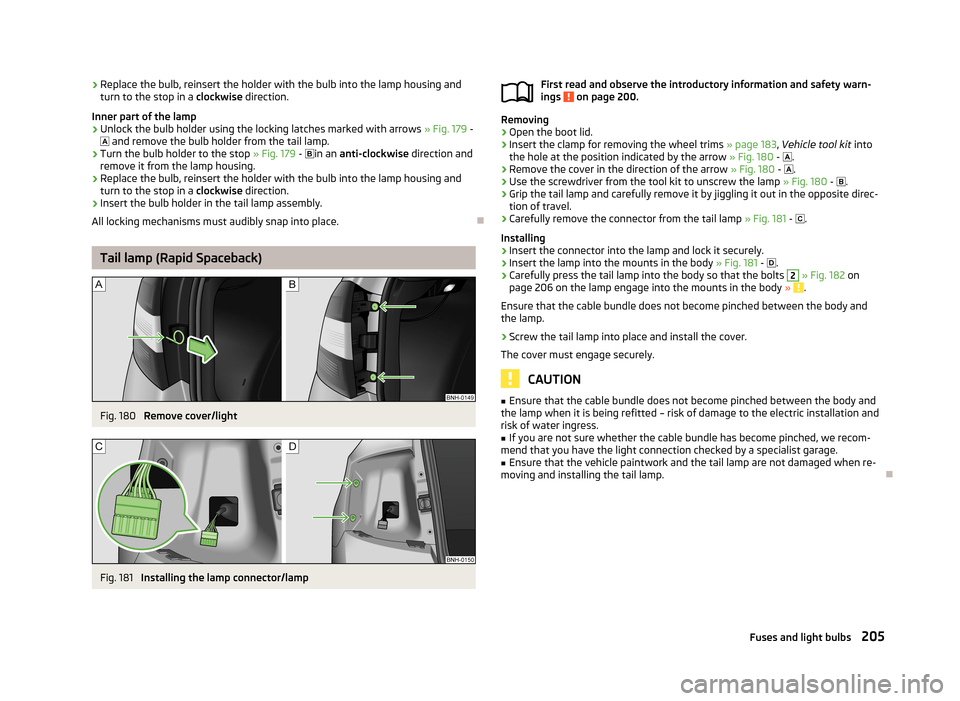
Tail lamp (Rapid Spaceback)
Fig. 180
Remove cover/light
Fig. 181
Installing the lamp connector/lamp
First read and observe the introductory information and safety warn-
ings on page 200.
Removing
›
Open the boot lid.
›
Insert the clamp for removing the wheel trims » page 183, Vehicle tool kit into
the hole at the position indicated by the arrow » Fig. 180 - .
›
Remove the cover in the direction of the arrow » Fig. 180 - .
›
Use the screwdriver from the tool kit to unscrew the lamp » Fig. 180 - .
›
Grip the tail lamp and carefully remove it by jiggling it out in the opposite direc-
tion of travel.
›
Carefully remove the connector from the tail lamp » Fig. 181 - .
Installing
›
Insert the connector into the lamp and lock it securely.
›
Insert the lamp into the mounts in the body » Fig. 181 -
.
›
Carefully press the tail lamp into the body so that the bolts
2
» Fig. 182 on
page 206 on the lamp engage into the mounts in the body » .
Ensure that the cable bundle does not become pinched between the body and
the lamp.
›
Screw the tail lamp into place and install the cover.
The cover must engage securely.
CAUTION
■ Ensure that the cable bundle does not become pinched between the body and
the lamp when it is being refitted – risk of damage to the electric installation and risk of water ingress.■
If you are not sure whether the cable bundle has become pinched, we recom-
mend that you have the light connection checked by a specialist garage.
■
Ensure that the vehicle paintwork and the tail lamp are not damaged when re-
moving and installing the tail lamp.
205Fuses and light bulbs
Page 220 of 226

Power outlet12 V60
Power steering97
Indicator light17
Practical features56
Meshed pockets on the front seat backrests64
Storage compartment in centre console58
Storage compartment on the passenger side63
Storage pockets on the front seats64
Waste container60
R
Radiator fan
165
Raise vehicle186
Rear fog light44
Indicator light18
Rear interior light46
Rear mirror49
Exterior mirror50
Interior mirror50
recirculated air mode Climatronic
83
Recirculated air mode Manual air conditioning
81
Refuelling160
Fuel160
Remote control Locking
33
Replacing the battery193
Synchronisation process194
Unlocking33
Remote control key Replacing the battery
193
Repairs and technical alterations149
Replacing Bulb for main beam, daytime running lights andparking light
202
Bulb for the fog light203
Bulb for the licence plate light203
Bulb in rear light (Rapid Spaceback)206
Bulb in rear light (Rapid)204
Bulbs200
Fuses197
Fuses in the dash panel197
Fuses in the engine compartment199
Low beam bulb201
Vehicle battery174
Windscreen wiper blades195
Wiper blades196
Replenishing Coolant
170
Engine oil168
Windscreen washer fluid165
Revolution counter11
Roof luggage rack Attachment points
74
Roof rack system74
Roof load75
Running-in The first 1500 km
104
Running in Brake pads
105
Engine104
Tyres105
S
SAFE See Safe securing system
33
SAFELOCK See Safe securing system
33
Safe securing system33
Safety126
Child safety142
Child safety seats142
Correct seated position127
Head restraints53
ISOFIX145
TOP TETHER146
Saving electrical energy105
Seals Taking care of your vehicle155
Seat Adjusting
53
Seat belt warning light
15
Seat belts130
Belt tensioners133
Cleaning159
fastening and unfastening132
Height adjustment133
Inertia reels133
The physical principle of a frontal collision131
Seat features54
Seats folding forward
55
Front armrest55
Head restraints53
Heating54
Rear armrest55
Seats and useful equipment52
Adjusting the seats52
see automatic gearbox Manual shifting of gears on the multifunction
steering wheel
103
Selector lever see Using the selector lever
102
Selector lever lock Indicator light
21
Service150
Service interval display28
Service intervals147
Setting Lower position of the variable loading floor
72
Upper position of the variable loading floor71
Setting the clock Clock
13
Shelves56
Shifting gears Driving and saving energy
106
217Index