2013 SKODA RAPID ignition
[x] Cancel search: ignitionPage 21 of 226

Antilock brake system (ABS)First read and observe the introductory information and safety warn-ings
on page 14.
If the warning light lights up, there is a fault in the ABS.
The following message is shown in the MAXI DOT display. Error: ABS
The vehicle will only be braked by the normal brake system without the ABS.
Seek assistance from a specialist garage immediately.
WARNING■ If you have to stop for technical reasons, then park the vehicle at a safe dis-
tance from the traffic, switch off the engine and switch on the hazard warning
lights » page 44 . The warning triangle must be set up at the prescribed dis-
tance - observe the national legal provisions when doing so.■
If the warning light » page 15 is displayed together with warning light
do not continue your journey! Seek help from a specialist garage.
■
A fault to the ABS system or the braking system can increase the vehicle's
braking distance – risk of accident!
Rear fog light
First read and observe the introductory information and safety warn-
ings
on page 14.
The indicator light
comes on when the rear fog light is switched on.
For further information, see » page 44.
Bulb failure
First read and observe the introductory information and safety warn-ings
on page 14.
The indicator light lights up if a bulb is faulty.
The indicator light lights up within a few seconds after switching on the igni-
tion or when a light with a faulty bulb is switched on.
The following message, for example, may be shown in the MAXI DOT display. INFORMATION Check front right low beam!
The rear side lights and the licence plate lighting have several light bulbs. The in-
dicator light
only lights up if all bulbs in the parking light (in one rear light) or
the licence plate lighting are faulty 1)
. For this reason, regular check that these
light bulbs are working correctly.
Exhaust inspection system
First read and observe the introductory information and safety warn-
ings
on page 14.
If the warning light
lights up, there is a fault in the exhaust inspection system.
The system allows the vehicle to run in emergency mode.
Seek assistance from a specialist garage immediately.
Glow plug system (diesel engine)
First read and observe the introductory information and safety warn-ings
on page 14.
The indicator light
lights up after the ignition has been switched on. Once the
light has gone out, the engine can be started immediately.
There is a fault in the glow plug system if the warning light
does not come on
at all or lights up continuously .
If the warning light
begins to flash while driving, a fault exists in the engine
control. The system allows the vehicle to run in emergency mode.
1)
Applies to vehicles with START-STOP system.
18Using the system
Page 23 of 226

Airbag systemFirst read and observe the introductory information and safety warn-ings
on page 14.
If the warning light lights up, there is a fault in the airbag system.
The following message is shown in the MAXI DOT display. Error: Airbag
The operational capability of the airbag system is monitored electronically, includ-
ing when one of the airbags is switched off.
If a front, side or head airbag or belt tensioner has been switched off using thevehicle system tester:
› The indicator light
lights up for around 4 seconds after the ignition is switch-
ed on and then flashes for around 12 seconds.
The following message is shown in the MAXI DOT display. Airbag/belt tensioner deactivated.
If the air bag was switched off using the key-operated switch on the side of the
dash panel on the passenger side:
› The indicator light
comes on for around 4 seconds after the ignition has been
switched on.
› Switched off airbags are indicated by the indicator light
in the
logo lighting up in the middle of the dash panel » Fig. 123 on page 140.
WARNINGIf there is a fault, have the airbag system checked immediately by a specialist
garage. Otherwise, there is a risk of the airbag not being activated in the
event of an accident.
Tyre inflation pressure
First read and observe the introductory information and safety warn-
ings
on page 14.
The indicator light
lights up , if there is a substantial drop in inflation pressure
in one of the tyres. Check and adjust the pressure in all tyres » page 175.
If the indicator light
flashes , there is a fault in the system.
Seek assistance from a specialist garage immediately.
Further information » page 178, Tyre pressure monitor .
Note
If the vehicle battery has been disconnected and then reconnected, the indicator
light comes on after switching on the ignition. If the indicator light does not go
out after moving a short distance, this means that there is an error in the system. Seek assistance from a specialist garage immediately.
Windscreen washer fluid level
First read and observe the introductory information and safety warn-ings
on page 14.
If the windscreen washer fluid level is too low, the warning light
comes on.
The following message is shown in the MAXI DOT display. Top up wash fluid!
Top up with liquid » page 165, Windscreen washer system .
Turn signal system
First read and observe the introductory information and safety warn-ings
on page 14.
Either the left
or right
indicator light flashes depending on the position of
the operating lever.
If there is a fault in the turn signal system, the indicator light flashes at twice its
normal rate.
Switching off the hazard warning light system is switched on will cause all of the
turn signal lights as well as both warning lights to flash.
Further information » page 43, Turn signal and main beam .
20Using the system
Page 26 of 226

Description of the operationButton/adjust-ment
wheel » Fig. 7OperationAction
ASelect dataBriefly push up or downSet data valuesBriefly push up or downOpen main menu in the MAXI DOT displayPress and hold buttonBShow dataPress brieflyConfirm dataPress brieflyCOpen main menu in the MAXI DOT displayPress and hold buttonto go back one level in the menu of the MAXI DOT displayPress brieflyDSelect dataTurn upwards or downwardsSet data valuesTurn upwards or downwardsShow dataPress brieflyConfirm dataPress briefly
Ice warning
First read and observe the introductory information and safety warn-ings
on page 22.
Prompt in the MAXI DOT display
If the outside temperature while driving drops to below +4°C, the following icon
appears on the display in front of the temperature display . An audible signal is
emitted.
If the outside temperature is already below +4°C when turning the ignition on,
the icon appears immediately. An audible signal is emitted.
Prompt in the segment display 1)
If the outside temperature while driving drops to below +4°C, the temperature
display » page 26 , Outside temperature will show up with the following icon in
front
. An audible signal is emitted.
If the outside temperature is already below +4°C when turning the ignition on, the temperature display and the
icon appear immediately. An audible signal is
emitted.
After pressing button A » Fig. 7 on page 22, the most recently displayed data is
shown.WARNINGEven at outside temperatures of around +4 °C, black ice may still be present
on the road surface! You should therefore not rely solely on the outside tem-
perature display for an indication of whether there is black ice on the road.
1)
Applies to vehicles with the multifunction display (MFA).
23Information system
Page 27 of 226
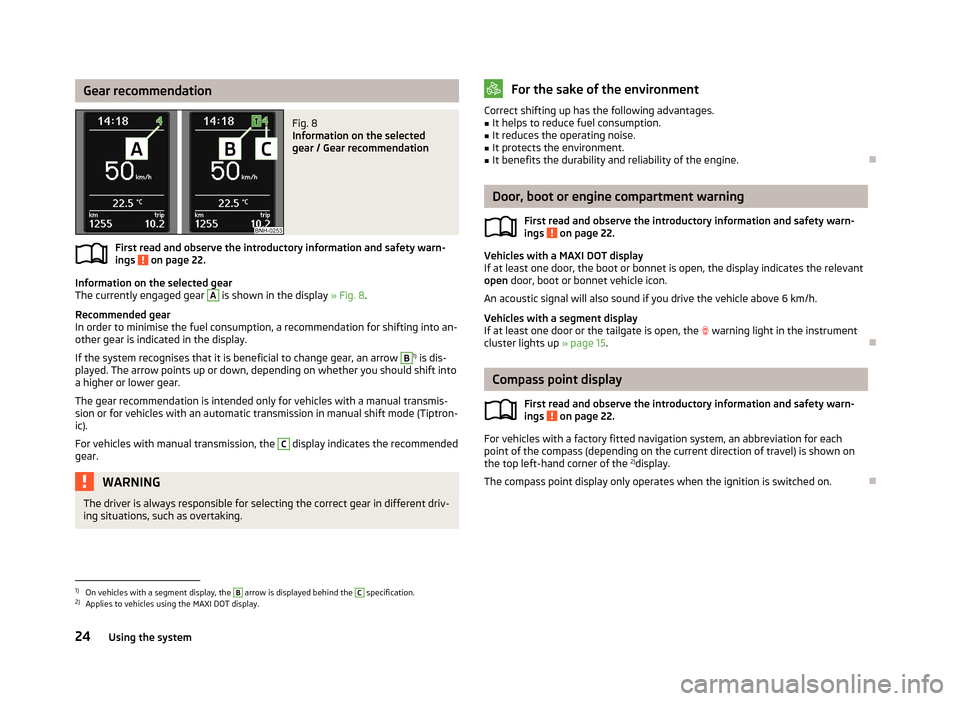
Gear recommendationFig. 8
Information on the selected
gear / Gear recommendation
First read and observe the introductory information and safety warn-
ings on page 22.
Information on the selected gear
The currently engaged gear
A
is shown in the display » Fig. 8.
Recommended gear
In order to minimise the fuel consumption, a recommendation for shifting into an-
other gear is indicated in the display.
If the system recognises that it is beneficial to change gear, an arrow
B
1) is dis-
played. The arrow points up or down, depending on whether you should shift into a higher or lower gear.
The gear recommendation is intended only for vehicles with a manual transmis-
sion or for vehicles with an automatic transmission in manual shift mode (Tiptron-
ic).
For vehicles with manual transmission, the
C
display indicates the recommended
gear.
WARNINGThe driver is always responsible for selecting the correct gear in different driv-
ing situations, such as overtaking.For the sake of the environmentCorrect shifting up has the following advantages.■It helps to reduce fuel consumption.■
It reduces the operating noise.
■
It protects the environment.
■
It benefits the durability and reliability of the engine.
Door, boot or engine compartment warning
First read and observe the introductory information and safety warn-ings
on page 22.
Vehicles with a MAXI DOT display
If at least one door, the boot or bonnet is open, the display indicates the relevant
open door, boot or bonnet vehicle icon.
An acoustic signal will also sound if you drive the vehicle above 6 km/h.
Vehicles with a segment display
If at least one door or the tailgate is open, the
warning light in the instrument
cluster lights up » page 15.
Compass point display
First read and observe the introductory information and safety warn-
ings
on page 22.
For vehicles with a factory fitted navigation system, an abbreviation for each
point of the compass (depending on the current direction of travel) is shown on
the top left-hand corner of the 2)
display.
The compass point display only operates when the ignition is switched on.
1)
On vehicles with a segment display, the
B
arrow is displayed behind the
C
specification.
2)
Applies to vehicles using the MAXI DOT display.
24Using the system
Page 28 of 226

Multifunction display (MFD)
Introduction
This chapter contains information on the following subjects:
Memory
25
Information overview
26
Warning at excessive speeds
27
The driving data is displayed on the multifunction display. The multifunction display only operates when the ignition is switched on. Afterthe ignition is switched on, the function that was last selected before switching
off the ignition is displayed.
For vehicles with a MAXI DOT display, the menu item MFA must be selected and
confirmed in the main menu » page 27, MAXI DOT display .
On vehicles with a MAXI DOT display, there is an option to fade out some of the information » page 28, Settings .
WARNING■
Concentrate fully on your driving at all times! As the driver, you are fully re-
sponsible for the operation of your vehicle.■
Even at outside temperatures of around +4 °C, black ice may still be present
on the road surface! You should therefore not rely solely on the outside tem-
perature display for an indication of whether there is black ice on the road.
Note
■ In certain national versions the displays appear in the Imperial system of meas-
ures.■
If the display of the second speed is activated in mph, the current speed is not
indicated in km/h on the display.
■
The amount of fuel consumed will not be indicated.
MemoryFig. 9
Multi-function display - Display example of the memory
First read and observe the introductory information and safety warn-
ings on page 25.
The multifunction display is equipped with two automatic memories, 1 and 2. The
selected memory is shown in the display » Fig. 9.
Single-trip memory (memory 1)
The single-trip memory collates the driving information from the moment the ig-
nition is switched on until it is switched off.
New data will also flow into the calculation of the current driving information if
the trip is continued within 2 hours after switching off the ignition.
If the trip is interrupted for more than 2 hours, the memory is automatically
erased.
Total-trip memory (memory 2)
The total trip memory collates the data from any number of individual trips up to
a total of 19 hours and 59 minutes or a 1999 km distance or, for vehicles with a
MAXI DOT display, 99 hours and 59 minutes, or a 9999 km distance.
The memory is deleted when either of these limits is reached and the calculation
starts all over again.
Unlike the single-trip memory, the total-trip memory is not deleted after a period of interruption of driving of 2 hours.
Select memory
›
Select the corresponding element of the multifunction display » page 22, Using
the information system .
Confirm the element again to switch between the individual memories.
25Information system
Page 30 of 226

The display is updated regularly while you are driving.Current driving speed
The current speed displayed is identical to the display on the speedometer3
» Fig. 2 on page 10.
Oil temperature
If the engine oil temperature is in the range of 80-110 °C, the engine operating
temperature has been reached.
If the oil temperature is lower than 80 °C or above 110 °C, avoid high engine revs, full throttle and high engine loads.
If the oil temperature is lower than 50 °C or if a fault in the system for checking
the oil temperature is present, the following
is displayed instead of the oil
temperature.
Warning at excessive speeds
Set the speed limit, e.g. for the maximum permissible speed in towns » page 27,
Warning at excessive speeds .
Warning at excessive speeds
First read and observe the introductory information and safety warn-
ings
on page 25.
Adjust the speed limit while the vehicle is stationary
›
Select the menu item Speed warning (MAXI DOT display) or
(segment dis-
play).
›
Activate the speed limit option by confirming this menu item 1)
.
›
Set the desired speed limit, e.g. 50 km/h.
›
Store the speed limit by confirming the set value, or wait several seconds; your
settings will be saved automatically.
The speed limit can be adjusted from 30 km/h to 250 km/h in 5 km/h increments.
Adjusting the speed limit while the vehicle is moving
›
Select the menu item Speed warning (MAXI DOT display) or
(segment dis-
play).
›
Drive at the desired speed, e.g. 50 km/h.
›
Confirm the current speed as the speed limit.
If you wish to adjust the set speed limit, you can do so in 5 km/h intervals (e.g. the
accepted speed of 47 km/h increases to 50 km/h or decreases to 45 km/h).›
Store the speed limit, or wait several seconds; your settings will be saved auto-
matically.
Change or disable speed limit
›
Select the menu item Speed warning (MAXI DOT display) or (segment dis-
play).
›
By confirming the stored value, the speed limit is disabled.
›
By reconfirming, the option to change the speed limit is activated.
If the set speed limit is exceeded, an audible signal will sound as a warning. The menu item Speed warning (MAXI DOT display) or (Segment display) appears in
the display at the same time as the set threshold.
The set speed limit value remains stored even after switching off the ignition.
MAXI DOT display
Introduction
This chapter contains information on the following subjects:
Main menu
28
Settings
28
The MAXI DOT display provides you with information about the current operating
state of your vehicle. Depending on the vehicle equipment, it also provides you
with data relating to the radio, multifunction display (MFD), mobile phone, naviga-
tion system, automatic gearbox » page 101 and devices connected via the MDI in-
put.
WARNINGConcentrate fully on your driving at all times! As the driver, you are fully re-
sponsible for the operation of your vehicle.
1)
If no value is set the output value 30 km/h is automatically displayed.
27Information system
Page 32 of 226
Before the next service interval is reached, a message concerning the kilometres
and days remaining until the next service is due is shown for about 10 seconds
after the ignition is switched on. Alternatively, this information can be displayed
manually at any time if required.
The kilometre indicator or the days indicator reduces in steps of 100 km or, where
applicable, days until the service due date is reached.
Note
■ Information is retained in the Service Interval Display even after the vehicle bat-
tery is disconnected.■
If the instrument cluster is exchanged after a repair, the correct values must be
entered in the counter for the Service Interval Display. This work is carried out by a specialist garage.
■
In certain national versions, the displays appear with Imperial values.
■
For more information on the service intervals, see » page 147, Service intervals .
Prompt in the segment display
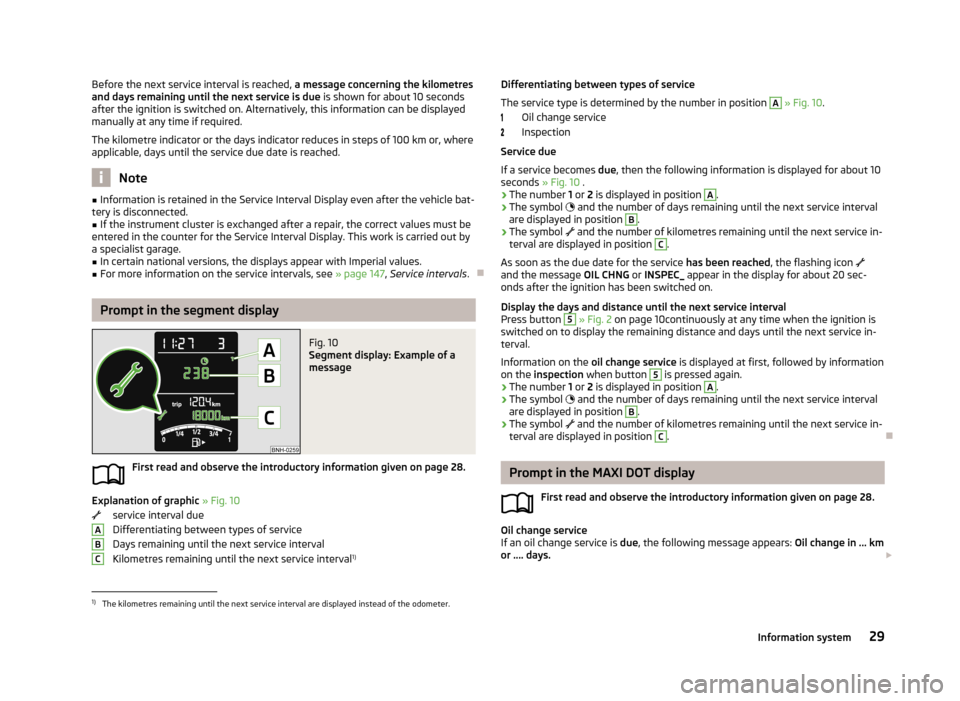
Fig. 10
Segment display: Example of a
message
First read and observe the introductory information given on page 28.
Explanation of graphic » Fig. 10
service interval due
Differentiating between types of service Days remaining until the next service interval
Kilometres remaining until the next service interval 1)
ABCDifferentiating between types of service
The service type is determined by the number in position A
» Fig. 10 .
Oil change service
Inspection
Service due
If a service becomes due, then the following information is displayed for about 10
seconds » Fig. 10 .
› The number
1 or 2 is displayed in position
A
.
› The symbol
and the number of days remaining until the next service interval
are displayed in position
B
.
› The symbol
and the number of kilometres remaining until the next service in-
terval are displayed in position
C
.
As soon as the due date for the service has been reached, the flashing icon
and the message OIL CHNG or INSPEC_ appear in the display for about 20 sec-
onds after the ignition has been switched on.
Display the days and distance until the next service interval
Press button
5
» Fig. 2 on page 10continuously at any time when the ignition is
switched on to display the remaining distance and days until the next service in- terval.
Information on the oil change service is displayed at first, followed by information
on the inspection when button
5
is pressed again.
› The number
1 or 2 is displayed in position
A
.
› The symbol
and the number of days remaining until the next service interval
are displayed in position
B
.
› The symbol
and the number of kilometres remaining until the next service in-
terval are displayed in position
C
.
Prompt in the MAXI DOT display
First read and observe the introductory information given on page 28.
Oil change service
If an oil change service is due, the following message appears: Oil change in ... km
or .... days.
1)
The kilometres remaining until the next service interval are displayed instead of the odometer.
29Information system
Page 33 of 226

As soon as the service interval date has been reached, the message Oil change
now! appears once the ignition has been switched on.
Inspection
If an inspection is due, the following message appears: Inspection in ... km or ...
days.
As soon as the service interval date has been reached, the message Inspection
now! appears once the ignition has been switched on.
Displaying the distance and days until the next service interval You can view the remaining distance and days until the next service appointmentat any time when the ignition is switched on by going to the Settings menu
item » page 28 or from the vehicle status in the main menu of the Maxi DOTdis-
play. » page 28
The following message is displayed for 10 seconds. Oil change ... km / ... days
Inspection ... km / ... days
30Using the system