2013 SKODA OCTAVIA warning lights
[x] Cancel search: warning lightsPage 72 of 287

Interior mirrorFig. 43
Manual dimming mirror
Fig. 44
Automatic dimming mirror
First read and observe the introductory information and safety warn-
ings
on page 68.
Manual dimming interior mirror
›
To dim the mirror set the lever on the rear view mirror in the direction of the
front wheel - arrow
A
» Fig. 43 .
›
To restore the original position, adjust the lever on the rear view mirror in the
direction of the front wheel off - arrow
B.
Automatic dimming mirror
›
To activate the auto-dimming, press button
D
» Fig. 44 .
The warning light
C
illuminates.
›
To disable auto-dimming, press button
D
» Fig. 44 again.
The warning light
C
goes out.
If automatic dimming is activated, the mirror dims automatically depending on
the light striking the mirror from the rear.
When the interior lights are switched on or the reverse gear is engaged, the mir- ror always moves back into the basic position (not dimmed).
Do not attach external navigation devices on to the windscreen or in the vicinity
of the automatic dimming interior mirror » page 68,
in section Introduction .
Exterior mirrors
Fig. 45
Front door: Knob for the mirrors
First read and observe the introductory information and safety warn-
ings on page 68.
The mirror can be adjusted to the desired position by moving the knob in the di-
rection of the arrow » Fig. 45.
The movement of the mirror surface is identical to the movement of the rotary knob.
The knob can be moved into the following positions.
adjust the left mirror or both mirrors
adjust right mirror or both mirrors
Switch off mirror control
Mirror heater
Folding in the exterior mirrors
Adjusting both mirrors in sync
After the rotary knob to position or in right-hand drive in the position
provided,
both mirrors may be adjusted simultaneously.
69Lights and visibility
Page 79 of 287

Seat features
Introduction
This chapter contains information on the following subjects:
Seat heaters
76
Front armrest
77
Rear armrest
77
Folding front passenger seat
77
Seat backrests
78
Seat heaters
Fig. 51
Heating: Front seats/ rear seats
First read and observe the introductory information given on page 76.
The seat backrests and surfaces of the front seats and the two outer rear seats
can be heated electrically.
The seat heating can only be switched on when the engine is running.
Switching on
›
Press the corresponding symbol button
or
» Fig. 51 .
By pressing the button once, the heating is switched to the highest intensity - level 3, which is indicated by three of the warning lights underneath the respec-
tive switch » Fig. 51 -
or in the respective button » Fig. 51 -
illuminating.
With repeated pressing of the switch, the level of the seat heating is down-regu-
lated up to the switch-off. The level of the seat heating is indicated by the num- ber of illuminated warning lights underneath/in the switch.WARNINGIf you have a subdued pain and/or temperature sensitivity, e.g. through medi-
cation, paralysis or because of chronic illness (e.g. diabetes), we recommend
not to use the seat heating. This can lead to burns on the back, the posterior
and the legs which are difficult to heal. If the seat heating is used, we recom-
mend to make regular breaks in your journey when driving long distances, so
that the body can recuperate from the stress of the journey. Please consult
your doctor, who can evaluate your specific condition.
CAUTION
■ Do not kneel on the seats or otherwise apply concentrated pressure to them.■Do not turn on the seat heater if seats are not occupied.■
Do not switch on the seat heating if the seats have objects attached to or
placed on them, for example a child seat, a bag, etc. A fault of the heating ele-
ments in the seat heating can occur.
■
If additional seat covers or protective covers are attached to the seats, do not
turn on the seat heater - there is a risk of damaging the seat covers and seat
heating.
■
Do not clean the seats using moisture » page 210.
Note
If the on-board voltage drops, the seat heating is switched off automatically, in
order to provide sufficient electrical energy for the engine control » page 227,
Automatic load deactivation .
76Using the system
Page 90 of 287

Storage compartment on the passenger sideFig. 72
Open storage compartment/control cooling of storage compartment
First read and observe the introductory information and safety warn-
ings
on page 79.
A pen and credit card holder is provided in the stowage compartment.
Opening
›
Pull the lid handle in the direction of the arrow » Fig. 72 -
and fold down the
lid.
Closing
›
Lift the lid upwards until it clicks into place.
Cooling
›
Use the rotary switch » Fig. 72 –
to open or close the air supply.
Opening the air supply when the air conditioning system is switched on allows cooled air to flow into the storage compartment.
Opening the air inlet when the air conditioning system is on causes fresh or inte-rior air to flow into the storage compartment.
We recommend closing the air supply if it is operated in heating mode or the cool-ing system for the storage compartment is not being used.
WARNINGThe storage compartment must always be closed when driving for safety rea-
sons.NoteWhen the stowage compartment is opened, a light lights up.
Storage compartment under the passenger seat
Fig. 73
Front passenger seat: Opening
the storage compartment
First read and observe the introductory information and safety warn-
ings on page 79.
Opening
›
Pull the handle to position
1
» Fig. 73 in the direction of the arrow.
The compartment opens out in the direction of the arrow
2
.
Closing
›
Grip the compartment by the handle and close in the opposite direction to that
of the arrow
2
» Fig. 73 .
›
Keep hold of the handle until the compartment is closed.
WARNINGThe storage compartment must always be closed when driving for safety rea-
sons.
CAUTION
The storage compartment is designed for storing small objects of up to 1.5 kg. in
weight.
87Seats and useful equipment
Page 112 of 287

AdjustingFirst read and observe the introductory information given on page 108.
Recommended basic settings of the heating controls.
AdjustmentControl dial settings » Fig. 108 on page 108Button Air outlet vents 4 » Fig. 106 on
page 107ABCDefrosting the windscreen and side windowsTo the right up to thestop4 - 5Do not switch onOpen and align with the side win- dowFree windscreen and side windowsfrom mistDesired temperature3 - 5Do not switch onOpen and align with the side win-
dowRapid heatingAs far as it will go tothe right4 - 5Briefly switch onOpeningComfortable heatingDesired temperature2 - 4Do not switch onOpeningFresh air mode – ventilationTo the left up to the
stop1 - 6
a)Do not switch onOpeninga)
Warmer air is directed to the footwell than to the upper part of the body.
We recommend that you leave the air outlet vents
3 » Fig. 106 on page 107 in the
open position in all operating modes.
Recirculated air mode
First read and observe the introductory information given on page 108.
Recirculated air mode prevents polluted air outside the vehicle from getting into
the vehicle, for example when driving through a tunnel or when standing in a
traffic jam.
Switching on/off
›
Press the symbol button
.
The warning light below the button lights up.
›
Press the symbol button
again.
The warning light below the button goes out.
Recirculated air mode is switched off automatically if the air distribution controlC » Fig. 108 on page 108 is turned to position . Recirculated air mode can be
switched on again from this position by repeatedly pressing the symbol button
.WARNINGNever leave recirculated air mode switched on over a longer period of time, as
“stale air” can cause driver and passenger fatigue, reduce attention levels and also cause the windows to mist up. The risk of having an accident increases.
Switch off recirculated air mode as soon as the windows start to mist up.
109Heating and air-conditioning
Page 113 of 287

Air conditioning system (manual air conditioningsystem)
Introduction
This chapter contains information on the following subjects: Control elements
110
adjusting
111
Recirculated air mode
111
The cooling system only operates if the following conditions are met. The cooling system is switched on » page 110, Control elements .
The engine is running.
The outside temperature above approx. +2 °C.
The blower switch is switched on (positions 1-6).
If the desired interior temperature can also be achieved without activating the cooling system, fresh air mode should be selected.
The cooling system is switched off at a high coolant temperature in order to pro-
vide cooling at a high load of the engine.
CAUTION
■ Under certain circumstances, air at a temperature of about 5 °C can flow out of
the vents when the cooling system is switched on.■
Lengthy and uneven distribution of the air flow out of the vents (especially
around the feet) and large differences in temperature, for example, when getting
out of the vehicle, can cause susceptible individuals to catch a cold.
Note
We recommend that you have the air conditioning system cleaned by a specialist
garage once every year.Control elementsFig. 109
Air conditioning: Control elements
First read and observe the introductory information and safety warn- ings
on page 110.
Functions of the individual controls » Fig. 109 .
Set the temperature (turn to the left to reduce the temperature, turn to the
right to increase the temperature)
Set the blower stage (stage 0: Fan out, stage 6: the highest fan speed)
Set the direction of the air outlet » page 107
Depending on equipment:
›
Switching the windscreen heater on/off » page 64
›
Aux. heating on/off » page 116
Control the seat heater on the front left seat » page 76
Switching the cooling system on/off
Switching the rear window heater on/off » page 64
Open/close the fresh air supply (recirculation) » page 111
Control the seat heater on the front right seat » page 76
Note
The warning light in the symbol button
lights after activation, even if not all of
the conditions for the function of the cooling system are met » page 110. By light-
ing up of the warning light in the button, the operational readiness of the cooling system is signalled.
ABC1110Using the system
Page 114 of 287
adjustingFirst read and observe the introductory information and safety warnings
on page 110.
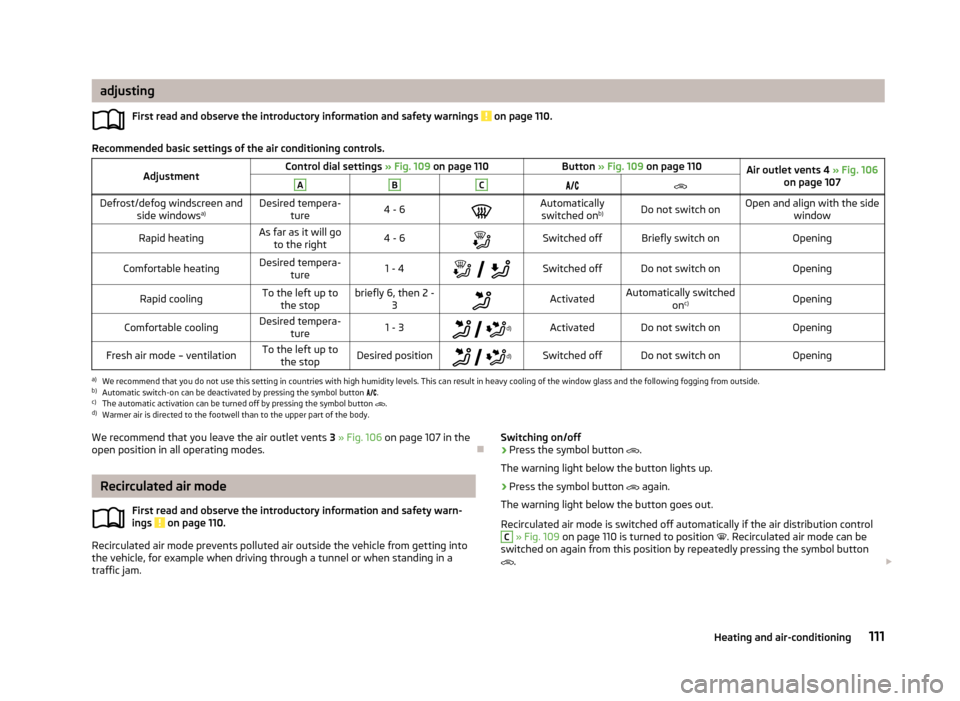
Recommended basic settings of the air conditioning controls.
AdjustmentControl dial settings » Fig. 109 on page 110Button » Fig. 109 on page 110Air outlet vents 4 » Fig. 106
on page 107ABCDefrost/defog windscreen and
side windows a)Desired tempera-
ture4 - 6Automatically
switched on b)Do not switch onOpen and align with the side
windowRapid heatingAs far as it will goto the right4 - 6Switched offBriefly switch onOpeningComfortable heatingDesired tempera-
ture1 - 4
Switched offDo not switch onOpeningRapid coolingTo the left up to
the stopbriefly 6, then 2 - 3ActivatedAutomatically switched
onc)OpeningComfortable coolingDesired tempera-
ture1 - 3
d)ActivatedDo not switch onOpeningFresh air mode – ventilationTo the left up to
the stopDesired position
d)Switched offDo not switch onOpeninga)
We recommend that you do not use this setting in countries with high humidity levels. This can result in heavy cooling of the window glass and the following fogging from outside.
b)
Automatic switch-on can be deactivated by pressing the symbol button
.
c)
The automatic activation can be turned off by pressing the symbol button
.
d)
Warmer air is directed to the footwell than to the upper part of the body.
We recommend that you leave the air outlet vents
3 » Fig. 106 on page 107 in the
open position in all operating modes.
Recirculated air mode
First read and observe the introductory information and safety warn-ings
on page 110.
Recirculated air mode prevents polluted air outside the vehicle from getting into
the vehicle, for example when driving through a tunnel or when standing in a traffic jam.
Switching on/off›Press the symbol button .
The warning light below the button lights up.›
Press the symbol button again.
The warning light below the button goes out.
Recirculated air mode is switched off automatically if the air distribution control
C
» Fig. 109 on page 110 is turned to position . Recirculated air mode can be
switched on again from this position by repeatedly pressing the symbol button
.
111Heating and air-conditioning
Page 116 of 287

Switching the windscreen heater on/off » page 64
Climatronic set in the Infotainment » Operating instructions for Infotain-
ment
Switch the temperature setting in Dual mode on/off » page 113
Switching automatic mode on » page 113
Switching the cooling system on/off » page 113
Note
Do not stick anything onto or cover the interior temperature sensor 11 » Fig. 110
as this could impair the functioning of the Climatronic.
Automatic mode
First read and observe the introductory information given on page 112.
Automatic mode works in three modes - moderate, medium, and intensive.Setting the individual operating modes » Operating instructions for Infotainment ,
chapter Vehicle settings .
Climatronic is set to the medium setting at the factory.
Recommended setting for all periods of the year
›
Set the desired temperature, we recommend 22 °C.
›
Press the button
» Fig. 110 on page 112.
›
Set the air outlet vents 3 and 4 » Fig. 106 on page 107 so that the air flow is
directed slightly upwards.
After the automatic mode is switched on, Climatronic works in the last selected
mode.
The currently selected mode is displayed in the Infotainment display. Automatic mode can be switched off by pressing one of the buttons for the air
distribution or by increasing/decreasing the blower speed.
Switching the cooling system on/off
First read and observe the introductory information given on page 112.
›
Press the symbol button
.
The warning light in the button lights up.›
Press the symbol button
again.
The warning light in the button goes out.
After the cooling system is switched off, only the ventilation function remains ac-
tive whereby the minimum temperature that can be reached is the outside tem-
perature.
Setting temperature
First read and observe the introductory information given on page 112.
The interior temperature for the left and right side can be set separately or to-
gether.
For both sides
›
Turn the control dial
A
» Fig. 110 on page 112 to the left or right to increase or
decrease the temperature.
The warning light in the symbol button
does not light up.
For the right side
›
Turn the control dial
D
» Fig. 110 on page 112 to the left or right to increase or
decrease the temperature.
The warning light in the symbol button
lights up.
If the warning light in the symbol button
is lit, the temperature for both sides
cannot be set with the control dial
A
. This function can be resumed by pressing
the symbol button
. The warning light in the button goes out.
The interior temperature can be set between +16 ℃ and +29 ℃. The interior tem-
perature is regulated automatically within this range.
If a temperature lower than +16 ℃ is selected, a blue symbol lights up on the cor-
responding control dial.
If a temperature higher than +29 ℃ is selected, a red symbol lights up on the cor-
responding control dial.
At both end positions, Climatronic runs at maximum cooling/heating output and
the temperature is automatically not regulated.
113Heating and air-conditioning
Page 117 of 287
CAUTIONLengthy and uneven distribution of the air flow out of the vents (especially
around the feet) and large differences in temperature, for example, when getting
out of the vehicle, can cause susceptible individuals to catch a cold.
Automatic recirculation mode
First read and observe the introductory information given on page 112.
Recirculated air mode prevents polluted air outside the vehicle from getting into
the vehicle, for example when driving through a tunnel or when standing in a
traffic jam.
If a considerable increase in concentration of pollutants is recognised by the air
quality sensor, recirculated air mode will temporarily be switched off.
If the concentration of pollutants decreases to the normal level, the air distribu-
tion control is automatically switched off so that fresh air can be guided into the
vehicle interior.
In recirculated air mode air is sucked out of the interior of the vehicle and then
fed back into the interior. When the automatic air distribution control is switched on, an air quality sensor measures the concentration of pollutants in the drawn in
air.
If the air quality sensor does not switch on automatic recirculated air mode when
there is an unpleasant smell, you can switch in on manually.
Switching on/off
›
Press the symbol button
.
The warning light below the button lights up.
›
Press the symbol button
again; the warning light below the button goes out;
if necessary, press the symbol button
again.
Switching on and off is also possible in the Infotainment » Operating instructions
for Infotainment , chapter Vehicle settings .
WARNINGNever leave recirculated air mode switched on over a longer period of time, as
“stale air” can cause driver and passenger fatigue, reduce attention levels and
also cause the windows to mist up. The risk of having an accident increases.
Switch off recirculated air mode as soon as the windows start to mist up.
Note
■ If the windscreen mists up, press the symbol button . Press the symbol
button when the windscreen is demisted.■
The automatic air distribution control operates only if the outside temperature
is higher than approx. 2 °C.
Controlling blower
First read and observe the introductory information given on page 112.
The blower stage can be manually adapted to suit your particular needs.
›
Turn the control dial
C
» Fig. 110 on page 112 to the left or right to increase or
decrease the temperature.
If the blower speed is reduced to a minimum, Climatronic is switched off.
The set blower speed is displayed in the control dial
C
when the respective num-
ber of warning lights illuminate.
WARNING■ “Stale air” may result in fatigue in the driver and occupants, reduce attention
levels and also cause the windows to mist up. The risk of having an accident
increases.■
Do not switch off the Climatronic system for longer than necessary.
■
Switch on the Climatronic system as soon as the windows mist up.
114Using the system