2013 SKODA OCTAVIA battery
[x] Cancel search: batteryPage 39 of 287
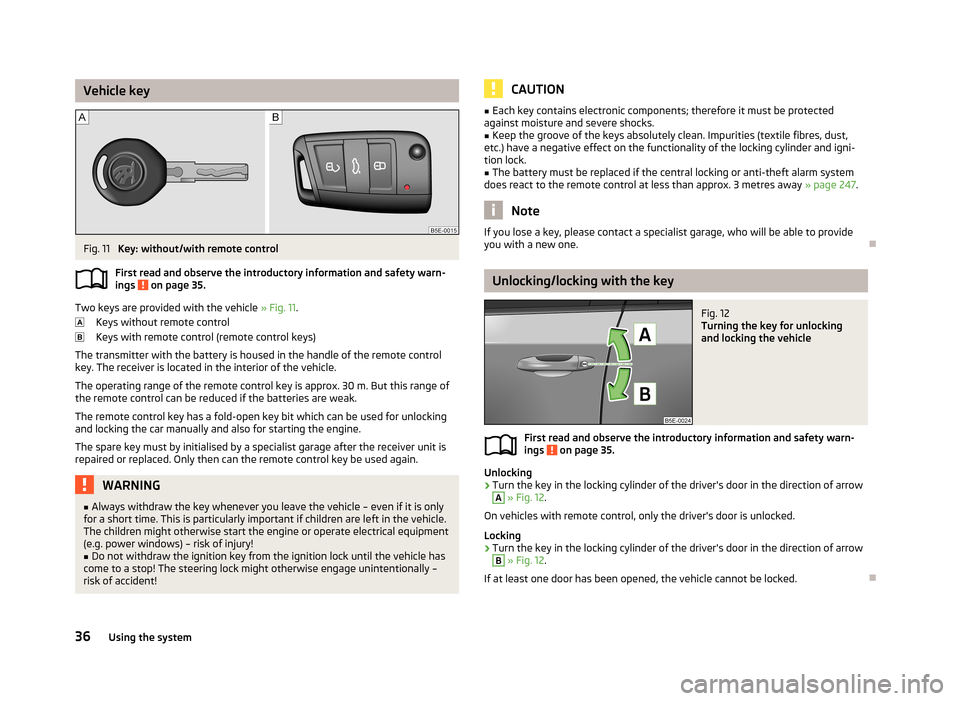
Vehicle keyFig. 11
Key: without/with remote control
First read and observe the introductory information and safety warn- ings
on page 35.
Two keys are provided with the vehicle » Fig. 11.
Keys without remote control
Keys with remote control (remote control keys)
The transmitter with the battery is housed in the handle of the remote control key. The receiver is located in the interior of the vehicle.
The operating range of the remote control key is approx. 30 m. But this range ofthe remote control can be reduced if the batteries are weak.
The remote control key has a fold-open key bit which can be used for unlocking
and locking the car manually and also for starting the engine.
The spare key must by initialised by a specialist garage after the receiver unit is repaired or replaced. Only then can the remote control key be used again.
WARNING■ Always withdraw the key whenever you leave the vehicle – even if it is only
for a short time. This is particularly important if children are left in the vehicle.
The children might otherwise start the engine or operate electrical equipment
(e.g. power windows) – risk of injury!■
Do not withdraw the ignition key from the ignition lock until the vehicle has
come to a stop! The steering lock might otherwise engage unintentionally – risk of accident!
CAUTION■ Each key contains electronic components; therefore it must be protected
against moisture and severe shocks.■
Keep the groove of the keys absolutely clean. Impurities (textile fibres, dust,
etc.) have a negative effect on the functionality of the locking cylinder and igni-
tion lock.
■
The battery must be replaced if the central locking or anti-theft alarm system
does react to the remote control at less than approx. 3 metres away » page 247.
Note
If you lose a key, please contact a specialist garage, who will be able to provide
you with a new one.
Unlocking/locking with the key
Fig. 12
Turning the key for unlocking
and locking the vehicle
First read and observe the introductory information and safety warn-
ings on page 35.
Unlocking
›
Turn the key in the locking cylinder of the driver's door in the direction of arrow
A
» Fig. 12 .
On vehicles with remote control, only the driver's door is unlocked.
Locking
›
Turn the key in the locking cylinder of the driver's door in the direction of arrow
B
» Fig. 12 .
If at least one door has been opened, the vehicle cannot be locked.
36Using the system
Page 40 of 287

Unlocking/locking with the remote controlFig. 13
Remote control key
First read and observe the introductory information and safety warn-
ings on page 35.
Explanation of graphic » Fig. 13
Unlocking the vehicle
Locking the vehicle
Unlocking the boot lid
Folding out/folding up of the key bit Warning light
Unlocking
The turn signal lights flash twice as confirmation that the vehicle has been un-
locked.
If you unlock the vehicle and do not open a door or the boot lid within the next
45 seconds, the vehicle will lock again automatically and the safelock system or
anti-theft alarm system will be switched on. This function is intended to prevent
the car being unlocked unintentionally.
The seat and mirror are adjusted after the vehicle is unlocked » page 74.
Locking
The turn signal lights flash once as confirmation that the vehicle has been locked.
If the doors or the luggage compartment lid remain open after the vehicle has been locked, the turn signal lights do not flash until they have been closed.
The current position of the seat and mirror after the vehicle is locked » page 75.
Checking the battery condition If the red indicator light
B
» Fig. 13 does not flash when you press a button on
the remote control key, the battery is empty. Replace the battery » page 247.
ABWARNINGIf the car is locked from the outside and the safelock system is switched on,
there must not be any person in the car as it is then not possible to open ei-
ther a door or a window from the inside. The locked doors make it more diffi-
cult for rescuers to get into the vehicle in an emergency – risk of death!
CAUTION
■ Only operate the remote control when the doors and luggage compartment lid
are closed and the vehicle is in your line of sight.■
If the driver door is open, the vehicle cannot be locked using the remote control
key.
■
The operation of the remote control may temporarily be affected by signal inter-
ference from transmitters close to the car and which operate in the same fre-
quency range.
Note
For vehicles with the anti-theft alarm system, the acoustic signals can additional-
ly also be enabled / disabled when unlocking / locking » Infotainment manual ,
chapter Vehicle settings (key CAR) .
37Unlocking and opening
Page 41 of 287

Unlocking/locking – KESSYFig. 14
KESSY: Name of the zones / sensors in the front door handle
First read and observe the introductory information and safety warn- ings
on page 35.
Unlocking or locking areas
Front door left
Front door right
Luggage compartment lid
The KESSY system (Keyless Entry Start Exit System) enables unlocking and lock-
ing of the vehicle without actively using the remote control key. The key must be
in one of the areas
A,
B
or
C
(about 1.5 meters away from the vehicle) » Fig. 14.
Unlocking
›
Grab the door handle of the front door or cover the sensor
2
» Fig. 14 with the
whole palm of your hand » .
Locking
›
Touch the sensor
1
» Fig. 14 with your fingers.
On vehicles fitted with automatic gearbox, the selector lever must be moved into the position P before unlocking.
Unlocking the boot lid
›
Press the button in the handle of the boot lid » Fig. 19 on page 44.
Switching off the safelock system
›
Use your fingers to touch the sensor
1
twice within 2 seconds.
ABCIf you cover the sensor 2 at the same time as the sensor 1 » Fig. 14 when un-
locking the vehicle, it is not unlocked.
If the vehicle is locked via the sensor 1
, it will not be possible to unlock it again
in the following 2 seconds via the sensor
2
- prevents accidental unlocking.
The KESSY system can find the valid key, even if it was left in the front of the ve-
hicle's roof for example
D
. » Fig. 14 It is therefore not always necessary to know
where the key is.
Always check to see whether the vehicle is locked. Further information about the KESSY system » page 41.
CAUTION
■
Do not use objects which might prevent direct contact between the hand and
the grip sensor.■
Some types of gloves can impair the function of the grip sensor.
■
After leaving the vehicle, it does not lock automatically, the procedure for lock-
ing the vehicle must therefore be observed.
■
The gear selector must be located in position P when leaving the vehicle 1)
. Oth-
erwise the vehicle cannot be locked.
■
If the battery in the key is weak or discharged, the vehicle may not be unlocked
or locked via the KESSY system. In this case, use the emergency unlocking or emergency locking on the driver's door » page 248.
Safe securing system
First read and observe the introductory information and safety warn-
ings
on page 35.
The door locks are blocked automatically if the vehicle is locked from the outside.
Afterwards, it is not possible to open the doors with the door handle either from
the inside or from the outside.
This fact is pointed out by the following message on the display of the instrument
cluster after switching out the ignition.
Check SAFELOCK! Owner's manual!
CHECK SAFELOCK
1)
Valid for vehicles with automatic gearbox.
38Using the system
Page 44 of 287

WARNING■Make sure that the door has closed correctly as it can open suddenly while
driving – risk of death!■
Only open and close the door when there is no one in the opening/closing
range – risk of injury!
■
An opened door can close automatically if there is a strong wind or the vehi-
cle is on an incline – risk of injury!
KESSY
Introduction
This chapter contains information on the following subjects:
Information message
41
Parking vehicle
41
The KESSY system (Keyless Entry Start Exit System) enables unlocking and lock-
ing of the vehicle without actively using the remote control key.
Information message
First read and observe the introductory information given on page 41.
Key in the vehicle
The protection against inadvertently locking the key in the vehicle unlocks the vehicle automatically if the following conditions are met.
The vehicle, including the boot lit, has been locked.The key with which the vehicle has been locked remains in the vehicle in the
zone
D
» Fig. 14 on page 38.
The turn signal lights flash four times as confirmation that the vehicle has been
unlocked again.
The following message is shown in the information cluster display. Key in vehicle.
KEY IN VEHICLE
Additionally, on vehicles which are fitted with the anti-theft alarm system, an au-
dible signal sounds.
The system has not found a key
If the system has not found a key in the vehicle, the following message appears in the display of the instrument cluster.
Key not found.
Key not detected. Owner's manual!
NO KEY
This can occur if the key is outside the vehicle, the battery in the key is dis-
charged, the key is defective or the electromagnetic field is strongly disturbed.
Fault in KESSY system
If there is a fault in the KESSY system, the following message will appear in the display of the instrument cluster.
Keyless access system faulty.
KEYLESS ACCESS SYSTEM FAULTY
Low voltage of the key battery
If the voltage of the battery in the remote control key is too low, the following message appears in the display of the instrument cluster.
Change the key battery!
KEY BATTERY PLEASE CHANGE
Change the key battery » page 247!
Parking vehicle
First read and observe the introductory information given on page 41.
If the vehicle is not unlocked within 60 or 90 hours, the sensors in the handle of
the driver or front passenger's door are deactivated automatically » Fig. 14 on
page 38.
Activation after 60 hours
›
Unlock the driver's door using the sensor
2
» Fig. 14 on page 38.
›
Press the handle of the boot lid.
›
Unlock the vehicle using the symbol button
on the remote control key.
›
Unlocking the driver's door in an emergency » page 248.
41Unlocking and opening
Page 45 of 287

Activation after 90 hours›Unlock the vehicle using the symbol button on the remote control key.›
Unlocking the driver's door in an emergency » page 248.
Anti-theft alarm system
Introduction
This chapter contains information on the following subjects:
Activating/deactivating
42
Interior monitor and towing protection
43
The anti-theft alarm system increases the level of protection against people
seeking to break into the vehicle. The system triggers audible and visual warning
signals if an attempt is made to break into the vehicle (hereafter referred to only
as alarm).
An alarm is triggered when the following monitored areas of the vehicle have a
fault.
› Bonnet.
› Boot lid.
› Doors.
› Ignition lock.
› Vehicle inclination
» page 43.
› Interior of car
» page 43.
› A drop in voltage of the on-board power supply.
› Socket of the factory-fitted towing device
» page 173, Driving with a trailer .
An alarm is immediately triggered if either of the two battery terminals is discon-
nected while the anti-theft alarm system is activated.
The alarm is switched off by unlocking the vehicle or switching on the ignition.
CAUTION
Before leaving the vehicle, it must be checked that all of the windows, doors and
the sliding/tilting roof are locked in order to ensure the full functionality of the
anti-theft alarm system.
Note
The working life of the alarm siren is 5 years.
Activating/deactivating
First read and observe the introductory information and safety warn-ings
on page 42.
Activating
The anti-theft alarm system is activated automatically approximately 30 seconds
after the vehicle is locked.
If you unlock the vehicle and do not open a door or the boot lid within the next
45 seconds, the vehicle will lock again automatically and the safelock system or
anti-theft alarm system will be switched on. This function is intended to prevent
the car being unlocked unintentionally.
Deactivating
The anti-theft alarm system is deactivated automatically after the vehicle is un-
locked. If the vehicle is not opened within 45 seconds, the anti-theft alarm sys-
tem is automatically activated again.
The alarm system is also deactivated if you unlock the driver door using the key
within 45 seconds of locking the vehicle.
Note
When the Vehicle is unlocked using the key on the driver's door, insert the key
into the ignition and switch on the ignition in order to deactivate the alarm sys-
tem.
42Using the system
Page 50 of 287

The top lid position is adjusted, for example, in the following situations.
› When the space for opening the lid is limited (e.g. garage height).
› For a more convenient operation, such as by a person's height.
The top position which is reached when the lid opens automatically, is always
lower than the maximum top position which can be reached when the lid is
opened manually.
The lid always opens to the height which was last stored.
Malfunctions
First read and observe the introductory information and safety warn-
ings
on page 44.
If the battery is disconnected and reconnected while the lid is open, it is necessa-
ry to activate the system of the electric boot lid. Activation means closing the lid
by hand. Thus, the end position of the lid is stored under fully closed in secured lock.
Examples of operational malfunctions
Description of the malfunc-
tionPossible solutionsThe lid cannot be lifted out of
the lockEmergency unlocking of the lid » page 249The lid does not react to an
opening signalRemoving a possible obstacle (e.g. snow), re-
opening the lid » page 45
Press handle A
and pull the lid upwards
The lid remains in the top po-
sitionManual closing of the lid
Electrical power windows
Introduction
This chapter contains information on the following subjects:
Opening/closing the window from the driver seat
48
Opening the windows in the front passenger door and in the rear doors
48Force limit49Window convenience operation49
Operational faults
49
The electrical power windows can only be operated when the ignition is switched
on.
After switching the ignition off, it is still possible to open or close the windows for
approx. 10 minutes. The electrical power windows are only switched off com- pletely once the driver's door or front passenger door are opened.
When driving always use the existing heating, air conditioning and ventilation
system for ventilating the interior of the vehicle. If the windows are opened, dust
as well as other dirt can get into the vehicle and in addition the wind noise is
more at certain speeds.
WARNING■ Ensure that no persons are still left in the vehicle when locking the vehicle.
In an emergency, the windows will no longer be able to be opened from the
inside.■
The system is fitted with a force limiter » page 49. If there is an obstacle,
the closing process is stopped and the window goes down by several centi-
metres. The windows should nevertheless be closed carefully – risk of injury!
■
It is recommended to deactivate the electrically operated power windows in
the rear doors (safety switch)
S
if there are children in the rear seats » Fig. 23
on page 48.
CAUTION
■ Keep the windows clean to ensure the correct functionality of the electric win-
dows.■
In the event that the windows are frozen, first of all eliminate the
ice » page 207 , De-icing windows and exterior mirrors and only then operate the
electrical power windows. Otherwise, the window sealing and the electrical pow- er window mechanism could be damaged.
■
In the winter, ice accumulating on the surface of the window may cause there
to be more resistance when closing the window. The window will stop and move back several centimetres.
■
It is necessary to deactivate the force limiter to close the window » page 49.
■
When leaving the locked vehicle make sure that the windows are closed at all
times.
47Unlocking and opening
Page 52 of 287

The window can be completely opened automatically by briefly pressing the but-ton down as far as the stop. Renewed pressing of the button causes the window
to stop immediately.
Closing›
Lightly press the appropriate button up and hold it until the window has moved
into the desired position.
The window can be completely closed automatically by briefly pressing the but-
ton up as far as the stop. Renewed pressing of the button causes the window to
stop immediately.
Force limit
First read and observe the introductory information and safety warn-ings
on page 47.
The electrical power window system is fitted with a force limiter. It reduces the
risk of bruises or injuries when closing the windows.
If there is an obstacle, the closing process is stopped and the window goes down
by several centimetres.
If the obstacle prevents the window from being closed during the next 10 sec-
onds, the closing process is interrupted once again and the window goes down by several centimetres.
If you attempt to close the window again within 10 seconds of the window being moved down for the second time, even though the obstacle was not yet been re-moved, the closing process is only stopped. During this time it is not possible to
automatically close the window. The force limiter is still switched on.
The force limiter is only switched off if you attempt to close the window again
within the next 10 seconds - the window will now close with full force!
If you wait longer than 10 seconds, the force limiter is switched on again.
Window convenience operation
First read and observe the introductory information and safety warn-ings
on page 47.
Convenience opening/closing of all windows can be operated by locking/unlock-
ing the vehicle as follows.
Settings the window convenience operation » Infotainment owner's manual ,
chapter Vehicle settings (button CAR) .
The prerequisite for ensuring that the convenience operating feature correctly is the automatic opening/closing of all windows is operational.
Opening and closing can take place in one of the following ways.
Opening
›
Press the symbol button
button on the remote control key.
›
Hold the key in the driver's lock in the unlock position.
›
Hold button
A
1)
in the opening position » Fig. 23 on page 48.
Closing
›
Press the symbol button
button on the remote control key.
›
Hold the key in the driver's lock in the lock position.
›
Hold button
A
1)
in the closing position » Fig. 23 on page 48.
›
In the KESSY system, hold a finger on the sensor
1
» Fig. 14 on page 38.
You can interrupt the opening or closing process for the windows immediately by
releasing the key or the the button
A
and interrupting the locking/unlocking.
Convenience opening or closing the window using the key in the driver's lock is
only possible within 45 seconds after locking the vehicle.
Operational faults
First read and observe the introductory information and safety warn-
ings
on page 47.
The automatic power windows do not work if the vehicle battery was disconnec- ted and connected while a window is open. The system must be activated.
Activation sequence:
1)
Convenience opening and closing the windows with the button
A
is possible immediately after un-
locking the vehicle or turning off the ignition and opening the driver's or front passenger's door.
49Unlocking and opening
Page 53 of 287

›Switch on the ignition.›Pull the top edge of the button and close the window.›
Release the button.
›
Pull the relevant button upwards again for approx. 3 seconds, and keep it press-
ed down.
Panoramic sliding/tilting roof (Octavia)
Introduction
This chapter contains information on the following subjects:
Operation
50
Convenience operation of sliding / tilting roof
51
The panoramic sliding/tilting roof (abbreviated in the following as 'sliding/tilting
roof') can only be operated when the ignition is turned on and when the outdoor temperature is higher than -20 °C.
The sliding/tilting roof can still be operated for approx. 10 minutes after switchingthe ignition off. However, as soon as the driver or front passenger's door is
opened it is no longer possible to operate the sliding/tilting roof.
CAUTION
■ Always close the sliding/tilting roof before disconnecting the battery.■If the battery has been disconnected and reconnected, it is possible that the
sliding/tilting roof does not operate correctly. Next, move the rotary switch into
position A
» Fig. 25 on page 50 , pull the recess firmly downwards and hold for-
wards firmly. The sliding/tilting roof opens and closes again after around 10 sec-
onds. Do not release the control dial until it has done so.
OperationFig. 25
Control dial for the sliding/tilting
roof
First read and observe the introductory information and safety warn-
ings on page 50.
Comfort position
›
Turn the switch to position
C
» Fig. 25 .
When the sliding/tilting roof is in the comfort position, the intensity of the wind noise is reduced.
Open partially
›
Turn the switch to a position in area
D
.
Open fully
›
Turn the switch to position
B
and hold it in this position (spring-tensioned po-
sition).
Tilting roof
›
Turn the switch to position
A
.
›
Press the switch in the region of the lug
E
towards the roof.
Closing
›
Turn the switch to position
A
.
›
Press the switch on the recess
E
down and pull forwards.
Force limiter
The sliding/tilting roof is fitted with a force limiter. The sliding/tilting roof stops and moves back several centimetres when it cannot be closed because there is
something in the way (e.g. ice). The sliding/tilting roof can be fully closed without
a force limiter by pressing the switch on the recess
E
down and then pushing it
forward until the sliding/tilting roof is fully closed » .
50Using the system