2013 Seat Toledo steering
[x] Cancel search: steeringPage 36 of 258

34Airbag system
WARNING (Continued)
● To clean the steering wheel or dash panel, you may use only a dry or a
water-moistened cloth. Never clean the dash panel and the airbag mod-
ule surface with cleaners containing solvents. Solvents cause the surface
to become porous. If the airbag triggered, plastic parts could become de-
tached and cause injuries.
● Never attempt to repair, adjust, remove or install parts of the airbag
system.
● Any work on the airbag system or removal and installation of the air-
bag components for other repairs (such as repairs to the steering wheel)
should be performed only by a specialised workshop. Specialised work-
shops have the necessary tools, repair information and qualified person-
nel.
● We strongly recommend you to go to a specialised workshop for all
work on the airbag system.
● Never attempt to alter the front bumper or the body.
● The airbags provide protection for just one accident; replace them
once they have deployed.
For the sake of the environment
The airbags, which are a special type of waste, must be disposed of through
an authorised service, because they contain pyrotechnic elements.
Page 37 of 258

35
Airbag system
Front airbags
Description of front airbags
The airbag system is not a substitute for the seat belts.
Fig. 17 Driver airbag in the steering wheel and front passenger airbag in the dash
panel The front airbag for the driver is located in the steering wheel ⇒ Fig. 17
and the front passenger airbag is located in the dash panel ⇒ Fig. 17 . Air-
bags are identified by the word “AIRBAG”.
In conjunction with the seat belts, the front airbag system gives the front
occupants additional protection for the head and chest in the event of a se-
vere frontal collision ⇒ page 37, Safety notes on the front airbag system.
In addition to their normal function of restraining the occupants, the seat
belts also hold the driver and front passenger in a position where the air-
bags can provide maximum protection in a frontal collision.
The airbag system is not a substitute for seat belts, but it is an integral part
of the vehicle's overall passive safety system. Please bear in mind that the
airbag system can only work effectively when the vehicle occupants are
wearing their seat belts correctly and have adjusted the head restraints properly. Therefore, it is most important to wear the seat belts at all times,
not only because this is required by law in most countries, but also for your
safety
⇒ page 20, Brief introduction.
The main parts of the front airbag system are:
● an electronic control and monitoring system (control unit)
● the two front airbags (airbag with gas generator) for the driver and front
passenger
● a control lamp on the dash panel ⇒ page 33
The airbag system operation is monitored electronically. The airbag control
lamp will light up for a few seconds every time the ignition is switched on
(self-diagnosis).
There is a fault in the system if the control lamp :
● does not light up when the ignition is switched on ⇒ page 33
● turns off after 4 seconds after the ignition is switched on
● turns off and then lights up again after the ignition is switched on
● lights up or flashes while the vehicle is moving
The front airbag system will not be triggered if:
● the ignition is switched off
● there is a minor frontal collision
● there is a side collision
● there is a rear-end collision
● the vehicle turns over
Safety FirstOperating instructionsPractical TipsTechnical specifications
Page 39 of 258

37
Airbag system
Airbag covers when the frontal airbags are triggered
Fig. 19 Airbag covers reacting when the front airbags are triggered The airbag covers fold out of the steering wheel or dash panel when the
driver and front passenger airbags are triggered ⇒ Fig. 19. The airbag cov-
ers remain connected to the steering wheel or the dash panel. Safety notes on the front airbag system
If you use airbags correctly, they can considerably reduce
the risk of injury in many kinds of accident.
WARNING
● It is important for the driver and front passenger to keep a distance of
at least 25 cm from the steering wheel and dash panel. If the minimum
distance is not observed then the airbags do not correctly protect the ve-
hicle occupants; risk of fatal injuries! In addition, the front seats and
head restraints must always be positioned correctly for the height of the
occupant.
● If you are not wearing a seat belt, if you lean forward or to the side
while travelling or assume an incorrect sitting position, there is a sub-
stantially increased risk of injury. This increased risk of injury will be fur-
ther increased if you are struck by an inflating airbag.
● Never let a child travel on the front seat without an appropriate re-
straint system. If the airbag is triggered in an accident, children can sus-
tain serious or fatal injuries from the airbag as it inflates ⇒ page 46.
● The deployment space between the front passengers and the airbags
must not in any case be occupied by other passenger, pets and objects.
● The airbags provide protection for just one accident; replace them
once they have deployed.
● It is also important not to attach any objects such as cup holders or
telephone mountings to the surfaces covering the airbag units.
● Do not attempt to modify components of the airbag system in any
way.
Safety FirstOperating instructionsPractical TipsTechnical specifications
Page 45 of 258

43
Airbag system
WARNING (Continued)
● Do not attempt to modify components of the airbag system in any
way.
● The side and head airbags are managed through sensors located in
the interior of the front doors. To ensure the correct operation of the side
and head airbags neither the doors nor the door panels should be modi-
fied in any way (e.g. fitting loudspeakers). If the front door is damaged,
the airbag system may not work correctly. All work carried out on the
front door must be done in a specialised workshop.
Deactivating airbags Deactivating airbags
The deactivation of airbags corresponds only to certain cases, i.e. if:
● a child seat is required in the front passenger seat with the child facing
in the opposite direction to the direction of travel (in some countries, due to
divergent legal requirements, facing in the direction of travel) ⇒ page 48;
● despite the driver seat being in the correct position, a minimum dis-
tance of 25 cm cannot be maintained between the centre of the steering
wheel and the driver's torso.
● installation of special devices is required in the steering wheel area due
to a physical disability.
● if you have special seats installed (e.g. an orthopaedic seat without side
airbag).
The front passenger front airbag can be disabled using the switch
⇒ page 44.
We recommend that you contact an authorised SEAT dealer for the disabling
of other airbags. Airbag system control
The airbag system availability is controlled electronically, regardless of
whether an airbag is disabled.
If an airbag was disabled using a diagnostics system:
●
the airbag system warning lamp lights up after switching on the igni-
tion for about 4 seconds, and then flashes for about 12 seconds
If the airbag has been disabled with the airbag switch on the side of the
dash panel:
● the airbag control lamp will light up for about 4 seconds after the ig-
nition is switched on.
● the airbag is disabled, signalled with the warning lamp which
lights up with the word placed in the centre part of the
dash panel ⇒ Fig. 24 3
.
Note
● Respect the current legislation in your country regarding the deactiva-
tion of airbags
● At your authorised SEAT dealer you can find information on which vehi-
cle airbags can be deactivated.
Safety FirstOperating instructionsPractical TipsTechnical specifications
Page 57 of 258
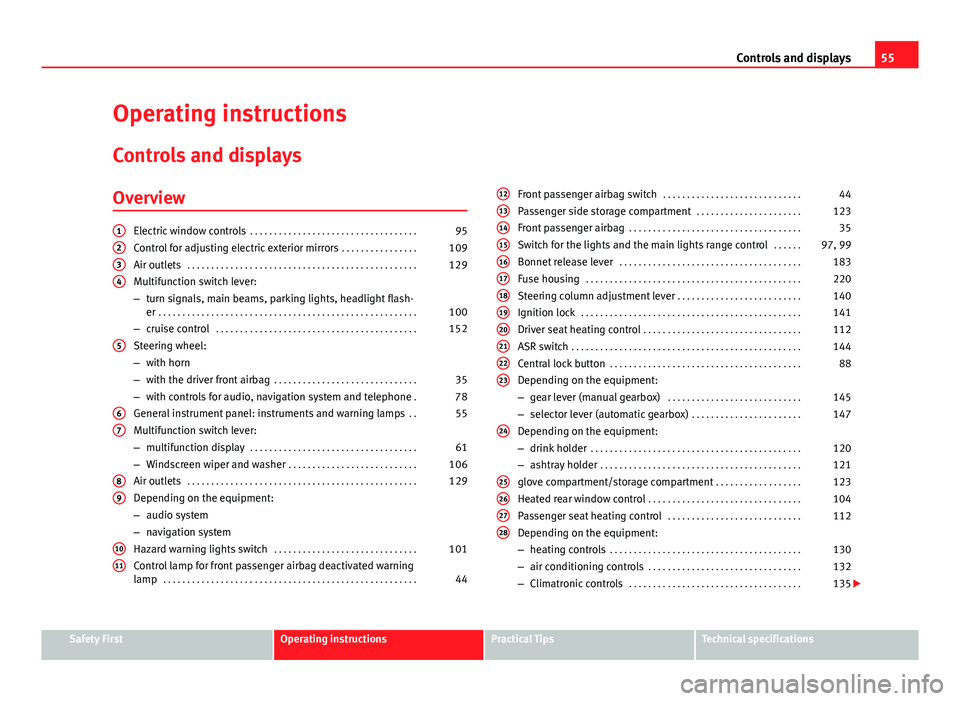
55
Controls and displays
Operating instructions Controls and displays
Overview
Electric window controls . . . . . . . . . . . . . . . . . . . . . . . . . . . . . . . . . . . 95
Control for adjusting electric exterior mirrors . . . . . . . . . . . . . . . .109
Air outlets . . . . . . . . . . . . . . . . . . . . . . . . . . . . . . . . . . . . . . . . . . . . . . . . 129
Multifunction switch lever:
– turn signals, main beams, parking lights, headlight flash-
er . . . . . . . . . . . . . . . . . . . . . . . . . . . . . . . . . . . . . . . . . . . . . . . . . . . . . . 100
– cruise control . . . . . . . . . . . . . . . . . . . . . . . . . . . . . . . . . . . . . . . . . . 152
Steering wheel:
– with horn
– with the driver front airbag . . . . . . . . . . . . . . . . . . . . . . . . . . . . . . 35
– with controls for audio, navigation system and telephone .78
General instrument panel: instruments and warning lamps . .55
Multifunction switch lever:
– multifunction display . . . . . . . . . . . . . . . . . . . . . . . . . . . . . . . . . . . 61
– Windscreen wiper and washer . . . . . . . . . . . . . . . . . . . . . . . . . . . 106
Air outlets . . . . . . . . . . . . . . . . . . . . . . . . . . . . . . . . . . . . . . . . . . . . . . . . 129
Depending on the equipment:
– audio system
– navigation system
Hazard warning lights switch . . . . . . . . . . . . . . . . . . . . . . . . . . . . . . 101
Control lamp for front passenger airbag deactivated warning
lamp . . . . . . . . . . . . . . . . . . . . . . . . . . . . . . . . . . . . . . . . . . . . . . . . . . . . . 44
1234
5
67
89
1011
Front passenger airbag switch
. . . . . . . . . . . . . . . . . . . . . . . . . . . . . 44
Passenger side storage compartment . . . . . . . . . . . . . . . . . . . . . .123
Front passenger airbag . . . . . . . . . . . . . . . . . . . . . . . . . . . . . . . . . . . . 35
Switch for the lights and the main lights range control . . . . . .97, 99
Bonnet release lever . . . . . . . . . . . . . . . . . . . . . . . . . . . . . . . . . . . . . . 183
Fuse housing . . . . . . . . . . . . . . . . . . . . . . . . . . . . . . . . . . . . . . . . . . . . . 220
Steering column adjustment lever . . . . . . . . . . . . . . . . . . . . . . . . . . 140
Ignition lock . . . . . . . . . . . . . . . . . . . . . . . . . . . . . . . . . . . . . . . . . . . . . . 141
Driver seat heating control . . . . . . . . . . . . . . . . . . . . . . . . . . . . . . . . . 112
ASR switch . . . . . . . . . . . . . . . . . . . . . . . . . . . . . . . . . . . . . . . . . . . . . . . . 144
Central lock button . . . . . . . . . . . . . . . . . . . . . . . . . . . . . . . . . . . . . . . . 88
Depending on the equipment:
– gear lever (manual gearbox) . . . . . . . . . . . . . . . . . . . . . . . . . . . . 145
– selector lever (automatic gearbox) . . . . . . . . . . . . . . . . . . . . . . .147
Depending on the equipment:
– drink holder . . . . . . . . . . . . . . . . . . . . . . . . . . . . . . . . . . . . . . . . . . . . 120
– ashtray holder . . . . . . . . . . . . . . . . . . . . . . . . . . . . . . . . . . . . . . . . . . 121
glove compartment/storage compartment . . . . . . . . . . . . . . . . . .123
Heated rear window control . . . . . . . . . . . . . . . . . . . . . . . . . . . . . . . . 104
Passenger seat heating control . . . . . . . . . . . . . . . . . . . . . . . . . . . . 112
Depending on the equipment:
– heating controls . . . . . . . . . . . . . . . . . . . . . . . . . . . . . . . . . . . . . . . . 130
– air conditioning controls . . . . . . . . . . . . . . . . . . . . . . . . . . . . . . . . 132
– Climatronic controls . . . . . . . . . . . . . . . . . . . . . . . . . . . . . . . . . . . . 135
121314151617181920212223
24
25262728
Safety FirstOperating instructionsPractical TipsTechnical specifications
Page 63 of 258

61
Controls and displays
Multi-function display* (on board computer)
Introduction
The multifunction display can only be operated when the ignition is switch-
ed on. When the ignition is switched on the last function selected before it
was switched off is displayed.
The multifunction display data is shown on the screen ⇒ Fig. 33
⇒ page 61.
In vehicles fitted with an informative display ⇒ page 66 the system can be
adjusted so that certain data is not shown.
WARNING
● Always keep your attention on driving! As the driver, you have the full
responsibility for the safety of traffic.
● Do not rely only on the outside temperature indicator to verify wheth-
er the road surface is frozen. This is because with an outside temperature
of +4 °C (+39 °F) ice can generate on the road - Warning of frozen road
surface!
Note
● Models for certain countries can show the values in imperial units.
● If the second speed in mph (km/h) is displayed, the current speed in
km/h (mph) is not displayed on the screen. Memory
Fig. 33 Multifunction
display
The multifunction display has two automatic memories. The selected mem-
ory is displayed on the screen ⇒ Fig. 33.
The current journey data (memory 1) is always displayed when the number
1 appears on the display. When number 2 appears on the display, the total
distance travelled is shown (memory 2).
The memory is selected depending on the equipment:
● by pressing the lever's B
button briefly
⇒ Fig. 34 ⇒ page 62, or else
● briefly pressing the right thumbwheel of the multifunction steering
wheel 1
⇒
Fig. 35.
Current journey memory (memory 1)
The current journey memory collects data from the moment the ignition is
switched on until it is switched off. If the journey is continued within two
hours of switching off the ignition, the new values will be added to the ex-
isting trip recorder memory. The memory will automatically be deleted if the
journey is interrupted for more than two hours.
Total distance travelled memory (memory 2)
The total distance travelled memory collects journey data from any number
of individual journeys up to a maximum of 19 hours and 59 minutes and
Safety FirstOperating instructionsPractical TipsTechnical specifications
Page 64 of 258
62Controls and displays
1999 km (miles) or until 99 hours and 59 minutes and 9999 km (miles) in
cars with an informative display. The memory will automatically be deleted
if one of the named values is reached, resetting the data collected.
Unlike the current journey memory, this memory is not deleted, even when
the ignition is switched off for more than two hours.
Note
After disconnecting the battery, all the values stored in the memories 1 and
2 are deleted.
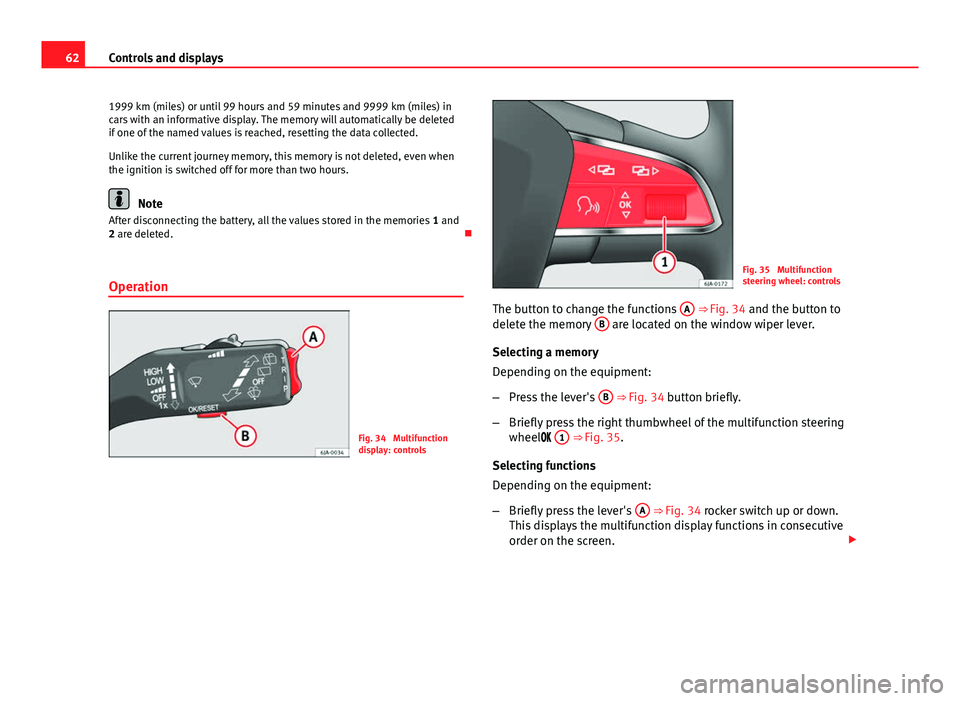
Operation
Fig. 34 Multifunction
display: controls
Fig. 35 Multifunction
steering wheel: controls
The button to change the functions A
⇒ Fig. 34 and the button to
delete the memory B are located on the window wiper lever.
Selecting a memory
Depending on the equipment:
– Press the lever's B
⇒ Fig. 34 button briefly.
– Briefly press the right thumbwheel of the multifunction steering
wheel 1
⇒
Fig. 35.
Selecting functions
Depending on the equipment:
– Briefly press the lever's A
⇒ Fig. 34 rocker switch up or down.
This displays the multifunction display functions in consecutive
order on the screen.
Page 65 of 258

63
Controls and displays
– Turn the right thumbwheel of the multifunction steering wheel
1
⇒ Fig. 35. This displays the multifunction display functions
in consecutive order on the screen.
Resetting
– Select the required memory.
Depending on the equipment:
– Press and hold the lever's B
⇒ Fig. 34 button.
– Press and hold the right thumbwheel of the multifunction steer-
ing wheel 1
⇒
Fig. 35.
This will reset the following values of the selected memory:
● the average fuel consumption
● journey distance covered
● average speed
● duration of the journey
Multifunction display data
Outside temperature
The display indicates the outside temperature.
At temperatures below +4 °C (+39 °F), the snowflake symbol is also dis-
played (frozen road surface warning symbol) and an audible warning is giv-
en. Pressing the lever's rocker switch A
⇒ Fig. 34 or turning the right thumbwheel of the steering wheel
1
⇒ Fig. 35 shows the last displayed
function.
Journey duration
The display shows the time you have covered since the memory was last re-
set. If you wish to measure the duration of a journey from a specific mo-
ment, the memory must be deleted ⇒ page 62.
The maximum time indicated by the two memories is 19 hours 59 minutes
or 99 hours and 59 minutes for vehicles fitted with an informative display.
The memory is reset if this value is exceeded.
Current fuel consumption
The current fuel consumption is indicated on the display in litres/100km
(miles) 1)
. You can adapt your driving style to the required consumption with
the assistance of this indicator.
The consumption is displayed in litres per hour while the vehicle is stopped
or at idling speed 2)
.
Average fuel consumption
The display shows the average fuel consumption in litres/100km (miles) 1)
calculated since the memory was last reset ⇒ page 61.
If you wish to measure the average fuel consumption from a specific period,
the memory must first be deleted ⇒ page 62. While driving the first 300 m
after deleting the memory this value is not shown on the display.
The value is updated regularly while the vehicle is in motion.
1)
The indication of consumption is given in kms (miles)/litres in models for certain countries.
2) The indication of the consumption when the vehicle is stationary is given in - -.- kms/litre
in models for certain countries.
Safety FirstOperating instructionsPractical TipsTechnical specifications