Page 52 of 319
50Child safety
WARNING
● The shoulder part of the seat belt must lie approximately on the cen-
tre of the shoulder, never across the neck or the arm. The seat belt must
lie close to the upper part of the body. The lap belt part must lie across
the pelvis, not across the stomach, and always fit closely. Pull the belt
tight if necessary to take up any slack ⇒ page 23, Seat belts.
● Read and always observe information and warnings concerning the
use of child seats ⇒
in Safety notes on using child seats on page 47.
Page 53 of 319
51
Child safety
Securing child seats
Ways to secure a child seat
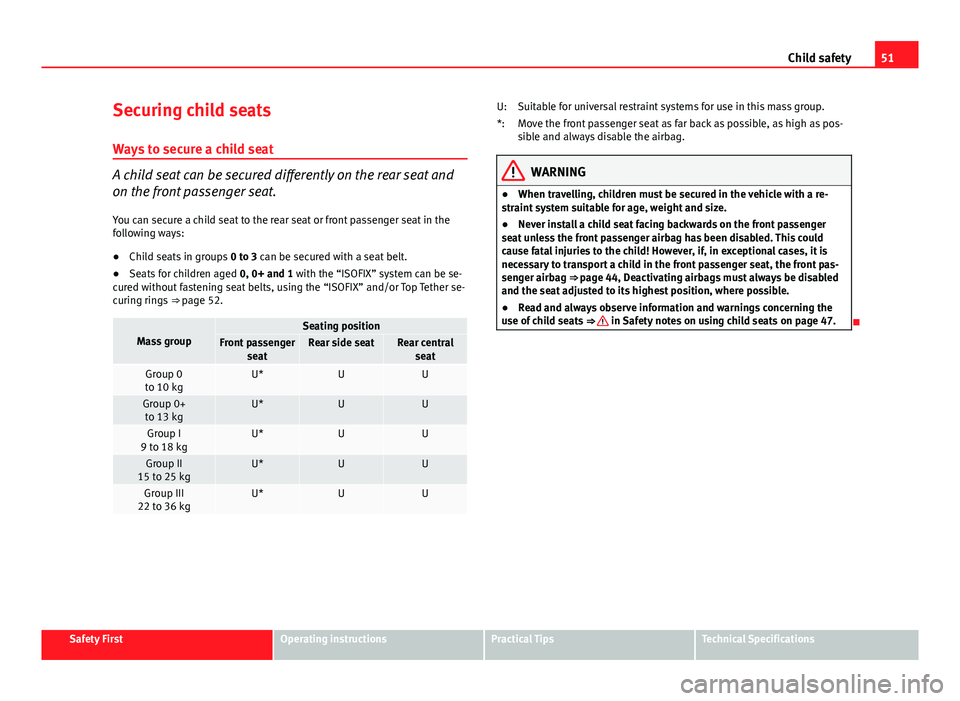
A child seat can be secured differently on the rear seat and
on the front passenger seat. You can secure a child seat to the rear seat or front passenger seat in the
following ways:
● Child seats in groups 0 to 3 can be secured with a seat belt.
● Seats for children aged 0, 0+ and 1 with the “ISOFIX” system can be se-
cured without fastening seat belts, using the “ISOFIX” and/or Top Tether se-
curing rings ⇒ page 52.
Mass groupSeating positionFront passenger
seatRear side seatRear centralseat
Group 0
to 10 kgU*UU
Group 0+ to 13 kgU*UU
Group I
9 to 18 kgU*UU
Group II
15 to 25 kgU*UU
Group III
22 to 36 kgU*UU
Suitable for universal restraint systems for use in this mass group.
Move the front passenger seat as far back as possible, as high as pos-
sible and always disable the airbag.
WARNING
● When travelling, children must be secured in the vehicle with a re-
straint system suitable for age, weight and size.
● Never install a child seat facing backwards on the front passenger
seat unless the front passenger airbag has been disabled. This could
cause fatal injuries to the child! However, if, in exceptional cases, it is
necessary to transport a child in the front passenger seat, the front pas-
senger airbag ⇒ page 44, Deactivating airbags must always be disabled
and the seat adjusted to its highest position, where possible.
● Read and always observe information and warnings concerning the
use of child seats ⇒
in Safety notes on using child seats on page 47.
U:
*:
Safety FirstOperating instructionsPractical TipsTechnical Specifications
Page 54 of 319

52Child safety
Child seat mounting using the “ISOFIX” and/or Top Tether system
The child retention systems can be installed quickly and safely on the rear seat using the ISOFIX and/or Top Tether systems
(fitted on the rear tray).
Fig. 33 Position of the
ISOFIX anchors on the
side rear seat
Fig. 34 The ISOFIX child
seat anchors slide along
the fitted plastic guides
until secured in the vehi-
cle's ISOFIX anchorages Following the instructions given by the child seat manufacturer
when installing and removing the seat.
–
Fit the plastic guides on the vehicle's ISOFIX anchorages be-
tween the backrest and the seat ⇒ Fig. 33.
– Slide the child seat anchorages along the plastic guides until
secured in the vehicle's ISOFIX rings (when correctly closed, you
will hear a “click”). The seat should also have a visual indicator
to confirm it is correctly secured ⇒ Fig. 34.
– Check that the ISOFIX system is correctly secured by pulling on
the child seat.
Detailed fitting instructions are supplied with the child safety seat.
Child seats with “ISOFIX” mountings are available from Technical Services
and specialist retailers.
Page 55 of 319

53
Child safety
Mass groupSize classElectrical equipmentMounting directionVehicle Isofix positionsRear side seats
Baby carrierFISO/L1Backward-facingXGISO/L2Backward-facingXGroup 0 to 10 kgEISO/R1Backward-facingIU
Group 0+ to 13 kgEISO/R1Backward-facingIUDISO/R2Backward-facingIUCISO/R3Backward-facingX
Group I 9 to 18 kg
DISO/R2Backward-facingIUCISO/R3Backward-facingXBISO/F2Forward-facingIUB1ISO/F2XForward-facingIUAISO/F3Forward-facingIUGroup II 15 to 25 kg------Forward-facing---Group III 22 to 36 kg------Forward-facing---
Suitable for ISOFIX universal child restraint systems approved for use in
this mass group
ISOFIX position not suitable for ISOFIX child restraint systems for this
mass group or size class
WARNING
The retainers employed for this child safety seat are specially designed
for the “ISOFIX” system. Never secure other child seats, seat belts or
other items into the retainers. If you do, you increase the risk of sustain-
ing severe or fatal injuries.
IU:
X:
Safety FirstOperating instructionsPractical TipsTechnical Specifications
Page 56 of 319

54Child safety
Top Tether retainer straps
Some child restraint seats have a third Top Tether anchoring
point, apart from both “ISOFIX” anchoring points, which al-
low better child retention.
Fig. 35 Position of the
Top Tether rings on the
rear tray
The Top Tether system has an upper strap for attachment to the vehicle's
upper anchoring point, which is found on the rear luggage compartment
cover.
The retainer strap is used to reduce forwards movements of the safety seat
in a crash, helping reduce the risk of injuries to the head from hitting the
inside of the vehicle.
It is foreseen that an EU Directive will introduce requirements related to the
retention of child restraint systems by means of ISOFIX and Top Tether an-
chorages (probably compulsory for new types from 2010), which will entail
improved retention of the child restraint seat and less head movement in
case of frontal collisions. Use of retainer straps on rear-facing seats
At present there are very few rear-facing child safety seats fitted with a re-
tainer strap. Please carefully read and follow the safety seat manufacturer's
instructions for information on how to install the retainer strap properly.
WARNING
An undue installation of the safety seat will increase the risk of injury in
the event of a crash.
● Never tie the retainer strap to a hook in the luggage compartment.
● Never secure or tie luggage or other items to the lower anchorages
(ISOFIX) or the upper ones (Top Tether).
Fitting the Top Tether child restraint to the anchoring point
Fig. 36 Retainer strap:
correct adjustment and
fitting
Page 121 of 319

119
Lights and visibility
Instrument lighting
The brightness of the instrument lighting, displays and cen-
tre console lighting can be varied as required.
Fig. 86 Instrument panel
lighting
– Press the +
button to increase the brightness.
– Press the -
button to reduce the brightness.
With the ignition switched on
The lighting of the digital displays will adjust automatically, depending on
the ambient light.
With the vehicle's lights switched on
When the vehicle's lights are switched on, the brightness of the instrument
lighting, displays and centre console lighting can be varied by pressing the +
and - buttons. Headlight range control
When the dipped beam headlights are switched on, the
range of the headlights can be adjusted to suit the load of
the vehicle.
Fig. 87 Headlight range
control
– Briefly press the knob ⇒ Fig. 87 to release it from its set posi-
tion.
– Turn the knob to the required setting.
– Press the knob in again to prevent the setting from being
changed unintentionally.
Settings
The settings roughly correspond to the following load conditions: Two front occupants, luggage compartment empty
All seats occupied, luggage compartment empty
O
1
Safety FirstOperating instructionsPractical TipsTechnical Specifications
Page 122 of 319
120Lights and visibility
All seats occupied, luggage compartment loaded
Driver only, luggage compartment loaded
CAUTION
Always adjust the headlights to avoid dazzling oncoming traffic. Make sure
you lower the headlights when the vehicle is more heavily laden.
Dynamic headlight range control
On vehicles with xenon lamps, the headlights automatically adapt to suit
the load being carried when the ignition is switched on and when the vehi-
cle is moving, depending on the load of the vehicle and the type of driving
(e.g. when accelerating and braking).
2
3Daytime driving lights*
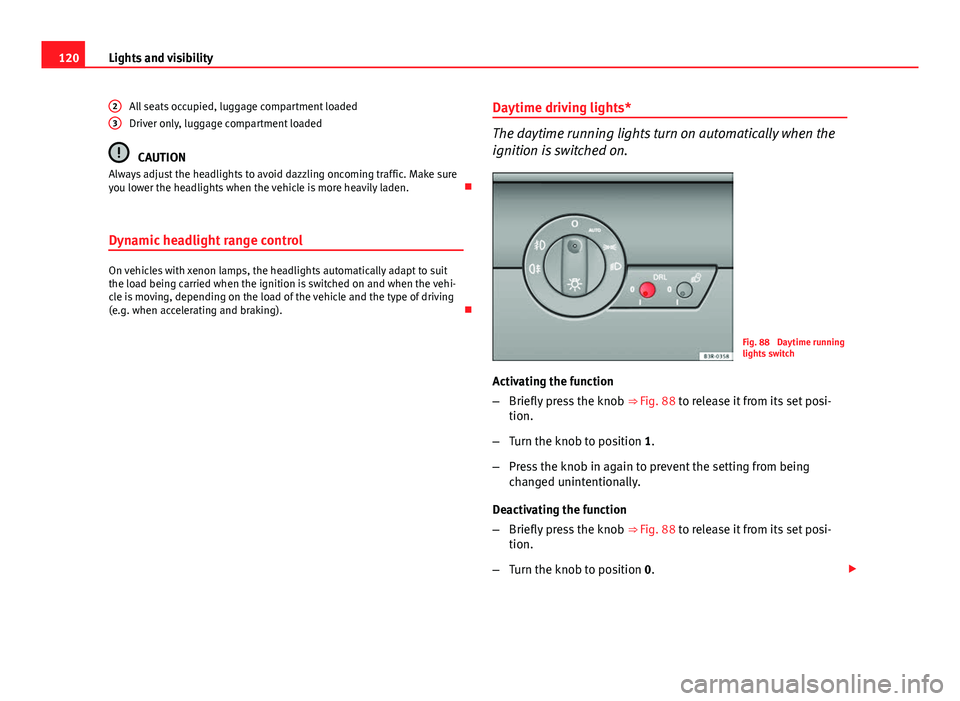
The daytime running lights turn on automatically when the
ignition is switched on.
Fig. 88 Daytime running
lights switch
Activating the function
– Briefly press the knob ⇒ Fig. 88 to release it from its set posi-
tion.
– Turn the knob to position 1.
– Press the knob in again to prevent the setting from being
changed unintentionally.
Deactivating the function
– Briefly press the knob ⇒ Fig. 88 to release it from its set posi-
tion.
– Turn the knob to position 0.
Page 135 of 319

133
Seats and storage
Seats and storage Manual adjustment of the front seats
Seat adjuster controls
There are several seat adjustment functions for your conven-
ience
Fig. 104 Adjuster con-
trols on driver seat
Some of the equipment listed is only fitted on certain models or is an op-
tional extra.
Controls Moving the seat backwards or forwards
Raising/lowering the seat
Adjusting the backrest angle
Adjusting the lumbar support
1
234
Moving the seats forwards and backwards
–
Lift the lever 1 ⇒ Fig. 104 and move the seat to the desired po-
sition.
– Then release the lever 1
and move the seat further until the
catch engages.
WARNING
The driver seat must only be moved forwards and backwards when the
vehicle is at a standstill. Failure to do so could result in an accident.
Adjusting the seat height*
Raising the seat
– Pull the lever 2
⇒ Fig. 104 up repeatedly until the seat is in the
desired position.
Lowering the seat
– Press the lever 2
down repeatedly until the seat is in the de-
sired position.
Safety FirstOperating instructionsPractical TipsTechnical Specifications
