Page 97 of 115
37B-97
MR-372-J84-37B000$720.mif
V11
37B
ELECTRONIC PARKING BRAKE
Fault finding – Parameter summary table
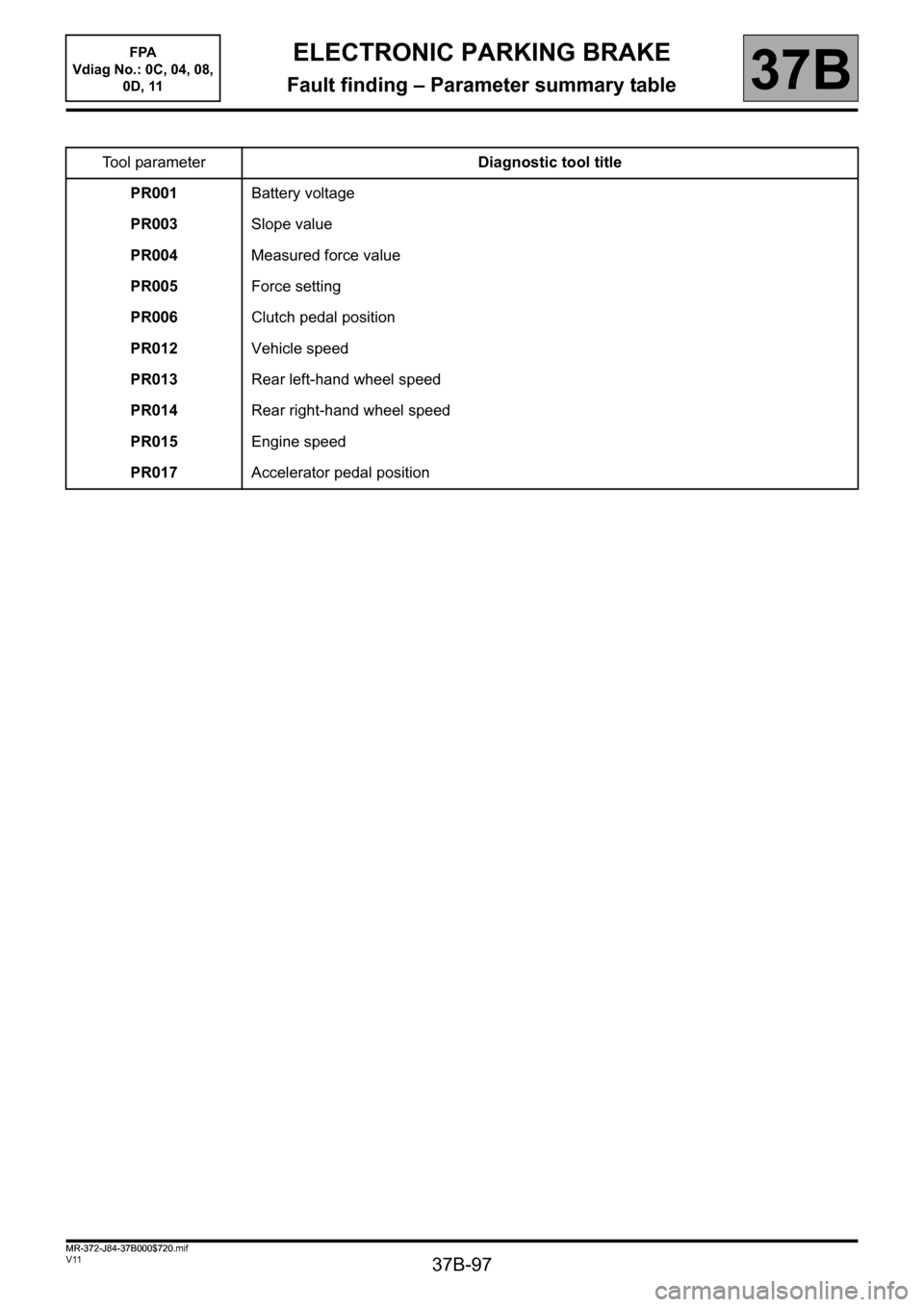
Tool parameterDiagnostic tool title
PR001Battery voltage
PR003Slope value
PR004Measured force value
PR005Force setting
PR006Clutch pedal position
PR012Vehicle speed
PR013Rear left-hand wheel speed
PR014Rear right-hand wheel speed
PR015Engine speed
PR017Accelerator pedal position
FPA
Vdiag No.: 0C, 04, 08,
0D, 11
MR-372-J84-37B000$720.mif
Page 101 of 115
37B-101
MR-372-J84-37B000$792.mif
V11
ELECTRONIC PARKING BRAKE
Fault finding – Interpretation of commands
FPA
Vdiag No.: 0C, 04, 08,
0D, 11
37B
SC005
SAVE CLUTCH PEDAL PROGRAMMING
NOTESSpecial notes:
The commands are found in the tool's repair mode, Programming button.
Run command SC005 Backup clutch pedal programming with the electronic parking brake computer which is
faulty or to be replaced.
The pedals and the gearbox must not be operated during the backup procedure.
Carrying out this backup procedure before each replacement of the computer enables the old clutch pedal travel
specifications to be re-entered into the new electronic parking brake computer.
Park the vehicle on a level surface.
– Select the diagnostic tool's Repair mode menu.
– From the tool's navigation menu, select Programming.
Run command SC005 Backup clutch pedal programming.
AFTER REPAIRRepeat the conformity check from the start.
Page 102 of 115
37B-102
MR-372-J84-37B000$792.mif
V11
ELECTRONIC PARKING BRAKE
Fault finding – Interpretation of commands
FPA
Vdiag No.: 0C, 04, 08,
0D, 11
37B
SC006
ENTER CLUTCH PEDAL PROGRAMMING
NOTESSpecial notes:
The commands are found in the tool's repair mode, Programming button.
Once the electronic parking brake computer has been changed.
Run command SC006 Enter clutch pedal programming after running command SC005 Backup clutch pedal
programming.
Test braking and release, and starting the electronic parking brake computer when applied, to check conformity.
Park the vehicle on a level surface.
– Select the diagnostic tool's Repair mode menu.
– From the tool's navigation menu, select Programming.
– Run command SC006 Enter clutch pedal programming.
Note:
When a new electronic parking brake computer is initialised, the angle sensor is calibrated after running
command VP011 Computer calibration and initialisation.
AFTER REPAIRRepeat the conformity check from the start.
Page 109 of 115
37B-109
MR-372-J84-37B000$936.mif
V11
ELECTRONIC PARKING BRAKE
Fault finding – Fault finding chart
FPA
Vdiag No.: 0C, 04, 08,
0D, 11
37B
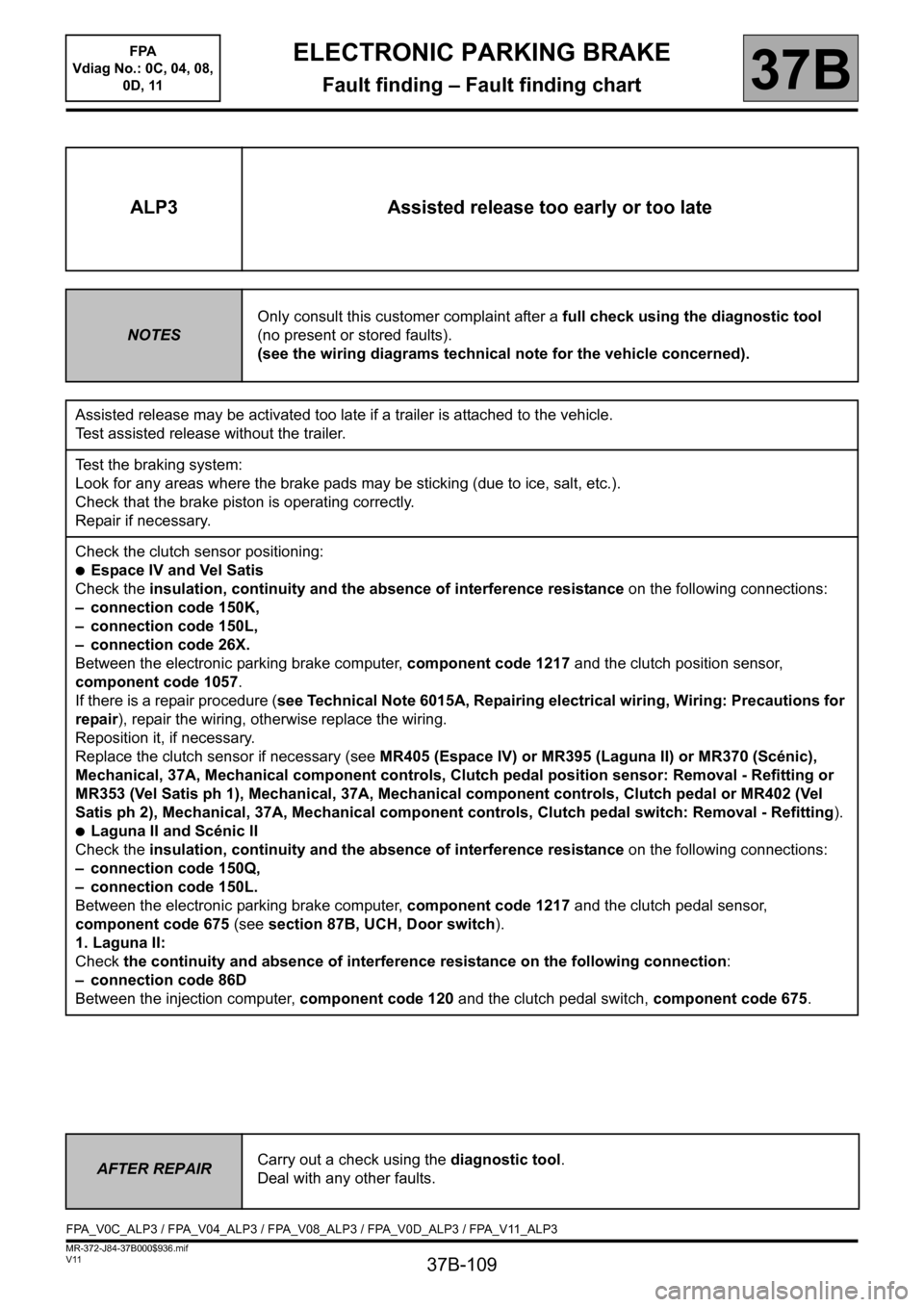
ALP3 Assisted release too early or too late
NOTESOnly consult this customer complaint after a full check using the diagnostic tool
(no present or stored faults).
(see the wiring diagrams technical note for the vehicle concerned).
Assisted release may be activated too late if a trailer is attached to the vehicle.
Test assisted release without the trailer.
Test the braking system:
Look for any areas where the brake pads may be sticking (due to ice, salt, etc.).
Check that the brake piston is operating correctly.
Repair if necessary.
Check the clutch sensor positioning:
●Espace IV and Vel Satis
Check the insulation, continuity and the absence of interference resistance on the following connections:
– connection code 150K,
– connection code 150L,
– connection code 26X.
Between the electronic parking brake computer, component code 1217 and the clutch position sensor,
component code 1057.
If there is a repair procedure (see Technical Note 6015A, Repairing electrical wiring, Wiring: Precautions for
repair), repair the wiring, otherwise replace the wiring.
Reposition it, if necessary.
Replace the clutch sensor if necessary (see MR405 (Espace IV) or MR395 (Laguna II) or MR370 (Scénic),
Mechanical, 37A, Mechanical component controls, Clutch pedal position sensor: Removal - Refitting or
MR353 (Vel Satis ph 1), Mechanical, 37A, Mechanical component controls, Clutch pedal or MR402 (Vel
Satis ph 2), Mechanical, 37A, Mechanical component controls, Clutch pedal switch: Removal - Refitting).
●Laguna II and Scénic II
Check the insulation, continuity and the absence of interference resistance on the following connections:
– connection code 150Q,
– connection code 150L.
Between the electronic parking brake computer, component code 1217 and the clutch pedal sensor,
component code 675 (see section 87B, UCH, Door switch).
1. Laguna II:
Check the continuity and absence of interference resistance on the following connection:
– connection code 86D
Between the injection computer, component code 120 and the clutch pedal switch, component code 675.
AFTER REPAIRCarry out a check using the diagnostic tool.
Deal with any other faults.
FPA_V0C_ALP3 / FPA_V04_ALP3 / FPA_V08_ALP3 / FPA_V0D_ALP3 / FPA_V11_ALP3
Page 110 of 115
37B-110
MR-372-J84-37B000$936.mif
V11
ELECTRONIC PARKING BRAKE
Fault finding – Fault finding chart
FPA
Vdiag No.: 0C, 04, 08,
0D, 11
37B
ALP3
CONTINUED
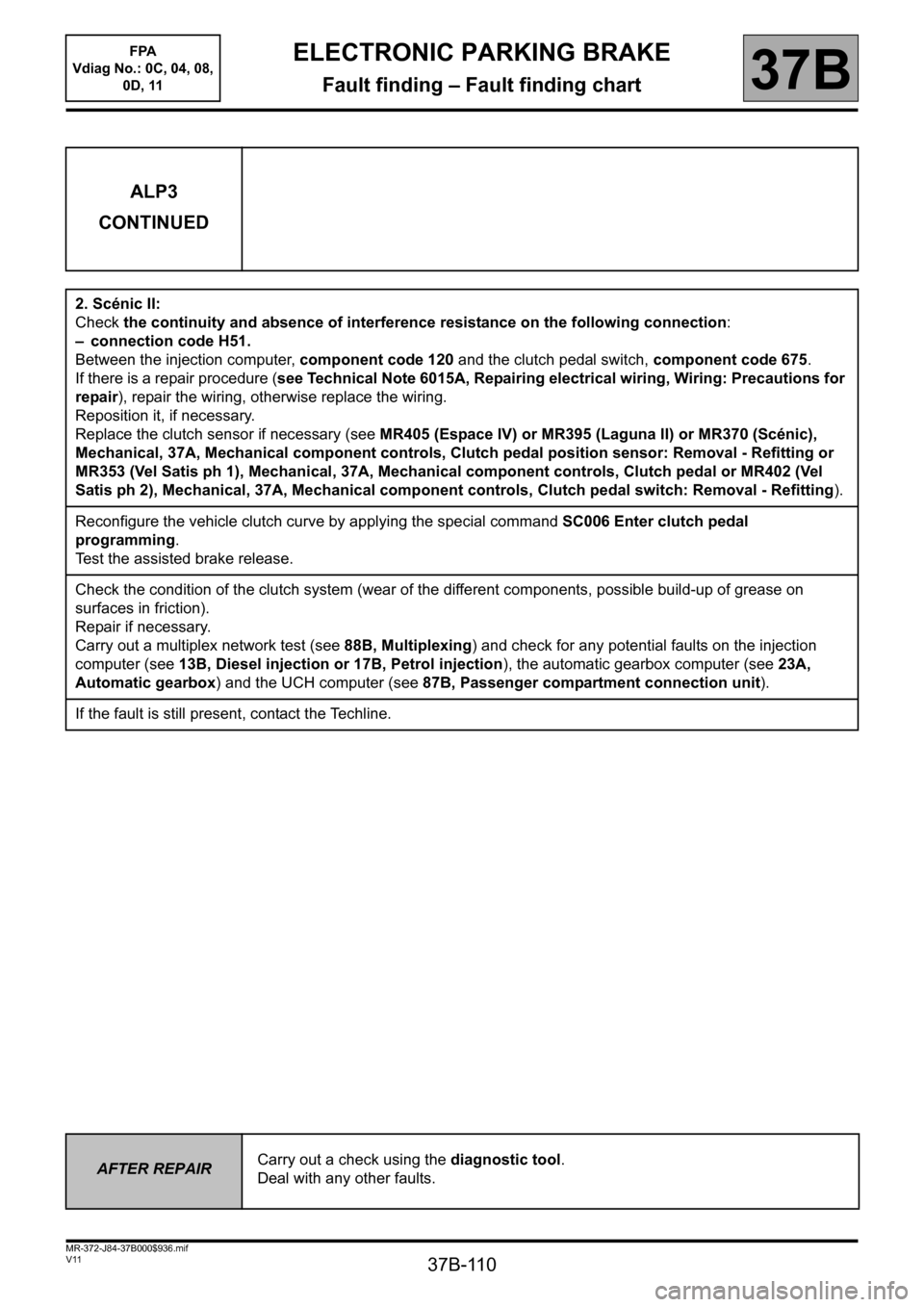
2. Scénic II:
Check the continuity and absence of interference resistance on the following connection:
– connection code H51.
Between the injection computer, component code 120 and the clutch pedal switch, component code 675.
If there is a repair procedure (see Technical Note 6015A, Repairing electrical wiring, Wiring: Precautions for
repair), repair the wiring, otherwise replace the wiring.
Reposition it, if necessary.
Replace the clutch sensor if necessary (see MR405 (Espace IV) or MR395 (Laguna II) or MR370 (Scénic),
Mechanical, 37A, Mechanical component controls, Clutch pedal position sensor: Removal - Refitting or
MR353 (Vel Satis ph 1), Mechanical, 37A, Mechanical component controls, Clutch pedal or MR402 (Vel
Satis ph 2), Mechanical, 37A, Mechanical component controls, Clutch pedal switch: Removal - Refitting).
Reconfigure the vehicle clutch curve by applying the special command SC006 Enter clutch pedal
programming.
Test the assisted brake release.
Check the condition of the clutch system (wear of the different components, possible build-up of grease on
surfaces in friction).
Repair if necessary.
Carry out a multiplex network test (see 88B, Multiplexing) and check for any potential faults on the injection
computer (see 13B, Diesel injection or 17B, Petrol injection), the automatic gearbox computer (see 23A,
Automatic gearbox) and the UCH computer (see 87B, Passenger compartment connection unit).
If the fault is still present, contact the Techline.
AFTER REPAIRCarry out a check using the diagnostic tool.
Deal with any other faults.