2013 RENAULT SCENIC air condition
[x] Cancel search: air conditionPage 28 of 115

37B-28
MR-372-J84-37B000$504.mif
V11
ELECTRONIC PARKING BRAKE
Fault finding – Interpretation of faults37B
DF025
CONTINUED
Using the diagnostic tool, display the wheel speed parameters on the parameters screen.
When stationary, these parameters must show 0 mph. If this is not the case, carry out fault finding on the anti-lock
braking system.
Check that the parking brake mechanical tensioning line is correct:
– Parking brake cables correctly fitted.
– Good condition of the parking brake cables (no seizing or deterioration).
– Conformity, condition and proper functioning of the rear brake callipers.
– Condition and conformity of rear brake pads.
Carry out the necessary repairs.
Check that the vehicle is not overloaded.
Check that the vehicle's tyres are not bald.
If the fault persists, contact the Techline.
AFTER REPAIRIf the computer has been replaced (at the request of the Techline), initialise the
electronic parking brake computer (see Replacement of components).
Issue several braking and release commands to confirm the repair.
Deal with any other faults.
FPA
Vdiag No.: 0C, 04, 08
Page 29 of 115

37B-29
MR-372-J84-37B000$504.mif
V11
ELECTRONIC PARKING BRAKE
Fault finding – Interpretation of faults
FPA
Vdiag No.: 0C, 04, 08,
0D, 11
37B
DF028
PRESENT
OR
STOREDCOMPUTER
1. DEF: Internal electronic fault
2. DEF: Internal electronic fault
NOTESPriorities when dealing with a number of faults:
This fault must be dealt with first.
Conditions for applying the fault finding procedure to a stored fault:
Apply the fault finding procedure even if the fault is stored.
Special notes:
Before replacing an electronic parking brake computer, save the data from the old
computer (for vehicles fitted with a manual gearbox). For this operation, see
Replacement of components.
Contact the Techline, without clearing the fault.
AFTER REPAIRIf the computer has been replaced (at the request of the Techline), initialise the
electronic parking brake computer (see Replacement of components).
Issue several braking and release commands to confirm the repair.
Deal with any other faults.
FPA_V0C_DF028/FPA_V04_DF028/FPA_V08_DF028/FPA_V0D_DF028/FPA_V11_DF028
Page 30 of 115

37B-30
MR-372-J84-37B000$504.mif
V11
ELECTRONIC PARKING BRAKE
Fault finding – Interpretation of faults37B
DF029
PRESENT
OR
STOREDCOMPUTER
1. DEF: Internal electronic fault
2. DEF: Internal electronic fault
NOTESPriorities when dealing with a number of faults:
This fault must be dealt with first.
Conditions for applying the fault finding procedure to a stored fault:
Apply the fault finding procedure even if the fault is stored.
Special notes:
Before replacing an electronic parking brake computer, save the data from the old
computer (for vehicles fitted with a manual gearbox). For this operation,
seeReplacement of components.
Contact the Techline, without clearing the fault.
AFTER REPAIRIf the computer has been replaced (at the request of the Techline), initialise the
electronic parking brake computer (see Replacement of components).
Issue several braking and release commands to confirm the repair.
Deal with any other faults.
FPA_V08_DF029/FPA_V0D_DF029/FPA_V11_DF029
FPA
Vdiag No.: 08, 0D, 11
Page 31 of 115

37B-31
MR-372-J84-37B000$504.mif
V11
ELECTRONIC PARKING BRAKE
Fault finding – Interpretation of faults
FPA
Vdiag No.: 0C, 04, 08,
0D, 11
37B
DF035
PRESENT
OR
STOREDUNDERVOLTAGE
1. DEF: Insufficient feed voltage during the command
NOTESPriority in the event of a number of faults:
Deal with fault DF055 Battery undervoltage first if it is present or stored.
Conditions for applying the fault finding procedure to a stored fault:
Apply this fault finding procedure if the fault reappears after the ignition has been
switched off and on again (+ forced after ignition feed: see Introduction) and an
application or release request using the control lever.
Special notes:
This fault is a power supply fault and does not usually stem from the electronic
parking brake computer.
This fault does not indicate computer feed undervoltage but a significant drop in
voltage to the parking brake motor while the command is being issued.
Only for Vdiag 08, 0C and 0D:
If there is a stored fault, refer to the statuses and parameters when it appears.
Explanation of counters: see Introduction.
If the fault is stored and PR018 = 0 and PR022 > 25, clear the fault:
do not take this fault into account.
Disconnect the electronic parking brake computer connector to check the conformity of the supplies and to
check the insulation, continuity and the absence of interference resistance on the following connections:
Electronic parking brake computer connector
track H4
(except Laguna II, Vel Satis and Espace IV)
track G4+12V
track H2
(except Laguna II, Vel Satis and Espace IV)
track G2earth
Repair if necessary (see the vehicle wiring diagram).
Apply the brake and then release it (engine running) to check that during the command the voltage measured at
the fuse does not drop below 10.5 V.
Make the repairs necessary for the parking brake computer electrical supply to be correct (equal to the battery
voltage).
If the fault persists, contact the Techline.
AFTER REPAIRIf the computer has been replaced (at the request of the Techline), initialise the
electronic parking brake computer (see Replacement of components).
Issue several braking and release commands to confirm the repair.
Deal with any other faults.
FPA_V0C_DF035/FPA_V04_DF035/FPA_V08_DF035/FPA_V0D_DF035/FPA_V11_DF035
Page 32 of 115

37B-32
MR-372-J84-37B000$504.mif
V11
ELECTRONIC PARKING BRAKE
Fault finding – Interpretation of faults
FPA
Vdiag No.: 0C, 04, 08,
0D, 11
37B
DF036
PRESENT
OR
STOREDINJECTION MULTIPLEX SIGNAL ABSENT
1. DEF: Multiplex signals absent or values invalid (fault with the computer generating
the signal or multiplex line connection fault)
NOTESPriority in the event of a number of faults:
Deal with faults DF055 Battery undervoltage and DF052 Multiplex network first if
they are present or stored.
Deal with any injection computer faults first.
The fault does not usually come from the electronic parking brake computer.
Note:
If there is a multiplex line fault like this one, the parking brake loses its assisted
application and release functions.
Conditions for applying the fault finding procedure to a stored fault:
Apply this fault finding procedure if the fault reappears as present or stored after a
fault has been cleared, and the ignition has been switched off and on again (forced
+ after ignition feed: see Introduction).
Special notes:
This fault only relates to multiplex signals received from the injection computer.
This fault indicates either that there is no transmission, or that the signals received by
the parking brake are inconsistent.
Only for Vdiag 08, 0C and 0D:
If there is a stored fault, refer to the statuses and parameters when it appears.
Explanation of counters: see Introduction section.
If the fault is stored and PR018 = 0 and PR022 > 25, clear the fault:
do not take this fault into account.
If the fault is stored and PR019 < 10, clear the fault:
do not take this fault into account.
AFTER REPAIRIf the computer has been replaced (at the request of the Techline), initialise the
electronic parking brake computer (see Replacement of components).
Issue several braking and release commands to confirm the repair.
Deal with any other faults.
FPA_V0C_DF036/FPA_V04_DF036/FPA_V08_DF036/FPA_V0D_DF036/FPA_V11_DF036
Page 33 of 115
37B-33
MR-372-J84-37B000$504.mif
V11
ELECTRONIC PARKING BRAKE
Fault finding – Interpretation of faults
FPA
Vdiag No.: 0C, 04, 08,
0D, 11
37B
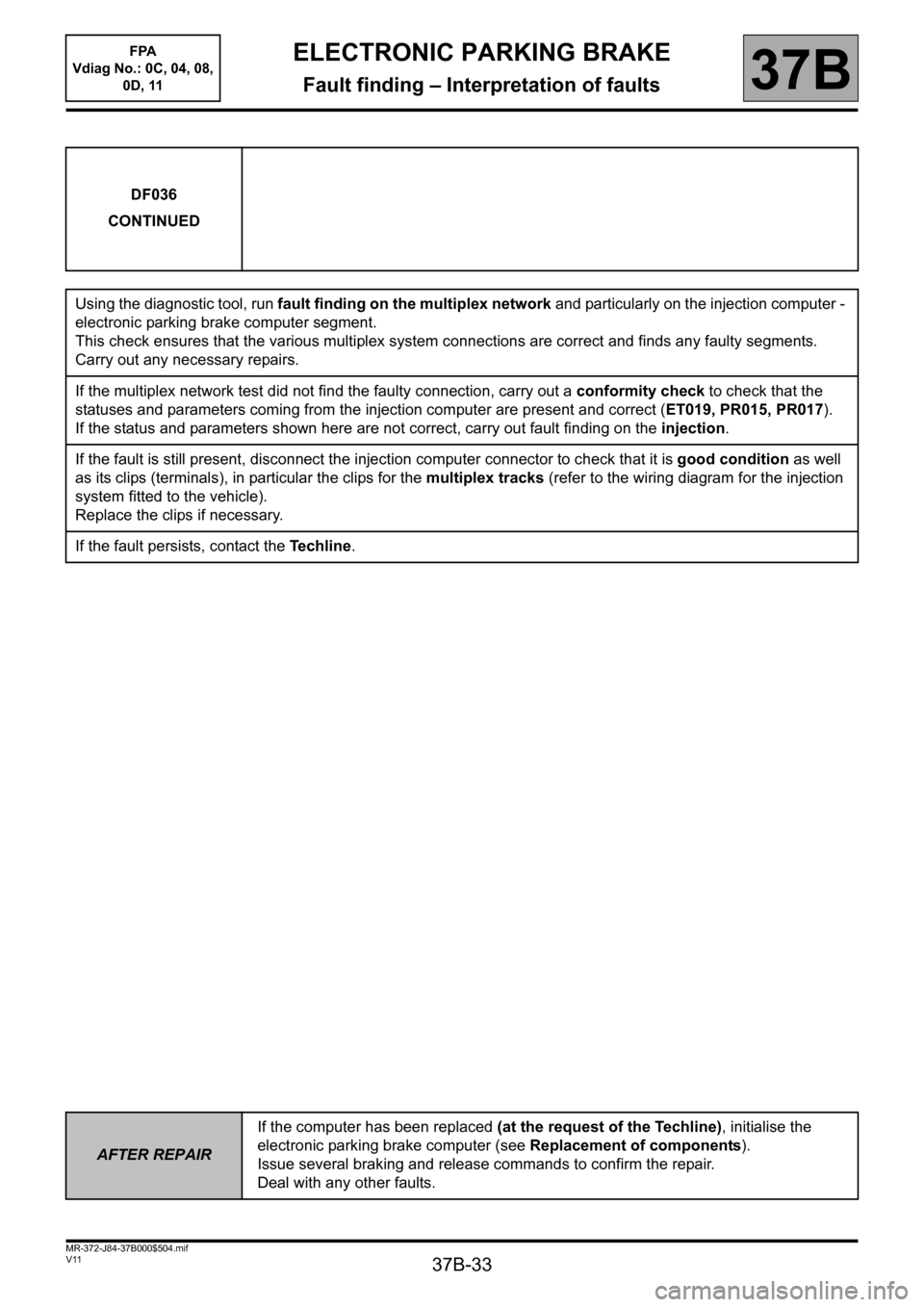
DF036
CONTINUED
Using the diagnostic tool, run fault finding on the multiplex network and particularly on the injection computer -
electronic parking brake computer segment.
This check ensures that the various multiplex system connections are correct and finds any faulty segments.
Carry out any necessary repairs.
If the multiplex network test did not find the faulty connection, carry out a conformity check to check that the
statuses and parameters coming from the injection computer are present and correct (ET019, PR015, PR017).
If the status and parameters shown here are not correct, carry out fault finding on the injection.
If the fault is still present, disconnect the injection computer connector to check that it is good condition as well
as its clips (terminals), in particular the clips for the multiplex tracks (refer to the wiring diagram for the injection
system fitted to the vehicle).
Replace the clips if necessary.
If the fault persists, contact the Techline.
AFTER REPAIRIf the computer has been replaced (at the request of the Techline), initialise the
electronic parking brake computer (see Replacement of components).
Issue several braking and release commands to confirm the repair.
Deal with any other faults.
Page 34 of 115
37B-34
MR-372-J84-37B000$504.mif
V11
ELECTRONIC PARKING BRAKE
Fault finding – Interpretation of faults
FPA
Vdiag No.: 0C, 04, 08,
0D, 11
37B
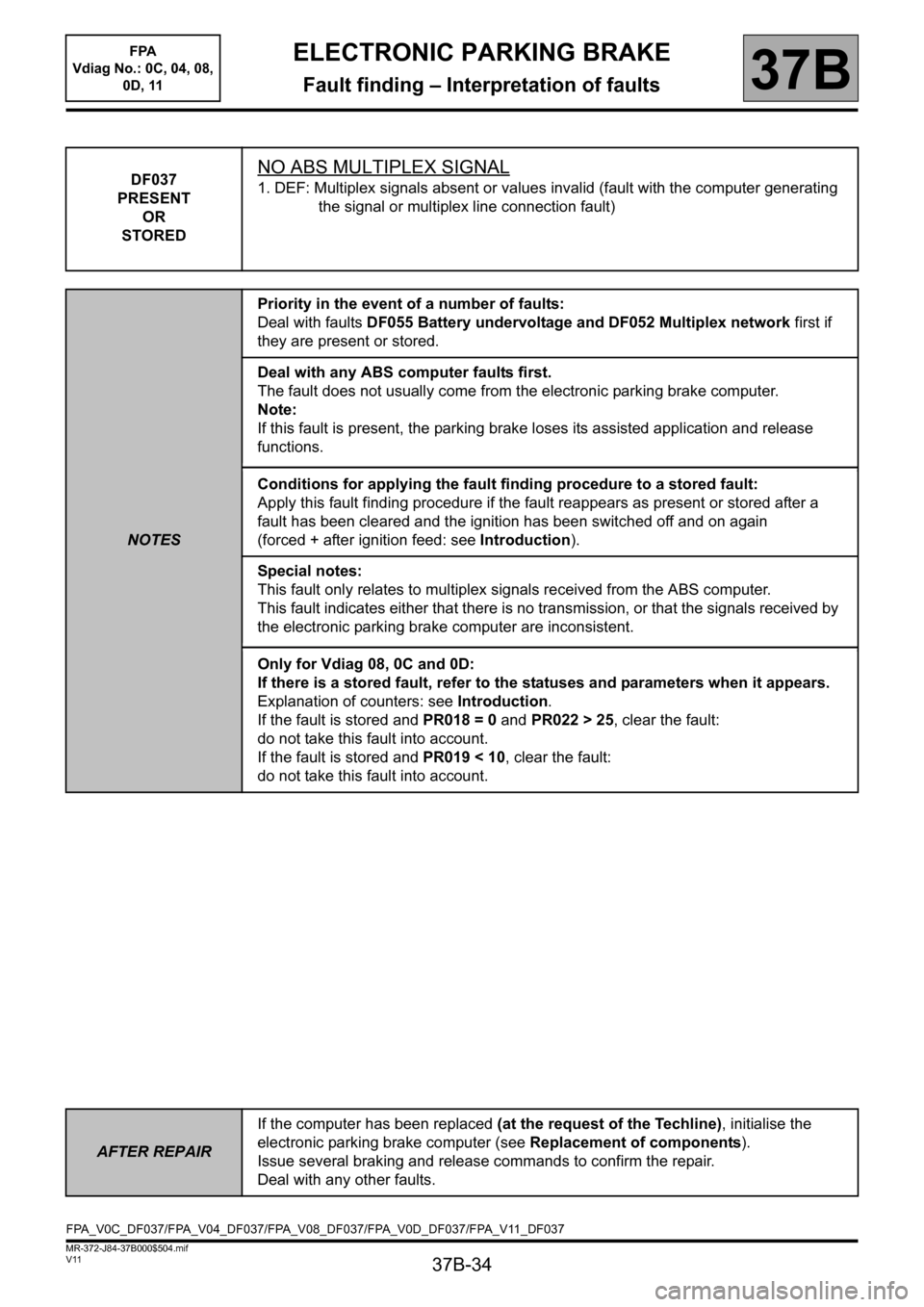
DF037
PRESENT
OR
STOREDNO ABS MULTIPLEX SIGNAL
1. DEF: Multiplex signals absent or values invalid (fault with the computer generating
the signal or multiplex line connection fault)
NOTESPriority in the event of a number of faults:
Deal with faults DF055 Battery undervoltage and DF052 Multiplex network first if
they are present or stored.
Deal with any ABS computer faults first.
The fault does not usually come from the electronic parking brake computer.
Note:
If this fault is present, the parking brake loses its assisted application and release
functions.
Conditions for applying the fault finding procedure to a stored fault:
Apply this fault finding procedure if the fault reappears as present or stored after a
fault has been cleared and the ignition has been switched off and on again
(forced + after ignition feed: see Introduction).
Special notes:
This fault only relates to multiplex signals received from the ABS computer.
This fault indicates either that there is no transmission, or that the signals received by
the electronic parking brake computer are inconsistent.
Only for Vdiag 08, 0C and 0D:
If there is a stored fault, refer to the statuses and parameters when it appears.
Explanation of counters: see Introduction.
If the fault is stored and PR018 = 0 and PR022 > 25, clear the fault:
do not take this fault into account.
If the fault is stored and PR019 < 10, clear the fault:
do not take this fault into account.
AFTER REPAIRIf the computer has been replaced (at the request of the Techline), initialise the
electronic parking brake computer (see Replacement of components).
Issue several braking and release commands to confirm the repair.
Deal with any other faults.
FPA_V0C_DF037/FPA_V04_DF037/FPA_V08_DF037/FPA_V0D_DF037/FPA_V11_DF037
Page 35 of 115
37B-35
MR-372-J84-37B000$504.mif
V11
ELECTRONIC PARKING BRAKE
Fault finding – Interpretation of faults
FPA
Vdiag No.: 0C, 04, 08,
0D, 11
37B
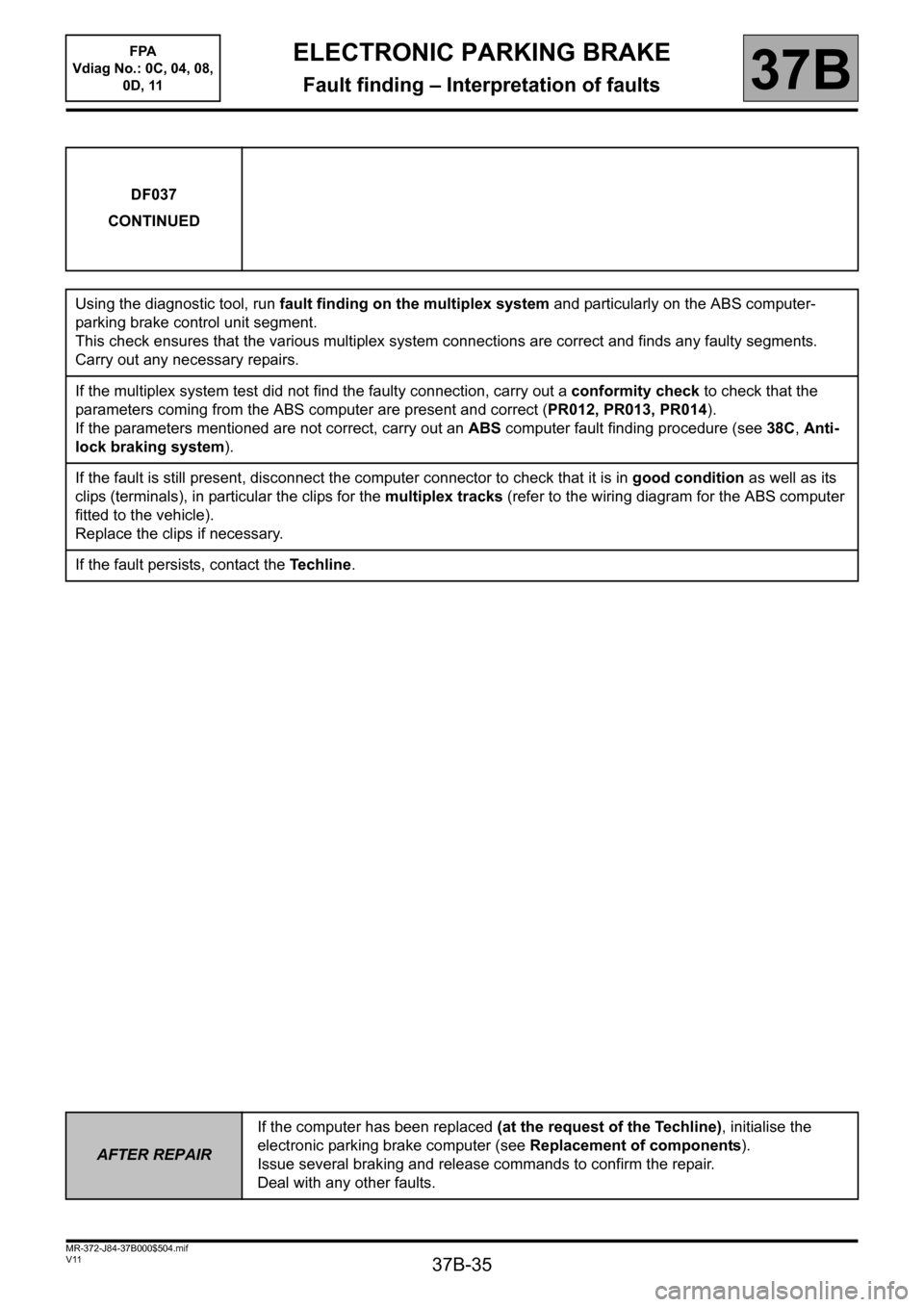
DF037
CONTINUED
Using the diagnostic tool, run fault finding on the multiplex system and particularly on the ABS computer-
parking brake control unit segment.
This check ensures that the various multiplex system connections are correct and finds any faulty segments.
Carry out any necessary repairs.
If the multiplex system test did not find the faulty connection, carry out a conformity check to check that the
parameters coming from the ABS computer are present and correct (PR012, PR013, PR014).
If the parameters mentioned are not correct, carry out an ABS computer fault finding procedure (see 38C, Anti-
lock braking system).
If the fault is still present, disconnect the computer connector to check that it is in good condition as well as its
clips (terminals), in particular the clips for the multiplex tracks (refer to the wiring diagram for the ABS computer
fitted to the vehicle).
Replace the clips if necessary.
If the fault persists, contact the Techline.
AFTER REPAIRIf the computer has been replaced (at the request of the Techline), initialise the
electronic parking brake computer (see Replacement of components).
Issue several braking and release commands to confirm the repair.
Deal with any other faults.