2013 RENAULT SCENIC ABS
[x] Cancel search: ABSPage 32 of 115

37B-32
MR-372-J84-37B000$504.mif
V11
ELECTRONIC PARKING BRAKE
Fault finding – Interpretation of faults
FPA
Vdiag No.: 0C, 04, 08,
0D, 11
37B
DF036
PRESENT
OR
STOREDINJECTION MULTIPLEX SIGNAL ABSENT
1. DEF: Multiplex signals absent or values invalid (fault with the computer generating
the signal or multiplex line connection fault)
NOTESPriority in the event of a number of faults:
Deal with faults DF055 Battery undervoltage and DF052 Multiplex network first if
they are present or stored.
Deal with any injection computer faults first.
The fault does not usually come from the electronic parking brake computer.
Note:
If there is a multiplex line fault like this one, the parking brake loses its assisted
application and release functions.
Conditions for applying the fault finding procedure to a stored fault:
Apply this fault finding procedure if the fault reappears as present or stored after a
fault has been cleared, and the ignition has been switched off and on again (forced
+ after ignition feed: see Introduction).
Special notes:
This fault only relates to multiplex signals received from the injection computer.
This fault indicates either that there is no transmission, or that the signals received by
the parking brake are inconsistent.
Only for Vdiag 08, 0C and 0D:
If there is a stored fault, refer to the statuses and parameters when it appears.
Explanation of counters: see Introduction section.
If the fault is stored and PR018 = 0 and PR022 > 25, clear the fault:
do not take this fault into account.
If the fault is stored and PR019 < 10, clear the fault:
do not take this fault into account.
AFTER REPAIRIf the computer has been replaced (at the request of the Techline), initialise the
electronic parking brake computer (see Replacement of components).
Issue several braking and release commands to confirm the repair.
Deal with any other faults.
FPA_V0C_DF036/FPA_V04_DF036/FPA_V08_DF036/FPA_V0D_DF036/FPA_V11_DF036
Page 34 of 115
37B-34
MR-372-J84-37B000$504.mif
V11
ELECTRONIC PARKING BRAKE
Fault finding – Interpretation of faults
FPA
Vdiag No.: 0C, 04, 08,
0D, 11
37B
DF037
PRESENT
OR
STOREDNO ABS MULTIPLEX SIGNAL
1. DEF: Multiplex signals absent or values invalid (fault with the computer generating
the signal or multiplex line connection fault)
NOTESPriority in the event of a number of faults:
Deal with faults DF055 Battery undervoltage and DF052 Multiplex network first if
they are present or stored.
Deal with any ABS computer faults first.
The fault does not usually come from the electronic parking brake computer.
Note:
If this fault is present, the parking brake loses its assisted application and release
functions.
Conditions for applying the fault finding procedure to a stored fault:
Apply this fault finding procedure if the fault reappears as present or stored after a
fault has been cleared and the ignition has been switched off and on again
(forced + after ignition feed: see Introduction).
Special notes:
This fault only relates to multiplex signals received from the ABS computer.
This fault indicates either that there is no transmission, or that the signals received by
the electronic parking brake computer are inconsistent.
Only for Vdiag 08, 0C and 0D:
If there is a stored fault, refer to the statuses and parameters when it appears.
Explanation of counters: see Introduction.
If the fault is stored and PR018 = 0 and PR022 > 25, clear the fault:
do not take this fault into account.
If the fault is stored and PR019 < 10, clear the fault:
do not take this fault into account.
AFTER REPAIRIf the computer has been replaced (at the request of the Techline), initialise the
electronic parking brake computer (see Replacement of components).
Issue several braking and release commands to confirm the repair.
Deal with any other faults.
FPA_V0C_DF037/FPA_V04_DF037/FPA_V08_DF037/FPA_V0D_DF037/FPA_V11_DF037
Page 35 of 115
37B-35
MR-372-J84-37B000$504.mif
V11
ELECTRONIC PARKING BRAKE
Fault finding – Interpretation of faults
FPA
Vdiag No.: 0C, 04, 08,
0D, 11
37B
DF037
CONTINUED
Using the diagnostic tool, run fault finding on the multiplex system and particularly on the ABS computer-
parking brake control unit segment.
This check ensures that the various multiplex system connections are correct and finds any faulty segments.
Carry out any necessary repairs.
If the multiplex system test did not find the faulty connection, carry out a conformity check to check that the
parameters coming from the ABS computer are present and correct (PR012, PR013, PR014).
If the parameters mentioned are not correct, carry out an ABS computer fault finding procedure (see 38C, Anti-
lock braking system).
If the fault is still present, disconnect the computer connector to check that it is in good condition as well as its
clips (terminals), in particular the clips for the multiplex tracks (refer to the wiring diagram for the ABS computer
fitted to the vehicle).
Replace the clips if necessary.
If the fault persists, contact the Techline.
AFTER REPAIRIf the computer has been replaced (at the request of the Techline), initialise the
electronic parking brake computer (see Replacement of components).
Issue several braking and release commands to confirm the repair.
Deal with any other faults.
Page 36 of 115
37B-36
MR-372-J84-37B000$504.mif
V11
ELECTRONIC PARKING BRAKE
Fault finding – Interpretation of faults
FPA
Vdiag No.: 0C, 04, 08,
0D, 11
37B
DF038
PRESENT
OR
STOREDNO AUTOMATIC TRANSMISSION MULTIPLEX SIGNAL
1. DEF: Multiplex signals absent or values invalid (fault with the computer generating
the signal or multiplex line connection fault)
NOTESPriority in the event of a number of faults:
Deal with faults DF055 Battery undervoltage and DF052 Multiplex network first if
they are present or stored.
Deal with any automatic transmission computer faults first.
The fault does not usually come from the electronic parking brake computer.
Note:
If this fault is present, the parking brake loses its assisted application and release
functions.
Conditions for applying the fault finding procedure to a stored fault:
Apply this fault finding procedure if the fault reappears as present or stored after a
fault has been cleared, and the ignition has been switched off and on again (forced
+ after ignition feed: see Introduction).
Special notes:
This fault only relates to multiplex signals received from the automatic transmission
computer.
This fault indicates either that there is no signal or that the signals transmitted are
inconsistent.
Only for Vdiag 08, 0C and 0D:
If there is a stored fault, refer to the statuses and parameters when it appears.
Explanation of counters: see Introduction.
If the fault is stored and PR018 = 0 and PR022 > 25, clear the fault:
do not take this fault into account.
If the fault is stored and PR019 < 15 clear the fault:
do not take this fault into account.
AFTER REPAIRIf the computer has been replaced (at the request of the Techline), initialise the
electronic parking brake computer (see Replacement of components).
Issue several braking and release commands to confirm the repair.
Deal with any other faults.
FPA_V0C_DF038/FPA_V04_DF038/FPA_V08_DF038/FPA_V0D_DF038/FPA_V11_DF038
Page 38 of 115
37B-38
MR-372-J84-37B000$504.mif
V11
ELECTRONIC PARKING BRAKE
Fault finding – Interpretation of faults
FPA
Vdiag No.: 0C, 04, 08,
0D, 11
37B
DF039
PRESENT
OR
STOREDNO UCH MULTIPLEX SIGNAL
1. DEF: Multiplex signals absent or values invalid (fault with the computer generating
the signal or multiplex line connection fault)
NOTESPriority in the event of a number of faults:
Deal with faults DF055 Battery undervoltage and DF052 Multiplex network first if
they are present or stored.
Deal with any UCH computer faults first.
The fault does not usually come from the electronic parking brake computer.
Note:
If this fault is present, the parking brake loses its assisted application and release
functions.
Conditions for applying the fault finding procedure to a stored fault:
Apply this fault finding procedure if the fault reappears as present or stored after a
fault has been cleared and the ignition has been switched off and on again
(forced + after ignition feed: see Introduction).
Special notes:
This fault only relates to multiplex signals received from the UCH computer.
This fault indicates either that there is no signal or that the signals transmitted are
inconsistent.
Only for Vdiag 08, 0C and 0D:
If there is a stored fault, refer to the statuses and parameters when it appears.
Explanation of counters: see Introduction.
If the fault is stored and PR018 = 0 and PR022 > 25, clear the fault:
do not take this fault into account.
If the fault is stored and PR019 < 15 clear the fault:
do not take this fault into account.
AFTER REPAIRIf the computer has been replaced (at the request of the Techline), initialise the
electronic parking brake computer (see Replacement of components).
Issue several braking and release commands to confirm the repair.
Deal with any other faults.
FPA_V0C_DF039/FPA_V04_DF039/FPA_V08_DF039/FPA_V0D_DF039/FPA_V11_DF039
Page 46 of 115

37B-46
MR-372-J84-37B000$504.mif
V11
ELECTRONIC PARKING BRAKE
Fault finding – Interpretation of faults
FPA
Vdiag No.: 0C, 04, 08,
0D, 11
37B
DF044
CONTINUED 2
With the parking brake control lever connector disconnected, check the insulation, continuity and absence of
interference resistance on the following connections:
Parking brake lever connector: 1216Electronic parking brake computer: 1217
track 9
track 7track D2
track C2
Repair if necessary.
With the parking brake control lever connector disconnected, switch on the ignition and check for a 5 V supply
(4 V < X < 5 V) on track 7 of the lever connector. If the power supply is not present and the parking brake
computer is correctly supplied (no other faults detected by the diagnostic tool), then contact the Te c h l i n e.
If the fault is still present, measure the resistance of the braking switch between tracks 7 and 9 of the parking
brake control lever.
Replace the lever (see MR405 (Espace IV), MR395 (Laguna II) or MR370 (Scénic), Mechanical, 37B,
Electronic parking brake, Lever: Removal - Refitting or MR353 (Vel Satis), Mechanical, 37B, Automatic
parking brake, Lever) if the resistance of the brake application switch is not approximately:
– Lever in rest position: 2700 ± 100
– Lever pulled: 172 ± 15 .
If the fault persists, contact the Techline.
AFTER REPAIRIf the computer has been replaced (at the request of the Techline), initialise the
electronic parking brake computer (see Replacement of components).
Issue several braking and release commands to confirm the repair.
Deal with any other faults.
Page 48 of 115
37B-48
MR-372-J84-37B000$504.mif
V11
ELECTRONIC PARKING BRAKE
Fault finding – Interpretation of faults
FPA
Vdiag No.: 0C, 04, 08,
0D, 11
37B
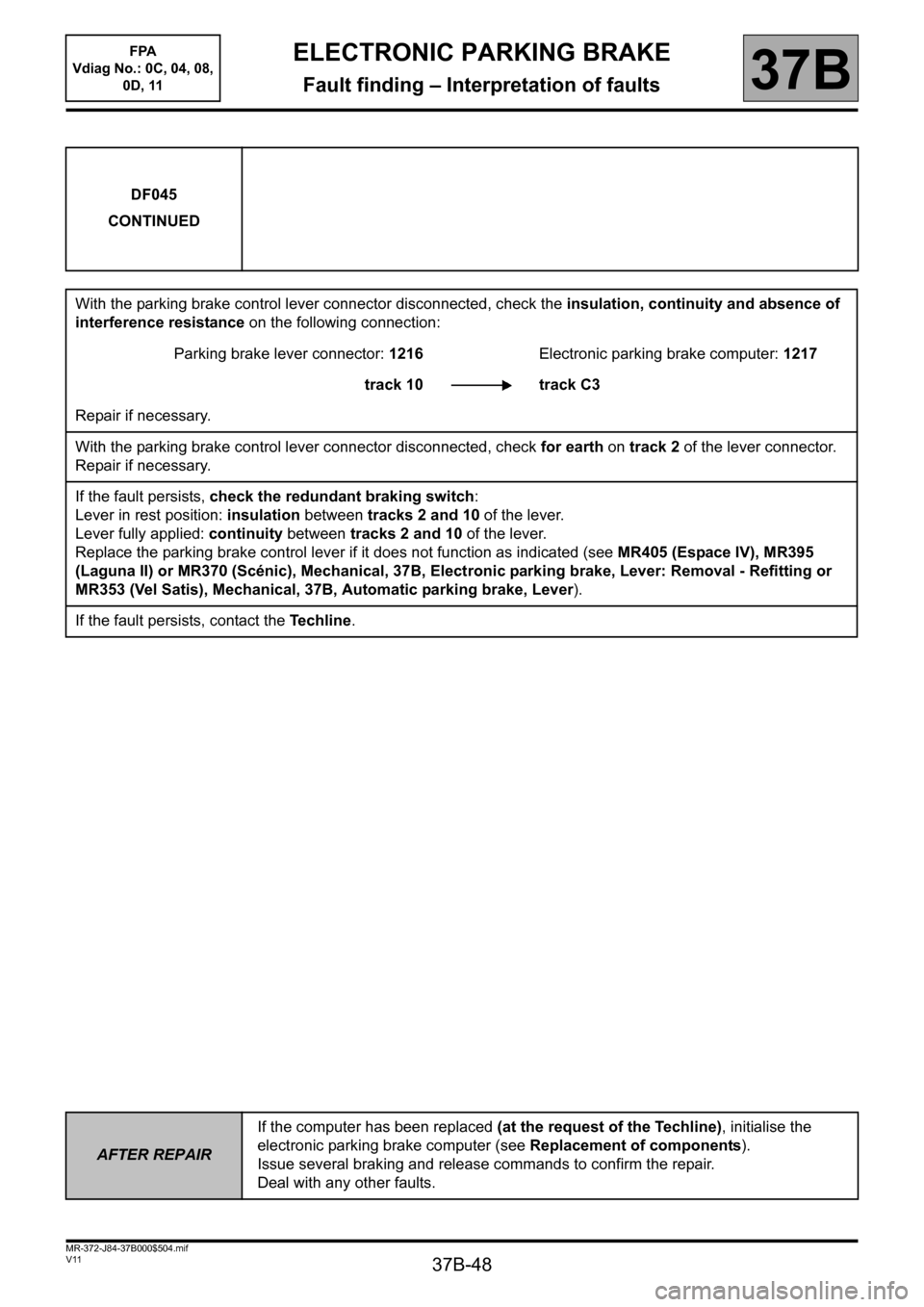
DF045
CONTINUED
With the parking brake control lever connector disconnected, check the insulation, continuity and absence of
interference resistance on the following connection:
Parking brake lever connector: 1216Electronic parking brake computer: 1217
track 10 track C3
Repair if necessary.
With the parking brake control lever connector disconnected, check for earth on track 2 of the lever connector.
Repair if necessary.
If the fault persists, check the redundant braking switch:
Lever in rest position: insulation between tracks 2 and 10 of the lever.
Lever fully applied: continuity between tracks 2 and 10 of the lever.
Replace the parking brake control lever if it does not function as indicated (see MR405 (Espace IV), MR395
(Laguna II) or MR370 (Scénic), Mechanical, 37B, Electronic parking brake, Lever: Removal - Refitting or
MR353 (Vel Satis), Mechanical, 37B, Automatic parking brake, Lever).
If the fault persists, contact the Techline.
AFTER REPAIRIf the computer has been replaced (at the request of the Techline), initialise the
electronic parking brake computer (see Replacement of components).
Issue several braking and release commands to confirm the repair.
Deal with any other faults.
Page 51 of 115
37B-51
MR-372-J84-37B000$504.mif
V11
ELECTRONIC PARKING BRAKE
Fault finding – Interpretation of faults
FPA
Vdiag No.: 0C, 04, 08,
0D, 11
37B
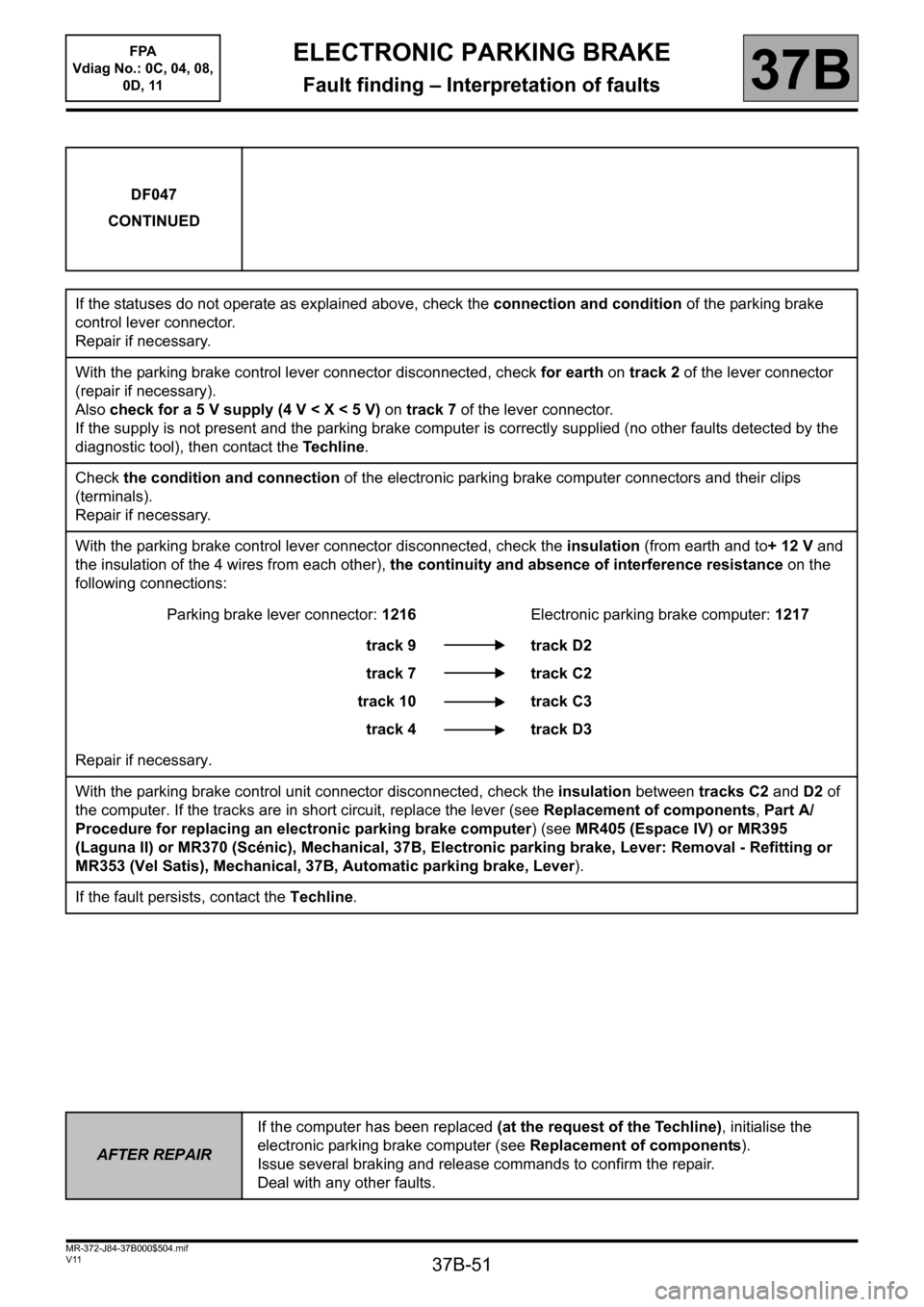
DF047
CONTINUED
If the statuses do not operate as explained above, check the connection and condition of the parking brake
control lever connector.
Repair if necessary.
With the parking brake control lever connector disconnected, check for earth on track 2 of the lever connector
(repair if necessary).
Also check for a 5 V supply (4 V < X < 5 V) on track 7 of the lever connector.
If the supply is not present and the parking brake computer is correctly supplied (no other faults detected by the
diagnostic tool), then contact the Te c h l i n e.
Check the condition and connection of the electronic parking brake computer connectors and their clips
(terminals).
Repair if necessary.
With the parking brake control lever connector disconnected, check the insulation (from earth and to+ 12 V and
the insulation of the 4 wires from each other), the continuity and absence of interference resistance on the
following connections:
Parking brake lever connector: 1216Electronic parking brake computer: 1217
track 9
track 7
track 10
track 4track D2
track C2
track C3
track D3
Repair if necessary.
With the parking brake control unit connector disconnected, check the insulation between tracks C2 and D2 of
the computer. If the tracks are in short circuit, replace the lever (see Replacement of components, Part A/
Procedure for replacing an electronic parking brake computer) (see MR405 (Espace IV) or MR395
(Laguna II) or MR370 (Scénic), Mechanical, 37B, Electronic parking brake, Lever: Removal - Refitting or
MR353 (Vel Satis), Mechanical, 37B, Automatic parking brake, Lever).
If the fault persists, contact the Techline.
AFTER REPAIRIf the computer has been replaced (at the request of the Techline), initialise the
electronic parking brake computer (see Replacement of components).
Issue several braking and release commands to confirm the repair.
Deal with any other faults.