2013 Peugeot 508 head-up display
[x] Cancel search: head-up displayPage 4 of 340
.
Contents
Instrument panel 22
Indicator and warning lamps 23
Gauges and indicators 33
Tr ip computer 38
Setting the date and time 41
Instruments and controlsFamiliarisation
Remote control key 43
Alarm 53
Electric windows 55
Boot 57
Motorised tailgate (SW) 58
Sunroof 61
Panoramic sunroof (SW) 63
Fuel tank 64
Diesel misfuel prevention 65
Access
Front seats 67
Rear seats 72
Mirrors 74
Steering wheel adjustment 76
Interior fi ttings 77
Boot fi ttings (Saloon) 80
Boot fi ttings (SW) 81
Heating and Ventilation 86
Manual air conditioning 88
Dual-zone digital air conditioning 90
Quad-zone digital air conditioning 93
Rear screen demist - defrost 98
Programmable Heating / Ventilation 99
Comfort
Starting-switching off the engine 101
Electric parking brake 103
Manual parking brake 110
Manual gearbox 111
Gear effi ciency indicator 112
Automatic gearbox 113
6-speed electronic gear control gearbox 117
Stop & Star t 121
Hill start assist 124
Head-up display 125
Speed limiter 128
Cruise control 130
Parking sensors 132
Parking space sensors 134
Driving
Lighting controls 136
Automatic illumination of headlamps 141
Headlamp adjustment 144
Directional lighting 145
Wiper controls 147
Automatic rain sensitive wipers 149
Cour tesy lamps 151
Interior mood lighting 152
Visibility
Eco-driving 20
Page 9 of 340
.
7
Familiarisation
Interior
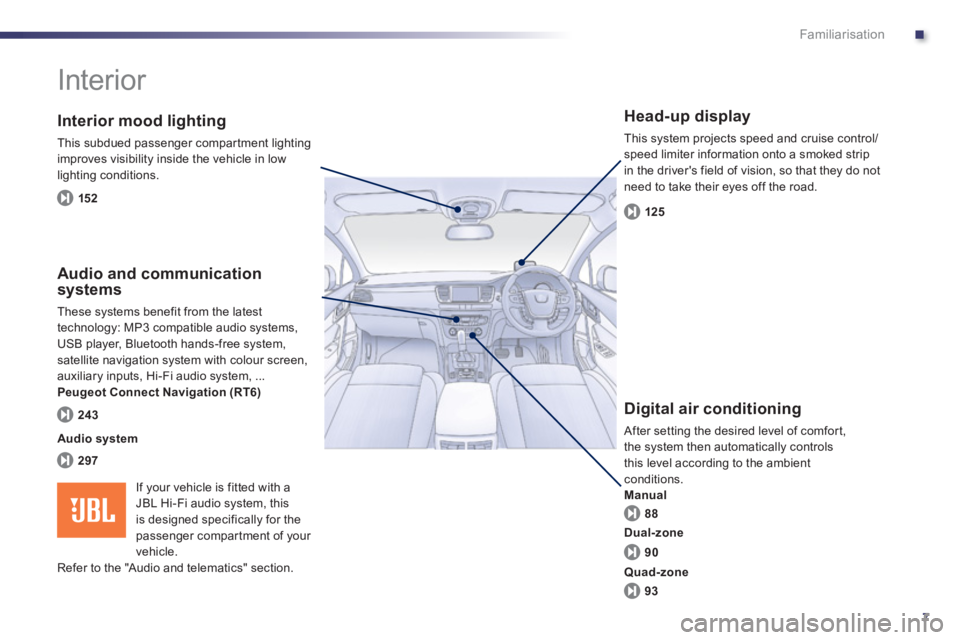
Interior mood lighting
This subdued passenger compar tment lighting
improves visibility inside the vehicle in low lighting conditions.
Head-up display
This system projects speed and cruise control/speed limiter information onto a smoked strip
in the driver's field of vision, so that they do not
need to take their eyes off the road.
Digital air conditioning
After setting the desired level of comfort,
the system then automatically controls
this level according to the ambient conditions.
Manual
Audio and communication
systems
These systems benefit from the latest
technology: MP3 compatible audio systems, USB player, Bluetooth hands-free system, satellite navigation system with colour screen,
auxiliary inputs, Hi-Fi audio system, ...Peugeot Connect Navigation (RT6)
152
125
88
297
243
Audio system
90
93
Dual-zone
Quad-zone
If your vehicle is fitted with aJBL Hi-Fi audio system, this
is designed specifically for the
passenger compar tment of your
vehicle.
Refer to the "Audio and telematics" section.
Page 10 of 340
8
Familiarisation
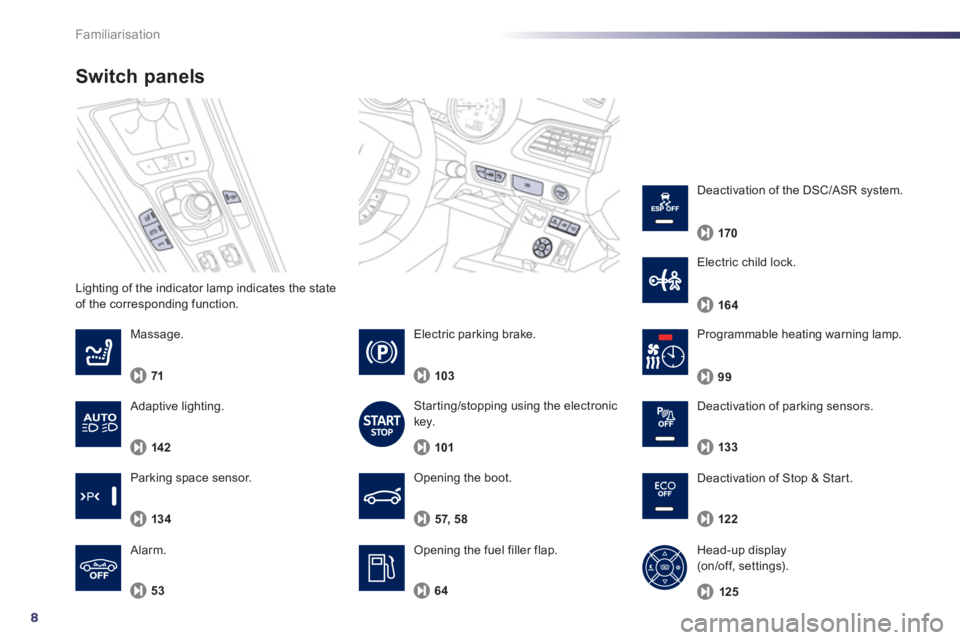
Lighting of the indicator lamp indicates the state
of the corresponding function.
Switch panels
Opening the boot.
Opening the fuel filler flap. 57, 58
Massa
ge.
7
1
53
Alarm.
Pro
grammable heating warning lamp.
6
4
99
Electric parking brake.
10
3
Starting/stopping using the electronic key.
10
1
Deactivation of Stop & Start.
122
Head-up display
(on/off, settings).
12
5
Deactivation of parking sensors.
133
Parking space sensor.
134
Electric child lock.
164
Deactivation of the DSC/ASR system.
170
Adaptive lighting.
142
Page 71 of 340
3
69
Comfort
Storing driving positions
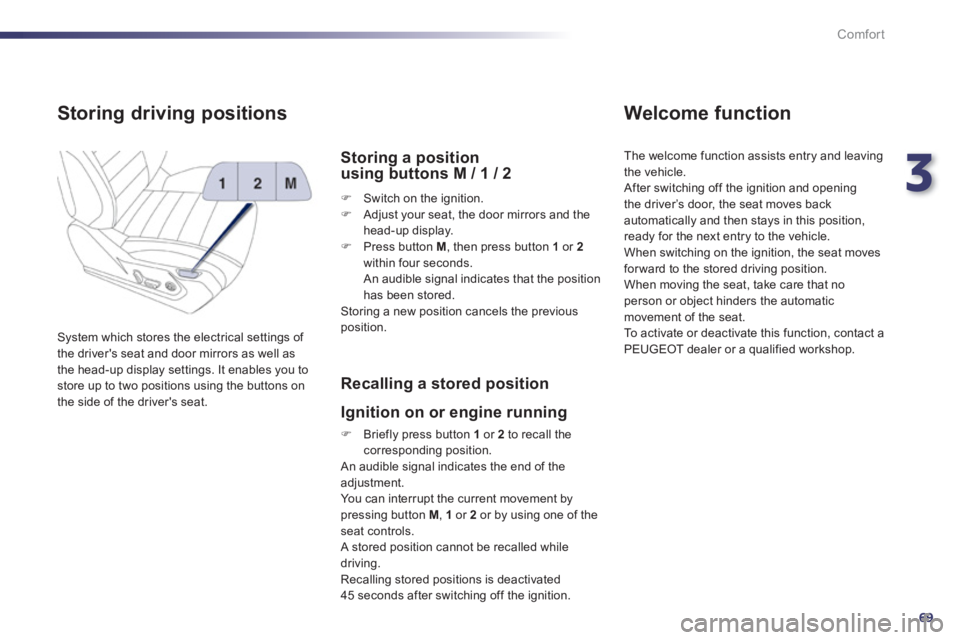
System which stores the electrical settings of
the driver's seat and door mirrors as well as
the head-up display settings. It enables you to store up to two positions using the buttons on
the side of the driver's seat.
Storing a position using buttons M / 1 / 2
FSwitch on the ignition. FAdjust your seat, the door mirrors and the
head-up display.
FPr
ess button M
, then press button 1or 2
within four seconds.
An audible signal indicates that the position
has been stored.
Storing a new position cancels the previousposition.
Recalling a stored position
I
gnition on or engine running
FBriefly press button 1
or 2
to recall thecorresponding position.
An audible signal indicates the end of the adjustment. You can interrupt the current movement by pressing button M , 1or 2or by using one of the seat controls.
A stored position cannot be recalled while
driving.
Recalling stored positions is deactivated
45 seconds after switching off the ignition.
Welcome function
The welcome function assists entry and leaving
th
e vehicle.
After switching off the ignition and openingthe driver’s door, the seat moves back
automatically and then stays in this position,
ready for the next entry to the vehicle.
When switching on the ignition, the seat movesfor ward to the stored driving position.
When moving the seat, take care that no
person or object hinders the automatic
movement of the seat.
To activate or deactivate this function, contact a
PEUGEOT dealer or a qualified workshop.
Page 127 of 340
4
125
Driving
Head-up display
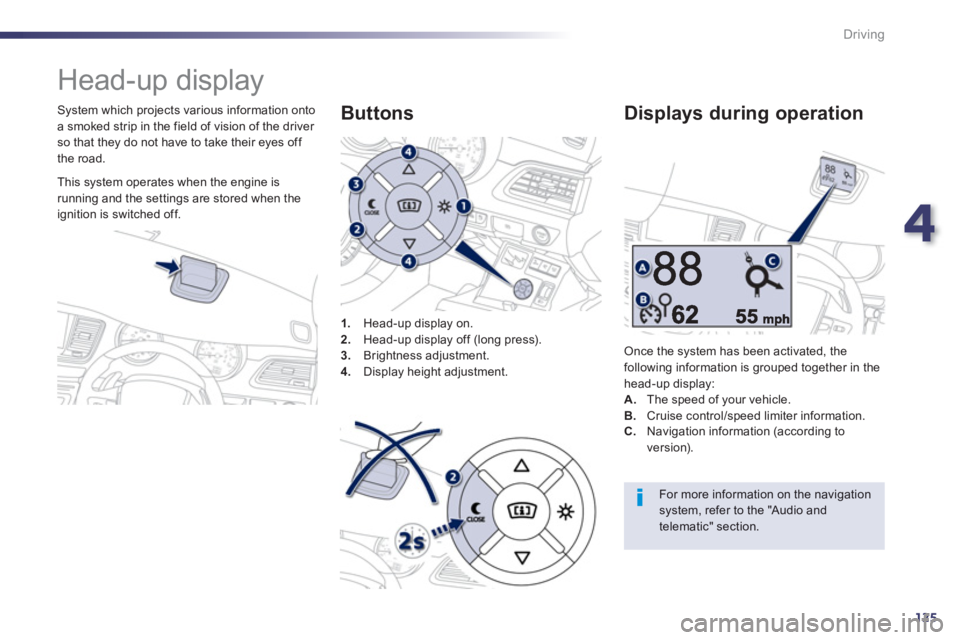
System which projects various information onto
a smoked strip in the field of vision of the driver so that they do not have to take their eyes off
the road.
1
.Head-up display on. 2. Head-up display off (long press).3.
Brightness adjustment. 4.
Display height adjustment.
Buttons
Once the system has been activated, thefollowing information is grouped together in the
head-up display:A.The speed of your vehicle. B. Cruise control/speed limiter information.
Displays during operation
C.
Navigation information (according to
version).
For more information on the navigation system, refer to the "Audio andtelematic" section.
This system operates when the engine is
running and the settings are stored when the
i
gnition is switched off.
Page 128 of 340
126
Driving
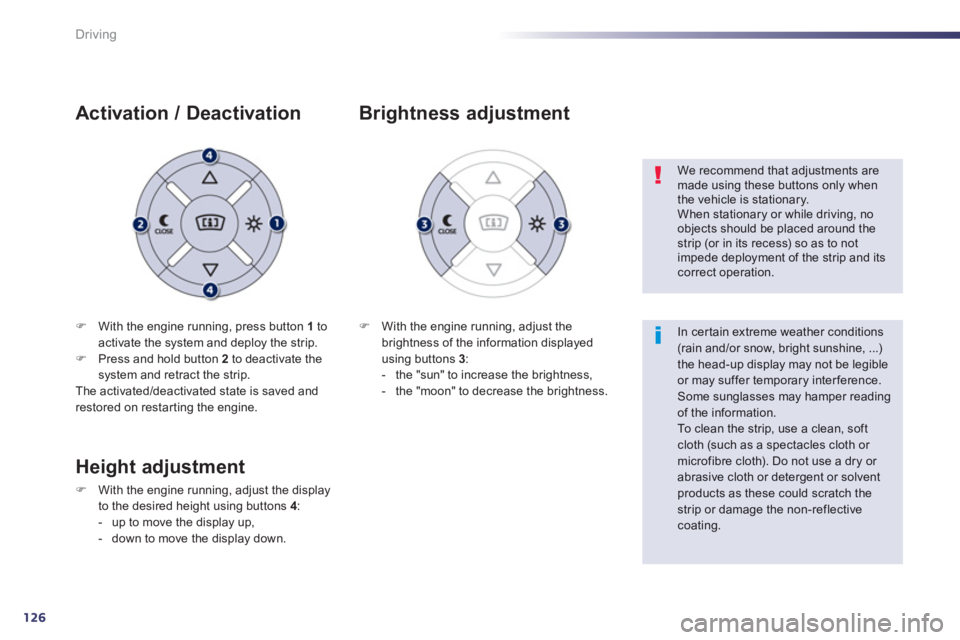
FWith the engine running, press button 1 toactivate the system and deploy the strip. FPress and hold button 2
to deactivate the
system and retract the strip.
The activated/deactivated state is saved and restored on restar ting the engine.
Activation / Deactivation
F With the engine running, adjust the
brightness of the information displayedusing buttons 3 :
- the "sun" to increase the brightness,
- the "moon" to decrease the brightness.
Brightness adjustment
We recommend that adjustments aremade using these buttons only whenthe vehicle is stationary.
When stationary or while driving, noobjects should be placed around thestrip (or in its recess) so as to not impede deployment of the strip and itscorrect operation.
In certain extreme weather conditions (rain and/or snow, bright sunshine, ...) the head-up display may not be legibleor may suffer temporary interference. Some sunglasses may hamper readingof the information.
To clean the strip, use a clean, soft cloth (such as a spectacles cloth or microfibre cloth). Do not use a dry or abrasive cloth or detergent or solventproducts as these could scratch thestrip or damage the non-reflectivecoating.
Height adjustment
FWith the engine running, adjust the display
to the desired height using buttons 4 :
- up to move the display up,
- down to move the display down.
Page 130 of 340
128
Driving
Speed limiter
System which prevents the vehicle fromexceeding the speed programmed by the driver.
When the programmed speed limit is reached,
pressing the accelerator pedal no longer has any effect unless it is pressed firmly,
which allows you to temporarily exceed theprogrammed speed.
To return to the programmed speed, simply
slow down to a speed below the programmed speed by releasing the accelerator.
The speed limiter is switched onmanuall
y:
it requires a programmed speed of at least
20 mph (30 km/h).
The speed limiter is
switched off by manual foperation of the control.
The pro
grammed speed remains in the memorywhen the ignition is switched off.
The speed limiter cannot, in anycircumstances, replace the need to obser ve speed limits, nor can it replacethe need for vigilance and responsibility on the par t of the driver.
This information also appears in the head-up display.
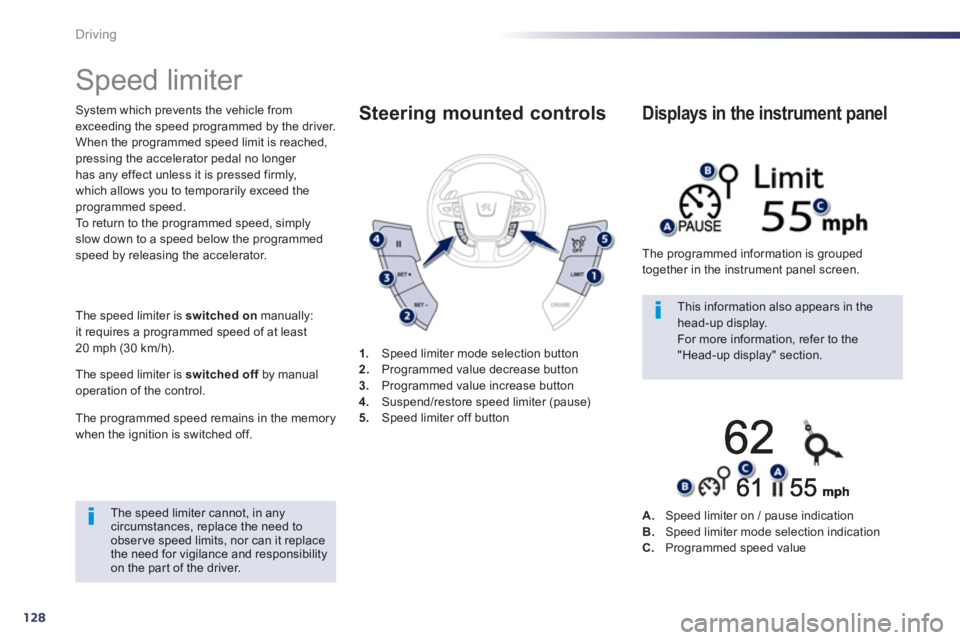
For more information, refer to the "Head-up display" section. 1.Speed limiter mode selection button
2. Programmed value decrease button3.
Programmed value increase button4.Suspend/restore speed limiter (pause)5.Speed limiter off button
Steering mounted controls
The programmed information is grouped
together in the instrument panel screen.
Displays in the instrument panel
A.Speed limiter on / pause indicationB.Speed limiter mode selection indicationC.Programmed speed value
Page 132 of 340
130
Driving
Cruise control
System which automatically maintains thespeed of the vehicle at the value programmed
by the driver, without any action on the
accelerator pedal. The cruise control is switched on
manually:
it requires a minimum vehicle speed of 25 mph(40 km/h) and the engaging:
- 4th gear or higher on a manual gearbox,
- 2nd
gear or higher on an electronic gear control gearbox or automatic gearbox,
- position A
on the electronic gear control gearbox or Don the automatic gearbox.
Th
e cruise control is switched offmanuallyfor by pressing the brake or clutch pedal or
on triggering of the ESC system for safety reasons.
It is possible to exceed the programmed speed
temporarily by pressing the accelerator pedal. To return to the programmed speed, simply release the accelerator pedal.
Switching off the ignition cancels any programmed speed value. 1
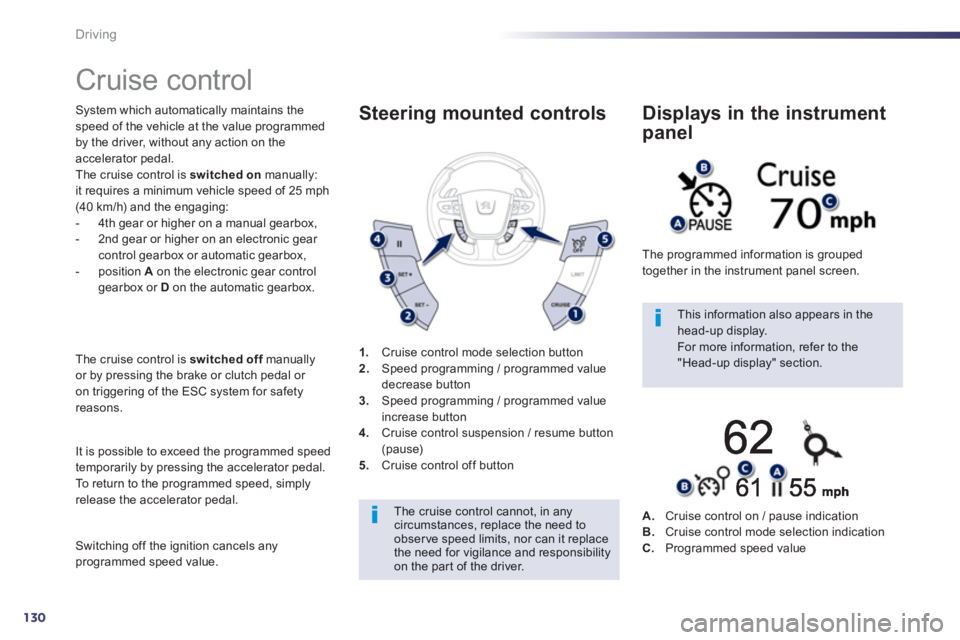
.Cruise control mode selection button
2. Speed programming / programmed value decrease button 3.
Speed programming / programmed value
increase button 4.Cruise control suspension / resume button (pause)5.Cruise control off button
Steering mounted controls
The cruise control cannot, in anycircumstances, replace the need to observe speed limits, nor can it replace the need for vigilance and responsibilityon the par t of the driver.
This information also appears in the head-up display.
For more information, refer to the "Head-up display" section. The pro
grammed information is grouped
together in the instrument panel screen.
Displays in the instrument
panel
A.Cruise control on / pause indicationB.Cruise control mode selection indication
C.Programmed speed value