2013 PEUGEOT 5008 display
[x] Cancel search: displayPage 30 of 364
IN
S
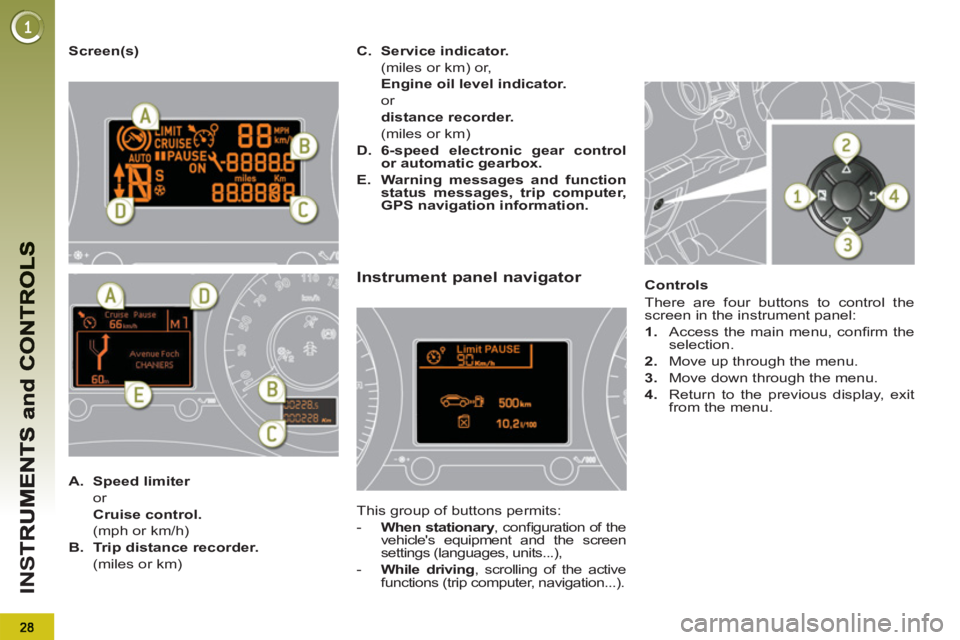
Screen(s)
Instrument panel navigator
This group of buttons permits:
- When stationary
, confi guration of the
vehicle's equipment and the screen
settings (languages, units...),
- While driving
, scrolling of the active
functions (trip computer, navigation...).
Controls
There are four buttons to control the
screen in the instrument panel:
1.
Access the main menu, confi rm the
selection.
2.
Move up through the menu.
3.
Move down through the menu.
4.
Return to the previous display, exit
from the menu.
A.
Speed limiter
or
Cruise control.
(mph or km/h)
B.
Trip distance recorder.
(miles or km)
C.
Service indicator.
(miles or km) or,
Engine oil level indicator.
or
distance recorder.
(miles or km)
D.
6-speed electronic gear control
or automatic gearbox.
E.
Warning messages and function
status messages, trip computer,
GPS navigation information.
Page 31 of 364
29
IN
S
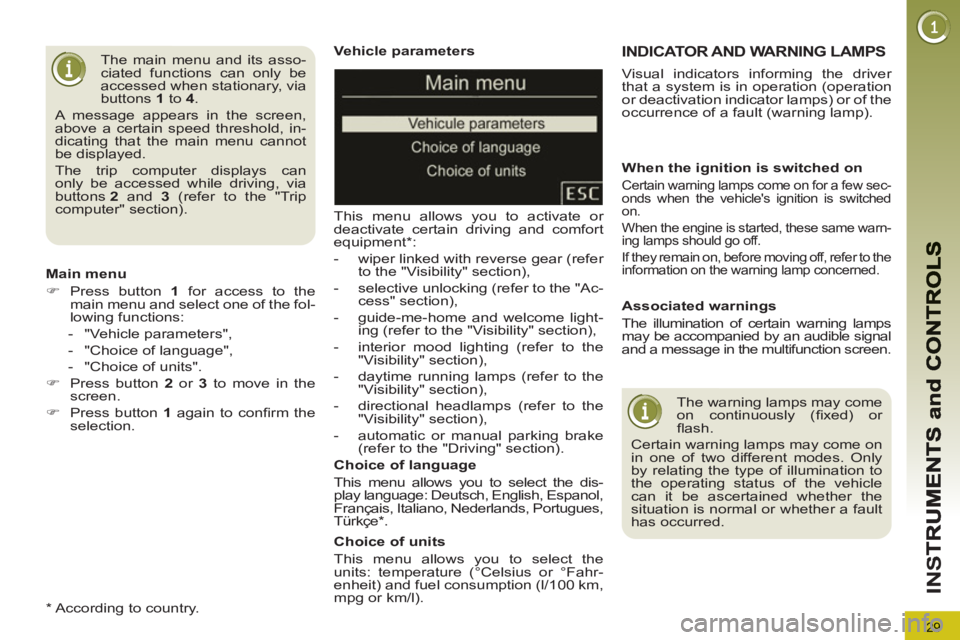
Vehicle parameters
This menu allows you to activate or
deactivate certain driving and comfort
equipment * :
- wiper linked with reverse gear (refer
to the "Visibility" section),
- selective unlocking (refer to the "Ac-
cess" section),
- guide-me-home and welcome light-
ing (refer to the "Visibility" section),
- interior mood lighting (refer to the
"Visibility" section),
- daytime running lamps (refer to the
"Visibility" section),
- directional headlamps (refer to the
"Visibility" section),
- automatic or manual parking brake
(refer to the "Driving" section).
Choice of units
This menu allows you to select the
units: temperature (°Celsius or °Fahr-
enheit) and fuel consumption (l/100 km,
mpg or km/l).
Choice of language
This menu allows you to select the dis-
play language: Deutsch, English, Espanol,
Français, Italiano, Nederlands, Portugues,
Türkçe * .
The main menu and its asso-
ciated functions can only be
accessed when stationary, via
buttons 1
to 4
.
A message appears in the screen,
above a certain speed threshold, in-
dicating that the main menu cannot
be displayed.
The trip computer displays can
only be accessed while driving, via
buttons 2
and 3
(refer to the "Trip
computer" section).
Main menu
)
Press button 1
for access to the
main menu and select one of the fol-
lowing functions:
- "Vehicle parameters",
- "Choice of language",
- "Choice of units".
)
Press button 2
or 3
to move in the
screen.
)
Press button 1
again to confi
rm the
selection.
*
According to country.
INDICATOR AND WARNING LAMPS
When the ignition is switched on
Certain warning lamps come on for a few sec-
onds when the vehicle's ignition is switched
on.
When the engine is started, these same warn-
ing lamps should go off.
If they remain on, before moving off, refer to the
information on the warning lamp concerned.
Associated warnings
The illumination of certain warning lamps
may be accompanied by an audible signal
and a message in the multifunction screen.
The warning lamps may come
on continuously (fi xed) or
fl ash.
Certain warning lamps may come on
in one of two different modes. Only
by relating the type of illumination to
the operating status of the vehicle
can it be ascertained whether the
situation is normal or whether a fault
has occurred.
Visual indicators informing the driver
that a system is in operation (operation
or deactivation indicator lamps) or of the
occurrence of a fault (warning lamp).
Page 40 of 364
38
IN
S
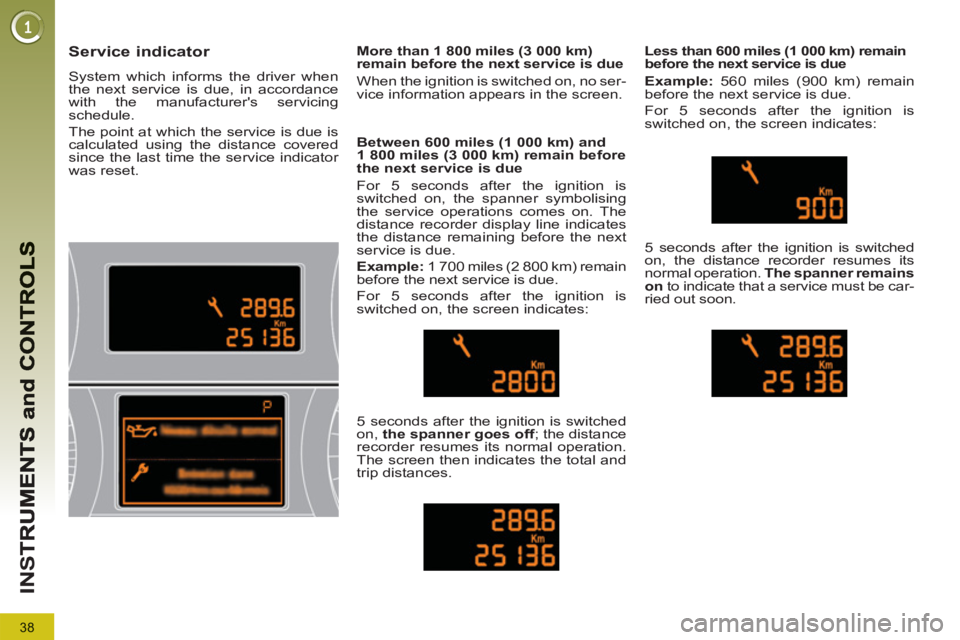
Service indicator
System which informs the driver when
the next service is due, in accordance
with the manufacturer's servicing
schedule.
The point at which the service is due is
calculated using the distance covered
since the last time the service indicator
was reset.
Between 600 miles (1 000 km) and
1 800 miles (3 000 km) remain before
the next service is due
For 5 seconds after the ignition is
switched on, the spanner symbolising
the service operations comes on. The
distance recorder display line indicates
the distance remaining before the next
service is due.
Example:
1 700 miles (2 800 km) remain
before the next service is due.
For 5 seconds after the ignition is
switched on, the screen indicates:
5 seconds after the ignition is switched
on, the spanner goes off
; the distance
recorder resumes its normal operation.
The screen then indicates the total and
trip distances.
Less than 600 miles (1 000 km) remain
before the next service is due
Example:
560 miles (900 km) remain
before the next service is due.
For 5 seconds after the ignition is
switched on, the screen indicates:
5 seconds after the ignition is switched
on, the distance recorder resumes its
normal operation. The spanner remains
on
to indicate that a service must be car-
ried out soon.
More than 1 800 miles (3 000 km)
remain before the next service is due
When the ignition is switched on, no ser-
vice information appears in the screen.
Page 41 of 364
39
IN
S
Following this operation, if you
wish to disconnect the battery,
lock the vehicle and wait at
least fi ve minutes for the zero reset
to be taken into account.
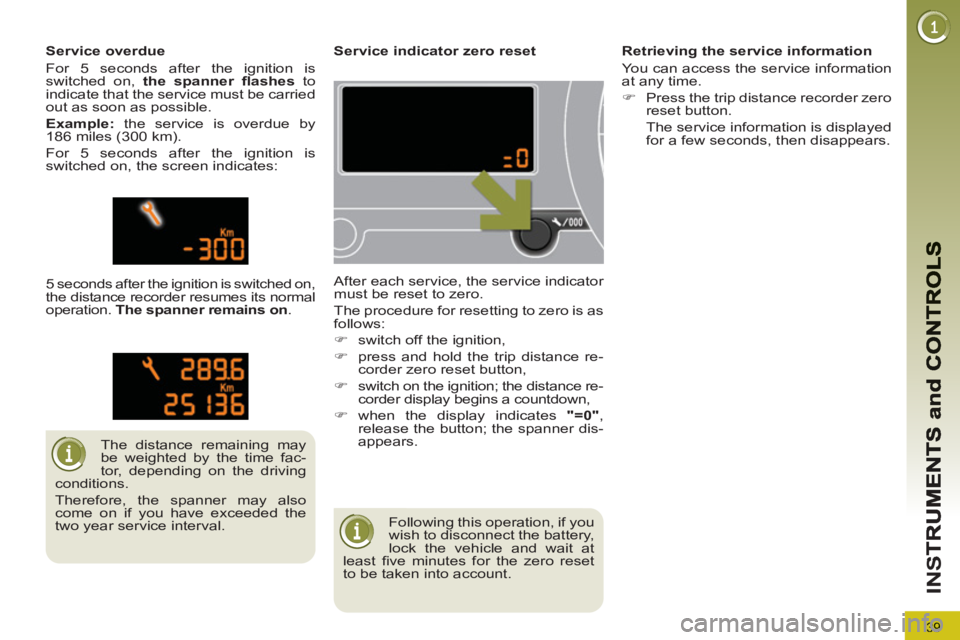
Service indicator zero reset
After each service, the service indicator
must be reset to zero.
The procedure for resetting to zero is as
follows:
)
switch off the ignition,
)
press and hold the trip distance re-
corder zero reset button,
)
switch on the ignition; the distance re-
corder display begins a countdown,
)
when the display indicates "=0"
,
release the button; the spanner dis-
appears.
The distance remaining may
be weighted by the time fac-
tor, depending on the driving
conditions.
Therefore, the spanner may also
come on if you have exceeded the
two year service interval.
Service overdue
For 5 seconds after the ignition is
switched on, the spanner fl ashes
to
indicate that the service must be carried
out as soon as possible.
Example:
the service is overdue by
186 miles (300 km).
For 5 seconds after the ignition is
switched on, the screen indicates:
5 seconds after the ignition is switched on,
the distance recorder resumes its normal
operation. The spanner remains on
.
Retrieving the service information
You can access the service information
at any time.
)
Press the trip distance recorder zero
reset button.
The service information is displayed
for a few seconds, then disappears.
Page 42 of 364
IN
S
The level shown will only be
correct if the vehicle is on lev-
el ground and the engine has
been off for more than 30 minutes.
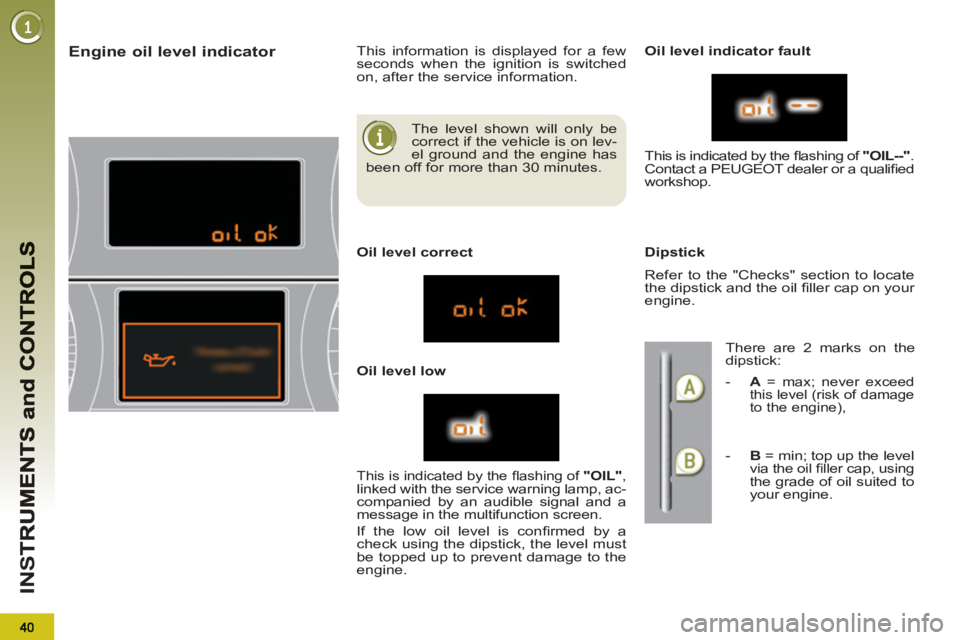
Engine oil level indicator
This information is displayed for a few
seconds when the ignition is switched
on, after the service information.
Oil level correct
Oil level low
Oil level indicator fault
Dipstick
This is indicated by the fl ashing of "OIL"
, linked with the service warning lamp, ac-
companied by an audible signal and a
message in the multifunction screen.
If the low oil level is confi rmed by a
check using the dipstick, the level must
be topped up to prevent damage to the
engine. This is indicated by the fl ashing of "OIL--"
.
Contact a PEUGEOT dealer or a qualifi ed
workshop.
Refer to the "Checks" section to locate
the dipstick and the oil fi ller cap on your
engine.
There are 2 marks on the
dipstick:
-
A
= max; never exceed
this level (risk of damage
to the engine),
- B
= min; top up the level via the oil fi ller cap, using the grade of oil suited to
your engine.
Page 43 of 364
41
IN
S
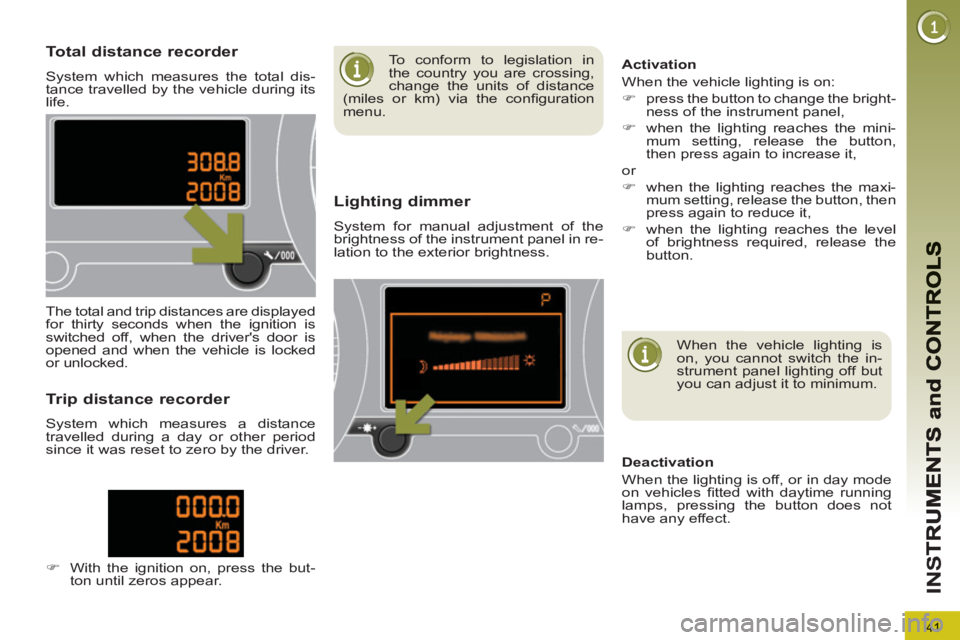
Total distance recorder
System which measures the total dis-
tance travelled by the vehicle during its
life.
Lighting dimmer
System for manual adjustment of the
brightness of the instrument panel in re-
lation to the exterior brightness.
The total and trip distances are displayed
for thirty seconds when the ignition is
switched off, when the driver's door is
opened and when the vehicle is locked
or unlocked.
Trip distance recorder
System which measures a distance
travelled during a day or other period
since it was reset to zero by the driver.
)
With the ignition on, press the but-
ton until zeros appear.
When the vehicle lighting is
on, you cannot switch the in-
strument panel lighting off but
you can adjust it to minimum.
Deactivation
When the lighting is off, or in day mode
on vehicles fi tted with daytime running
lamps, pressing the button does not
have any effect.
Activation
When the vehicle lighting is on:
)
press the button to change the bright-
ness of the instrument panel,
)
when the lighting reaches the mini-
mum setting, release the button,
then press again to increase it,
or
)
when the lighting reaches the maxi-
mum setting, release the button, then
press again to reduce it,
)
when the lighting reaches the level
of brightness required, release the
button.
To conform to legislation in
the country you are crossing,
change the units of distance
(miles or km) via the confi guration
menu.
Page 44 of 364
M
U
42
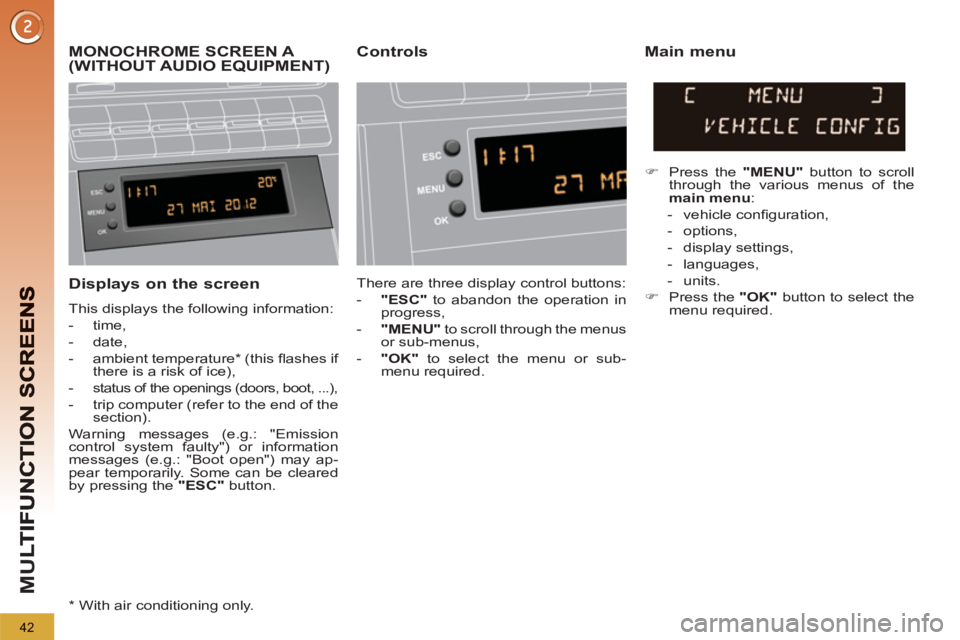
Displays on the screen
This displays the following information:
- time,
- date,
- ambient temperature * (this fl ashes if
there is a risk of ice),
-
status of the openings (doors, boot, ...),
- trip computer (refer to the end of the
section).
Warning messages (e.g.: "Emission
control system faulty") or information
messages (e.g.: "Boot open") may ap-
pear temporarily. Some can be cleared
by pressing the "ESC"
button.
MONOCHROME SCREEN A (WITHOUT AUDIO EQUIPMENT) Controls Main menu
There are three display control buttons:
- "ESC"
to abandon the operation in
progress,
- "MENU"
to scroll through the menus
or sub-menus,
- "OK"
to select the menu or sub-
menu required.
)
Press the "MENU"
button to scroll
through the various menus of the
main menu
:
- vehicle confi guration,
- options,
- display settings,
- languages,
- units.
)
Press the "OK"
button to select the
menu required.
*
With air conditioning only.
Page 45 of 364
M
U
43
Vehicle confi guration
Options
Once the "Options" menu has been se-
lected, you can start diagnostics of the
status of the equipment (active, not active,
faulty).
Languages
Once the "Languages" menu has been
selected, you can change the language
used by the display (Français, Italiano,
Nederlands, Portugues, Portugues-Brasil,
Türkçe, Deutsch, English, Espanol).
Display settings
Once the "Display settings" menu has
been selected, you can gain access to
the following settings:
- year,
- month,
- day,
- hour,
- minutes,
- 12 or 24 hour mode.
Units
Once the "Units" menu has been selected,
you can change the units for:
- temperature (°C or °F),
- fuel consumption (l/100 km, mpg or
km/l).
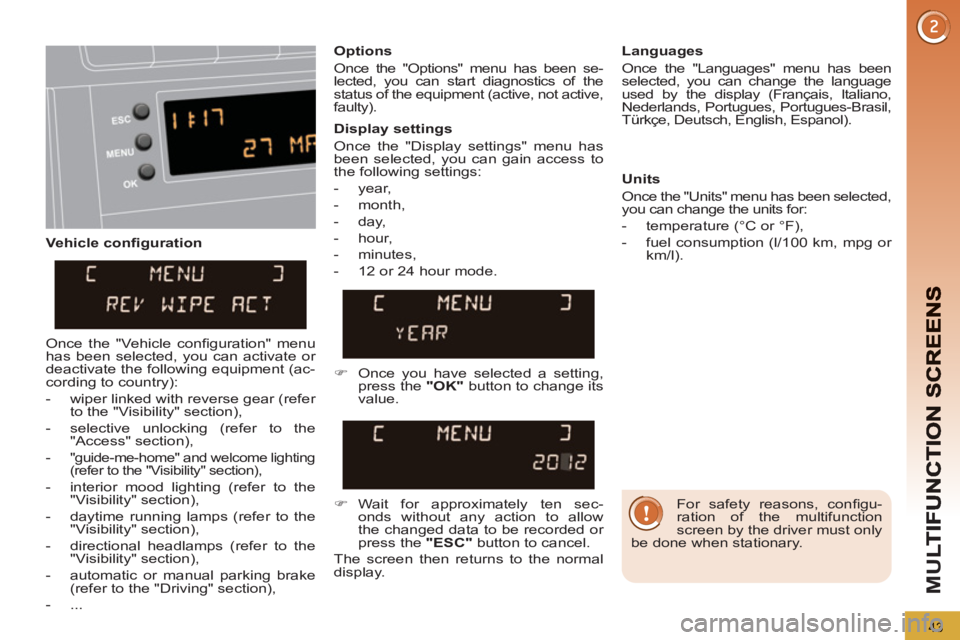
)
Once you have selected a setting,
press the "OK"
button to change its
value.
)
Wait for approximately ten sec-
onds without any action to allow
the changed data to be recorded or
press the "ESC"
button to cancel.
The screen then returns to the normal
display.
Once the "Vehicle confi guration" menu
has been selected, you can activate or
deactivate the following equipment (ac-
cording to country):
- wiper linked with reverse gear (refer
to the "Visibility" section),
- selective unlocking (refer to the
"Access" section),
-
"guide-me-home" and welcome lighting
(refer to the "Visibility" section),
- interior mood lighting (refer to the
"Visibility" section),
- daytime running lamps (refer to the
"Visibility" section),
- directional headlamps (refer to the
"Visibility" section),
- automatic or manual parking brake
(refer to the "Driving" section),
- ...
For safety reasons, confi gu-
ration of the multifunction
screen by the driver must only
be done when stationary.